

Как и в предыдущих версиях, Android 15 включает изменения в поведении, которые могут повлиять на ваше приложение. Следующие изменения в поведении применяются исключительно к приложениям, ориентированным на Android 15 или выше. Если ваше приложение ориентировано на Android 15 или выше, вам следует внести в него изменения для корректной поддержки этих изменений, где это применимо.
Обязательно ознакомьтесь также со списком изменений в поведении, которые затрагивают все приложения, работающие на Android 15, независимо от targetSdkVersion вашего приложения.
Основная функциональность
Android 15 изменяет или расширяет различные основные возможности системы Android.
Изменения в работе служб переднего плана
Мы вносим следующие изменения в службы переднего плана в Android 15.
- Поведение времени ожидания службы синхронизации данных на переднем плане
- Новый тип приоритетной службы обработки мультимедиа
- Ограничения на широковещательные приемники
BOOT_COMPLETED, запускающие службы приоритета - Ограничения на запуск служб переднего плана, пока приложение имеет разрешение
SYSTEM_ALERT_WINDOW
Поведение тайм-аута службы синхронизации данных на переднем плане
В Android 15 представлен новый режим тайм-аута для dataSync для приложений, предназначенных для Android 15 (уровень API 35) или выше. Это поведение также применимо к новому типу службы переднего плана mediaProcessing .
Система разрешает службам dataSync приложения работать в общей сложности 6 часов в течение 24-часового периода, после чего система вызывает метод Service.onTimeout(int, int) работающей службы (представленный в Android 15). В это время у службы есть несколько секунд для вызова Service.stopSelf() . При вызове Service.onTimeout() служба больше не считается службой переднего плана. Если служба не вызывает Service.stopSelf() , система выдает внутреннее исключение. Исключение регистрируется в Logcat со следующим сообщением:
Fatal Exception: android.app.RemoteServiceException: "A foreground service of
type dataSync did not stop within its timeout: [component name]"
Чтобы избежать проблем с этим изменением поведения, вы можете выполнить одно или несколько из следующих действий:
- Пусть ваш сервис реализует новый метод
Service.onTimeout(int, int). Когда ваше приложение получит обратный вызов, обязательно вызовитеstopSelf()в течение нескольких секунд. (Если вы не остановите приложение сразу, система выдаст ошибку.) - Убедитесь, что службы
dataSyncвашего приложения не работают более 6 часов в течение 24-часового периода (если только пользователь не взаимодействует с приложением, сбрасывая таймер). - Запускайте службы
dataSyncпереднего плана только в результате прямого взаимодействия с пользователем; поскольку ваше приложение находится на переднем плане при запуске службы, у вашей службы есть полные шесть часов после того, как приложение перейдет в фоновый режим. - Вместо использования службы переднего плана
dataSyncиспользуйте альтернативный API .
Если службы приоритетного плана dataSync вашего приложения работали в течение 6 часов за последние 24 часа, вы не сможете запустить другую службу приоритетного плана dataSync , пока пользователь не переведет ваше приложение на передний план (что сбрасывает таймер). Если вы попытаетесь запустить другую службу переднего плана dataSync , система выдаст исключение ForegroundServiceStartNotAllowedException с сообщением об ошибке, например «Ограничение времени для типа службы переднего плана dataSync уже исчерпано».
Тестирование
Чтобы проверить поведение вашего приложения, вы можете включить таймауты синхронизации данных, даже если ваше приложение не предназначено для Android 15 (при условии, что приложение работает на устройстве Android 15). Чтобы включить таймауты, выполните следующую команду adb :
adb shell am compat enable FGS_INTRODUCE_TIME_LIMITS your-package-name
Вы также можете настроить период ожидания, чтобы было проще протестировать поведение вашего приложения при достижении предела. Чтобы установить новый период ожидания, выполните следующую команду adb :
adb shell device_config put activity_manager data_sync_fgs_timeout_duration duration-in-milliseconds
Новый тип приоритетной службы обработки мультимедиа
В Android 15 представлен новый тип службы переднего плана — mediaProcessing . Этот тип службы подходит для таких операций, как перекодирование медиафайлов. Например, мультимедийное приложение может загрузить аудиофайл, и ему необходимо преобразовать его в другой формат перед воспроизведением. Вы можете использовать службу переднего плана mediaProcessing чтобы гарантировать, что преобразование продолжается, даже когда приложение находится в фоновом режиме.
Система разрешает службам mediaProcessing приложения работать в общей сложности 6 часов в течение 24-часового периода, после чего система вызывает метод Service.onTimeout(int, int) работающей службы (представленный в Android 15). В это время у службы есть несколько секунд для вызова Service.stopSelf() . Если служба не вызывает Service.stopSelf() , система выдает внутреннее исключение. Исключение регистрируется в Logcat со следующим сообщением:
Fatal Exception: android.app.RemoteServiceException: "A foreground service of
type mediaProcessing did not stop within its timeout: [component name]"
Чтобы избежать исключения, вы можете сделать одно из следующих действий:
- Пусть ваш сервис реализует новый метод
Service.onTimeout(int, int). Когда ваше приложение получит обратный вызов, обязательно вызовитеstopSelf()в течение нескольких секунд. (Если вы не остановите приложение сразу, система выдаст ошибку.) - Убедитесь, что службы
mediaProcessingвашего приложения не работают более 6 часов в течение любого 24-часового периода (если только пользователь не взаимодействует с приложением, сбрасывая таймер). - Запускайте службы переднего плана
mediaProcessingтолько в результате прямого взаимодействия с пользователем; поскольку ваше приложение находится на переднем плане при запуске службы, у вашей службы есть полные шесть часов после того, как приложение перейдет в фоновый режим. - Вместо использования службы переднего плана
mediaProcessingиспользуйте альтернативный API , например WorkManager.
Если службы переднего плана mediaProcessing вашего приложения работали в течение 6 часов за последние 24, вы не сможете запустить другую службу переднего плана mediaProcessing , пока пользователь не переведет ваше приложение на передний план (что сбрасывает таймер). Если вы попытаетесь запустить другую службу переднего плана mediaProcessing , система выдаст ForegroundServiceStartNotAllowedException с сообщением об ошибке, например «Ограничение времени уже исчерпано для типа службы переднего плана mediaProcessing».
Дополнительные сведения о типе службы mediaProcessing см. в разделе Изменения в типах служб переднего плана для Android 15: обработка мультимедиа .
Тестирование
Чтобы проверить поведение вашего приложения, вы можете включить тайм-ауты обработки мультимедиа, даже если ваше приложение не предназначено для Android 15 (при условии, что приложение работает на устройстве Android 15). Чтобы включить таймауты, выполните следующую команду adb :
adb shell am compat enable FGS_INTRODUCE_TIME_LIMITS your-package-name
Вы также можете настроить период ожидания, чтобы было проще протестировать поведение вашего приложения при достижении предела. Чтобы установить новый период ожидания, выполните следующую команду adb :
adb shell device_config put activity_manager media_processing_fgs_timeout_duration duration-in-milliseconds
Ограничения на широковещательные приемники BOOT_COMPLETED , запускающие службы приоритета
Существуют новые ограничения на широковещательные приемники BOOT_COMPLETED , запускающие службы приоритета. Получателям BOOT_COMPLETED не разрешено запускать следующие типы служб приоритета:
-
dataSync -
camera -
mediaPlayback -
phoneCall -
mediaProjection -
microphone(это ограничение действует дляmicrophoneначиная с Android 14)
Если получатель BOOT_COMPLETED пытается запустить любой из этих типов служб переднего плана, система выдает исключение ForegroundServiceStartNotAllowedException .
Тестирование
Чтобы проверить поведение вашего приложения, вы можете включить эти новые ограничения, даже если ваше приложение не предназначено для Android 15 (при условии, что приложение работает на устройстве Android 15). Запустите следующую команду adb :
adb shell am compat enable FGS_BOOT_COMPLETED_RESTRICTIONS your-package-name
Чтобы отправить широковещательную рассылку BOOT_COMPLETED без перезагрузки устройства, выполните следующую команду adb :
adb shell am broadcast -a android.intent.action.BOOT_COMPLETED your-package-name
Ограничения на запуск служб переднего плана, пока приложение имеет разрешение SYSTEM_ALERT_WINDOW
Раньше, если приложение имело разрешение SYSTEM_ALERT_WINDOW , оно могло запустить службу переднего плана, даже если приложение в данный момент находилось в фоновом режиме (как обсуждалось в разделе об исключениях из ограничений фонового запуска ).
Если приложение предназначено для Android 15, это исключение теперь уже. Теперь приложению необходимо иметь разрешение SYSTEM_ALERT_WINDOW , а также иметь видимое окно наложения. То есть приложению необходимо сначала запустить окно TYPE_APPLICATION_OVERLAY , и это окно должно быть видимым перед запуском службы переднего плана.
Если ваше приложение пытается запустить службу переднего плана в фоновом режиме, не отвечая этим новым требованиям (и у него нет других исключений), система выдает ForegroundServiceStartNotAllowedException .
Если ваше приложение объявляет разрешение SYSTEM_ALERT_WINDOW и запускает службы переднего плана в фоновом режиме, это изменение может повлиять на него. Если ваше приложение получает исключение ForegroundServiceStartNotAllowedException , проверьте порядок операций вашего приложения и убедитесь, что в нем уже есть активное окно наложения, прежде чем оно попытается запустить службу переднего плана из фона. Вы можете проверить, видимо ли ваше окно наложения в данный момент, вызвав View.getWindowVisibility() , или вы можете переопределить View.onWindowVisibilityChanged() чтобы получать уведомления при каждом изменении видимости.
Тестирование
Чтобы проверить поведение вашего приложения, вы можете включить эти новые ограничения, даже если ваше приложение не предназначено для Android 15 (при условии, что приложение работает на устройстве Android 15). Чтобы включить эти новые ограничения на запуск служб переднего плана в фоновом режиме, выполните следующую команду adb :
adb shell am compat enable FGS_SAW_RESTRICTIONS your-package-name
Изменения в условиях, когда приложения могут изменять глобальное состояние режима «Не беспокоить».
Приложения, предназначенные для Android 15 (уровень API 35) и выше, больше не могут изменять глобальное состояние или политику режима «Не беспокоить» (DND) на устройстве (путем изменения пользовательских настроек или отключения режима «Не беспокоить»). Вместо этого приложения должны внести AutomaticZenRule , которое система объединяет в глобальную политику с существующей схемой наиболее ограничительной политики. Вызовы к существующим API, которые ранее влияли на глобальное состояние ( setInterruptionFilter , setNotificationPolicy ), приводят к созданию или обновлению неявного AutomaticZenRule , который включается и выключается в зависимости от цикла вызовов этих вызовов API.
Обратите внимание, что это изменение влияет на наблюдаемое поведение только в том случае, если приложение вызывает setInterruptionFilter(INTERRUPTION_FILTER_ALL) и ожидает, что этот вызов деактивирует AutomaticZenRule , который ранее был активирован его владельцами.
Изменения в API OpenJDK
В Android 15 продолжается работа по обновлению основных библиотек Android в соответствии с функциями последних версий OpenJDK LTS.
Некоторые из этих изменений могут повлиять на совместимость приложений, ориентированных на Android 15 (уровень API 35):
Изменения в API форматирования строк : проверка индекса аргумента, флагов, ширины и точности теперь более строгая при использовании следующих API
String.format()иFormatter.format():-
String.format(String, Object[]) -
String.format(Locale, String, Object[]) -
Formatter.format(String, Object[]) -
Formatter.format(Locale, String, Object[])
Например, при использовании аргумента с индексом 0 (
%0в строке формата) выбрасывается следующее исключение:IllegalFormatArgumentIndexException: Illegal format argument index = 0В этом случае проблему можно решить, используя индекс аргумента, равный 1 (
%1в строке формата).-
Изменения в типе компонента метода
Arrays.asList(...).toArray(): При использованииArrays.asList(...).toArray()тип компонента результирующего массива теперь равенObject, а не типу элементов базового массива. Поэтому следующий код вызывает исключениеClassCastException:String[] elements = (String[]) Arrays.asList("one", "two").toArray();В этом случае, чтобы сохранить тип компонента
Stringв результирующем массиве, можно использоватьCollection.toArray(Object[]):String[] elements = Arrays.asList("two", "one").toArray(new String[0]);Изменения в обработке языковых кодов : При использовании API
Localeязыковые коды для иврита, идиша и индонезийского языка больше не преобразуются в их устаревшие формы (иврит:iw, идиш:jiи индонезийский:in). При указании языкового кода для одной из этих локалей используйте вместо него коды из ISO 639-1 (иврит:he, идиш:yiи индонезийский:id).Изменения в последовательностях случайных целых чисел : В соответствии с изменениями, внесенными в https://bugs.openjdk.org/browse/JDK-8301574 , следующие методы
Random.ints()теперь возвращают другую последовательность чисел, чем методыRandom.nextInt():В целом, это изменение не должно приводить к некорректной работе приложения, но ваш код не должен ожидать, что последовательность, сгенерированная методами
Random.ints()будет совпадать с последовательностью, сгенерированной методомRandom.nextInt().
Новый API SequencedCollection может повлиять на совместимость вашего приложения после обновления compileSdk в конфигурации сборки приложения для использования Android 15 (уровень API 35) :
Конфликт с функциями расширения
MutableList.removeFirst()иMutableList.removeLast()вkotlin-stdlibВ Java тип
Listсопоставляется с типомMutableListв Kotlin. Поскольку APIList.removeFirst()иList.removeLast()были введены в Android 15 (уровень API 35), компилятор Kotlin статически разрешает вызовы функций, напримерlist.removeFirst(), в новые APIList, а не в функции расширения изkotlin-stdlib.Если приложение перекомпилируется с
compileSdkустановленным на35, и параметромminSdkустановленным на34или ниже, а затем запускается на Android 14 и ниже, возникает ошибка выполнения:java.lang.NoSuchMethodError: No virtual method removeFirst()Ljava/lang/Object; in class Ljava/util/ArrayList;Существующая опция проверки синтаксиса
NewApiв плагине Android Gradle может выявлять эти новые случаи использования API../gradlew lintMainActivity.kt:41: Error: Call requires API level 35 (current min is 34): java.util.List#removeFirst [NewApi] list.removeFirst()Для исправления исключений времени выполнения и ошибок линтера вызовы функций
removeFirst()иremoveLast()можно заменить наremoveAt(0)иremoveAt(list.lastIndex)соответственно в Kotlin. Если вы используете Android Studio Ladybug | 2024.1.3 или выше, также доступен быстрый способ исправления этих ошибок.Если параметр проверки синтаксиса отключен, рекомендуется удалить
@SuppressLint("NewApi")иlintOptions { disable 'NewApi' }.Конфликт с другими методами в Java
В существующие типы были добавлены новые методы, например,
ListиDeque. Эти новые методы могут быть несовместимы с методами с тем же именем и типами аргументов в других интерфейсах и классах. В случае конфликта сигнатур методов с несовместимостью компиляторjavacвыдаст ошибку во время сборки. Например:Пример ошибки 1:
javac MyList.javaMyList.java:135: error: removeLast() in MyList cannot implement removeLast() in List public void removeLast() { ^ return type void is not compatible with Object where E is a type-variable: E extends Object declared in interface ListПример ошибки 2:
javac MyList.javaMyList.java:7: error: types Deque<Object> and List<Object> are incompatible; public class MyList implements List<Object>, Deque<Object> { both define reversed(), but with unrelated return types 1 errorПример ошибки 3:
javac MyList.javaMyList.java:43: error: types List<E#1> and MyInterface<E#2> are incompatible; public static class MyList implements List<Object>, MyInterface<Object> { class MyList inherits unrelated defaults for getFirst() from types List and MyInterface where E#1,E#2 are type-variables: E#1 extends Object declared in interface List E#2 extends Object declared in interface MyInterface 1 errorДля исправления этих ошибок сборки класс, реализующий эти интерфейсы, должен переопределить метод с совместимым типом возвращаемого значения. Например:
@Override
public Object getFirst() {
    return List.super.getFirst();
}
Безопасность
В Android 15 внесены изменения, повышающие безопасность системы и помогающие защитить приложения и пользователей от вредоносных программ.
Ограниченные версии TLS
Android 15 ограничивает использование TLS версий 1.0 и 1.1. Эти версии ранее были признаны устаревшими в Android, но теперь запрещены для приложений, ориентированных на Android 15.
Запуск защищенной фоновой активности
Android 15 защищает пользователей от вредоносных приложений и предоставляет им больше контроля над устройствами, добавляя изменения, которые не позволяют вредоносным фоновым приложениям выводить другие приложения на передний план, повышать их привилегии и злоупотреблять взаимодействием с пользователем. Запуск фоновых приложений ограничен начиная с Android 10 (уровень API 29).
Другие изменения
- Измените создатели
PendingIntentтак, чтобы они блокировали запуск фоновых процессов по умолчанию . Это поможет предотвратить случайное созданиеPendingIntentприложениями, которое может быть использовано злоумышленниками. - Не выводите приложение на передний план, если отправитель
PendingIntentне разрешит это . Это изменение направлено на предотвращение злоупотребления вредоносными приложениями возможностью запуска действий в фоновом режиме. По умолчанию приложениям не разрешено выводить стек задач на передний план, если создатель не предоставил права на запуск фоновых действий или у отправителя нет прав на запуск фоновых действий. - Управляет тем, как верхняя активность в стеке задач может завершить свою задачу . Если верхняя активность завершает задачу, Android возвращается к последней активной задаче. Более того, если не верхняя активность завершает свою задачу, Android возвращается на главный экран; это не блокирует завершение этой не верхней активности.
- Запретите запуск произвольных действий из других приложений в вашей собственной задаче . Это изменение предотвращает фишинг пользователей вредоносными приложениями, создающими действия, имитирующие действия из других приложений.
- Блокировать невидимые окна от запуска фоновых процессов . Это помогает предотвратить использование фоновых процессов вредоносными приложениями для отображения пользователям нежелательного или вредоносного контента.
Более безопасные намерения
В Android 15 представлен StrictMode для намерений.
Чтобы просмотреть подробные журналы нарушений использования Intent , используйте следующий метод:
Котлин
fun onCreate() {
    StrictMode.setVmPolicy(VmPolicy.Builder()
        .detectUnsafeIntentLaunch()
        .build()
    )
}
Ява
public void onCreate() {
    StrictMode.setVmPolicy(new VmPolicy.Builder()
            .detectUnsafeIntentLaunch()
            .build());
}
Пользовательский опыт и пользовательский интерфейс системы
В Android 15 внесены некоторые изменения, призванные обеспечить более согласованный и интуитивно понятный пользовательский интерфейс.
Изменения отступа окна
Есть два изменения, связанных с вставками окон в Android 15: по умолчанию применяется сквозное изображение, а также есть изменения конфигурации, такие как конфигурация системных панелей по умолчанию.
Комплексное обеспечение соблюдения требований
Приложения по умолчанию отображаются без рамок на устройствах под управлением Android 15, если приложение ориентировано на Android 15 (уровень API 35).
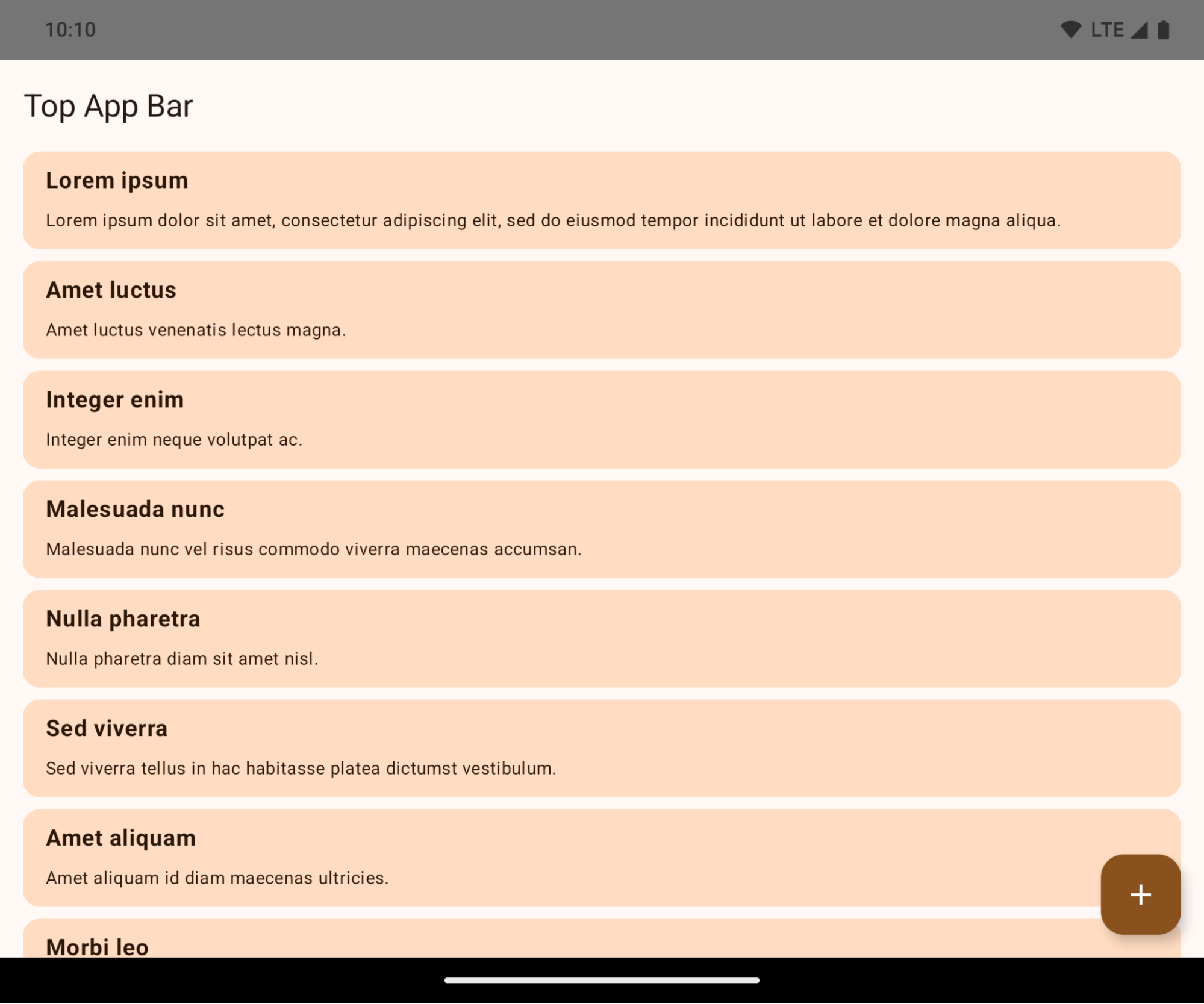
Это критическое изменение, которое может негативно повлиять на пользовательский интерфейс вашего приложения. Изменения затрагивают следующие области пользовательского интерфейса:
- Панель навигации с помощью жестов
- По умолчанию прозрачный.
- Функция смещения вниз отключена, поэтому контент отображается за панелью навигации системы, если не применены отступы.
-
setNavigationBarColorиR.attr#navigationBarColorустарели и не влияют на навигацию жестами. -
setNavigationBarContrastEnforcedиR.attr#navigationBarContrastEnforcedпо-прежнему не влияют на навигацию жестами.
- 3-кнопочная навигация
- По умолчанию непрозрачность установлена на 80%, при этом цвет может соответствовать фону окна.
- Отключено смещение снизу, поэтому контент отображается за панелью навигации системы, если не применены отступы.
-
setNavigationBarColorиR.attr#navigationBarColorпо умолчанию устанавливают цвет в соответствии с фоном окна. Для применения этого значения по умолчанию фон окна должен быть задан цветом из графического объекта. Этот API устарел, но продолжает влиять на навигацию с тремя кнопками. -
setNavigationBarContrastEnforcedиR.attr#navigationBarContrastEnforcedпо умолчанию установлено значение true, что добавляет 80% непрозрачный фон к навигации из 3 кнопок.
- Строка состояния
- По умолчанию прозрачный.
- Верхнее смещение отключено, поэтому контент отображается за строкой состояния, если не применены отступы.
-
setStatusBarColorиR.attr#statusBarColorустарели и не оказывают никакого влияния на Android 15. -
setStatusBarContrastEnforcedиR.attr#statusBarContrastEnforcedустарели, но по-прежнему эффективны на Android 15.
- Вырез для дисплея
- Для неплавающих окон
layoutInDisplayCutoutModeдолжен быть установленLAYOUT_IN_DISPLAY_CUTOUT_MODE_ALWAYS.SHORT_EDGES,NEVERиDEFAULTинтерпретируются какALWAYS, чтобы пользователи не видели черную полосу, вызванную вырезом в экране, и чтобы окно отображалось от края до края.
- Для неплавающих окон
В следующем примере показано приложение до и после перехода на Android 15 (уровень API 35), а также до и после применения отступов. Этот пример не является исчерпывающим, в Android Auto это может выглядеть иначе.
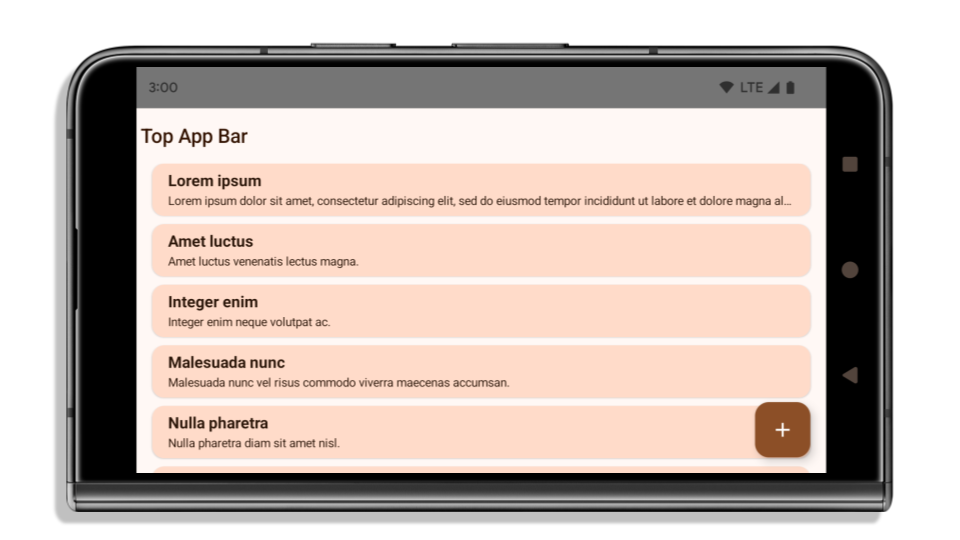
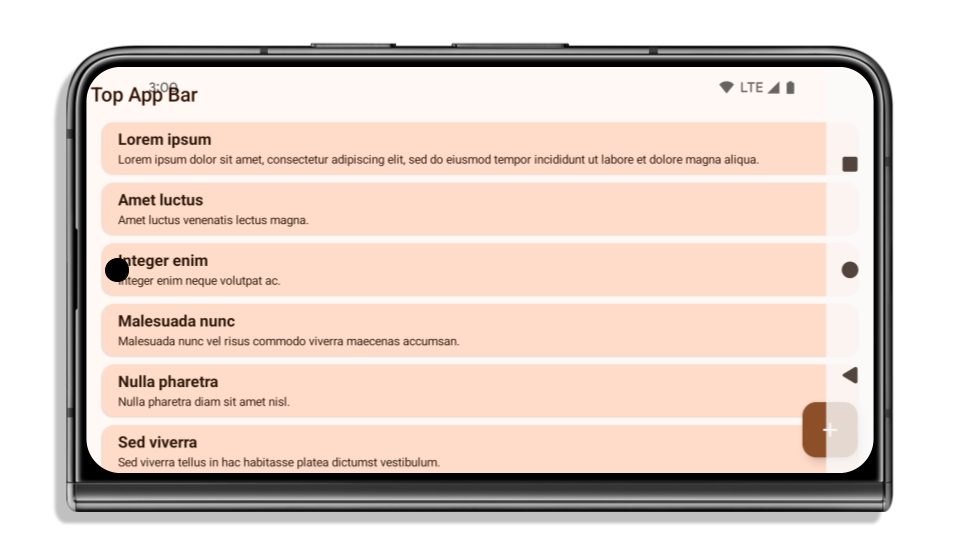
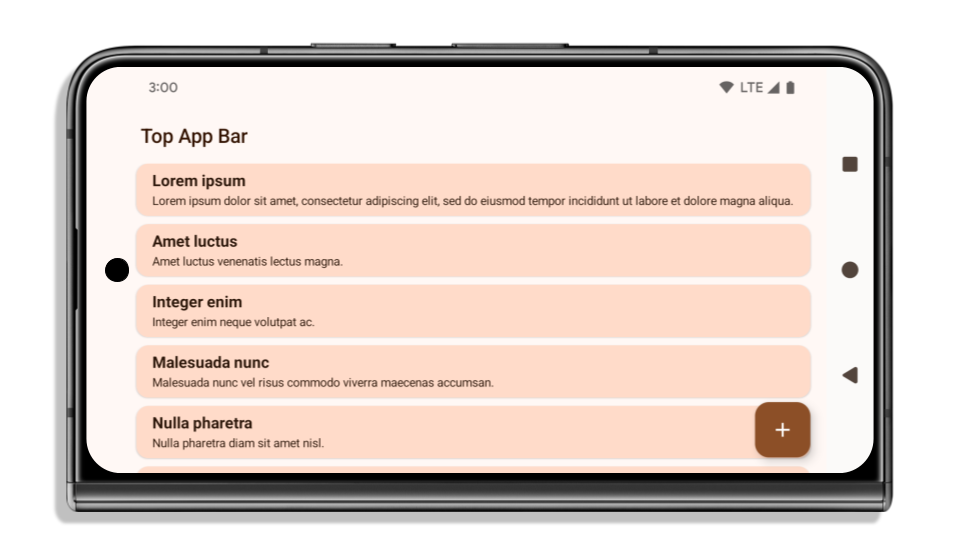
Что проверить, если ваше приложение уже полностью занимает всю ширину экрана?
Если ваше приложение уже имеет полноэкранный режим и применяет отступы, то в большинстве случаев это вас не затронет, за исключением следующих сценариев. Однако, даже если вы считаете, что это вас не коснется, мы рекомендуем протестировать ваше приложение.
- У вас неплавающее окно, например,
Activity, которое используетSHORT_EDGES,NEVERилиDEFAULTвместоLAYOUT_IN_DISPLAY_CUTOUT_MODE_ALWAYS. Если ваше приложение вылетает при запуске, это может быть связано с вашим заставочным экраном. Вы можете либо обновить основную зависимость заставочного экрана до 1.2.0-alpha01 или более поздней, либо установитьwindow.attributes.layoutInDisplayCutoutMode = WindowManager.LayoutInDisplayCutoutMode.always. - Возможно, существуют экраны с низкой посещаемостью, на которых частично перекрыт пользовательский интерфейс. Убедитесь, что на этих менее посещаемых экранах нет перекрытого пользовательского интерфейса. К экранам с низкой посещаемостью относятся:
- Экраны регистрации или входа в систему
- Страницы настроек
Что проверить, если ваше приложение еще не оптимизировано для отображения всего экрана?
Если ваше приложение ещё не является полностью открытым (bread to edge), то, скорее всего, оно вас затронет. Помимо сценариев для приложений, которые уже являются полностью открытыми (bread to edge), следует учитывать следующее:
- Если ваше приложение использует компоненты Material 3 (
androidx.compose.material3) в Compose, такие какTopAppBar,BottomAppBarиNavigationBar, то эти компоненты, скорее всего, не будут затронуты, поскольку они автоматически обрабатывают отступы. - Если ваше приложение использует компоненты Material 2 (
androidx.compose.material) в Compose, эти компоненты не обрабатывают отступы автоматически. Однако вы можете получить доступ к отступам и применить их вручную. В androidx.compose.material версии 1.6.0 и выше используйте параметрwindowInsets, чтобы вручную применить отступы дляBottomAppBar,TopAppBar,BottomNavigationиNavigationRail. Аналогично используйте параметрcontentWindowInsetsдляScaffold. - Если ваше приложение использует представления и компоненты Material (
com.google.android.material), большинство компонентов Material на основе представлений, таких какBottomNavigationView,BottomAppBar,NavigationRailViewилиNavigationView, обрабатывают отступы и не требуют дополнительной работы. Однако вам необходимо добавитьandroid:fitsSystemWindows="true"если вы используетеAppBarLayout. - Для пользовательских элементов, создаваемых с помощью компоновки, задайте отступы вручную. Если ваш контент находится внутри
Scaffold, вы можете использовать значения отступовScaffold. В противном случае задайте отступы с помощью одного изWindowInsets. - Если ваше приложение использует представления и
BottomSheet,SideSheetили пользовательские контейнеры, примените отступы с помощьюViewCompat.setOnApplyWindowInsetsListener. ДляRecyclerViewпримените отступы с помощью этого слушателя, а также добавьтеclipToPadding="false".
Что проверить, если вашему приложению необходима настраиваемая защита от фоновых процессов?
Если вашему приложению необходимо обеспечить настраиваемую защиту фона для трехкнопочной навигации или строки состояния, то следует разместить компонент или представление за системной панелью, используя WindowInsets.Type#tappableElement() для получения высоты трехкнопочной панели навигации или WindowInsets.Type#statusBars .
Дополнительные ресурсы, охватывающие все аспекты.
Дополнительные сведения о применении отступов см. в руководствах « Вид от края до края» и «Композиция от края до края» .
Устаревшие API
Следующие API-интерфейсы устарели, но не отключены:
-
R.attr#enforceStatusBarContrast -
R.attr#navigationBarColor(для навигации с 3 кнопками, с 80% прозрачностью) -
Window#isStatusBarContrastEnforced -
Window#setNavigationBarColor(для навигации с 3 кнопками, с 80% прозрачностью) -
Window#setStatusBarContrastEnforced
Следующие API-интерфейсы устарели и отключены:
-
R.attr#navigationBarColor(для навигации жестами) -
R.attr#navigationBarDividerColor -
R.attr#statusBarColor -
Window#setDecorFitsSystemWindows -
Window#getNavigationBarColor -
Window#getNavigationBarDividerColor -
Window#getStatusBarColor -
Window#setNavigationBarColor(для навигации жестами) -
Window#setNavigationBarDividerColor -
Window#setStatusBarColor
Стабильная конфигурация
Если ваше приложение ориентировано на Android 15 (уровень API 35) или выше, Configuration больше не исключает системные панели. Если вы используете размер экрана в классе Configuration для расчета компоновки, вам следует заменить его на более подходящие альтернативы, такие как соответствующий ViewGroup , WindowInsets или WindowMetricsCalculator в зависимости от ваших потребностей.
Configuration доступны с API 1. Обычно их получают из Activity.onConfigurationChanged . Они предоставляют информацию, такую как плотность окон, ориентация и размеры. Важной особенностью размеров окон, возвращаемых Configuration является то, что ранее они не включали системные панели.
Размер конфигурации обычно используется для выбора ресурсов, например, /res/layout-h500dp , и это по-прежнему допустимый вариант использования. Однако использование его для расчета компоновки всегда не рекомендовалось. Если вы все же используете его, вам следует отказаться от него. Вам следует заменить использование Configuration чем-то более подходящим в зависимости от ваших задач.
Если вы используете его для расчета компоновки, используйте соответствующий ViewGroup , например CoordinatorLayout или ConstraintLayout . Если вы используете его для определения высоты системной панели навигации, используйте WindowInsets . Если вы хотите узнать текущий размер окна вашего приложения, используйте computeCurrentWindowMetrics .
Ниже приведён список полей, затронутых этим изменением:
- Размеры
Configuration.screenWidthDpиscreenHeightDpбольше не исключают системные полосы. - Изменения параметров
screenWidthDpиscreenHeightDpкосвенно влияют наConfiguration.smallestScreenWidthDp. - На устройствах с почти квадратным экраном изменения параметров
screenWidthDpиscreenHeightDpкосвенно влияют наConfiguration.orientation. -
Display.getSize(Point)косвенно зависит от изменений вConfiguration. Он был объявлен устаревшим начиная с уровня API 30. -
Display.getMetrics()работает подобным образом уже с 33-го уровня API.
Атрибут elegantTextHeight по умолчанию имеет значение true.
Для приложений, ориентированных на Android 15 (уровень API 35), атрибут elegantTextHeight TextView становится true по умолчанию, заменяя компактный шрифт, используемый по умолчанию, некоторыми скриптами с большими вертикальными метриками на гораздо более читаемый. Компактный шрифт был введен, чтобы предотвратить нарушение макета; Android 13 (уровень API 33) предотвращает многие из этих проблем, позволяя текстовому макету растягивать вертикальную высоту с помощью атрибута fallbackLineSpacing .
В Android 15 компактный шрифт по-прежнему остается в системе, поэтому ваше приложение может установить для elegantTextHeight значение false чтобы получить то же поведение, что и раньше, но вряд ли он будет поддерживаться в следующих выпусках. Итак, если ваше приложение поддерживает следующие сценарии: арабский, лаосский, мьянманский, тамильский, гуджаратский, каннада, малаялам, одиа, телугу или тайский, протестируйте свое приложение, установив для elegantTextHeight значение true .

elegantTextHeight для приложений, ориентированных на Android 14 (уровень API 34) и ниже. 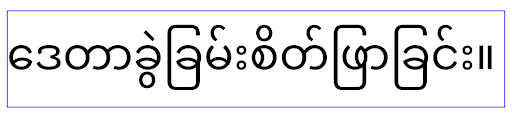
elegantTextHeight для приложений, ориентированных на Android 15.Изменение ширины TextView для сложных форм букв
В предыдущих версиях Android некоторые рукописные шрифты или языки сложной формы могли отображать буквы в области предыдущего или следующего символа. В некоторых случаях такие буквы обрезались в начальной или конечной позиции. Начиная с Android 15, TextView выделяет ширину для рисования достаточного места для таких букв и позволяет приложениям запрашивать дополнительные поля слева, чтобы предотвратить обрезку.
Поскольку это изменение влияет на то, как TextView определяет ширину, TextView по умолчанию выделяет большую ширину, если приложение предназначено для Android 15 (уровень API 35) или выше. Вы можете включить или отключить это поведение, вызвав API setUseBoundsForWidth в TextView .
Поскольку добавление левого отступа может привести к смещению существующих макетов, отступы не добавляются по умолчанию даже для приложений, ориентированных на Android 15 или более позднюю версию. Однако вы можете добавить дополнительные отступы для предотвращения обрезки, вызвав setShiftDrawingOffsetForStartOverhang .
В следующих примерах показано, как эти изменения могут улучшить макет текста для некоторых шрифтов и языков.

<TextView
    android:fontFamily="cursive"
    android:text="java" />
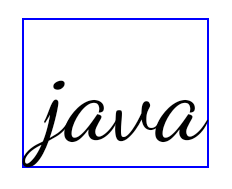
<TextView
    android:fontFamily="cursive"
    android:text="java"
    android:useBoundsForWidth="true"
    android:shiftDrawingOffsetForStartOverhang="true" />

<TextView
    android:text="คอมพิวเตอร์" />

<TextView
    android:text="คอมพิวเตอร์"
    android:useBoundsForWidth="true"
    android:shiftDrawingOffsetForStartOverhang="true" />
Высота строки по умолчанию для EditText с учетом локали
В предыдущих версиях Android текстовый макет растягивал высоту текста так, чтобы она соответствовала высоте строки шрифта, соответствующего текущему языковому стандарту. Например, если контент был на японском языке, поскольку высота строки японского шрифта немного больше, чем у латинского шрифта, высота текста стала немного больше. Однако, несмотря на эти различия в высоте строк, размер элемента EditText был одинаковым, независимо от используемой локали, как показано на следующем изображении:

EditText , которые могут содержать текст на английском (en), японском (ja) и бирманском (my). Высота EditText одинакова, хотя эти языки имеют разную высоту строк. Для приложений, ориентированных на Android 15 (уровень API 35), минимальная высота строки теперь зарезервирована для EditText , чтобы соответствовать эталонному шрифту для указанного языкового стандарта, как показано на следующем изображении:

EditText , которые могут содержать текст на английском (en), японском (ja) и бирманском (my). Высота EditText теперь включает пространство для размещения высоты строки по умолчанию для шрифтов этих языков. При необходимости ваше приложение может восстановить предыдущее поведение, указав для атрибута useLocalePreferredLineHeightForMinimum значение false , а ваше приложение может установить собственные минимальные вертикальные метрики с помощью API setMinimumFontMetrics в Kotlin и Java.
Камера и медиа
В Android 15 внесены следующие изменения в работу камеры и мультимедиа для приложений, ориентированных на Android 15 и выше.
Ограничения на запрос фокусировки звука
Приложения, предназначенные для Android 15 (уровень API 35), должны быть главным приложением или запускать службу переднего плана, чтобы запросить фокус звука . Если приложение пытается запросить фокус, хотя оно не соответствует одному из этих требований, вызов возвращает AUDIOFOCUS_REQUEST_FAILED .
Дополнительную информацию о фокусе звука можно узнать в разделе «Управление фокусом звука» .
Обновлены ограничения, не относящиеся к SDK.
В Android 15 обновлены списки ограниченных интерфейсов, не использующих SDK, на основе сотрудничества с разработчиками Android и последних внутренних тестов. По возможности мы обеспечиваем наличие общедоступных альтернатив, прежде чем ограничивать использование интерфейсов, не использующих SDK.
Если ваше приложение не ориентировано на Android 15, некоторые из этих изменений могут не сразу повлиять на него. Однако, хотя ваше приложение может получить доступ к некоторым интерфейсам, не связанным с SDK, в зависимости от целевого уровня API вашего приложения , использование любого метода или поля, не связанного с SDK, всегда сопряжено с высоким риском нарушения работы вашего приложения.
Если вы не уверены, использует ли ваше приложение интерфейсы, отличные от SDK, вы можете протестировать его , чтобы это выяснить. Если ваше приложение зависит от интерфейсов, отличных от SDK, вам следует начать планировать переход на альтернативы SDK. Тем не менее, мы понимаем, что в некоторых приложениях есть обоснованные сценарии использования интерфейсов, отличных от SDK. Если вы не можете найти альтернативу использованию интерфейса, отличного от SDK, для какой-либо функции в вашем приложении, вам следует запросить новый публичный API .
Дополнительные сведения об изменениях в этой версии Android см. в разделе Обновления ограничений интерфейса, не связанных с SDK, в Android 15 . Дополнительные сведения об интерфейсах, отличных от SDK, см. в разделе Ограничения на интерфейсы, не относящиеся к SDK .