

Android 15 プラットフォームには、アプリに影響する可能性がある動作変更が含まれています。下記の動作変更は、targetSdkVersion に関係なく、Android 15 上で稼働するすべてのアプリに適用されます。該当する場合は、アプリをテストし、必要に応じて修正して、適切に対応する必要があります。
Android 15 をターゲットとするアプリにのみ影響する動作変更のリストも必ずご確認ください。
コア機能
Android 15 では、Android システムのさまざまなコア機能が変更または拡張されています。
パッケージの停止状態の変更
パッケージの FLAG_STOPPED 状態(ユーザーが AOSP ビルドでアプリアイコンを長押しして [強制停止] を選択することで有効にできます)の目的は、ユーザーがアプリを直接起動するか、アプリを間接的に操作(共有シートやウィジェット、ライブ壁紙としてアプリを選択するなど)して、明示的にアプリをこの状態から削除するまで、アプリをこの状態に保つことです。Android 15 では、この想定される動作に合わせてシステムの動作を更新しました。アプリは、ユーザーの直接または間接的な操作によってのみ、停止状態から削除する必要があります。
意図した動作をサポートするため、Android 15 を搭載したデバイスでアプリが停止状態になると、既存の制限に加えて、すべての保留中のインテントもキャンセルされます。ユーザーの操作によってアプリが停止状態から削除されると、ACTION_BOOT_COMPLETED ブロードキャストがアプリに配信され、保留中のインテントを再登録できます。
新しい ApplicationStartInfo.wasForceStopped() メソッドを呼び出して、アプリが停止状態になったかどうかを確認できます。
16 KB ページサイズのサポート
これまで Android は 4 KB のメモリ ページサイズのみをサポートしており、Android デバイスが通常備えている合計メモリの平均量に合わせてシステム メモリのパフォーマンスを最適化してきました。Android 15 以降、AOSP は 16 KB のページサイズを使用するように構成されたデバイス(16 KB デバイス)をサポートしています。アプリが NDK ライブラリを直接的または SDK を介して間接的に使用している場合は、16 KB デバイスで動作するようにアプリを再ビルドする必要があります。
デバイス メーカーが物理メモリ(RAM)の容量が大きいデバイスを構築し続けるにつれて、これらのデバイスの多くは、デバイスのパフォーマンスを最適化するために 16 KB(最終的にはそれ以上)のページサイズを採用するようになります。16 KB ページサイズのデバイスのサポートを追加すると、アプリをこれらのデバイスで実行できるようになり、関連するパフォーマンスの改善のメリットをアプリで享受できるようになります。再コンパイルしないと、今後の Android リリースで 16 KB デバイスでアプリが動作しなくなります。
アプリのサポートを追加するにあたって、アプリが影響を受けるかどうかを確認する方法、アプリを再ビルドする方法(該当する場合)、エミュレータ(Android Emulator の Android 15 システム イメージを含む)を使用して 16 KB 環境でアプリをテストする方法に関するガイダンスをご用意しました。
メリットとパフォーマンスの向上
16 KB のページサイズで構成されたデバイスでは、平均でメモリ使用量が若干増加しますが、システムとアプリの両方でさまざまなパフォーマンスが向上します。
- システムのメモリ負荷が高いときのアプリ起動時間の短縮: 平均 3.16% 短縮、テストした一部のアプリでは大幅な改善(最大 30%)
- アプリ起動時の消費電力の削減: 平均 4.56% 削減
- カメラの起動が速くなる: ホット スタートが平均 4.48%、コールド スタートが平均 6.60% 高速化
- システムの起動時間の短縮: 平均で 8%(約 950 ミリ秒)短縮
これらの改善は初期テストに基づくものであり、実際のデバイスでの結果は異なる可能性があります。テストを継続する中で、アプリの潜在的な収益増加に関する追加の分析情報を提供していきます。
アプリが影響を受けるかどうかを確認する
アプリがネイティブ コードを使用している場合は、16 KB デバイスをサポートするようにアプリを再ビルドする必要があります。アプリがネイティブ コードを使用しているかどうか不明な場合は、APK Analyzer を使用してネイティブ コードが存在するかどうかを特定し、見つかった共有ライブラリの ELF セグメントのアライメントを確認できます。Android Studio には、配置の問題を自動的に検出するのに役立つ機能も用意されています。
ライブラリや SDK もすべて含めて、Java プログラミング言語または Kotlin で記述されたコードだけを使用しているアプリは、すでに 16 KB デバイスをサポートしています。ただし、アプリの動作に予期しない回帰がないことを確認するため、16 KB の環境でアプリをテストすることをおすすめします。
一部のアプリでプライベート スペースをサポートするために必要な変更
Private space is a new feature in Android 15 that lets users create a separate space on their device where they can keep sensitive apps away from prying eyes, under an additional layer of authentication. Because apps in the private space have restricted visibility, some types of apps need to take additional steps to be able to see and interact with apps in a user's private space.
All apps
Because apps in the private space are kept in a separate user profile, similar to work profiles, apps shouldn't assume that any installed copies of their app that aren't in the main profile are in the work profile. If your app has logic related to work profile apps that make this assumption, you'll need to adjust this logic.
Medical apps
When a user locks the private space, all apps in the private space are stopped, and those apps can't perform foreground or background activities, including showing notifications. This behavior might critically impact the use and function of medical apps installed in the private space.
The private space setup experience warns users that the private space is not suitable for apps that need to perform critical foreground or background activities, such as showing notifications from medical apps. However, apps can't determine whether or not they're being used in the private space, so they can't show a warning to the user for this case.
For these reasons, if you develop a medical app, review how this feature might impact your app and take appropriate actions—such as informing your users not to install your app in the private space—to avoid disrupting critical app capabilities.
Launcher apps
If you develop a launcher app, you must do the following before apps in the private space will be visible:
- Your app must be assigned as the default launcher app for the device—that
is, possessing the
ROLE_HOMErole. - Your app must declare the
ACCESS_HIDDEN_PROFILESnormal permission in your app's manifest file.
Launcher apps that declare the ACCESS_HIDDEN_PROFILES permission must handle
the following private space use cases:
- Your app must have a separate launcher container for apps installed in the
private space. Use the
getLauncherUserInfo()method to determine which type of user profile is being handled. - The user must be able to hide and show the private space container.
- The user must be able to lock and unlock the private space container. Use
the
requestQuietModeEnabled()method to lock (by passingtrue) or unlock (by passingfalse) the private space. While locked, no apps in the private space container should be visible or discoverable through mechanisms such as search. Your app should register a receiver for the
ACTION_PROFILE_AVAILABLEandACTION_PROFILE_UNAVAILABLEbroadcasts and update the UI in your app when the locked or unlocked state of the private space container changes. Both of these broadcasts includeEXTRA_USER, which your app can use to refer to the private profile user.You can also use the
isQuietModeEnabled()method to check whether the private space profile is locked or not.
App store apps
The private space includes an "Install Apps" button that launches an implicit
intent to install apps into the user's private space. In order for your app to
receive this implicit intent, declare an <intent-filter>
in your app's manifest file with a <category> of
CATEGORY_APP_MARKET.
PNG ベースの絵文字フォントを削除
従来の PNG ベースの絵文字フォント ファイル(NotoColorEmojiLegacy.ttf)は削除され、ベクターベースのファイルのみが残されています。Android 13(API レベル 33)以降、システム 絵文字レンダラで使用される絵文字フォント ファイルは、PNG ベースのファイルからベクター ベースのファイルに変更されました。システムは互換性上の理由から、Android 13 と 14 で以前のフォント ファイルを保持しました。これにより、独自のフォント レンダラを持つアプリは、アップグレードできるまで以前のフォント ファイルを引き続き使用できました。
アプリが影響を受けているかどうかを確認するには、アプリのコードで NotoColorEmojiLegacy.ttf ファイルへの参照を検索します。
アプリを適応させる方法はいくつかあります。
- テキストのレンダリングにはプラットフォーム API を使用します。テキストをビットマップ バックの
Canvasにレンダリングし、必要に応じてそれを使用して未加工の画像を取得できます。 - アプリに COLRv1 フォント サポートを追加します。FreeType オープンソース ライブラリは、バージョン 2.13.0 以降で COLRv1 をサポートしています。
- 最後の手段として、以前の絵文字フォント ファイル(
NotoColorEmoji.ttf)を APK にバンドルすることもできますが、その場合、アプリには最新の絵文字のアップデートが適用されません。詳しくは、Noto Emoji GitHub プロジェクトのページをご覧ください。
最小ターゲット SDK バージョンを 23 から 24 に引き上げ
Android 15 は、
Android 14 で行われた変更を
セキュリティをさらに強化できます。Android 15 では、
24 未満の targetSdkVersion はインストールできません。
アプリが最新の API レベルを満たすことを必須にすることで、セキュリティと
プライバシーを保護する。
マルウェアはセキュリティとプライバシーをすり抜けるために、低い API レベルをターゲットにすることが多い
Android の上位バージョンで導入された保護機能。たとえば、一部のマルウェア アプリは、2015 年に Android 6.0 Marshmallow(API レベル 23)で導入された実行時の権限モデルの対象にならないよう、22 の targetSdkVersion を使用します。この Android 15 の変更により、マルウェアによるセキュリティの回避が難しくなる
プライバシーが改善されます下位の API をターゲットとするアプリをインストールしようとする
インストールが失敗すると、次のようなメッセージが表示されます。
Logcat に表示されます:
INSTALL_FAILED_DEPRECATED_SDK_VERSION: App package must target at least SDK version 24, but found 7
Android 15 にアップグレードするデバイスで、targetSdkVersion 未満のアプリ
インストールしたままになります。
古い API レベルをターゲットとするアプリをテストする必要がある場合は、次の ADB コマンドを使用します。
adb install --bypass-low-target-sdk-block FILENAME.apk
セキュリティとプライバシー
Android 15 では、通知リスナー サービスと画面共有の保護強化に重点を置き、ワンタイム パスコード(OTP)の不正行為に対処し、ユーザーの機密コンテンツを保護するための堅牢な対策が導入されています。主な機能強化には、信頼できないアプリがアクセスできる通知から OTP を削除する、画面共有中に通知を非表示にする、OTP が投稿されたときにアプリ アクティビティを保護するなどがあります。これらの変更は、ユーザーの機密コンテンツを不正な行為者から保護することを目的としています。
アプリが Android 15 の変更に対応できるようにするには、デベロッパーは以下の点に注意する必要があります。
OTP の除去
Android では、NotificationListenerService を実装する信頼できないアプリが、OTP が検出された通知から未修正のコンテンツを読み取ることを禁止します。コンパニオン デバイス管理アプリの関連付けなどの信頼できるアプリは、これらの制限の対象外です。
画面共有の保護
- ユーザーのプライバシーを保護するため、画面共有セッション中は通知の内容は表示されません。アプリが
setPublicVersion()を実装している場合、Android は、安全でないコンテキストで置換通知として機能する通知の公開版を表示します。それ以外の場合、通知の内容は編集され、コンテキストは表示されません。 - パスワード入力などの機密情報は、リモート ビューアに対して非表示になり、ユーザーの機密情報が漏洩するのを防ぎます。
- 画面共有中に OTP が検出されたアプリから通知が送信されたアクティビティは非表示になります。アプリのコンテンツは、起動時にリモート ビューアには表示されません。
- Android が機密性の高いフィールドを自動的に識別するだけでなく、デベロッパーは
setContentSensitivityを使用してアプリの一部を手動で機密性の高いものとしてマークできます。このマークは、画面共有中にリモート ビューアから非表示になります。 - デベロッパーは、[開発者向けオプション] で [画面共有の保護を無効にする] オプションを切り替えて、デモやテスト目的で画面共有の保護から除外できます。デフォルトのシステム画面レコーダーは、録画がデバイス上に残るため、これらの変更の対象外です。
カメラとメディア
Android 15 では、すべてのアプリのカメラとメディアの動作に次の変更が加えられています。
リソース上限に達すると、直接再生とオフロード再生によって、以前に開いた直接オーディオ トラックまたはオフロード オーディオ トラックが無効になる
Android 15 より前は、別のアプリがオーディオを再生しているときにアプリが直接またはオフロードのオーディオ再生をリクエストし、リソースの上限に達した場合、アプリは新しい AudioTrack を開けませんでした。
Android 15 以降、アプリが直接再生またはオフロード再生をリクエストし、リソースの上限に達すると、システムは現在開いている AudioTrack オブジェクトを無効にし、新しいトラック リクエストを処理できなくなります。
(通常、直接オーディオ トラックとオフロード オーディオ トラックは、圧縮オーディオ形式の再生用に開かれます。直接オーディオを再生する一般的なユースケースには、HDMI 経由でテレビにエンコードされたオーディオをストリーミングするなどがあります。オフロード トラックは通常、ハードウェア DSP アクセラレーションを使用してモバイル デバイスで圧縮オーディオを再生するために使用されます)。
ユーザー エクスペリエンスとシステム UI
Android 15 には、より一貫性のある直感的なユーザー エクスペリエンスを実現するための変更が含まれています。
オプトインしたアプリで予測型「戻る」アニメーションが有効化
Android 15 以降では、予測型「戻る」アニメーションの開発者向けオプションが削除されました。予測型「戻る」ジェスチャーを有効にしているアプリ(アプリ全体またはアクティビティ レベルで有効にしている)では、ホームに戻る、タスクを切り替える、アクティビティを切り替えるなどのシステム アニメーションが表示されるようになりました。アプリが影響を受けている場合は、次の操作を行います。
- 予測型「戻る」ジェスチャーを使用するようにアプリが適切に移行されていることを確認します。
- フラグメント遷移が予測型「戻る」ナビゲーションと連携して動作することを確認します。
- アニメーションとフレームワークの遷移から移行し、代わりに Animator と androidx の遷移を使用します。
FragmentManagerが認識していないバックスタックから移行します。代わりに、FragmentManagerまたは Navigation コンポーネントによって管理されるバックスタックを使用します。
ユーザーがアプリを強制停止するとウィジェットが無効になる
Android 15 を搭載したデバイスでユーザーがアプリを強制停止すると、システムはアプリのすべてのウィジェットを一時的に無効にします。ウィジェットはグレー表示され、ユーザーは操作できません。これは、Android 15 以降では、アプリが強制停止されると、システムがアプリの保留中のインテントをすべてキャンセルするためです。
ユーザーが次回アプリを起動すると、これらのウィジェットが再度有効になります。
詳細については、パッケージの停止状態の変更をご覧ください。
メディア プロジェクション ステータスバー チップで、画面共有、キャスト、録画をユーザーに通知
画面投影の悪用は、デバイスの画面が共有されていることにユーザーが気付かないため、金融情報などの機密データが漏洩する可能性があります。
Android 15 QPR1 以降を搭載したデバイスで実行されているアプリの場合、進行中の画面投影をユーザーに知らせるために、ステータスバーに大きく目立つチップが表示されます。ユーザーはチップをタップして、画面の共有、キャスト、録画を停止できます。また、デバイスの画面がロックされると、画面投影は自動的に停止します。
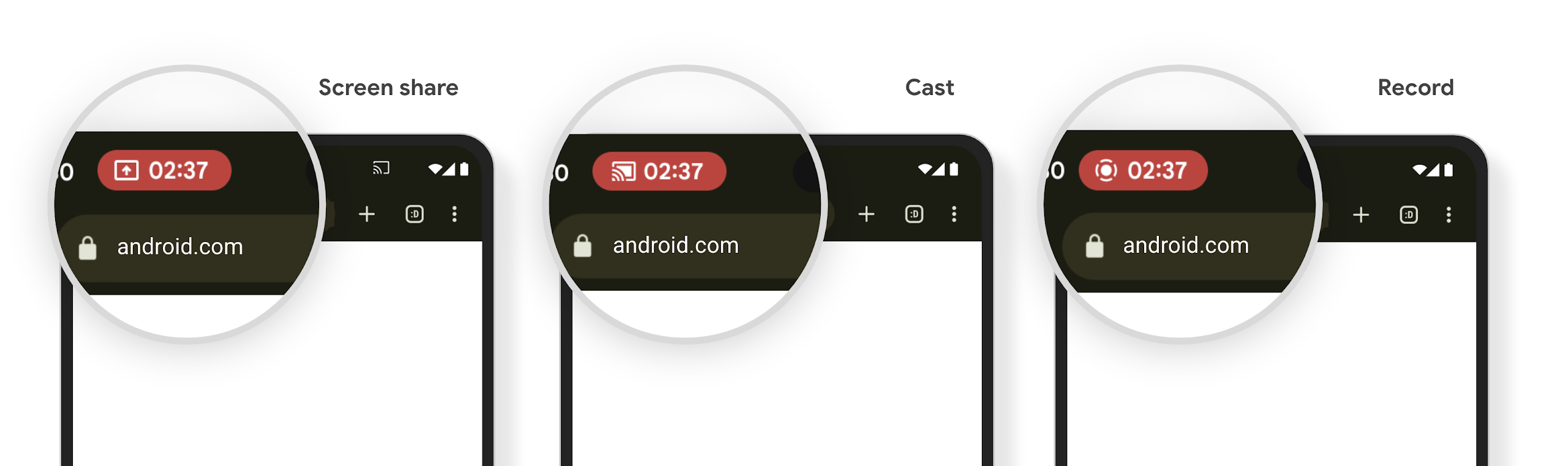
アプリが影響を受けるかどうかを確認する
デフォルトでは、アプリにはステータスバー チップが含まれており、ロック画面が有効になると画面投影が自動的に一時停止されます。
これらのユースケースでアプリをテストする方法については、ステータスバー チップと自動停止をご覧ください。
バックグラウンドでのネットワーク アクセスの制限
In Android 15, apps that start a network request outside of a valid process
lifecycle receive an exception. Typically, an
UnknownHostException or other socket-related
IOException. Network requests that happen outside of a valid lifecycle are
usually due to apps unknowingly continuing a network request even after the app
is no longer active.
To mitigate this exception, ensure your network requests are lifecycle aware and cancelled upon leaving a valid process lifecycle by using lifecycle aware components. If it is important that the network request should happen even when the user leaves the application, consider scheduling the network request using WorkManager or continue a user visible task using Foreground Service.
サポートの終了
リリースのたびに、デベロッパー エクスペリエンスの向上や新しいプラットフォーム機能のサポートのために、特定の Android API が使用されなくなったり、リファクタリングが必要になったりすることがあります。このような場合、Android は使用されなくなった API のサポートを正式に終了し、代わりに代替 API を使用するようデベロッパーに案内します。
「非推奨」または「サポートの終了」とは、API の正式なサポートが終了したことを指しますが、デベロッパーは引き続きそうした API を利用できます。Android の今回のリリースでサポートが終了した API について詳しくは、サポート終了ページをご覧ください。