
Android 15 memperkenalkan fitur dan API baru yang hebat untuk para developer. Bagian berikut merangkum fitur ini untuk membantu Anda mulai menggunakan API terkait.
Untuk melihat daftar mendetail tentang API yang ditambahkan, diubah, dan dihapus, baca laporan perbedaan API. Untuk mengetahui detail tentang API yang ditambahkan, buka referensi API Android — untuk Android 15, cari API yang ditambahkan di level API 35. Untuk mempelajari area tempat perubahan platform dapat memengaruhi aplikasi Anda, pastikan untuk memeriksa perubahan perilaku Android 15 untuk aplikasi yang menargetkan Android 15 dan untuk semua aplikasi.
Kamera dan media
Android 15 menyertakan berbagai fitur yang meningkatkan pengalaman kamera dan media serta memberi Anda akses ke alat dan hardware untuk mendukung kreator dalam mewujudkan visi mereka di Android.
Untuk mengetahui informasi selengkapnya tentang fitur dan solusi developer terbaru untuk media dan kamera Android, lihat materi Membangun pengalaman media dan kamera Android modern dari Google I/O.
Peningkatan Cahaya Rendah
Android 15 introduces Low Light Boost, an auto-exposure mode available to both Camera 2 and the night mode camera extension. Low Light Boost adjusts the exposure of the Preview stream in low-light conditions. This is different from how the night mode camera extension creates still images, because night mode combines a burst of photos to create a single, enhanced image. While night mode works very well for creating a still image, it can't create a continuous stream of frames, but Low Light Boost can. Thus, Low Light Boost enables camera capabilities, such as:
- Providing an enhanced image preview, so users are better able to frame their low-light pictures
- Scanning QR codes in low light
If you enable Low Light Boost, it automatically turns on when there's a low light level, and turns off when there's more light.
Apps can record off the Preview stream in low-light conditions to save a brightened video.
For more information, see Low Light Boost.
Kontrol kamera dalam aplikasi
Android 15 添加了一个扩展程序,可让您更好地控制支持的设备上的相机硬件及其算法:
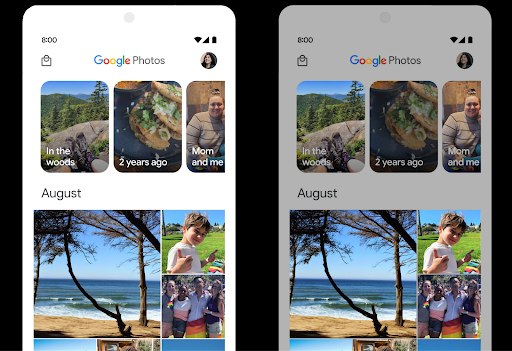
Kontrol ruang kosong HDR
Android 15 chooses HDR headroom that is appropriate for the underlying device
capabilities and bit-depth of the panel. For pages that have lots of SDR
content, such as a messaging app displaying a single HDR thumbnail, this
behavior can end up adversely influencing the perceived brightness of the SDR
content. Android 15 lets you control the HDR headroom with
setDesiredHdrHeadroom to strike a balance between SDR
and HDR content.
Kontrol keras suara

Android 15 引入了对 CTA-2075 响度标准的支持,可帮助您避免音频响度不一致,并确保用户在切换内容时不必不断调整音量。系统利用输出设备(头戴式耳机和扬声器)的已知特性以及 AAC 音频内容中提供的响度元数据,智能调整音频响度和动态范围压缩级别。
如需启用此功能,您需要确保 AAC 内容中提供响度元数据,并在应用中启用平台功能。为此,您可以通过使用关联的 AudioTrack 中的音频会话 ID 调用其 create 工厂方法来实例化 LoudnessCodecController 对象;这会自动开始应用音频更新。您可以传递 OnLoudnessCodecUpdateListener 来修改或过滤响度参数,然后再将其应用于 MediaCodec。
// Media contains metadata of type MPEG_4 OR MPEG_D
val mediaCodec = …
val audioTrack = AudioTrack.Builder()
                                .setSessionId(sessionId)
                                .build()
...
// Create new loudness controller that applies the parameters to the MediaCodec
try {
   val lcController = LoudnessCodecController.create(mSessionId)
   // Starts applying audio updates for each added MediaCodec
}
AndroidX media3 ExoPlayer 也将更新,以使用
LoudnessCodecController API,可实现无缝应用集成。
Perangkat MIDI 2.0 virtual
Android 13 添加了对使用 USB 连接 MIDI 2.0 设备的支持,这些设备使用通用 MIDI 数据包 (UMP) 进行通信。Android 15 将 UMP 支持扩展到了虚拟 MIDI 应用,使作曲应用能够像使用 USB MIDI 2.0 设备一样,将虚拟 MIDI 2.0 设备用作控制合成器应用的设备。
Decoding software AV1 yang lebih efisien

dav1d 是 VideoLAN 推出的热门 AV1 软件解码器,适用于不支持硬件 AV1 解码的 Android 设备。与旧版 AV1 软件解码器相比,dav1d 的性能最高可提升 3 倍,让更多用户(包括一些低端和中端设备)能够播放高清 AV1 视频。
您的应用需要选择启用 dav1d,方法是通过名称 "c2.android.av1-dav1d.decoder" 调用它。在后续更新中,dav1d 将成为默认的 AV1 软件解码器。此支持已标准化,并向后移植到收到 Google Play 系统更新的 Android 11 设备。
Alat dan produktivitas developer
Meskipun sebagian besar upaya kami untuk meningkatkan produktivitas Anda berpusat pada alat seperti Android Studio, Jetpack Compose, dan library Android Jetpack, kami selalu mencari cara di platform untuk membantu Anda mewujudkan visi dengan lebih mudah.
Update OpenJDK 17
Android 15 将继续更新 Android 的核心库,以与最新 OpenJDK LTS 版本中的功能保持一致。
其中包含以下主要功能和改进:
- 改进了 NIO 缓冲区的使用体验
- 数据流
- 其他
math和strictmath方法 util软件包更新,包括顺序的collection、map和setDeflater中的ByteBuffer支持- 安全更新,例如
X500PrivateCredential和安全密钥更新
这些 API 会通过 Google Play 系统更新在搭载 Android 12(API 级别 31)及更高版本的 10 亿多部设备上更新,以便您以最新的编程功能为目标平台。
Peningkatan PDF
Android 15 对 PdfRenderer API 进行了重大改进。应用可以整合呈现等高级功能
受密码保护的文件、注释、表单编辑、
searching,而 selection 则包含副本。支持线性化 PDF 优化,此功能可加快本地 PDF 查看速度并减少资源使用量。Jetpack PDF 库使用这些 API 来简化 PDF 的添加
查看功能。
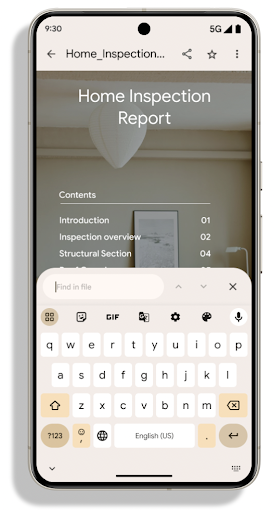
PdfRenderer 已移至一个可使用 Google
Play 系统更新独立于平台版本,并且我们支持
将这些变更还原到 Android 11(API 级别 30),方法是创建兼容的
Android 15 之前版本的 API Surface,称为
PdfRendererPreV。
Penyempurnaan pengalihan bahasa otomatis
Android 14 added on-device, multi-language recognition in audio with automatic
switching between languages, but this can cause words to get dropped,
especially when languages switch with less of a pause between the two
utterances. Android 15 adds additional controls to help apps tune this switching
to their use case.
EXTRA_LANGUAGE_SWITCH_INITIAL_ACTIVE_DURATION_TIME_MILLIS
confines the automatic switching to the beginning of the audio session, while
EXTRA_LANGUAGE_SWITCH_MATCH_SWITCHES deactivates the
language switching after a defined number of switches. These options are
particularly useful if you expect that there will be a single language spoken
during the session that should be autodetected.
Peningkatan OpenType Variable Font API
Android 15 improves the usability of the OpenType variable font. You can create
a FontFamily instance from a variable font without specifying weight axes
with the buildVariableFamily API. The text renderer overrides the value
of wght axis to match the displaying text.
Using the API simplifies the code for creating a Typeface considerably:
Kotlin
val newTypeface = Typeface.CustomFallbackBuilder(
            FontFamily.Builder(
                Font.Builder(assets, "RobotoFlex.ttf").build())
                    .buildVariableFamily())
    .build()
Java
Typeface newTypeface = Typeface.CustomFallbackBuilder(
            new FontFamily.Builder(
                new Font.Builder(assets, "RobotoFlex.ttf").build())
                    .buildVariableFamily())
    .build();
Previously, to create the same Typeface, you would need much more code:
Kotlin
val oldTypeface = Typeface.CustomFallbackBuilder(
            FontFamily.Builder(
                Font.Builder(assets, "RobotoFlex.ttf")
                    .setFontVariationSettings("'wght' 400")
                    .setWeight(400)
                    .build())
                .addFont(
                    Font.Builder(assets, "RobotoFlex.ttf")
                        .setFontVariationSettings("'wght' 100")
                        .setWeight(100)
                        .build()
                )
                .addFont(
                    Font.Builder(assets, "RobotoFlex.ttf")
                        .setFontVariationSettings("'wght' 200")
                        .setWeight(200)
                        .build()
                )
                .addFont(
                    Font.Builder(assets, "RobotoFlex.ttf")
                        .setFontVariationSettings("'wght' 300")
                        .setWeight(300)
                        .build()
                )
                .addFont(
                    Font.Builder(assets, "RobotoFlex.ttf")
                        .setFontVariationSettings("'wght' 500")
                        .setWeight(500)
                        .build()
                )
                .addFont(
                    Font.Builder(assets, "RobotoFlex.ttf")
                        .setFontVariationSettings("'wght' 600")
                        .setWeight(600)
                        .build()
                )
                .addFont(
                    Font.Builder(assets, "RobotoFlex.ttf")
                        .setFontVariationSettings("'wght' 700")
                        .setWeight(700)
                        .build()
                )
                .addFont(
                    Font.Builder(assets, "RobotoFlex.ttf")
                        .setFontVariationSettings("'wght' 800")
                        .setWeight(800)
                        .build()
                )
                .addFont(
                    Font.Builder(assets, "RobotoFlex.ttf")
                        .setFontVariationSettings("'wght' 900")
                        .setWeight(900)
                        .build()
                ).build()
        ).build()
Java
Typeface oldTypeface = new Typeface.CustomFallbackBuilder(
    new FontFamily.Builder(
        new Font.Builder(assets, "RobotoFlex.ttf")
            .setFontVariationSettings("'wght' 400")
            .setWeight(400)
            .build()
    )
    .addFont(
        new Font.Builder(assets, "RobotoFlex.ttf")
            .setFontVariationSettings("'wght' 100")
            .setWeight(100)
            .build()
    )
    .addFont(
        new Font.Builder(assets, "RobotoFlex.ttf")
            .setFontVariationSettings("'wght' 200")
            .setWeight(200)
            .build()
    )
    .addFont(
        new Font.Builder(assets, "RobotoFlex.ttf")
            .setFontVariationSettings("'wght' 300")
            .setWeight(300)
            .build()
    )
    .addFont(
        new Font.Builder(assets, "RobotoFlex.ttf")
            .setFontVariationSettings("'wght' 500")
            .setWeight(500)
            .build()
    )
    .addFont(
        new Font.Builder(assets, "RobotoFlex.ttf")
            .setFontVariationSettings("'wght' 600")
            .setWeight(600)
            .build()
    )
    .addFont(
        new Font.Builder(assets, "RobotoFlex.ttf")
            .setFontVariationSettings("'wght' 700")
            .setWeight(700)
            .build()
    )
    .addFont(
        new Font.Builder(assets, "RobotoFlex.ttf")
            .setFontVariationSettings("'wght' 800")
            .setWeight(800)
            .build()
    )
    .addFont(
        new Font.Builder(assets, "RobotoFlex.ttf")
            .setFontVariationSettings("'wght' 900")
            .setWeight(900)
            .build()
    )
    .build()
).build();
Here's an example of how a Typeface created with both the old and new APIs
renders:
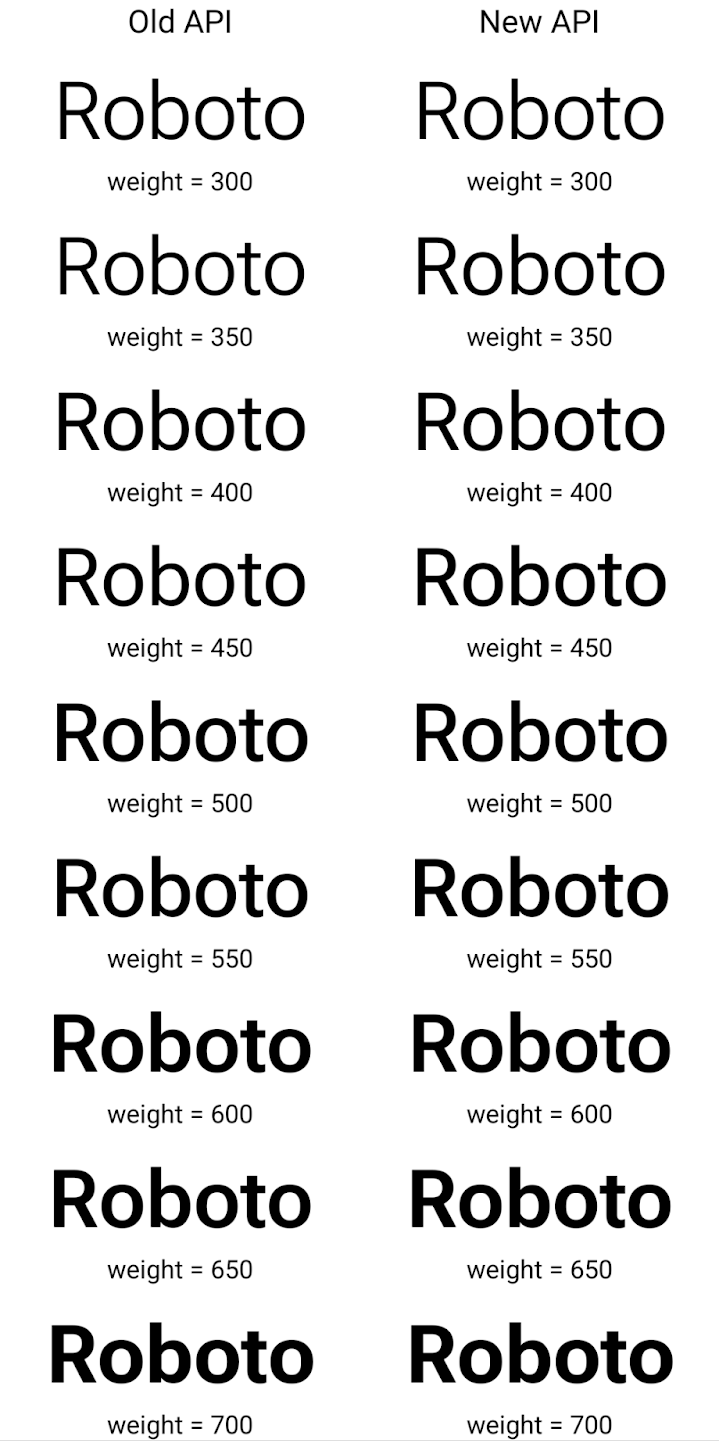
In this example, the Typeface created with the old API doesn't have the
capability to create accurate font weights for the 350, 450, 550 and 650
Font instances, so the renderer falls back to the closest weight. So in
this case, 300 is rendered instead of 350, 400 is rendered instead of 450, and
so on. By contrast, the Typeface created with the new APIs dynamically creates
a Font instance for a given weight, so accurate weights are rendered for 350,
450, 550, and 650 as well.
Kontrol pemisah baris terperinci
Starting in Android 15, a TextView and the underlying
line breaker can preserve the given portion of text in the same line to improve
readability. You can take advantage of this line break customization by using
the <nobreak> tag in string resources or
createNoBreakSpan. Similarly, you can preserve words from
hyphenation by using the <nohyphen> tag or
createNoHyphenationSpan.
For example, the following string resource doesn't include a line break, and renders with the text "Pixel 8 Pro." breaking in an undesirable place:
<resources>
    <string name="pixel8pro">The power and brains behind Pixel 8 Pro.</string>
</resources>
In contrast, this string resource includes the <nobreak> tag, which wraps the
phrase "Pixel 8 Pro." and prevents line breaks:
<resources>
    <string name="pixel8pro">The power and brains behind <nobreak>Pixel 8 Pro.</nobreak></string>
</resources>
The difference in how these strings are rendered is shown in the following images:
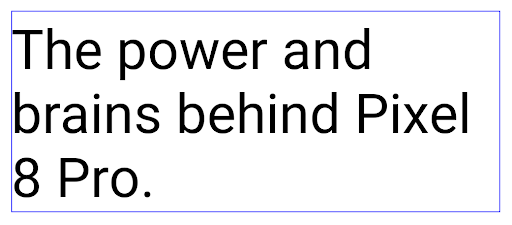
<nobreak> tag.
<nobreak> tag.Pengarsipan aplikasi
Android and Google Play announced support for app archiving last year, allowing users to free up space by partially removing infrequently used apps from the device that were published using Android App Bundle on Google Play. Android 15 includes OS level support for app archiving and unarchiving, making it easier for all app stores to implement it.
Apps with the REQUEST_DELETE_PACKAGES permission can call the
PackageInstaller requestArchive method to request archiving an
installed app package, which removes the APK and any cached files, but persists
user data. Archived apps are returned as displayable apps through the
LauncherApps APIs; users will see a UI treatment to highlight that those
apps are archived. If a user taps on an archived app, the responsible installer
will get a request to unarchive it, and the restoration process can be
monitored by the ACTION_PACKAGE_ADDED broadcast.
Mengaktifkan mode 16 KB di perangkat menggunakan opsi developer
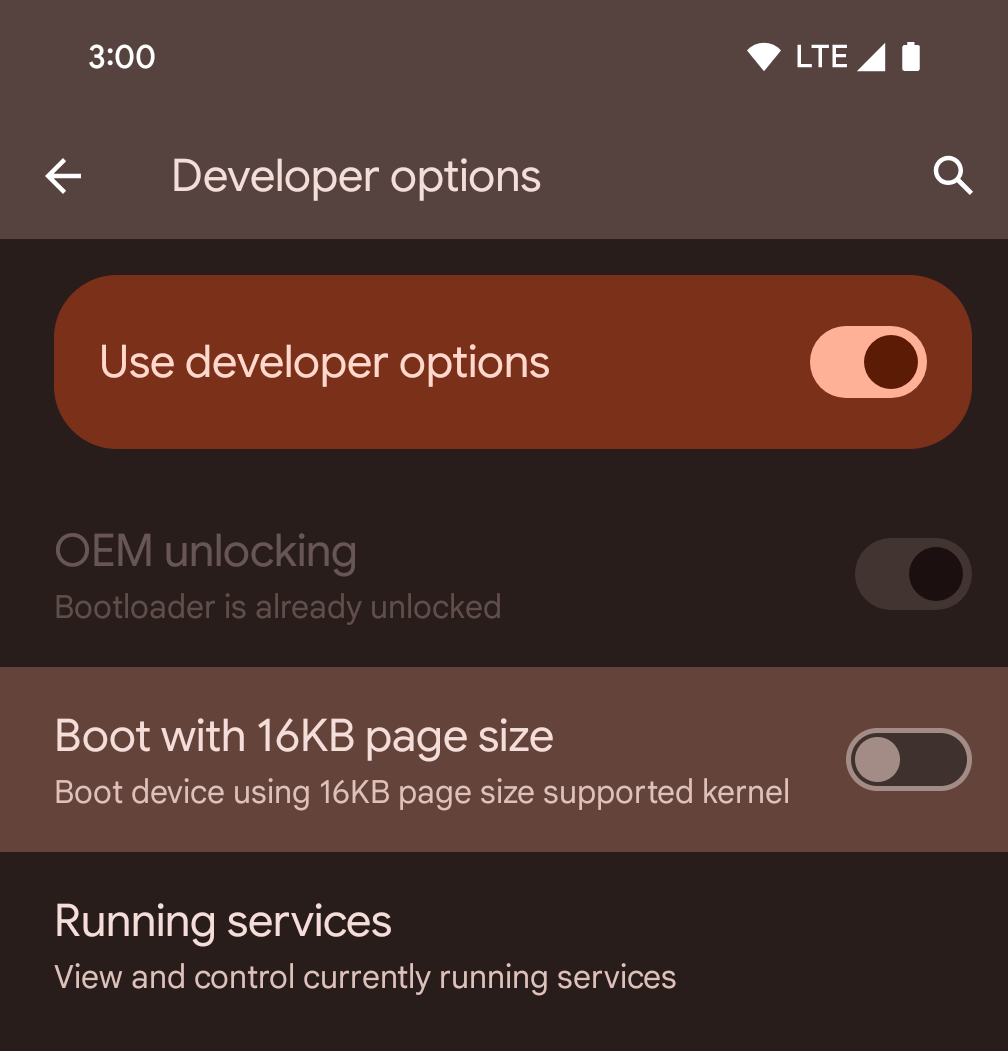
Aktifkan opsi developer Boot dengan ukuran halaman 16 KB untuk mem-boot perangkat dalam mode 16 KB.
Dalam versi QPR Android 15, Anda dapat menggunakan opsi developer yang tersedia di perangkat tertentu untuk mem-boot perangkat dalam mode 16 KB dan melakukan pengujian di perangkat. Sebelum menggunakan opsi developer, buka Setelan > Sistem > Update software dan terapkan update yang tersedia.
Opsi developer ini tersedia di perangkat berikut:
Pixel 8 dan 8 Pro (dengan Android 15 QPR1 atau yang lebih tinggi)
Pixel 8a (dengan Android 15 QPR1 atau yang lebih baru)
Pixel 9, 9 Pro, dan 9 Pro XL (dengan Android 15 QPR2 atau yang lebih baru)
Pixel 9a (dengan Android 16 atau yang lebih baru)
Grafik
Android 15 menghadirkan peningkatan grafis terbaru, termasuk ANGLE dan penambahan pada sistem grafis Canvas.
Memodernisasi akses GPU Android

与早期相比,Android 硬件已经有了很大的进步。早期,核心操作系统在单个 CPU 上运行,并且使用基于固定功能流水线的 API 访问 GPU。从 Android 7.0(API 级别 24)开始,NDK 中就提供了 Vulkan® 图形 API,其较低级别的抽象更好地反映了现代 GPU 硬件,可更好地扩缩以支持多个 CPU 核心,并可降低 CPU 驱动程序开销,从而提升应用性能。所有现代游戏引擎都支持 Vulkan。
Vulkan 是 Android 与 GPU 的首选接口。因此,Android 15 包含 ANGLE 作为可选层,用于在 Vulkan 基础上运行 OpenGL® ES。改用 ANGLE 将标准化 Android OpenGL 实现,提高兼容性,在某些情况下还有助于提升性能。在 Android 15 中,您可以依次前往设置 -> 系统 -> 开发者选项 -> 实验性功能:启用 ANGLE,启用开发者选项,以便通过 ANGLE 测试 OpenGL ES 应用的稳定性和性能。
Android ANGLE on Vulkan 路线图
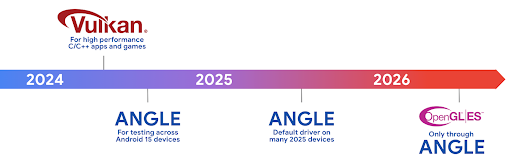
为了简化 GPU 堆栈,我们今后将在更多新设备上将 ANGLE 作为 GL 系统驱动程序提供,未来 OpenGL/ES 将只能通过 ANGLE 获得支持。尽管如此,我们计划继续在所有设备上支持 OpenGL ES。
建议的后续措施
使用开发者选项为 OpenGL ES 选择 ANGLE 驱动程序,然后测试您的应用。对于新项目,我们强烈建议您为 C/C++ 使用 Vulkan。
Peningkatan untuk Canvas
Android 15 continues our modernization of Android's Canvas graphics system with additional capabilities:
Matrix44provides a 4x4 matrix for transforming coordinates that should be used when you want to manipulate the canvas in 3D.clipShaderintersects the current clip with the specified shader, whileclipOutShadersets the clip to the difference of the current clip and the shader, each treating the shader as an alpha mask. This supports the drawing of complex shapes efficiently.
Performa dan baterai
Android terus berfokus untuk membantu Anda meningkatkan performa dan kualitas aplikasi Anda. Android 15 memperkenalkan API yang membantu membuat tugas di aplikasi Anda dieksekusi secara lebih efisien, mengoptimalkan performa aplikasi, dan mengumpulkan insight tentang aplikasi Anda.
Untuk praktik terbaik yang hemat baterai, men-debug penggunaan jaringan dan daya, serta detail tentang cara kami meningkatkan efisiensi baterai tugas latar belakang di Android 15 dan versi Android terbaru, lihat materi Meningkatkan efisiensi baterai tugas latar belakang di Android dari Google I/O.
ApplicationStartInfo API
In previous versions of Android, app startup has been a bit of a mystery. It was
challenging to determine within your app whether it started from a cold, warm,
or hot state. It was also difficult to know how long your app spent during the
various launch phases: forking the process, calling onCreate, drawing the
first frame, and more. When your Application class was instantiated, you had no
way of knowing whether the app started from a broadcast, a content provider, a
job, a backup, boot complete, an alarm, or an Activity.
The ApplicationStartInfo API on Android 15 provides
all of this and more. You can even choose to add your own timestamps into the
flow to help collect timing data in one place. In addition to collecting
metrics, you can use ApplicationStartInfo to help directly optimize app
startup; for example, you can eliminate the costly instantiation of UI-related
libraries within your Application class when your app is starting up due to a
broadcast.
Informasi mendetail tentang ukuran aplikasi
Since Android 8.0 (API level 26), Android has included the
StorageStats.getAppBytes API that summarizes the installed
size of an app as a single number of bytes, which is a sum of the APK size, the
size of files extracted from the APK, and files that were generated on the
device such as ahead-of-time (AOT) compiled code. This number is not very
insightful in terms of how your app is using storage.
Android 15 adds the
StorageStats.getAppBytesByDataType([type]) API, which lets
you get insight into how your app is using up all that space, including APK file
splits, AOT and speedup related code, dex metadata, libraries, and guided
profiles.
Pembuatan profil yang dikelola aplikasi
Android 15 includes the ProfilingManager class,
which lets you collect profiling information from within your app such as heap
dumps, heap profiles, stack sampling, and more. It provides a callback to your
app with a supplied tag to identify the output file, which is delivered to your
app's files directory. The API does rate limiting to minimize the performance
impact.
To simplify constructing profiling requests in your app, we recommend using the
corresponding Profiling AndroidX API, available
in Core 1.15.0-rc01 or higher.
Peningkatan database SQLite
Android 15 引入了 SQLite API,这些 API 可公开底层 SQLite 引擎的高级功能,以解决可能在应用中出现的特定性能问题。将 SQLite 更新到版本 3.44.3。
开发者应参阅 SQLite 性能最佳实践 以便充分利用其 SQLite 数据库,尤其是在处理大型 或运行对延迟敏感的查询时
- 只读延迟事务:在发出
只读(不包括写入语句),请使用
beginTransactionReadOnly()和beginTransactionWithListenerReadOnly(SQLiteTransactionListener)发出只读的DEFERRED事务。此类事务 如果数据库处于 WAL 模式 与IMMEDIATE或EXCLUSIVE事务并发运行。 - 行数和 ID:添加了 API 以检索已更改的行数和 ID
行或最后插入的行 ID 而不发出额外的查询。
getLastChangedRowCount()会返回当前事务中最近的 SQL 语句插入、更新或删除的行数,而getTotalChangedRowCount()会返回当前连接的计数。getLastInsertRowId()返回最后一行的rowid以便在当前连接中插入 - 原始语句:发出原始 SQlite 语句,从而绕过便利 及其可能产生的任何额外处理开销。
Update Android Dynamic Performance Framework
Android 15 继续投资于 Android 动态性能框架 (ADPF),这是一组 API,可让游戏和性能密集型应用更为直接地与 Android 设备的电源和散热系统进行互动。在受支持的设备上,Android 15 添加了 ADPF 功能:
- 针对提示会话的节能模式,用于指明其关联的线程应优先节能而非性能,非常适合长时间运行的后台工作负载。
- 系统可以在提示会话中报告 GPU 和 CPU 工作时长,以便同时调整 CPU 和 GPU 频率,以最佳方式满足工作负载需求。
- 热余量阈值,用于根据余量预测来解读可能的热节流状态。
如需详细了解如何在应用和游戏中使用 ADPF,请参阅相关文档。
Privasi
Android 15 menyertakan berbagai fitur yang membantu developer aplikasi melindungi privasi pengguna.
Deteksi perekaman layar
Android 15 增加了对应用的支持,以检测 正在录制。每当应用转换时,系统都会调用回调 在屏幕录制内容中处于可见与隐藏状态之间。如果正在记录注册进程的 UID 拥有的 activity,则系统会将应用视为可见。这样一来,如果您的应用执行敏感操作,您就可以告知用户正在录制他们的操作。
val mCallback = Consumer<Int> { state ->
  if (state == SCREEN_RECORDING_STATE_VISIBLE) {
    // We're being recorded
  } else {
    // We're not being recorded
  }
}

override fun onStart() {
   super.onStart()
   val initialState =
      windowManager.addScreenRecordingCallback(mainExecutor, mCallback)
   mCallback.accept(initialState)
}

override fun onStop() {
    super.onStop()
    windowManager.removeScreenRecordingCallback(mCallback)
}
Kemampuan IntentFilter yang diperluas
Android 15 builds in support for more precise Intent resolution through
UriRelativeFilterGroup, which contains a set of
UriRelativeFilter objects that form a set of Intent
matching rules that must each be satisfied, including URL query parameters, URL
fragments, and blocking or exclusion rules.
These rules can be defined in the AndroidManifest XML file with the
<uri-relative-filter-group> tag, which can optionally include an
android:allow tag. These tags can contain <data> tags that use existing data
tag attributes as well as the android:query and android:fragment
attributes.
Here's an example of the AndroidManifest syntax:
<intent-filter android:autoVerify="true">
  <action android:name="android.intent.action.VIEW" />
  <category android:name="android.intent.category.BROWSABLE" />
  <category android:name="android.intent.category.DEFAULT" />
  <data android:scheme="http" />
  <data android:scheme="https" />
  <data android:host="astore.com" />
  <uri-relative-filter-group>
    <data android:pathPrefix="/auth" />
    <data android:query="region=na" />
  </uri-relative-filter-group>
  <uri-relative-filter-group android:allow="false">
    <data android:pathPrefix="/auth" />
    <data android:query="mobileoptout=true" />
  </uri-relative-filter-group>
  <uri-relative-filter-group android:allow="false">
    <data android:pathPrefix="/auth" />
    <data android:fragmentPrefix="faq" />
  </uri-relative-filter-group>
</intent-filter>
Ruang privasi
Private space lets users create a separate space on their device where they can keep sensitive apps away from prying eyes, under an additional layer of authentication. The private space uses a separate user profile. The user can choose to use the device lock or a separate lock factor for the private space.
Apps in the private space show up in a separate container in the launcher, and are hidden from the recents view, notifications, settings, and from other apps when the private space is locked. User-generated and downloaded content (such as media or files) and accounts are separated between the private space and the main space. The system sharesheet and the photo picker can be used to give apps access to content across spaces when the private space is unlocked.
Users can't move existing apps and their data into the private space. Instead, users select an install option in the private space to install an app using whichever app store they prefer. Apps in the private space are installed as separate copies from any apps in the main space (new copies of the same app).
When a user locks the private space, the profile is stopped. While the profile is stopped, apps in the private space are no longer active and can't perform foreground or background activities, including showing notifications.
We recommend that you test your app with private space to make sure your app works as expected, especially if your app falls into one of the following categories:
- Apps with logic for work profiles that assumes that any installed copies of their app that aren't in the main profile are in the work profile.
- Medical apps
- Launcher apps
- App store apps
Membuat kueri pilihan pengguna terbaru untuk Akses Foto yang Dipilih
Apps can now highlight only the most-recently-selected photos and videos when
partial access to media permissions is granted. This feature can improve
the user experience for apps that frequently request access to photos and
videos. To use this feature in your app, enable the
QUERY_ARG_LATEST_SELECTION_ONLY argument when querying MediaStore
through ContentResolver.
Kotlin
val externalContentUri = MediaStore.Files.getContentUri("external")

val mediaColumns = arrayOf(
   FileColumns._ID,
   FileColumns.DISPLAY_NAME,
   FileColumns.MIME_TYPE,
)

val queryArgs = bundleOf(
   // Return only items from the last selection (selected photos access)
   QUERY_ARG_LATEST_SELECTION_ONLY to true,
   // Sort returned items chronologically based on when they were added to the device's storage
   QUERY_ARG_SQL_SORT_ORDER to "${FileColumns.DATE_ADDED} DESC",
   QUERY_ARG_SQL_SELECTION to "${FileColumns.MEDIA_TYPE} = ? OR ${FileColumns.MEDIA_TYPE} = ?",
   QUERY_ARG_SQL_SELECTION_ARGS to arrayOf(
       FileColumns.MEDIA_TYPE_IMAGE.toString(),
       FileColumns.MEDIA_TYPE_VIDEO.toString()
   )
)
Java
Uri externalContentUri = MediaStore.Files.getContentUri("external");

String[] mediaColumns = {
    FileColumns._ID,
    FileColumns.DISPLAY_NAME,
    FileColumns.MIME_TYPE
};

Bundle queryArgs = new Bundle();
queryArgs.putBoolean(MediaStore.QUERY_ARG_LATEST_SELECTION_ONLY, true);
queryArgs.putString(MediaStore.QUERY_ARG_SQL_SORT_ORDER, FileColumns.DATE_ADDED + " DESC");
queryArgs.putString(MediaStore.QUERY_ARG_SQL_SELECTION, FileColumns.MEDIA_TYPE + " = ? OR " + FileColumns.MEDIA_TYPE + " = ?");
queryArgs.putStringArray(MediaStore.QUERY_ARG_SQL_SELECTION_ARGS, new String[] {
    String.valueOf(FileColumns.MEDIA_TYPE_IMAGE),
    String.valueOf(FileColumns.MEDIA_TYPE_VIDEO)
});
Privacy Sandbox di Android
Android 15 包含最新的 Android 广告服务扩展,其中包含最新版本的 Privacy Sandbox on Android。我们一直致力于开发可更好地保护用户隐私,并为移动应用打造高效的个性化广告体验的技术,此次添加新功能就是其中的一项举措。我们的 Privacy Sandbox 页面详细介绍了 Privacy Sandbox on Android 开发者预览版和 Beta 版计划,可帮助您上手使用。
Health Connect
Android 15 mengintegrasikan ekstensi terbaru di seputar Health Connect dari Android, platform terpusat dan aman untuk mengelola serta membagikan data kesehatan dan kebugaran yang dikumpulkan aplikasi. Update ini menambahkan dukungan untuk jenis data tambahan di seluruh kebugaran, gizi, suhu kulit, rencana latihan, dan lainnya.
Pelacakan suhu kulit memungkinkan pengguna menyimpan dan membagikan data suhu yang lebih akurat dari perangkat wearable atau perangkat pelacakan lainnya.
Rencana latihan adalah rencana olahraga terstruktur untuk membantu pengguna mencapai kebugaran mereka tujuan tersebut. Dukungan paket pelatihan mencakup berbagai penyelesaian dan performa tujuan:
- Sasaran penyelesaian seputar kalori yang terbakar, jarak, durasi, repetisi, dan langkah.
- Sasaran performa sekitar pengulangan sebanyak mungkin (AMRAP), irama, detak jantung, daya, tingkat pengerahan tenaga yang dirasakan, dan kecepatan.
Pelajari lebih lanjut update terbaru untuk Health Connect di Android dalam presentasi Membuat pengalaman yang dapat disesuaikan dengan Android Health dari Google I/O.
Berbagi layar aplikasi
Android 15 supports app screen sharing so users can share or record just an
app window rather than the entire device screen. This feature, first enabled in
Android 14 QPR2, includes
MediaProjection callbacks that allow your app
to customize the app screen sharing experience. Note that for apps targeting
Android 14 (API level 34) or higher,
user consent is required for each
MediaProjection capture session.
Pengalaman pengguna dan UI sistem
Android 15 memberi developer dan pengguna aplikasi kontrol dan fleksibilitas yang lebih besar untuk mengonfigurasi perangkat agar sesuai dengan kebutuhan mereka.
Untuk mempelajari lebih lanjut cara menggunakan peningkatan terbaru di Android 15 untuk meningkatkan pengalaman pengguna aplikasi Anda, lihat sesi Meningkatkan pengalaman pengguna aplikasi Android Anda dari Google I/O.
Pratinjau widget yang lebih kaya dengan Generated Previews API
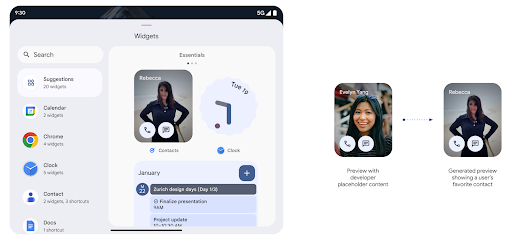
在 Android 15 之前,提供微件选择器预览的唯一方法是指定静态图片或布局资源。这些预览通常与放置在主屏幕上的实际 widget 的外观大不相同。此外,由于无法使用 Jetpack Glance 创建静态资源,因此“资讯一览” 开发者必须为其微件截屏或创建 XML 布局, 微件预览。
Android 15 添加了对生成的预览的支持。这意味着,应用微件提供程序可以生成 RemoteViews 以用作选择器预览,而不是静态资源。
推送 API
应用可以通过推送 API 提供生成的预览。应用可以提供
预览,并且不会收到明确的请求,
以提供预览。预览会保留在 AppWidgetService 中,并且主持人可以按需请求预览。以下示例加载了一个 XML 微件
并将其设置为预览:
AppWidgetManager.getInstance(appContext).setWidgetPreview(
   ComponentName(
       appContext,
       SociaLiteAppWidgetReceiver::class.java
   ),
   AppWidgetProviderInfo.WIDGET_CATEGORY_HOME_SCREEN,
   RemoteViews("com.example", R.layout.widget_preview)
)
预期的流程如下:
- 任何时候,widget 提供程序都会调用
setWidgetPreview。提供的预览会与其他提供方信息一起保留在AppWidgetService中。 setWidgetPreview会通过AppWidgetHost.onProvidersChanged回调。作为回应,微件宿主会重新加载其所有提供方信息。- 显示微件预览时,主机会检查
AppWidgetProviderInfo.generatedPreviewCategories,如果所选类别可用,则调用AppWidgetManager.getWidgetPreview以返回此提供程序的已保存预览。
何时调用 setWidgetPreview
由于没有用于提供预览的回调,因此应用可以选择在运行期间的任何时间发送预览。预览的更新频率取决于微件的用例。
以下列表介绍了两大类预览用例:
- 在 widget 预览中显示真实数据(例如个性化数据)的提供程序 或最新信息。这些提供商可以设置预览 已登录 Google 账号或已在其应用中完成初始配置。之后 可以设置一项定期任务,按照所选的节奏更新预览。 此类 widget 的示例包括照片、日历、天气或新闻 widget。
- 在预览中显示静态信息或不显示任何数据的快捷操作 widget 的提供程序。这些提供程序可以在应用首次启动时设置预览一次。例如,快速开车便是此类微件的示例 操作 widget 或 Chrome 快捷方式 widget。
某些提供商可能会在基座接入模式选择器上显示静态预览,但真实的 信息。这些提供商应遵循指南 设置预览
Picture-in-Picture
Android 15 引入了画中画 (PiP) 方面的变更,确保实现 更流畅的过渡效果。对于在主界面上叠加界面元素的应用,这将非常有用,因为这些界面元素会进入 PiP。
开发者使用 onPictureInPictureModeChanged 回调来定义逻辑
用于切换叠加界面元素的可见性。此回调是
在画中画进入或退出动画播放完毕时触发。距离开始还有
Android 15 中,PictureInPictureUiState 类包含另一种状态。
在此界面状态下,以 Android 15(API 级别 35)为目标平台的应用将遵守
使用以下参数调用 Activity#onPictureInPictureUiStateChanged 回调:
isTransitioningToPip()。还有
在画中画模式下,有很多与应用无关的界面元素,
包含建议、
评分和标题当应用进入画中画模式时,请使用
onPictureInPictureUiStateChanged 回调以隐藏这些界面元素。当
应用从画中画窗口进入全屏模式,使用
onPictureInPictureModeChanged 回调以取消隐藏这些元素,如
请参阅以下示例:
override fun onPictureInPictureUiStateChanged(pipState: PictureInPictureUiState) {
        if (pipState.isTransitioningToPip()) {
          // Hide UI elements
        }
    }
override fun onPictureInPictureModeChanged(isInPictureInPictureMode: Boolean) {
        if (isInPictureInPictureMode) {
          // Unhide UI elements
        }
    }
不相关界面元素的快速可见性切换(适用于画中画窗口)有助于 确保画中画播放动画更流畅、无闪烁。
Aturan Jangan Ganggu yang ditingkatkan
AutomaticZenRule 允许应用自定义注意力机制
管理(勿扰)规则,并确定何时启用或停用
。Android 15 极大地增强了这些规则,旨在提高
用户体验。其中包含以下增强功能:
- 向
AutomaticZenRule添加类型,让系统能够应用特殊类型 对某些规则的处理 - 向
AutomaticZenRule添加图标,使模式更加丰富 易于识别。 - 将
triggerDescription字符串添加到AutomaticZenRule,用于描述 规则应当对用户生效的条件。 - 已添加
ZenDeviceEffects更改为AutomaticZenRule,从而允许规则触发灰度等操作 显示、夜间模式或调暗壁纸。
Menetapkan VibrationEffect untuk saluran notifikasi
Android 15 supports setting rich vibrations for incoming notifications by
channel using NotificationChannel.setVibrationEffect, so
your users can distinguish between different types of notifications without
having to look at their device.
Chip status proyeksi media dan penghentian otomatis
Media projection can expose private user information. A new, prominent status bar chip makes users aware of any ongoing screen projection. Users can tap the chip to stop screen casting, sharing, or recording. Also, for a more intuitive user experience, any in‑progress screen projection now automatically stops when the device screen is locked.

Layar besar dan faktor bentuk
Android 15 memberi aplikasi Anda dukungan untuk mendapatkan hasil maksimal dari faktor bentuk Android, termasuk layar besar, perangkat flippable, dan perangkat foldable.
Multitasking layar besar yang ditingkatkan
Android 15 gives users better ways to multitask on large screen devices. For example, users can save their favorite split-screen app combinations for quick access and pin the taskbar on screen to quickly switch between apps. This means that making sure your app is adaptive is more important than ever.
Google I/O has sessions on Building adaptive Android apps and Building UI with the Material 3 adaptive library that can help, and our documentation has more to help you Design for large screens.
Dukungan layar luar
您的应用可以声明一个属性,Android 15 会使用该属性来允许您的 Application 或 Activity 显示在受支持的可翻转设备的小封面屏幕上。这些屏幕太小,无法被视为适合运行 Android 应用的兼容目标平台,但您的应用可以选择支持它们,从而让您的应用在更多平台上可用。
Konektivitas
Android 15 mengupdate platform untuk memberi aplikasi Anda akses ke kemajuan terbaru dalam teknologi nirkabel dan komunikasi.
Dukungan satelit
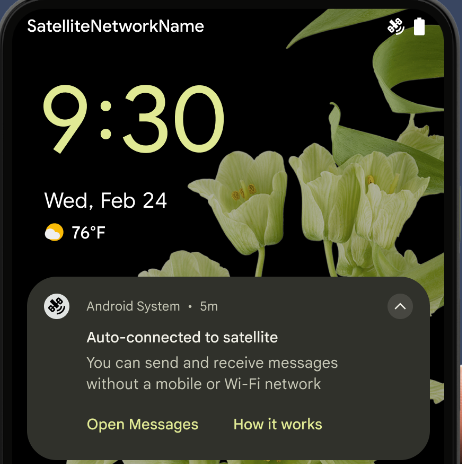
Android 15 继续扩大对卫星连接的平台支持,并包含一些界面元素,以确保在整个卫星连接环境中提供一致的用户体验。
应用可以使用 ServiceState.isUsingNonTerrestrialNetwork() 执行以下操作:
检测设备是否连接到卫星,让他们更清楚地了解
可能会导致完全网络服务不可用的原因此外,Android 15 支持短信和彩信应用以及预加载的 RCS 应用,以便使用卫星连接发送和接收消息。
Pengalaman NFC yang lebih lancar
Android 15 正在努力打造更顺畅、更可靠的感应式付款体验,同时继续支持 Android 强大的 NFC 应用生态系统。在受支持的设备上,应用可以请求 NfcAdapter 进入观察模式,在该模式下,设备会监听但不会响应 NFC 读卡器,并将应用的 NFC 服务 PollingFrame
对象发送以进行处理。PollingFrame 对象可用于在与 NFC 读卡器进行首次通信之前进行身份验证,在许多情况下,这支持一触式交易。
此外,应用可以在受支持的设备上注册过滤器,以便在有轮询循环活动时收到通知,从而能够与多个感知 NFC 的应用顺畅运行。
Peran Wallet
Android 15 引入了钱包角色,可与用户的首选钱包应用更紧密地集成。此角色会取代 NFC 默认的感应式付款设置。用户可以前往设置 > 应用 > 默认应用,管理钱包角色持有者。
在为在付款类别中注册的 AID 路由 NFC 感应式付款时,系统会使用钱包角色。点按操作始终会转到 Google 钱包角色持有者,除非有已注册相同 AID 的其他应用在前台运行。
此角色还用于确定“Google 钱包”快速访问功能块在启用后应显示在何处。将角色设为“无”时,“快速访问”功能块不可用,并且支付类别 NFC 点按仅传送到前台应用。
Keamanan
Android 15 membantu Anda meningkatkan keamanan aplikasi, melindungi data aplikasi, dan memberi pengguna lebih banyak transparansi dan kontrol atas data mereka. Tonton video Melindungi keamanan pengguna di Android dari Google I/O untuk mengetahui lebih lanjut tindakan yang kami lakukan untuk meningkatkan perlindungan pengguna dan melindungi aplikasi Anda dari ancaman baru.
Mengintegrasikan Credential Manager dengan isi otomatis
从 Android 15 开始,开发者可以将用户名或密码字段等特定视图与 Credential Manager 请求相关联,从而更轻松地在登录过程中提供量身定制的用户体验。当用户聚焦于其中一个视图时,系统会向 Credential Manager 发送相应请求。系统会汇总来自各个提供商的凭据,并在自动填充后备界面(例如内嵌建议或下拉菜单建议)中显示这些凭据。Jetpack androidx.credentials 库是开发者首选的端点,很快将在 Android 15 及更高版本中推出,以进一步增强此功能。
Mengintegrasikan pendaftaran dan login sekali ketuk dengan perintah biometrik
Credential Manager将生物识别提示集成到凭据创建过程中 和登录流程,这样提供商就无需管理 生物识别提示。因此,凭据提供程序只需专注于创建和获取流程的结果,并辅以生物识别流程结果。这一简化的流程创建了更高效、更精简的凭据 创建和检索过程。
Pengelolaan kunci untuk enkripsi end-to-end
Kami memperkenalkan E2eeContactKeysManager di Android 15, yang
memfasilitasi enkripsi end-to-end (E2EE) di aplikasi Android Anda dengan menyediakan
API tingkat OS untuk penyimpanan kunci publik kriptografis.
E2eeContactKeysManager dirancang untuk berintegrasi dengan aplikasi
kontak platform guna memberi pengguna cara terpusat untuk mengelola dan memverifikasi
kunci publik kontak mereka.
Pemeriksaan izin pada URI konten
Android 15 introduces a set of APIs that perform permission checks on content URIs:
Context.checkContentUriPermissionFull: This performs a full permission check on content URIs.Activitymanifest attributerequireContentUriPermissionFromCaller: This enforces specified permissions on the provided content URIs at activity launch.ComponentCallerclass forActivitycallers: This represents the app that launched the activity.
Aksesibilitas
Android 15 menambahkan fitur yang meningkatkan aksesibilitas bagi pengguna.
Braille yang Lebih Baik
In Android 15, we've made it possible for TalkBack to support Braille displays that are using the HID standard over both USB and secure Bluetooth.
This standard, much like the one used by mice and keyboards, will help Android support a wider range of Braille displays over time.
Internasionalisasi
Android 15 menambahkan fitur dan kemampuan yang melengkapi pengalaman pengguna saat perangkat digunakan dalam bahasa yang berbeda.
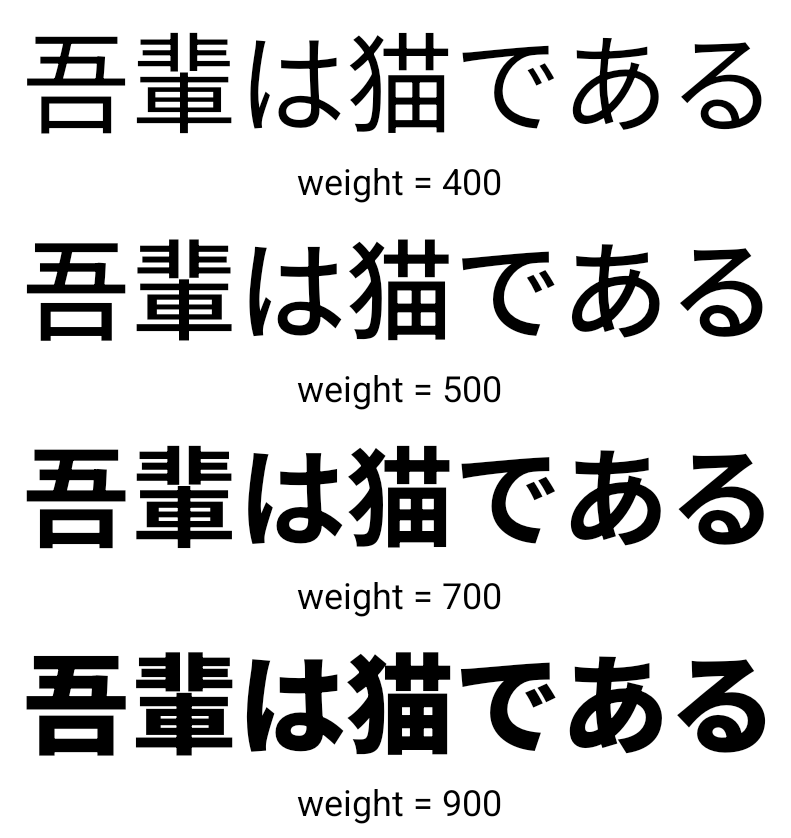
Font variabel CJK
从 Android 15 开始,面向中文、日文和韩文 (CJK) 语言的字体文件 NotoSansCJK 现在是可变字体。可变字体为中日韩语言的创意排版提供了更多可能性。设计师可以探索更多样式的排版,并制作出以前难以实现或根本无法实现的视觉效果出色的布局。
Justifikasi antar-karakter
从 Android 15 开始,可以通过
使用 JUSTIFICATION_MODE_INTER_CHARACTER。“字词间的理由”原为
最初是在 Android 8.0(API 级别 26)中引入的,
Justifications 功能为使用
例如中文、日语等。
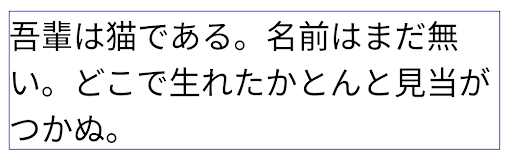
JUSTIFICATION_MODE_NONE 的日语文本布局。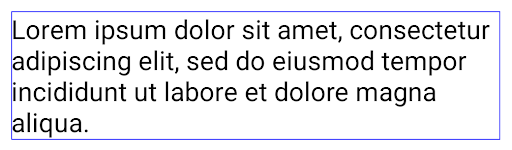
JUSTIFICATION_MODE_NONE 的英语文本布局。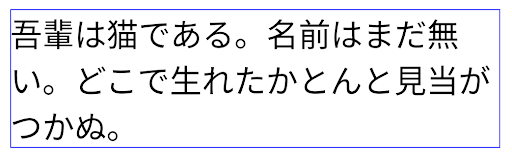
JUSTIFICATION_MODE_INTER_WORD 的日语文本布局。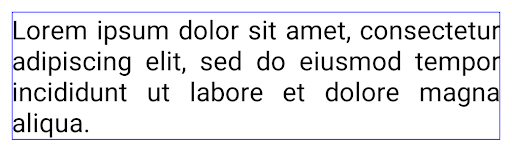
JUSTIFICATION_MODE_INTER_WORD 的英语文本布局。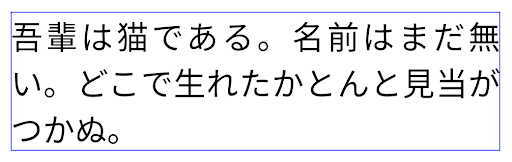
JUSTIFICATION_MODE_INTER_CHARACTER 的日语文本布局。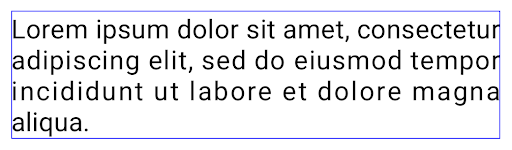
JUSTIFICATION_MODE_INTER_CHARACTER 的英语文本布局。Konfigurasi jeda baris otomatis
Android 从以下语言开始支持基于短语的日语和韩语换行:
Android 13(API 级别 33)。不过,虽然基于短语的行分隔符可以提高短文本行的可读性,但对于长文本行,效果并不理想。在 Android 15 中,应用只能使用 LINE_BREAK_WORD_STYLE_AUTO 选项,针对短文本行应用基于短语的行分隔符。此选项会为文本选择最佳字词样式选项。
对于短文本行,则使用基于短语的换行符,功能相同
为 LINE_BREAK_WORD_STYLE_PHRASE,如
以下图片:
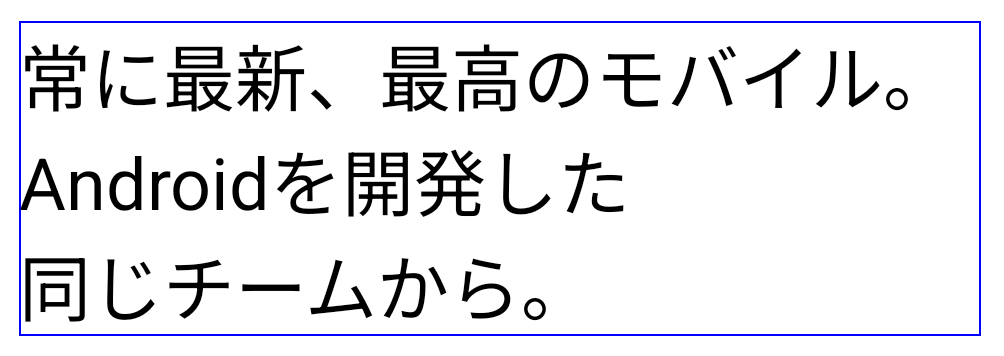
LINE_BREAK_WORD_STYLE_AUTO
应用基于短语的换行符,以提高文本的可读性。
这与应用
LINE_BREAK_WORD_STYLE_PHRASE。对于较长的文本行,LINE_BREAK_WORD_STYLE_AUTO 会使用 no
换行字词样式,
LINE_BREAK_WORD_STYLE_NONE,如
以下图片:
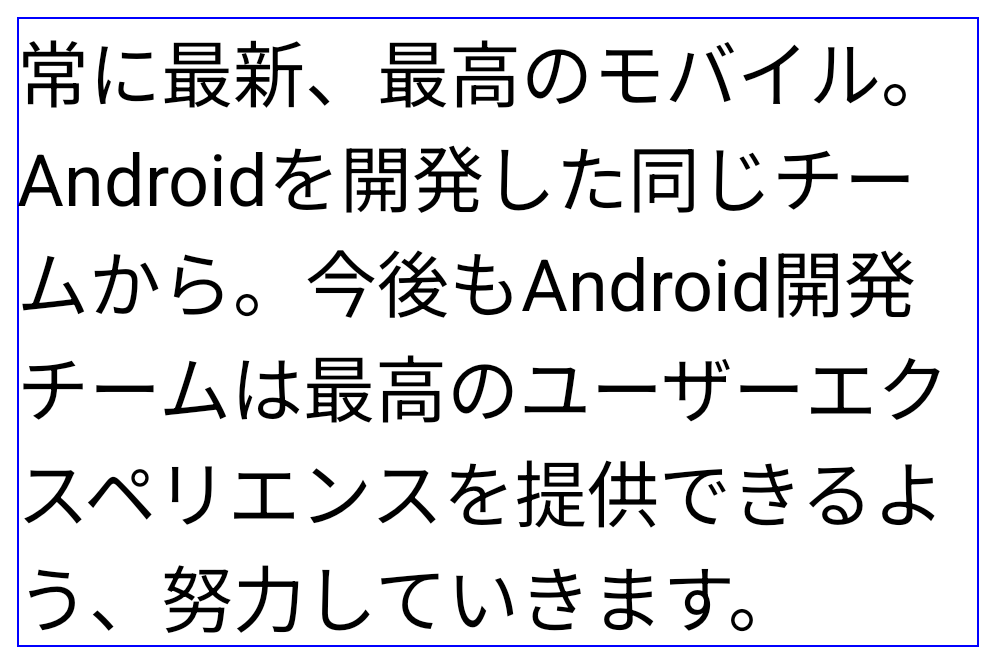
LINE_BREAK_WORD_STYLE_AUTO
应用不换行的字词样式,以提高文本的可读性。
这与应用
LINE_BREAK_WORD_STYLE_NONE。Font Hentaigana Jepang Tambahan
In Android 15, a font file for old Japanese Hiragana (known as Hentaigana) is bundled by default. The unique shapes of Hentaigana characters can add a distinctive flair to artwork or design while also helping to preserve accurate transmission and understanding of ancient Japanese documents.

VideoLAN 圆锥图标 版权所有 (c) 1996-2010 VideoLAN。任何人都可以使用此徽标或修改版徽标来提及 VideoLAN 项目或 VideoLAN 团队开发的任何产品,但这并不表示该项目对其表示认可。
Vulkan 和 Vulkan 徽标是 Khronos Group Inc.的注册商标。
OpenGL 是注册商标,OpenGL ES 徽标是 Hewlett Packard Enterprise 的商标,已获得 Khronos 的许可。