
The Android Studio Otter 2 Feature Drop is here to supercharge your productivity.
This final stable release for ‘25 powers up Agent Mode, equipping it with the new Android Knowledge Base for improved accuracy, and giving you the option to try out the new Gemini 3 model. You’ll also be able to take advantage of new settings such as the ability to keep your personalized IDE environment consistent across all of your machines. We've also incorporated all of the latest stability and performance improvements from the IntelliJ IDEA 2025.2 platform, including Kotlin compiler and terminal improvements, making this a significant enhancement for your development workflow.
Updates to Agent Mode
Access to Gemini 3
We recently introduced the ability to use our latest model, Gemini 3 Pro Preview, within Android Studio. This is our best model for coding and agentic capabilities. It’ll give you superior performance in Agent Mode and advanced problem-solving capabilities so you can focus on what you do best: creating high quality apps for your users.
We are beginning to roll out limited Gemini 3 access (with a 1 million token size window) to developers who are using the no-cost default model. For higher usage rate limits and longer sessions with Agent Mode, you can add a paid Gemini API Key or use a Gemini Code Assist Enterprise plan. Learn more about how to get started with Gemini 3.
Enhance Agent Mode with Android knowledge
While the training of large language models provides deep knowledge that is excellent for common tasks—like creating Compose UIs—training concludes on a fixed date, resulting in gaps for new libraries and updated best practices. They are also less effective with niche APIs because the necessary training data is scarce. To fix this, Android Studio’s Agent Mode is now equipped with the Android Knowledge Base, a new feature designed to significantly improve accuracy and reduce hallucinations by grounding responses with authoritative documentation. This means that instead of just relying on its training data, the agent can actively consult fresh documentation from official sources like the Android developer docs, Firebase, Google Developers, and Kotlin docs before it answers you.
The information in the Android Knowledge Base is stored in Android Studio and its content is automatically updated in the background on a periodic basis, so this feature is available regardless of which LLM you’re using for AI assistance.
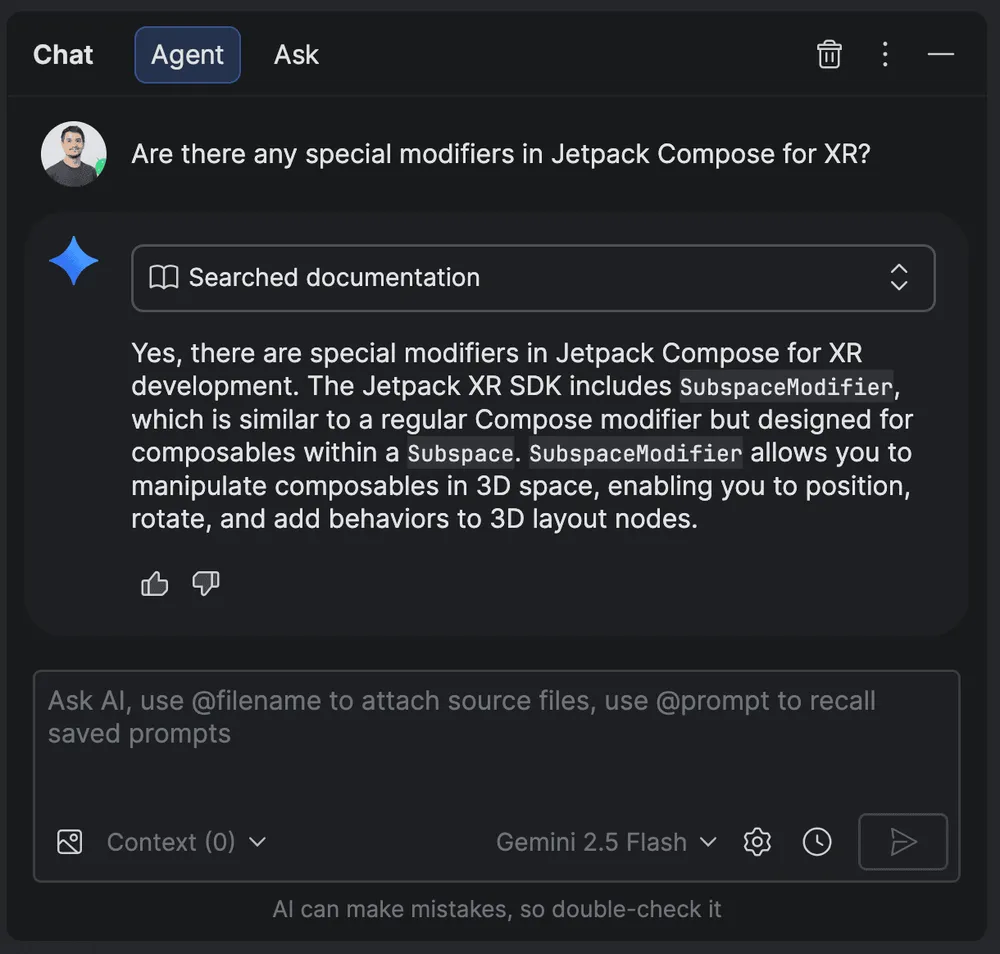
Gemini searching documentation before it answers you
This feature will be invoked automatically when Agent Mode detects a need for additional context, and you’ll see additional explanatory text. However, if you'd like Agent Mode to reference documentation more frequently, you can include a line such as "Refer to Android documentation for guidance" in your Rules configuration.
Requested settings updates
Backup and Sync
Backup and Sync is a new way to keep your personalized Android Studio environment consistent across all your installations. You can now back up your settings—including your preferred keymaps, Code Editor settings, system settings, and more—to cloud storage using your Google Account, giving you a seamless experience wherever you code. We also support Backup and Sync using JetBrains accounts for developers using both IntelliJ and Android Studio installs simultaneously.
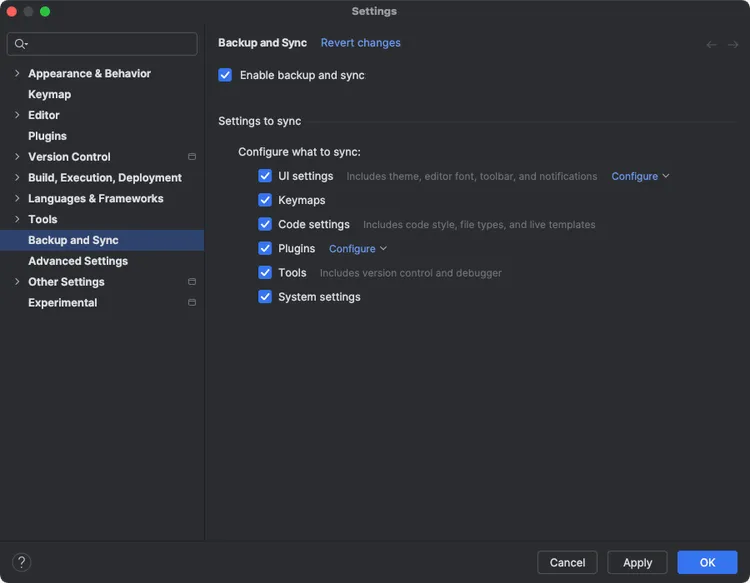
Backup and Sync
Getting started is simple. Just sign into your Google Account by clicking the avatar in the top-right corner of the IDE, or navigate to Settings > Backup and Sync. Once you authorize Android Studio to access your account's storage, you have full control over which categories of app data you want to sync. If you're syncing for the first time on a new machine, Android Studio will give you the option to either download your existing remote settings or upload your current local settings to the cloud. Of course, if you change your mind, you can easily disable Backup and Sync at any time from the settings menu. This feature has been available since the first Android Studio Otter release.
Communications from Android Studio
You can now opt in to receive communications directly from the Android Studio team. This enables you to get emails and notifications about important product updates, new features, and new libraries as soon as they're available.
You'll see this option when you sign in, and you can change your preference at any time by going to Settings > Tools > Google Accounts > Communications.
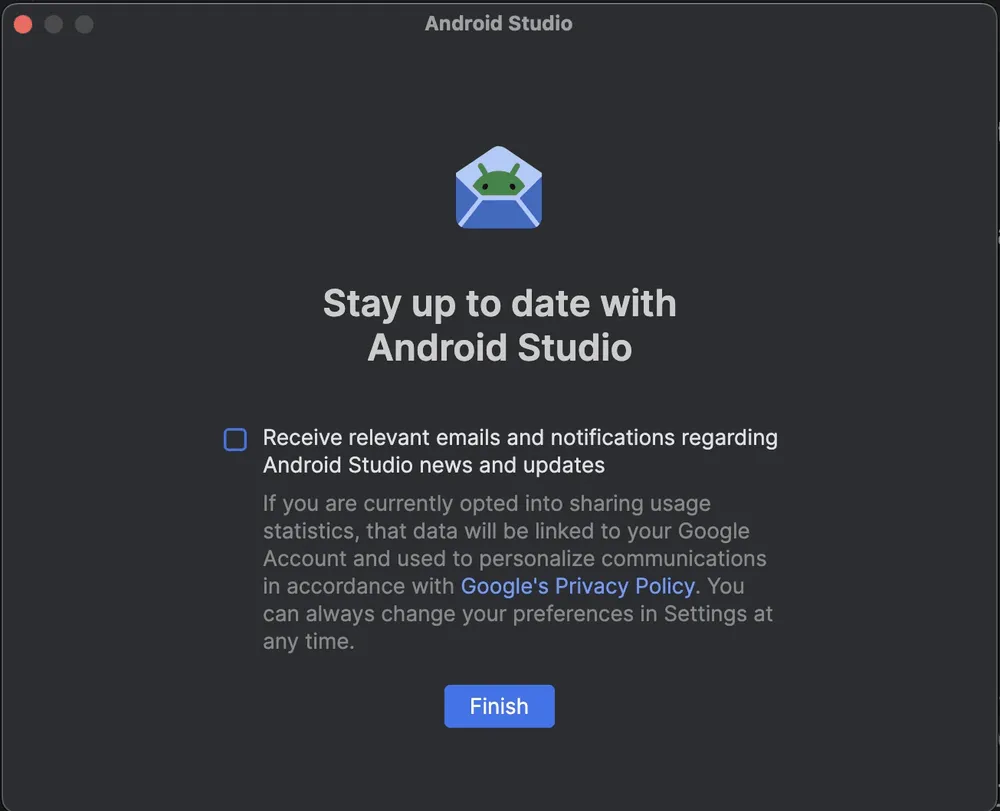
Your option to receive emails and notifications
IntelliJ Merge Updates
This release incorporates all stability and quality improvements from the IntelliJ IDEA 2025.2 platform. Notable highlights include:
- Kotlin K2 Mode: Following its rapid adoption after being enabled by default, the K2 Kotlin mode is now more stable and performant. This version improves Kotlin code analysis stability, adds new inspections, and enhances the reliability of Kotlin script execution.
- Terminal Performance: The integrated terminal is significantly faster, with major improvements in rendering. For Bash and Zsh, this update also introduces minor visual refinements without compromising or altering core shell behavior.
Get started
Ready to dive in and accelerate your development? Download Android Studio Otter 2 Feature Drop and start exploring these powerful new features today! As always, your feedback is crucial to us. Check known issues, report bugs, and be part of our vibrant community on LinkedIn Medium, YouTube, or X. Let's build the future of Android apps together!
-


 Product News
We are excited to announce that Android Studio Otter 3 Feature Drop is now stable! This feature-packed release brings a huge update to your agentic workflows in Android Studio, and offers you more flexibility and control for how you use AI to help you build Android apps.
Sandhya Mohan, Trevor Johns • 9 min read -
 Product News
In January we announced Android Studio Otter 3 Feature Drop in stable, including Agent Mode enhancements and many other updates to provide more control and flexibility over using AI to help you build high quality Android apps.
Trevor Johns • 4 min read -

 Product News
This is the final stable release for Android Studio Quail. The new features in Android Studio enable you to build premium apps with AI efficiently and effectively.
Amman Asfaw • 5 min read
Get the latest Android development insights delivered to your inbox weekly.