

Today, we are excited to announce that official support for Unreal Engine and Godot has arrived for Android XR. Alongside these engine expansions, we are also launching new tools designed to boost your productivity and enable new XR capabilities: the Android XR Engine Hub and the Android XR Interaction Framework.
Android XR Engine Hub
The Android XR Engine Hub is currently available for Windows and is your mission control for development. It unifies your workflow across Unity, Unreal Engine, and Godot by serving as a high-speed bridge that streams device-created perception data straight from your device into the engine of your choice.
Real-Time Streaming via OpenXR

The Hub bridges the gap between desktop power and mobile sensor data. Instead of requiring a full build to see how your app reacts to the world, the Hub streams OpenXR extensions from the physical Android XR device directly to your Windows machine.
This means you can iterate on complex interactions in "Play Mode" while receiving live, high-fidelity data from the headset’s sensors. Without this streaming capability, testing even a minor change to eye-tracking or spatial mapping would require a full APK export and installation.
The Hub enables low-latency testing for the following streamed extensions:
Core & Interaction Support
- XR_EXT_hand_tracking & hand_interaction: Streams 26-point hand meshes and joint data for immediate interaction testing.
- XR_EXT_eye_gaze_interaction: Virtualizes eye-gaze data to test UI and foveated logic on your PC.
- XR_EXT_palm_pose & XR_EXT_uuid: Real-time precision tracking and persistent object ID streaming.
Android XR Vendor Extensions
- Eye & Face Tracking (
XR_ANDROID): Stream expressive avatar data to your editor to refine social presence without building. - Passthrough & Trackables: Access live environmental understanding—like plane detection and hit testing—directly within the engine's viewport.
By virtualizing the device's hardware capabilities and streaming them over a low-latency desktop bridge, the Android XR Engine Hub allows for game engine developers to quickly iterate.
Download the Hub:
Expanding Game Engine Support
Through our commitments to OpenXR standards, we are ensuring that whether you are a veteran studio or an indie developer, you have best-in-class tools to help bring your creative vision to life.
Unreal Engine
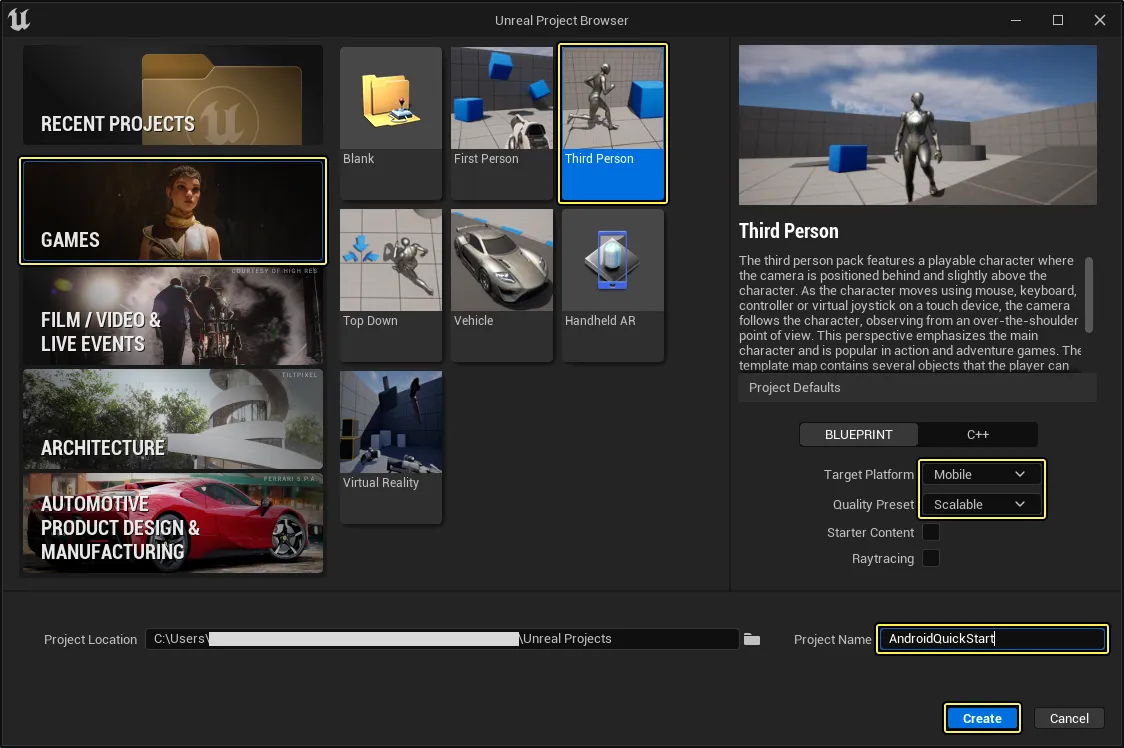
Unreal Engine support is now available in developer preview, targeting version 5.6.1. This integration is built directly on using OpenXR with the support for AndroidXR vendor specific API using the Android XR vendor plugin for Unreal, you can access platform-specific extensions for advanced hand tracking, face tracking, and scene understanding (like plane detection and depth) whilst making use of Unreal blueprints or C++ support.
Get Started with Unreal:
- Download the Android XR Extension Plugin for Unreal
- Official Unreal Engine Website
- View the Unreal Engine Developer Guide
Godot
In partnership with the Godot Foundation and W4 Games, we are bringing official Godot support to Android XR for Godot 4.6.2 and higher.
We are already seeing incredible momentum from W4 as they have ported experiences like MoAT and Expedition to Blobotopia that are already live on Google Play, proving that Godot is ready for production-grade spatial experiences today.
To unlock the full potential of the platform, use the Godot OpenXR Vendors plugin 5.1, which provides the necessary Android XR vendor extensions for features like scene meshing, dynamic resolution, light estimation and much more. We're collaborating with Godot to optimize the OpenXR implementation for the Android XR power profile and input standards.
Get Started with Godot:
Unity
The Unity OpenXR: Android XR 1.13 package is now available for Unity 6.5 Beta. Unity has expanded Application SpaceWarp support to include both uGUI and TextMeshPro. Keep an eye out for the general release of Unity 6.5 and more platform enhancements arriving this summer.
Android XR Extensions v1.3.1 for Unity
Everything else you need for comprehensive platform integration is available in our latest Android XR Extensions release:
- Spatial API Support: You can now manage the
android.software.xr.api.SPATIALmanifest tag directly through XRSessionFeature settings, making it easier than ever to define your app's Spatial API requirements and target levels. - Fine Eye Face Tracking: A new Fine Eye Poses feature provides high-precision eye poses using the
TryGetFineEyePosesextension method. - Direct Preview Support: The Android XR Streaming feature enables Direct Preview support within Unity Editor's PlayMode (Windows only).
Note: Android XR (Extensions): Hand Mesh has been removed; you should now use the unified Hand Mesh Data within the extensions package.
Android XR Interaction Framework for Unity
The Android XR Interaction Framework (AXRIF) is now available in developer preview. AXRIF is an unstyled, opinionated input toolkit that abstracts the complex logic required to build interfaces that are consistent with Android XR system interactions.
Instead of focusing on UI visuals, AXRIF prioritizes the underlying mechanics of the Android XR user experience. At its core is the same Transition Manager that powers the system's rich multimodal inputs, enabling state switching between 6DoF controllers, 3D mouse, hand tracking, and eye gaze. By leveraging this framework, developers can significantly reduce the implementation burden required to bring Android XR's full complement of robust interactions to their apps.
At launch, the framework provides three core capabilities:
- Automated Multimodal Input Transitions: The framework manages the state machine for switching between input modalities. For example, it handles the transition logic when a user moves from gaze-targeting an object to directly touching it, simplifying simultaneous support for hands, controllers, and mice.
- Gaze-Assisted Gesture Interaction: AXRIF combines gaze vector targeting with hand gesture recognition (such as pinch-to-select) for precise distant interaction, matching the system's default behavior.
- Physics-Based 2D UI Interaction: The framework maps high-fidelity hand tracking to 2D plane interactions, enabling intuitive poke and swipe gestures on floating panels while respecting physical boundary constraints.
By adopting AXRIF, your app inherits the platform's native interaction model, ensuring your app feels consistent with the rest of the OS.
Explore the Toolkit:
Get Started Today:
There has never been a better time to dive into Android XR development. With support across Unity, Unreal, and Godot, the platform is ready for your creative vision, no matter which engine you call home. Explore our official engine partners to get started:
Explore this announcement and all Google I/O 2026 updates on io.google.
-


 Product News
We're excited to launch Developer Preview 4 of the Android XR SDK, continuing our focus on unifying cross-device development for headsets, wired XR glasses, and intelligent eyewear.
-
 Product News
Since introducing the Android XR SDK, developers have transformed their ideas into innovative immersive experiences across headsets and wired XR glasses.
-

 Product News
From augmented overlays to fully immersive environments, the Android XR ecosystem is expanding rapidly, with the Samsung Galaxy XR already available today.
Stevan Silva, Vinny DaSilva • 2 min read
Get the latest Android development insights delivered to your inbox weekly.