

在應用程式中加入自訂圖片,可大幅提升使用者體驗、打造個人化體驗,並提高使用者參與度。本文將探討 Firebase AI Logic 的兩項全新圖像生成功能:目前處於預先發布階段的專用 Imagen 編輯功能,以及正式發布的 Gemini 2.5 Flash Image (又稱「Nano Banana」),專為情境或對話式圖像生成而設計。
使用 Firebase AI Logic 生成圖片,提高使用者參與度
圖像生成模型可用於建立自訂使用者個人資料顯示圖片,或直接將個人化視覺素材整合至重要畫面流程。
舉例來說,Imagen 提供新的編輯功能 (開發人員預覽版)。現在可以繪製遮罩,並使用修補功能在遮罩區域內生成像素。此外,您也可以使用外擴功能,在遮罩外生成像素。
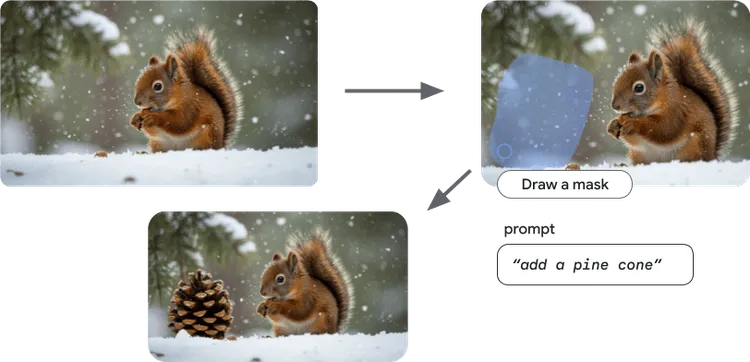
Imagen 支援 inpainting 功能,可只生成圖片的一部分。
此外,Gemini 2.5 Flash Image (又稱 Nano Banana) 可運用 Gemini 模型的廣泛世界知識和推論能力,生成符合情境的圖像,非常適合用來建立動態插圖,配合使用者目前的應用程式體驗。
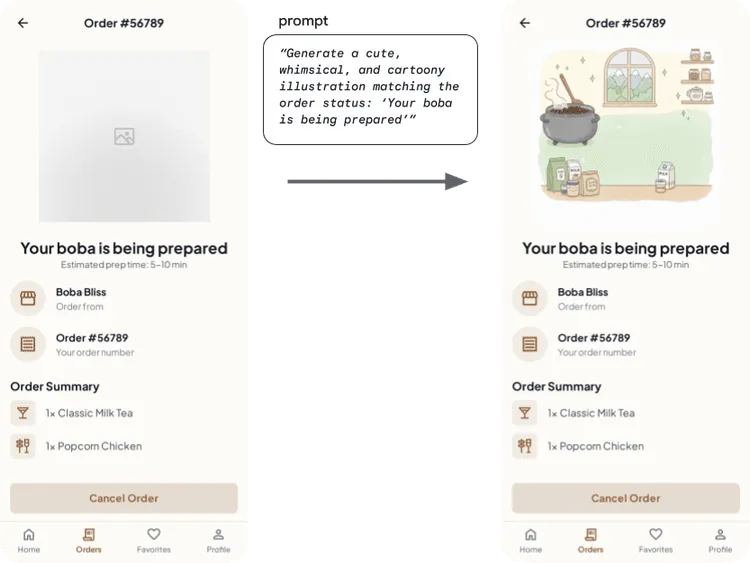
使用 Gemini 2.5 Flash Image,根據應用程式情境建立動態插圖。
最後,使用者可以透過對話和反覆編輯圖片,使用自然語言編輯相片。
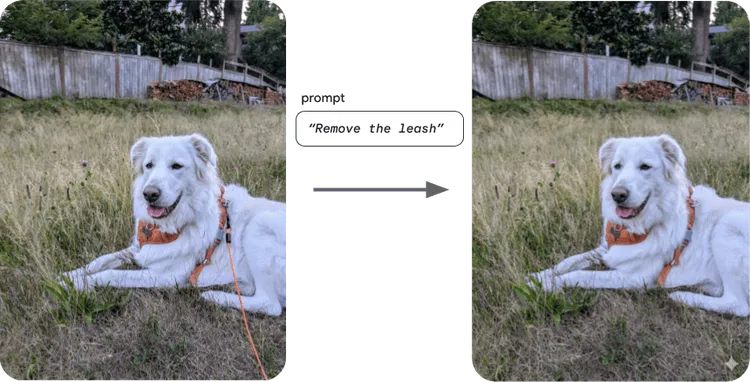
使用 Gemini 2.5 Flash Image,以自然語言編輯圖片。
開始將 AI 整合至應用程式時,請務必瞭解 AI 安全性。其中最重要的是評估應用程式的資安風險、考慮調整以降低安全風險、根據用途執行適當的安全測試、徵求使用者意見回饋,以及監控內容。
Imagen 或 Gemini:任君選擇
Gemini 2.5 Flash Image (Nano Banana) 和 Imagen 的差異在於主要用途和進階功能。Gemini 2.5 Flash Image 是 Gemini 系列中的圖像模型,擅長對話式圖像編輯,可在多次疊代中維持脈絡和主題一致性,並運用「世界知識和推論」建立與脈絡相關的視覺效果,或在長文字序列中嵌入準確的視覺效果。
Imagen 是 Google 專門用於生成圖像的模型,可讓使用者更精確地控制創意,擅長生成高度逼真的圖像、藝術細節和特定風格,並提供明確的控制選項,可指定生成圖像的顯示比例或格式。
| Gemini 2.5 Flash Images (Nano Banana 🍌) | Imagen |
🌎 世界知識和推論能力,可生成更符合情境的圖片 💬 透過對話編輯圖片,同時保留上下文 📖 在長文字序列中嵌入準確的視覺元素 | 📐 指定生成圖像的顯示比例或格式
🖌️支援遮罩式編輯,可進行內補和外擴。
🎚️ 更能掌控生成圖像的細節 (品質、藝術細節和特定風格) |
接下來,我們來看看如何在應用程式中使用這些功能。
使用 Imagen 進行圖像修復
幾個月前,我們推出了 Imagen 的新編輯功能。雖然 Imagen 已可正式用於圖像生成,但編輯功能仍處於開發人員預覽版階段。
Imagen 編輯功能包括局部修飾和外擴,以及遮罩式圖片編輯功能。這項新功能可讓使用者修改圖片的特定區域,不必重新生成整張圖片。也就是說,你可以保留圖片中最棒的部分,只修改想變更的地方。
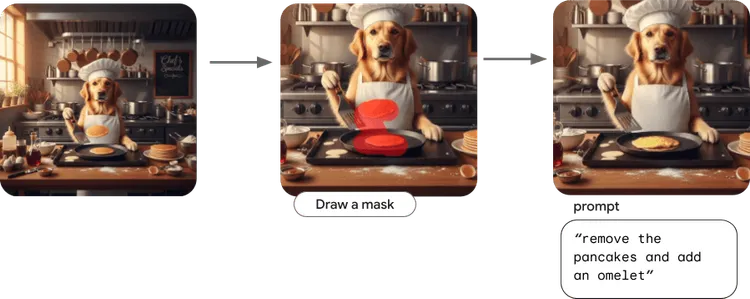
使用 Imagen 編輯功能,精準修改圖片中的特定部分,同時確保其餘部分完整無缺
這些變更只會修改遮罩區域,同時保留原始圖片的核心元素和整體完整性。
如要使用 Imagen 進行內繪,請先初始化 imagen-3.0-capability-001,這是支援編輯功能的特定 Imagen 模型:
// Copyright 2025 Google LLC.
// SPDX-License-Identifier: Apache-2.0
val editingModel =
        Firebase.ai(backend = GenerativeBackend.vertexAI()).imagenModel(
            "imagen-3.0-capability-001",
            generationConfig = ImagenGenerationConfig(
                numberOfImages = 1,
                aspectRatio = ImagenAspectRatio.SQUARE_1x1,
                imageFormat = ImagenImageFormat.jpeg(compressionQuality = 75),
            ),
        )
接著定義 inpainting 函式:
// Copyright 2025 Google LLC.
// SPDX-License-Identifier: Apache-2.0

val prompt = "remove the pancakes and make it an omelet instead"

suspend fun inpaintImageWithMask(sourceImage: Bitmap, maskImage: Bitmap, prompt: String, editSteps: Int = 50): Bitmap {
        val imageResponse = editingModel.editImage(
            referenceImages = listOf(
                ImagenRawImage(sourceImage.toImagenInlineImage()),
                ImagenRawMask(maskImage.toImagenInlineImage()),
            ),
            prompt = prompt,
            config = ImagenEditingConfig(
                editMode = ImagenEditMode.INPAINT_INSERTION,
                editSteps = editSteps,
            ),
        )
        return imageResponse.images.first().asBitmap()
    }
您需要提供 sourceImage、maskImage、編輯提示,以及要執行的編輯步驟數量。
您可以前往 Android AI 範例目錄,查看 Imagen 編輯範例的實際運作情形!
Imagen 也支援外繪,可讓模型生成遮罩外的像素。您也可以使用 Imagen 的圖片自訂功能,變更圖片風格或更新圖片中的主體。詳情請參閱 Android 開發人員說明文件。
使用 Gemini 2.5 Flash Image 透過對話生成圖像
使用 Gemini 2.5 Flash Image 編輯圖片的方法之一,是運用模型的多輪對話功能。
首先,初始化模型:
// Copyright 2025 Google LLC.
// SPDX-License-Identifier: Apache-2.0

val model = Firebase.ai(backend = GenerativeBackend.googleAI()).generativeModel(
    modelName = "gemini-2.5-flash-image",
    // Configure the model to respond with text and images (required)
    generationConfig = generationConfig {
        responseModalities = listOf(ResponseModality.TEXT,
        ResponseModality.IMAGE)
    }
)
如要達到與上述 Imagen 遮罩方法類似的效果,可以使用 chat API 與 Gemini 2.5 Flash Image 對話。
// Copyright 2025 Google LLC.
// SPDX-License-Identifier: Apache-2.0

// Initialize the chat
val chat = model.startChat()


// Load a bitmap
val source = ImageDecoder.createSource(context.contentResolver, uri)
val bitmap = ImageDecoder.decodeBitmap(source)


// Create the initial prompt instructing the model to edit the image
val prompt = content {
    image(bitmap)
    text("remove the pancakes and add an omelet")
}

// To generate an initial response, send a user message with the image and text prompt
var response = chat.sendMessage(prompt)

// Inspect the returned image
var generatedImageAsBitmap = response
    .candidates.first().content.parts.filterIsInstance<ImagePart>().firstOrNull()?.image

// Follow up requests do not need to specify the image again
response = chat.sendMessage("Now, center the omelet in the pan")
generatedImageAsBitmap = response
    .candidates.first().content.parts.filterIsInstance<ImagePart>().firstOrNull()?.image
您可以查看 Android AI 範例目錄中的 Gemini Image Chat 範例,瞭解實際運作情形,並參閱 Android 說明文件瞭解詳情。
結語
Imagen 和 Gemini 2.5 Flash Image 都提供強大功能,您可以根據特定用途,選取理想的圖像生成模型,打造個人化應用程式並提升使用者參與度。
-

 產品最新消息
如果您是 Android 開發人員,想在應用程式中導入創新的 AI 功能,我們最近推出了強大的新更新。
Thomas Ezan • 閱讀時間:2 分鐘 -
 產品最新消息
今天,我們推出 Gemini 3 Flash,擴大 Gemini 3 模型系列。這款模型以低成本提供最先進的智慧功能,而且速度飛快。
Thomas Ezan • 閱讀時間:2 分鐘 -

 產品最新消息
今天,我們在 Android 開發人員高峰會上宣布,將廣泛提供多項工具和 API,旨在消除日常摩擦,讓您更靈活地建構出色的 Android 應用程式。
Matthew McCullough • 閱讀時間:4 分鐘
每週透過電子郵件接收 Android 開發人員的最新深入分析。