
Jetpack Navigation 3 version 1.0 is stable 🎉. Go ahead and use it in your production apps today. JetBrains are already using it in their KotlinConf app.
Navigation 3 is a new navigation library built from the ground up to embrace Jetpack Compose state. It gives you full control over your back stack, helps you retain navigation state, and allows you to easily create adaptive layouts (like list-detail). There's even a cross-platform version from JetBrains.
Why a new library?
The original Jetpack Navigation library (now Nav2) was designed 7 years ago and, while it serves its original goals well and has been improved iteratively, the way apps are now built has fundamentally changed.
Reactive programming with a declarative UI is now the norm. Nav3 embraces this approach. For example, NavDisplay (the Nav3 UI component that displays your screens) simply observes a list of keys (each one representing a screen) backed by Compose state and updates its UI when that list changes.
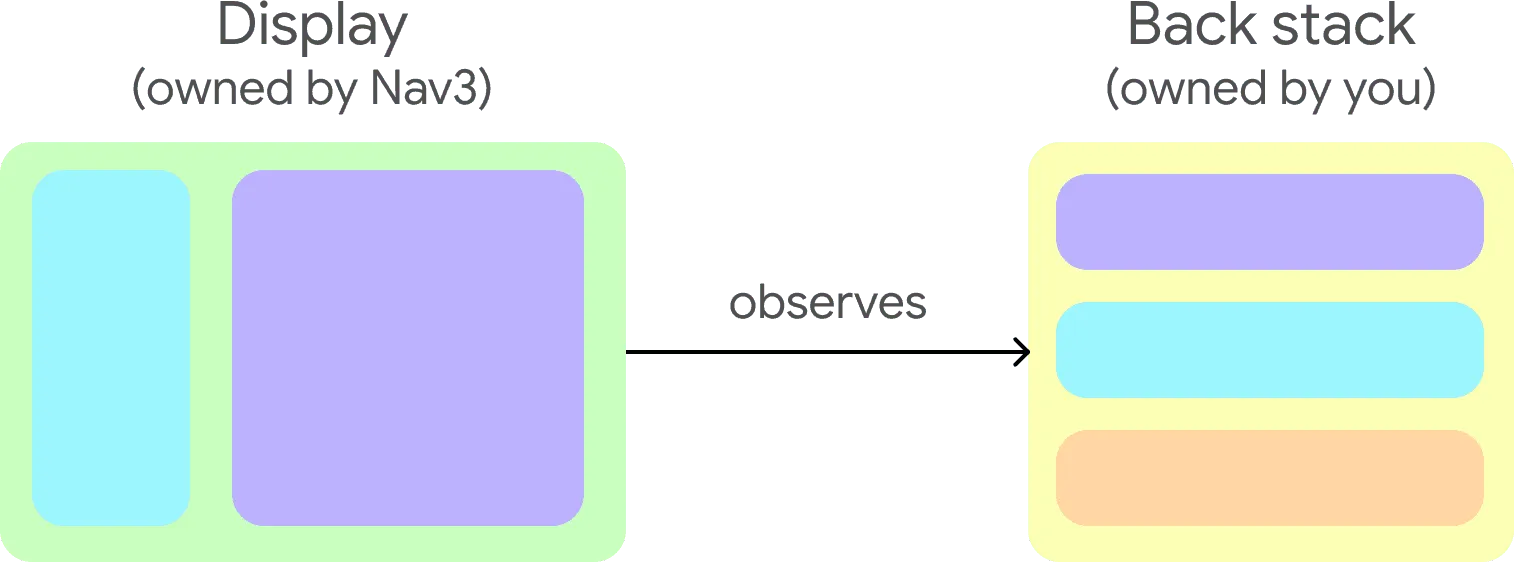
Nav2 can also make it difficult to have a single source of truth for your navigation state because it has its own internal state. With Nav3, you supply your own state, which gives you complete control.
Lastly, you asked for more flexibility and customizability. Rather than having a single, monolithic API, Nav3 provides smaller, decoupled APIs (or "building blocks") that can be combined together to create complex functionality. Nav3 itself uses these building blocks to provide sensible defaults for well-defined navigation use cases.
This approach allows you to:
- Customize screen animations at both a global and individual level
- Display multiple panes at the same time, and create flexible layouts using the Scenes API
- Easily replace Nav3 components with your own implementations if you want custom behavior
Read more about its design and features in the launch blog.
Migrating from Navigation 2
If you're already using Nav2, specifically Navigation Compose, you should consider migrating to Nav3. To assist you with this, there is a migration guide. The key steps are:
- Add the navigation 3 dependencies.
- Update your navigation routes to implement NavKey. Your routes don't have to implement this interface to use Nav3, but if they do, you can take advantage of Nav3's rememberNavBackStack function to create a persistent back stack.
- Create classes to hold and modify your navigation state - this is where your back stacks are held.
- Replace NavController with these classes.
- Move your destinations from NavHost's NavGraph into an entryProvider.
- Replace NavHost with NavDisplay.
Experimenting with AI agent migration
You may want to experiment with using an AI agent to read the migration guide and perform the steps on your project. To try this with Gemini in Android Studio's Agent Mode:
- Save this markdown version of the guide into your project.
- Paste this prompt to the agent (but don't hit enter): "Migrate this project to Navigation 3 using ".
- Type @migration-guide.md - this will supply the guide as context to the agent.
As always, make sure you carefully review the changes made by the AI agent - it can make mistakes!
We'd love to hear how you or your agent performed, please send your feedback here.
Tasty navigation recipes for common scenarios
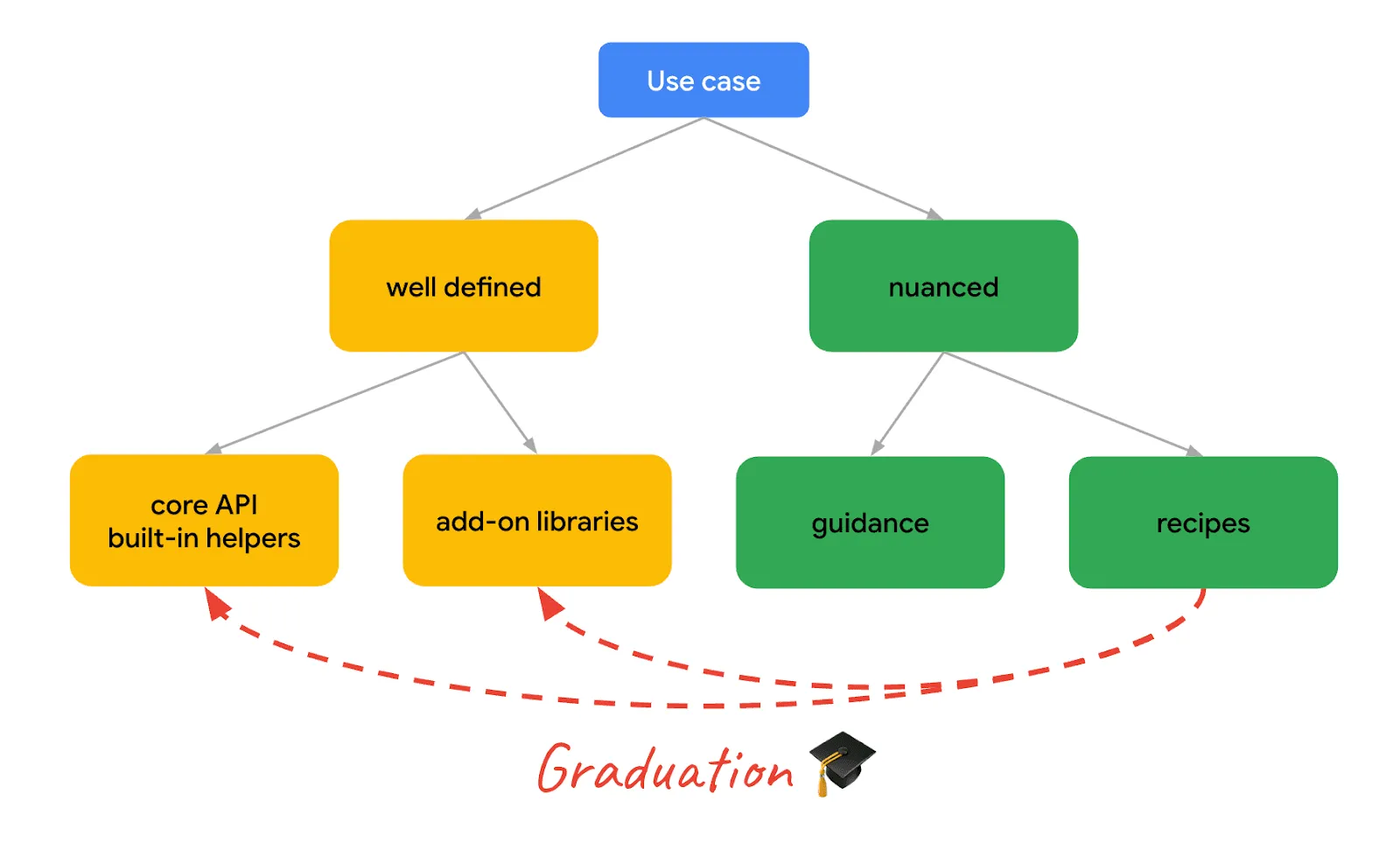
For common but nuanced use cases, we have a recipes repository. This shows how to combine the Nav3 APIs in a particular way, allowing you to choose or modify the recipe to your particular needs. If a recipe turns out to be popular, we'll consider "graduating" the non-nuanced parts of it into the core Nav3 library or add-on libraries.
There are currently 19 recipes, including for:
- Multiple back stacks
- Modularization and dependency injection
- Passing navigation arguments to ViewModels (including using Koin)
- Returning results from screens by events and by shared state
We're currently working on a deeplinks recipe, plus a Koin integration, and have plenty of others planned. An engineer from JetBrains has also published a Compose Multiplatform version of the recipes.
If you have a common use case that you'd like to see a recipe for, please file a recipe request.
Summary
To get started with Nav3, check out the docs and the recipes. Plus, keep an eye out for a whole week of technical content including:
- A deep dive video on the API covering modularization, animations and adaptive layouts.
- A live Ask Me Anything (AMA) with the engineers who built Nav3.
Nav3 Spotlight Week starts Dec 1st 2025.
As always, if you find any issues, please file them here.
-

 Product News
In 2025 the Android ecosystem has grown far beyond the phone. Today, developers have the opportunity to reach over 500 million active devices, including foldables, tablets, XR, Chromebooks, and compatible cars.
Fahd Imtiaz • 2 min read -

 Product News
As agentic development accelerates, Android engineering is reaching an exciting new frontier: moving from assistive code completion to agents executing end-to-end under your direction. You have total choice and flexibility in the models and agents you use.
Jason Buchel • 3 min read -

 Product News
Today, we shared how we’re taking our “more than a store” vision into its next chapter. From You tab, now the personal home base for over 250M monthly active users, to our unified gaming platform connecting over 700M gamer profiles, Google Play is meeting users wherever they are.
Paul Feng • 3 min read
Get the latest Android development insights delivered to your inbox weekly.