
This document describes using Credential Manager to get a cryptographically verified email address from a user's device. This process removes the need for your app users to verify their email with one-time passwords (OTPs) or magic links.
This document explains the following areas:
- Android compatibility
- User experience
- Accounts supported
- Implication of email deliverability
- Comparison with Sign in with Google
This guide assumes you are familiar with the following concepts:
Android skills
View on GitHub
Retrieve verified email
android skills add verified-email
Android compatibility
This feature is supported on mobiles, tablets, and foldable devices running Android 9 (API level 28) and higher. The minimum version of Google Play services (GMS) required is 25.49.x.
User experience
The following sections describe the user experience during the verification flow, the need to include fallback verification methods, as well as the recommended user experience for various use cases.
The verification flow
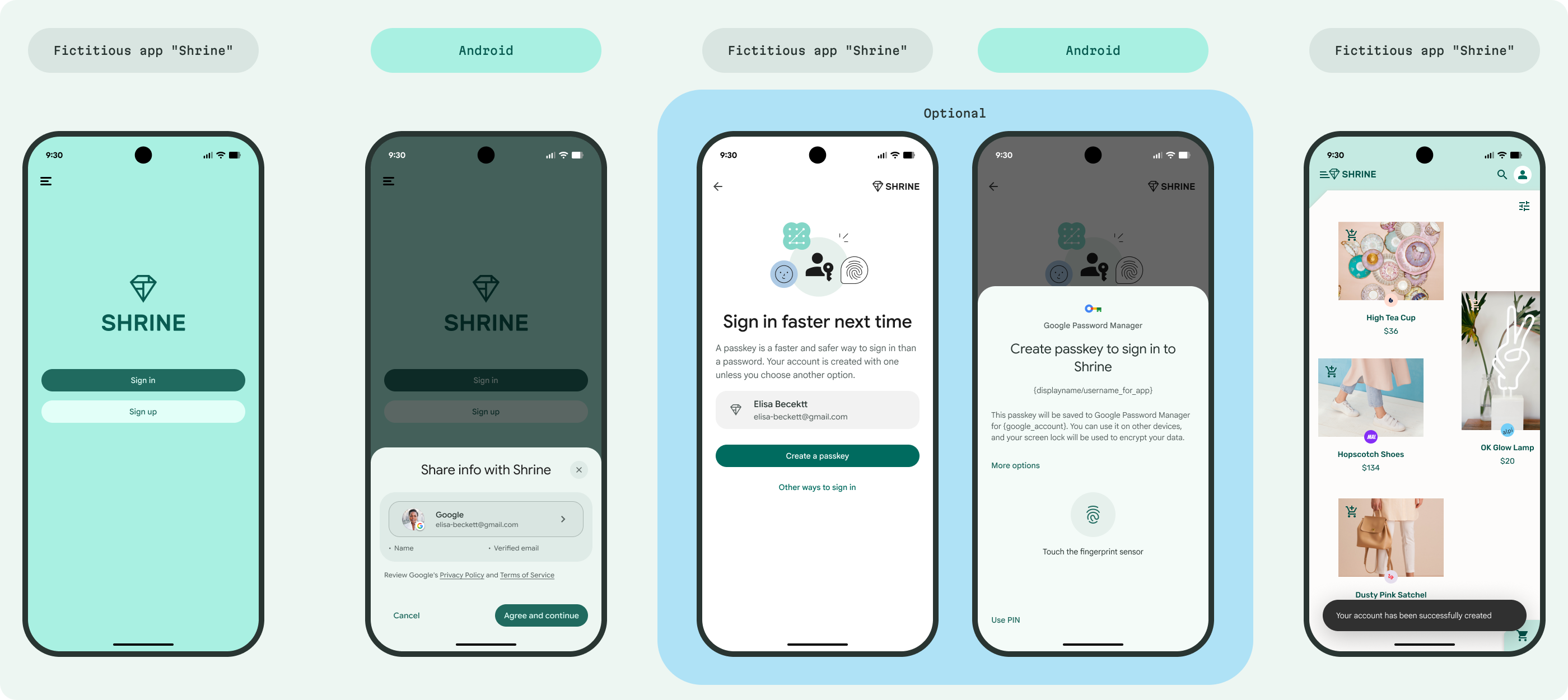
The user experience for sharing a verified email is as follows:
The user either focuses on an input field or taps a button that calls the Credential Manager API. Depending on the design of the screen, you can also call the API on your app's screen load.
A bottom sheet appears, showing the information that will be shared with the app. If no information is available on that device, the user sees a generic error message.
After the user taps Agree and Continue, display a success or failure message.
Optional: If the user is signing up for your service, prompt the user to create a passkey to make it easier for them to sign in subsequently.
Include primary and fallback flows
To ensure a streamlined user experience, include the following options on screens that require email verification:
- Primary verification option: An email field or button to trigger the Credential Manager API flow for quick verification.
- Alternate verification options: A link or button for users to "Verify another way" or with "Other options" for manual email entry in case of failures, such as no information available on the device, or a mismatch between the retrieved and expected email. This should allow users to try verification with a different credential or by providing a manual OTP.
Use cases
The following sections describe the recommended use cases, as well as the suggested user experience, for email verification.
Sign up
Users can immediately create an account with a verified email without a separate verification step. Optionally, prompt the user to add a passkey. If they opt to add a passkey, trigger the passkey creation flow.
Account recovery
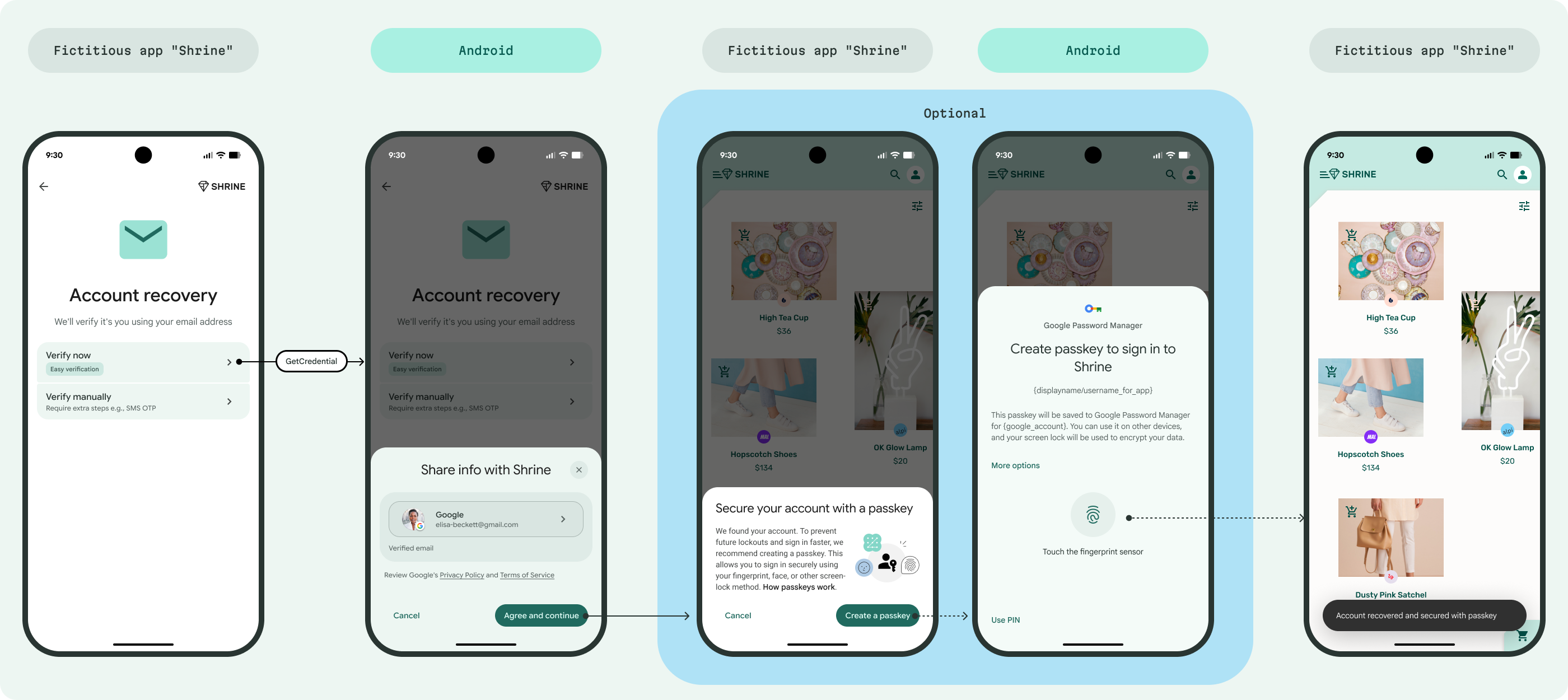
To eliminate the frustration of users searching for recovery codes in their spam folders, allow them to recover their account using the verified email securely stored on their device. Additionally, suggest that they create a passkey for future use.
Reauthentication for sensitive actions
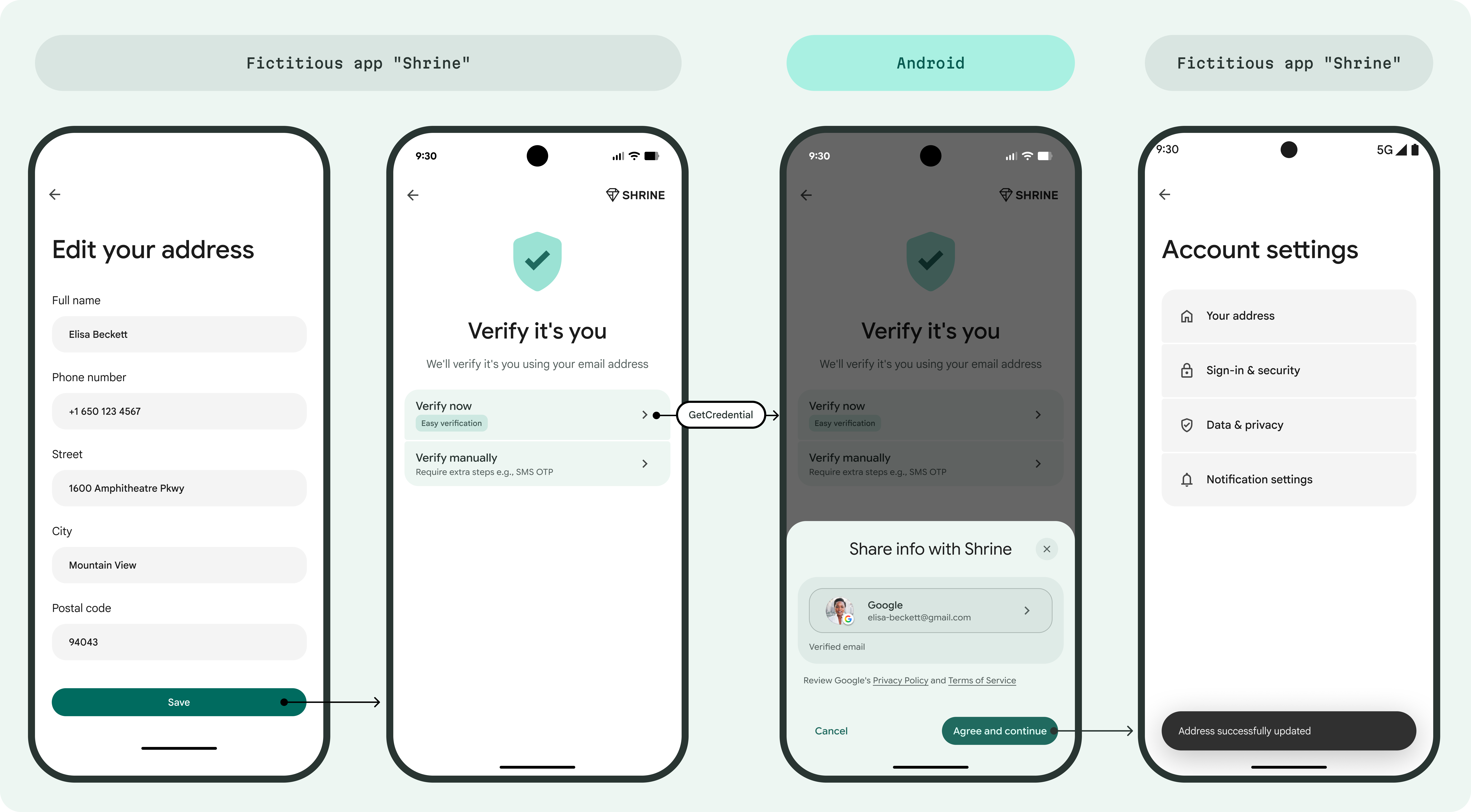
Protect sensitive user actions, such as changing settings or updating profile details, by requiring a quick reauthentication step.
Accounts supported
Email verification through Credential Manager only supports verification of consumer Google Accounts. Workspace accounts and supervised accounts aren't supported.
A consumer Google Account can be created with an email address from any provider, not necessarily @gmail.com. However, Google verifies these accounts differently:
- For @gmail.com accounts: Google is the authoritative source, and the email is known to be verified.
- For non-@gmail.com accounts: Google is not the authoritative source for these email addresses in the long term. While Google verifies the email when the account is created, the ownership of that email address might change over time. Therefore, for non-@gmail.com addresses, you should consider an additional verification step, such as sending an OTP, to ensure that the user still has access to the email account.
For more information about what verification implies, see Digital Credentials.
Validity and freshness
The system issues verifiable credentials (VCs) based on the user's current email from the active Google Accounts on the device. These credentials are issued to the device in advance, typically while the device is idle. While these credentials might remain valid for multiple days, the system performs a check at the moment of sharing the credentials to ensure that the account still exists, is on the device, and that the email address is valid—effectively prioritizing the account's immediate status over the credential's validity window.
To help ensure authenticity, a Key Binding (kb) signature is generated at the time of sharing, incorporating the nonce.
If a device is offline or the account is removed, the process fails rather than providing an expired VC or a VC for an inactive Google Account.
Email deliverability
While the process confirms the account's legitimacy, it doesn't guarantee inbox delivery (for instance, the email might be diverted to spam). An OTP remains the definitive method for confirming email deliverability.
Comparison with Sign in with Google
While both Digital Credentials and Sign in with Google solutions provide a verified email, the user flows and use cases are different:
- Use cases: The Credential Manager email verification flow is not exclusively used in sign up or sign in use cases, but rather can be used in any use case involving the retrieval of verified email. This could include account recovery as well.
- Registration: The Credential Manager flow doesn't require Google registration, unlike Sign in with Google.
- Platform support: The Credential Manager flow is an Android-only solution.
- Scopes: Unlike Sign in with Google, which can use OAuth 2.0 to request access to user data (such as Calendar or Drive through scopes), the Digital Credentials API is strictly for retrieving verified identity attributes. It can't be used to request additional authorization scopes.
Next steps
To implement this feature in your app, see the Implementation guide.