

คู่มือนี้จะอธิบายรายละเอียดเกี่ยวกับวิธีใช้ DigitalCredential API เพื่อรับหมายเลขโทรศัพท์ที่ยืนยันแล้ว ของผู้ใช้ กระบวนการนี้มี 2 ขั้นตอน ดังนี้
- ขอ
TS.43 token: แอปไคลเอ็นต์ของคุณ ("ผู้ยืนยัน") ขอ โทเค็น TS.43 ชั่วคราวจากอุปกรณ์ของผู้ใช้TS.43 tokenเป็นข้อมูลเข้าสู่ระบบที่ผู้ให้บริการออกให้ซึ่งแสดงถึงตัวตนของผู้ใช้ - แลกโทเค็นเป็นหมายเลขโทรศัพท์: แบ็กเอนด์ของแอปจะแลก
TS.43 tokenกับผู้รวบรวมหรือผู้ให้บริการเพื่อรับหมายเลขโทรศัพท์ที่ยืนยันแล้วของผู้ใช้
ความเข้ากันได้กับ Android เวอร์ชันต่างๆ
Phone Number Verification API รองรับ Android 10 (API ระดับ 29) ขึ้นไป
สิ่งที่ต้องมีก่อน
หากต้องการใช้การยืนยันหมายเลขโทรศัพท์ด้วย DigitalCredential API คุณต้องมีบัญชีกับผู้รวบรวม ผู้รวบรวมจะโต้ตอบกับผู้ให้บริการและจัดเตรียมพื้นผิว API ที่จำเป็นสำหรับแอปของคุณ ซึ่งโดยปกติจะเป็นปลายทาง API บนระบบคลาวด์ที่เรียกเก็บเงินได้
นอกจากนี้ คุณยังต้องเพิ่มการขึ้นต่อกันต่อไปนี้ลงในสคริปต์การสร้าง Gradle ด้วย
Kotlin
dependencies {
    implementation("androidx.credentials:credentials:1.7.0-alpha02")
    implementation("androidx.credentials:credentials-play-services-auth:1.7.0-alpha02")
}
Groovy
dependencies {
    implementation "androidx.credentials:credentials:1.7.0-alpha02"
    implementation "androidx.credentials:credentials-play-services-auth:1.7.0-alpha02"
}
การใช้งาน
โดยทั่วไปกระบวนการตั้งแต่ต้นจนจบจะมีขั้นตอนดังนี้
- **ขอพารามิเตอร์ DCQL (Digital Credential Query Language) จากผู้รวบรวม**: เรียกใช้ผู้รวบรวมอย่างน้อย 1 รายและขอชุดพารามิเตอร์ DCQL DCQL ช่วยให้คุณระบุข้อมูลเข้าสู่ระบบดิจิทัลที่ต้องการจากผู้รวบรวมแต่ละรายได้อย่างแม่นยำ
สร้างคำขอ OpenID4VP: สร้าง คำขอ OpenID4VP จากแบ็กเอนด์ของแอป พร้อมกับใส่พารามิเตอร์ DCQL จากผู้รวบรวม จากนั้นส่งคำขอ OpenID4VP ไปยังแอปไคลเอ็นต์
เรียกใช้ Credential Manager API: ในแอปไคลเอ็นต์ ให้ใช้ Credential Manager API เพื่อส่งคำขอ OpenID4VP ไปยังระบบปฏิบัติการ คุณจะได้รับออบเจ็กต์การตอบกลับ OpenID4VP ที่มี
TS.43 Digital Credentialข้อมูลเข้าสู่ระบบนี้ได้รับการเข้ารหัสและมีเพียงผู้รวบรวมที่เชื่อมโยงเท่านั้นที่จะถอดรหัสได้ หลังจากได้รับโทเค็นของผู้ให้บริการแล้ว ให้ส่งการตอบกลับจากแอปไคลเอ็นต์ไปยังแบ็กเอนด์ของแอปตรวจสอบการตอบกลับ: ตรวจสอบการตอบกลับ OpenID4VP ในแบ็กเอนด์ของแอป
แลกเป็นหมายเลขโทรศัพท์: ส่ง
TS.43 Digital Credentialจากแบ็กเอนด์ของแอปไปยังผู้รวบรวม ผู้รวบรวมจะตรวจสอบข้อมูลเข้าสู่ระบบและส่งกลับหมายเลขโทรศัพท์ที่ยืนยันแล้ว
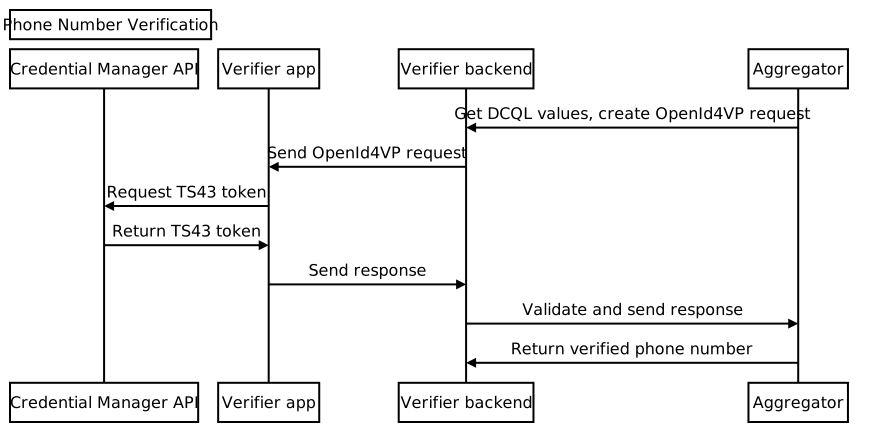
ขอพารามิเตอร์ DCQL จากผู้รวบรวม
ส่งคำขอไปยังผู้รวบรวมเพื่อขอออบเจ็กต์ข้อมูลเข้าสู่ระบบ Digital Credential Query Language (DCQL) จากแบ็กเอนด์ของแอป อย่าลืมระบุ Nonce และรหัสคำขอในคำขอ ผู้รวบรวมจะส่งกลับออบเจ็กต์ข้อมูลเข้าสู่ระบบ DCQL ซึ่งมีโครงสร้างคล้ายกับตัวอย่างต่อไปนี้
{
  // The credential ID is mapped to the request ID that is sent in your request to the aggregator.
  "id": "aggregator1",
  "format": "dc-authorization+sd-jwt",
  "meta": {
    "vct_values": [
      "number-verification/device-phone-number/ts43"
    ],
    "credential_authorization_jwt": "..."
  },
  "claims": [
    {
      "path": ["subscription_hint"],
      "values": [1]
    },
    {
      "path": ["phone_number_hint"],
      "values": ["+14155552671"]
    }
  ]
}
สร้างคำขอ OpenID4VP
ขั้นแรก ให้สร้างออบเจ็กต์ dcql_query จากแบ็กเอนด์ของแอปโดยวางออบเจ็กต์ข้อมูลเข้าสู่ระบบ DCQL ไว้ในอาร์เรย์ credentials ที่ซ้อนอยู่ในออบเจ็กต์ dcql_query ดังที่แสดงในตัวอย่างต่อไปนี้
"dcql_query": {
  "credentials": [
      "id": "aggregator1",
      "format": "dc-authorization+sd-jwt",
      "meta": {
        "vct_values": [
          "number-verification/device-phone-number/ts43"
        ],
        "credential_authorization_jwt": "..."
      },
      "claims": [
        {
          "path": ["subscription_hint"],
          "values": [1]
        },
        {
          "path": ["phone_number_hint"],
          "values": ["+14155552671"]
        }
      ]
  ]
}
จากนั้นสร้างคำขอ OpenID4VP ที่มีโครงสร้างดังนี้
{
  "protocol": "openid4vp-v1-unsigned",
  "data": {
    "response_type": "vp_token",
    "response_mode": "dc_api",
    "nonce": "...",
    "dcql_query": { ... }
  }
}
protocol: ต้องตั้งค่าเป็นopenid4vp-v1-unsignedสำหรับคำขอการยืนยันหมายเลขโทรศัพท์response_typeและresponse_mode: ค่าคงที่ที่แสดงรูปแบบของคำขอโดยมีค่าคงที่คือvp_tokenและdc_apiตามลำดับnonce: ค่าที่ไม่ซ้ำกันซึ่งแบ็กเอนด์สร้างขึ้นสำหรับคำขอแต่ละรายการ Nonce ในออบเจ็กต์ข้อมูลเข้าสู่ระบบ DCQL ของผู้รวบรวมต้องตรงกับ Nonce นี้dcql_query: ในกรณีนี้ ให้ใช้dcql_queryเพื่อระบุว่ามีการขอTS.43 Digital Credentialนอกจากนี้ คุณยังขอข้อมูลเข้าสู่ระบบดิจิทัลอื่นๆ ได้ที่นี่
จากนั้นห่อคำขอ OpenID4VP ในออบเจ็กต์คำขอ DigitalCredential API แล้วส่งไปยังแอปไคลเอ็นต์
{
  "requests":
    [
      {
        "protocol": "openid4vp-v1-unsigned",
        "data": {
          "response_type": "vp_token",
          "response_mode": "dc_api",
          "nonce": "...",
          "dcql_query": { ... }
        }
      }
    ]
}
ข้อมูลโค้ดต่อไปนี้แสดงวิธีสร้างคำขอ DigitalCredential API
def GenerateDCRequest():
    credentials = []
    aggregator1_dcql = call_aggregator_endpoint(nonce, "aggregator1", additional_params)
    credentials.append(aggregator1_dcql) # You can optionally work with multiple
    # aggregators, or request other types of credentials

    val dc_request =
    {
      "requests":
        [
          {
            "protocol": "openid4vp-v1-unsigned",
            "data": {
              "response_type": "vp_token",
              "response_mode": "dc_api",
              "nonce": "...",
              "dcql_query": {"credentials": credentials}
            }
          }
        ]
    }
    return dc_request
เรียกใช้ Credential Manager API
ในแอปไคลเอ็นต์ ให้เรียกใช้ Credential Manager API ด้วยคำขอ API DigitalCredential ที่แบ็กเอนด์ของแอปให้มา
val requestJson = generateTs43DigitalCredentialRequestFromServer()
val digiCredOption = GetDigitalCredentialOption(requestJson = requestJson)
val getCredRequest = GetCredentialRequest(
    listOf(digiCredOption)
)

coroutineScope.launch {
  try {
    val response = credentialManager.getCredential(
      context = activityContext,
      request = getCredRequest
    )
    val credential = response.credential
    when (credential) {
      is DigitalCredential -> {
        val responseJson = credential.credentialJson
        validateResponseOnServer(responseJson)
      }
      else -> {
        // Catch any unrecognized credential type here.
        Log.e(TAG, "Unexpected type of credential ${credential.type}")
      }
    }
  } catch (e : GetCredentialException) {
      // If user cancels the operation, the feature isn't available, or the
      // SIM doesn't support the feature, a GetCredentialCancellationException
      // will be returned. Otherwise, a GetCredentialUnsupportedException will
      // be returned with details in the exception message.
      handleFailure(e)
  }
}
การตอบกลับ DigitalCredential API มีการตอบกลับ OpenID4VP JSON ข้อมูลเข้าสู่ระบบทั่วไปจากผลลัพธ์ DigitalCredential มีลักษณะดังนี้
{
  "protocol": "openid4vp-v1-unsigned",

  "data": {
    "vp_token": {
      "aggregator1": ["eyJhbGciOiAiRVMy..."] # The encrypted TS.43 Digital
                                             # Credential in an array structure.
    }
  }
}
จากแอปไคลเอ็นต์ ให้ส่งการตอบกลับ DigitalCredential API กลับไปยังเซิร์ฟเวอร์แบ็กเอนด์เพื่อตรวจสอบและใช้แลกหมายเลขโทรศัพท์ที่ยืนยันแล้วกับผู้รวบรวม
ในบางกรณี การตอบกลับอาจมีข้อผิดพลาด TS.43 การตอบกลับข้อผิดพลาดเป็นออบเจ็กต์ JSON ที่เป็นไปตามรูปแบบการตอบกลับข้อผิดพลาด OpenID4VP
{
  "protocol": "openid4vp-v1-unsigned",

  "data": {
    "error": "<error_code>",
    "error_description": "<Human-readable description of the error>",
  }
}
error_code มีค่าที่เป็นไปได้ 2 ค่า ดังนี้
invalid_request: แสดงว่าคำขอมีรูปแบบไม่ถูกต้องserver_error: แสดงว่าเกิดข้อผิดพลาดขณะประมวลผลคำขอ ซึ่งอาจเป็นข้อผิดพลาดในเครื่องหรือปัญหา TS.43
ฟิลด์ error_description ให้รายละเอียดเพิ่มเติมเกี่ยวกับปัญหา
ตรวจสอบการตอบกลับข้อมูลเข้าสู่ระบบดิจิทัล
ต่อไปนี้เป็นตัวอย่างวิธีแยกวิเคราะห์การตอบกลับและดำเนินการขั้นตอนการตรวจสอบในแบ็กเอนด์ของแอป
def processDigitalCredentialsResponse(response):
  # Step 1: Parse out the TS.43 Digital Credential from the response
  openId4VpResponse = response['data']

  ts43_digital_credential = response['vp_token']["aggregator1"][0]

  # Step 2: Perform response validation
  verifyResponse(ts43_digital_credential)

def verifyResponse(ts43_digital_credential):
  # The returned ts43_digital_credential is an SD-JWT-based Verifiable Credentials
  # (SD-JWT VC) as defined in this IETF spec. The section 3.4 of the specification
  # outlines how to validate the credential. At a high level, the steps involves
  # validating (1) the nonce in the response credential matches the one in the
  # request, (2) the integrity of the credential by checking the credential is
  # signed by the trusted issuer Android Telephony, and (3) other validity
  # properties associated with this credential, such as issue time and expiration
  # time

  # In most cases, you can use an SD-JWT VC library to perform these validations.

  # Some aggregators may also perform the validation logic for you. Check with your
  # aggregator to decide the exact scope of the validation required.
แลกเป็นหมายเลขโทรศัพท์
ส่งTS.43 Digital Credential ที่ตรวจสอบแล้วจากแบ็กเอนด์ของแอปไปยัง
ปลายทางของผู้รวบรวมเพื่อตรวจสอบข้อมูลเข้าสู่ระบบและรับหมายเลขโทรศัพท์ที่ยืนยันแล้ว
def processDigitalCredentialsResponse(response):
  # ... prior steps

  # Step 3: Call aggregator endpoint to exchange the verified phone number
  callAggregatorPnvEndpoint(ts43_digital_credential)