

Android 15 mang đến cho nhà phát triển các tính năng và API mới hữu ích. Các phần sau đây tóm tắt những tính năng này để giúp bạn làm quen với các API liên quan.
Để biết danh sách chi tiết về các API đã thêm, sửa đổi và xoá, hãy đọc báo cáo điểm khác biệt về API. Để biết thông tin chi tiết về các API đã thêm, hãy truy cập vào tài liệu tham khảo API cho Android. Đối với Android 15, hãy tìm các API đã thêm vào cấp độ API 35. Để tìm hiểu những thay đổi của nền tảng có thể tác động đến ứng dụng của bạn, hãy nhớ tham khảo các thay đổi về hành vi của Android 15 đối với ứng dụng nhắm đến Android 15 và tất cả ứng dụng.
Camera và nội dung nghe nhìn
Android 15 có nhiều tính năng giúp cải thiện trải nghiệm về camera và nội dung nghe nhìn, đồng thời cho phép bạn truy cập vào các công cụ và phần cứng để hỗ trợ nhà sáng tạo hiện thực hoá ý tưởng của họ trên Android.
Để biết thêm về các tính năng mới nhất và giải pháp dành cho nhà phát triển đối với nội dung nghe nhìn và camera trên Android, hãy xem bài nói chuyện Xây dựng trải nghiệm hiện đại về nội dung nghe nhìn và camera trên Android tại Google I/O.
Tăng cường ánh sáng yếu
Android 15 introduces Low Light Boost, an auto-exposure mode available to both Camera 2 and the night mode camera extension. Low Light Boost adjusts the exposure of the Preview stream in low-light conditions. This is different from how the night mode camera extension creates still images, because night mode combines a burst of photos to create a single, enhanced image. While night mode works very well for creating a still image, it can't create a continuous stream of frames, but Low Light Boost can. Thus, Low Light Boost enables camera capabilities, such as:
- Providing an enhanced image preview, so users are better able to frame their low-light pictures
- Scanning QR codes in low light
If you enable Low Light Boost, it automatically turns on when there's a low light level, and turns off when there's more light.
Apps can record off the Preview stream in low-light conditions to save a brightened video.
For more information, see Low Light Boost.
Các chế độ điều khiển camera trong ứng dụng
Android 15 添加了一个扩展程序,可让您更好地控制支持的设备上的相机硬件及其算法:
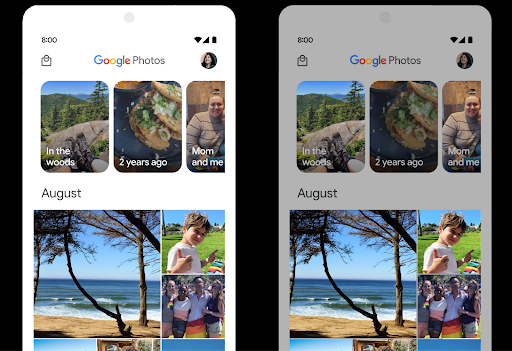
Kiểm soát khoảng không HDR
Android 15 会选择适合底层设备功能和面板位深的 HDR 余量。对于包含大量 SDR 内容的网页(例如显示单个 HDR 缩略图的消息应用),此行为最终可能会对 SDR 内容的感知亮度产生不利影响。在 Android 15 中,您可以使用 setDesiredHdrHeadroom 控制 HDR 余量,以便在 SDR 内容和 HDR 内容之间取得平衡。
Kiểm soát độ lớn

Android 15 引入了对 CTA-2075 响度标准的支持,可帮助您避免音频响度不一致,并确保用户在切换内容时不必不断调整音量。系统利用输出设备(头戴式耳机和扬声器)的已知特性以及 AAC 音频内容中提供的响度元数据,智能调整音频响度和动态范围压缩级别。
如需启用此功能,您需要确保 AAC 内容中提供响度元数据,并在应用中启用平台功能。为此,您可以通过使用关联的 AudioTrack 中的音频会话 ID 调用其 create 工厂方法来实例化 LoudnessCodecController 对象;这会自动开始应用音频更新。您可以传递 OnLoudnessCodecUpdateListener 来修改或过滤响度参数,然后再将其应用于 MediaCodec。
// Media contains metadata of type MPEG_4 OR MPEG_D
val mediaCodec = …
val audioTrack = AudioTrack.Builder()
                                .setSessionId(sessionId)
                                .build()
...
// Create new loudness controller that applies the parameters to the MediaCodec
try {
   val lcController = LoudnessCodecController.create(mSessionId)
   // Starts applying audio updates for each added MediaCodec
}
AndroidX media3 ExoPlayer 也将更新,以使用
LoudnessCodecController API,可实现无缝应用集成。
Thiết bị MIDI 2.0 ảo
Android 13 added support for connecting to MIDI 2.0 devices using USB, which communicate using Universal MIDI Packets (UMP). Android 15 extends UMP support to virtual MIDI apps, enabling composition apps to control synthesizer apps as a virtual MIDI 2.0 device just like they would with an USB MIDI 2.0 device.
Giải mã phần mềm AV1 hiệu quả hơn

dav1d 是 VideoLAN 推出的热门 AV1 软件解码器,适用于不支持硬件 AV1 解码的 Android 设备。与旧版 AV1 软件解码器相比,dav1d 的性能最高可提升 3 倍,让更多用户(包括一些低端和中端设备)能够播放高清 AV1 视频。
您的应用需要选择启用 dav1d,方法是通过名称 "c2.android.av1-dav1d.decoder" 调用它。在后续更新中,dav1d 将成为默认的 AV1 软件解码器。此支持已标准化,并向后移植到收到 Google Play 系统更新的 Android 11 设备。
Năng suất và công cụ cho nhà phát triển
Mặc dù hầu hết công việc của chúng tôi nhằm cải thiện năng suất của bạn đều tập trung vào các công cụ như Android Studio, Jetpack Compose và thư viện Android Jetpack , nhưng chúng tôi luôn tìm cách giúp bạn dễ dàng hiện thực hoá ý tưởng của mình hơn trong nền tảng.
Nội dung cập nhật OpenJDK 17
Android 15 continues the work of refreshing Android's core libraries to align with the features in the latest OpenJDK LTS releases.
The following key features and improvements are included:
- Quality-of-life improvements around NIO buffers
- Streams
- Additional
mathandstrictmathmethods utilpackage updates including sequencedcollection,map, andsetByteBuffersupport inDeflater- Security updates such as
X500PrivateCredentialand security key updates
These APIs are updated on over a billion devices running Android 12 (API level 31) and higher through Google Play System updates, so you can target the latest programming features.
Cải tiến về tệp PDF
Android 15 includes substantial improvements to the PdfRenderer
APIs. Apps can incorporate advanced features such as rendering
password-protected files, annotations, form editing,
searching, and selection with copy. Linearized PDF
optimizations are supported to speed local PDF viewing and reduce resource use.
The Jetpack PDF library uses these APIs to simplify adding PDF
viewing capabilities to your app.
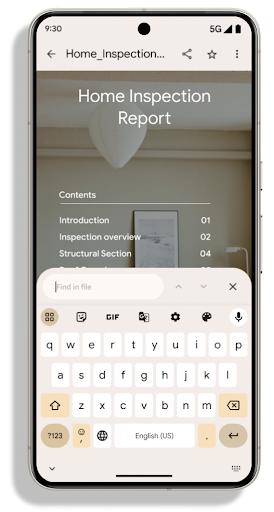
The PdfRenderer has been moved to a module that can be updated using Google
Play system updates independent of the platform release, and we're supporting
these changes back to Android 11 (API level 30) by creating a compatible
pre-Android 15 version of the API surface, called
PdfRendererPreV.
Tinh chỉnh tính năng tự động chuyển đổi ngôn ngữ
Android 14 added on-device, multi-language recognition in audio with automatic
switching between languages, but this can cause words to get dropped,
especially when languages switch with less of a pause between the two
utterances. Android 15 adds additional controls to help apps tune this switching
to their use case.
EXTRA_LANGUAGE_SWITCH_INITIAL_ACTIVE_DURATION_TIME_MILLIS
confines the automatic switching to the beginning of the audio session, while
EXTRA_LANGUAGE_SWITCH_MATCH_SWITCHES deactivates the
language switching after a defined number of switches. These options are
particularly useful if you expect that there will be a single language spoken
during the session that should be autodetected.
Cải thiện API Phông chữ biến đổi OpenType
Android 15 提高了 OpenType 可变字体的易用性。您可以创建
来自可变字体的 FontFamily 实例,而不指定粗细轴
使用 buildVariableFamily API。文本渲染程序会替换 wght 轴的值,以匹配显示的文本。
使用该 API 可以大大简化创建 Typeface 的代码:
Kotlin
val newTypeface = Typeface.CustomFallbackBuilder(
            FontFamily.Builder(
                Font.Builder(assets, "RobotoFlex.ttf").build())
                    .buildVariableFamily())
    .build()
Java
Typeface newTypeface = Typeface.CustomFallbackBuilder(
            new FontFamily.Builder(
                new Font.Builder(assets, "RobotoFlex.ttf").build())
                    .buildVariableFamily())
    .build();
以前,如需创建相同的 Typeface,您需要更多代码:
Kotlin
val oldTypeface = Typeface.CustomFallbackBuilder(
            FontFamily.Builder(
                Font.Builder(assets, "RobotoFlex.ttf")
                    .setFontVariationSettings("'wght' 400")
                    .setWeight(400)
                    .build())
                .addFont(
                    Font.Builder(assets, "RobotoFlex.ttf")
                        .setFontVariationSettings("'wght' 100")
                        .setWeight(100)
                        .build()
                )
                .addFont(
                    Font.Builder(assets, "RobotoFlex.ttf")
                        .setFontVariationSettings("'wght' 200")
                        .setWeight(200)
                        .build()
                )
                .addFont(
                    Font.Builder(assets, "RobotoFlex.ttf")
                        .setFontVariationSettings("'wght' 300")
                        .setWeight(300)
                        .build()
                )
                .addFont(
                    Font.Builder(assets, "RobotoFlex.ttf")
                        .setFontVariationSettings("'wght' 500")
                        .setWeight(500)
                        .build()
                )
                .addFont(
                    Font.Builder(assets, "RobotoFlex.ttf")
                        .setFontVariationSettings("'wght' 600")
                        .setWeight(600)
                        .build()
                )
                .addFont(
                    Font.Builder(assets, "RobotoFlex.ttf")
                        .setFontVariationSettings("'wght' 700")
                        .setWeight(700)
                        .build()
                )
                .addFont(
                    Font.Builder(assets, "RobotoFlex.ttf")
                        .setFontVariationSettings("'wght' 800")
                        .setWeight(800)
                        .build()
                )
                .addFont(
                    Font.Builder(assets, "RobotoFlex.ttf")
                        .setFontVariationSettings("'wght' 900")
                        .setWeight(900)
                        .build()
                ).build()
        ).build()
Java
Typeface oldTypeface = new Typeface.CustomFallbackBuilder(
    new FontFamily.Builder(
        new Font.Builder(assets, "RobotoFlex.ttf")
            .setFontVariationSettings("'wght' 400")
            .setWeight(400)
            .build()
    )
    .addFont(
        new Font.Builder(assets, "RobotoFlex.ttf")
            .setFontVariationSettings("'wght' 100")
            .setWeight(100)
            .build()
    )
    .addFont(
        new Font.Builder(assets, "RobotoFlex.ttf")
            .setFontVariationSettings("'wght' 200")
            .setWeight(200)
            .build()
    )
    .addFont(
        new Font.Builder(assets, "RobotoFlex.ttf")
            .setFontVariationSettings("'wght' 300")
            .setWeight(300)
            .build()
    )
    .addFont(
        new Font.Builder(assets, "RobotoFlex.ttf")
            .setFontVariationSettings("'wght' 500")
            .setWeight(500)
            .build()
    )
    .addFont(
        new Font.Builder(assets, "RobotoFlex.ttf")
            .setFontVariationSettings("'wght' 600")
            .setWeight(600)
            .build()
    )
    .addFont(
        new Font.Builder(assets, "RobotoFlex.ttf")
            .setFontVariationSettings("'wght' 700")
            .setWeight(700)
            .build()
    )
    .addFont(
        new Font.Builder(assets, "RobotoFlex.ttf")
            .setFontVariationSettings("'wght' 800")
            .setWeight(800)
            .build()
    )
    .addFont(
        new Font.Builder(assets, "RobotoFlex.ttf")
            .setFontVariationSettings("'wght' 900")
            .setWeight(900)
            .build()
    )
    .build()
).build();
以下示例展示了同时使用旧版和新版 API 创建的 Typeface 的呈现方式:
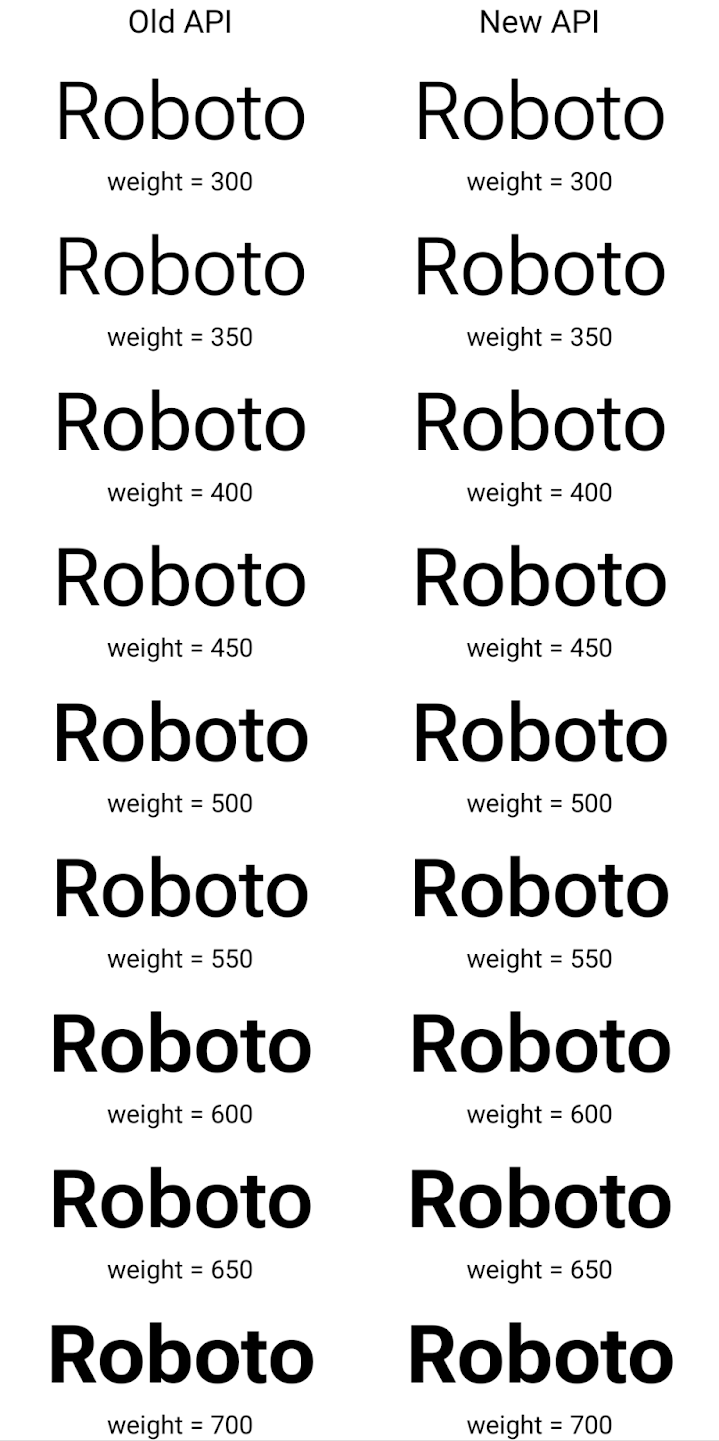
在此示例中,使用旧 API 创建的 Typeface 不包含
为 350、450、550 和 650 创建准确的字体粗细
Font 实例,因此渲染程序会回退到最接近的权重。在
在此示例中,系统会渲染 300 而不是 350,渲染 400 而不是 450,
依此类推。相比之下,使用新 API 创建的 Typeface 会为给定重量动态创建 Font 实例,因此系统也会为 350、450、550 和 650 呈现准确的重量。
Kiểm soát chi tiết dấu ngắt dòng
Starting in Android 15, a TextView and the underlying
line breaker can preserve the given portion of text in the same line to improve
readability. You can take advantage of this line break customization by using
the <nobreak> tag in string resources or
createNoBreakSpan. Similarly, you can preserve words from
hyphenation by using the <nohyphen> tag or
createNoHyphenationSpan.
For example, the following string resource doesn't include a line break, and renders with the text "Pixel 8 Pro." breaking in an undesirable place:
<resources>
    <string name="pixel8pro">The power and brains behind Pixel 8 Pro.</string>
</resources>
In contrast, this string resource includes the <nobreak> tag, which wraps the
phrase "Pixel 8 Pro." and prevents line breaks:
<resources>
    <string name="pixel8pro">The power and brains behind <nobreak>Pixel 8 Pro.</nobreak></string>
</resources>
The difference in how these strings are rendered is shown in the following images:
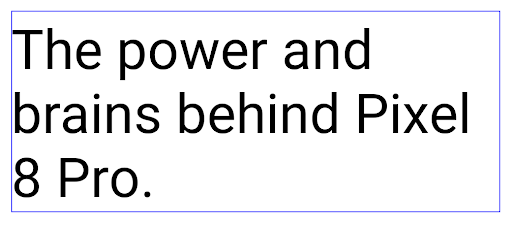
<nobreak> tag.
<nobreak> tag.Lưu trữ ứng dụng
Android and Google Play announced support for app archiving last year, allowing users to free up space by partially removing infrequently used apps from the device that were published using Android App Bundle on Google Play. Android 15 includes OS level support for app archiving and unarchiving, making it easier for all app stores to implement it.
Apps with the REQUEST_DELETE_PACKAGES permission can call the
PackageInstaller requestArchive method to request archiving an
installed app package, which removes the APK and any cached files, but persists
user data. Archived apps are returned as displayable apps through the
LauncherApps APIs; users will see a UI treatment to highlight that those
apps are archived. If a user taps on an archived app, the responsible installer
will get a request to unarchive it, and the restoration process can be
monitored by the ACTION_PACKAGE_ADDED broadcast.
Bật chế độ 16 KB trên thiết bị bằng cách sử dụng tuỳ chọn cho nhà phát triển
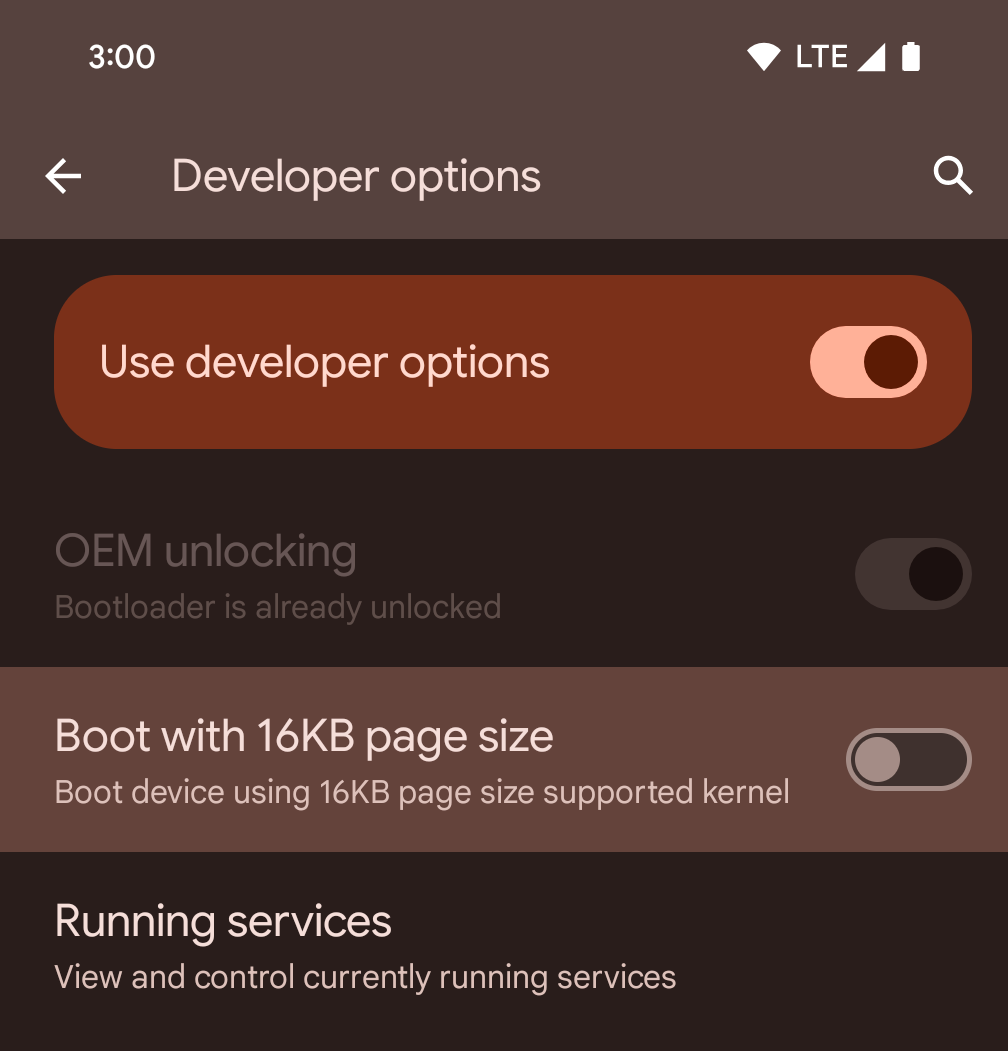
Bật/tắt lựa chọn cho nhà phát triển Khởi động với kích thước trang 16 KB để khởi động thiết bị ở chế độ 16 KB.
Trong các phiên bản QPR của Android 15, bạn có thể sử dụng tùy chọn cho nhà phát triển có trên một số thiết bị để khởi động thiết bị ở chế độ 16 KB và thực hiện kiểm thử trên thiết bị. Trước khi sử dụng tuỳ chọn cho nhà phát triển, hãy chuyển đến phần Cài đặt > Hệ thống > Bản cập nhật phần mềm rồi áp dụng mọi bản cập nhật hiện có.
Tuỳ chọn cho nhà phát triển này có trên các thiết bị sau:
Pixel 8 và 8 Pro (chạy Android 15 QPR1 trở lên)
Pixel 8a (chạy Android 15 QPR1 trở lên)
Pixel 9, 9 Pro và 9 Pro XL (chạy Android 15 QPR2 trở lên)
Pixel 9a (chạy Android 16 trở lên)
Đồ hoạ
Android 15 mang đến những cải tiến mới nhất về đồ hoạ, bao gồm ANGLE và các điểm bổ sung cho hệ thống đồ hoạ Canvas.
Hiện đại hoá quyền truy cập GPU của Android

与早期相比,Android 硬件已经有了很大的进步。早期,核心操作系统在单个 CPU 上运行,并且使用基于固定功能流水线的 API 访问 GPU。从 Android 7.0(API 级别 24)开始,NDK 中就提供了 Vulkan® 图形 API,其较低级别的抽象更好地反映了现代 GPU 硬件,可更好地扩缩以支持多个 CPU 核心,并可降低 CPU 驱动程序开销,从而提升应用性能。所有现代游戏引擎都支持 Vulkan。
Vulkan 是 Android 与 GPU 的首选接口。因此,Android 15 包含 ANGLE 作为可选层,用于在 Vulkan 基础上运行 OpenGL® ES。改用 ANGLE 将标准化 Android OpenGL 实现,提高兼容性,在某些情况下还有助于提升性能。在 Android 15 中,您可以依次前往设置 -> 系统 -> 开发者选项 -> 实验性功能:启用 ANGLE,启用开发者选项,以便通过 ANGLE 测试 OpenGL ES 应用的稳定性和性能。
Android ANGLE on Vulkan 路线图
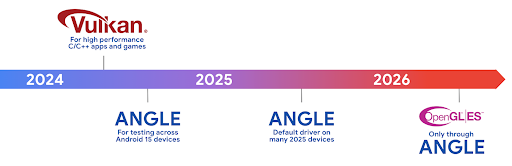
为了简化 GPU 堆栈,我们今后将在更多新设备上将 ANGLE 作为 GL 系统驱动程序提供,未来 OpenGL/ES 将只能通过 ANGLE 获得支持。尽管如此,我们计划继续在所有设备上支持 OpenGL ES。
建议的后续措施
使用开发者选项为 OpenGL ES 选择 ANGLE 驱动程序,然后测试您的应用。对于新项目,我们强烈建议您为 C/C++ 使用 Vulkan。
Cải tiến cho Canvas
Android 15 继续对 Android 的 Canvas 图形系统进行现代化改造,并新增了以下功能:
Matrix44提供一个 4x4 矩阵来转换坐标,当您想在 3D 中操控画布时,应使用此矩阵。clipShader会将当前剪裁区域与指定的着色器相交,而clipOutShader会将剪裁区域设为当前剪裁区域与着色器的差值,每个操作都会将着色器视为一个 Alpha 遮罩。这支持高效地绘制复杂形状。
Hiệu suất và pin
Android tiếp tục tập trung vào việc giúp bạn cải thiện hiệu suất và chất lượng của ứng dụng. Android 15 ra mắt các API giúp thực hiện các tác vụ trong ứng dụng của bạn một cách hiệu quả hơn, tối ưu hoá hiệu suất của ứng dụng và thu thập thông tin chi tiết về ứng dụng.
Để biết các phương pháp hay nhất giúp tiết kiệm pin, gỡ lỗi việc sử dụng mạng và nguồn điện, và thông tin chi tiết về cách chúng tôi cải thiện hiệu quả sử dụng pin của công việc ở chế độ nền trong Android 15 và các phiên bản Android gần đây, hãy xem bài nói chuyện Cải thiện hiệu quả sử dụng pin của công việc ở chế độ nền trên Android tại Google I/O.
ApplicationStartInfo API
在以前的 Android 版本中,应用启动一直是个谜。在应用中确定应用是从冷启动、温启动还是热启动状态启动很困难。您还很难了解应用在各种启动阶段(分叉进程、调用 onCreate、绘制第一个帧等)所花的时间。在 Application 类被实例化时,您无法知道应用是通过广播、content provider、作业、备份、启动完成、闹钟还是 Activity 启动的。
Android 15 上的 ApplicationStartInfo API 提供了所有这些功能,以及更多功能。您甚至可以选择在流程中添加自己的时间戳,以便在一个位置收集时间数据。除了收集指标之外,您还可以使用 ApplicationStartInfo 直接优化应用启动;例如,您可以消除在应用因广播而启动时在 Application 类中实例化与界面相关的库所带来的高昂开销。
Thông tin chi tiết về kích thước ứng dụng
从 Android 8.0(API 级别 26)开始,Android 包含 StorageStats.getAppBytes API,该 API 会将应用的安装大小总结为一个字节数,该数值是 APK 大小、从 APK 中提取的文件的大小以及在设备上生成的文件(例如提前编译 [AOT] 代码)的总和。此数字对于了解应用的存储空间使用情况而言,没有太大帮助。
Android 15 添加了 StorageStats.getAppBytesByDataType([type]) API,可让您深入了解应用如何使用所有这些空间,包括 APK 文件分块、AOT 和加速相关代码、DEX 元数据、库和引导式配置文件。
Hồ sơ do ứng dụng quản lý
Android 15 includes the ProfilingManager class,
which lets you collect profiling information from within your app such as heap
dumps, heap profiles, stack sampling, and more. It provides a callback to your
app with a supplied tag to identify the output file, which is delivered to your
app's files directory. The API does rate limiting to minimize the performance
impact.
To simplify constructing profiling requests in your app, we recommend using the
corresponding Profiling AndroidX API, available
in Core 1.15.0-rc01 or higher.
Cải tiến về cơ sở dữ liệu SQLite
Android 15 introduces SQLite APIs that expose advanced features from the underlying SQLite engine that target specific performance issues that can manifest in apps. These APIs are included with the update of SQLite to version 3.44.3.
Developers should consult best practices for SQLite performance to get the most out of their SQLite database, especially when working with large databases or when running latency-sensitive queries.
- Read-only deferred transactions: when issuing transactions that are
read-only (don't include write statements), use
beginTransactionReadOnly()andbeginTransactionWithListenerReadOnly(SQLiteTransactionListener)to issue read-onlyDEFERREDtransactions. Such transactions can run concurrently with each other, and if the database is in WAL mode, they can run concurrently withIMMEDIATEorEXCLUSIVEtransactions. - Row counts and IDs: APIs were added to retrieve the count of changed
rows or the last inserted row ID without issuing an additional query.
getLastChangedRowCount()returns the number of rows that were inserted, updated, or deleted by the most recent SQL statement within the current transaction, whilegetTotalChangedRowCount()returns the count on the current connection.getLastInsertRowId()returns therowidof the last row to be inserted on the current connection. - Raw statements: issue a raw SQlite statement, bypassing convenience wrappers and any additional processing overhead that they may incur.
Nội dung cập nhật Khung hiệu suất động Android
Android 15 继续投资于 Android 动态性能框架 (ADPF),这是一组 API,可让游戏和性能密集型应用更为直接地与 Android 设备的电源和散热系统进行互动。在受支持的设备上,Android 15 添加了 ADPF 功能:
- 针对提示会话的节能模式,用于指明其关联的线程应优先节能而非性能,非常适合长时间运行的后台工作负载。
- 系统可以在提示会话中报告 GPU 和 CPU 工作时长,以便同时调整 CPU 和 GPU 频率,以最佳方式满足工作负载需求。
- 热余量阈值,用于根据余量预测来解读可能的热节流状态。
如需详细了解如何在应用和游戏中使用 ADPF,请参阅相关文档。
Quyền riêng tư
Android 15 có nhiều tính năng giúp nhà phát triển ứng dụng bảo vệ quyền riêng tư của người dùng.
Phát hiện hoạt động ghi màn hình
Android 15 adds support for apps to detect that they are being recorded. A callback is invoked whenever the app transitions between being visible or invisible within a screen recording. An app is considered visible if activities owned by the registering process's UID are being recorded. This way, if your app is performing a sensitive operation, you can inform the user that they're being recorded.
val mCallback = Consumer<Int> { state ->
  if (state == SCREEN_RECORDING_STATE_VISIBLE) {
    // We're being recorded
  } else {
    // We're not being recorded
  }
}

override fun onStart() {
   super.onStart()
   val initialState =
      windowManager.addScreenRecordingCallback(mainExecutor, mCallback)
   mCallback.accept(initialState)
}

override fun onStop() {
    super.onStop()
    windowManager.removeScreenRecordingCallback(mCallback)
}
Mở rộng các tính năng của IntentFilter
Android 15 通过 UriRelativeFilterGroup 支持更精确的 Intent 解析,UriRelativeFilterGroup 包含一组 UriRelativeFilter 对象,这些对象构成一组必须满足的 Intent 匹配规则,包括网址查询参数、网址片段以及屏蔽或排除规则。
您可以在 AndroidManifest XML 文件中使用 <uri-relative-filter-group> 标记来定义这些规则,该标记可以包含 android:allow 标记。这些代码可以包含使用现有数据代码属性以及 android:query 和 android:fragment 属性的 <data> 代码。
下面是一个 AndroidManifest 语法示例:
<intent-filter android:autoVerify="true">
  <action android:name="android.intent.action.VIEW" />
  <category android:name="android.intent.category.BROWSABLE" />
  <category android:name="android.intent.category.DEFAULT" />
  <data android:scheme="http" />
  <data android:scheme="https" />
  <data android:host="astore.com" />
  <uri-relative-filter-group>
    <data android:pathPrefix="/auth" />
    <data android:query="region=na" />
  </uri-relative-filter-group>
  <uri-relative-filter-group android:allow="false">
    <data android:pathPrefix="/auth" />
    <data android:query="mobileoptout=true" />
  </uri-relative-filter-group>
  <uri-relative-filter-group android:allow="false">
    <data android:pathPrefix="/auth" />
    <data android:fragmentPrefix="faq" />
  </uri-relative-filter-group>
</intent-filter>
Không gian riêng tư
借助私密空间,用户可以在设备上创建一个单独的空间,在额外的身份验证层保护下,防止敏感应用遭到窥探。私密空间使用单独的用户个人资料。用户可以选择使用设备锁定方式或为私密空间使用单独的锁定方式。
私密空间中的应用会显示在启动器的单独容器中,并且当私密空间处于锁定状态时,这些应用不会显示在“最近用过”视图、通知、“设置”和其他应用中。用户生成的内容和下载的内容(例如媒体内容或文件)以及账号在私密空间和主空间之间是分开的。在私密空间处于解锁状态时,您可以使用系统 Sharesheet 和照片选择器向应用授予对各个空间中内容的访问权限。
用户无法将现有应用及其数据移至私密空间。相反,用户可以在私密空间中选择安装选项,以便使用他们偏好的任意应用商店安装应用。私密空间中的应用会作为主空间中任何应用的单独副本进行安装(同一应用的新副本)。
当用户锁定私密空间时,系统会停止该个人资料。在个人资料停止运行时,私密空间中的应用将不再处于活动状态,无法执行前台或后台活动,包括显示通知。
我们建议您使用私密空间测试应用,以确保应用能按预期运行,尤其是当您的应用属于以下某一类别时:
- 具有工作资料逻辑的应用:假定其应用的任何已安装副本(不在主资料中)均位于工作资料中。
- 医疗应用
- 启动器应用
- 应用商店应用
Truy vấn lựa chọn gần đây nhất của người dùng đối với quyền truy cập vào Ảnh đã chọn
现在,如果应用获得了部分访问权限,则只能突出显示最近选择的照片和视频。此功能可以改善频繁请求访问照片和视频的应用的用户体验。如需在应用中使用此功能,请在通过 ContentResolver 查询 MediaStore 时启用 QUERY_ARG_LATEST_SELECTION_ONLY 参数。
Kotlin
val externalContentUri = MediaStore.Files.getContentUri("external")

val mediaColumns = arrayOf(
   FileColumns._ID,
   FileColumns.DISPLAY_NAME,
   FileColumns.MIME_TYPE,
)

val queryArgs = bundleOf(
   // Return only items from the last selection (selected photos access)
   QUERY_ARG_LATEST_SELECTION_ONLY to true,
   // Sort returned items chronologically based on when they were added to the device's storage
   QUERY_ARG_SQL_SORT_ORDER to "${FileColumns.DATE_ADDED} DESC",
   QUERY_ARG_SQL_SELECTION to "${FileColumns.MEDIA_TYPE} = ? OR ${FileColumns.MEDIA_TYPE} = ?",
   QUERY_ARG_SQL_SELECTION_ARGS to arrayOf(
       FileColumns.MEDIA_TYPE_IMAGE.toString(),
       FileColumns.MEDIA_TYPE_VIDEO.toString()
   )
)
Java
Uri externalContentUri = MediaStore.Files.getContentUri("external");

String[] mediaColumns = {
    FileColumns._ID,
    FileColumns.DISPLAY_NAME,
    FileColumns.MIME_TYPE
};

Bundle queryArgs = new Bundle();
queryArgs.putBoolean(MediaStore.QUERY_ARG_LATEST_SELECTION_ONLY, true);
queryArgs.putString(MediaStore.QUERY_ARG_SQL_SORT_ORDER, FileColumns.DATE_ADDED + " DESC");
queryArgs.putString(MediaStore.QUERY_ARG_SQL_SELECTION, FileColumns.MEDIA_TYPE + " = ? OR " + FileColumns.MEDIA_TYPE + " = ?");
queryArgs.putStringArray(MediaStore.QUERY_ARG_SQL_SELECTION_ARGS, new String[] {
    String.valueOf(FileColumns.MEDIA_TYPE_IMAGE),
    String.valueOf(FileColumns.MEDIA_TYPE_VIDEO)
});
Hộp cát về quyền riêng tư trên Android
Android 15 includes the latest Android Ad Services extensions, incorporating the latest version of the Privacy Sandbox on Android. This addition is part of our work to develop technologies that improve user privacy and enable effective, personalized advertising experiences for mobile apps. Our privacy sandbox page has more information about the Privacy Sandbox on Android developer preview and beta programs to help you get started.
Health Connect
Android 15 integrates the latest extensions around Health Connect by Android, a secure and centralized platform to manage and share app-collected health and fitness data. This update adds support for additional data types across fitness, nutrition, skin temperature, training plans, and more.
Skin temperature tracking allows users to store and share more accurate temperature data from a wearable or other tracking device.
Training plans are structured workout plans to help a user achieve their fitness goals. Training plans support includes a variety of completion and performance goals:
- Completion goals around calories burned, distance, duration, repetition, and steps.
- Performance goals around as many repetitions as possible (AMRAP), cadence, heart rate, power, perceived rate of exertion, and speed.
Learn more about the latest updates to Health Connect in Android in the Building adaptable experiences with Android Health talk from Google I/O.
Chia sẻ màn hình ứng dụng
Android 15 hỗ trợ tính năng chia sẻ màn hình ứng dụng để người dùng có thể chỉ chia sẻ hoặc ghi lại một cửa sổ ứng dụng thay vì toàn bộ màn hình thiết bị. Tính năng này được bật lần đầu trong Android 14 QPR2, bao gồm các lệnh gọi lại MediaProjection cho phép ứng dụng của bạn tuỳ chỉnh trải nghiệm chia sẻ màn hình ứng dụng. Xin lưu ý rằng đối với các ứng dụng nhắm đến Android 14 (API cấp 34) trở lên, bạn phải có sự đồng ý của người dùng đối với mỗi phiên chụp MediaProjection.
Trải nghiệm người dùng và giao diện người dùng hệ thống
Android 15 giúp nhà phát triển ứng dụng và người dùng có nhiều quyền kiểm soát và tính linh hoạt hơn để định cấu hình thiết bị cho phù hợp với nhu cầu của họ.
Để tìm hiểu thêm về cách sử dụng các điểm cải tiến mới nhất trong Android 15 nhằm cải thiện trải nghiệm người dùng của ứng dụng, hãy xem bài nói chuyện Cải thiện trải nghiệm người dùng của ứng dụng Android tại Google I/O.
Bản xem trước tiện ích phong phú hơn với API Bản xem trước đã tạo
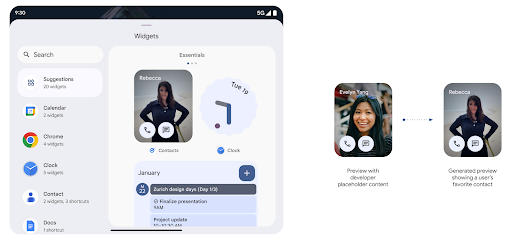
Before Android 15, the only way to provide widget picker previews was to specify a static image or layout resource. These previews often differ significantly from the look of the actual widget when it is placed on the home screen. Also, static resources can't be created with Jetpack Glance, so a Glance developer had to screenshot their widget or create an XML layout to have a widget preview.
Android 15 adds support for generated previews. This means that app widget
providers can generate RemoteViews to use as the picker preview, instead
of a static resource.
Push API
Apps can provide generated previews through a push API. Apps can provide
previews at any point in their lifecycle, and don't receive an explicit request
from the host to provide previews. Previews are persisted in AppWidgetService,
and hosts can request them on-demand. The following example loads an XML widget
layout resource and sets it as the preview:
AppWidgetManager.getInstance(appContext).setWidgetPreview(
   ComponentName(
       appContext,
       SociaLiteAppWidgetReceiver::class.java
   ),
   AppWidgetProviderInfo.WIDGET_CATEGORY_HOME_SCREEN,
   RemoteViews("com.example", R.layout.widget_preview)
)
The expected flow is:
- At any time, the widget provider calls
setWidgetPreview. The provided previews are persisted inAppWidgetServicewith other provider info. setWidgetPreviewnotifies hosts of an updated preview through theAppWidgetHost.onProvidersChangedcallback. In response, the widget host reloads all of its provider information.- When displaying a widget preview, the host checks
AppWidgetProviderInfo.generatedPreviewCategories, and if the chosen category is available, callsAppWidgetManager.getWidgetPreviewto return the saved preview for this provider.
When to call setWidgetPreview
Because there is no callback to provide previews, apps can choose to send previews at any point when they are running. How often to update the preview depends on the widget's use case.
The following list describes the two main categories of preview use cases:
- Providers that show real data in their widget previews, such as personalized or recent information. These providers can set the preview once the user has signed in or has done initial configuration in their app. After this, they can set up a periodic task to update the previews at their chosen cadence. Examples of this type of widget could be a photo, calendar, weather or news widget.
- Providers that show static information in previews or quick-action widgets that don't display any data. These providers can set previews once, when the app first launches. Examples of this type of widget include a drive quick actions widget or chrome shortcuts widget.
Some providers might show static previews on the hub mode picker, but real information on the homescreen picker. These providers should follow the guidance for both of these use cases to set previews.
Hình trong hình
Android 15 introduces changes in Picture-in-Picture (PiP) ensuring an even smoother transition when entering into PiP mode. This will be beneficial for apps having UI elements overlaid on top of their main UI, which goes into PiP.
Developers use the onPictureInPictureModeChanged callback to define logic
that toggles the visibility of the overlaid UI elements. This callback is
triggered when the PiP enter or exit animation is completed. Beginning in
Android 15, the PictureInPictureUiState class includes another state.
With this UI state, apps targeting Android 15 (API level 35) will observe the
Activity#onPictureInPictureUiStateChanged callback being invoked with
isTransitioningToPip() as soon as the PiP animation starts. There are
many UI elements that are not relevant for the app when it is in PiP mode, for
example views or layout that include information such as suggestions, upcoming
video, ratings, and titles. When the app goes to PiP mode, use the
onPictureInPictureUiStateChanged callback to hide these UI elements. When the
app goes to full screen mode from the PiP window, use
onPictureInPictureModeChanged callback to unhide these elements, as shown in
the following examples:
override fun onPictureInPictureUiStateChanged(pipState: PictureInPictureUiState) {
        if (pipState.isTransitioningToPip()) {
          // Hide UI elements
        }
    }
override fun onPictureInPictureModeChanged(isInPictureInPictureMode: Boolean) {
        if (isInPictureInPictureMode) {
          // Unhide UI elements
        }
    }
This quick visibility toggle of irrelevant UI elements (for a PiP window) helps ensure a smoother and flicker-free PiP enter animation.
Cải thiện quy tắc Không làm phiền
AutomaticZenRule lets apps customize Attention
Management (Do Not Disturb) rules and decide when to activate or deactivate
them. Android 15 greatly enhances these rules with the goal of improving the
user experience. The following enhancements are included:
- Adding types to
AutomaticZenRule, allowing the system to apply special treatment to some rules. - Adding an icon to
AutomaticZenRule, helping to make the modes be more recognizable. - Adding a
triggerDescriptionstring toAutomaticZenRulethat describes the conditions on which the rule should become active for the user. - Added
ZenDeviceEffectstoAutomaticZenRule, allowing rules to trigger things like grayscale display, night mode, or dimming the wallpaper.
Đặt VibrationEffect cho các kênh thông báo
Android 15 supports setting rich vibrations for incoming notifications by
channel using NotificationChannel.setVibrationEffect, so
your users can distinguish between different types of notifications without
having to look at their device.
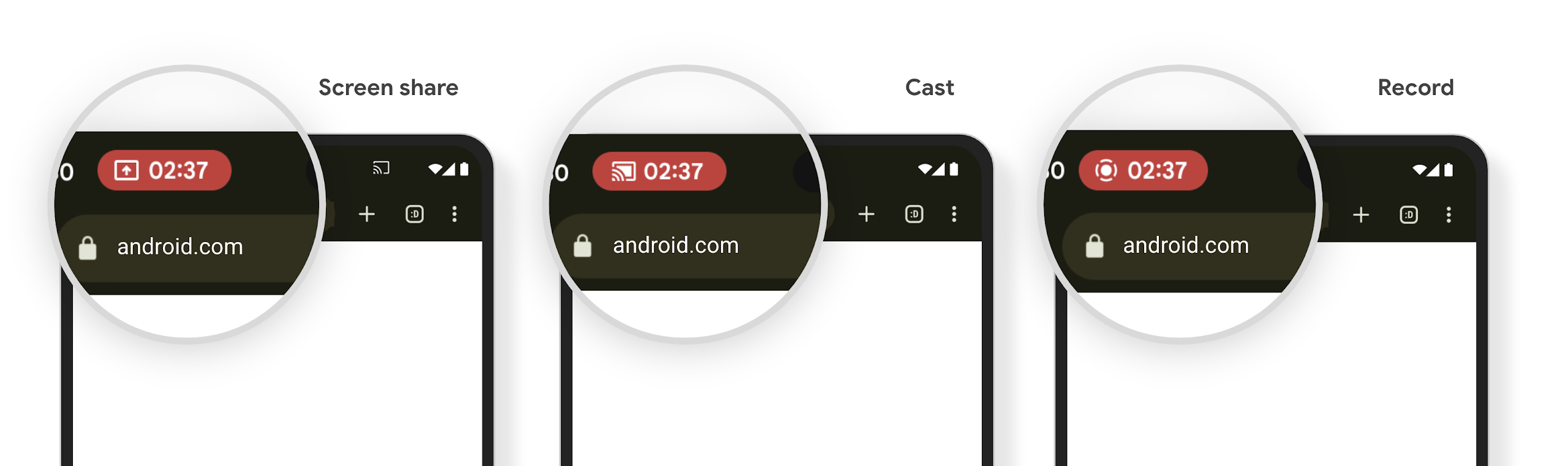
Chip trên thanh trạng thái của tính năng chiếu nội dung nghe nhìn và tính năng tự động dừng
Media projection can expose private user information. A new, prominent status bar chip makes users aware of any ongoing screen projection. Users can tap the chip to stop screen casting, sharing, or recording. Also, for a more intuitive user experience, any in‑progress screen projection now automatically stops when the device screen is locked.
Màn hình lớn và hệ số hình dạng
Android 15 hỗ trợ ứng dụng của bạn tận dụng tối đa các hệ số hình dạng của Android, bao gồm màn hình lớn, thiết bị có thể gập lại và thiết bị có thể lật.
Cải thiện tính năng đa nhiệm trên màn hình lớn
Android 15 为用户提供了在大屏设备上更好地进行多任务处理的方式。对于 例如,用户可以保存自己喜爱的分屏应用组合, 访问并固定屏幕上的任务栏,以便在应用之间快速切换。这意味着 让应用具备自适应能力比以往任何时候都更加重要。
Google I/O 大会上有一些关于构建自适应 Android 的会议 应用和使用 Material 3 构建界面 自适应库 我们的文档中提供了更多帮助信息,帮助您针对大型语言 。
Hỗ trợ màn hình phụ
您的应用可以声明一个属性,Android 15 会使用该属性来允许您的 Application 或 Activity 显示在受支持的可翻转设备的小封面屏幕上。这些屏幕太小,无法被视为适合运行 Android 应用的兼容目标平台,但您的应用可以选择支持它们,从而让您的应用在更多平台上可用。
Khả năng kết nối
Android 15 cập nhật nền tảng để cấp cho ứng dụng của bạn quyền truy cập vào những tiến bộ mới nhất về công nghệ không dây và công nghệ giao tiếp.
Hỗ trợ vệ tinh
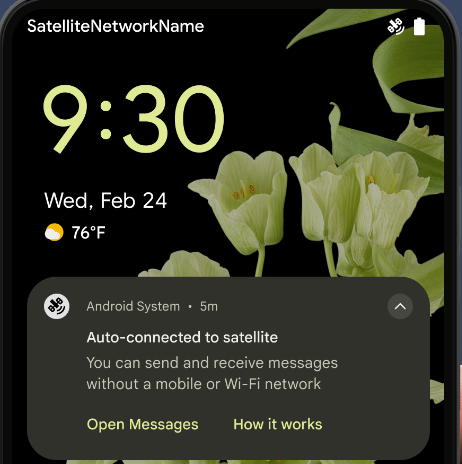
Android 15 继续扩大对卫星连接的平台支持,并包含一些界面元素,以确保在整个卫星连接环境中提供一致的用户体验。
应用可以使用 ServiceState.isUsingNonTerrestrialNetwork() 执行以下操作:
检测设备是否连接到卫星,让他们更清楚地了解
可能会导致完全网络服务不可用的原因此外,Android 15 支持短信和彩信应用以及预加载的 RCS 应用,以便使用卫星连接发送和接收消息。
Trải nghiệm NFC mượt mà hơn
Android 15 is working to make the tap to pay experience more seamless and
reliable while continuing to support Android's robust NFC app ecosystem. On
supported devices, apps can request the NfcAdapter to enter
observe mode, where the device listens but doesn't respond to NFC
readers, sending the app's NFC service PollingFrame
objects to process. The PollingFrame objects can be used to auth
ahead of the first communication to the NFC reader, allowing for a one tap
transaction in many cases.
In addition, apps can register a filter on supported devices so they can be notified of polling loop activity, which allows for smooth operation with multiple NFC-aware applications.
Vai trò ví
Android 15 引入了钱包角色,可与用户的首选钱包应用更紧密地集成。此角色会取代 NFC 默认的感应式付款设置。用户可以前往设置 > 应用 > 默认应用,管理钱包角色持有者。
在为在付款类别中注册的 AID 路由 NFC 感应式付款时,系统会使用钱包角色。点按操作始终会转到 Google 钱包角色持有者,除非有已注册相同 AID 的其他应用在前台运行。
此角色还用于确定“Google 钱包”快速访问功能块在启用后应显示在何处。将角色设为“无”时,“快速访问”功能块不可用,并且支付类别 NFC 点按仅传送到前台应用。
Bảo mật
Android 15 giúp bạn tăng cường tính bảo mật của ứng dụng, bảo vệ dữ liệu của ứng dụng và giúp người dùng minh bạch hơn cũng như có nhiều quyền kiểm soát hơn đối với dữ liệu của họ. Hãy xem bài nói chuyện Đảm bảo an toàn cho người dùng trên Android tại Google I/O để biết thêm về những việc chúng tôi đang làm nhằm cải thiện các biện pháp bảo vệ người dùng và bảo vệ ứng dụng của bạn trước các mối đe doạ mới.
Tích hợp Trình quản lý thông tin xác thực với tính năng tự động điền
Starting with Android 15, developers can link specific views like username or password fields with Credential Manager requests, making it easier to provide a tailored user experience during the sign-in process. When the user focuses on one of these views, a corresponding request is sent to Credential Manager. The resulting credentials are aggregated across providers and displayed in autofill fallback UIs, such as inline suggestions or drop-down suggestions. The Jetpack androidx.credentials library is the preferred endpoint for developers to use and will soon be available to further enhance this feature in Android 15 and higher.
Tích hợp tính năng đăng ký và đăng nhập bằng một lần nhấn với lời nhắc sinh trắc học
Credential Manager integrates biometric prompts into the credential creation and sign-in processes, eliminating the need for providers to manage biometric prompts. As a result, credential providers only need to focus on the results of the create and get flows, augmented with the biometric flow result. This simplified process creates a more efficient and streamlined credential creation and retrieval process.
Quản lý khoá để mã hoá hai đầu
We are introducing the E2eeContactKeysManager in Android 15, which
facilitates end-to-end encryption (E2EE) in your Android apps by providing an
OS-level API for the storage of cryptographic public keys.
The E2eeContactKeysManager is designed to integrate with the platform
contacts app to give users a centralized way to manage and verify their
contacts' public keys.
Kiểm tra quyền đối với URI nội dung
Android 15 introduces a set of APIs that perform permission checks on content URIs:
Context.checkContentUriPermissionFull: This performs a full permission check on content URIs.Activitymanifest attributerequireContentUriPermissionFromCaller: This enforces specified permissions on the provided content URIs at activity launch.ComponentCallerclass forActivitycallers: This represents the app that launched the activity.
Hỗ trợ tiếp cận
Android 15 bổ sung các tính năng giúp cải thiện khả năng hỗ trợ tiếp cận cho người dùng.
Cải thiện chữ nổi
In Android 15, we've made it possible for TalkBack to support Braille displays that are using the HID standard over both USB and secure Bluetooth.
This standard, much like the one used by mice and keyboards, will help Android support a wider range of Braille displays over time.
Quốc tế hoá
Android 15 bổ sung các tính năng và chức năng bổ trợ cho trải nghiệm người dùng khi thiết bị được sử dụng bằng nhiều ngôn ngữ.
Phông chữ biến đổi CJK
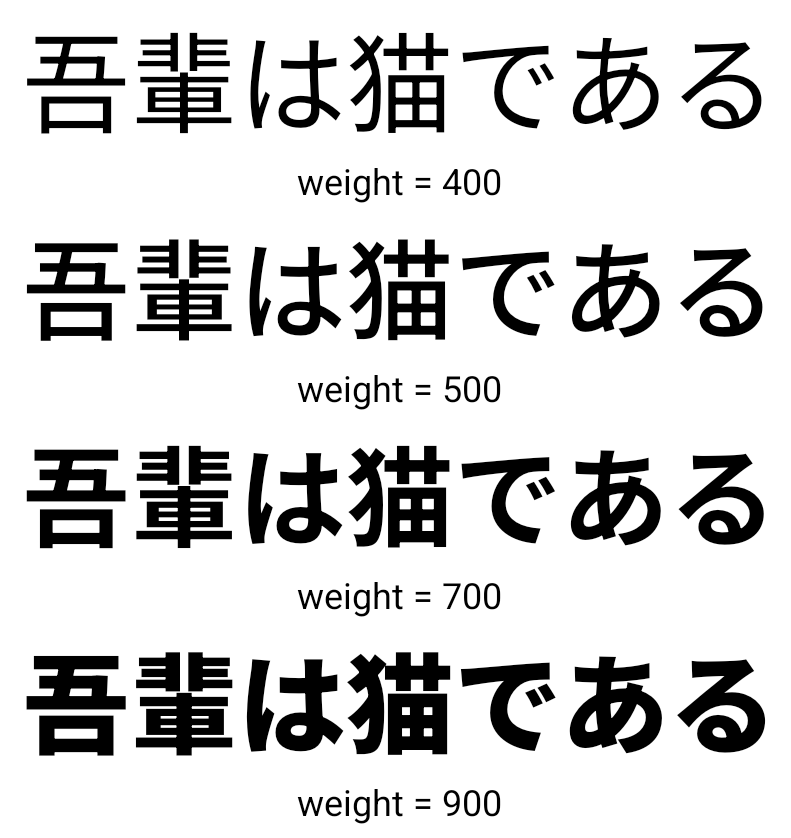
Starting with Android 15, the font file for Chinese, Japanese, and Korean (CJK) languages, NotoSansCJK, is now a variable font. Variable fonts open up possibilities for creative typography in CJK languages. Designers can explore a broader range of styles and create visually striking layouts that were previously difficult or impossible to achieve.
Căn chỉnh giữa các ký tự
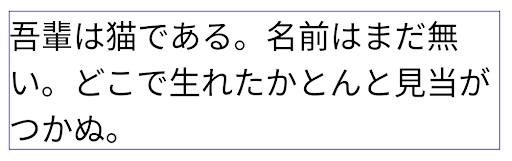
Starting with Android 15, text can be justified utilizing letter spacing by
using JUSTIFICATION_MODE_INTER_CHARACTER. Inter-word justification was
first introduced in Android 8.0 (API level 26), and inter-character
justification provides similar capabilities for languages that use the
whitespace character for segmentation, such as Chinese, Japanese, and others.
JUSTIFICATION_MODE_NONE.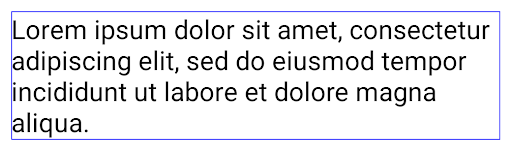
JUSTIFICATION_MODE_NONE.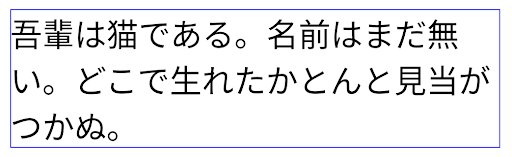
JUSTIFICATION_MODE_INTER_WORD.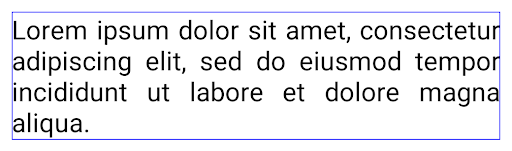
JUSTIFICATION_MODE_INTER_WORD.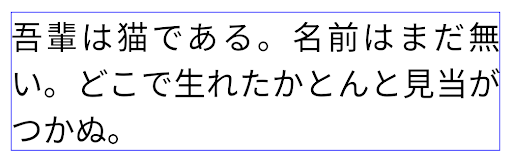
JUSTIFICATION_MODE_INTER_CHARACTER.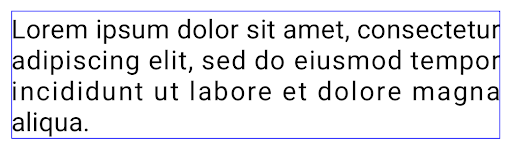
JUSTIFICATION_MODE_INTER_CHARACTER.Tự động định cấu hình dấu ngắt dòng
Android 从以下语言开始支持基于短语的日语和韩语换行:
Android 13(API 级别 33)。不过,虽然基于短语的行分隔符可以提高短文本行的可读性,但对于长文本行,效果并不理想。在 Android 15 中,应用只能使用 LINE_BREAK_WORD_STYLE_AUTO 选项,针对短文本行应用基于短语的行分隔符。此选项会为文本选择最佳字词样式选项。
对于短文本行,则使用基于短语的换行符,功能相同
为 LINE_BREAK_WORD_STYLE_PHRASE,如
以下图片:
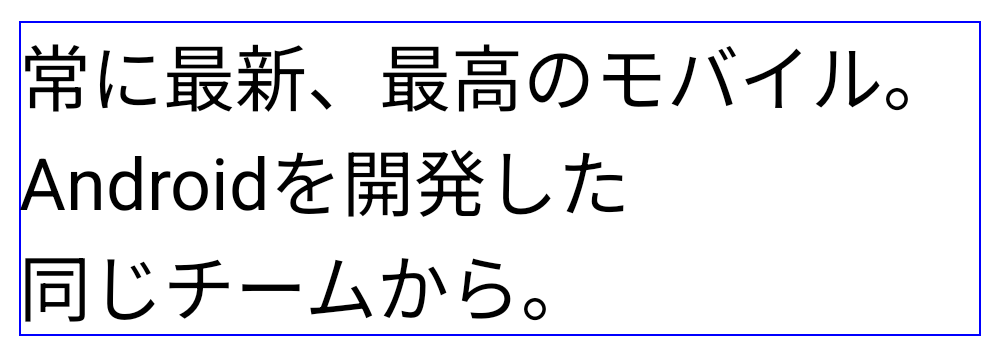
LINE_BREAK_WORD_STYLE_AUTO
应用基于短语的换行符,以提高文本的可读性。
这与应用
LINE_BREAK_WORD_STYLE_PHRASE。对于较长的文本行,LINE_BREAK_WORD_STYLE_AUTO 会使用 no
换行字词样式,
LINE_BREAK_WORD_STYLE_NONE,如
以下图片:
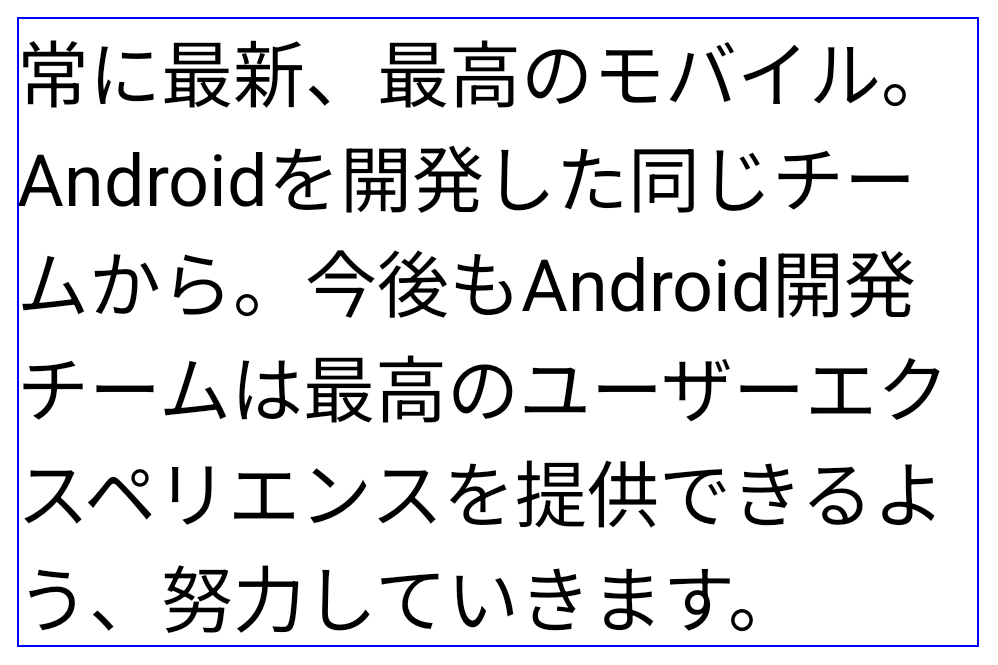
LINE_BREAK_WORD_STYLE_AUTO
应用不换行的字词样式,以提高文本的可读性。
这与应用
LINE_BREAK_WORD_STYLE_NONE。Phông chữ Hentaigana bổ sung của Nhật Bản
In Android 15, a font file for old Japanese Hiragana (known as Hentaigana) is bundled by default. The unique shapes of Hentaigana characters can add a distinctive flair to artwork or design while also helping to preserve accurate transmission and understanding of ancient Japanese documents.

VideoLAN 圆锥图标 版权所有 (c) 1996-2010 VideoLAN。任何人都可以使用此徽标或修改版徽标来提及 VideoLAN 项目或 VideoLAN 团队开发的任何产品,但这并不表示该项目对其表示认可。
Vulkan 和 Vulkan 徽标是 Khronos Group Inc.的注册商标。
OpenGL 是注册商标,OpenGL ES 徽标是 Hewlett Packard Enterprise 的商标,已获得 Khronos 的许可。