

Android 16 มาพร้อมฟีเจอร์และ API ใหม่ๆ ที่ยอดเยี่ยมสำหรับนักพัฒนาแอป ส่วนต่อไปนี้ จะสรุปฟีเจอร์เหล่านี้เพื่อช่วยให้คุณเริ่มต้นใช้งาน API ที่เกี่ยวข้องได้
ดูรายการ API ใหม่ที่มีการแก้ไขและนำออกได้ที่รายงานความแตกต่างของ API ดูรายละเอียดเกี่ยวกับ API ใหม่ได้ที่เอกสารอ้างอิง Android API โดยเราจะไฮไลต์ API ใหม่เพื่อให้มองเห็นได้ชัดเจนนอกจากนี้ คุณควรตรวจสอบส่วนที่การเปลี่ยนแปลงของแพลตฟอร์มอาจส่งผลต่อแอปด้วย ดูข้อมูลเพิ่มเติมได้ที่หน้าต่อไปนี้
- การเปลี่ยนแปลงลักษณะการทำงานที่มีผลกับแอปเมื่อกำหนดเป้าหมายเป็น Android 16
- การเปลี่ยนแปลงลักษณะการทำงานที่มีผลกับแอปทั้งหมดโดยไม่คำนึงถึง
targetSdkVersion
ฟังก์ชันหลัก
Android มี API ใหม่ๆ ที่ขยายความสามารถหลักของระบบ Android
การเปิดตัว Android API 2 รายการในปี 2025
- ตัวอย่างนี้เป็นเวอร์ชันหลักรุ่นถัดไปของ Android ซึ่งมีกำหนดเปิดตัวในไตรมาสที่ 2 ของปี 2025 เวอร์ชันนี้คล้ายกับ API ทั้งหมดของเราในอดีต ซึ่งเราอาจมีการเปลี่ยนแปลงลักษณะการทำงานตามแผนที่วางไว้ซึ่งมักเชื่อมโยงกับ targetSdkVersion
- เราวางแผนที่จะเปิดตัวรุ่นหลักเร็วขึ้น 1 ไตรมาส (ไตรมาสที่ 2 แทนที่จะเป็นไตรมาสที่ 3 ของปีก่อนๆ) เพื่อให้สอดคล้องกับกำหนดการเปิดตัวอุปกรณ์ในระบบนิเวศของเรามากขึ้น เพื่อให้อุปกรณ์จำนวนมากขึ้นได้รับ Android เวอร์ชันหลักได้เร็วขึ้น เนื่องจากจะมีการเปิดตัวรุ่นหลักในไตรมาสที่ 2 คุณจะต้องทำการทดสอบความเข้ากันได้ประจำปีก่อนเวลาปกติ 2-3 เดือนเพื่อให้แน่ใจว่าแอปของคุณพร้อมใช้งาน
- เราวางแผนที่จะเปิดตัวอีกรุ่นในไตรมาสที่ 4 ของปี 2025 ซึ่งจะมี API ใหม่สำหรับนักพัฒนาแอปด้วย เวอร์ชันหลักในไตรมาสที่ 2 จะเป็นเวอร์ชันเดียวในปี 2025 ที่มีการเปลี่ยนแปลงลักษณะการทำงานตามแผนที่อาจส่งผลต่อแอป
นอกจาก API ใหม่สำหรับนักพัฒนาแอปแล้ว รุ่นย่อยในไตรมาสที่ 4 จะรวมการอัปเดตฟีเจอร์ การเพิ่มประสิทธิภาพ และการแก้ไขข้อบกพร่อง แต่จะไม่มีการเปลี่ยนแปลงลักษณะการทำงานที่ส่งผลต่อแอป
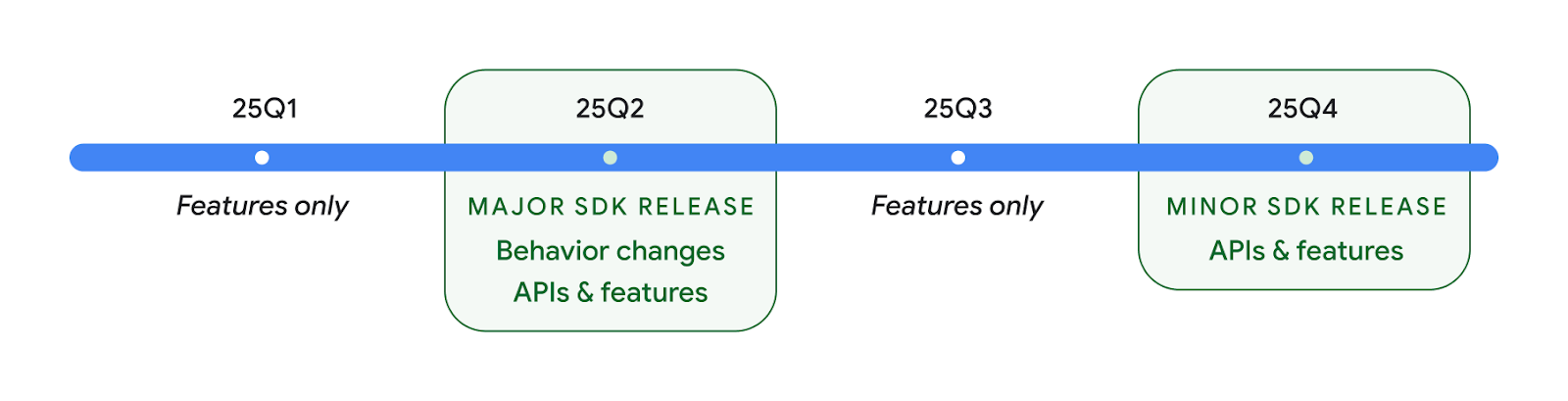
เราจะยังเผยแพร่ Android แบบรายไตรมาสต่อไป การอัปเดตในไตรมาสที่ 1 และ 3 ระหว่างการเปิดตัว API ต่างๆ จะเป็นการเพิ่มการอัปเดตเพื่อช่วยให้มั่นใจถึงคุณภาพอย่างต่อเนื่อง เรากำลังทำงานร่วมกับพาร์ทเนอร์อุปกรณ์ของเราอย่างจริงจังเพื่อทำให้รุ่น Q2 พร้อมให้บริการในอุปกรณ์จำนวนมากที่สุด
การใช้ API ใหม่กับรุ่นหลักและรุ่นย่อย
การป้องกันบล็อกโค้ดด้วยการตรวจสอบระดับ API ทำได้โดยใช้ค่าคงที่ SDK_INT กับ VERSION_CODES เราจะยังคงรองรับฟีเจอร์นี้ใน Android ทุกรุ่นหลักต่อไป
if (SDK_INT >= VERSION_CODES.BAKLAVA) {
  // Use APIs introduced in Android 16
}
คุณสามารถใช้สแตติก SDK_INT_FULL ใหม่ในการตรวจสอบ API กับทั้งเวอร์ชันหลักและรองได้โดยใช้การแจกแจง VERSION_CODES_FULL ใหม่
if (SDK_INT_FULL >= VERSION_CODES_FULL.[MAJOR or MINOR RELEASE]) {
  // Use APIs introduced in a major or minor release
}
นอกจากนี้ คุณยังใช้วิธีนี้เพื่อดูเฉพาะเวอร์ชันย่อยของ SDK ได้ด้วย
Build.getMinorSdkVersion()
val minorSdkVersion = Build.getMinorSdkVersion(VERSION_CODES_FULL.BAKLAVA)
API เหล่านี้ยังไม่เสร็จสมบูรณ์และอาจมีการเปลี่ยนแปลง ดังนั้นโปรดส่งความคิดเห็นถึงเราหากมีข้อกังวล
ประสบการณ์ของผู้ใช้และ UI ของระบบ
Android 16 ช่วยให้นักพัฒนาแอปและผู้ใช้ควบคุมและปรับแต่ง การกำหนดค่าอุปกรณ์ให้เหมาะกับความต้องการของตนได้มากขึ้น
การแจ้งเตือนที่เน้นความคืบหน้า
Android 16 เปิดตัวการแจ้งเตือนที่เน้นความคืบหน้าเพื่อช่วยผู้ใช้ติดตามเส้นทางตั้งแต่ต้นจนจบที่ผู้ใช้เป็นผู้เริ่มได้อย่างราบรื่น
Notification.ProgressStyle เป็นการแจ้งเตือนรูปแบบใหม่ที่ให้คุณสร้างการแจ้งเตือนที่เน้นความคืบหน้า กรณีการใช้งานหลัก ได้แก่ บริการร่วมเดินทาง การนำส่ง และการนำทาง ภายในNotification.ProgressStyle
คลาส คุณสามารถระบุสถานะและเหตุการณ์สำคัญในเส้นทางของผู้ใช้โดยใช้จุดและกลุ่ม
ดูข้อมูลเพิ่มเติมได้ที่หน้าเอกสารประกอบเกี่ยวกับการแจ้งเตือนที่เน้นความคืบหน้า


การอัปเดตการย้อนกลับที่คาดการณ์ได้
Android 16 เพิ่ม API ใหม่เพื่อช่วยให้คุณเปิดใช้การเคลื่อนไหวของระบบแบบคาดเดาสำหรับการนําทางด้วยท่าทางสัมผัส เช่น การเคลื่อนไหวกลับไปยังหน้าแรก การลงทะเบียน onBackInvokedCallback ด้วย PRIORITY_SYSTEM_NAVIGATION_OBSERVER ใหม่จะช่วยให้แอปของคุณได้รับการเรียก onBackInvoked ปกติทุกครั้งที่ระบบจัดการการนําทางกลับโดยไม่ส่งผลกระทบต่อขั้นตอนการนำทางกลับปกติ
Android 16 เพิ่ม finishAndRemoveTaskCallback() และ moveTaskToBackCallback เข้ามาด้วย การลงทะเบียนการเรียกกลับเหล่านี้กับ OnBackInvokedDispatcher จะช่วยให้ระบบทริกเกอร์ลักษณะการทำงานที่เฉพาะเจาะจงและเล่นภาพเคลื่อนไหวที่เกี่ยวข้องล่วงหน้าได้เมื่อมีการเรียกใช้ท่าทางสัมผัสกลับ
การโต้ตอบการสัมผัสที่ละเอียดยิ่งขึ้น
Android ได้เปิดการควบคุมตัวกระตุ้นการสัมผัสมาตั้งแต่เริ่มแรก
Android 11 เพิ่มการรองรับเอฟเฟกต์การสัมผัสที่ซับซ้อนมากขึ้นซึ่งตัวกระตุ้นขั้นสูงรองรับได้ผ่าน VibrationEffect.Compositions ของพรอมต์เชิงความหมายที่อุปกรณ์กำหนด
Android 16 เพิ่ม Haptic API ที่ช่วยแอปกำหนดความกว้างและความถี่ของเส้นโค้งของผลลัพธ์การสัมผัสได้ขณะที่แยกความแตกต่างระหว่างความสามารถของอุปกรณ์
ประสิทธิภาพการทำงานและเครื่องมือสำหรับนักพัฒนาซอฟต์แวร์
แม้ว่างานส่วนใหญ่ของเราในการปรับปรุงประสิทธิภาพการทำงานของคุณจะมุ่งเน้นไปที่เครื่องมือต่างๆ เช่น Android Studio, Jetpack Compose และไลบรารี Android Jetpack แต่เราก็มองหาวิธีต่างๆ ในแพลตฟอร์มเพื่อช่วยให้คุณตระหนักถึงวิสัยทัศน์ของคุณอยู่เสมอ
การจัดการเนื้อหาสำหรับวอลเปเปอร์เคลื่อนไหว
ใน Android 16 เฟรมเวิร์กวอลเปเปอร์เคลื่อนไหวจะได้รับ Content API ใหม่เพื่อรับมือกับความท้าทายของวอลเปเปอร์แบบไดนามิกที่ขับเคลื่อนโดยผู้ใช้ ปัจจุบันวอลเปเปอร์แบบสดที่รวมเนื้อหาที่ได้จากผู้ใช้ต้องใช้การติดตั้งใช้งานที่ซับซ้อนและเจาะจงบริการ Android 16 เปิดตัว WallpaperDescription และ WallpaperInstance WallpaperDescription ช่วยให้คุณระบุอินสแตนซ์ที่แตกต่างกันของวอลเปเปอร์เคลื่อนไหวจากบริการเดียวกันได้ ตัวอย่างเช่น วอลเปเปอร์ที่มีอินสแตนซ์ทั้งในหน้าจอหลักและหน้าจอล็อกอาจมีเนื้อหาที่ไม่ซ้ำกันทั้ง 2 ตำแหน่ง เครื่องมือเลือกวอลเปเปอร์และ WallpaperManager จะใช้ข้อมูลเมตานี้เพื่อนำเสนอวอลเปเปอร์แก่ผู้ใช้ได้ดียิ่งขึ้น ซึ่งจะช่วยคุณประหยัดเวลาในการสร้างประสบการณ์การใช้งานวอลเปเปอร์สดที่หลากหลายและปรับเปลี่ยนในแบบของคุณ
ประสิทธิภาพและแบตเตอรี่
Android 16 เปิดตัว API ที่ช่วยรวบรวมข้อมูลเชิงลึกเกี่ยวกับแอปของคุณ
การทำโปรไฟล์ที่ทริกเกอร์โดยระบบ
ProfilingManager เพิ่มเข้ามาใน Android 15 ซึ่งช่วยให้แอปสามารถส่งคําขอรวบรวมข้อมูลการจัดทำโปรไฟล์โดยใช้ Perfetto ในอุปกรณ์สาธารณะในสนามได้
อย่างไรก็ตาม เนื่องจากต้องเริ่มการโปรไฟล์นี้จากแอป แอปจึงอาจจับภาพขั้นตอนสําคัญ เช่น การเริ่มต้นหรือ ANR ได้ยากหรือเป็นไปไม่ได้
Android 16 เปิดตัวการโปรไฟล์ที่ระบบทริกเกอร์เพื่อแก้ปัญหานี้ใน ProfilingManager แอปสามารถลงทะเบียนความสนใจในการรับการติดตามสำหรับทริกเกอร์บางอย่าง เช่น Cold Start reportFullyDrawn หรือ ANR จากนั้นระบบจะเริ่มและหยุดการติดตามในนามของแอป หลังจากการติดตามเสร็จสมบูรณ์แล้ว ระบบจะส่งผลลัพธ์ไปยังไดเรกทอรีข้อมูลของแอป
คอมโพเนนต์เริ่มต้นใน ApplicationStartInfo
ApplicationStartInfo เพิ่มใน Android 15 ซึ่งช่วยให้แอปเห็นสาเหตุของการเริ่มกระบวนการ ประเภทการเริ่ม เวลาเริ่มต้น การจำกัด และข้อมูลการวินิจฉัยอื่นๆ ที่มีประโยชน์ Android 16 เพิ่ม getStartComponent() เพื่อแยกแยะประเภทคอมโพเนนต์ที่ทริกเกอร์การเริ่มต้น ซึ่งจะเป็นประโยชน์ในการเพิ่มประสิทธิภาพขั้นตอนการเริ่มต้นของแอป
การตรวจสอบงานที่ดีขึ้น
JobScheduler#getPendingJobReason() API จะแสดงเหตุผลที่งานอาจรอดำเนินการ อย่างไรก็ตาม งานอาจรอดำเนินการเนื่องจากหลายสาเหตุ
ใน Android 16 เราจะเปิดตัว API ใหม่ JobScheduler#getPendingJobReasons(int jobId) ซึ่งจะแสดงเหตุผลหลายประการที่งานรอดำเนินการอยู่ ทั้งข้อจำกัดที่นักพัฒนาแอปกำหนดไว้อย่างชัดเจนและข้อจำกัดโดยนัยที่ระบบกำหนดไว้
นอกจากนี้ เรายังเปิดตัว JobScheduler#getPendingJobReasonsHistory(int jobId) ซึ่งจะแสดงรายการการเปลี่ยนแปลงข้อจำกัดล่าสุด
เราขอแนะนำให้ใช้ API เพื่อช่วยแก้ไขข้อบกพร่องเกี่ยวกับสาเหตุที่งานอาจไม่ทํางาน โดยเฉพาะในกรณีที่อัตราความสําเร็จของงานบางอย่างลดลงหรือมีข้อบกพร่องเกี่ยวกับเวลาในการตอบสนองของงานที่เสร็จสมบูรณ์ เช่น การอัปเดตวิดเจ็ตในเบื้องหลังไม่สำเร็จ หรือเรียกใช้งานการเรียกข้อมูลล่วงหน้าก่อนการเริ่มแอปไม่สำเร็จ
นอกจากนี้ ยังช่วยให้คุณเข้าใจได้ดีขึ้นหากงานบางอย่างไม่เสร็จสมบูรณ์เนื่องจากข้อจำกัดที่ระบบกําหนดไว้เมื่อเทียบกับข้อจำกัดที่ตั้งไว้อย่างชัดเจน
อัตราการรีเฟรชแบบปรับอัตโนมัติ
อัตราการรีเฟรชแบบปรับได้ (ARR) ซึ่งเปิดตัวใน Android 15 จะช่วยให้อัตราการรีเฟรชของจอแสดงผลในฮาร์ดแวร์ที่รองรับปรับตามอัตราเฟรมของเนื้อหาได้โดยใช้ขั้นตอน VSync แบบแยก ซึ่งจะช่วยลดการใช้พลังงานและไม่จำเป็นต้องสลับโหมดที่อาจทำให้เกิดอาการกระตุก
Android 16 เปิดตัว hasArrSupport() และ
getSuggestedFrameRate(int) ขณะกู้คืน
getSupportedRefreshRates() เพื่อให้แอปของคุณใช้ประโยชน์จาก ARR ได้ง่ายขึ้น RecyclerView
1.4 รองรับ ARR ภายในเมื่อกำลังหยุดจากการปัดหรือเลื่อนอย่างราบรื่น และเรายังคงดำเนินการเพื่อเพิ่มการรองรับ ARR ลงในไลบรารี Jetpack เพิ่มเติม บทความเกี่ยวกับอัตราเฟรมนี้ครอบคลุม API หลายรายการที่คุณสามารถใช้เพื่อตั้งค่าอัตราเฟรมเพื่อให้แอปใช้ ARR ได้โดยตรง
Headroom API ใน ADPF
SystemHealthManager เปิดตัว API getCpuHeadroom และ getGpuHeadroom ซึ่งออกแบบมาเพื่อให้เกมและแอปที่ใช้ทรัพยากรมากทราบทรัพยากร CPU และ GPU ที่พร้อมใช้งานโดยประมาณ วิธีเหล่านี้เป็นวิธีให้คุณประเมินวิธีที่แอปหรือเกมจะปรับปรุงประสิทธิภาพของระบบได้ดีที่สุด โดยเฉพาะเมื่อใช้ร่วมกับ API อื่นๆ ของ Android Dynamic Performance Framework (ADPF) ที่ตรวจหาการจำกัดความร้อน
เมื่อใช้ CpuHeadroomParams และ GpuHeadroomParams ในอุปกรณ์ที่รองรับ คุณจะปรับแต่งกรอบเวลาที่ใช้คำนวณ Headroom และเลือกระหว่างความพร้อมใช้งานทรัพยากรโดยเฉลี่ยหรือขั้นต่ำได้ ซึ่งจะช่วยคุณลดการใช้ทรัพยากร CPU หรือ GPU ตามความเหมาะสม ส่งผลให้ผู้ใช้ได้รับประสบการณ์การใช้งานที่ดีขึ้นและอายุการใช้งานแบตเตอรี่เพิ่มขึ้น
การช่วยเหลือพิเศษ
Android 16 เพิ่ม API และฟีเจอร์การช่วยเหลือพิเศษใหม่ๆ ที่จะช่วยให้คุณนำแอปไปสู่ผู้ใช้ทุกคนได้
API การช่วยเหลือพิเศษที่ได้รับการปรับปรุง
Android 16 เพิ่ม API เพิ่มเติมเพื่อปรับปรุงความหมายของ UI ซึ่งจะช่วยเพิ่มความสอดคล้องสำหรับผู้ใช้ที่อาศัยบริการช่วยเหลือพิเศษ เช่น TalkBack
ขีดเส้นขอบข้อความเพื่อให้ข้อความมีความคมชัดสูงสุด
ผู้ใช้ที่มีความบกพร่องทางการมองเห็นมักมีความไวต่อคอนทราสต์ลดลง ทำให้แยกแยะวัตถุออกจากพื้นหลังได้ยาก Android 16 เปิดตัวข้อความขอบแทนที่ข้อความคอนทราสต์สูงเพื่อช่วยผู้ใช้เหล่านี้ ซึ่งจะวาดพื้นที่คอนทราสต์ขนาดใหญ่ขึ้นรอบข้อความเพื่อปรับปรุงความสามารถในการอ่านได้อย่างมาก
Android 16 มี API AccessibilityManager ใหม่เพื่อให้แอปตรวจสอบหรือลงทะเบียนโปรแกรมฟังเพื่อดูว่าเปิดใช้โหมดนี้หรือไม่ การดำเนินการนี้มีไว้สำหรับชุดเครื่องมือ UI เช่น Compose เป็นหลัก เพื่อมอบประสบการณ์การรับชมที่คล้ายกัน หากคุณดูแลรักษาไลบรารี UI Toolkit หรือแอปของคุณแสดงผลข้อความที่กำหนดเองซึ่งข้ามคลาส android.text.Layout คุณสามารถใช้แอตทริบิวต์นี้เพื่อดูว่าเปิดใช้ข้อความขอบหรือไม่

เพิ่มระยะเวลาลงใน TtsSpan
Android 16 ขยาย TtsSpan ด้วย TYPE_DURATION ซึ่งประกอบด้วย ARG_HOURS, ARG_MINUTES และ ARG_SECONDS ซึ่งจะช่วยให้คุณกำกับเวลาได้โดยตรง เพื่อให้เอาต์พุตการอ่านออกเสียงข้อความมีความแม่นยำและสอดคล้องกันกับบริการต่างๆ เช่น TalkBack
รองรับองค์ประกอบที่มีป้ายกำกับหลายรายการ
ปัจจุบัน Android อนุญาตให้องค์ประกอบ UI ดึงข้อมูลป้ายกำกับการช่วยเหลือพิเศษจากองค์ประกอบอื่น และตอนนี้สามารถเชื่อมโยงป้ายกำกับหลายรายการเข้าด้วยกันได้แล้ว ซึ่งเป็นสถานการณ์ที่พบได้ทั่วไปในเนื้อหาเว็บ การใช้ API ตามรายการภายใน AccessibilityNodeInfo จะช่วยให้ Android รองรับความสัมพันธ์แบบหลายป้ายกำกับเหล่านี้ได้โดยตรง การเปลี่ยนแปลงนี้ทำให้เราเลิกใช้งาน AccessibilityNodeInfo#setLabeledBy และ #getLabeledBy แล้วหันมาใช้ #addLabeledBy, #removeLabeledBy และ #getLabeledByList แทน
ปรับปรุงการรองรับองค์ประกอบแบบขยายได้
Android 16 เพิ่ม API การช่วยเหลือพิเศษที่ช่วยให้คุณสื่อสถานะแบบขยายหรือยุบขององค์ประกอบแบบอินเทอร์แอกทีฟ เช่น เมนูและรายการแบบขยายได้ การตั้งค่าสถานะแบบขยายโดยใช้ setExpandedState และการส่ง TYPE_WINDOW_CONTENT_CHANGED AccessibilityEvents ด้วยประเภทการเปลี่ยนแปลงเนื้อหา CONTENT_CHANGE_TYPE_EXPANDED จะช่วยให้มั่นใจได้ว่าโปรแกรมอ่านหน้าจออย่าง TalkBack จะประกาศการเปลี่ยนแปลงสถานะ ซึ่งมอบประสบการณ์การใช้งานที่ใช้งานง่ายและครอบคลุมมากขึ้นแก่ผู้ใช้
แถบความคืบหน้าที่ระบุสถานะไม่ได้
Android 16 เพิ่ม RANGE_TYPE_INDETERMINATE ซึ่งช่วยให้คุณแสดง RangeInfo สำหรับวิดเจ็ต ProgressBar ทั้งแบบกำหนดได้และแบบกำหนดไม่ได้ ซึ่งช่วยให้บริการอย่าง TalkBack แสดงความคิดเห็นสำหรับตัวบ่งชี้ความคืบหน้าได้อย่างสม่ำเสมอมากขึ้น
ช่องทำเครื่องหมายแบบ 3 สถานะ
ตอนนี้เมธอด AccessibilityNodeInfo
getChecked และ setChecked(int) แบบใหม่ใน Android 16 รองรับสถานะ "เลือกบางส่วน" นอกเหนือจาก "เลือก" และ "ยกเลิกการเลือก" แล้ว ซึ่งมาแทนที่บูลีน isChecked และ setChecked(boolean) ที่เลิกใช้งานแล้ว
คำอธิบายเพิ่มเติม
เมื่อบริการการช่วยเหลือพิเศษอธิบาย ViewGroup บริการจะรวมป้ายกำกับเนื้อหาจากมุมมองย่อย หากคุณระบุ contentDescription สำหรับ ViewGroup บริการการช่วยเหลือพิเศษจะถือว่าคุณลบล้างคำอธิบายของมุมมองย่อยที่โฟกัสไม่ได้ด้วย ซึ่งอาจทำให้เกิดปัญหาหากคุณต้องการติดป้ายกำกับรายการต่างๆ เช่น เมนูแบบเลื่อนลง (เช่น "ตระกูลแบบอักษร") ขณะเก็บค่าที่เลือกไว้ในปัจจุบันไว้สำหรับการช่วยเหลือพิเศษ (เช่น "Roboto") Android 16 เพิ่ม setSupplementalDescription เพื่อให้คุณระบุข้อความที่ให้ข้อมูลเกี่ยวกับ ViewGroup ได้โดยไม่ต้องลบล้างข้อมูลจากรายการย่อย
ฟิลด์ในแบบฟอร์มที่ต้องกรอก
Android 16 เพิ่ม setFieldRequired ลงใน AccessibilityNodeInfo เพื่อให้แอปบอกบริการการช่วยเหลือพิเศษได้ว่าต้องป้อนข้อมูลในช่องแบบฟอร์ม นี่เป็นสถานการณ์ที่สําคัญสําหรับผู้ใช้ที่กรอกแบบฟอร์มหลายประเภท แม้กระทั่งสิ่งง่ายๆ อย่างช่องทําเครื่องหมายข้อกําหนดและเงื่อนไขที่จําเป็น ซึ่งช่วยให้ผู้ใช้ระบุและไปยังช่องที่ต้องกรอกต่างๆ ได้อย่างรวดเร็วอย่างสม่ำเสมอ
โทรศัพท์เป็นอินพุตไมโครโฟนสำหรับการโทรด้วยเสียงผ่านเครื่องช่วยฟัง LEA
Android 16 เพิ่มความสามารถในการสลับระหว่างไมโครโฟนในตัวของเครื่องช่วยฟัง LE Audio กับไมโครโฟนในโทรศัพท์สำหรับใช้โทรด้วยเสียงให้แก่ผู้ใช้ ซึ่งจะมีประโยชน์ในสภาพแวดล้อมที่มีเสียงดังหรือสถานการณ์อื่นๆ ที่ไมโครโฟนของเครื่องช่วยฟังอาจทำงานได้ไม่ดี
การควบคุมระดับเสียงโดยรอบสำหรับเครื่องช่วยฟัง LEA
Android 16 เพิ่มความสามารถในการปรับระดับเสียงของเสียงรอบข้างที่ไมโครโฟนของเครื่องช่วยฟังตรวจพบให้แก่ผู้ใช้เครื่องช่วยฟัง LE Audio ซึ่งจะมีประโยชน์ในสถานการณ์ที่มีเสียงรบกวนรอบข้างดังหรือเบาเกินไป
กล้อง
Android 16 จะเพิ่มการรองรับผู้ใช้กล้องระดับมืออาชีพ โดยอนุญาตให้ใช้การเปิดรับแสงอัตโนมัติแบบไฮบริด
พร้อมกับการปรับอุณหภูมิสีและสีอย่างแม่นยำ ตัวบ่งชี้โหมดกลางคืนแบบใหม่จะช่วยให้แอปทราบว่าเมื่อใดควรสลับไปใช้และออกจากเซสชันกล้องในโหมดกลางคืน Intentการดำเนินการใหม่ๆ ช่วยให้คุณถ่ายภาพเคลื่อนไหวได้ง่ายขึ้น
และเราจะปรับปรุงรูปภาพ UltraHDR ต่อไปโดยรองรับการเข้ารหัส HEIC
และพารามิเตอร์ใหม่จากมาตรฐานฉบับร่าง ISO 21496-1
การรับแสงอัตโนมัติแบบผสม
Android 16 เพิ่มโหมดการเปิดรับแสงอัตโนมัติแบบผสมใหม่ลงใน Camera2 ซึ่งช่วยให้คุณควบคุมแง่มุมต่างๆ ของการเปิดรับแสงด้วยตนเองได้ขณะที่อัลกอริทึมการเปิดรับแสงอัตโนมัติ (AE) จัดการส่วนที่เหลือ คุณสามารถควบคุมISO + AE และเวลาเปิดรับแสง + AE ซึ่งให้ความยืดหยุ่นมากกว่าแนวทางปัจจุบันที่คุณต้องควบคุมด้วยตนเองทั้งหมดหรือใช้การเปิดรับแสงอัตโนมัติทั้งหมด
fun setISOPriority() {
    // ... (Your existing code before the snippet) ...

    val availablePriorityModes = mStaticInfo.characteristics.get(
        CameraCharacteristics.CONTROL_AE_AVAILABLE_PRIORITY_MODES
    )

    // ... (Your existing code between the snippets) ...

    // Turn on AE mode to set priority mode
    reqBuilder.set(
        CaptureRequest.CONTROL_AE_MODE,
        CameraMetadata.CONTROL_AE_MODE_ON
    )
    reqBuilder.set(
        CaptureRequest.CONTROL_AE_PRIORITY_MODE,
        CameraMetadata.CONTROL_AE_PRIORITY_MODE_SENSOR_SENSITIVITY_PRIORITY
    )
    reqBuilder.set(
        CaptureRequest.SENSOR_SENSITIVITY,
        TEST_SENSITIVITY_VALUE
    )
    val request: CaptureRequest = reqBuilder.build()

    // ... (Your existing code after the snippet) ...
}
การปรับอุณหภูมิสีและสีอย่างแม่นยำ
Android 16 เพิ่มการรองรับกล้องสำหรับการปรับอุณหภูมิสีและการปรับสีเล็กน้อยเพื่อรองรับแอปพลิเคชันการบันทึกวิดีโอระดับมืออาชีพได้ดียิ่งขึ้น ใน Android เวอร์ชันก่อนหน้า คุณสามารถควบคุมการตั้งค่าสมดุลแสงสีขาวผ่าน CONTROL_AWB_MODE ซึ่งมีตัวเลือกที่จํากัดอยู่ในรายการที่กำหนดล่วงหน้า เช่น หลอดไส้ เมฆมาก และช่วงพลบค่ำ COLOR_CORRECTION_MODE_CCT ช่วยให้สามารถใช้ COLOR_CORRECTION_COLOR_TEMPERATURE และ COLOR_CORRECTION_COLOR_TINT เพื่อปรับสมดุลสีขาวได้อย่างแม่นยำตามอุณหภูมิสีที่เกี่ยวข้อง
fun setCCT() {
    // ... (Your existing code before this point) ...

    val colorTemperatureRange: Range<Int> =
        mStaticInfo.characteristics[CameraCharacteristics.COLOR_CORRECTION_COLOR_TEMPERATURE_RANGE]

    // Set to manual mode to enable CCT mode
    reqBuilder[CaptureRequest.CONTROL_AWB_MODE] = CameraMetadata.CONTROL_AWB_MODE_OFF
    reqBuilder[CaptureRequest.COLOR_CORRECTION_MODE] = CameraMetadata.COLOR_CORRECTION_MODE_CCT
    reqBuilder[CaptureRequest.COLOR_CORRECTION_COLOR_TEMPERATURE] = 5000
    reqBuilder[CaptureRequest.COLOR_CORRECTION_COLOR_TINT] = 30

    val request: CaptureRequest = reqBuilder.build()

    // ... (Your existing code after this point) ...
}
ตัวอย่างต่อไปนี้แสดงลักษณะของรูปภาพหลังจากปรับอุณหภูมิสีและการปรับสีต่างๆ


การตรวจจับฉากในโหมดกลางคืนของกล้อง
Android 16 เพิ่ม EXTENSION_NIGHT_MODE_INDICATOR เพื่อช่วยแอปในการระบุเวลาสลับจากและไปยังเซสชันกล้องโหมดกลางคืน หากรองรับ ฟีเจอร์นี้จะอยู่ใน CaptureResult ภายใน Camera2
นี่คือ API ที่เราได้พูดถึงสั้นๆ ว่ากำลังจะเปิดตัวในบล็อกโพสต์วิธีที่ Instagram ช่วยผู้ใช้ให้ถ่ายภาพในที่แสงน้อยได้อย่างน่าทึ่ง โพสต์ดังกล่าวเป็นคำแนะนำที่เป็นประโยชน์เกี่ยวกับวิธีใช้โหมดกลางคืน พร้อมกรณีศึกษาที่เชื่อมโยงรูปภาพในโหมดกลางคืนในแอปที่มีคุณภาพสูงขึ้นกับจำนวนรูปภาพที่แชร์จากกล้องในแอปที่เพิ่มขึ้น
การดำเนินการผ่าน Intent ในการจับภาพเคลื่อนไหว
Android 16 เพิ่มการดำเนินการของ Intent มาตรฐาน ACTION_MOTION_PHOTO_CAPTURE และ ACTION_MOTION_PHOTO_CAPTURE_SECURE ซึ่งจะส่งคําขอให้แอปพลิเคชันกล้องจับภาพเคลื่อนไหวและแสดงผล
คุณต้องส่ง EXTRA_OUTPUT เพิ่มเติมเพื่อควบคุมตำแหน่งที่จะเขียนรูปภาพ หรือส่ง Uri ผ่าน Intent.setClipData(ClipData) หากคุณไม่ได้ตั้งค่า
ClipData ระบบจะคัดลอกค่านั้นให้คุณเมื่อโทรไปที่ Context.startActivity(Intent)
การปรับปรุงรูปภาพ Ultra HDR

Android 16 สานต่องานของเราในการมอบคุณภาพรูปภาพที่ยอดเยี่ยมด้วยรูปภาพ UltraHDR
โดยเพิ่มการรองรับรูปภาพ UltraHDR ในไฟล์รูปแบบ HEIC รูปภาพเหล่านี้จะได้รับประเภท ImageFormat
HEIC_ULTRAHDR และจะมีแผนที่การขยายสัญญาณที่ฝังอยู่คล้ายกับรูปแบบ UltraHDR JPEG ที่มีอยู่ เรากำลังดำเนินการเพื่อรองรับ AVIF สำหรับ UltraHDR ด้วย โปรดติดตามความคืบหน้าต่อไป
นอกจากนี้ Android 16 ยังใช้พารามิเตอร์เพิ่มเติมใน UltraHDR จากมาตรฐานฉบับร่าง ISO 21496-1 ซึ่งรวมถึงความสามารถในการรับและตั้งค่าพื้นที่สีที่ควรใช้คณิตศาสตร์ของตารางการขยายสัญญาณ รวมถึงการรองรับรูปภาพฐานที่เข้ารหัส HDR ที่มีตารางการขยายสัญญาณ SDR
กราฟิก
Android 16 มีการปรับปรุงกราฟิกใหม่ล่าสุด เช่น เอฟเฟ็กต์กราฟิกที่กำหนดเองด้วย AGSL
เอฟเฟกต์กราฟิกที่กำหนดเองด้วย AGSL
Android 16 เพิ่ม RuntimeColorFilter และ RuntimeXfermode ซึ่งช่วยให้คุณสร้างเอฟเฟกต์ที่ซับซ้อนได้ เช่น เกณฑ์ สีซีเปีย และความอิ่มตัวของสี และนำไปใช้กับการโทรแบบวาดได้ ตั้งแต่ Android 13 เป็นต้นไป คุณสามารถใช้ AGSL เพื่อสร้าง RuntimeShaders ที่กําหนดเองซึ่งขยาย Shader API ใหม่นี้ทำงานแบบเดียวกัน โดยเพิ่ม RuntimeColorFilter ที่ทำงานด้วย AGSL ซึ่งขยาย ColorFilter และเอฟเฟกต์ Xfermode ที่ช่วยให้คุณใช้การคอมโพสและผสมผสานที่กำหนดเองตาม AGSL ระหว่างพิกเซลต้นทางและปลายทางได้
private val thresholdEffectString = """
    uniform half threshold;

    half4 main(half4 c) {
        half luminosity = dot(c.rgb, half3(0.2126, 0.7152, 0.0722));
        half bw = step(threshold, luminosity);
        return bw.xxx1 * c.a;
    }"""

fun setCustomColorFilter(paint: Paint) {
   val filter = RuntimeColorFilter(thresholdEffectString)
   filter.setFloatUniform(0.5);
   paint.colorFilter = filter
}
การเชื่อมต่อ
Android 16 อัปเดตแพลตฟอร์มเพื่อให้แอปของคุณเข้าถึงความก้าวหน้าล่าสุด ในเทคโนโลยีการสื่อสารและไร้สาย
การวัดระยะที่มีการรักษาความปลอดภัยที่ดียิ่งขึ้น
Android 16 เพิ่มการรองรับฟีเจอร์ด้านความปลอดภัยที่มีประสิทธิภาพในตำแหน่ง Wi-Fi บนอุปกรณ์ที่รองรับ 802.11az ของ Wi-Fi 6 ซึ่งช่วยให้แอปสามารถรวมความแม่นยำที่สูงขึ้น ความสามารถในการปรับขนาดที่มากขึ้น และการกําหนดเวลาแบบไดนามิกของโปรโตคอลเข้ากับการปรับปรุงด้านความปลอดภัย ซึ่งรวมถึงการเข้ารหัสตาม AES-256 และการป้องกันการโจมตี MITM ซึ่งช่วยให้ใช้งานได้อย่างปลอดภัยมากขึ้นใน Use Case ต่างๆ ในระยะใกล้ เช่น ปลดล็อกแล็ปท็อปหรือประตูรถยนต์ 802.11az ผสานรวมกับมาตรฐาน Wi-Fi 6 เพื่อใช้ประโยชน์จากโครงสร้างพื้นฐานและความสามารถของมาตรฐานนี้เพื่อการใช้งานในวงกว้างขึ้นและการติดตั้งใช้งานได้ง่ายขึ้น
API การกำหนดช่วงทั่วไป
Android 16 มี RangingManager ใหม่ ซึ่งระบุวิธีหาระยะทางและมุมในฮาร์ดแวร์ที่รองรับระหว่างอุปกรณ์ในเครื่องกับอุปกรณ์ระยะไกล RangingManager รองรับการใช้เทคโนโลยีการระบุตำแหน่งแบบต่างๆ เช่น การตรวจหาช่อง BLE, การระบุตำแหน่งตาม RSSI ของ BLE, Ultra Wideband และเวลาในการรับส่งข้อมูล Wi-Fi
การตรวจหาอุปกรณ์ที่ใช้ร่วมกัน
ใน Android 16 เราจะเปิดตัว API ใหม่สำหรับการเชื่อมโยงบริการของแอปที่ใช้ร่วมกัน บริการจะเชื่อมโยงเมื่อ BLE อยู่ในระยะสัญญาณและบลูทูธเชื่อมต่ออยู่ และบริการจะยกเลิกการเชื่อมโยงเมื่อ BLE อยู่นอกระยะสัญญาณหรือบลูทูธยกเลิกการเชื่อมต่อ แอปจะได้รับการเรียกกลับ 'onDevicePresenceEvent()' ใหม่ตาม DevicePresenceEvent ต่างๆ
ดูรายละเอียดเพิ่มเติมได้ใน 'startObservingDevicePresence(ObservingDevicePresenceRequest)'
สื่อ
Android 16 มีฟีเจอร์มากมายที่ช่วยปรับปรุงประสบการณ์การใช้งานสื่อ
การปรับปรุงเครื่องมือเลือกรูปภาพ
เครื่องมือเลือกรูปภาพเป็นวิธีที่มีอยู่แล้วในตัวที่ปลอดภัยสำหรับให้ผู้ใช้มอบสิทธิ์ให้แอปของคุณเข้าถึงรูปภาพและวิดีโอที่เลือกไว้จากทั้งพื้นที่เก็บข้อมูลในเครื่องและระบบคลาวด์ แทนที่จะเข้าถึงคลังสื่อทั้งหมด เมื่อใช้คอมโพเนนต์ของระบบโมดูลผ่านการอัปเดตระบบของ Google และบริการ Google Play เครื่องมือนี้จะรองรับการใช้งานย้อนกลับไปถึง Android 4.4 (API ระดับ 19) การผสานรวมต้องใช้โค้ดเพียงไม่กี่บรรทัดกับคลัง Android Jetpack ที่เกี่ยวข้อง
Android 16 มีการปรับปรุงเครื่องมือเลือกรูปภาพดังต่อไปนี้
- เครื่องมือเลือกรูปภาพที่ฝัง: API ใหม่ที่ช่วยให้แอปฝังเครื่องมือเลือกรูปภาพลงในลําดับชั้นมุมมองได้ วิธีนี้ช่วยให้ผู้ใช้รู้สึกว่าเป็นส่วนที่ผสานรวมมากขึ้นของแอป ทั้งยังใช้ประโยชน์จากการแยกกระบวนการที่ช่วยให้ผู้ใช้เลือกสื่อได้โดยไม่ต้องให้สิทธิ์ที่กว้างเกินไปแก่แอป หากต้องการเพิ่มความเข้ากันได้สูงสุดในแพลตฟอร์มต่างๆ และลดความซับซ้อนในการผสานรวม คุณควรใช้ไลบรารี Android ที่จะเปิดตัวในเร็วๆ นี้ของ Jetpack หากต้องการผสานรวมเครื่องมือเลือกรูปภาพที่ฝัง
- การค้นหาในระบบคลาวด์ในเครื่องมือเลือกรูปภาพ: API ใหม่ที่เปิดใช้การค้นหาจากผู้ให้บริการสื่อในระบบคลาวด์สำหรับเครื่องมือเลือกรูปภาพของ Android ฟังก์ชันการค้นหาในเครื่องมือเลือกรูปภาพจะพร้อมใช้งานเร็วๆ นี้
วิดีโอระดับมืออาชีพขั้นสูง
Android 16 รองรับตัวแปลงรหัส Advanced Professional Video (APV) ซึ่งออกแบบมาเพื่อใช้ในการบันทึกวิดีโอคุณภาพสูงระดับมืออาชีพและหลังการประมวลผล
มาตรฐานตัวแปลงรหัส APV มีฟีเจอร์ต่อไปนี้
- คุณภาพวิดีโอที่ไม่มีการสูญเสียข้อมูล (ใกล้เคียงกับคุณภาพวิดีโอ RAW)
- การโค้ดภายในเฟรมเท่านั้นที่มีความซับซ้อนต่ำและมีอัตราผ่านข้อมูลสูง (ไม่มีการคาดการณ์โดเมนพิกเซล) เพื่อรองรับเวิร์กโฟลว์การแก้ไขได้ดียิ่งขึ้น
- รองรับช่วงอัตราบิตสูงถึง 2-3 Gbps สำหรับเนื้อหาความละเอียด 2K, 4K และ 8K ซึ่งเปิดใช้โดยรูปแบบการเข้ารหัสเอนโทรปีแบบเบา
- การแบ่งเฟรมเป็นไทล์สําหรับเนื้อหาที่สมจริงและเพื่อเปิดใช้การเข้ารหัสและการถอดรหัสแบบขนาน
- รองรับรูปแบบการสุ่มตัวอย่างสีและบิตความลึกที่หลากหลาย
- รองรับการถอดรหัสหลายครั้งและการเข้ารหัสอีกครั้งโดยไม่ทำให้คุณภาพของภาพลดลงอย่างรุนแรง
- รองรับวิดีโอหลายมุมมองและวิดีโอเสริม เช่น วิดีโอแสดงภาพระดับความลึก วิดีโออัลฟ่า และวิดีโอตัวอย่าง
- การรองรับ HDR10/10+ และข้อมูลเมตาที่ผู้ใช้กำหนด
การใช้งาน APV อ้างอิงมีให้ผ่านโปรเจ็กต์ OpenAPV Android 16 จะรองรับโปรไฟล์ APV 422-10 ซึ่งให้การสุ่มตัวอย่างสี YUV 422 พร้อมกับการเข้ารหัส 10 บิตและอัตราบิตเป้าหมายสูงสุด 2 Gbps
ความเป็นส่วนตัว
Android 16 มีฟีเจอร์มากมายที่จะช่วยนักพัฒนาแอปปกป้องความเป็นส่วนตัวของผู้ใช้
ข้อมูลอัปเดตเกี่ยวกับ Health Connect
Health Connect จะเพิ่ม ACTIVITY_INTENSITY ซึ่งเป็นประเภทข้อมูลที่กําหนดตามหลักเกณฑ์ขององค์การอนามัยโลกเกี่ยวกับกิจกรรมระดับปานกลางและหนัก แต่ละระเบียนต้องมีเวลาเริ่มต้น เวลาสิ้นสุด และระดับความเข้มข้นของกิจกรรมว่าปานกลางหรือหนัก
นอกจากนี้ Health Connect ยังมี API ที่อัปเดตซึ่งรองรับเวชระเบียนด้วย ซึ่งจะช่วยให้แอปอ่านและเขียนบันทึกทางการแพทย์ในรูปแบบ FHIR ได้เมื่อได้รับความยินยอมจากผู้ใช้อย่างชัดเจน
Privacy Sandbox ใน Android
Android 16 มี Privacy Sandbox ใน Android เวอร์ชันล่าสุด ซึ่งเป็นส่วนหนึ่งของความพยายามอย่างต่อเนื่องของเราในการพัฒนาเทคโนโลยีที่ผู้ใช้รู้ว่าความเป็นส่วนตัวของตนได้รับการคุ้มครอง เว็บไซต์ของเรามีข้อมูลเพิ่มเติมเกี่ยวกับโปรแกรมเบต้าสำหรับนักพัฒนาแอป Android ของ Privacy Sandbox เพื่อช่วยให้คุณเริ่มต้นใช้งาน โปรดดูรันไทม์ของ SDK ซึ่งช่วยให้ SDK ทำงานในสภาพแวดล้อมรันไทม์เฉพาะที่แยกจากแอปที่ให้บริการ ซึ่งช่วยเสริมเกราะป้องกันที่มากขึ้นในการเก็บรวบรวมและแชร์ข้อมูลผู้ใช้
ความปลอดภัย
Android 16 มีฟีเจอร์ที่จะช่วยเพิ่มความปลอดภัยของแอปและ ปกป้องข้อมูลของแอป
API การแชร์กุญแจ
Android 16 เพิ่ม API ที่รองรับการแชร์สิทธิ์เข้าถึงคีย์ใน Android Keystore กับแอปอื่นๆ คลาส KeyStoreManager ใหม่รองรับการให้และเพิกถอนสิทธิ์เข้าถึงคีย์ตาม uid ของแอป และมี API สําหรับแอปในการเข้าถึงคีย์ที่แชร์
รูปแบบของอุปกรณ์
Android 16 จะให้การสนับสนุนแอปของคุณเพื่อให้ใช้ประโยชน์จากรูปแบบ ของ Android ได้อย่างเต็มที่
กรอบคุณภาพของภาพและเสียงที่เป็นมาตรฐานสำหรับทีวี
MediaQualityแพ็กเกจใหม่ใน Android 16 จะแสดงชุด API มาตรฐานสำหรับการเข้าถึงโปรไฟล์เสียงและรูปภาพ รวมถึงการตั้งค่าที่เกี่ยวข้องกับฮาร์ดแวร์ ซึ่งช่วยให้แอปสตรีมมิงสามารถค้นหาโปรไฟล์และนำไปใช้กับสื่อแบบไดนามิกได้
- ภาพยนตร์ที่ผ่านการปรับมาสเตอร์ด้วยช่วงไดนามิกที่กว้างขึ้นต้องใช้ความแม่นยำของสีที่มากขึ้นเพื่อดูรายละเอียดเล็กๆ น้อยๆ ในเงาและปรับให้เข้ากับแสงโดยรอบ ดังนั้นโปรไฟล์ที่ให้ความสำคัญกับความแม่นยำของสีมากกว่าความสว่างจึงอาจเหมาะกว่า
- การแข่งขันกีฬาแบบสดมักจะมาสเตอร์ด้วยช่วงไดนามิกแคบ แต่มักรับชมในเวลากลางวัน ดังนั้นโปรไฟล์ที่ให้ความสำคัญกับความสว่างมากกว่าความถูกต้องของสีจะให้ผลลัพธ์ที่ดีกว่า
- เนื้อหาแบบอินเทอร์แอกทีฟทั้งหมดต้องการการประมวลผลน้อยที่สุดเพื่อลดเวลาในการตอบสนอง และต้องการอัตราเฟรมที่สูงขึ้น ทีวีหลายรุ่นจึงมาพร้อมกับโปรไฟล์เกม
API นี้ช่วยให้แอปสลับระหว่างโปรไฟล์ได้ และผู้ใช้สามารถปรับแต่งทีวีที่รองรับให้เหมาะกับเนื้อหาของตนมากที่สุด
การทำให้เป็นสากล
Android 16 เพิ่มฟีเจอร์และความสามารถที่ช่วยเสริมประสบการณ์ของผู้ใช้ เมื่อใช้อุปกรณ์ในภาษาต่างๆ
ข้อความแนวตั้ง
Android 16 เพิ่มการรองรับระดับล่างสำหรับการแสดงผลและการวัดข้อความในแนวตั้งเพื่อให้บริการรองรับการเขียนแนวตั้งพื้นฐานสำหรับนักพัฒนาไลบรารี ซึ่งมีประโยชน์อย่างยิ่งสำหรับภาษาอย่างภาษาญี่ปุ่นที่ใช้ระบบการเขียนแนวตั้งโดยทั่วไป มีการเพิ่ม Flag ใหม่ VERTICAL_TEXT_FLAG ลงในคลาส Paint เมื่อตั้งค่า Flag นี้โดยใช้ Paint.setFlags API การวัดข้อความของ Paint จะรายงานการเลื่อนแนวตั้งแทนการเลื่อนแนวนอน และ Canvas จะวาดข้อความในแนวตั้ง
val text = "「春は、曙。」"
Box(
    Modifier.padding(innerPadding).background(Color.White).fillMaxSize().drawWithContent {
        drawIntoCanvas { canvas ->
            val paint = Paint().apply { textSize = 64.sp.toPx() }
            // Draw text vertically
            paint.flags = paint.flags or VERTICAL_TEXT_FLAG
            val height = paint.measureText(text)
            canvas.nativeCanvas.drawText(
                text,
                0,
                text.length,
                size.width / 2,
                (size.height - height) / 2,
                paint
            )
        }
    }
) {}
การปรับแต่งระบบการวัด
ตอนนี้ผู้ใช้ปรับแต่งระบบการวัดค่าในค่ากำหนดระดับภูมิภาคภายในการตั้งค่าได้แล้ว ค่ากําหนดของผู้ใช้จะรวมอยู่ในโค้ดภาษา คุณจึงลงทะเบียน BroadcastReceiver ใน ACTION_LOCALE_CHANGED ได้เพื่อจัดการการเปลี่ยนแปลงการกําหนดค่าภาษาเมื่อค่ากําหนดระดับภูมิภาคมีการเปลี่ยนแปลง
การใช้ตัวจัดรูปแบบจะช่วยให้ประสบการณ์การใช้งานในอุปกรณ์เคลื่อนที่ตรงกับประสบการณ์การใช้งานในอุปกรณ์เดสก์ท็อป เช่น "0.5 นิ้ว" ในภาษาอังกฤษ (สหรัฐอเมริกา) จะแสดงเป็น "12.7 มม." สำหรับผู้ใช้ที่ตั้งค่าโทรศัพท์เป็นภาษาอังกฤษ (เดนมาร์ก) หรือผู้ใช้ที่ใช้โทรศัพท์เป็นภาษาอังกฤษ (สหรัฐอเมริกา) โดยมีระบบเมตริกเป็นระบบการวัดที่ต้องการ
หากต้องการค้นหาการตั้งค่าเหล่านี้ ให้เปิดแอปการตั้งค่าแล้วไปที่ระบบ >ภาษาและภูมิภาค