
AI agents can carry out multi-step development tasks, such as adding a feature, upgrading a dependency, or fixing a crash. Working with agents brings new problems to solve: giving an agent the right context and tools, and a reliable way to check its work. This page explains how agents work, so that you can solve those problems and make the most of AI assistance in your Android projects.
Why LLMs need a harness
On its own, a large language model (LLM) only generates text from its context and training data. To turn that text into actions, such as editing files and running builds, the LLM needs a software harness that provides the right capabilities and knowledge.
Together, the LLM and its harness make up an agent. Understanding how LLMs work is the foundation for working with agents.
How LLMs generate text
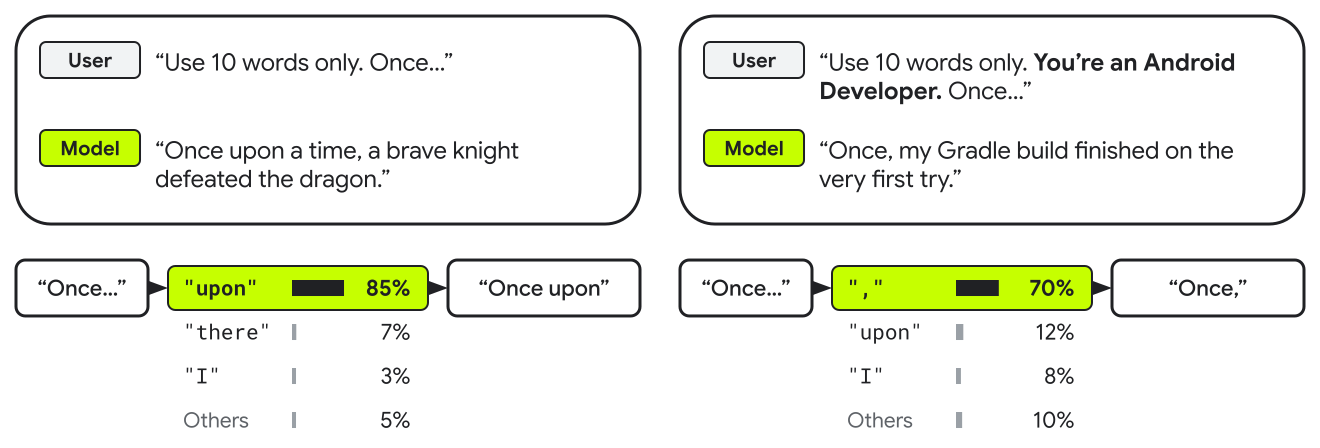
An LLM generates text one token at a time. For each token, it processes everything so far—your prompt plus what it has generated—and picks the next token from a list of likely candidates. That token becomes part of the input for the next one.
This process is called autoregression. The following diagram shows how it works, and how adding a persona to the prompt influences the likely next tokens:
How context bridges knowledge gaps
The likelihood of a token to follow another token depends—among other things—on the training data, which has a cutoff date. For example, an LLM can't use an API released after the cutoff date unless you provide information about the API.
The context, or text that an LLM processes for each response, also changes which tokens are likely to be next. Context is the only way that information about your project reaches the LLM.
For example, your app might wrap Material components in its own design system. That design system isn't in the training data, so by default the LLM writes standard Material components. If the context includes your design system's code—or a reference to it—tokens that match it become more likely.
What LLMs can't do on their own
An LLM only produces output, one response per request, generally in text. It can write a Gradle command, but it can't run the build, get the result, or inspect your app on a device.
Agents bridge this gap through software.
How agents work
The harness is the software around an LLM that turns its responses into actions.
It provides three core elements:
- Foundation: The baseline context included with every request, such as
system instructions, user preferences, project instructions (the
AGENTS.mdfile), and memory. - Capabilities: The on-demand functionality the agent can call to take action, including tools, such as the Android CLI or Model Context Protocol (MCP) servers, and skills.
- Execution: The runtime mechanics that drive tasks to completion, managing the iterative agent loop and lifecycle hooks.
The following diagram shows how these parts fit together:
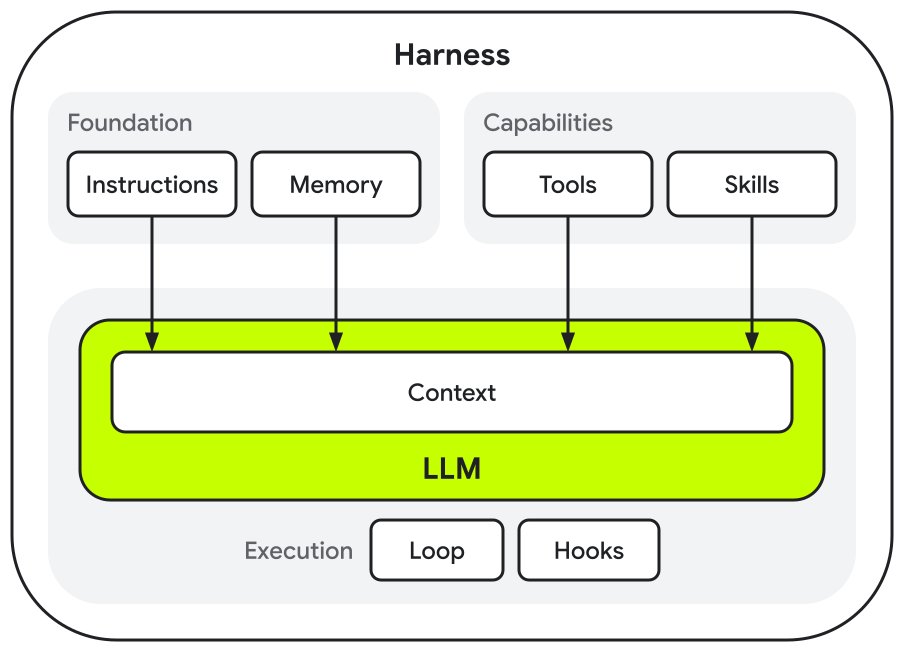
The foundation and capabilities both add knowledge to the context, and can take up space in the context window. The code that supports execution is independent of the LLM, so it doesn't take up space in its context window.
Agents differ mostly in their harness: where it runs, which tools it provides, and how much Android tooling comes built in. The quickstart helps you choose an agent for your Android work.
Foundation
The harness includes the foundation in every request, so it applies to every task.
| Instruction | Function |
|---|---|
| System instructions | Describe the agent's role, its tools, and the rules that it follows. Some harnesses offer a way for you to customize system instructions through features like custom agents. |
| User preferences | Define your individual preferences, such as programming language or response style, which apply only to you. For example, Android Studio adds your IDE-level rules to the beginning of every prompt. |
| Project instructions | Provide project-level conventions that the harness loads when you start a conversation in a project folder. You specify them in files such as AGENTS.md, an open format that many agents read. |
Use project instructions for guidance that applies to almost every task, such as build and test commands and architecture rules. Keep them short, and link to longer documents instead of copying them.
The following table compares vague instructions with specific ones that work
well in an AGENTS.md file:
| Not recommended | Recommended |
|---|---|
| "Make sure the app builds." | "Build: ./gradlew assembleDebug" |
| "Use the latest library versions." | "Use the versions in gradle/libs.versions.toml. Ask before adding a dependency." |
| "Follow modern Android architecture." | "Hoist screen state to a ViewModel so that it survives configuration changes." |
| A copy of your architecture guide | "For architecture details, see docs/architecture.md." |
Memory
Some agents also have memory, which carries history across conversations, such as preferences that you mentioned, earlier decisions, and facts about your project. How memory works varies by harness.
Capabilities
The agent uses tools and skills when a task needs them: tools let the LLM take actions, and skills give it procedures. Like the foundation, capabilities add knowledge to the context.
Tools
When a task needs an action, such as reading a file, building the app, or capturing a screenshot, the LLM calls a tool. The harness runs the tool and adds the result to the context. Without tools, an agent can only predict how your code behaves; with tools, it can check.
The context holds a description of each available tool, so add only the tools that your tasks need. Most harnesses include built-in tools, such as tools that read and edit files and run shell commands. You can add more tools in two ways:
- Connect an MCP server, which provides tools to any agent that supports MCP.
- Install a CLI, which the agent runs through its shell. The same commands also work in scripts and CI.
Skills
A skill is a reusable procedure, such as migrating to a new API, that the agent loads when a task needs it. Until then, the context holds only the skill's name and description.
Skills fill capability gaps: procedures that an LLM doesn't perform reliably on its own. Upgrades with breaking framework changes are a common example. If the new API isn't in the training data, an upgrade across hundreds of files can produce cascading compile errors.
Project instructions and skills both guide the agent, but they reach the LLM differently. Project instructions are in every request, so use them for rules that apply to almost every task. A skill loads only when a task matches its description, so use skills for procedures that only some tasks need.
When you create a skill, limit it to one procedure, and write a
description that says what the skill does and when to use it. Keep SKILL.md
short, and move details into files that it references. Skills use the open
Agent Skills format.
Execution
An LLM produces one response at a time, but most tasks take many steps. Execution turns single responses into a finished task. The agent loop calls the LLM repeatedly and runs its tool calls until the LLM can answer. Hooks run scripts at set points in the loop to make sure that required steps happen.
The loop
The agent loop turns the LLM's responses into actions. The following diagram shows the steps that most agents follow:
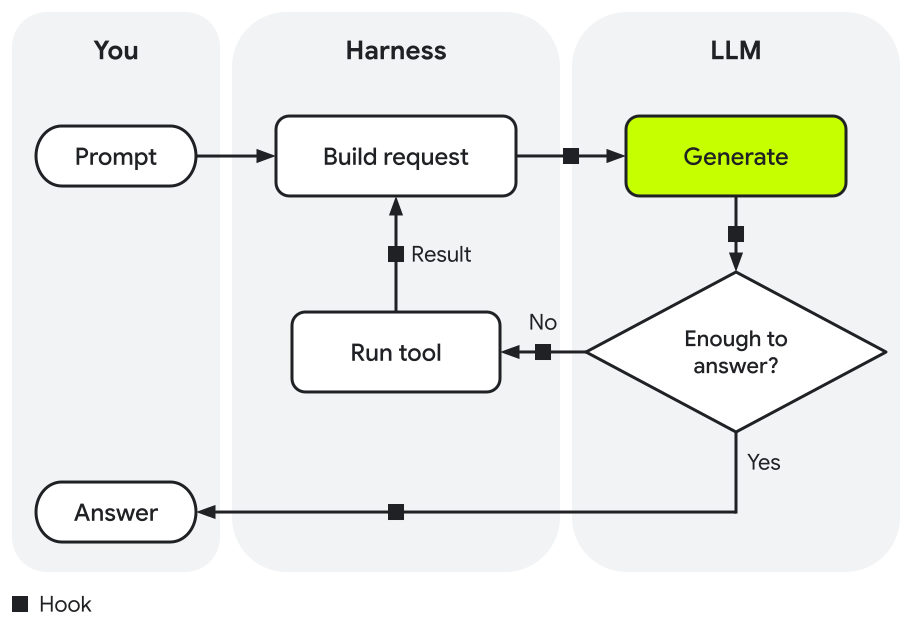
- You send a prompt that describes the task.
- The harness builds a request for the LLM. Its context includes your prompt, the conversation so far, instructions, memory, and the descriptions of available tools and skills.
- The LLM generates a response.
- If it fulfills your request, this is the answer you receive.
- Otherwise, the response is a tool call, such as a call to read a file or run a build.
The harness runs the tool and adds the result, including any error, to the context.
The loop then returns to step 2. Each pass through the loop is one turn.
When the LLM answers instead of calling a tool, the loop ends.
The end of the loop isn't the end of the conversation, the series of prompts and responses that share one context. Your next prompt starts the loop again, with the previous conversation in the context. The context keeps growing with every prompt, so earlier tasks affect later ones until you start a new conversation.
Hooks
An LLM doesn't always follow instructions. Even a clear rule in your prompt or project instructions only makes an action likely, not certain. When something must always happen, or must never happen, you need a deterministic mechanism instead.
A hook is a script that the harness runs at set points in the loop, such as after each tool call or before the answer. Because the harness runs it, not the LLM, a hook runs every time. A hook can also add its output to the context, such as lint errors for the LLM to fix.
Use hooks in two ways:
- Make required steps happen, such as formatting code after each edit, running lint, or running unit tests before the answer.
- Block actions that break a rule. Agents sometimes make a check pass without fixing the code, for example by deleting a failing test or loosening a screenshot comparison. A hook can block edits to test files.
Get better results from agents
Optimizing the results that you get from agents lets you focus on building high-quality apps. Each recommendation in this section closes a gap that causes rework, and explains why it helps.
Give the agent the right context
The right context steers what the LLM generates toward what's relevant to you, such as your project and the current task. This has two sides: the context needs to include what the task needs, and only what the task needs. Unrelated content, such as rules for other tasks or details from an earlier task, can steer the output away from what you asked for.
| Recommendation | Why it helps |
|---|---|
| Give the agent your project's specifics, such as your design system's code. | Your project isn't in the training data, so by default the most likely tokens follow common patterns. When the context includes its specifics, tokens that match your project become more likely. |
| Keep team rules in project instructions, not in user preferences or memory. | Project instructions live in your project, so you add a rule once and everyone on your team gets the same rules. User preferences and memory usually belong to one user and one agent, so rules stored there don't reach your teammates. |
| Put only rules that apply to almost every task in project instructions, and keep them short. | Project instructions are part of every request, so each line can steer the output, even when it doesn't apply to the current task. Linking to longer documents keeps their details out of the context until the agent reads them. |
| Start a new conversation for each unrelated task. | Everything in a conversation stays in the context, so details from earlier tasks can keep steering the output, even when the current task is unrelated. A new conversation starts with only the foundation in the context. |
| If your agent supports subagents, use one for a self-contained subtask, such as researching an API. | A subagent works in its own context window and returns only its result, such as a summary of the API. Its intermediate steps, such as the pages that it reads, stay out of the main agent's context, so they don't affect the main task. |
Give the agent the right tools and skills
Tools let an agent act on your project and check the results, such as by building the app or running tests. Without them, an agent can only predict how your code behaves, and the checking falls to you. Tool and skill descriptions are part of the context too, so the same two sides apply. The agent needs the tools and skills for your tasks, and only those.
| Recommendation | Why it helps |
|---|---|
| Give the agent tools to check its work, such as Android CLI. | The harness adds the results, such as build errors or failed tests, to the context, where they steer the next response toward a fix. |
| Add only the tools and skills that your tasks need. | The context holds a description of every available tool and skill, in every request. Unrelated descriptions can steer the likely next tokens in their direction, such as toward a tool call that the task doesn't need. |
| Install skills only from sources that you trust. | When a skill loads, its instructions guide what the agent does, and a skill can include scripts that the agent runs. In a skill from an untrusted source, either one can lead to actions that you didn't ask for. |
| Name a skill in your prompt when a task depends on it. | A skill loads when the LLM's response requests it. Even when the skill's description matches the task, that request is likely, not certain. The skill's name in your prompt makes it more likely that the agent will use a relevant skill when needed. |
Give the agent a reliable way to check its work
The agent loop ends when the LLM answers instead of calling a tool, and that answer can come before the task works. An agent can even write a test that confirms its own mistake. Clear success conditions, and checks that run every time, give you and the agent a reliable signal that a task is done.
| Recommendation | Why it helps |
|---|---|
| Define requirements and success conditions before the agent starts, and keep them outside the conversation, such as in a file or an implementation plan. | An agent's default definition of done comes from the LLM's training data. Writing yours down before the agent starts puts it early in the context, where it steers the work that follows. A file keeps it intact when the harness summarizes older turns, and you can reference it in a new conversation. |
| Use hooks for steps that must happen every time. | Instructions in your prompt make an action likely, but not certain. The harness runs a hook, not the LLM, so the step happens whatever the LLM generates. |
| Protect the checks that matter, for example with a hook that blocks edits to test files. | An agent can make a check pass without fixing the code, for example by deleting a failing test. With the check protected, a pass means that the code does what the check tests. |
| For complex tasks, have the agent track progress against the requirements, for example with a planning mode or a goal mode. | In a complex task, the conversation grows, and compaction can summarize the requirements that you gave at the start. Each progress update restates the open requirements in the context. That way, details such as dark theme support or state that survives rotation keep steering the output. |
Key terms
The following terms appear throughout this page:
| Term | Definition |
|---|---|
| Agent | An LLM running inside a harness that uses tools in a loop to complete a task |
| Token | A unit of text that an LLM processes, such as a word or part of a word |
| Context | Everything that an LLM processes to generate a response, such as your prompt, files, and instructions |
| Context window | The maximum size of the context, in tokens |
| Harness | The software around an LLM that provides its instructions and tools, runs the agent loop, and turns its responses into actions |
| System instructions | Instructions from the harness, such as the agent's role and rules, that are part of every request |
| Project instructions | Your instructions for a project, such as an
AGENTS.md file,
that are part of every request |
| Memory | Information from earlier conversations that some agents keep and add to the context |
| Tool | A function that the LLM can call to take an action, such as reading a file or running a build |
| Model Context Protocol (MCP) | An open standard for connecting AI applications to external systems |
| Skill | A reusable procedure that the agent loads on demand, such as how to migrate to a new API, in the Agent Skills format |
| Agent loop | The cycle of generating responses and running tools until the LLM can answer |
| Hook | A script that the harness runs at a set point in the loop |
Next steps
Set up an agent for your Android project, and give it Android tools and skills: