בדף הזה מוסבר איך לטפל בבעיות שקשורות לתוצאות של בדיקות יושרה.
אחרי שמבקשים אסימון תקינות, אפשר להציג למשתמש תיבת דו-שיח של Google Play. אפשר להציג את תיבת הדו-שיח אם יש בעיה אחת או יותר בקביעת התקינות או אם התרחש חריג במהלך בקשת API ל-Integrity API. אחרי שסוגרים את תיבת הדו-שיח, אפשר לוודא שהבעיה נפתרה באמצעות בקשה נוספת של אסימון יושרה. אם אתם שולחים בקשות רגילות, אתם צריכים להפעיל מחדש את ספק הטוקנים כדי לקבל פסיקה חדשה.
בקשה לתיבת דו-שיח בנושא תקינות כדי לפתור בעיה בקביעת תקינות
כשלקוח מבקש אסימון יושרה, אפשר להשתמש בשיטה שמוצעת ב-StandardIntegrityToken (Standard API) וב-IntegrityTokenResponse (Classic API):
showDialog(Activity activity, int integrityDialogTypeCode).
בשלבים הבאים מוסבר איך להשתמש ב-Play Integrity API כדי להציג תיבת דו-שיח לתיקון באמצעות קוד תיבת הדו-שיח GET_LICENSED.
אחרי הקטע הזה מפורטים קודי דיאלוג אחרים שהאפליקציה יכולה לבקש.
מבקשים טוקן תקינות מהאפליקציה ושולחים את הטוקן לשרת. אפשר להשתמש בבקשה רגילה או בבקשה קלאסית.
Kotlin
// Request an integrity token
val tokenResponse: StandardIntegrityToken = requestIntegrityToken()
// Send token to app server and get response on what to do next
val yourServerResponse: YourServerResponse = sendToServer(tokenResponse.token())
Java
// Request an integrity token
StandardIntegrityToken tokenResponse = requestIntegrityToken();
// Send token to app server and get response on what to do next
YourServerResponse yourServerResponse = sendToServer(tokenResponse.token());
Unity
// Request an integrity token
StandardIntegrityToken tokenResponse = RequestIntegrityToken();
// Send token to app server and get response on what to do next
YourServerResponse yourServerResponse = sendToServer(tokenResponse.Token);
Unreal Engine
// Request an integrity token
StandardIntegrityToken* Response = RequestIntegrityToken();
// Send token to app server and get response on what to do next
YourServerResponse YourServerResponse = SendToServer(Response->Token);
פורמט מותאם
/// Request an integrity token
StandardIntegrityToken* response = requestIntegrityToken();
/// Send token to app server and get response on what to do next
YourServerResponse yourServerResponse = sendToServer(StandardIntegrityToken_getToken(response));
בשרת, מפענחים את אסימון השלמות ובודקים את השדה
appLicensingVerdict. הוא יכול להיראות בערך כך:// Licensing issue { ... "accountDetails": { "appLicensingVerdict": "UNLICENSED" } }
אם האסימון מכיל את הערך
appLicensingVerdict: "UNLICENSED", צריך להשיב ללקוח של האפליקציה ולבקש ממנו להציג את תיבת הדו-שיח של הרישיון:Kotlin
private fun getDialogTypeCode(integrityToken: String): Int{
  // Get licensing verdict from decrypted and verified integritytoken
  val licensingVerdict: String = getLicensingVerdictFromDecryptedToken(integrityToken)

  return if (licensingVerdict == "UNLICENSED") {
          1 // GET_LICENSED
      } else 0
}
Java
private int getDialogTypeCode(String integrityToken) {
  // Get licensing verdict from decrypted and verified integrityToken
  String licensingVerdict = getLicensingVerdictFromDecryptedToken(integrityToken);

  if (licensingVerdict.equals("UNLICENSED")) {
    return 1; // GET_LICENSED
  }
  return 0;
}
Unity
private int GetDialogTypeCode(string IntegrityToken) {
  // Get licensing verdict from decrypted and verified integrityToken
  string licensingVerdict = GetLicensingVerdictFromDecryptedToken(IntegrityToken);

  if (licensingVerdict == "UNLICENSED") {
    return 1; // GET_LICENSED
  }
  return 0;
}
Unreal Engine
private int GetDialogTypeCode(FString IntegrityToken) {
  // Get licensing verdict from decrypted and verified integrityToken
  FString LicensingVerdict = GetLicensingVerdictFromDecryptedToken(IntegrityToken);

  if (LicensingVerdict == "UNLICENSED") {
    return 1; // GET_LICENSED
  }
  return 0;
}
פורמט מותאם
private int getDialogTypeCode(string integrity_token) {
  /// Get licensing verdict from decrypted and verified integrityToken
  string licensing_verdict = getLicensingVerdictFromDecryptedToken(integrity_token);

  if (licensing_verdict == "UNLICENSED") {
    return 1; // GET_LICENSED
  }
  return 0;
}
באפליקציה, מפעילים את
showDialogעם הקוד המבוקש שאוחזר מהשרת:Kotlin
// Show dialog as indicated by the server
val showDialogType: Int? = yourServerResponse.integrityDialogTypeCode()
if (showDialogType == null) {
   return
}

// Create dialog request
val dialogRequest = StandardIntegrityDialogRequest.builder()
        .setActivity(activity)
        .setTypeCode(showDialogType)
        .setStandardIntegrityResponse(StandardIntegrityResponse.TokenResponse(token))
        .build()

// Call showDialog, the dialog will be shown on top of the provided activity
// and the task will complete when the dialog is closed.
val result: Task<Int> = standardIntegrityManager.showDialog(dialogRequest)

// Handle response code, call the Integrity API again to confirm that the
// verdict issue has been resolved.
Java
// Show dialog as indicated by the server
@Nullable Integer showDialogType = yourServerResponse.integrityDialogTypeCode();
if (showDialogType == null) {
   return;
}

// Create dialog request
StandardIntegrityDialogRequest dialogRequest =
    StandardIntegrityDialogRequest.builder()
        .setActivity(getActivity())
        .setTypeCode(showDialogTypeCode)
        .setStandardIntegrityResponse(new StandardIntegrityResponse.TokenResponse(token))
        .build();

// Call showDialog, the dialog will be shown on top of the provided activity
// and the task will complete when the dialog is closed.
Task<Integer> result = standardIntegrityManager.showDialog(dialogRequest);

// Handle response code, call the Integrity API again to confirm that the
// verdict issue has been resolved.
Unity
// Initialize the V2 manager. Requires Play Integrity Unity Plugin v2.0.0 or
// higher.
var standardIntegrityManager = new StandardIntegrityManagerV2();
IEnumerator ShowDialogCoroutine() {
  int showDialogType = yourServerResponse.IntegrityDialogTypeCode();

  PlayAsyncOperation<IntegrityDialogResponseCode, StandardIntegrityError> showDialogTask;

  using (var activity = UnityPlayerHelper.GetCurrentActivity())
  {
      // Create a dialog request
      var dialogRequest = new StandardIntegrityDialogRequest(tokenResponse, activity, showDialogType);

      // Call showDialog with the request, the dialog will be shown on top of the
      // provided activity and complete when the dialog is closed.
      showDialogTask = standardIntegrityManager.ShowDialog(dialogRequest);
  }

  // Wait for PlayAsyncOperation to complete.
  yield return showDialogTask;

  // Handle response code, call the Integrity API again to confirm that the
  // verdict issue been resolved.
}
Unreal Engine
// .h
void MyClass::OnShowDialogCompleted(
  EStandardIntegrityErrorCode Error,
  EIntegrityDialogResponseCode Response)
{
  // Handle response code, call the Integrity API again to confirm that the
  // verdict issue has been resolved.
}

// .cpp
void MyClass::RequestIntegrityToken()
{
  UStandardIntegrityToken* Response = ...
  int TypeCode = YourServerResponse.integrityDialogTypeCode();

  // Create a delegate to bind the callback function.
  FShowDialogStandardOperationCompletedDelegate Delegate;

  // Bind the completion handler (OnShowDialogCompleted) to the delegate.
  Delegate.BindDynamic(this, &MyClass::OnShowDialogCompleted);

  // Call ShowDialog with TypeCode which completes when the dialog is closed.
  Response->ShowDialog(TypeCode, Delegate);
}
פורמט מותאם
// Show dialog as indicated by the server
int show_dialog_type = yourServerResponse.integrityDialogTypeCode();
if(show_dialog_type == 0){
return;
}

/// Create dialog request
StandardIntegrityDialogRequest* dialog_request;
StandardIntegrityDialogRequest_create(&dialog_request);
StandardIntegrityDialogRequest_setTypeCode(dialog_request, show_dialog_type);
StandardIntegrityDialogRequest_setActivity(dialog_request, activity);
StandardIntegrityDialogRequest_setStandardIntegrityToken(dialog_request,
                                              token_response);

/// Call showDialog with the dialog request. The dialog will be shown on top
/// of the provided activity and complete when the dialog is closed by the
/// user.
StandardIntegrityDialogResponse* dialog_response;
StandardIntegrityErrorCode error_code =
  StandardIntegrityManager_showDialog(dialog_request, &dialog_response);

/// Use polling to wait for the async operation to complete. Note, the polling
/// shouldn't block the thread where the StandardIntegrityManager is running.
IntegrityDialogResponseCode response_code = INTEGRITY_DIALOG_RESPONSE_UNKNOWN;
while (error_code == STANDARD_INTEGRITY_NO_ERROR) {
  error_code = StandardIntegrityDialogResponse_getResponseCode(dialog_response, &response_code);
  if(response_code != INTEGRITY_DIALOG_RESPONSE_UNKNOWN){
    break;
  }
}

/// Free memory
StandardIntegrityDialogRequest_destroy(dialog_request);
StandardIntegrityDialogResponse_destroy(dialog_response);

/// Handle response code, call the Integrity API again to confirm that the
/// verdict issues have been resolved.
תיבת הדו-שיח מוצגת מעל הפעילות שצוינה. כשהמשתמש סוגר את תיבת הדו-שיח, המשימה מסתיימת עם קוד תגובה.
(אופציונלי) מבקשים עוד אסימון כדי להציג תיבות דו-שיח נוספות. אם אתם שולחים בקשות רגילות, אתם צריכים להפעיל מחדש את ספק הטוקנים כדי לקבל פסיקה חדשה.
בקשה לתיבת דו-שיח שלמות כדי לתקן חריגה בצד הלקוח
אם בקשה ל-Integrity API נכשלת עם StandardIntegrityException (Standard API) או IntegrityServiceException (Classic API) ואפשר לתקן את החריגה, אפשר להשתמש בתיבות הדו-שיח GET_INTEGRITY או GET_STRONG_INTEGRITY כדי לתקן את השגיאה.
בשלבים הבאים מוסבר איך להשתמש בתיבת הדו-שיח GET_INTEGRITY כדי לתקן שגיאה בצד הלקוח שאפשר לתקן, שדווחה על ידי Integrity API.
בודקים שאפשר לתקן את החריגה שמוחזרת מבקשה ל-Integrity API.
Kotlin
private fun isExceptionRemediable(exception: ExecutionException): Boolean {
  val cause = exception.cause
  if (cause is StandardIntegrityException && cause.isRemediable) {
      return true
  }
  return false
}
Java
private boolean isExceptionRemediable(ExecutionException exception) {
  Throwable cause = exception.getCause();
  if (cause instanceof StandardIntegrityException integrityException
&& integrityException.isRemediable()) {
      return true;
  }
  return false;
}
Unity
private bool IsExceptionRemediable(StandardIntegrityError error) {
  // Check if the operation resulted in a remediable error
  if (error != null && error.ErrorCode != StandardIntegrityErrorCode.NoError && error.IsRemediable) {
      return true;
  }
  return false;
}
פורמט מותאם
bool IsErrorRemediable(StandardIntegrityToken* token) {
  /// Check if the error associated with the token is remediable
  bool isRemediable = false;
  if(StandardIntegrityToken_getIsRemediable(response, &isRemediable) == STANDARD_INTEGRITY_NO_ERROR){
    return isRemediable;
  }
  return false;
}
אם אפשר לתקן את החריגה, מבקשים את תיבת הדו-שיח
GET_INTEGRITYבאמצעות החריגה שהוחזרה. תיבת הדו-שיח תוצג מעל הפעילות שצוינה, והמשימה שהוחזרה תושלם עם קוד תגובה אחרי שהמשתמש יסגור את תיבת הדו-שיח.Kotlin
private fun showDialog(exception: StandardIntegrityException) {
  // Create a dialog request
  val standardIntegrityDialogRequest =
      StandardIntegrityDialogRequest.builder()
          .setActivity(activity)
          .setType(IntegrityDialogTypeCode.GET_INTEGRITY)
          .setStandardIntegrityResponse(ExceptionDetails(exception))
          .build()

  // Request dialog
  val responseCode: Task<Int> =
        standardIntegrityManager.showDialog(standardIntegrityDialogRequest)
}
Java
private void showDialog(StandardIntegrityException exception) {
  // Create a dialog request
  StandardIntegrityDialogRequest standardIntegrityDialogRequest =
      StandardIntegrityDialogRequest.builder()
          .setActivity(this.activity)
          .setType(IntegrityDialogTypeCode.GET_INTEGRITY)
          .setStandardIntegrityResponse(new ExceptionDetails(exception))
          .build();

  // Request dialog
  Task<Integer> responseCode =
        standardIntegrityManager.showDialog(standardIntegrityDialogRequest);
}
Unity
// Initialize the V2 manager. Requires Play Integrity Unity Plugin v2.0.0 or
// higher.
var standardIntegrityManager = new StandardIntegrityManagerV2();
IEnumerator ShowDialogToFixError(StandardIntegrityError error) {
  PlayAsyncOperation<IntegrityDialogResponseCode, StandardIntegrityError> showDialogTask;

  using (var activity = UnityPlayerHelper.GetCurrentActivity())
  {
      // Create a dialog request using the error
      var dialogRequest = new StandardIntegrityDialogRequest(error, activity, GET_INTEGRITY_DIALOG);

      // Request dialog
      showDialogTask = standardIntegrityManager.ShowDialog(dialogRequest);
  }

  // Wait for PlayAsyncOperation to complete.
  yield return showDialogTask;
}
פורמט מותאם
private void showDialogToFixError(StandardIntegrityToken* token) {
  /// If the token request failed, and the underlying error is not fixable
  /// then return early
  if(isErrorRemediable(token)) {
    return;
  }

  /// Create dialog request
  StandardIntegrityDialogRequest* dialog_request;
  StandardIntegrityDialogRequest_create(&dialog_request);
  StandardIntegrityDialogRequest_setTypeCode(dialog_request,
                                     kGetIntegrityDialogTypeCode);
  StandardIntegrityDialogRequest_setActivity(dialog_request, activity);
  StandardIntegrityDialogRequest_setStandardIntegrityToken(dialog_request,
                                                  token_response);

  /// Call showDialog with the dialog request. The dialog will be shown on
  /// top of the provided activity and complete when the dialog is closed by
  /// the user.
  StandardIntegrityDialogResponse* dialog_response;
  StandardIntegrityErrorCode error_code =
      StandardIntegrityManager_showDialog(dialog_request, &dialog_response);

  /// Use polling to wait for the async operation to complete.
  /// Note, the polling shouldn't block the thread where the
  /// StandardIntegrityManager is running.
  IntegrityDialogResponseCode response_code = INTEGRITY_DIALOG_RESPONSE_UNKNOWN;
  while (error_code == STANDARD_INTEGRITY_NO_ERROR) {
      error_code = StandardIntegrityDialogResponse_getResponseCode(response, &response_code);
      if(response_code != INTEGRITY_DIALOG_RESPONSE_UNKNOWN){
        break;
      }
  }

  /// Free memory
  StandardIntegrityDialogRequest_destroy(dialog_request);
  StandardIntegrityDialogResponse_destroy(dialog_response);

}
אם קוד התגובה שמוחזר מציין שהפעולה בוצעה בהצלחה, הבקשה הבאה לאסימון יושרה אמורה להצליח ללא חריגים. אם אתם שולחים בקשות רגילות, אתם צריכים להפעיל מחדש את ספק הטוקנים כדי לקבל פסיקה חדשה.
קודים של תיבות דו-שיח של Integrity API
GET_LICENSED (קוד סוג 1)
בעיה בתוצאה
תיבת הדו-שיח הזו מתאימה לשתי בעיות:
- גישה לא מורשית:
appLicensingVerdict: "UNLICENSED". המשמעות היא שלמשתמש אין הרשאה לאפליקציה שלכם, וזה יכול לקרות אם המשתמש העביר אותה ממחשב או רכש אותה מחנות אפליקציות אחרת ולא מ-Google Play. - אפליקציה שבוצעה בה התערבות:
appRecognitionVerdict: "UNRECOGNIZED_VERSION". המשמעות היא שהקובץ הבינארי של האפליקציה שלך עבר שינוי או שהוא לא גרסה שמזוהה על ידי Google Play.
תיקון שגיאות
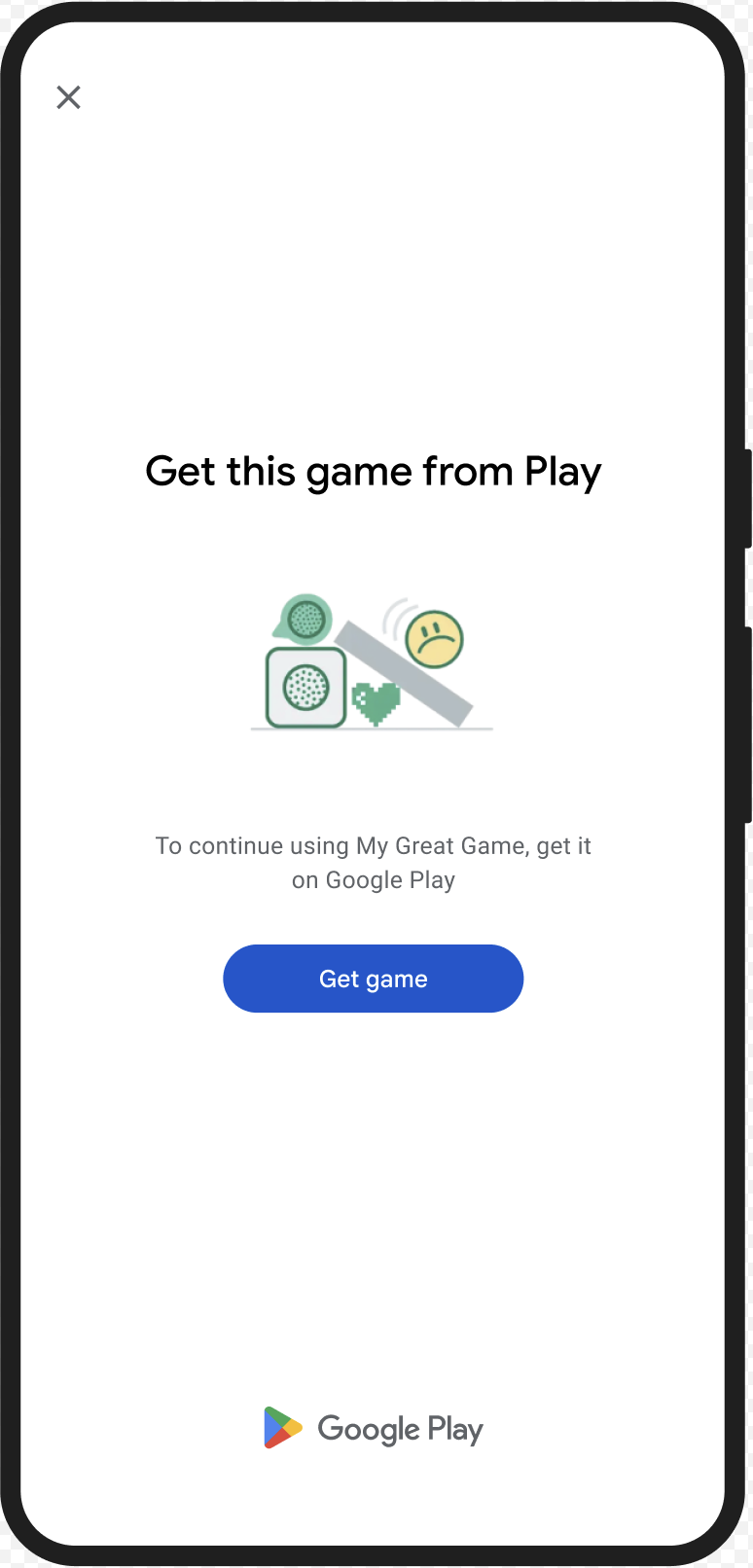
אתם יכולים להציג את תיבת הדו-שיח GET_LICENSED כדי לבקש מהמשתמש להוריד את האפליקציה המקורית מ-Google Play. תיבת הדו-שיח הזו מתייחסת לשני התרחישים:
- למשתמש ללא רישיון, המדיניות מעניקה רישיון ל-Play. ההגדרה הזו מאפשרת למשתמש לקבל עדכונים לאפליקציות מ-Google Play.
- משתמשים עם גרסה שעברה שינוי לא מורשה של האפליקציה מופנים להתקנת הגרסה המקורית מ-Google Play.
כשהמשתמש משלים את תיבת הדו-שיח, בדיקות השלמות הבאות מחזירות appLicensingVerdict: "LICENSED" ו-appRecognitionVerdict: "PLAY_RECOGNIZED".
דוגמה לחוויית משתמש
CLOSE_UNKNOWN_ACCESS_RISK (קוד סוג 2)
בעיה בתוצאה
אם הערך של environmentDetails.appAccessRiskVerdict.appsDetected הוא "UNKNOWN_CAPTURING" או "UNKNOWN_CONTROLLING", המשמעות היא שיש אפליקציות אחרות שפועלות במכשיר (לא אפליקציות שהותקנו דרך Google Play או שהוטענו מראש במחיצת המערכת על ידי יצרן המכשיר) שיכולות לצלם את המסך או לשלוט במכשיר.
תיקון שגיאות
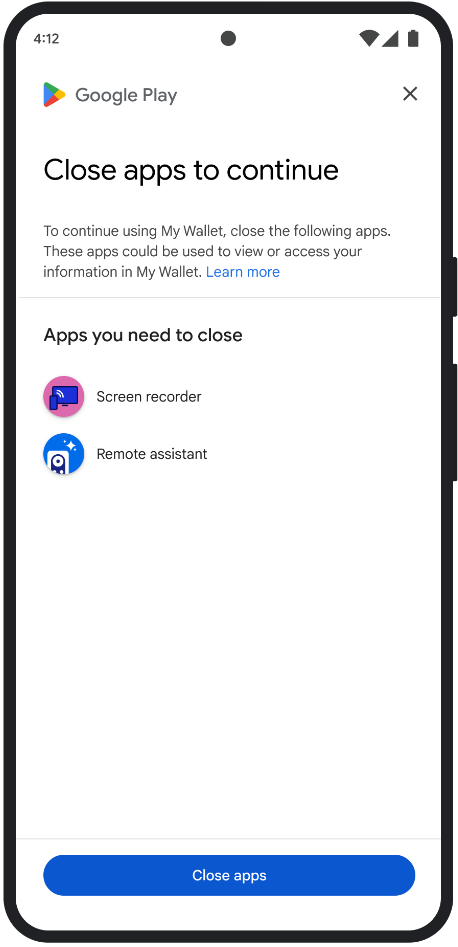
אתם יכולים להציג את תיבת הדו-שיח CLOSE_UNKNOWN_ACCESS_RISK כדי להציג למשתמש הנחיה לסגור את כל האפליקציות הלא מוכרות שעשויות לצלם את המסך או לשלוט במכשיר.
אם המשתמש מקיש על הלחצן Close all, כל האפליקציות האלה נסגרות.
דוגמה לחוויית משתמש
CLOSE_ALL_ACCESS_RISK (קוד סוג 3)
בעיה בתוצאה
אם environmentDetails.appAccessRiskVerdict.appsDetected מכיל את אחד מהערכים הבאים: "KNOWN_CAPTURING", "KNOWN_CONTROLLING","UNKNOWN_CAPTURING" או "UNKNOWN_CONTROLLING", המשמעות היא שיש אפליקציות שפועלות במכשיר ויכולות לצלם את המסך או לשלוט במכשיר.
תיקון שגיאות
אתם יכולים להציג את תיבת הדו-שיח CLOSE_ALL_ACCESS_RISK כדי להציג למשתמש הנחיה לסגור את כל האפליקציות שיכולות לצלם את המסך או לשלוט במכשיר. אם המשתמש מקיש על הלחצן Close all, כל האפליקציות האלה נסגרות במכשיר.
דוגמה לחוויית משתמש
GET_INTEGRITY (קוד סוג 4)
בעיה בתוצאה
תיבת הדו-שיח הזו מתאימה לבעיות הבאות:
יושרה חלשה של המכשיר: אם
deviceRecognitionVerdictלא מכילMEETS_DEVICE_INTEGRITY, יכול להיות שהמכשיר לא מקורי ולא מאושר כמכשיר Android. לדוגמה, מצב כזה יכול לקרות אם תוכנת האתחול של המכשיר פתוחה או שמערכת ההפעלה של Android שנטענה בו היא לא תמונה מאושרת של היצרן.גישה לא מורשית:
appLicensingVerdict: "UNLICENSED". המשמעות היא שלמשתמש אין הרשאה לאפליקציה שלכם, וזה יכול לקרות אם המשתמש העביר אותה ממחשב או רכש אותה מחנות אפליקציות אחרת ולא מ-Google Play.אפליקציה שבוצעה בה התערבות:
appRecognitionVerdict: "UNRECOGNIZED_VERSION". המשמעות היא שהקובץ הבינארי של האפליקציה שלך עבר שינוי או שהוא לא גרסה שמערכת Google Play מזהה.חריגים בצד הלקוח: כשמתרחש חריג שניתן לתיקון במהלך בקשת API ל-Integrity API. חריגים שניתן לפתור הם חריגים של Integrity API עם קודי שגיאה כמו
PLAY_SERVICES_VERSION_OUTDATED,NETWORK_ERROR,PLAY_SERVICES_NOT_FOUNDוכו'. אפשר להשתמש בשיטהexception.isRemediable()כדי לבדוק אם אפשר לפתור חריג באמצעות תיבת הדו-שיח.
תיקון שגיאות
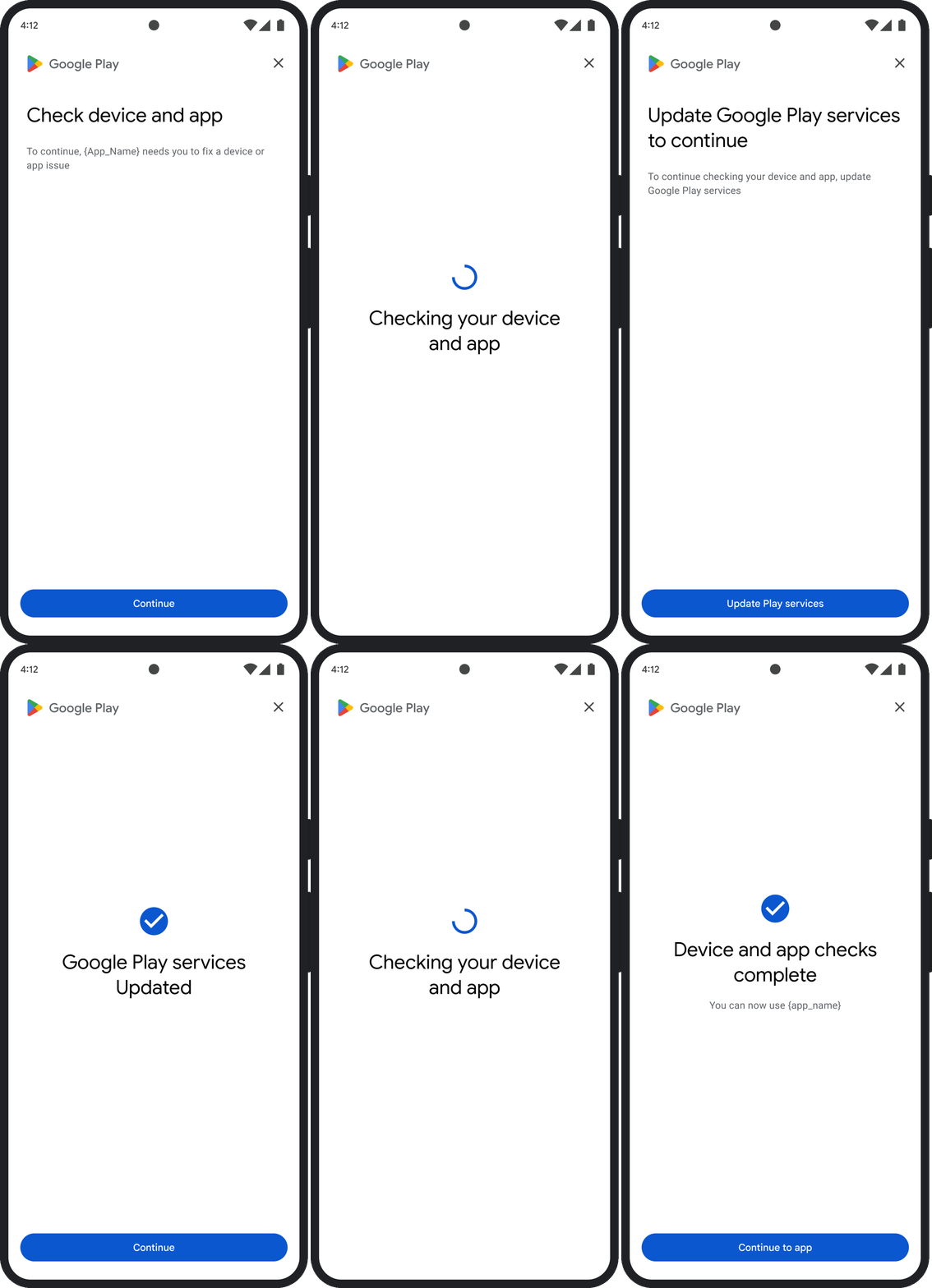
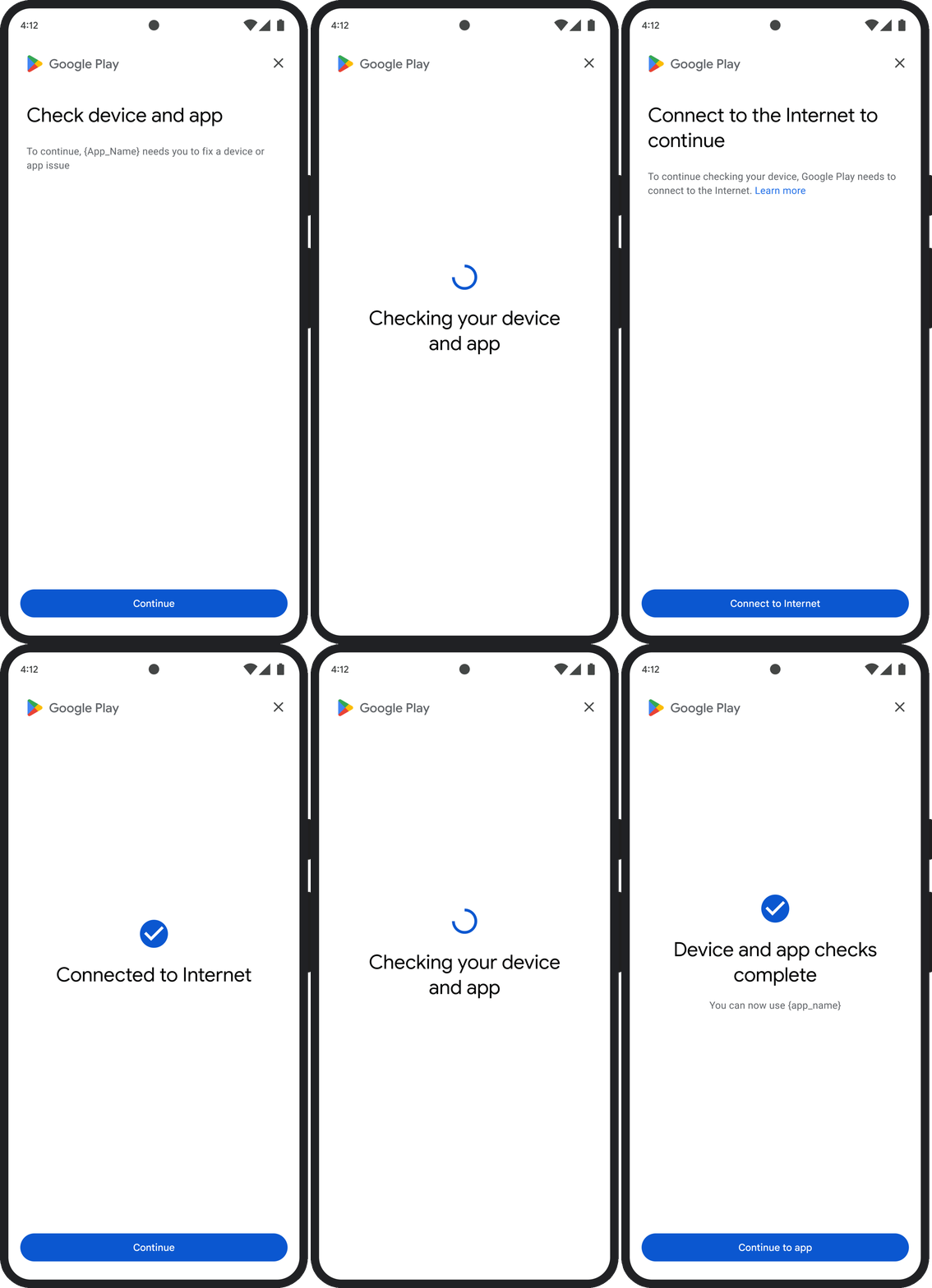
תיבת הדו-שיח GET_INTEGRITY נועדה לייעל את חוויית המשתמש על ידי טיפול בכמה שלבי תיקון בתהליך רציף אחד. כך המשתמש לא צריך ליצור אינטראקציה עם כמה תיבות דו-שיח נפרדות כדי לפתור בעיות שונות.
כשמבקשים את תיבת הדו-שיח, היא מזהה באופן אוטומטי אילו בעיות מתוך הבעיות שזוהו בחוות הדעת קיימות, ומספקת את השלבים המתאימים לפתרון הבעיות. כלומר, בקשה אחת לדיאלוג יכולה לטפל בכמה בעיות בו-זמנית, כולל:
- תקינות המכשיר: אם מזוהה בעיה בתקינות המכשיר, בתיבת הדו-שיח יוצגו למשתמש הוראות לשיפור מצב האבטחה של המכשיר כדי לעמוד בדרישות לקבלת תוצאה
MEETS_DEVICE_INTEGRITY. - תקינות האפליקציה: אם מזוהות בעיות כמו גישה לא מורשית או שיבוש של האפליקציה, תיבת הדו-שיח תנחה את המשתמשים להוריד את האפליקציה מחנות Play כדי לפתור את הבעיות.
- חריגים בצד הלקוח: בתיבת הדו-שיח מתבצעת בדיקה של בעיות בסיסיות שגרמו לחריג ב-Integrity API, ונעשה ניסיון לפתור אותן. לדוגמה, יכול להיות שההודעה תבקש מהמשתמש לעדכן גרסה לא עדכנית של Google Play Services.
דוגמה לחוויית משתמש
GET_STRONG_INTEGRITY (קוד סוג 5)
בעיה בתוצאה
התיבה הזו נועדה לפתור את כל הבעיות שקשורות ל-GET_INTEGRITY, עם יכולת נוספת לפתור בעיות שמונעות ממכשיר לקבל פסיקה של MEETS_STRONG_INTEGRITY ובעיות שקשורות לפסיקה של Play Protect.
תיקון שגיאות
GET_STRONG_INTEGRITY נועד לייעל את חוויית המשתמש על ידי טיפול בכמה שלבי תיקון בתהליך רציף אחד. בתיבת הדו-שיח מתבצעת בדיקה אוטומטית של בעיות בשלמות הכתובת, כולל:
- תקינות המכשיר: אם מזוהה בעיה בתקינות המכשיר, בתיבת הדו-שיח יוצגו למשתמש הוראות לשיפור מצב האבטחה של המכשיר כדי לעמוד בדרישות לקבלת תוצאה
MEETS_STRONG_INTEGRITY. סטטוס Play Protect: אם הסמל
playProtectVerdictמציין שיש בעיה, בתיבת הדו-שיח יוצגו למשתמש הוראות לפתרון הבעיה:- אם Play Protect מושבת (
playProtectVerdict == POSSIBLE_RISK), בתיבת הדו-שיח תוצג למשתמש בקשה להפעיל אותו ולבצע סריקה של כל האפליקציות במכשיר. - אם מזוהות אפליקציות מזיקות (
playProtectVerdict == MEDIUM_RISKאוHIGH_RISK), תיבת הדו-שיח תפנה את המשתמש להסיר אותן באמצעות Google Play Protect.
- אם Play Protect מושבת (
תקינות האפליקציה: אם מזוהות בעיות כמו גישה לא מורשית או שינוי לא מורשה באפליקציה, בתיבת הדו-שיח תופיע בקשה מהמשתמש להוריד את האפליקציה מחנות Play כדי לפתור את הבעיה.
חריגים בצד הלקוח: תיבת הדו-שיח מנסה גם לפתור בעיות בסיסיות שגרמו לחריג ב-Integrity API. לדוגמה, יכול להיות שהאפליקציה תבקש מהמשתמש להפעיל את Google Play Services אם היא תזהה שהשירות מושבת. חריגים שניתן לפתור הם חריגים של Integrity API עם קודי שגיאה כמו
PLAY_SERVICES_VERSION_OUTDATED,NETWORK_ERRORאוPLAY_SERVICES_NOT_FOUND. אפשר להשתמש בשיטהexception.isRemediable()כדי לבדוק אם אפשר לתקן שגיאה באמצעות תיבת הדו-שיח.
דוגמה לחוויית משתמש