

با دسترسی به کاربران خود در هر کجا که هستند، تعامل با برنامه را افزایش دهید. Engage SDK را ادغام کنید تا توصیههای شخصیسازیشده و محتوای مداوم را مستقیماً به کاربران در سطوح مختلف روی دستگاه، مانند Collections ، Entertainment Space و Play Store ارائه دهید. این ادغام کمتر از ۵۰ کیلوبایت (فشردهشده) به میانگین APK اضافه میکند و برای اکثر برنامهها حدود یک هفته از زمان توسعهدهنده را میگیرد. برای اطلاعات بیشتر به سایت تجاری ما مراجعه کنید.
این راهنما شامل دستورالعملهایی برای شرکای توسعهدهنده است تا محتوای سفر و رویدادها را به سطوح محتوای Engage ارائه دهند.
جزئیات ادغام
اصطلاحات
این ادغام شامل انواع خوشههای زیر است: توصیه ، ویژه ، رزرو و ادامه جستجو .
خوشههای توصیه، پیشنهادهای شخصیسازیشدهی سفر و رویداد را از یک شریک توسعهدهندهی منفرد نشان میدهند. این توصیهها میتوانند برای کاربر شخصیسازی شده یا عمومی شوند (برای مثال، موارد پرطرفدار). از این موارد برای ارائهی توصیههای مقالات، رویدادها، اقامتگاهها یا مکانهای دیدنی استفاده کنید.
- یک خوشه توصیه میتواند از فهرستهای
ArticleEntity،EventEntity،LodgingEntity،PointOfInterestEntityیاStoreEntityساخته شود، اما ترکیبی از انواع مختلف موجودیتها نیست.
توصیههای شما ساختار زیر را دارند:
خوشه توصیه: یک نمای رابط کاربری که شامل گروهی از توصیهها از یک شریک توسعهدهنده است.
موجودیت: شیئی که یک آیتم واحد را در یک خوشه نشان میدهد. این ادغام، موجودیتهایی را ارائه میدهد که با استفاده از خوشه توصیه، نمایان میشوند:
ArticleEntity : ArticleEntity یک پیشنهاد برای محتوای متنی مرتبط با سفر و رویدادها ارائه میدهد. میتوان از آن برای مقالات، پستهای وبلاگ، محتوای بازاریابی، گزیدههای خبری و غیره استفاده کرد.
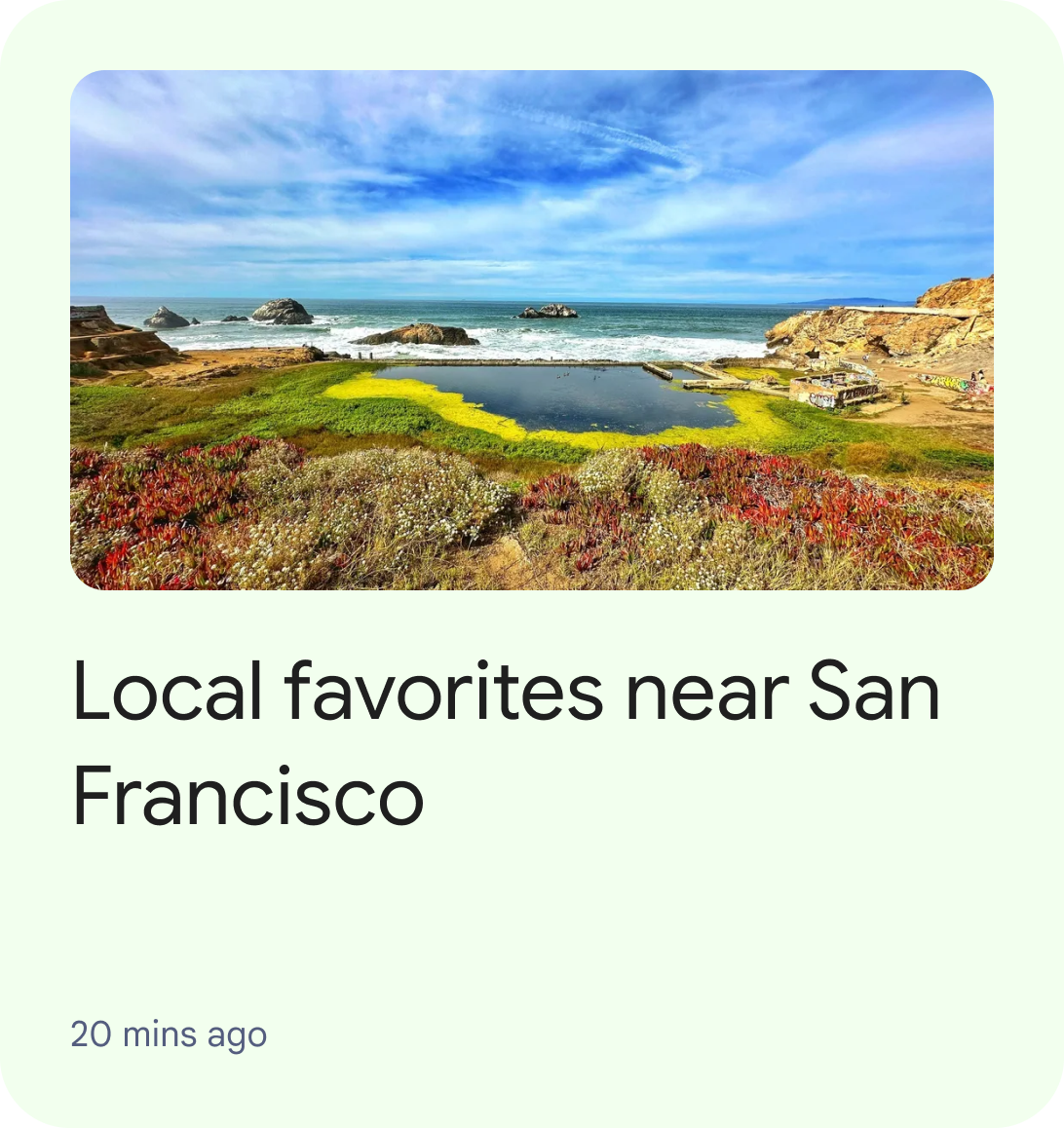
شکل ۱: رابط کاربری که یک ArticleEntity واحد را در خوشه توصیهها نشان میدهد. EventEntity : EventEntity نشان دهنده رویدادی است که در آینده اتفاق میافتد. زمان شروع رویداد، بخش مهمی از اطلاعات است که باید به کاربران منتقل شود.
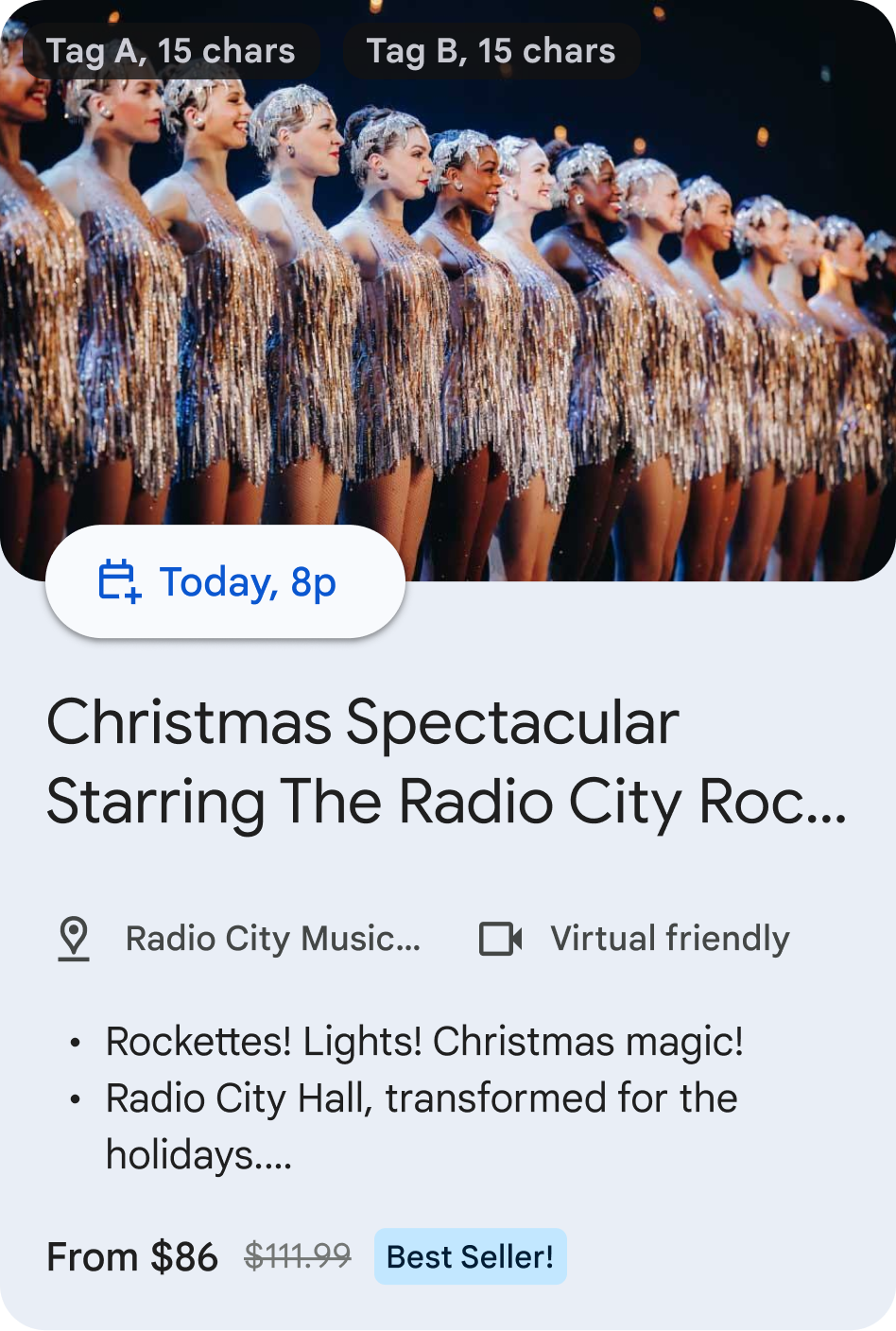
شکل ۲: رابط کاربری که یک EventEntity واحد را در خوشه توصیهها نشان میدهد. LodgingEntity : LodgingEntity نشان دهنده یک اقامتگاه، مانند هتل، آپارتمان، خانه تعطیلات برای اجاره کوتاه مدت و بلند مدت است.
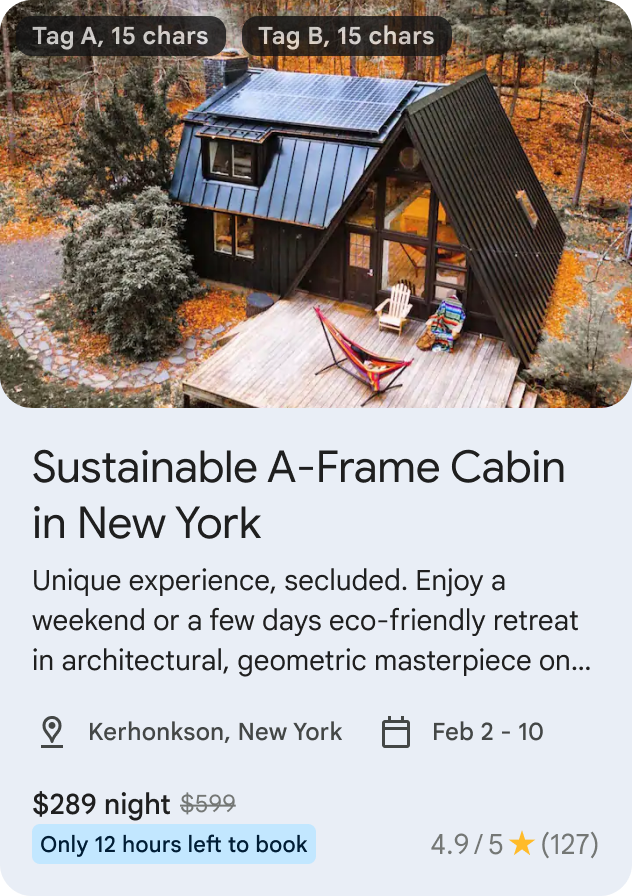
شکل ۳: رابط کاربری که یک LodgingEntity واحد را در خوشه توصیهها نشان میدهد. StoreEntity : StoreEntity نشاندهنده یک فروشگاه، رستوران، کافه و غیره است. این عنصر، محتوایی را برجسته میکند که در آن یک محل غذاخوری یا فروشگاه، بخش مهمی از اطلاعات است که باید به کاربران منتقل شود.
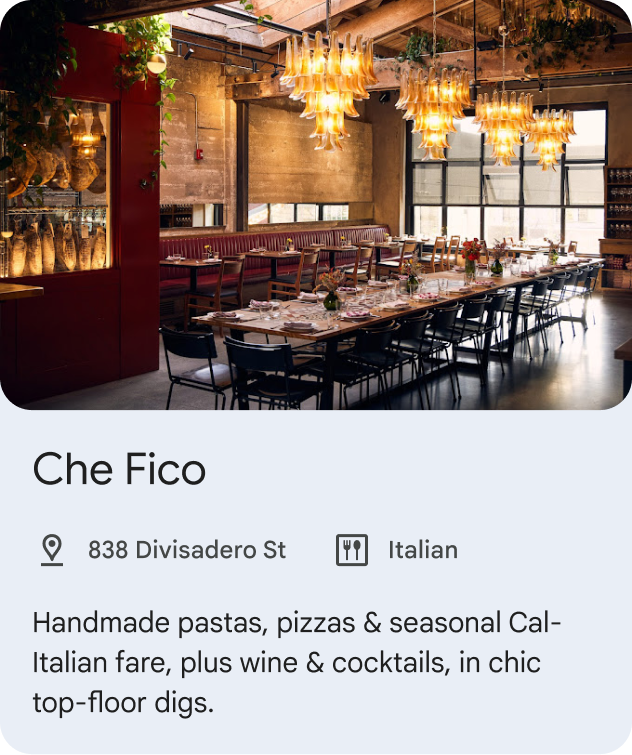
شکل ۴: رابط کاربری که یک StoreEntity واحد را در خوشه توصیهها نشان میدهد. PointOfInterestEntity : PointOfInterestEntity نشاندهنده یک مکان مورد علاقه مانند پمپ بنزین، محل برگزاری رویداد، پارک تفریحی، موزه، جاذبه گردشگری، مسیر پیادهروی و غیره است. این مکان، محتوایی را برجسته میکند که در آن مکان، اطلاعات مهمی است که باید به کاربران منتقل شود. نباید از آن برای اقامت، فروشگاه یا محل غذاخوری استفاده شود.
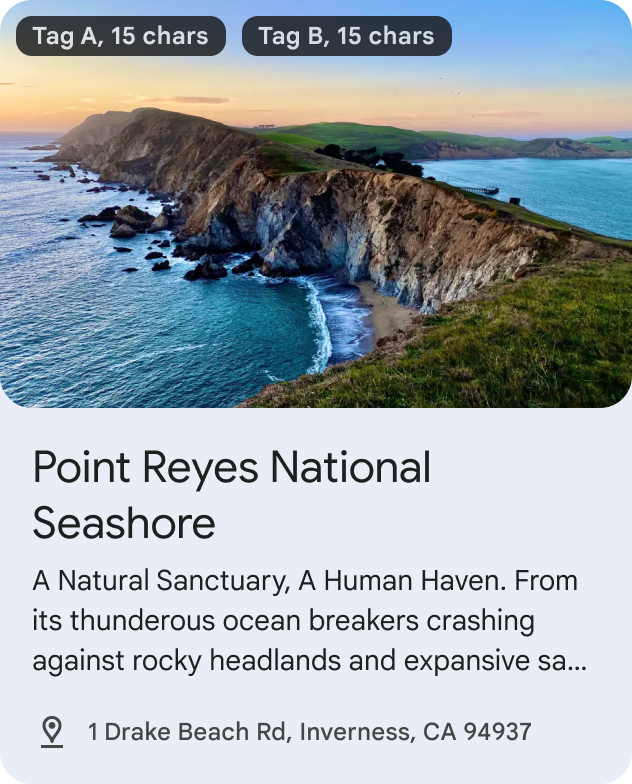
شکل ۵: رابط کاربری که یک PointOfInterestEntity واحد را در خوشه توصیهها نشان میدهد.
- یک خوشه توصیه میتواند از فهرستهای
خوشه رزرو ، محتوایی را که اخیراً توسط کاربران چندین شریک توسعهدهنده در یک گروهبندی رابط کاربری واحد مورد استفاده قرار گرفته است، نشان میدهد. هر شریک توسعهدهنده مجاز به پخش حداکثر ۱۰ موجودیت در خوشه رزرو خواهد بود.
محتوای رزرو شما میتواند ساختار زیر را داشته باشد:
RestaurantReservationEntity : RestaurantReservationEntity نشاندهنده رزرو برای یک رستوران یا کافه است و به کاربران کمک میکند تا رزروهای آینده یا جاری رستوران را پیگیری کنند.
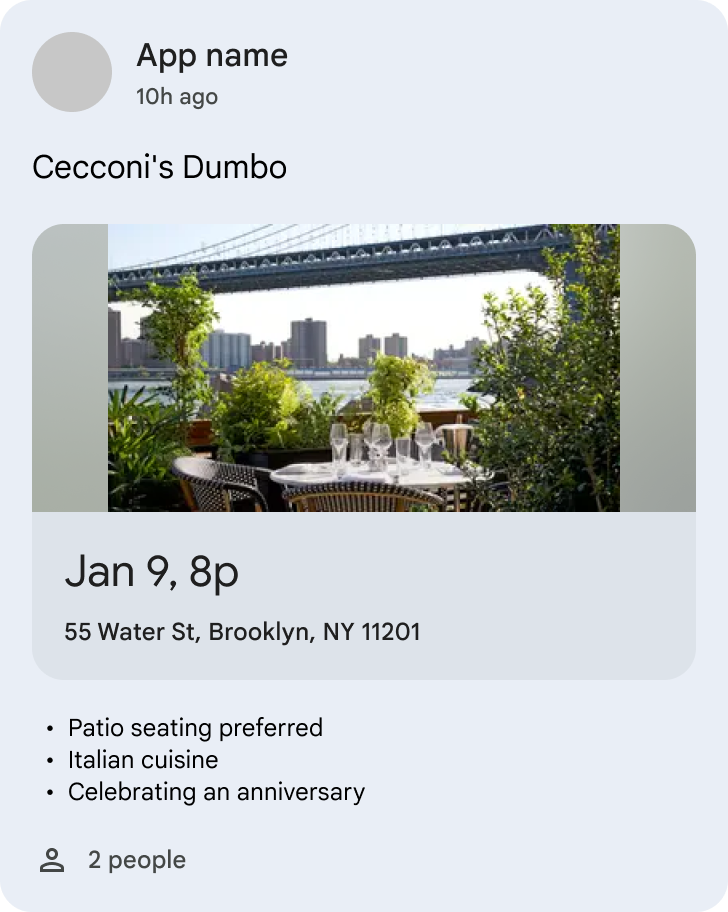
شکل ۶. رابط کاربری که یک RestaurantReservationEntity واحد را در یک خوشه Reservation نشان میدهد. EventReservationEntity : EventReservationEntity نشاندهنده رزرو برای یک رویداد است و به کاربران کمک میکند تا رزرو رویدادهای آینده یا در حال انجام را پیگیری کنند. رویدادها میتوانند شامل موارد زیر باشند، اما محدود به آنها نیستند:
- رویدادهای ورزشی مانند رزرو مسابقه فوتبال
- رویدادهای بازی مانند رزرو برای eSports
- رویدادهای سرگرمی مانند رزرو فیلم در سینما، کنسرت، تئاتر، امضای کتاب
- رزرو سفر یا مکانهای مورد علاقه مانند تورهای گردشگری، بلیط موزه
- رزروهای اجتماعی / سمینار / کنفرانس
- رزرو جلسات آموزشی/تربیتی
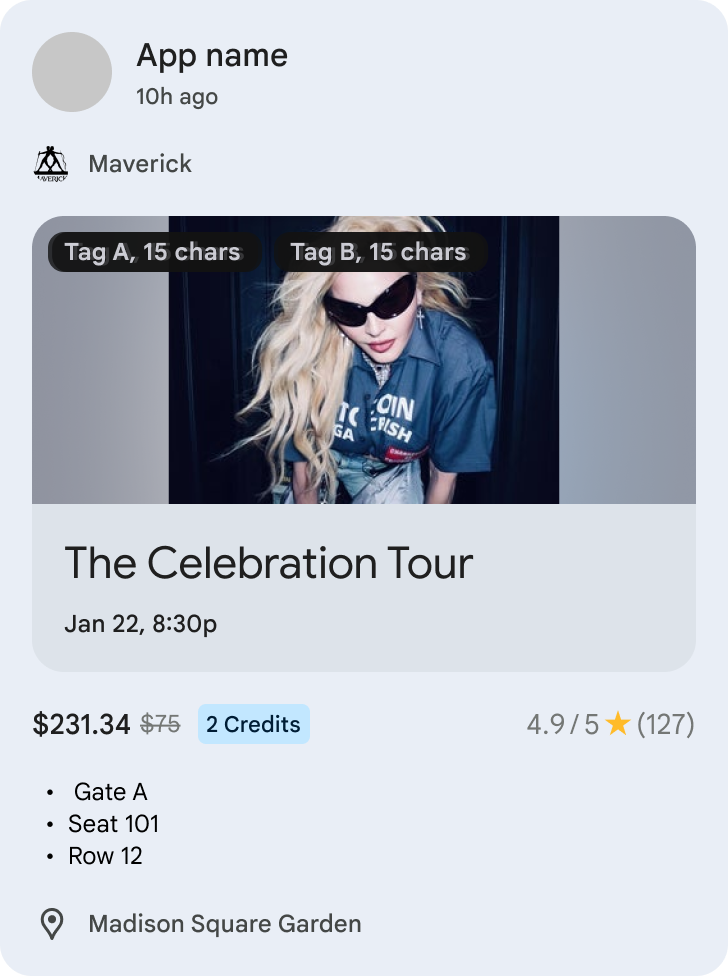
شکل ۷. رابط کاربری که یک EventReservationEntity واحد را درون یک خوشه Reservation نشان میدهد. LodgingReservationEntity : LodgingEntityReservation نشاندهنده رزرو برای اقامتگاه مسافرتی است و به کاربران کمک میکند تا رزروهای هتل یا اجاره تعطیلات آینده یا در حال انجام را پیگیری کنند.
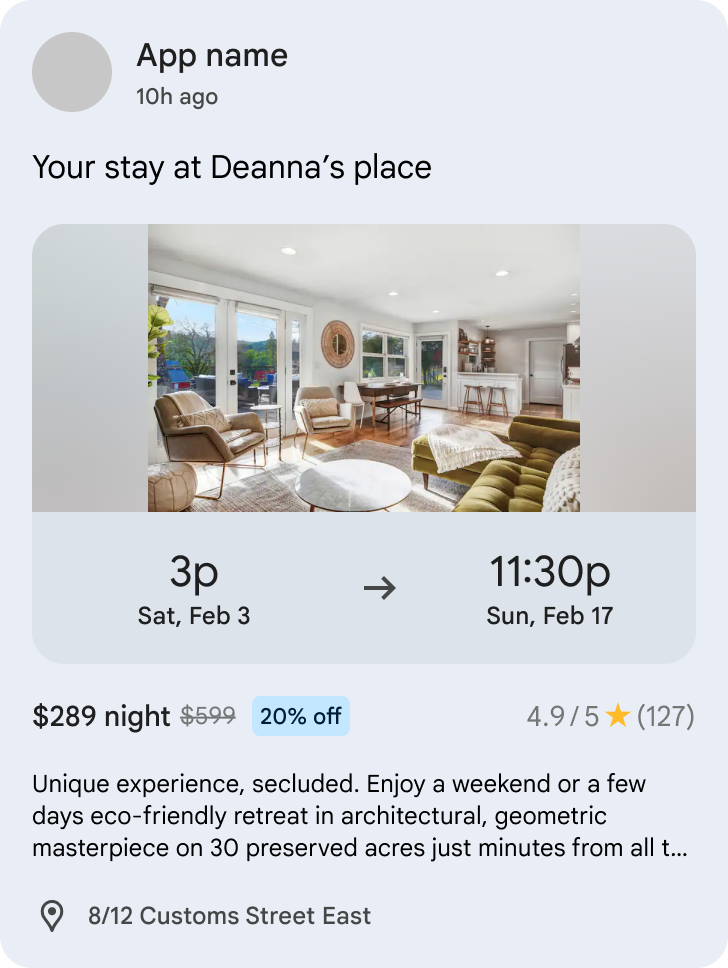
شکل ۸. رابط کاربری که یک LodgingReservationEntity واحد را در یک خوشه Reservation نشان میدهد. TransportationReservationEntity : TransportationReservationEntity نشاندهنده رزرو حمل و نقل با هر روشی است و به کاربران کمک میکند تا رزروهای پرواز، کشتی، قطار، اتوبوس، تاکسی اینترنتی یا سفر دریایی آینده یا در حال انجام را پیگیری کنند.
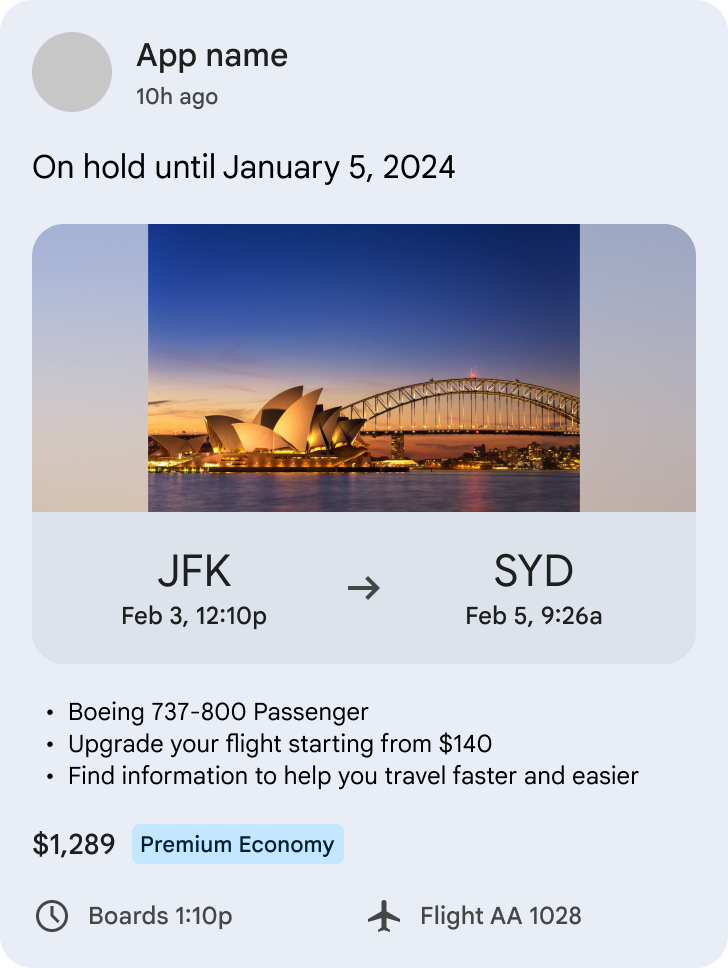
شکل ۹. رابط کاربری که یک TransportationReservationEntity واحد را درون یک خوشه Reservation نشان میدهد. VehicleRentalReservationEntity : VehicleRentalReservationEntity نشاندهنده رزرو اجاره خودرو است و به کاربران کمک میکند تا رزروهای اجاره خودرو در آینده یا در حال انجام را پیگیری کنند.
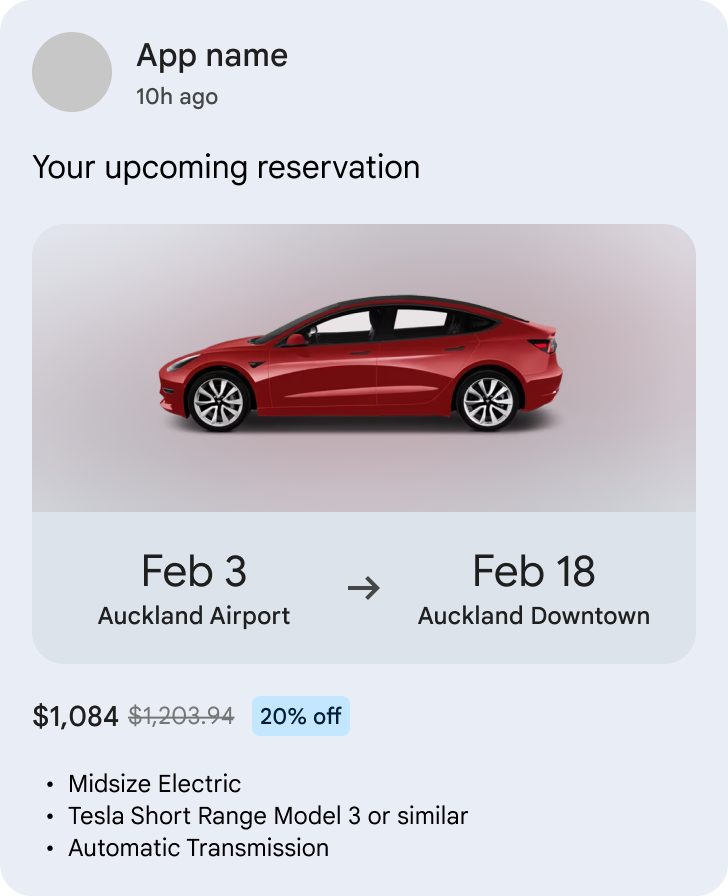
شکل ۱۰. رابط کاربری که یک VehicleRentalReservationEntity واحد را در یک خوشه Reservation نشان میدهد.
خوشه ویژه ، مجموعهای از موجودیتها را از چندین شریک توسعهدهنده در یک گروهبندی رابط کاربری نمایش میدهد. یک خوشه ویژه وجود خواهد داشت که در نزدیکی بالای رابط کاربری با اولویت بالاتر از همه خوشههای توصیه نمایش داده میشود. هر شریک توسعهدهنده مجاز به پخش حداکثر 10 موجودیت در خوشه ویژه خواهد بود.
موجودیت ویژه عمومی (GenericFeaturedEntity) : موجودیت ویژه عمومی با آیتم توصیه (Recommendation item) متفاوت است، زیرا آیتم ویژه باید برای یک محتوای برتر از توسعهدهندگان استفاده شود و باید مهمترین محتوایی را که برای کاربران جالب و مرتبط خواهد بود، نشان دهد.
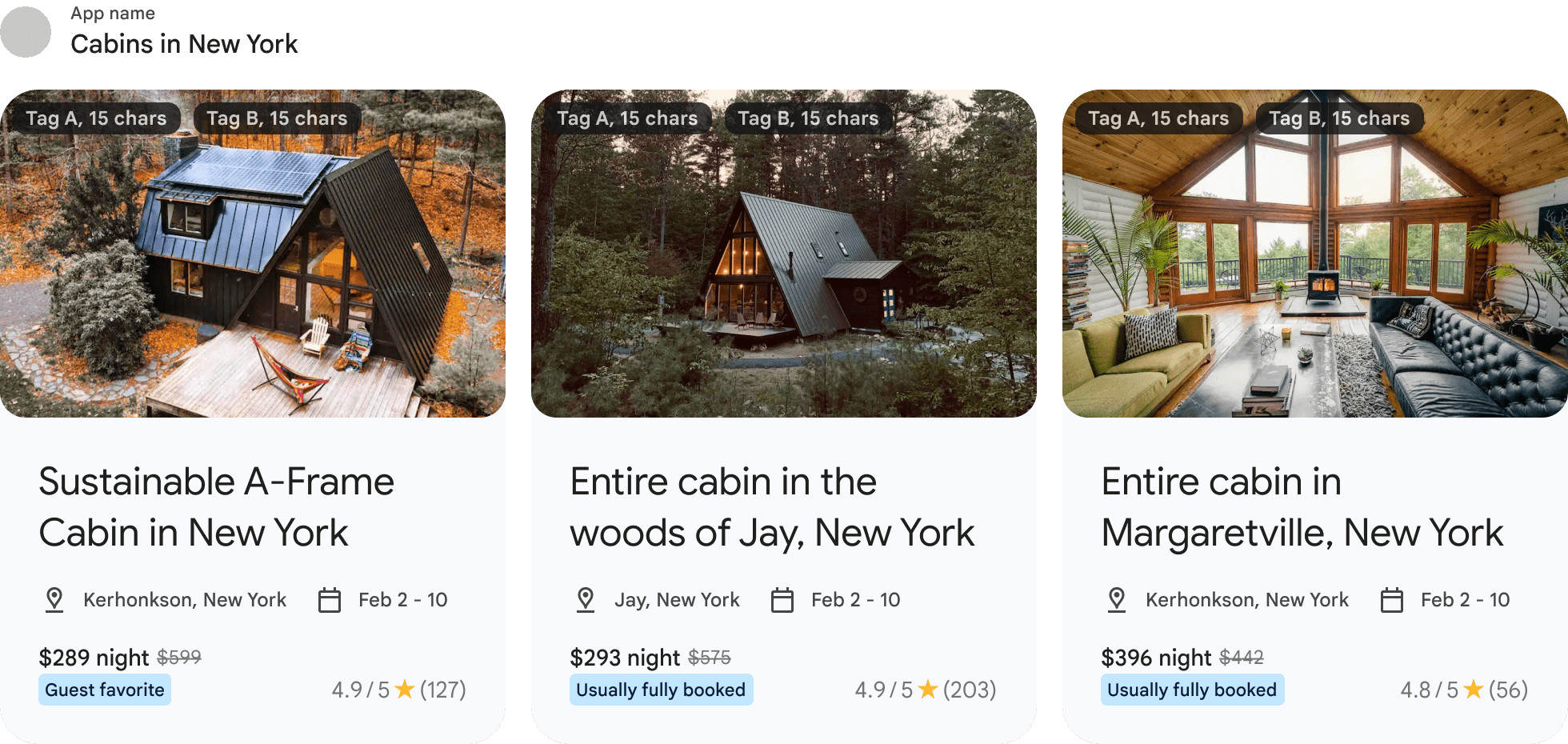
شکل 11: رابط کاربری که یک FeaturedCluster را با لیستی از GenericFeaturedEntity نشان میدهد
خوشه «ادامه جستجو» با نمایش فهرستی از جستجوهایی که کاربر اخیراً در تمام برنامههای سفر خود جستجو کرده است، به کاربران کمک میکند تا سفر جستجوی سفر قبلی خود را از سر بگیرند. این خوشه در جایگاه دوم، پس از رزروها و قبل از خوشههای ویژه و توصیهشده، پین خواهد شد. هر شریک توسعهدهنده مجاز خواهد بود تا حداکثر ۳ موجودیت را در خوشه «ادامه جستجو» پخش کند.
- PointOfInterestEntity: PointOfInterestEntity نشاندهنده یک مکان مورد علاقه مانند پمپ بنزین، محل برگزاری رویداد، پارک موضوعی، موزه، جاذبه گردشگری، مسیر پیادهروی و غیره است. این عنصر، محتوایی را که کاربر قبلاً جستجو کرده است، برجسته میکند.
پیش کار
حداقل سطح API: ۱۹
کتابخانه com.google.android.engage:engage-core به برنامه خود اضافه کنید:
dependencies {
    // Make sure you also include that repository in your project's build.gradle file.
    implementation 'com.google.android.engage:engage-core:1.6.0'
}
خلاصه
طراحی بر اساس پیادهسازی یک سرویس محدود (bound service) است.
دادههایی که یک کلاینت میتواند منتشر کند، برای انواع مختلف خوشهها مشمول محدودیتهای زیر است:
| نوع خوشه | محدودیتهای خوشه | حداقل محدودیت موجودیت در یک خوشه | حداکثر محدودیتهای موجودیت در یک خوشه |
|---|---|---|---|
| خوشه(های) پیشنهادی | حداکثر ۷ عدد | حداقل ۱ | حداکثر ۵۰ ( ArticleEntity ، EventEntity ، LodgingEntity ، StoreEntity یا PointOfInterestEntity ) |
| خوشه رزرو | حداکثر ۱ | حداقل ۱ | حداکثر ۲۰ ( RestaurantReservationEntity ، EventReservationEntity ، LodgingReservationEntity ، TransportationReservationEntity ، یا VehicleRentalReservationEntity ) |
| خوشه ویژه | حداکثر ۱ | حداقل ۱ | حداکثر 20 ( GenericFeaturedEntity ) |
| ادامه جستجو در خوشه | حداکثر ۱ | حداقل ۱ | حداکثر ۳ ( PointOfInterestEntity ) |
مرحله ۱: ارائه دادههای موجودیت
SDK برای نمایش هر نوع آیتم، موجودیتهای مختلفی تعریف کرده است. ما از موجودیتهای زیر برای دستهبندی سفر و رویدادها پشتیبانی میکنیم:
-
GenericFeaturedEntity -
ArticleEntity -
EventEntity -
LodgingEntity -
StoreEntity -
PointOfInterestEntity -
RestaurantReservationEntity -
EventReservationEntity -
LodgingReservationEntity -
TransportationReservationEntity -
VehicleRentalReservationEntity
نمودارهای زیر ویژگیها و الزامات موجود برای هر نوع را شرح میدهند.
GenericFeaturedEntity
| ویژگی | مورد نیاز | توضیحات | قالب |
|---|---|---|---|
| اکشن اوری | مورد نیاز | پیوند عمیق به موجودیت در برنامه ارائه دهنده. توجه: میتوانید از لینکهای عمیق برای ارجاع استفاده کنید. به این سوالات متداول مراجعه کنید. | اوری |
| تصاویر پوستر | مورد نیاز | در صورت ارائه چندین تصویر، فقط ۱ تصویر نمایش داده میشود. نسبت تصویر توصیه شده ۱۶:۹ است. توجه: اگر نشان ارائه میشود، فضای امن ۲۴ dps را در بالا و پایین تصویر تضمین کنید. | برای راهنمایی به مشخصات تصویر مراجعه کنید. |
| عنوان | اختیاری | عنوان نهاد. | متن رایگان اندازه متن پیشنهادی: ۵۰ کاراکتر |
| توضیحات | اختیاری | یک پاراگراف متن برای توصیف موجودیت. توجه: یا توضیحات یا فهرست زیرنویسها به کاربر نمایش داده میشود، نه هر دو. | متن رایگان اندازه متن پیشنهادی: ۱۸۰ کاراکتر |
| فهرست زیرنویسها | اختیاری | حداکثر ۳ زیرنویس، که هر زیرنویس شامل یک خط متن است. توجه: یا توضیحات یا فهرست زیرنویسها به کاربر نمایش داده میشود، نه هر دو. | متن رایگان اندازه متن پیشنهادی برای هر زیرنویس: حداکثر ۵۰ کاراکتر |
| نشانها | اختیاری | هر نشان یا متن آزاد (حداکثر ۱۵ کاراکتر) یا تصویر کوچک است. جلوههای ویژه UX روی تصویر/ویدئو، مثلاً به عنوان پوشش نشان روی تصویر
| |
| نشان - متن | اختیاری | عنوان برای نشان توجه: برای نشان، متن یا تصویر الزامی است. | متن رایگان اندازه متن پیشنهادی: حداکثر ۱۵ کاراکتر |
| نشان - تصویر | اختیاری | تصویر کوچک جلوههای ویژه تجربه کاربری، برای مثال به صورت پوشش نشان روی تصویر کوچک تصویر/ویدئو. توجه: برای نشان، متن یا تصویر الزامی است. | برای راهنمایی به مشخصات تصویر مراجعه کنید. |
| دسته بندی محتوا | اختیاری | دسته بندی محتوای موجود در موجودیت را شرح دهید. | فهرست Enumها برای راهنمایی به بخش دستهبندی محتوا مراجعه کنید. |
| DisplayTimeWindow (اختیاری) - یک پنجره زمانی برای نمایش محتوا روی سطح تنظیم کنید | |||
| شروع مهر زمانی | اختیاری | مهر زمانیِ دورهای که پس از آن محتوا باید روی سطح نمایش داده شود. اگر تنظیم نشده باشد، محتوا واجد شرایط نمایش روی سطح است. | مهر زمانی عصر بر حسب میلی ثانیه |
| مهر زمان پایان | اختیاری | مهر زمانیِ دورهای که پس از آن محتوا دیگر روی سطح نمایش داده نمیشود. اگر تنظیم نشده باشد، محتوا واجد شرایط نمایش روی سطح است. | مهر زمانی عصر بر حسب میلی ثانیه |
ArticleEntity
| ویژگی | مورد نیاز | توضیحات | قالب |
|---|---|---|---|
| اکشن اوری | مورد نیاز | پیوند عمیق به موجودیت در برنامه ارائه دهنده. توجه: میتوانید از لینکهای عمیق برای ارجاع استفاده کنید. به این سوالات متداول مراجعه کنید. | اوری |
| عنوان | مورد نیاز | عنوان نهاد. | متن رایگان اندازه متن پیشنهادی: حداکثر ۵۰ کاراکتر |
| تصاویر پوستر | اختیاری | در صورت ارائه چندین تصویر، فقط ۱ تصویر نمایش داده میشود. نسبت تصویر توصیه شده ۱۶:۹ است. توجه: تصویر اکیداً توصیه میشود. در صورت ارائه نشان، فضای امن ۲۴ dps را در بالا و پایین تصویر تضمین کنید. | برای راهنمایی به مشخصات تصویر مراجعه کنید. |
| منبع - عنوان | اختیاری | نام نویسنده، سازمان یا گزارشگر | متن رایگان اندازه متن پیشنهادی: کمتر از ۲۵ کاراکتر |
| منبع - تصویر | اختیاری | تصویری از منبع مانند نویسنده، سازمان، خبرنگار | برای راهنمایی به مشخصات تصویر مراجعه کنید. |
| توضیحات | اختیاری | یک پاراگراف متن برای توصیف موجودیت. توجه: یا توضیحات یا فهرست زیرنویسها به کاربر نمایش داده میشود، نه هر دو. | متن رایگان اندازه متن پیشنهادی: ۱۸۰ کاراکتر |
| فهرست زیرنویسها | اختیاری | حداکثر ۳ زیرنویس، که هر زیرنویس شامل یک خط متن است. توجه: یا توضیحات یا فهرست زیرنویسها به کاربر نمایش داده میشود، نه هر دو. | متن رایگان اندازه متن پیشنهادی برای هر زیرنویس: حداکثر ۵۰ کاراکتر |
| نشانها | اختیاری | هر نشان یا متن آزاد (حداکثر ۱۵ کاراکتر) یا تصویر کوچک است. جلوههای ویژه UX روی تصویر/ویدئو، مثلاً به عنوان پوشش نشان روی تصویر
| |
| نشان - متن | اختیاری | عنوان برای نشان توجه: برای نشان، متن یا تصویر الزامی است. | متن رایگان اندازه متن پیشنهادی: حداکثر ۱۵ کاراکتر |
| نشان - تصویر | اختیاری | تصویر کوچک جلوههای ویژه تجربه کاربری، برای مثال به صورت پوشش نشان روی تصویر کوچک تصویر/ویدئو. توجه: برای نشان، متن یا تصویر الزامی است. | برای راهنمایی به مشخصات تصویر مراجعه کنید. |
| زمان انتشار محتوا | اختیاری | این نشانگر زمانیِ epoch بر حسب میلیثانیه است که نشان میدهد محتوا در چه زمانی در برنامه منتشر/بهروزرسانی شده است. | مهر زمانی عصر بر حسب میلی ثانیه |
| آخرین زمان نامزدی | اختیاری | مهر زمانیِ آخرین تعامل کاربر با این موجودیت بر حسب میلیثانیه. | مهر زمانی عصر بر حسب میلی ثانیه |
| درصد پیشرفت | اختیاری | درصد کل محتوای مصرفشده توسط کاربر تا به امروز. | یک مقدار صحیح بین ۰ تا ۱۰۰. |
| دسته بندی محتوا | اختیاری | دسته بندی محتوای موجود در موجودیت را شرح دهید. | فهرست Enumها برای راهنمایی به بخش دستهبندی محتوا مراجعه کنید. |
| DisplayTimeWindow (اختیاری) - یک پنجره زمانی برای نمایش محتوا روی سطح تنظیم کنید | |||
| شروع مهر زمانی | اختیاری | مهر زمانیِ دورهای که پس از آن محتوا باید روی سطح نمایش داده شود. اگر تنظیم نشده باشد، محتوا واجد شرایط نمایش روی سطح است. | مهر زمانی عصر بر حسب میلی ثانیه |
| مهر زمان پایان | اختیاری | مهر زمانیِ دورهای که پس از آن محتوا دیگر روی سطح نمایش داده نمیشود. اگر تنظیم نشده باشد، محتوا واجد شرایط نمایش روی سطح است. | مهر زمانی عصر بر حسب میلی ثانیه |
EventEntity
| ویژگی | مورد نیاز | توضیحات | قالب |
|---|---|---|---|
| اکشن اوری | مورد نیاز | پیوند عمیق به موجودیت در برنامه ارائه دهنده. توجه: میتوانید از لینکهای عمیق برای ارجاع استفاده کنید. به این سوالات متداول مراجعه کنید. | اوری |
| عنوان | مورد نیاز | عنوان نهاد. | رشته اندازه متن پیشنهادی: حداکثر ۵۰ کاراکتر |
| زمان شروع محلی - مهر زمان | مورد نیاز | مهر زمانیِ دورهای که انتظار میرود رویداد در آن شروع شود. | جودا-تایم فوری |
| زمان شروع محلی - منطقه زمانی | مورد نیاز | منطقه زمانی که انتظار میرود رویداد در آن شروع شود. | جودا-زمان تاریخ و زمانمنطقه زمانی برای راهنمایی به مشخصات منطقه زمانی مراجعه کنید. |
| حالت رویداد | مورد نیاز | فیلدی برای مشخص کردن اینکه آیا رویداد مجازی، حضوری یا هر دو خواهد بود. | Enum: مجازی، حضوری یا ترکیبی |
| تصاویر پوستر | مورد نیاز | در صورت ارائه چندین تصویر، فقط ۱ تصویر نمایش داده میشود. نسبت تصویر توصیه شده ۱۶:۹ است. توجه: تصویر اکیداً توصیه میشود. در صورت ارائه نشان، فضای امن ۲۴ dps را در بالا و پایین تصویر تضمین کنید. | برای راهنمایی به مشخصات تصویر مراجعه کنید. |
| مکان - کشور | مشروط مورد نیاز | کشوری که رویداد در آن اتفاق میافتد. توجه: این مورد برای رویدادهایی که IN_PERSON یا HYBRID هستند، الزامی است. | متن رایگان اندازه متن پیشنهادی: حداکثر ~20 کاراکتر |
| مکان - شهر | مشروط مورد نیاز | شهری که رویداد در آن اتفاق میافتد. توجه: این مورد برای رویدادهایی که IN_PERSON یا HYBRID هستند، الزامی است. | متن رایگان اندازه متن پیشنهادی: حداکثر ~20 کاراکتر |
| مکان - نمایش آدرس | مشروط مورد نیاز | آدرس یا نام مکانی که رویداد در آن برگزار خواهد شد که باید به کاربر نمایش داده شود. توجه: این مورد برای رویدادهایی که IN_PERSON یا HYBRID هستند، الزامی است. | متن رایگان اندازه متن پیشنهادی: حداکثر ~20 کاراکتر |
| مکان - آدرس خیابان | اختیاری | آدرس خیابان (در صورت وجود) مکانی که رویداد در آن برگزار میشود. | متن رایگان اندازه متن پیشنهادی: حداکثر ~20 کاراکتر |
| مکان - ایالت | اختیاری | ایالت یا استانی (در صورت وجود) که رویداد در آن برگزار میشود. | متن رایگان اندازه متن پیشنهادی: حداکثر ~20 کاراکتر |
| مکان - کد پستی | اختیاری | کد پستی (در صورت وجود) محل برگزاری رویداد. | متن رایگان اندازه متن پیشنهادی: حداکثر ~20 کاراکتر |
| موقعیت مکانی - محله | اختیاری | محله (در صورت وجود) که رویداد در آن برگزار میشود. | متن رایگان اندازه متن پیشنهادی: حداکثر ~20 کاراکتر |
| زمان پایان | اختیاری | مهر زمانیِ دورهای که انتظار میرود رویداد در آن پایان یابد. نکته: این مقدار بر حسب میلیثانیه نمایش داده میشود. | مهر زمانی عصر بر حسب میلی ثانیه |
| توضیحات | اختیاری | یک پاراگراف متن برای توصیف موجودیت. توجه: یا توضیحات یا فهرست زیرنویسها به کاربر نمایش داده میشود، نه هر دو. | متن رایگان اندازه متن پیشنهادی: ۱۸۰ کاراکتر |
| فهرست زیرنویسها | اختیاری | حداکثر ۳ زیرنویس، که هر زیرنویس شامل یک خط متن است. توجه: یا توضیحات یا فهرست زیرنویسها به کاربر نمایش داده میشود، نه هر دو. | متن رایگان اندازه متن پیشنهادی برای هر زیرنویس: حداکثر ۵۰ کاراکتر |
| نشانها | اختیاری | هر نشان یا متن آزاد (حداکثر ۱۵ کاراکتر) یا تصویر کوچک است. | |
| نشان - متن | اختیاری | عنوان برای نشان توجه: برای نشان، متن یا تصویر الزامی است. | متن رایگان اندازه متن پیشنهادی: حداکثر ۱۵ کاراکتر |
| نشان - تصویر | اختیاری | تصویر کوچک جلوههای ویژه تجربه کاربری، برای مثال به صورت پوشش نشان روی تصویر کوچک تصویر/ویدئو. توجه: برای نشان، متن یا تصویر الزامی است. | برای راهنمایی به مشخصات تصویر مراجعه کنید. |
| قیمت - قیمت فعلی | مشروط مورد نیاز | قیمت فعلی بلیط/کارت ورود به رویداد. در صورت ارائه قیمت خط خورده، باید ارائه شود. | متن رایگان |
| قیمت - قیمت ضربدری | اختیاری | قیمت اصلی بلیط/کارت ورود به رویداد. | متن رایگان |
| اطلاع از قیمت | اختیاری | اعلام قیمت برای ارائه تخفیف ویژه، رویداد، و تخفیف برای اعضا، در صورت وجود. | متن رایگان اندازه متن پیشنهادی: کمتر از ۴۵ کاراکتر (متن خیلی طولانی ممکن است بیضی نشان دهد) |
| دسته بندی محتوا | اختیاری | دسته بندی محتوای موجود در موجودیت را شرح دهید. | فهرست Enumهای واجد شرایط
برای راهنمایی به بخش دستهبندی محتوا مراجعه کنید. |
| DisplayTimeWindow (اختیاری) - یک پنجره زمانی برای نمایش محتوا روی سطح تنظیم کنید | |||
| شروع مهر زمانی | اختیاری | مهر زمانیِ دورهای که پس از آن محتوا باید روی سطح نمایش داده شود. اگر تنظیم نشده باشد، محتوا واجد شرایط نمایش روی سطح است. | مهر زمانی عصر بر حسب میلی ثانیه |
| مهر زمان پایان | اختیاری | مهر زمانیِ دورهای که پس از آن محتوا دیگر روی سطح نمایش داده نمیشود. اگر تنظیم نشده باشد، محتوا واجد شرایط نمایش روی سطح است. | مهر زمانی عصر بر حسب میلی ثانیه |
LodgingEntity
| ویژگی | مورد نیاز | توضیحات | قالب |
|---|---|---|---|
| اکشن اوری | مورد نیاز | پیوند عمیق به موجودیت در برنامه ارائه دهنده. توجه: میتوانید از لینکهای عمیق برای ارجاع استفاده کنید. به این سوالات متداول مراجعه کنید. | اوری |
| عنوان | مورد نیاز | عنوان نهاد. | رشته اندازه متن پیشنهادی: حداکثر ۵۰ کاراکتر |
| تصاویر پوستر | مورد نیاز | در صورت ارائه چندین تصویر، فقط ۱ تصویر نمایش داده میشود. نسبت تصویر توصیه شده ۱۶:۹ است. توجه: اگر نشان ارائه میشود، فضای امن ۲۴ dps را در بالا و پایین تصویر تضمین کنید. | برای راهنمایی به مشخصات تصویر مراجعه کنید. |
| مکان - کشور | مورد نیاز | کشوری که محل اقامت در آن اتفاق میافتد. | متن رایگان اندازه متن پیشنهادی: حداکثر ~20 کاراکتر |
| مکان - شهر | مورد نیاز | شهری که محل اقامت در آن واقع شده است. | متن رایگان اندازه متن پیشنهادی: حداکثر ~20 کاراکتر |
| مکان - نمایش آدرس | مورد نیاز | آدرسی که به کاربر نمایش داده میشود. در بیشتر موارد استفاده، توصیه میکنیم نام شهر و در صورت امکان استان یا کشور را نیز ذکر کنید. فقط در صورتی آدرس خیابان یا محله را ذکر کنید که کاربر در نزدیکی محل باشد، با آن آشنا باشد یا شهر در عنوان خوشه گنجانده شده باشد. اگر آدرس خیابان را ذکر میکنید، آدرس مختصری ارائه دهید و در صورت امکان از اختصارات استفاده کنید (برای مثال، "خیابان" برای "خیابان"، "خیابان" برای "خیابان"). | متن رایگان اندازه متن پیشنهادی: حداکثر ~20 کاراکتر |
| مکان - آدرس خیابان | اختیاری | آدرس خیابان (در صورت وجود) محل اقامت. | متن رایگان اندازه متن پیشنهادی: حداکثر ~20 کاراکتر |
| مکان - ایالت | اختیاری | ایالت یا استانی (در صورت وجود) که محل اقامت در آن واقع شده است. | متن رایگان اندازه متن پیشنهادی: حداکثر ~20 کاراکتر |
| مکان - کد پستی | اختیاری | کد پستی (در صورت وجود) محل اقامت. | متن رایگان اندازه متن پیشنهادی: حداکثر ~20 کاراکتر |
| موقعیت مکانی - محله | اختیاری | محله (در صورت وجود) محل اقامت. | متن رایگان اندازه متن پیشنهادی: حداکثر ~20 کاراکتر |
| نشانها | اختیاری | هر نشان یا متن آزاد (حداکثر ۱۵ کاراکتر) یا تصویر کوچک است. | |
| نشان - متن | اختیاری | عنوان برای نشان توجه: برای نشان، متن یا تصویر الزامی است. | متن رایگان اندازه متن پیشنهادی: حداکثر ۱۵ کاراکتر |
| نشان - تصویر | اختیاری | تصویر کوچک جلوههای ویژه تجربه کاربری، برای مثال به صورت پوشش نشان روی تصویر کوچک تصویر/ویدئو. توجه: برای نشان، متن یا تصویر الزامی است. | برای راهنمایی به مشخصات تصویر مراجعه کنید. |
| توضیحات | اختیاری | یک پاراگراف متن برای توصیف موجودیت. توجه: یا توضیحات یا فهرست زیرنویسها به کاربر نمایش داده میشود، نه هر دو. | متن رایگان اندازه متن پیشنهادی: ۱۸۰ کاراکتر |
| فهرست زیرنویسها | اختیاری | حداکثر ۳ زیرنویس، که هر زیرنویس شامل یک خط متن است. توجه: یا توضیحات یا فهرست زیرنویسها به کاربر نمایش داده میشود، نه هر دو. | متن رایگان اندازه متن پیشنهادی برای هر زیرنویس: حداکثر ۵۰ کاراکتر |
| پنجره زمان دسترسی - زمان شروع محلی - مهر زمانی | اختیاری | مهر زمانیِ دورهای که انتظار میرود اقامتگاه باز/در دسترس باشد. | جودا-تایم فوری |
| پنجره زمان دسترسی - زمان شروع محلی - منطقه زمانی | اختیاری | منطقه زمانی که انتظار میرود اقامتگاه در آن باز/در دسترس باشد. | جودا-زمان تاریخ و زمانمنطقه زمانی برای راهنمایی به مشخصات منطقه زمانی مراجعه کنید. |
| پنجره زمان دسترسی - زمان پایان محلی - مهر زمان | اختیاری | مهر زمانی دورهای که انتظار میرود اقامتگاه تا آن زمان باز/در دسترس باشد. | جودا-تایم فوری |
| پنجره زمان دسترسی - زمان پایان محلی - منطقه زمانی | اختیاری | منطقه زمانی که انتظار میرود اقامتگاه در آن باز/در دسترس باشد. | جودا-زمان تاریخ و زمانمنطقه زمانی برای راهنمایی به مشخصات منطقه زمانی مراجعه کنید. |
| رتبهبندی - حداکثر مقدار | اختیاری | حداکثر مقدار مقیاس رتبهبندی. اگر مقدار فعلی رتبهبندی نیز ارائه شده باشد، باید ارائه شود. | عدد >= 0.0 |
| رتبهبندی - ارزش فعلی | اختیاری | مقدار فعلی مقیاس رتبهبندی. اگر حداکثر مقدار رتبهبندی نیز ارائه شده باشد، باید ارائه شود. | عدد >= 0.0 |
| رتبهبندی - تعداد | اختیاری | تعداد امتیازهای مربوط به اقامتگاه. نکته: اگر برنامه شما میخواهد نحوه نمایش این عدد به کاربران را کنترل کند، این فیلد را ارائه دهید. رشته مختصری را که میتواند به کاربر نمایش داده شود، ارائه دهید. برای مثال، اگر تعداد ۱,۰۰۰,۰۰۰ است، استفاده از اختصاراتی مانند ۱M را در نظر بگیرید تا در اندازههای کوچکتر صفحه نمایش کوتاه نشود. | رشته |
| رتبهبندی - مقدار شمارش | اختیاری | تعداد امتیازهای مربوط به اقامتگاه. توجه: اگر نمیخواهید خودتان منطق نمایش اختصارات را مدیریت کنید، این فیلد را وارد کنید. اگر هم تعداد و هم مقدار تعداد وجود داشته باشد، از تعداد برای نمایش به کاربران استفاده خواهیم کرد. | طولانی |
| قیمت - قیمت فعلی | مشروط مورد نیاز | قیمت فعلی اقامتگاه. در صورت ارائه قیمت خط خورده، باید ارائه شود. | متن رایگان |
| قیمت - قیمت ضربدری | اختیاری | قیمت اصلی اقامتگاه، که در فاکتور خط خورده است. | متن رایگان |
| اطلاع از قیمت | اختیاری | اعلام قیمت برای ارائه تخفیف ویژه، رویداد، و تخفیف برای اعضا، در صورت وجود. | متن رایگان اندازه متن پیشنهادی: کمتر از ۴۵ کاراکتر (متن خیلی طولانی ممکن است بیضی نشان دهد) |
| DisplayTimeWindow (اختیاری) - یک پنجره زمانی برای نمایش محتوا روی سطح تنظیم کنید | |||
| شروع مهر زمانی | اختیاری | مهر زمانیِ دورهای که پس از آن محتوا باید روی سطح نمایش داده شود. اگر تنظیم نشده باشد، محتوا واجد شرایط نمایش روی سطح است. | مهر زمانی عصر بر حسب میلی ثانیه |
| مهر زمان پایان | اختیاری | مهر زمانیِ دورهای که پس از آن محتوا دیگر روی سطح نمایش داده نمیشود. اگر تنظیم نشده باشد، محتوا واجد شرایط نمایش روی سطح است. | مهر زمانی عصر بر حسب میلی ثانیه |
StoreEntity
شیء StoreEntity نشاندهنده یک فروشگاه شخصی است که شرکای توسعهدهنده میخواهند منتشر کنند، مانند یک رستوران یا غذاخوری محبوب که به تجربه سفر فرد مرتبط است.
| ویژگی | مورد نیاز | توضیحات | قالب |
|---|---|---|---|
| تصاویر پوستر | مورد نیاز | حداقل یک تصویر باید ارائه شود. | برای راهنمایی به مشخصات تصویر مراجعه کنید. |
| اکشن اوری | مورد نیاز | پیوند عمیق به موجودیت در برنامه ارائه دهنده. توجه: میتوانید از لینکهای عمیق برای ارجاع استفاده کنید. به این سوالات متداول مراجعه کنید. | اوری |
| عنوان | اختیاری | نام فروشگاه. | متن رایگان اندازه متن پیشنهادی: کمتر از ۴۵ کاراکتر (متن خیلی طولانی ممکن است بیضی نشان دهد) |
| مکان | اختیاری | موقعیت مکانی فروشگاه. | متن رایگان اندازه متن پیشنهادی: کمتر از ۴۵ کاراکتر (متن خیلی طولانی ممکن است بیضی نشان دهد) |
| فراخوان | اختیاری | در صورت امکان، برای تبلیغ، رویداد یا بهروزرسانی فروشگاه، فراخوان دهید. | متن رایگان اندازه متن پیشنهادی: کمتر از ۴۵ کاراکتر (متن خیلی طولانی ممکن است بیضی نشان دهد) |
| چاپ خوب را بنویسید | اختیاری | متن چاپی زیبا برای توضیحات. | متن رایگان اندازه متن پیشنهادی: کمتر از ۴۵ کاراکتر (متن خیلی طولانی ممکن است بیضی نشان دهد) |
| توضیحات | اختیاری | توضیحی در مورد فروشگاه. | متن رایگان اندازه متن پیشنهادی: کمتر از ۹۰ کاراکتر (متن خیلی طولانی ممکن است بیضی نشان دهد) |
| دسته بندی | اختیاری | دسته بندی یک فروشگاه، در زمینه رستورانها، میتواند شامل غذاهایی مانند «فرانسوی»، «نیو امریکن»، «رامِن» یا «فوقالعاده» باشد. | متن رایگان اندازه متن پیشنهادی: کمتر از ۴۵ کاراکتر (متن خیلی طولانی ممکن است بیضی نشان دهد) |
| رتبهبندی - حداکثر مقدار | اختیاری | حداکثر مقدار مقیاس رتبهبندی. اگر مقدار فعلی رتبهبندی نیز ارائه شده باشد، باید ارائه شود. | عدد >= 0.0 |
| رتبهبندی - ارزش فعلی | اختیاری | مقدار فعلی مقیاس رتبهبندی. اگر حداکثر مقدار رتبهبندی نیز ارائه شده باشد، باید ارائه شود. | عدد >= 0.0 |
| رتبهبندی - تعداد | اختیاری | تعداد امتیازهای مربوط به اقامتگاه. نکته: اگر برنامه شما میخواهد نحوه نمایش این عدد به کاربران را کنترل کند، این فیلد را ارائه دهید. رشته مختصری را که میتواند به کاربر نمایش داده شود، ارائه دهید. برای مثال، اگر تعداد ۱,۰۰۰,۰۰۰ است، استفاده از اختصاراتی مانند ۱M را در نظر بگیرید تا در اندازههای کوچکتر صفحه نمایش کوتاه نشود. | رشته |
| رتبهبندی - مقدار شمارش | اختیاری | تعداد امتیازهای مربوط به اقامتگاه. توجه: اگر نمیخواهید خودتان منطق نمایش اختصارات را مدیریت کنید، این فیلد را وارد کنید. اگر هم تعداد و هم مقدار تعداد وجود داشته باشد، از تعداد برای نمایش به کاربران استفاده خواهیم کرد. | طولانی |
| DisplayTimeWindow (اختیاری) - یک پنجره زمانی برای نمایش محتوا روی سطح تنظیم کنید | |||
| شروع مهر زمانی | اختیاری | مهر زمانیِ دورهای که پس از آن محتوا باید روی سطح نمایش داده شود. اگر تنظیم نشده باشد، محتوا واجد شرایط نمایش روی سطح است. | مهر زمانی عصر بر حسب میلی ثانیه |
| مهر زمان پایان | اختیاری | مهر زمانیِ دورهای که پس از آن محتوا دیگر روی سطح نمایش داده نمیشود. اگر تنظیم نشده باشد، محتوا واجد شرایط نمایش روی سطح است. | مهر زمانی عصر بر حسب میلی ثانیه |
PointOfInterestEntity
| ویژگی | مورد نیاز | توضیحات | قالب |
|---|---|---|---|
| اکشن اوری | مورد نیاز | پیوند عمیق به موجودیت در برنامه ارائه دهنده. توجه: میتوانید از لینکهای عمیق برای ارجاع استفاده کنید. به این سوالات متداول مراجعه کنید. | اوری |
| عنوان | مورد نیاز | عنوان نهاد. | رشته اندازه متن پیشنهادی: حداکثر ۵۰ کاراکتر |
| تصاویر پوستر | مشروط مورد نیاز | در صورت ارائه چندین تصویر، فقط ۱ تصویر نمایش داده میشود. نسبت تصویر توصیه شده ۱۶:۹ است. توجه: اگر نهاد بخشی از خوشه توصیهها باشد، تصویر الزامی است. اگر نشان ارائه میشود، فضای امن ۲۴ dps را در بالا و پایین تصویر تضمین کنید. | برای راهنمایی به مشخصات تصویر مراجعه کنید. |
| آخرین زمان نامزدی | مشروط مورد نیاز | مهر زمانیِ آخرین باری که کاربر با این موجودیت تعامل داشته است. توجه: اگر موجودیت بخشی از خوشه جستجوی ادامه باشد، این فیلد الزامی است. | جودا-تایم فوری |
| مکان - کشور | مشروط مورد نیاز | کشوری که نقطه مورد نظر در آن اتفاق میافتد. توجه: اگر نهاد بخشی از خوشه توصیه باشد، این فیلد الزامی است. | متن رایگان اندازه متن پیشنهادی: حداکثر ~20 کاراکتر |
| مکان - شهر | مشروط مورد نیاز | شهری که نقطه مورد نظر در آن اتفاق میافتد. توجه: اگر نهاد بخشی از خوشه توصیه باشد، این فیلد الزامی است. | متن رایگان اندازه متن پیشنهادی: حداکثر ~20 کاراکتر |
| مکان - نمایش آدرس | مشروط مورد نیاز | آدرسی که به کاربر نمایش داده میشود. یک آدرس مختصر ارائه دهید و در صورت امکان از اختصارات استفاده کنید (برای مثال، "St" برای "Street"، "Ave" برای "Avenue"). این رشته ممکن است بسته به دستگاه و تنظیمات کاربر کوتاه شود. برای شناسایی بهتر، نام شهر را نیز ذکر کنید. توجه: اگر نهاد بخشی از خوشه توصیه باشد، این فیلد الزامی است. | متن رایگان اندازه متن پیشنهادی: حداکثر ~35 کاراکتر |
| مکان - آدرس خیابان | اختیاری | آدرس خیابان (در صورت وجود) نقطه مورد نظر. | متن رایگان اندازه متن پیشنهادی: حداکثر ~20 کاراکتر |
| مکان - ایالت | اختیاری | ایالت یا استانی (در صورت وجود) که نقطه مورد نظر در آن واقع شده است. | متن رایگان اندازه متن پیشنهادی: حداکثر ~20 کاراکتر |
| مکان - کد پستی | اختیاری | کد پستی (در صورت وجود) نقطه مورد نظر. | متن رایگان اندازه متن پیشنهادی: حداکثر ~20 کاراکتر |
| موقعیت مکانی - محله | اختیاری | محله (در صورت وجود) نقطه مورد نظر. | متن رایگان اندازه متن پیشنهادی: حداکثر ~20 کاراکتر |
| پنجره زمان دسترسی - زمان شروع محلی - مهر زمانی | اختیاری | مهر زمانیِ دورهای که انتظار میرود نقطه مورد نظر باز/در دسترس باشد. | جودا-تایم فوری |
| پنجره زمان دسترسی - زمان شروع محلی - منطقه زمانی | اختیاری | منطقه زمانی که انتظار میرود نقطه مورد نظر در آن باز/در دسترس باشد. | جودا-زمان تاریخ و زمانمنطقه زمانی برای راهنمایی به مشخصات منطقه زمانی مراجعه کنید. |
| پنجره زمان دسترسی - زمان پایان محلی - مهر زمان | اختیاری | مهر زمانی دورهای که انتظار میرود نقطه مورد نظر تا آن زمان باز/در دسترس باشد. | جودا-تایم فوری |
| پنجره زمان دسترسی - زمان پایان محلی - منطقه زمانی | اختیاری | منطقه زمانی که انتظار میرود نقطه مورد نظر در آن باز/در دسترس باشد. | جودا-زمان تاریخ و زمانمنطقه زمانی برای راهنمایی به مشخصات منطقه زمانی مراجعه کنید. |
| نشانها | اختیاری | هر نشان یا متن آزاد (حداکثر ۱۵ کاراکتر) یا تصویر کوچک است. | |
| نشان - متن | اختیاری | عنوان برای نشان توجه: برای نشان، متن یا تصویر الزامی است. | متن رایگان اندازه متن پیشنهادی: حداکثر ۱۵ کاراکتر |
| نشان - تصویر | اختیاری | تصویر کوچک جلوههای ویژه تجربه کاربری، برای مثال به صورت پوشش نشان روی تصویر کوچک تصویر/ویدئو. توجه: برای نشان، متن یا تصویر الزامی است. | برای راهنمایی به مشخصات تصویر مراجعه کنید. |
| توضیحات | اختیاری | یک پاراگراف متن برای توصیف موجودیت. توجه: یا توضیحات یا فهرست زیرنویسها به کاربر نمایش داده میشود، نه هر دو. | متن رایگان اندازه متن پیشنهادی: ۱۸۰ کاراکتر |
| فهرست زیرنویسها | اختیاری | حداکثر ۳ زیرنویس، که هر زیرنویس شامل یک خط متن است. توجه: یا توضیحات یا فهرست زیرنویسها به کاربر نمایش داده میشود، نه هر دو. | متن رایگان اندازه متن پیشنهادی برای هر زیرنویس: حداکثر ۵۰ کاراکتر |
| رتبهبندی - حداکثر مقدار | اختیاری | حداکثر مقدار مقیاس رتبهبندی. اگر مقدار فعلی رتبهبندی نیز ارائه شده باشد، باید ارائه شود. | عدد >= 0.0 |
| رتبهبندی - ارزش فعلی | اختیاری | مقدار فعلی مقیاس رتبهبندی. اگر حداکثر مقدار رتبهبندی نیز ارائه شده باشد، باید ارائه شود. | عدد >= 0.0 |
| رتبهبندی - تعداد | اختیاری | تعداد امتیازهای مربوط به نقطه مورد نظر. نکته: اگر برنامه شما میخواهد نحوه نمایش این عدد به کاربران را کنترل کند، این فیلد را ارائه دهید. رشته مختصری را که میتواند به کاربر نمایش داده شود، ارائه دهید. برای مثال، اگر تعداد ۱,۰۰۰,۰۰۰ است، استفاده از اختصاراتی مانند ۱M را در نظر بگیرید تا در اندازههای کوچکتر صفحه نمایش کوتاه نشود. | رشته |
| رتبهبندی - مقدار شمارش | اختیاری | تعداد امتیازهای مربوط به نقطه مورد نظر. توجه: اگر نمیخواهید خودتان منطق نمایش اختصارات را مدیریت کنید، این فیلد را وارد کنید. اگر هم تعداد و هم مقدار تعداد وجود داشته باشد، از تعداد برای نمایش به کاربران استفاده خواهیم کرد. | طولانی |
| قیمت - قیمت فعلی | مشروط مورد نیاز | قیمت فعلی بلیط/کارت ورود به نقطه مورد نظر. در صورت ارائه قیمت خط خورده، باید ارائه شود. | متن رایگان |
| قیمت - قیمت ضربدری | اختیاری | قیمت اصلی بلیط/کارت ورود به نقطه مورد نظر. | متن رایگان |
| اطلاع از قیمت | اختیاری | اعلام قیمت برای ارائه تخفیف ویژه، رویداد، و تخفیف برای اعضا، در صورت وجود. | متن رایگان اندازه متن پیشنهادی: کمتر از ۴۵ کاراکتر (متن خیلی طولانی ممکن است بیضی نشان دهد) |
| دسته بندی محتوا | اختیاری | دسته بندی محتوای موجود در موجودیت را شرح دهید. | فهرست Enumهای واجد شرایط
برای راهنمایی به بخش دستهبندی محتوا مراجعه کنید. |
| DisplayTimeWindow (اختیاری) - یک پنجره زمانی برای نمایش محتوا روی سطح تنظیم کنید | |||
| شروع مهر زمانی | اختیاری | مهر زمانیِ دورهای که پس از آن محتوا باید روی سطح نمایش داده شود. اگر تنظیم نشده باشد، محتوا واجد شرایط نمایش روی سطح است. | مهر زمانی عصر بر حسب میلی ثانیه |
| مهر زمان پایان | اختیاری | مهر زمانیِ دورهای که پس از آن محتوا دیگر روی سطح نمایش داده نمیشود. اگر تنظیم نشده باشد، محتوا واجد شرایط نمایش روی سطح است. | مهر زمانی عصر بر حسب میلی ثانیه |
RestaurantReservationEntity
| ویژگی | مورد نیاز | توضیحات | قالب |
|---|---|---|---|
| اکشن اوری | مورد نیاز | پیوند عمیق به موجودیت در برنامه ارائه دهنده. توجه: میتوانید از لینکهای عمیق برای ارجاع استفاده کنید. به این سوالات متداول مراجعه کنید. | اوری |
| عنوان | مورد نیاز | عنوان نهاد. | رشته اندازه متن پیشنهادی: حداکثر ۵۰ کاراکتر |
| زمان شروع رزرو محلی - مهر زمان | مورد نیاز | مهر زمانیِ دورهای که انتظار میرود رزرو از آن شروع شود. | جودا-تایم فوری |
| زمان شروع رزرو محلی - منطقه زمانی | مورد نیاز | منطقه زمانی که انتظار میرود رزرو از آن شروع شود. | جودا-زمان تاریخ و زمانمنطقه زمانی برای راهنمایی به مشخصات منطقه زمانی مراجعه کنید. |
| مکان - کشور | مورد نیاز | کشوری که رستوران در آن برگزار میشود. | متن رایگان اندازه متن پیشنهادی: حداکثر ~20 کاراکتر |
| مکان - شهر | مورد نیاز | شهری که رستوران در آن واقع شده است. | متن رایگان اندازه متن پیشنهادی: حداکثر ~20 کاراکتر |
| مکان - نمایش آدرس | مورد نیاز | آدرس رستوران که به کاربر نمایش داده خواهد شد. | متن رایگان اندازه متن پیشنهادی: حداکثر ~20 کاراکتر |
| مکان - آدرس خیابان | اختیاری | آدرس خیابان (در صورت وجود) رستوران. | متن رایگان اندازه متن پیشنهادی: حداکثر ~20 کاراکتر |
| مکان - ایالت | اختیاری | ایالت یا استانی (در صورت وجود) که رستوران در آن واقع شده است. | متن رایگان اندازه متن پیشنهادی: حداکثر ~20 کاراکتر |
| مکان - کد پستی | اختیاری | کد پستی (در صورت وجود) رستوران. | متن رایگان اندازه متن پیشنهادی: حداکثر ~20 کاراکتر |
| موقعیت مکانی - محله | اختیاری | محله رستوران (در صورت وجود). | متن رایگان اندازه متن پیشنهادی: حداکثر ~20 کاراکتر |
| تصاویر پوستر | اختیاری | در صورت ارائه چندین تصویر، فقط ۱ تصویر نمایش داده میشود. نسبت تصویر توصیه شده ۱۶:۹ است. | برای راهنمایی به مشخصات تصویر مراجعه کنید. |
| توضیحات | اختیاری | یک پاراگراف متن برای توصیف موجودیت. توجه: یا توضیحات یا فهرست زیرنویسها به کاربر نمایش داده میشود، نه هر دو. | متن رایگان اندازه متن پیشنهادی: ۱۸۰ کاراکتر |
| فهرست زیرنویسها | اختیاری | حداکثر ۳ زیرنویس، که هر زیرنویس شامل یک خط متن است. توجه: یا توضیحات یا فهرست زیرنویسها به کاربر نمایش داده میشود، نه هر دو. | متن رایگان اندازه متن پیشنهادی برای هر زیرنویس: حداکثر ۵۰ کاراکتر |
| اندازه میز | اختیاری | تعداد افراد در گروه رزرو | عدد صحیح > 0 |
| DisplayTimeWindow (اختیاری) - یک پنجره زمانی برای نمایش محتوا روی سطح تنظیم کنید | |||
| شروع مهر زمانی | اختیاری | مهر زمانیِ دورهای که پس از آن محتوا باید روی سطح نمایش داده شود. اگر تنظیم نشده باشد، محتوا واجد شرایط نمایش روی سطح است. | مهر زمانی عصر بر حسب میلی ثانیه |
| مهر زمان پایان | اختیاری | مهر زمانیِ دورهای که پس از آن محتوا دیگر روی سطح نمایش داده نمیشود. اگر تنظیم نشده باشد، محتوا واجد شرایط نمایش روی سطح است. | مهر زمانی عصر بر حسب میلی ثانیه |
EventReservationEntity
| ویژگی | مورد نیاز | توضیحات | قالب |
|---|---|---|---|
| اکشن اوری | مورد نیاز | پیوند عمیق به موجودیت در برنامه ارائه دهنده. توجه: میتوانید از لینکهای عمیق برای ارجاع استفاده کنید. به این سوالات متداول مراجعه کنید. | اوری |
| عنوان | مورد نیاز | عنوان نهاد. | رشته اندازه متن پیشنهادی: حداکثر ۵۰ کاراکتر |
| زمان شروع محلی - مهر زمان | مورد نیاز | مهر زمانیِ دورهای که انتظار میرود رویداد در آن شروع شود. | جودا-تایم فوری |
| Localized Start time - Timezone | مورد نیاز | The timezone in which the event is expected to start. | Joda-Time DateTimeZone See Timezone Specifications for guidance. |
| Event mode | مورد نیاز | A field to indicate whether the event will be virtual, in-person or both. | Enum: VIRTUAL, IN_PERSON, or HYBRID |
| Location - Country | Conditionally required | The country in which the event is happening. Note: This is required for events which are IN_PERSON or HYBRID | متن رایگان Recommended text size: max ~20 chars |
| مکان - شهر | Conditionally required | The city in which the event is happening. Note: This is required for events which are IN_PERSON or HYBRID | متن رایگان Recommended text size: max ~20 chars |
| Location - Display Address | Conditionally required | The address or venue name where the event will take place that should be displayed to the user. Note: This is required for events which are IN_PERSON or HYBRID | متن رایگان Recommended text size: max ~20 chars |
| Location - Street Address | اختیاری | The street address (if applicable) of the location at which event is being hosted. | متن رایگان Recommended text size: max ~20 chars |
| Location - State | اختیاری | The state or province (if applicable) in which the event is being hosted. | متن رایگان Recommended text size: max ~20 chars |
| Location - Zip code | اختیاری | The zip code (if applicable) of the location in which the event is being hosted. | متن رایگان Recommended text size: max ~20 chars |
| Location - Neighborhood | اختیاری | The neighborhood (if applicable) in which the event is being hosted. | متن رایگان Recommended text size: max ~20 chars |
| Poster images | اختیاری | We will show only 1 image when multiple images are provided. Recommended aspect ratio is 16:9 Note: Image is highly recommended. If a badge is provided, ensure safe space of 24 dps at both the top and bottom of the image | See Image Specifications for guidance. |
| Localized End time - Timestamp | اختیاری | The epoch timestamp when the event is expected to end. | Joda-Time Instant |
| Localized End time - Timezone | اختیاری | The timezone in which the event is expected to end. | Joda-Time DateTimeZone See Timezone Specifications for guidance. |
| Service Provider - Name | اختیاری | The name of the service provider. Note: Either text or image is required for the service provider. | Free text. For example, name of the event organizer/tour |
| Service Provider - Image | اختیاری | The logo/image of the service provider. Note: Either text or image is required for the service provider. | See Image Specifications for guidance. |
| توضیحات | اختیاری | A single paragraph of text to describe the entity. Note: Either description or subtitle list will be displayed to the user, not both. | متن رایگان Recommended text size: 180 chars |
| Subtitle list | اختیاری | Up to 3 subtitles, with each subtitle a single line of text. Note: Either description or subtitle list will be displayed to the user, not both. | متن رایگان Recommended text size for each subtitle: max 50 chars |
| نشانها | اختیاری | Each badge is either free text (max 15 chars) or small image. | |
| Badge - Text | اختیاری | Title for the badge Note: Either text or image is required for the badge | متن رایگان Recommended text size: max 15 chars |
| Badge - Image | اختیاری | Small image Special UX treatment, for example as badge overlay on the image/video thumbnail. Note: Either text or image is required for the badge | See Image Specifications for guidance. |
| Reservation ID | اختیاری | The reservation ID for the event reservation. | متن رایگان |
| Price - CurrentPrice | Conditionally required | The current price of the ticket/pass for the event. Must be provided if strikethrough price is provided. | متن رایگان |
| Price - StrikethroughPrice | اختیاری | The original price of the ticket/pass for the event. | متن رایگان |
| Price Callout | اختیاری | Price callout to feature a promo, event, member discount, if available. | متن رایگان Recommended text size: under 45 chars (Text that is too long may show ellipses) |
| Rating - Max value | اختیاری | The maximum value of the rating scale. Must be provided if current value of rating is also provided. | Number >= 0.0 |
| Rating - Current value | اختیاری | The current value of the rating scale. Must be provided if maximum value of rating is also provided. | Number >= 0.0 |
| Rating - Count | اختیاری | The count of the ratings for the event. Note: Provide this field if your app wants to control how this is displayed to the users. Provide the concise string that can be displayed to the user. For example, if the count is 1,000,000, consider using abbreviations like 1M, so that it won't be truncated on smaller display sizes. | رشته |
| Rating - Count Value | اختیاری | The count of the ratings for the event. Note: Provide this field if you don't want to handle the display abbreviation logic yourself. If both Count and Count Value are present, we will use the Count to display to users | طولانی |
| دسته بندی محتوا | اختیاری | Describe the category of the content in the entity. | List of Eligible Enums
See the Content Category section for guidance. |
| DisplayTimeWindow (Optional) - Set a time window for a content to be shown on the surface | |||
| Start Timestamp | اختیاری | The epoch timestamp after which the content should be shown on the surface. If not set, content is eligible to be shown on the surface. | Epoch timestamp in milliseconds |
| End Timestamp | اختیاری | The epoch timestamp after which the content is no longer shown on the surface. If not set, content is eligible to be shown on the surface. | Epoch timestamp in milliseconds |
LodgingReservationEntity
| ویژگی | مورد نیاز | توضیحات | قالب |
|---|---|---|---|
| Action Uri | مورد نیاز | Deep Link to the entity in the provider app. Note: You can use deep links for attribution. Refer to this FAQ | اوری |
| عنوان | مورد نیاز | Title of the entity. | Free text. For example, "Your Stay from Dec 12th" Recommended text size: Max 50 chars |
| Localized Check-in Time - Timestamp | مورد نیاز | The epoch timestamp that represents the check in time for the reservation. | Joda-Time Instant |
| Localized Check-in Time - Timezone | مورد نیاز | The timezone in which the check in time exists for the reservation. | Joda-Time DateTimeZone See Timezone Specifications for guidance. |
| Localized Check-out Time - Timestamp | مورد نیاز | The epoch timestamp that represents the check out time for the reservation. | Joda-Time Instant |
| Localized Check-out Time - Timezone | مورد نیاز | The timezone in which the check out time exists for the reservation. | Joda-Time DateTimeZone See Timezone Specifications for guidance. |
| Location - Country | مورد نیاز | The country in which the lodging is located. | متن رایگان Recommended text size: max ~20 chars |
| مکان - شهر | مورد نیاز | The city in which the lodging is located. | متن رایگان Recommended text size: max ~20 chars |
| Location - Display Address | مورد نیاز | The address that will be displayed to the user. Provide a succinct address, using abbreviations where possible (for example, "St" for "Street", "Ave" for "Avenue"). This string may be truncated depending on the user's device and settings. Include the city name for clear identification. | متن رایگان Recommended text size: max ~35 chars |
| Location - Street Address | اختیاری | The street address (if applicable) of the lodging. | متن رایگان Recommended text size: max ~20 chars |
| Location - State | اختیاری | The state or province (if applicable) in which the lodging is located. | متن رایگان Recommended text size: max ~20 chars |
| Location - Zip code | اختیاری | The zip code (if applicable) of the lodging. | متن رایگان Recommended text size: max ~20 chars |
| Location - Neighborhood | اختیاری | The neighborhood (if applicable) of the lodging. | متن رایگان Recommended text size: max ~20 chars |
| Poster images | اختیاری | We will show only 1 image when multiple images are provided. Recommended aspect ratio is 16:9 Note: If a badge is provided, ensure safe space of 24 dps at both the top and bottom of the image | See Image Specifications for guidance. |
| توضیحات | اختیاری | A single paragraph of text to describe the entity. Note: Either description or subtitle list will be displayed to the user, not both. | متن رایگان Recommended text size: 180 chars |
| Subtitle list | اختیاری | Up to 3 subtitles, with each subtitle a single line of text. Note: Either description or subtitle list will be displayed to the user, not both. | متن رایگان Recommended text size for each subtitle: max 50 chars |
| Reservation ID | اختیاری | The reservation ID for the lodging reservation. | متن رایگان |
| Rating - Max value | اختیاری | The maximum value of the rating scale. Must be provided if current value of rating is also provided. | Number >= 0.0 |
| Rating - Current value | اختیاری | The current value of the rating scale. Must be provided if maximum value of rating is also provided. | Number >= 0.0 |
| Rating - Count | اختیاری | The count of the ratings for the lodging. Note: Provide this field if your app wants to control how this is displayed to the users. Provide the concise string that can be displayed to the user. For example, if the count is 1,000,000, consider using abbreviations like 1M, so that it won't be truncated on smaller display sizes. | رشته |
| Rating - Count Value | اختیاری | The count of the ratings for the lodging. Note: Provide this field if you don't want to handle the display abbreviation logic yourself. If both Count and Count Value are present, we will use the Count to display to users | طولانی |
| Price - CurrentPrice | Conditionally required | The current price of the lodging. Must be provided if strikethrough price is provided. | متن رایگان |
| Price - StrikethroughPrice | اختیاری | The original price of the lodging, which is be struck-through in the UI. | متن رایگان |
| Price Callout | اختیاری | Price callout to feature a promo, event, member discount, if available. | متن رایگان Recommended text size: under 45 chars (Text that is too long may show ellipses) |
| DisplayTimeWindow (Optional) - Set a time window for a content to be shown on the surface | |||
| Start Timestamp | اختیاری | The epoch timestamp after which the content should be shown on the surface. If not set, content is eligible to be shown on the surface. | Epoch timestamp in milliseconds |
| End Timestamp | اختیاری | The epoch timestamp after which the content is no longer shown on the surface. If not set, content is eligible to be shown on the surface. | Epoch timestamp in milliseconds |
TransportationReservationEntity
| ویژگی | مورد نیاز | توضیحات | قالب |
|---|---|---|---|
| Action Uri | مورد نیاز | Deep Link to the entity in the provider app. Note: You can use deep links for attribution. Refer to this FAQ | اوری |
| عنوان | مورد نیاز | Title of the entity. | Free text. For example, "SFO to SAN" Recommended text size: Max 50 chars |
| Transportation Type | مورد نیاز | The mode/type of transportation for the reservation. | Enum: FLIGHT, TRAIN, BUS, or FERRY |
| Localized Departure Time - Timestamp | مورد نیاز | The epoch timestamp that represents the departure time. | Joda-Time Instant |
| Localized Departure Time - Timezone | مورد نیاز | The timezone of the departure time. | Joda-Time DateTimeZone See Timezone Specifications for guidance. |
| Localized Arrival Time - Timestamp | مورد نیاز | The epoch timestamp that represents the arrival time. | Joda-Time Instant |
| Localized Arrival Time - Timezone | مورد نیاز | The timezone of the arrival time. | Joda-Time DateTimeZone See Timezone Specifications for guidance. |
| Transportation Number | مورد نیاز | The flight number, bus number, train number, or ferry/cruise number. | متن رایگان |
| Localized Boarding Time - Timestamp | مورد نیاز | The epoch timestamp that represents the boarding time for the reservation (if applicable) | Joda-Time Instant |
| Localized Boarding Time - Timezone | مورد نیاز | The timezone of the boarding time for the reservation (if applicable) | Joda-Time DateTimeZone See Timezone Specifications for guidance. |
| Departure Location - Country | اختیاری | The country of departure. | متن رایگان Recommended text size: max ~20 chars |
| Departure Location - City | اختیاری | The city of departure. | متن رایگان Recommended text size: max ~20 chars |
| Departure Location - Display Address | اختیاری | The location of departure that will be displayed to the user. | متن رایگان Recommended text size: max ~20 chars |
| Departure Location - Street Address | اختیاری | The street address (if applicable) of the departure location. | متن رایگان Recommended text size: max ~20 chars |
| Departure Location - State | اختیاری | The state or province (if applicable) of the departure location. | متن رایگان Recommended text size: max ~20 chars |
| Departure Location - Zip code | اختیاری | The zip code (if applicable) of the departure location. | متن رایگان Recommended text size: max ~20 chars |
| Departure Location - Neighborhood | اختیاری | The neighborhood (if applicable) of the departure location. | متن رایگان Recommended text size: max ~20 chars |
| Arrival Location - Country | اختیاری | The country of arrival. | متن رایگان Recommended text size: max ~20 chars |
| Arrival Location - City | اختیاری | The city of arrival. | متن رایگان Recommended text size: max ~20 chars |
| Arrival Location - Display Address | اختیاری | The location of arrival that will be displayed to the user. | متن رایگان Recommended text size: max ~20 chars |
| Arrival Location - Street Address | اختیاری | The street address (if applicable) of the arrival location. | متن رایگان Recommended text size: max ~20 chars |
| Arrival Location - State | اختیاری | The state or province (if applicable) of the arrival location. | متن رایگان Recommended text size: max ~20 chars |
| Arrival Location - Zip code | اختیاری | The zip code (if applicable) of the arrival location. | متن رایگان Recommended text size: max ~20 chars |
| Arrival Location - Neighborhood | اختیاری | The neighborhood (if applicable) of the arrival location. | متن رایگان Recommended text size: max ~20 chars |
| Service Provider - Name | اختیاری | The name of the service provider. Note: Either text or image is required for the service provider. | Free text. For example, Airline name |
| Service Provider - Image | اختیاری | The logo/image of the service provider. Note: Either text or image is required for the service provider. | See Image Specifications for guidance. |
| Poster images | اختیاری | We will show only 1 image when multiple images are provided. Recommended aspect ratio is 16:9 | See Image Specifications for guidance. |
| توضیحات | اختیاری | A single paragraph of text to describe the entity. Note: Either description or subtitle list will be displayed to the user, not both. | متن رایگان Recommended text size: 180 chars |
| Subtitle list | اختیاری | Up to 3 subtitles, with each subtitle a single line of text. Note: Either description or subtitle list will be displayed to the user, not both. | متن رایگان Recommended text size for each subtitle: max 50 chars |
| Reservation ID | اختیاری | The reservation ID for the transportation reservation. | متن رایگان |
| Price - CurrentPrice | Conditionally required | The current price of the reservation. Must be provided if strikethrough price is provided. | متن رایگان |
| Price - StrikethroughPrice | اختیاری | The original price of the reservation, which is be struck-through in the UI. | متن رایگان |
| Price Callout | اختیاری | Price callout to feature a promo, event, member discount, if available. | متن رایگان Recommended text size: under 45 chars (Text that is too long may show ellipses) |
| DisplayTimeWindow (Optional) - Set a time window for a content to be shown on the surface | |||
| Start Timestamp | اختیاری | The epoch timestamp after which the content should be shown on the surface. If not set, content is eligible to be shown on the surface. | Epoch timestamp in milliseconds |
| End Timestamp | اختیاری | The epoch timestamp after which the content is no longer shown on the surface. If not set, content is eligible to be shown on the surface. | Epoch timestamp in milliseconds |
VehicleRentalReservationEntity
| ویژگی | مورد نیاز | توضیحات | قالب |
|---|---|---|---|
| Action Uri | مورد نیاز | Deep Link to the entity in the provider app. Note: You can use deep links for attribution. Refer to this FAQ | اوری |
| عنوان | مورد نیاز | Title of the entity. | Free text. For example, "Avis Union Square SF" Recommended text size: Max 50 chars |
| Localized Pickup Time - Timestamp | مورد نیاز | The epoch timestamp that represents the pick up time for the reservation. | Joda-Time Instant |
| Localized Pickup Time - Timezone | مورد نیاز | The timezone of the pick up time for the reservation. | Joda-Time DateTimeZone See Timezone Specifications for guidance. |
| Localized Return Time - Timestamp | اختیاری | The epoch timestamp that represents the check out time for the reservation. | Joda-Time Instant |
| Localized Return Time - Timezone | اختیاری | The timezone of the check out time for the reservation. | Joda-Time DateTimeZone See Timezone Specifications for guidance. |
| Pickup Address - Country | اختیاری | The country of the pickup location. | متن رایگان Recommended text size: max ~20 chars |
| Pickup Address - City | اختیاری | The city of the pickup location. | متن رایگان Recommended text size: max ~20 chars |
| Pickup Address - Display Address | اختیاری | The pickup location that will be displayed to the user. | متن رایگان Recommended text size: max ~20 chars |
| Pickup Address - Street Address | اختیاری | The street address (if applicable) of the pickup location. | متن رایگان Recommended text size: max ~20 chars |
| Pickup Address - State | اختیاری | The state or province (if applicable) of the pickup location. | متن رایگان Recommended text size: max ~20 chars |
| Pickup Address - Zip code | اختیاری | The zip code (if applicable) of the pickup location. | متن رایگان Recommended text size: max ~20 chars |
| Pickup Address - Neighborhood | اختیاری | The neighborhood (if applicable) of the pickup location. | متن رایگان Recommended text size: max ~20 chars |
| Return Address - Country | اختیاری | The country of return location. | متن رایگان Recommended text size: max ~20 chars |
| Return Address - City | اختیاری | The city of return location. | متن رایگان Recommended text size: max ~20 chars |
| Return Address - Display Address | اختیاری | The return location that will be displayed to the user. | متن رایگان Recommended text size: max ~20 chars |
| Return Address - Street Address | اختیاری | The street address (if applicable) of the return location. | متن رایگان Recommended text size: max ~20 chars |
| Return Address - State | اختیاری | The state or province (if applicable) of the return location. | متن رایگان Recommended text size: max ~20 chars |
| Return Address - Zip code | اختیاری | The zip code (if applicable) of the return location. | متن رایگان Recommended text size: max ~20 chars |
| Return Address - Neighborhood | اختیاری | The neighborhood (if applicable) of the return location. | متن رایگان Recommended text size: max ~20 chars |
| Service Provider - Name | اختیاری | The name of the service provider. Note: Either text or image is required for the service provider. | Free text. For example, "Avis Car Rental" |
| Service Provider - Image | اختیاری | The logo/image of the service provider. Note: Either text or image is required for the service provider. | See Image Specifications for guidance. |
| Poster images | اختیاری | We will show only 1 image when multiple images are provided. Recommended aspect ratio is 16:9 | See Image Specifications for guidance. |
| توضیحات | اختیاری | A single paragraph of text to describe the entity. Note: Either description or subtitle list will be displayed to the user, not both. | متن رایگان Recommended text size: 180 chars |
| Subtitle list | اختیاری | Up to 3 subtitles, with each subtitle a single line of text. Note: Either description or subtitle list will be displayed to the user, not both. | متن رایگان Recommended text size for each subtitle: max 50 chars |
| Confirmation ID | اختیاری | The confirmation ID for the vehicle rental reservation. | متن رایگان |
| Price - CurrentPrice | Conditionally required | The current price of the reservation. Must be provided if strikethrough price is provided. | متن رایگان |
| Price - StrikethroughPrice | اختیاری | The original price of the reservation, which is be struck-through in the UI. | متن رایگان |
| Price Callout | اختیاری | Price callout to feature a promo, event, member discount, if available. | متن رایگان Recommended text size: under 45 chars (Text that is too long may show ellipses) |
| DisplayTimeWindow (Optional) - Set a time window for a content to be shown on the surface | |||
| Start Timestamp | اختیاری | The epoch timestamp after which the content should be shown on the surface. If not set, content is eligible to be shown on the surface. | Epoch timestamp in milliseconds |
| End Timestamp | اختیاری | The epoch timestamp after which the content is no longer shown on the surface. If not set, content is eligible to be shown on the surface. | Epoch timestamp in milliseconds |
Image specifications
Required specifications for image assets are listed in this table:
| نسبت ابعاد | Minimum pixels | Recommended pixels |
|---|---|---|
Square (1x1) ترجیحی | ۳۰۰x۳۰۰ | ۱۲۰۰x۱۲۰۰ |
| Landscape (1.91x1) | 600x314 | 1200x628 |
| Portrait (4x5) | ۴۸۰x۶۰۰ | ۹۶۰x۱۲۰۰ |
The images are required to be hosted on public CDNs so that Google can access them.
فرمتهای فایل
PNG, JPG, static GIF, WebP
حداکثر اندازه فایل
5120 KB
توصیههای اضافی
- Image safe area: Put your important content in the center 80% of the image.
- Use a transparent background so that the image can be properly displayed in Dark and Light theme settings.
Timezone specifications
Prefer ID (for example, "America/Los_Angeles") over offset (for example, "-07:00").
Sample usage: DateTimeZone.forID("America/Los_Angeles")
دسته بندی محتوا
The content category allows apps to publish content belonging to multiple categories. This maps the content with some of the predefined categories namely:
-
TYPE_EDUCATION -
TYPE_SPORTS -
TYPE_MOVIES_AND_TV_SHOWS -
TYPE_BOOKS -
TYPE_AUDIOBOOKS -
TYPE_MUSIC -
TYPE_DIGITAL_GAMES -
TYPE_TRAVEL_AND_LOCAL -
TYPE_HOME_AND_AUTO -
TYPE_BUSINESS -
TYPE_NEWS -
TYPE_FOOD_AND_DRINK -
TYPE_SHOPPING -
TYPE_HEALTH_AND_FITENESS -
TYPE_MEDICAL -
TYPE_PARENTING -
TYPE_DATING
The images are required to be hosted on public CDNs so that Google can access them.
Guidelines to use the content categories
- Some entities like ArticleEntity and GenericFeaturedEntity are eligible to use any of the content categories. For other entities like EventEntity , EventReservationEntity , PointOfInterestEntity , only a subset of these categories are eligible. Check the list of categories eligible for an entity type before populating the list.
Use the specific entity type for some content categories over a combination of the Generic entities and the ContentCategory:
- TYPE_MOVIES_AND_TV_SHOWS - Check out the entities from Watch integration guide before using the generic entities.
- TYPE_BOOKS - Check out the EbookEntity before using the generic entities.
- TYPE_AUDIOBOOKS - Check out AudiobookEntity before using the generic entities.
- TYPE_SHOPPING - Check out ShoppingEntity before using the generic entities.
- TYPE_FOOD_AND_DRINK - Check out entities from Food Integration guide before using the generic entities.
The ContentCategory field is optional and should be left blank if the content doesn't belong to any of the categories mentioned earlier.
In case multiple content categories are provided, provide them in the order of relevance to the content with the most relevant content category placed first in the list.
Step 2: Provide Cluster data
It is recommended to have the content publish job executed in the background (for example, using WorkManager ) and scheduled on a regular basis or on an event basis (for example, every time the user opens the app or when the user just added something to their cart).
AppEngageTravelClient is responsible for publishing clusters.
There are following APIs to publish clusters in the client:
-
isServiceAvailable -
publishRecommendationClusters -
publishFeaturedCluster -
publishReservationCluster -
publishContinueSearchCluster -
publishUserAccountManagementRequest -
updatePublishStatus -
deleteRecommendationsClusters -
deleteFeaturedCluster -
deleteReservationCluster -
deleteContinueSearchCluster -
deleteUserManagementCluster -
deleteClusters
isServiceAvailable
This API is used to check if the service is available for integration and whether the content can be presented on the device.
For Engage SDK v1.6.0 and higher (Recommended)
Android skills
View on GitHub Engage SDK integration
android skills add engage-sdk-integrationUse the engage-sdk-integration skill to use Engage SDK 1.6.0 and refactor isServiceAvailable to pass ServiceAvailabilityRequest for publishing all cluster types.
You can check the service availability for every cluster type that you intend to publish. The isServiceAvailable API accepts a request object, ServiceAvailabilityRequest , which contains the cluster types for which service availability needs to be checked. You can find the ClusterType enum values required for ServiceAvailabilityRequest from the following table.
| Cluster Type | Cluster Type Constant | Integer Value |
|---|---|---|
| ناشناخته | TYPE_UNKNOWN | 0 |
| Recommendation Cluster | TYPE_RECOMMENDATION | ۱ |
| Featured Cluster | TYPE_FEATURED | ۲ |
| Continuation Cluster | TYPE_CONTINUATION | ۳ |
| User Management Cluster | TYPE_ENGAGEMENT | ۸ |
| Subscription Cluster | TYPE_SUBSCRIPTION | ۱۲ |
| Continue Search Cluster | TYPE_CONTINUE_SEARCH | ۱۳ |
| Reservation Cluster | TYPE_RESERVATION | ۱۴ |
کاتلین
val request = ServiceAvailabilityRequest.Builder()
    .addIntendedClusterType(ClusterType.TYPE_CONTINUATION)
    .addIntendedClusterType(ClusterType.TYPE_RECOMMENDATION)
    .build()

client.isServiceAvailable(request).addOnCompleteListener { task ->
    if (task.isSuccessful) {
        val availabilityMap = task.result
        if (availabilityMap[ClusterType.TYPE_CONTINUATION] == true) {
            // Proceed with publishing continuation content
        }
        if (availabilityMap[ClusterType.TYPE_RECOMMENDATION] == true) {
            // Proceed with publishing recommendation content
        }
    } else {
        // The IPC call itself fails, proceed with error handling logic here,
        // such as retry.
    }
}
جاوا
ServiceAvailabilityRequest request =
    new ServiceAvailabilityRequest.Builder()
        .addIntendedClusterType(ClusterType.TYPE_CONTINUATION)
        .addIntendedClusterType(ClusterType.TYPE_RECOMMENDATION)
        .build();

client.isServiceAvailable(request).addOnCompleteListener(task -> {
    if (task.isSuccessful()) {
        Map<Integer, Boolean> availabilityMap = task.getResult();
        if (Boolean.TRUE.equals(availabilityMap.get(ClusterType.TYPE_CONTINUATION))) {
            // Proceed with publishing continuation content
        }
        if (Boolean.TRUE.equals(availabilityMap.get(ClusterType.TYPE_RECOMMENDATION))) {
            // Proceed with publishing recommendation content
        }
    } else {
        // The IPC call itself fails, proceed with error handling logic here,
        // such as retry.
    }
});
Conditional Service Availability Feature
Some integrated apps request a special configuration that enables and disables the Engage service intermittently in order to reduce their serving cost. This intermittent content ingestion strategy, although possible, negatively affects the user and the product – stale content will not be presented and some surfaces will not be served at all.
Starting with v1.6.0, the Engage SDK allows checking availability for specific cluster types. This provides more flexibility so that if the intermittent content strategy was adopted by a given application, some cluster types can follow that intermittent strategy while other cluster types are always enabled (ie continuation clusters).
If the Engage service should not be 'continuously' enabled on all supported devices for whatever reason, and is configured for intermittent ingestion for any set of devices, all continuation cluster publications (eg Reservation and Continue Search) will be still enabled by default configuration, and the rest of the cluster types will be enabled and disabled intermittently. If intermittent ingestion applies to you but this default configuration is not suitable for your needs, please contact engage-developers@google.com.
For SDK versions prior to v1.6.0 (Deprecated)
کاتلین
client.isServiceAvailable.addOnCompleteListener { task ->
    if (task.isSuccessful) {
        // Handle IPC call success
        if(task.result) {
          // Service is available on the device, proceed with content publish
          // calls.
        } else {
          // Service is not available, no further action is needed.
        }
    } else {
      // The IPC call itself fails, proceed with error handling logic here,
      // such as retry.
    }
}
جاوا
client.isServiceAvailable().addOnCompleteListener(task - > {
    if (task.isSuccessful()) {
        // Handle success
        if(task.getResult()) {
          // Service is available on the device, proceed with content publish
          // calls.
        } else {
          // Service is not available, no further action is needed.
        }
    } else {
      // The IPC call itself fails, proceed with error handling logic here,
      // such as retry.
    }
});
publishRecommendationClusters
This API is used to publish a list of RecommendationCluster objects.
کاتلین
client.publishRecommendationClusters(
      PublishRecommendationClustersRequest.Builder()
        .addRecommendationCluster(
          RecommendationCluster.Builder()
            .addEntity(entity1)
            .addEntity(entity2)
            .setTitle("Top Picks For You")
            .build()
        )
        .build()
    )
جاوا
client.publishRecommendationClusters(
            new PublishRecommendationClustersRequest.Builder()
                .addRecommendationCluster(
                    new RecommendationCluster.Builder()
                        .addEntity(entity1)
                        .addEntity(entity2)
                        .setTitle("Top Picks For You")
                        .build())
                .build());
When the service receives the request, the following actions take place within one transaction:
- Existing
RecommendationClusterdata from the developer partner is removed. - Data from the request is parsed and stored in the updated Recommendation Cluster.
In case of an error, the entire request is rejected and the existing state is maintained.
publishFeaturedCluster
This API is used to publish a list of FeaturedCluster objects.
کاتلین
client.publishFeaturedCluster(
    PublishFeaturedClusterRequest.Builder()
      .setFeaturedCluster(
        FeaturedCluster.Builder()
          .addEntity(entity1)
          .addEntity(entity2)
          .build())
      .build())
جاوا
client.publishFeaturedCluster(
            new PublishFeaturedClustersRequest.Builder()
                .addFeaturedCluster(
                    new FeaturedCluster.Builder()
                        .addEntity(entity1)
                        .addEntity(entity2)
                        .build())
                .build());
When the service receives the request, the following actions take place within one transaction:
- Existing
FeaturedClusterdata from the developer partner is removed. - Data from the request is parsed and stored in the updated Featured Cluster.
In case of an error, the entire request is rejected and the existing state is maintained.
publishReservationCluster
This API is used to publish a ReservationCluster object.
کاتلین
client.publishReservationCluster(
    PublishReservationClusterRequest.Builder()
      .setReservationCluster(
        ReservationCluster.Builder()
          .addLodgingReservationEntity(lodgingReservationEntity)
          .addVehicleRentalReservationEntity(vehicleRentalReservationEntity)
          .addTransportationReservationEntity(transportationReservationEntity)
          .addEventReservationEntity(eventReservationEntity)
          .addRestaurantReservationEntity(restaurantReservationEntity)
          .build())
      .build())
جاوا
client.publishReservationCluster(
            new PublishReservationClusterRequest.Builder()
                .setReservationCluster(
                    new ReservationCluster.Builder()
                        .addLodgingReservationEntity(lodgingReservationEntity)
                        .addVehicleRentalReservationEntity(vehicleRentalReservationEntity)
                        .addTransportationReservationEntity(transportationReservationEntity)
                        .addEventReservationEntity(eventReservationEntity)
                        .addRestaurantReservationEntity(restaurantReservationEntity)
                        .build())
                .build());
When the service receives the request, the following actions take place within one transaction:
- Existing
ReservationClusterdata from the developer partner is removed. - Data from the request is parsed and stored in the updated Reservation Cluster.
In case of an error, the entire request is rejected and the existing state is maintained.
publishContinueSearchCluster
This API is used to publish a list of ContinueSearchCluster objects.
کاتلین
client.publishContinueSearchCluster(
    PublishContinueSearchClusterRequest.Builder()
      .setContinueSearchCluster(
        ContinueSearchCluster.Builder()
          .addPointOfInterestEntity(entity1)
          .addPointOfInterestEntity(entity2)
          .build())
      .build())
جاوا
client.publishContinueSearchCluster(
            new PublishContinueSearchClusterRequest.Builder()
                .setContinueSearchCluster(
                    new ContinueSearchCluster.Builder()
                        .addPointOfInterestEntity(entity1)
                        .addPointOfInterestEntity(entity2)
                        .build())
                .build());
When the service receives the request, the following actions take place within one transaction:
- Existing
ContinueSearchClusterdata from the developer partner is removed. - Data from the request is parsed and stored in the updated Continue Search Cluster.
In case of an error, the entire request is rejected and the existing state is maintained.
publishUserAccountManagementRequest
This API is used to publish a Sign In card . The signin action directs users to the app's sign in page so that the app can publish content (or provide more personalized content)
The following metadata is part of the Sign In Card -
| ویژگی | مورد نیاز | توضیحات |
|---|---|---|
| Action Uri | مورد نیاز | Deeplink to Action (ie navigates to app sign in page) |
| تصویر | Optional - If not provided, Title must be provided | Image Shown on the Card 16x9 aspect ratio images with a resolution of 1264x712 |
| عنوان | Optional - If not provided, Image must be provided | Title on the Card |
| متن اکشن | اختیاری | Text Shown on the CTA (ie Sign in) |
| زیرنویس | اختیاری | Optional Subtitle on the Card |
کاتلین
var SIGN_IN_CARD_ENTITY =
      SignInCardEntity.Builder()
          .addPosterImage(
              Image.Builder()
                  .setImageUri(Uri.parse("http://www.x.com/image.png"))
                  .setImageHeightInPixel(500)
                  .setImageWidthInPixel(500)
                  .build())
          .setActionText("Sign In")
          .setActionUri(Uri.parse("http://xx.com/signin"))
          .build()

client.publishUserAccountManagementRequest(
            PublishUserAccountManagementRequest.Builder()
                .setSignInCardEntity(SIGN_IN_CARD_ENTITY)
                .build());
جاوا
SignInCardEntity SIGN_IN_CARD_ENTITY =
      new SignInCardEntity.Builder()
          .addPosterImage(
              new Image.Builder()
                  .setImageUri(Uri.parse("http://www.x.com/image.png"))
                  .setImageHeightInPixel(500)
                  .setImageWidthInPixel(500)
                  .build())
          .setActionText("Sign In")
          .setActionUri(Uri.parse("http://xx.com/signin"))
          .build();

client.publishUserAccountManagementRequest(
            new PublishUserAccountManagementRequest.Builder()
                .setSignInCardEntity(SIGN_IN_CARD_ENTITY)
                .build());
When the service receives the request, the following actions take place within one transaction:
- Existing
UserAccountManagementClusterdata from the developer partner is removed. - Data from the request is parsed and stored in the updated UserAccountManagementCluster Cluster.
In case of an error, the entire request is rejected and the existing state is maintained.
updatePublishStatus
If for any internal business reason, none of the clusters is published, we strongly recommend updating the publish status using the updatePublishStatus API. This is important because :
- Providing the status in all scenarios, even when the content is published (STATUS == PUBLISHED), is critical to populate dashboards that use this explicit status to convey the health and other metrics of your integration.
- If no content is published but the integration status isn't broken (STATUS == NOT_PUBLISHED), Google can avoid triggering alerts in the app health dashboards. It confirms that content is not published due to an expected situation from the provider's standpoint.
- It helps developers provide insights into when the data is published versus not.
- Google may use the status codes to nudge the user to do certain actions in the app so they can see the app content or overcome it.
The list of eligible publish status codes are :
// Content is published
AppEngagePublishStatusCode.PUBLISHED,

// Content is not published as user is not signed in
AppEngagePublishStatusCode.NOT_PUBLISHED_REQUIRES_SIGN_IN,

// Content is not published as user is not subscribed
AppEngagePublishStatusCode.NOT_PUBLISHED_REQUIRES_SUBSCRIPTION,

// Content is not published as user location is ineligible
AppEngagePublishStatusCode.NOT_PUBLISHED_INELIGIBLE_LOCATION,

// Content is not published as there is no eligible content
AppEngagePublishStatusCode.NOT_PUBLISHED_NO_ELIGIBLE_CONTENT,

// Content is not published as the feature is disabled by the client
// Available in v1.3.1
AppEngagePublishStatusCode.NOT_PUBLISHED_FEATURE_DISABLED_BY_CLIENT,

// Content is not published as the feature due to a client error
// Available in v1.3.1
AppEngagePublishStatusCode.NOT_PUBLISHED_CLIENT_ERROR,

// Content is not published as the feature due to a service error
// Available in v1.3.1
AppEngagePublishStatusCode.NOT_PUBLISHED_SERVICE_ERROR,

// Content is not published due to some other reason
// Reach out to engage-developers@ before using this enum.
AppEngagePublishStatusCode.NOT_PUBLISHED_OTHER
If the content is not published due to a user not logged in, Google would recommend publishing the Sign In Card. If for any reason providers are not able to publish the Sign In Card then we recommend calling the updatePublishStatus API with the status code NOT_PUBLISHED_REQUIRES_SIGN_IN
کاتلین
client.updatePublishStatus(
   PublishStatusRequest.Builder()
     .setStatusCode(AppEngagePublishStatusCode.NOT_PUBLISHED_REQUIRES_SIGN_IN)
     .build())
جاوا
client.updatePublishStatus(
    new PublishStatusRequest.Builder()
        .setStatusCode(AppEngagePublishStatusCode.NOT_PUBLISHED_REQUIRES_SIGN_IN)
        .build());
deleteRecommendationClusters
This API is used to delete the content of Recommendation Clusters.
کاتلین
client.deleteRecommendationClusters()
جاوا
client.deleteRecommendationClusters();
When the service receives the request, it removes the existing data from the Recommendation Clusters. In case of an error, the entire request is rejected and the existing state is maintained.
deleteFeaturedCluster
This API is used to delete the content of Featured Cluster.
کاتلین
client.deleteFeaturedCluster()
جاوا
client.deleteFeaturedCluster();
When the service receives the request, it removes the existing data from the Featured Cluster. In case of an error, the entire request is rejected and the existing state is maintained.
deleteReservationCluster
This API is used to delete the content of Reservation Cluster.
کاتلین
client.deleteReservationCluster()
جاوا
client.deleteReservationCluster();
When the service receives the request, it removes the existing data from the Reservation Cluster. In case of an error, the entire request is rejected and the existing state is maintained.
deleteUserManagementCluster
This API is used to delete the content of UserAccountManagement Cluster.
کاتلین
client.deleteUserManagementCluster()
جاوا
client.deleteUserManagementCluster();
When the service receives the request, it removes the existing data from the UserAccountManagement Cluster. In case of an error, the entire request is rejected and the existing state is maintained.
deleteContinueSearchCluster
This API is used to delete the content of Continue Search Cluster.
کاتلین
client.deleteContinueSearchCluster()
جاوا
client.deleteContinueSearchCluster();
When the service receives the request, it removes the existing data from the Continue Search Cluster. In case of an error, the entire request is rejected, and the existing state is maintained.
deleteClusters
This API is used to delete the content of a given cluster type.
کاتلین
client.deleteClusters(
    DeleteClustersRequest.Builder()
      .addClusterType(ClusterType.TYPE_RESERVATION)
      .addClusterType(ClusterType.TYPE_FEATURED)
      .addClusterType(ClusterType.TYPE_RECOMMENDATION)
      .addClusterType(ClusterType.TYPE_CONTINUE_SEARCH)
      .build())
جاوا
client.deleteClusters(
            new DeleteClustersRequest.Builder()
                .addClusterType(ClusterType.TYPE_RESERVATION)
                .addClusterType(ClusterType.TYPE_FEATURED)
                .addClusterType(ClusterType.TYPE_RECOMMENDATION)
                .addClusterType(ClusterType.TYPE_CONTINUE_SEARCH)
                .build());
When the service receives the request, it removes the existing data from all clusters matching the specified cluster types. Clients can choose to pass one or many cluster types. In case of an error, the entire request is rejected and the existing state is maintained.
مدیریت خطا
It is highly recommended to listen to the task result from the publish APIs such that a follow-up action can be taken to recover and resubmit an successful task.
کاتلین
client.publishRecommendationClusters(
        PublishRecommendationClustersRequest.Builder()
          .addRecommendationCluster(..)
          .build())
      .addOnCompleteListener { task ->
        if (task.isSuccessful) {
          // do something
        } else {
          val exception = task.exception
          if (exception is AppEngageException) {
            @AppEngageErrorCode val errorCode = exception.errorCode
            if (errorCode == AppEngageErrorCode.SERVICE_NOT_FOUND) {
              // do something
            }
          }
        }
      }
جاوا
client.publishRecommendationClusters(
              new PublishRecommendationClustersRequest.Builder()
                  .addRecommendationCluster(...)
                  .build())
          .addOnCompleteListener(
              task -> {
                if (task.isSuccessful()) {
                  // do something
                } else {
                  Exception exception = task.getException();
                  if (exception instanceof AppEngageException) {
                    @AppEngageErrorCode
                    int errorCode = ((AppEngageException) exception).getErrorCode();
                    if (errorCode == AppEngageErrorCode.SERVICE_NOT_FOUND) {
                      // do something
                    }
                  }
                }
              });
The error is returned as an AppEngageException with the cause included as an error code.
| کد خطا | Error name | توجه داشته باشید |
|---|---|---|
1 | SERVICE_NOT_FOUND | The service is not available on the given device. |
2 | SERVICE_NOT_AVAILABLE | The service is available on the given device, but it is not available at the time of the call (for example, it is explicitly disabled). |
3 | SERVICE_CALL_EXECUTION_FAILURE | The task execution failed due to threading issues. In this case, it can be retried. |
4 | SERVICE_CALL_PERMISSION_DENIED | The caller is not allowed to make the service call. |
5 | SERVICE_CALL_INVALID_ARGUMENT | The request contains invalid data (for example, more than the allowed number of clusters). |
6 | SERVICE_CALL_INTERNAL | There is an error on the service side. |
7 | SERVICE_CALL_RESOURCE_EXHAUSTED | The service call is made too frequently. |
Step 3: Handle broadcast intents
In addition to making publish content API calls through a job, it is also required to set up a BroadcastReceiver to receive the request for a content publish.
The goal of broadcast intents is mainly for app reactivation and forcing data sync. Broadcast intents are not designed to be sent very frequently. It is only triggered when the Engage Service determines the content might be stale (for example, a week old). That way, there is more confidence that the user can have a fresh content experience, even if the application has not been executed for a long period of time.
The BroadcastReceiver must be set up in the following two ways:
Dynamically register an instance of the
BroadcastReceiverclass usingContext.registerReceiver(). This enables communication from applications that are still live in memory.
کاتلین
class AppEngageBroadcastReceiver : BroadcastReceiver(){
  // Trigger recommendation cluster publish when PUBLISH_RECOMMENDATION broadcast
  // is received
  // Trigger featured cluster publish when PUBLISH_FEATURED broadcast is received
  // Trigger continue search cluster publish when PUBLISH_CONTINUE_SEARCH
  // broadcast is received
  // Trigger reservation cluster publish when PUBLISH_RESERVATION broadcast is
  // received
}

fun registerBroadcastReceivers(context: Context){
  var  context = context
  context = context.applicationContext

// Register Recommendation Cluster Publish Intent
  context.registerReceiver(AppEngageBroadcastReceiver(),
                           IntentFilter(com.google.android.engage.service.Intents.ACTION_PUBLISH_RECOMMENDATION),
                           com.google.android.engage.service.BroadcastReceiverPermissions.BROADCAST_REQUEST_DATA_PUBLISH_PERMISSION,
                           /*scheduler=*/null)

// Register Featured Cluster Publish Intent
  context.registerReceiver(AppEngageBroadcastReceiver(),
                           IntentFilter(com.google.android.engage.service.Intents.ACTION_PUBLISH_FEATURED),
                           com.google.android.engage.service.BroadcastReceiverPermissions.BROADCAST_REQUEST_DATA_PUBLISH_PERMISSION,
                           /*scheduler=*/null)

// Register Continue Search Cluster Publish Intent
  context.registerReceiver(AppEngageBroadcastReceiver(),
                           IntentFilter(com.google.android.engage.travel.service.Intents.ACTION_PUBLISH_CONTINUE_SEARCH),
                           com.google.android.engage.service.BroadcastReceiverPermissions.BROADCAST_REQUEST_DATA_PUBLISH_PERMISSION,
                           /*scheduler=*/null)

// Register Reservation Cluster Publish Intent
  context.registerReceiver(AppEngageBroadcastReceiver(),
                           IntentFilter(com.google.android.engage.travel.service.Intents.ACTION_PUBLISH_RESERVATION),
                           com.google.android.engage.service.BroadcastReceiverPermissions.BROADCAST_REQUEST_DATA_PUBLISH_PERMISSION,
                           /*scheduler=*/null)
}
جاوا
class AppEngageBroadcastReceiver extends BroadcastReceiver {
// Trigger recommendation cluster publish when PUBLISH_RECOMMENDATION broadcast
// is received

// Trigger featured cluster publish when PUBLISH_FEATURED broadcast is received

// Trigger continue search cluster publish when PUBLISH_CONTINUE_SEARCH
// broadcast is received

// Trigger reservation cluster publish when PUBLISH_RESERVATION broadcast is
// received
}

public static void registerBroadcastReceivers(Context context) {

context = context.getApplicationContext();

// Register Recommendation Cluster Publish Intent
context.registerReceiver(new AppEngageBroadcastReceiver(),
                         new IntentFilter(com.google.android.engage.service.Intents.ACTION_PUBLISH_RECOMMENDATION),
                         com.google.android.engage.service.BroadcastReceiverPermissions.BROADCAST_REQUEST_DATA_PUBLISH_PERMISSION,
                         /*scheduler=*/null);

// Register Featured Cluster Publish Intent
context.registerReceiver(new AppEngageBroadcastReceiver(),
                         new IntentFilter(com.google.android.engage.service.Intents.ACTION_PUBLISH_FEATURED),
                         com.google.android.engage.service.BroadcastReceiverPermissions.BROADCAST_REQUEST_DATA_PUBLISH_PERMISSION,
                         /*scheduler=*/null);

// Register Continue Search Cluster Publish Intent
context.registerReceiver(new AppEngageBroadcastReceiver(),
                         new IntentFilter(com.google.android.engage.travel.service.Intents.ACTION_PUBLISH_CONTINUE_SEARCH),
                         com.google.android.engage.service.BroadcastReceiverPermissions.BROADCAST_REQUEST_DATA_PUBLISH_PERMISSION,
                         /*scheduler=*/null);

// Register Reservation Cluster Publish Intent
context.registerReceiver(new AppEngageBroadcastReceiver(),
                         new IntentFilter(com.google.android.engage.travel.service.Intents.ACTION_PUBLISH_RESERVATION),
                         com.google.android.engage.service.BroadcastReceiverPermissions.BROADCAST_REQUEST_DATA_PUBLISH_PERMISSION,
                         /*scheduler=*/null);

}
Statically declare an implementation with the
<receiver>tag in yourAndroidManifest.xmlfile. This allows the application to receive broadcast intents when it is not running, and also allows the application to publish the content.
<application>
   <receiver
      android:name=".AppEngageBroadcastReceiver"
      android:permission="com.google.android.engage.REQUEST_ENGAGE_DATA"
      android:exported="true"
      android:enabled="true">
      <intent-filter>
         <action android:name="com.google.android.engage.action.PUBLISH_RECOMMENDATION" />
      </intent-filter>
      <intent-filter>
         <action android:name="com.google.android.engage.action.PUBLISH_FEATURED" />
      </intent-filter>
      <intent-filter>
         <action android:name="com.google.android.engage.action.travel.PUBLISH_CONTINUE_SEARCH" />
      </intent-filter>
      <intent-filter>
         <action android:name="com.google.android.engage.action.travel.PUBLISH_RESERVATION" />
      </intent-filter>
   </receiver>
</application>
The following intents is sent by the service:
-
com.google.android.engage.action.PUBLISH_RECOMMENDATIONIt is recommended to start apublishRecommendationClusterscall when receiving this intent. -
com.google.android.engage.action.PUBLISH_FEATUREDIt is recommended to start apublishFeaturedClustercall when receiving this intent. -
com.google.android.engage.action.travel.PUBLISH_CONTINUE_SEARCHIt is recommended to start apublishContinueSearchClustercall when receiving this intent. -
com.google.android.engage.action.travel.PUBLISH_RESERVATIONIt is recommended to start apublishReservationClustercall when receiving this intent.
Integration workflow
For a step-by-step guide on verifying your integration after it is complete, see Engage developer integration workflow .
سوالات متداول
See Engage SDK Frequently Asked Questions for FAQs.
تماس
Contact engage-developers@google.com if there are any questions during the integration process.
مراحل بعدی
After completing this integration, your next steps are as follows:
- Send an email to
engage-developers@google.comand attach your integrated APK that is ready for testing by Google. - Google performs a verification and reviews internally to make sure the integration works as expected. If changes are needed, Google contacts you with any necessary details.
- When testing is complete and no changes are needed, Google contacts you to notify you that you can start publishing the updated and integrated APK to the Play Store.
- After Google has confirmed that your updated APK has been published to the Play Store, your Recommendation , Featured , Reservation , and Continue Search clusters may be published and visible to users.