

本指南包含相关说明,介绍了开发者如何使用 Engage SDK 与 Google TV 分享应用订阅和授权数据。用户可以找到自己有权访问的内容,并让 Google TV 直接在电视、移动设备和平板电脑上的 Google TV 体验中向用户提供高度相关的内容推荐。
前提条件
您必须先完成媒体操作 Feed 的初始配置,然后才能使用设备授权 API。如果您尚未完成媒体操作 Feed 的初始配置流程,请完成该流程。
准备工作
完成《入门指南》中的准备工作说明。
- 在以下事件中发布订阅信息:
- 用户登录您的应用。
- 用户在个人资料之间切换(如果支持个人资料)。
- 用户购买新订阅。
- 用户升级现有订阅。
- 用户订阅到期。
集成
本部分提供了必要的代码示例和说明,以帮助您实现 SubscriptionEntity 来管理各种订阅类型。
普通层级订阅
对于订阅媒体提供商服务(例如,只有一个订阅层级且可访问所有付费内容的服务)基本方案的用户,请提供以下基本详细信息:
SubscriptionType:清楚指明用户所用的具体订阅方案。SUBSCRIPTION_TYPE_ACTIVE:用户拥有有效的付费订阅。SUBSCRIPTION_TYPE_ACTIVE_TRIAL:用户拥有试用订阅。SUBSCRIPTION_TYPE_INACTIVE:用户有账号,但没有有效订阅或试用。
ExpirationTimeMillis:可选时间(以毫秒为单位)。指定订阅的过期时间。ProviderPackageName:指定处理订阅的应用的软件包名称。
示例媒体提供商 Feed 的示例。
"actionAccessibilityRequirement": [
  {
    "@type": "ActionAccessSpecification",
    "category": "subscription",
    "availabilityStarts": "2022-06-01T07:00:00Z",
    "availabilityEnds": "2026-05-31T07:00:00Z",
    "requiresSubscription": {
    "@type": "MediaSubscription",
    // Don't match this string,
    // ID is only used to for reconciliation purpose
    "@id": "https://www.example.com/971bfc78-d13a-4419",
    // Don't match this, as name is only used for displaying purpose
    "name": "Basic common name",
    "commonTier": true
  }
以下示例为用户创建了一个 SubscriptionEntity:
val subscription = SubscriptionEntity.Builder()
  setSubscriptionType(
    SubscriptionType.SUBSCRIPTION_TYPE_ACTIVE
  )
  .setProviderPackageName("com.google.android.example")
  // Optional
  // December 30, 2025 12:00:00AM in milliseconds since epoch
  .setExpirationTimeMillis(1767052800000)
  .build()
付费订阅
如果应用提供多层级的高级订阅套餐(包含超出普通层级的扩展内容或功能),请通过向 Subscription 添加一项或多项授权来表示这一点。
此授权包含以下字段:
Identifier:相应使用权的必需标识符字符串。此值必须与发布到 Google TV 的媒体提供商 Feed 中提供的某个授权标识符(请注意,这不是 ID 字段)相匹配。Name:这是辅助信息,用于匹配使用权。 虽然是可选的,但提供能让人看懂的授权名称有助于开发者和支持团队更好地了解用户授权。 例如:Sling Orange。ExpirationTimeMillis:如果此授权的到期时间与订阅到期时间不同,则可以选择以毫秒为单位指定此授权的到期时间。默认情况下,授权将随订阅的到期而到期。
对于以下示例媒体提供商 Feed 代码段:
"actionAccessibilityRequirement": [
  {
    "@type": "ActionAccessSpecification",
    "category": "subscription",
    "availabilityStarts": "2022-06-01T07:00:00Z",
    "availabilityEnds": "2026-05-31T07:00:00Z",
    "requiresSubscription": {
    "@type": "MediaSubscription",
    // Don't match this string,
    // ID is only used to for reconciliation purpose
    "@id": "https://www.example.com/971bfc78-d13a-4419",

    // Don't match this, as name is only used for displaying purpose
    "name": "Example entitlement name",
    "commonTier": false,
    // match this identifier in your API. This is the crucial
    // entitlement identifier used for recommendation purpose.
    "identifier": "example.com:entitlementString1"
  }
以下示例为订阅用户创建了一个 SubscriptionEntity:
// Subscription with entitlements.
// The entitlement expires at the same time as its subscription.
val subscription = SubscriptionEntity.Builder()
  .setSubscriptionType(
    SubscriptionType.SUBSCRIPTION_TYPE_ACTIVE
  )
  .setProviderPackageName("com.google.android.example")
  // Optional
  // December 30, 2025 12:00:00AM in milliseconds
  .setExpirationTimeMillis(1767052800000)
  .addEntitlement(
    SubscriptionEntitlement.Builder()
    // matches with the identifier in media provider feed
    .setEntitlementId("example.com:entitlementString1")
    .setDisplayName("entitlement name1")
    .build()
  )
  .build()
// Subscription with entitlements
// The entitement has different expiration time from its subscription
val subscription = SubscriptionEntity.Builder()
  .setSubscriptionType(
    SubscriptionType.SUBSCRIPTION_TYPE_ACTIVE
  )
  .setProviderPackageName("com.google.android.example")
  // Optional
  // December 30, 2025 12:00:00AM in milliseconds
  .setExpirationTimeMillis(1767052800000)
  .addEntitlement(
    SubscriptionEntitlement.Builder()
    .setEntitlementId("example.com:entitlementString1")
    .setDisplayName("entitlement name1")
    // You may set the expiration time for entitlement
    // December 15, 2025 10:00:00 AM in milliseconds
    .setExpirationTimeMillis(1765792800000)
    .build())
  .build()
关联服务套餐的订阅
虽然订阅通常属于原始应用的媒体提供方,但可以通过在订阅中指定关联的服务软件包名称,将订阅归因于关联的服务软件包。
以下代码示例演示了如何创建用户订阅。
// Subscription for linked service package
val subscription = SubscriptionEntity.Builder()
  .setSubscriptionType(
    SubscriptionType.SUBSCRIPTION_TYPE_ACTIVE
  )
  .setProviderPackageName("com.google.android.example")
  // Optional
  // December 30, 2025 12:00:00AM in milliseconds since epoch
  .setExpirationTimeMillis(1767052800000)
  .build()
此外,如果用户还订阅了子服务,请添加另一项订阅,并相应地设置关联的服务软件包名称。
// Subscription for linked service package
val linkedSubscription = Subscription.Builder()
  .setSubscriptionType(
    SubscriptionType.SUBSCRIPTION_TYPE_ACTIVE
  )
  .setProviderPackageName("linked service package name")
  // Optional
  // December 30, 2025 12:00:00AM in milliseconds since epoch
  .setExpirationTimeMillis(1767052800000)
  .addBundledSubscription(
    BundledSubscription.Builder()
      .setBundledSubscriptionProviderPackageName(
        "bundled-subscription-package-name"
      )
      .setSubscriptionType(SubscriptionType.SUBSCRIPTION_TYPE_ACTIVE)
      .setExpirationTimeMillis(111)
      .addEntitlement(
        SubscriptionEntitlement.Builder()
        .setExpirationTimeMillis(111)
        .setDisplayName("Silver subscription")
        .setEntitlementId("subscription.tier.platinum")
        .build()
      )
      .build()
  )
    .build()
您还可以选择向关联的服务订阅添加授权。
提供订阅集
在应用位于前台时运行内容发布作业。
使用 AppEngagePublishClient 类中的 publishSubscriptionCluster() 方法发布 SubscriptionCluster 对象。
请务必按照入门指南中的说明初始化客户端并检查服务可用性。
client.publishSubscription(
  PublishSubscriptionRequest.Builder()
    .setAccountProfile(accountProfile)
    .setSubscription(subscription)
    .build()
  )
使用 setSubscription() 验证用户是否只能订阅一次相应服务。
使用 addLinkedSubscription() 或 addLinkedSubscriptions()(接受关联订阅的列表)可让用户拥有零个或多个关联订阅。
当服务收到请求时,系统会创建一个新条目,并在 60 天后自动删除旧条目。系统始终使用最新的条目。 如果发生错误,系统将拒绝整个请求,并保留现有状态。
确保订阅保持最新状态
为了在发生更改时立即提供更新,请在用户订阅状态发生变化(例如激活、停用、升级、降级)时调用
publishSubscriptionCluster。为了定期验证以确保持续的准确性,请至少每月调用一次
publishSubscriptionCluster。如需在标准 60 天保留期限之前删除 Google TV 服务器中的用户 Engage 数据,请使用
client.deleteClusters方法手动删除用户数据。此方法会删除相应账号个人资料或整个账号的所有现有 Engage 数据,具体取决于给定的DeleteReason。以下代码段展示了如何移除用户订阅:
// If the user logs out from your media app, you must make the following call
// to remove subscription and other Engage data from the current
// google TV device.
client.deleteClusters(
  new DeleteClustersRequest.Builder()
    .setAccountProfile(accountProfile)
  .setReason(DeleteReason.DELETE_REASON_USER_LOG_OUT)
  .build()
  )
以下代码段演示了当用户撤消同意声明时如何移除用户订阅:
// If the user revokes the consent to share across device, make the call
// to remove subscription and other Engage data from all google
// TV devices.
client.deleteClusters(
  new DeleteClustersRequest.Builder()
    .setAccountProfile(accountProfile)
    .setReason(DeleteReason.DELETE_REASON_LOSS_OF_CONSENT)
    .build()
)
以下代码演示了如何在删除用户个人资料时移除订阅数据。
// If the user delete a specific profile, you must make the following call
// to remove subscription data and other Engage data.
client.deleteClusters(
  new DeleteClustersRequest.Builder()
  .setAccountProfile(accountProfile)
  .setReason(DeleteReason.DELETE_REASON_ACCOUNT_PROFILE_DELETION)
  .build()
)
测试
本部分提供了有关测试订阅实现的分步指南。在发布之前,请验证数据准确性和功能是否正常。
发布集成核对清单
发布应在应用处于前台且用户正积极与其互动时进行。
发布时间:
- 用户首次登录。
- 用户更改了个人资料(如果支持个人资料)。
- 用户购买了新订阅。
- 用户升级订阅。
- 用户订阅到期。
在 logcat 中检查应用是否在发布事件时正确调用了
isServiceAvailable和publishClustersAPI。验证数据是否显示在验证应用中。验证应用应将订阅显示为单独的行。调用发布 API 时,数据应显示在验证应用中。
前往应用并执行以下各项操作:
- 登录。
- 在个人资料之间切换(如果支持)。
- 购买新订阅。
- 升级现有订阅。
- 使订阅过期。
验证集成
如需测试集成,请使用验证应用。
- 针对每个事件,检查应用是否已调用
publishSubscriptionAPI。在验证应用中验证已发布的数据。 验证应用中的所有内容是否均为绿色 如果所有实体的信息都正确无误,则所有实体都会显示绿色的“一切正常”对勾标记。
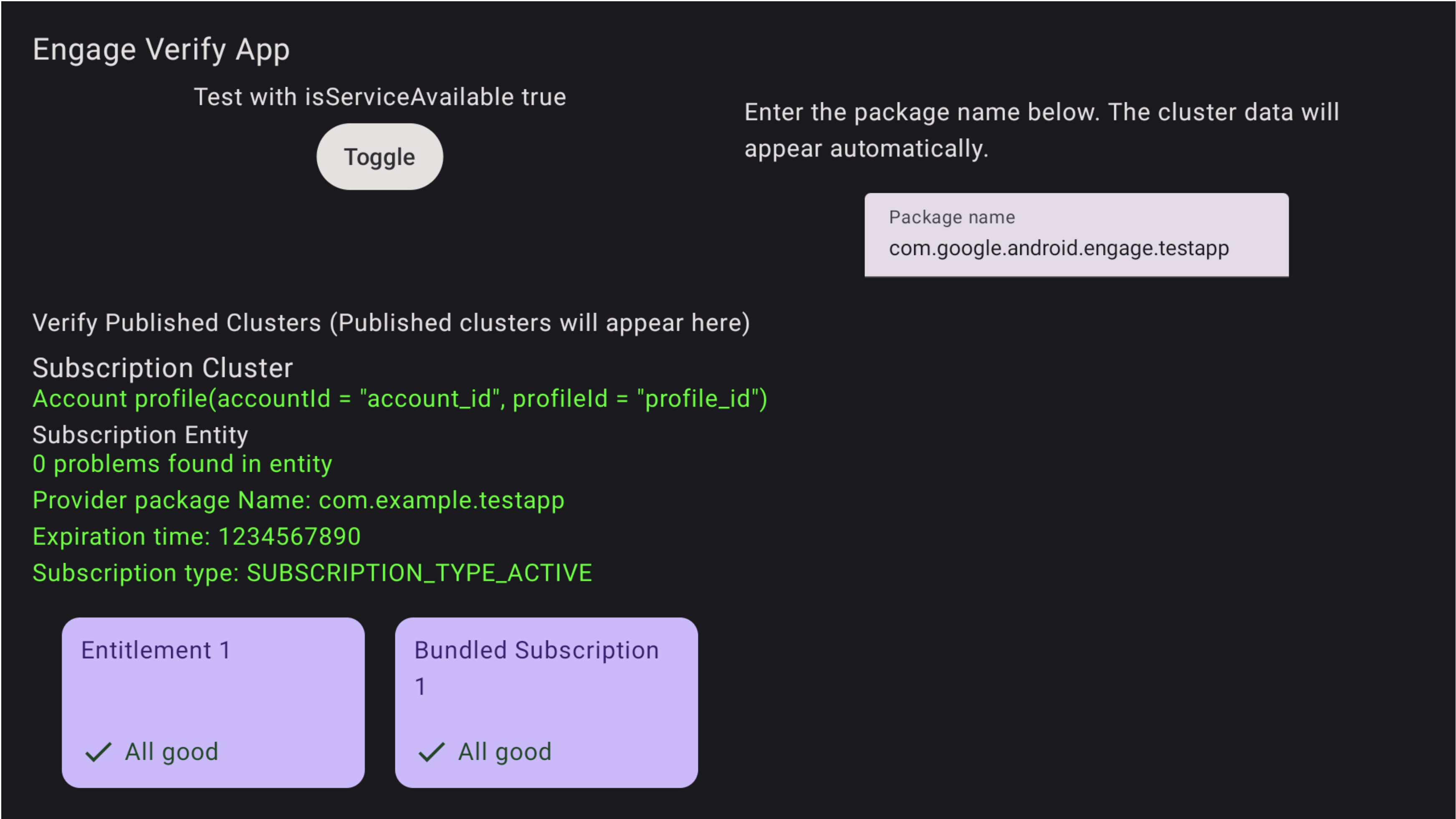
图 1. 成功订阅 验证应用中也会突出显示问题
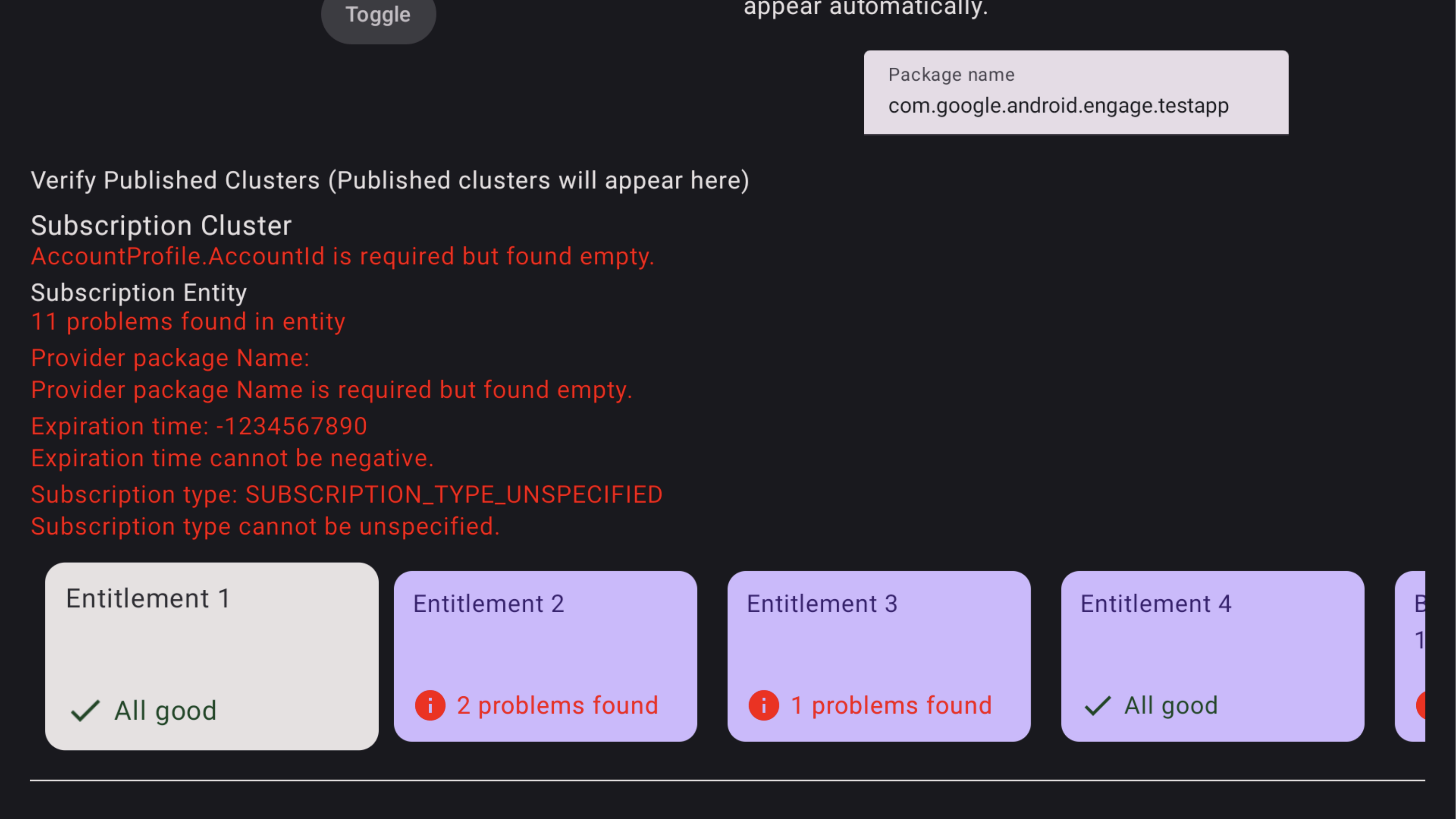
图 2. 订阅失败 如需查看捆绑式订阅中的问题,请使用电视遥控器将焦点对准该特定捆绑式订阅,然后点击以查看问题。您可能需要先将焦点移至相应行,然后向右移动,找到“捆绑式订阅”卡片。问题会突出显示为红色,如图 3 所示。 此外,您还可以使用遥控器向下移动,查看套装订阅中授权存在的问题
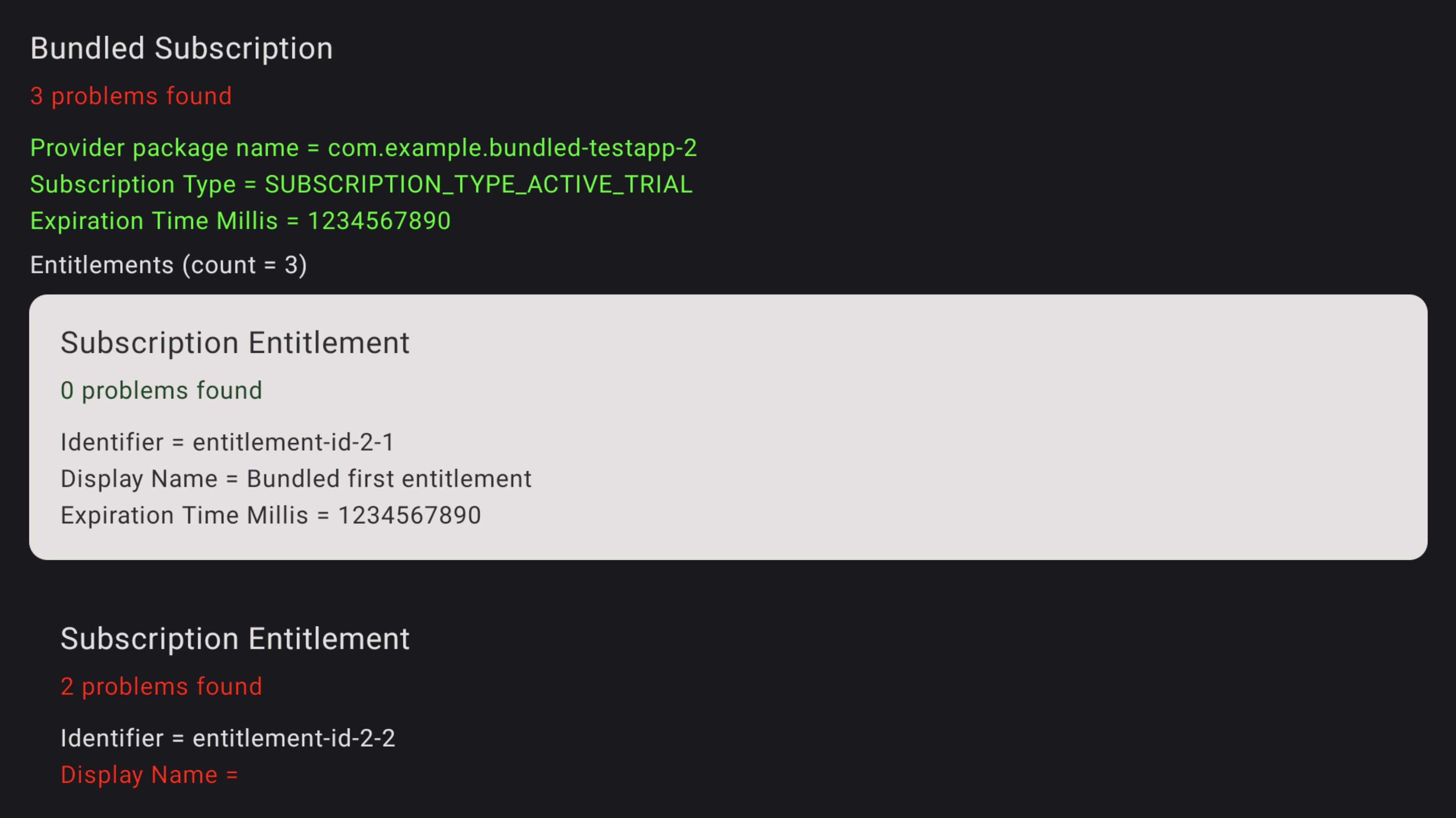
图 3.订阅错误 如需查看相应授权中的问题,请使用电视遥控器将焦点对准该特定授权,然后点击以查看问题。问题会突出显示为红色。
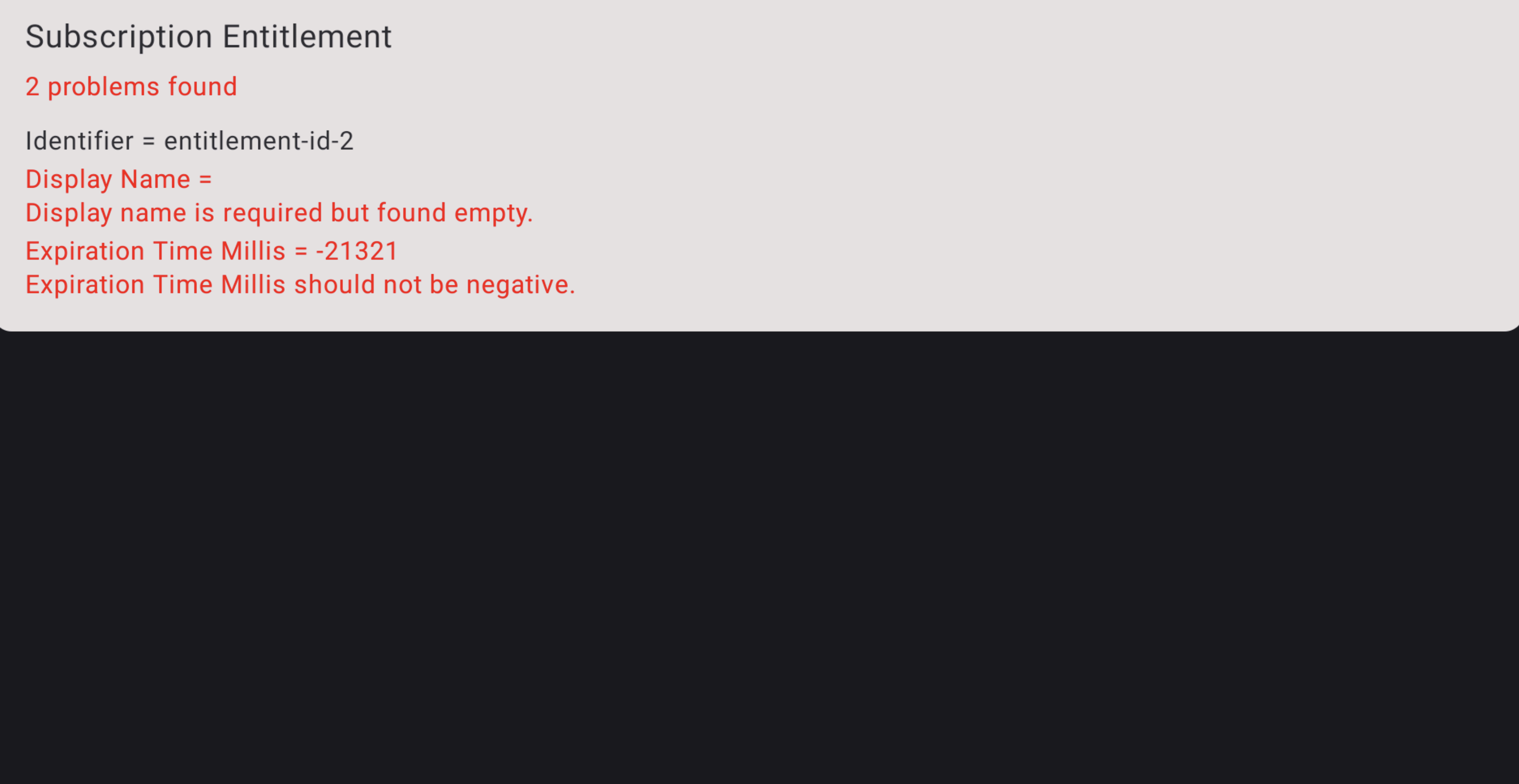
图 4. 订阅错误详情