

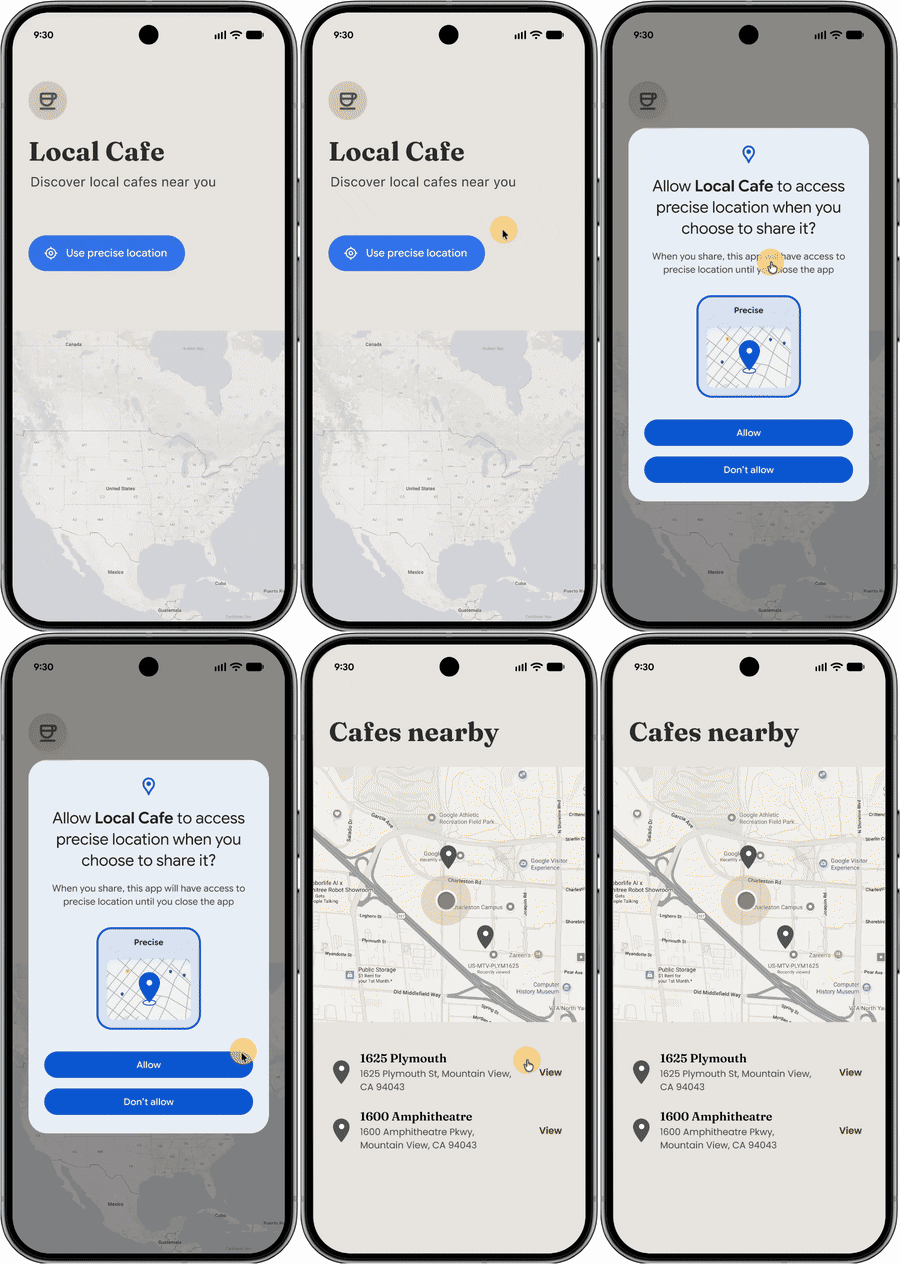
Android 位置信息按钮是一种可自定义的系统界面元素,旨在简化您请求会话级范围的精确位置信息访问权限的方式。通过直接的用户操作来发起位置信息请求,该按钮可改善用户隐私保护,并减少通常在授予临时“仅限这次”权限时遇到的重复权限对话框带来的不便。
如果您的应用以 Android 17(API 级别 37)或更高版本为目标平台,并且仅包含需要基于会话的位置信息访问权限才能正常运行的功能,则 Google Play 政策要求您使用位置信息按钮。如需了解详情,请参阅位置信息按钮政策。
何时使用位置信息按钮
对于需要短时间访问精确位置信息(基于会话)的功能,请使用位置信息按钮。这非常适合不需要持续访问位置信息且旨在减少重复的“仅限这次”权限提示的应用。
常见用例包括:
- “搜索附近”功能:查找附近的酒店、商店或餐馆。
- 位置信息分享:与亲朋好友分享您的当前位置信息(一次性)。
- 社交媒体:签到或位置标记。
- 电子商务:自动填充配送地址。
自定义界面
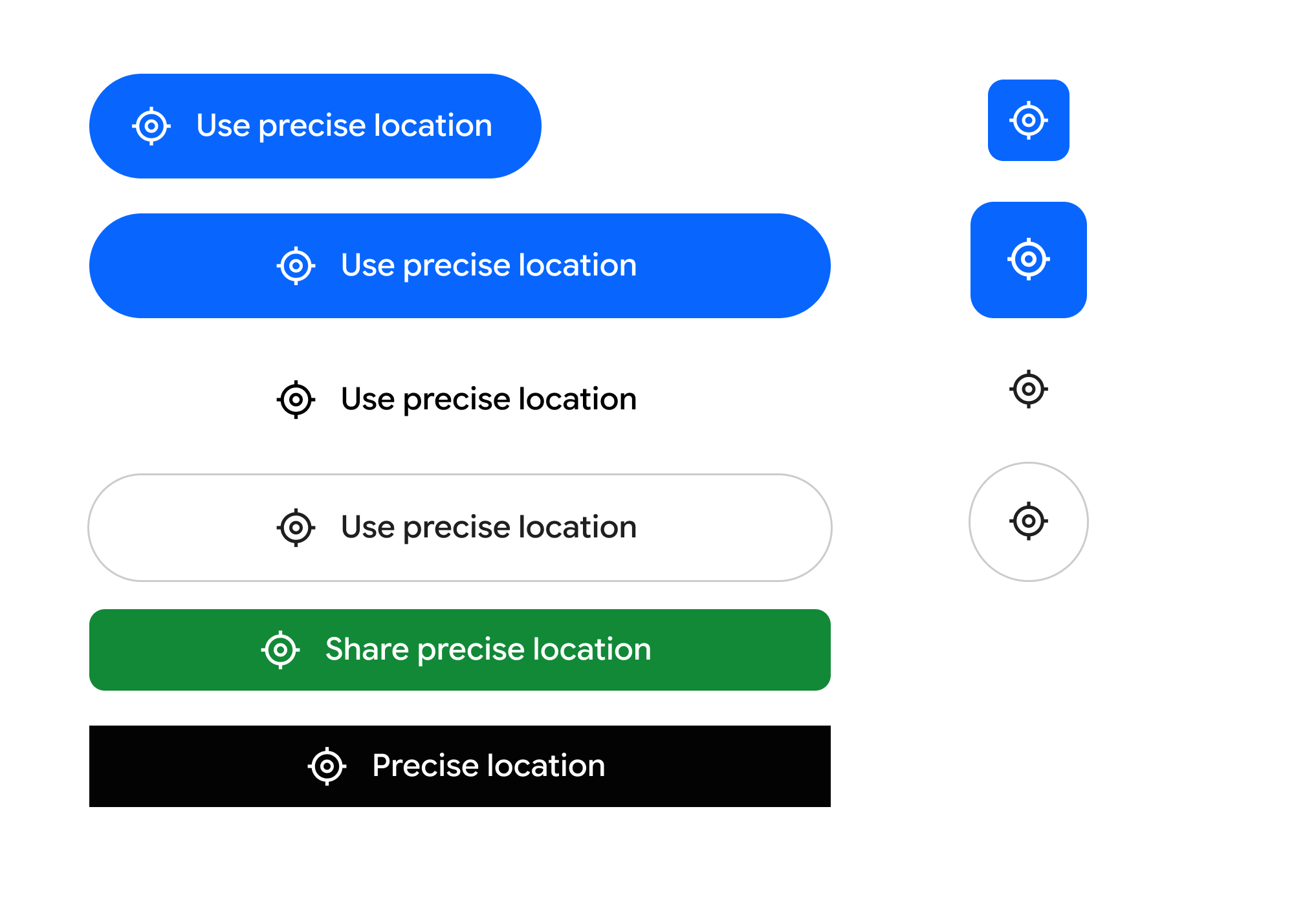
为了确保按钮与应用的风格相符,同时仍能被识别,您可以修改以下视觉元素:
- 背景和图标配色方案。
- 轮廓样式、大小和形状。
- 来自预定义列表的文本标签(例如“使用精确位置”“分享精确位置”)。
实现位置信息按钮
如需集成位置信息按钮,请使用 Jetpack 库。此库可简化设置,在较新的平台上处理安全渲染,并为以 Android 16 及更低版本为目标平台的应用提供回退。
第 1 步:在 Android 清单中声明权限
您必须声明标准位置信息权限以及系统远程渲染服务所需的专用 USE_LOCATION_BUTTON 权限。
<?xml version="1.0" encoding="utf-8"?> <!-- Copyright 2026 The Android Open Source Project Licensed under the Apache License, Version 2.0 (the "License"); you may not use this file except in compliance with the License. You may obtain a copy of the License at https://www.apache.org/licenses/LICENSE-2.0 Unless required by applicable law or agreed to in writing, software distributed under the License is distributed on an "AS IS" BASIS, WITHOUT WARRANTIES OR CONDITIONS OF ANY KIND, either express or implied. See the License for the specific language governing permissions and limitations under the License. --> <manifest xmlns:android="http://schemas.android.com/apk/res/android"> <!-- 1. Standard Coarse and Fine Location Permissions --> <uses-permission android:name="android.permission.ACCESS_COARSE_LOCATION" /> <uses-permission android:name="android.permission.ACCESS_FINE_LOCATION" /> <!-- Optional: If your app is only using the location button to access location, you should add the "onlyForLocationButton" flag shown below to your ACCESS_FINE_LOCATION declaration. <uses-permission android:name="android.permission.ACCESS_FINE_LOCATION" android:usesPermissionFlags="onlyForLocationButton"/> Note: Adding this flag restricts your app from accessing the precise location permission via the broader permission, and that users will be required to use the location button in order to share precise location with the app. This is designed to improve user privacy & trust when granting location access. --> <!-- 2. CRITICAL: Required system permission for rendering the LocationButton --> <uses-permission android:name="android.permission.USE_LOCATION_BUTTON" /> <application android:icon="@mipmap/ic_launcher" android:label="LocationButtonSample" android:theme="@style/Theme.PinPoint"> <activity android:name=".MainActivity" android:exported="true"> <intent-filter> <action android:name="android.intent.action.MAIN" /> <category android:name="android.intent.category.LAUNCHER" /> </intent-filter> </activity> </application> </manifest>
第 2 步:实现 Kotlin 可组合项
以下是位置信息按钮的实现示例,包括使用可用自定义选项的示例,这些选项可用于使界面与应用的其余部分相匹配。
import androidx.compose.foundation.layout.PaddingValues import androidx.compose.foundation.layout.height import androidx.compose.foundation.layout.width import androidx.compose.runtime.Composable import androidx.compose.ui.graphics.Color import androidx.compose.ui.unit.dp import androidx.core.locationbutton.compose.LocationButton import androidx.core.locationbutton.compose.LocationButtonTextType @Composable fun LocationPermissionScreen(onPermissionGranted: () -> Unit, onPermissionDenied: () -> Unit) { // Renders the secure system-trusted Location Button composable LocationButton( // Callback triggered when the user taps the secure button and makes a decision on the permission dialog onPermissionResult = { isGranted -> if (isGranted) { onPermissionGranted() } else { onPermissionDenied() } }, /* ============================================================================ * VISUAL CUSTOMIZATIONS * Un-comment any of the parameters below to customize the button's aesthetics. * If omitted, the button falls back to secure, high-contrast system defaults. * ============================================================================ */ /* // LABEL TEXT TYPE: // Predefined system strings rendered inside the secure process. // Options: PreciseLocation, UsePreciseLocation, SharePreciseLocation, // NearMyPreciseLocation, or None (for an icon-only button). textType = LocationButtonTextType.UsePreciseLocation, // COLOR PALETTE: // Customize the container background, text label, and icon tint colors. backgroundColor = Color(0xFF00796B), // e.g., Material Teal textColor = Color.White, iconTint = Color(0xFFFFC107), // e.g., Amber icon tint // CORNER RADIUS & SHAPE: // Define the resting corner radius and the morphed radius when pressed. cornerRadius = 24.dp, // Rounded capsule shape pressedCornerRadius = 12.dp, // Morphs to sharper corners on tap // OUTLINE STROKE (BORDERS): // Add a contrasting outline stroke around the button bounds. strokeColor = Color(0xFF004D40), strokeWidth = 2.dp, // INTERACTIVE TOUCH PADDING: // Defines the secure clickable touch target boundary. // Coerced securely by the system between 4.dp and 8.dp. clickablePadding = PaddingValues(6.dp) */ ) }
第 3 步:处理向后兼容性
Jetpack 库会自动处理较低 Android 版本的向后兼容性。在搭载 Android 16 或更低版本的设备上,该库会回退到本地渲染的组件,该组件会保留自定义的图文并茂布局,但会恢复为触发标准位置信息权限提示。
使用此方法,您可以充分利用采用位置信息按钮的优势,而无需为搭载 Android 16 或更低版本的设备维护并行解决方案。