

Android 应用中的数字凭证验证可用于对用户身份(例如政府身份证件)、用户属性(例如驾照、学位或年龄或地址等属性)进行身份验证和授权,或用于需要签发和验证凭证以断言实体真实性的其他场景。
Android 9(API 级别 28)及更高版本支持 Verifier API。
实现
如需在 Android 项目中验证数字凭证,请执行以下操作:
- 向应用的 build 脚本添加依赖项,并初始化
CredentialManager类。 - 构建数字凭证请求,并使用该请求初始化
DigitalCredentialOption,然后构建GetCredentialRequest。 - 使用构建的请求启动
getCredential流程,以接收成功的GetCredentialResponse或处理可能发生的任何异常。成功检索后,验证响应。
添加依赖项并初始化
将以下依赖项添加到 Gradle 构建脚本中:
dependencies {
    implementation("androidx.credentials:credentials:1.6.0-beta01")
    implementation("androidx.credentials:credentials-play-services-auth:1.6.0-beta01")
}
接下来,初始化 CredentialManager 类的实例。
val credentialManager = CredentialManager.create(context)
构建数字凭证请求
构建数字凭证请求,并使用该请求初始化 DigitalCredentialOption。
// The request in the JSON format to conform with
// the JSON-ified Credential Manager - Verifier API request definition.
val requestJson = generateRequestFromServer()
val digitalCredentialOption =
    GetDigitalCredentialOption(requestJson = requestJson)

// Use the option from the previous step to build the `GetCredentialRequest`.
val getCredRequest = GetCredentialRequest(
    listOf(digitalCredentialOption)
)
以下示例演示了 OpenId4Vp1 请求。 如需详细了解此请求中的字段,请参阅 OpenID 文档。
{
  "requests": [
    {
      "protocol": "openid4vp-v1-unsigned",
      "data": {
        "response_type": "vp_token",
        "response_mode": "dc_api",
        "nonce": "OD8eP8BYfr0zyhgq4QCVEGN3m7C1Ht_No9H5fG5KJFk",
        "dcql_query": {
          "credentials": [
            {
              "id": "cred1",
              "format": "mso_mdoc",
              "meta": {
                "doctype_value": "org.iso.18013.5.1.mDL"
              },
              "claims": [
                {
                  "path": [
                    "org.iso.18013.5.1",
                    "family_name"
                  ]
                },
                {
                  "path": [
                    "org.iso.18013.5.1",
                    "given_name"
                  ]
                },
                {
                  "path": [
                    "org.iso.18013.5.1",
                    "age_over_21"
                  ]
                }
              ]
            }
          ]
        }
      }
    }
  ]
}
获取凭证
使用构建的请求启动 getCredential 流程。如果请求成功,您将收到 GetCredentialResponse;如果请求失败,您将收到 GetCredentialException。
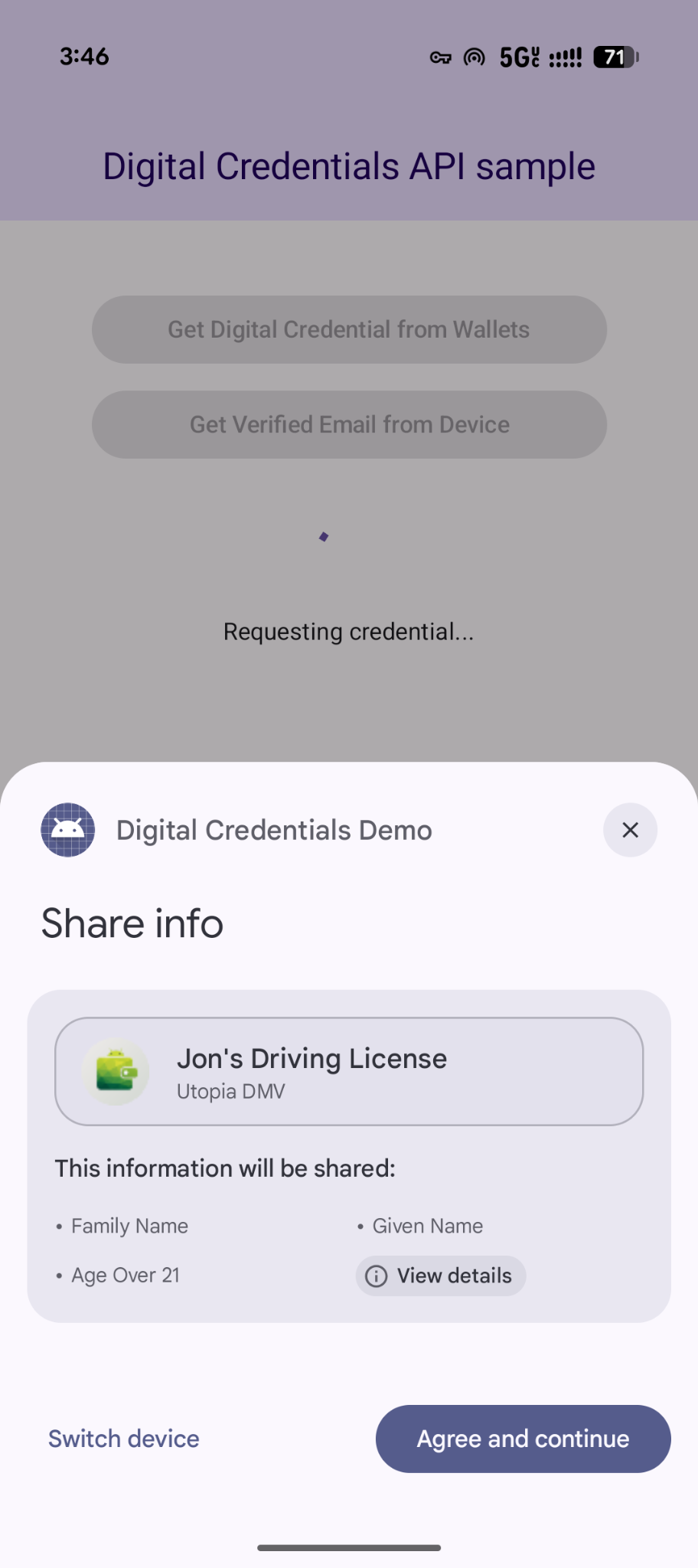
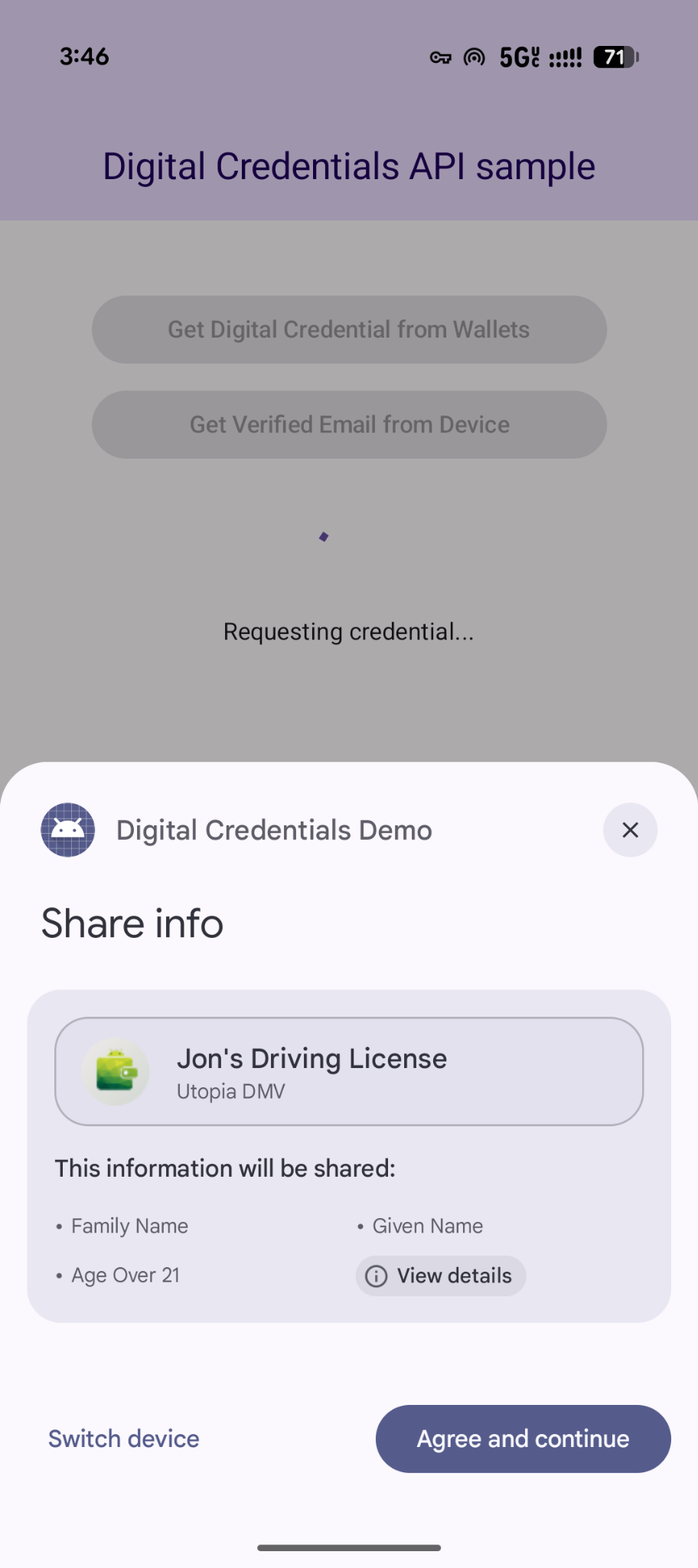
getCredential 流程会触发 Android 系统对话框,以显示用户可用的凭据选项并收集其选择。接下来,包含所选凭证选项的钱包应用将显示界面,以收集用户同意并执行生成数字凭证响应所需的操作。
coroutineScope.launch {
    try {
        val result = credentialManager.getCredential(
            context = activityContext,
            request = getCredRequest
        )
        verifyResult(result)
    } catch (e : GetCredentialException) {
        handleFailure(e)
    }
}

// Handle the successfully returned credential.
fun verifyResult(result: GetCredentialResponse) {
    val credential = result.credential
    when (credential) {
        is DigitalCredential -> {
            val responseJson = credential.credentialJson
            validateResponseOnServer(responseJson)
        }
        else -> {
            // Catch any unrecognized credential type here.
            Log.e(TAG, "Unexpected type of credential ${credential.type}")
        }
    }
}

// Handle failure.
fun handleFailure(e: GetCredentialException) {
  when (e) {
        is GetCredentialCancellationException -> {
            // The user intentionally canceled the operation and chose not
            // to share the credential.
        }
        is GetCredentialInterruptedException -> {
            // Retry-able error. Consider retrying the call.
        }
        is NoCredentialException -> {
            // No credential was available.
        }
        else -> Log.w(TAG, "Unexpected exception type ${e::class.java}")
    }
}
灵活的多凭据请求
Digital Credentials API 还支持使用 OpenID4VP 一次请求多种类型的凭证:
- 同时请求:在单个用户事务中请求多个凭据。例如,旅行应用可以同时请求登机牌和政府身份证件,让用户只需点按一下即可查看并同意提供这两项信息。
- 灵活履单:接受多种凭证类型或颁发机构中的任何一种。例如,年龄验证流程可以接受驾照或护照,让用户能够使用其凭证夹中存储的任一凭证来满足要求。
以下示例展示了如何在单个请求中请求多个凭证:
{
  "credentials": [
    {
      "id": "gov_id1",
      "format": "mso_mdoc",
      "meta": {
        "doctype_value": "org.iso.18013.5.1.mDL"
      },
      "claims": [
        {
          "path": [
            "org.iso.18013.5.1",
            "age_over_21"
          ]
        }
      ]
    },
    {
      "id": "boarding_pass1",
      "format": "dc+sd-jwt",
      "meta": {
        "vct_values": [
          "https://credentials.example.airline/boarding-pass"
        ]
      },
      "claims": [
        {
          "path": [
            "flight_number"
          ]
        },
        {
          "path": [
            "seat"
          ]
        }
      ]
    }
  ]
}
处理响应
发出凭证请求后,处理从 CredentialManager 返回的 GetCredentialResponse。
// Handle the successfully returned credential.
fun verifyResult(result: GetCredentialResponse) {
    val credential = result.credential
    when (credential) {
        is DigitalCredential -> {
            val responseJson = credential.credentialJson
            validateResponseOnServer(responseJson)
        }
        else -> {
            // Catch any unrecognized credential type here.
            Log.e(TAG, "Unexpected type of credential ${credential.type}")
        }
    }
}
处理异常
您的应用应处理可能抛出的错误,包括设备上没有凭据或用户取消操作的情况:
// Handle failure.
fun handleFailure(e: GetCredentialException) {
    when (e) {
        is GetCredentialCancellationException -> {
            // The user intentionally canceled the operation and chose not
            // to share the credential.
        }
        is GetCredentialInterruptedException -> {
            // Retry-able error. Consider retrying the call.
        }
        is NoCredentialException -> {
            // No credential was available.
        }
        is CreateCredentialUnknownException -> {
            // An unknown, usually unexpected, error has occurred. Check the
            // message error for any additional debugging information.
        }
        is CreateCredentialCustomException -> {
            // You have encountered a custom error thrown by the wallet.
            // If you made the API call with a request object that's a
            // subclass of CreateCustomCredentialRequest using a 3rd-party SDK,
            // then you should check for any custom exception type constants
            // within that SDK to match with e.type. Otherwise, drop or log the
            // exception.
        }
        else -> Log.w(TAG, "Unexpected exception type ${e::class.java}")
    }
}