

如果您是原始设备制造商 (OEM) 或维护特权无线下载 (OTA) 更新客户端,则可以使设备上对安全性敏感的应用能够了解待处理的安全更新,以便它们准确评估设备的安全性态势。为了强制执行严格的零信任政策,应用必须能够验证设备上安装的补丁级别(设备安全补丁级别,简称 DSPL),以及可供安装的安全更新(可用安全补丁级别,简称 ASPL)。
由于非特权客户端应用无法直接读取固件属性、检查专用更新程序数据库或查询内部 OEM 后端端点,因此 AndroidX Security State Provider 库提供了一种标准化的安全进程间通信 (IPC) 架构,更新客户端可使用该架构来共享有关可用更新的信息。通过在 OTA 更新客户端中实现 UpdateInfoService,您可以发布系统的 ASPL 元数据,而无需公开专有的后端集成。虽然 Google 为 GMS 设备提供了模块化系统组件 (Mainline) 更新程序的实现,但非 GMS 设备也可以发布这些模块化系统组件的 ASPL 元数据。
架构概览
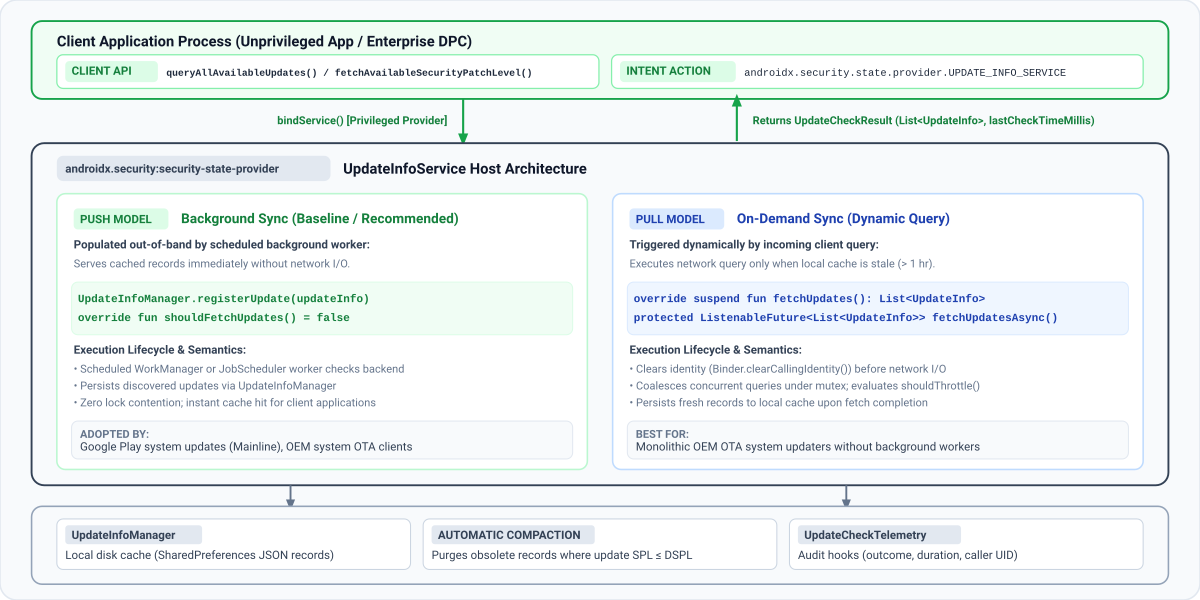
下图展示了 AndroidX Security State Provider 库如何在非特权客户端应用与设备端更新服务之间建立标准化的安全 IPC 框架:
数据传送模式
客户端应用通过调用 queryAllAvailableUpdates 或 fetchAvailableSecurityPatchLevel 查询更新可用性。在底层,客户端库会自动发现并绑定到设备上扩展 UpdateInfoService 类的所有已注册服务(来自持有 READ_PRIVILEGED_PHONE_STATE 权限的系统应用)。
如上图所示,security-state-provider 库支持两种数据传送模型:
| 交付模式 | 同步触发器 | 客户端响应 | 推荐的使用场景 |
|---|---|---|---|
| 推送模型(后台同步) | 已调度的后台工作器(WorkManager 或 JobScheduler)会与后端同步,并将记录写入 UpdateInfoManager。您的服务始终从本地磁盘缓存 (shouldFetchUpdates() = false) 提供内容。 |
立即从本地缓存提供。 | OEM 系统 OTA 更新程序和后台同步的模块化组件更新程序。 |
| 拉取模型(按需同步) | 当缓存记录过时 (shouldFetchUpdates() = true) 时,传入的客户端 IPC 查询会触发网络提取。互斥锁合并和速率限制 (shouldThrottle()) 可保护后端免受峰值的影响。 |
当缓存过时时,等待后端提取。 | 没有预定后台同步工作器的单体 OEM OTA 更新程序。 |
多个更新提供方
在生产 Android 设备上,多个独立的更新提供方同时共存。例如,Mainline 会发布模块化组件 (COMPONENT_SYSTEM_MODULES) 的可用性,而 OEM OTA 客户端会发布主要操作系统映像 (COMPONENT_SYSTEM) 的更新。
您的服务只需注册其管理的特定组件的更新。如果设备上的多个提供程序针对同一组件发布更新,客户端应用会评估最高的可用补丁级别(使用 fetchAvailableSecurityPatchLevel())或检查各个 UpdateInfo 记录(使用 queryAllAvailableUpdates())以进行企业审核。确保您的服务始终发布组件的规范格式(COMPONENT_SYSTEM 的 DateBasedSecurityPatchLevel)。
分步指南:引导更新客户端
请按以下步骤将 AndroidX Security State Provider 库集成到更新客户端中,并开始发布设备的安全更新可用性。
第 1 步:添加依赖项
如需实现更新提供程序,请确保您的项目包含 Google Maven 制品库,然后将 security-state-provider 库添加到模块的 build.gradle.kts (Kotlin DSL) 或 build.gradle (Groovy DSL) 文件中:
Kotlin
// Kotlin DSL (build.gradle.kts)
dependencies {
    // Core provider library for OTA and system update clients
    implementation("androidx.security:security-state-provider:1.0.0")
    // Required to construct UpdateInfo and DateBasedSecurityPatchLevel records
    implementation("androidx.security:security-state:1.1.0")
    // Optional: Guava ListenableFuture support for Java implementations
    implementation("androidx.concurrent:concurrent-futures:1.2.0")
    implementation("com.google.guava:guava:33.0.0-android")
}
Groovy
// Groovy DSL (build.gradle)
dependencies {
    // Core provider library for OTA and system update clients
    implementation 'androidx.security:security-state-provider:1.0.0'
    // Required to construct UpdateInfo and DateBasedSecurityPatchLevel records
    implementation 'androidx.security:security-state:1.1.0'
    // Optional: Guava ListenableFuture support for Java implementations
    implementation 'androidx.concurrent:concurrent-futures:1.2.0'
    implementation 'com.google.guava:guava:33.0.0-android'
}
第 2 步:在清单中声明更新服务
在应用的 AndroidManifest.xml 中声明您的服务,并使用与 androidx.security.state.provider.UPDATE_INFO_SERVICE 匹配的 <intent-filter>。该服务必须已导出 (android:exported="true") 并配置为单用户服务 (android:singleUser="true"),以便客户端库可以跨进程和用户边界(尤其是对于工作资料)绑定到该服务:
<!-- AndroidManifest.xml -->
<manifest xmlns:android="http://schemas.android.com/apk/res/android"
    xmlns:tools="http://schemas.android.com/tools"
    package="com.example.android.updater">
    <application>
        <service
            android:name=".MyUpdateInfoService"
            android:exported="true"
            android:singleUser="true"
            tools:ignore="ExportedService">
            <intent-filter>
                <action android:name="androidx.security.state.provider.UPDATE_INFO_SERVICE" />
            </intent-filter>
        </service>
    </application>
</manifest>
如果您的更新程序不是以 android.uid.system 身份运行,请在清单中声明以下权限,并确保将其添加到您的特权权限许可名单中:
READ_PRIVILEGED_PHONE_STATE:客户端信任您的提供商所必需的。INTERACT_ACROSS_USERS:对于android:singleUser="true"是必需的。
第 3 步:实现 UpdateInfoService
如需发布更新状态,您必须实现 UpdateInfoService 类,并构建与预期数据模型匹配的更新记录。
UpdateInfo 数据模型规范
无论您选择推送模型还是拉取模型,都应根据以下规范使用 UpdateInfo.Builder 构建 UpdateInfo 记录:
| 字段名称 | Getter 方法 | 数据类型 | 验证和格式要求 | 用途和系统语义 |
|---|---|---|---|---|
component |
getComponent() |
String (@Component) |
SecurityPatchState 中的规范常量:COMPONENT_SYSTEM、COMPONENT_SYSTEM_MODULES 或 COMPONENT_KERNEL。 |
标识相应更新所针对的软件或固件子系统。 |
securityPatchLevel |
getSecurityPatchLevel() |
SecurityPatchLevel |
必须是 DateBasedSecurityPatchLevel (YYYY-MM-DD) 或 VersionedSecurityPatchLevel (major.minor.patch) 的实例,或者使用 SecurityPatchState.getComponentSecurityPatchLevel() 进行解析。 |
安装此更新后将达到的目标安全补丁级别。 |
publishedDateMillis |
getPublishedDateMillis() |
long |
自 Unix 纪元以来的毫秒数 (System.currentTimeMillis())。必须为 > 0。 |
向用户提供更新的时间,例如 OTA 发布时间。请勿使用载荷下载或安装时间。 |
lastCheckTimeMillis |
getLastCheckTimeMillis() |
long |
自 Unix 纪元以来的毫秒数。必须为 > 0。 |
提供方在同步期间验证或发现此更新记录时的时间戳。 |
从以下选项中选择适合您的更新程序架构的交付模型:
方案 A:推送模型(推荐)
当后台同步工作器检查 OTA 服务器时,验证发现的任何更新是否会提高设备的当前补丁级别,并使用 UpdateInfoManager.registerUpdate() 持久保存该级别,或者在没有待处理的升级安全更新时调用 UpdateInfoManager.unregisterUpdate()。始终在每次同步结束时调用 UpdateInfoManager.setLastCheckTimeMillis()(即使在调用 registerUpdate() 之后也是如此,会保留每个组件的 UpdateInfo 记录,但不会更新返回给客户端的全局上次检查时间戳)。您可以使用 Kotlin 中的 WorkManager CoroutineWorker 或 Java 中的 Worker 来实现此目的:
Kotlin
import android.content.Context
import androidx.security.state.SecurityPatchState
import androidx.security.state.SecurityPatchState.DateBasedSecurityPatchLevel
import androidx.security.state.UpdateInfo
import androidx.security.state.provider.UpdateInfoManager
import androidx.work.CoroutineWorker
import androidx.work.WorkerParameters
import kotlin.math.max

class OtaSyncWorker(context: Context, params: WorkerParameters) : CoroutineWorker(context, params) {
    override suspend fun doWork(): Result {
        val updateInfoManager = UpdateInfoManager(applicationContext)
        val securityPatchState = SecurityPatchState(applicationContext)
        val currentSpl = securityPatchState.getDeviceSecurityPatchLevel(SecurityPatchState.COMPONENT_SYSTEM)

        // 1. Fetch available update metadata from OEM backend
        val latestUpdate = MyOtaClient.fetchLatestSystemUpdate()
        val targetSplString = latestUpdate?.spl?.trim()
        val targetSpl = if (!targetSplString.isNullOrEmpty()) {
            DateBasedSecurityPatchLevel.fromString(targetSplString)
        } else {
            null
        }

        // 2. Defensively verify that target SPL is non-blank AND strictly newer than installed DSPL.
        // If an update is a maintenance patch with no SPL increment (or if no update is available),
        // unregister any stale cached record for this component.
        if (latestUpdate != null && targetSpl != null && targetSpl > currentSpl) {
            val updateInfo = UpdateInfo.Builder()
                .setComponent(SecurityPatchState.COMPONENT_SYSTEM)
                .setSecurityPatchLevel(targetSpl)
                .setPublishedDateMillis(latestUpdate.releaseTimeMillis)
                .setLastCheckTimeMillis(System.currentTimeMillis())
                .build()
            updateInfoManager.registerUpdate(updateInfo)
        } else {
            val clearTarget = UpdateInfo.Builder()
                .setComponent(SecurityPatchState.COMPONENT_SYSTEM)
                .build()
            updateInfoManager.unregisterUpdate(clearTarget)
        }

        // 3. Update global freshness timestamp (monotonic synchronization)
        val currentCheckTime = System.currentTimeMillis()
        val previousCheckTime = updateInfoManager.getLastCheckTimeMillis()
        updateInfoManager.setLastCheckTimeMillis(max(previousCheckTime, currentCheckTime))
        return Result.success()
    }
}
Java
import android.content.Context;
import android.text.TextUtils;
import androidx.annotation.NonNull;
import androidx.security.state.SecurityPatchState;
import androidx.security.state.SecurityPatchState.DateBasedSecurityPatchLevel;
import androidx.security.state.SecurityPatchState.SecurityPatchLevel;
import androidx.security.state.UpdateInfo;
import androidx.security.state.provider.UpdateInfoManager;
import androidx.work.Worker;
import androidx.work.WorkerParameters;

public class OtaSyncWorker extends Worker {
    public OtaSyncWorker(@NonNull Context context, @NonNull WorkerParameters params) {
        super(context, params);
    }

    @NonNull
    @Override
    public Result doWork() {
        // In Java, pass null for customSecurityState because UpdateInfoManager does not declare @JvmOverloads
        UpdateInfoManager updateInfoManager =
                new UpdateInfoManager(getApplicationContext(), /* customSecurityState= */ null);
        SecurityPatchState securityPatchState = new SecurityPatchState(getApplicationContext());
        SecurityPatchLevel currentSpl =
                securityPatchState.getDeviceSecurityPatchLevel(SecurityPatchState.COMPONENT_SYSTEM);

        // 1. Fetch available update metadata from OEM backend
        MyOtaUpdate latestUpdate = MyOtaClient.fetchLatestSystemUpdate();
        String targetSplString = (latestUpdate != null && latestUpdate.getSpl() != null)
                ? latestUpdate.getSpl().trim()
                : null;
        DateBasedSecurityPatchLevel targetSpl =
                !TextUtils.isEmpty(targetSplString)
                        ? DateBasedSecurityPatchLevel.fromString(targetSplString)
                        : null;

        // 2. Defensively verify that target SPL is non-blank AND strictly newer than installed DSPL.
        // If an update is a maintenance patch with no SPL increment (or if no update is available),
        // unregister any stale cached record for this component.
        if (latestUpdate != null && targetSpl != null && targetSpl.compareTo(currentSpl) > 0) {
            UpdateInfo updateInfo = new UpdateInfo.Builder()
                    .setComponent(SecurityPatchState.COMPONENT_SYSTEM)
                    .setSecurityPatchLevel(targetSpl)
                    .setPublishedDateMillis(latestUpdate.getReleaseTimeMillis())
                    .setLastCheckTimeMillis(System.currentTimeMillis())
                    .build();
            updateInfoManager.registerUpdate(updateInfo);
        } else {
            UpdateInfo clearTarget = new UpdateInfo.Builder()
                    .setComponent(SecurityPatchState.COMPONENT_SYSTEM)
                    .build();
            updateInfoManager.unregisterUpdate(clearTarget);
        }

        // 3. Update global freshness timestamp (monotonic synchronization)
        long currentCheckTime = System.currentTimeMillis();
        long previousCheckTime = updateInfoManager.getLastCheckTimeMillis();
        updateInfoManager.setLastCheckTimeMillis(Math.max(previousCheckTime, currentCheckTime));
        return Result.success();
    }
}
在基于推送的模型中,后台任务会将更新记录直接持久保存到 UpdateInfoManager。如需指示框架始终从本地磁盘存储空间提供记录,请通过在 Kotlin 中扩展 UpdateInfoService 或在 Java 中扩展 ListenableFutureUpdateInfoService 来替换 shouldFetchUpdates() 以返回 false:
Kotlin
import androidx.security.state.UpdateInfo
import androidx.security.state.provider.UpdateInfoService

class PushUpdateInfoService : UpdateInfoService() {
    // Cache is populated out-of-band by background sync tasks
    override fun shouldFetchUpdates(): Boolean = false

    // Never invoked under normal flow because shouldFetchUpdates() returns false
    override suspend fun fetchUpdates(): List<UpdateInfo> = emptyList()
}
Java
import androidx.annotation.NonNull;
import androidx.security.state.UpdateInfo;
import androidx.security.state.provider.ListenableFutureUpdateInfoService;
import com.google.common.util.concurrent.Futures;
import com.google.common.util.concurrent.ListenableFuture;
import java.util.Collections;
import java.util.List;

public class PushUpdateInfoService extends ListenableFutureUpdateInfoService {
    @Override
    protected boolean shouldFetchUpdates() {
        return false;
    }

    @NonNull
    @Override
    protected ListenableFuture<List<UpdateInfo>> fetchUpdatesAsync() {
        return Futures.immediateFuture(Collections.emptyList());
    }
}
方案 B:拉取模型(按需)
在基于拉取的架构中,当本地缓存过时时,您的服务会处理由客户端应用触发的按需刷新请求。
如需处理按需更新查询,请在 Kotlin 中扩展 UpdateInfoService(实现挂起的 fetchUpdates() 函数),或在 Java 中扩展 ListenableFutureUpdateInfoService(实现返回 Guava ListenableFuture 的 fetchUpdatesAsync()):
Kotlin
package com.example.android.updater

import androidx.security.state.SecurityPatchState
import androidx.security.state.SecurityPatchState.DateBasedSecurityPatchLevel
import androidx.security.state.UpdateInfo
import androidx.security.state.provider.UpdateInfoManager
import androidx.security.state.provider.UpdateInfoService
import java.util.concurrent.TimeUnit

class MyUpdateInfoService : UpdateInfoService() {
    // Manage local update records and check timestamps
    private val updateInfoManager by lazy { UpdateInfoManager(this) }

    override suspend fun fetchUpdates(): List<UpdateInfo> {
        val currentSpl = SecurityPatchState(this)
            .getDeviceSecurityPatchLevel(SecurityPatchState.COMPONENT_SYSTEM)

        // 1. Execute network request to OTA backend
        val response = MyOtaBackendClient.checkAvailableUpdates()

        // 2. Defensively filter out blank or non-advancing SPLs and map to UpdateInfo objects
        val validUpdates = response.updates
            .mapNotNull { updateItem ->
                val splString = updateItem.targetSpl?.trim()
                if (splString.isNullOrEmpty()) return@mapNotNull null
                val parsedSpl = DateBasedSecurityPatchLevel.fromString(splString)
                if (parsedSpl > currentSpl) {
                    UpdateInfo.Builder()
                        .setComponent(SecurityPatchState.COMPONENT_SYSTEM)
                        .setSecurityPatchLevel(parsedSpl)
                        .setPublishedDateMillis(updateItem.releaseTimestampMillis)
                        .setLastCheckTimeMillis(System.currentTimeMillis())
                        .build()
                } else {
                    null
                }
            }

        // 3. If no advancing SYSTEM update is available (or if a previously offered update was revoked),
        // proactively unregister any cached record for this component.
        if (validUpdates.isEmpty()) {
            val clearTarget = UpdateInfo.Builder()
                .setComponent(SecurityPatchState.COMPONENT_SYSTEM)
                .build()
            updateInfoManager.unregisterUpdate(clearTarget)
        }
        return validUpdates
    }

    override fun shouldFetchUpdates(): Boolean {
        // Enforce custom freshness threshold (for example, 4 hours instead of default 1 hour)
        val lastCheckMillis = updateInfoManager.getLastCheckTimeMillis()
        val dataAge = System.currentTimeMillis() - lastCheckMillis
        return dataAge > TimeUnit.HOURS.toMillis(4)
    }
}
Java
package com.example.android.updater;

import android.text.TextUtils;
import androidx.annotation.NonNull;
import androidx.security.state.SecurityPatchState;
import androidx.security.state.SecurityPatchState.DateBasedSecurityPatchLevel;
import androidx.security.state.SecurityPatchState.SecurityPatchLevel;
import androidx.security.state.UpdateInfo;
import androidx.security.state.provider.ListenableFutureUpdateInfoService;
import androidx.security.state.provider.UpdateInfoManager;
import com.google.common.util.concurrent.Futures;
import com.google.common.util.concurrent.ListenableFuture;
import java.util.ArrayList;
import java.util.List;
import java.util.concurrent.TimeUnit;

public class MyUpdateInfoService extends ListenableFutureUpdateInfoService {
    private UpdateInfoManager updateInfoManager;

    @Override
    public void onCreate() {
        super.onCreate();
        // Pass null for customSecurityState because UpdateInfoManager does not declare @JvmOverloads
        updateInfoManager = new UpdateInfoManager(this, /* customSecurityState= */ null);
    }

    @NonNull
    @Override
    protected ListenableFuture<List<UpdateInfo>> fetchUpdatesAsync() {
        try {
            SecurityPatchLevel currentSpl = new SecurityPatchState(this)
                    .getDeviceSecurityPatchLevel(SecurityPatchState.COMPONENT_SYSTEM);
            MyOtaBackendResponse response = MyOtaBackendClient.checkAvailableUpdates();
            List<UpdateInfo> updates = new ArrayList<>();
            for (MyOtaUpdateItem item : response.getUpdates()) {
                String trimmedSpl = (item.getTargetSpl() != null) ? item.getTargetSpl().trim() : null;
                if (!TextUtils.isEmpty(trimmedSpl)) {
                    DateBasedSecurityPatchLevel parsedSpl =
                            DateBasedSecurityPatchLevel.fromString(trimmedSpl);
                    if (parsedSpl.compareTo(currentSpl) > 0) {
                        updates.add(new UpdateInfo.Builder()
                                .setComponent(SecurityPatchState.COMPONENT_SYSTEM)
                                .setSecurityPatchLevel(parsedSpl)
                                .setPublishedDateMillis(item.getReleaseTimestampMillis())
                                .setLastCheckTimeMillis(System.currentTimeMillis())
                                .build());
                    }
                }
            }

            // If no advancing SYSTEM update is available (or if a previously offered update was revoked),
            // proactively unregister any cached record for this component.
            if (updates.isEmpty()) {
                UpdateInfo clearTarget = new UpdateInfo.Builder()
                        .setComponent(SecurityPatchState.COMPONENT_SYSTEM)
                        .build();
                updateInfoManager.unregisterUpdate(clearTarget);
            }
            return Futures.immediateFuture(updates);
        } catch (Exception e) {
            return Futures.immediateFailedFuture(e);
        }
    }

    @Override
    protected boolean shouldFetchUpdates() {
        long lastCheckMillis = updateInfoManager.getLastCheckTimeMillis();
        long dataAge = System.currentTimeMillis() - lastCheckMillis;
        return dataAge > TimeUnit.HOURS.toMillis(4);
    }
}
第 4 步:在设备重启后清除已应用更新
虽然 UpdateInfoManager 会在每次调用 registerUpdate() 时自动剪除过时的更新,但您的更新程序在 OTA 更新完成安装后,直到下一个预定的服务器同步周期才会再次调用 registerUpdate()。为防止客户端应用在重新启动后立即将已安装的更新视为仍处于待处理状态,请监听 ACTION_BOOT_COMPLETED,并在 OTA 更新安装完毕后调用 UpdateInfoManager.unregisterUpdate() 以清除本地缓存中的记录。仅在更新安装完毕后执行此操作,可避免在每次正常设备重启时无条件清除待处理(未安装)的更新。由于 UpdateInfoManager 键按组件更新记录,因此在构建用于取消注册的 UpdateInfo 对象时,您只需指定目标组件:
Kotlin
// Build target identifying the component to unregister
val target = UpdateInfo.Builder()
    .setComponent(SecurityPatchState.COMPONENT_SYSTEM)
    .build()
// Unregister the update to remove it from disk cache
updateInfoManager.unregisterUpdate(target)
// Refresh last check timestamp to indicate up-to-date state
updateInfoManager.setLastCheckTimeMillis(System.currentTimeMillis())
Java
// Build target identifying the component to unregister
UpdateInfo target = new UpdateInfo.Builder()
    .setComponent(SecurityPatchState.COMPONENT_SYSTEM)
    .build();
// Unregister the update to remove it from disk cache
updateInfoManager.unregisterUpdate(target);
// Refresh last check timestamp to indicate up-to-date state
updateInfoManager.setLastCheckTimeMillis(System.currentTimeMillis());
第 5 步:验证集成
使用 Android 调试桥 (ADB) 在 Android 设备或模拟器上运行以下检查,以验证端到端集成并防止常见的 OEM 部署陷阱:
验证客户端是否信任您的提供程序:客户端应用会忽略任何未持有
READ_PRIVILEGED_PHONE_STATE的提供程序,即使该提供程序是预安装的。确认已授予相应权限:adb shell dumpsys package <your_package_name> | grep "READ_PRIVILEGED_PHONE_STATE: granted=true"然后,确认您的服务可被发现,且没有服务权限。 在服务的输出中,检查
exported=true和permission=null:adb shell pm query-services --user 0 -a androidx.security.state.provider.UPDATE_INFO_SERVICE如果客户端仍然看不到您的提供程序,请检查 logcat 中来自
SecurityPatchState标记的Ignoring untrusted update provider。验证用户 0 和工作资料中的 intent 解析:断言 Android OS
PackageManager在主用户 (User 0) 和任何有效的 Android Enterprise 工作资料(例如User 10)中解析导出的UPDATE_INFO_SERVICEintent 过滤器:adb shell pm query-services --user 0 -a androidx.security.state.provider.UPDATE_INFO_SERVICE adb shell pm query-services --user 10 -a androidx.security.state.provider.UPDATE_INFO_SERVICE使用
dumpsys验证服务状态和缓存记录:UpdateInfoService会替换dump()以报告Global Last Check、Should Throttle(速率限制器的状态)和Cached Updates。由于UpdateInfoService是绑定服务,并且客户端在查询后立即解除绑定,因此当没有客户端绑定时,dumpsys activity service会输出(nothing)。在运行dumpsys之前,明确启动服务:adb shell am start-service -a androidx.security.state.provider.UPDATE_INFO_SERVICE <your_package_name>/.<service_class_name> adb shell dumpsys activity service <your_package_name>/.<service_class_name>诊断输出示例:
UpdateInfoService State: Active Requests: 0 Global Last Check: Thu Jan 01 12:00:00 UTC 2026 Should Throttle: false Cached Updates (1): - Component: SYSTEM SPL: 2026-01-01 Published: Thu Jan 01 00:00:00 UTC 2026 Last Checked: Thu Jan 01 12:00:00 UTC 2026触发客户端绑定并验证遥测结果:从非特权测试应用(不持有系统签名权限)调用
SecurityPatchState.queryAllAvailableUpdates()。如果您实现了遥测回调,请检查以下各项:- 验证非特权客户端是否在没有
SecurityException的情况下绑定并触发onClientConnected(packageName, callerUid)。 - 对于推送模型提供方 (
shouldFetchUpdates() == false):验证onRequestCompleted(telemetry)日志UpdateFetchOutcome.CACHE_HIT(1) 是否在每次查询时都包含fetchDurationMillis == 0。 - 对于拉取模式提供程序 (
shouldFetchUpdates() == true):验证初始过时缓存查询中的onRequestCompleted(telemetry)日志UpdateFetchOutcome.FETCHED(3),随后在紧随其后的查询中验证CACHE_HIT(1)。(如需在 Pull 模型测试运行之间重置 1 小时持久速率限制器,请运行adb shell pm clear <your_package_name>。)
- 验证非特权客户端是否在没有
可选配置和高级配置
缓存政策和速率限制
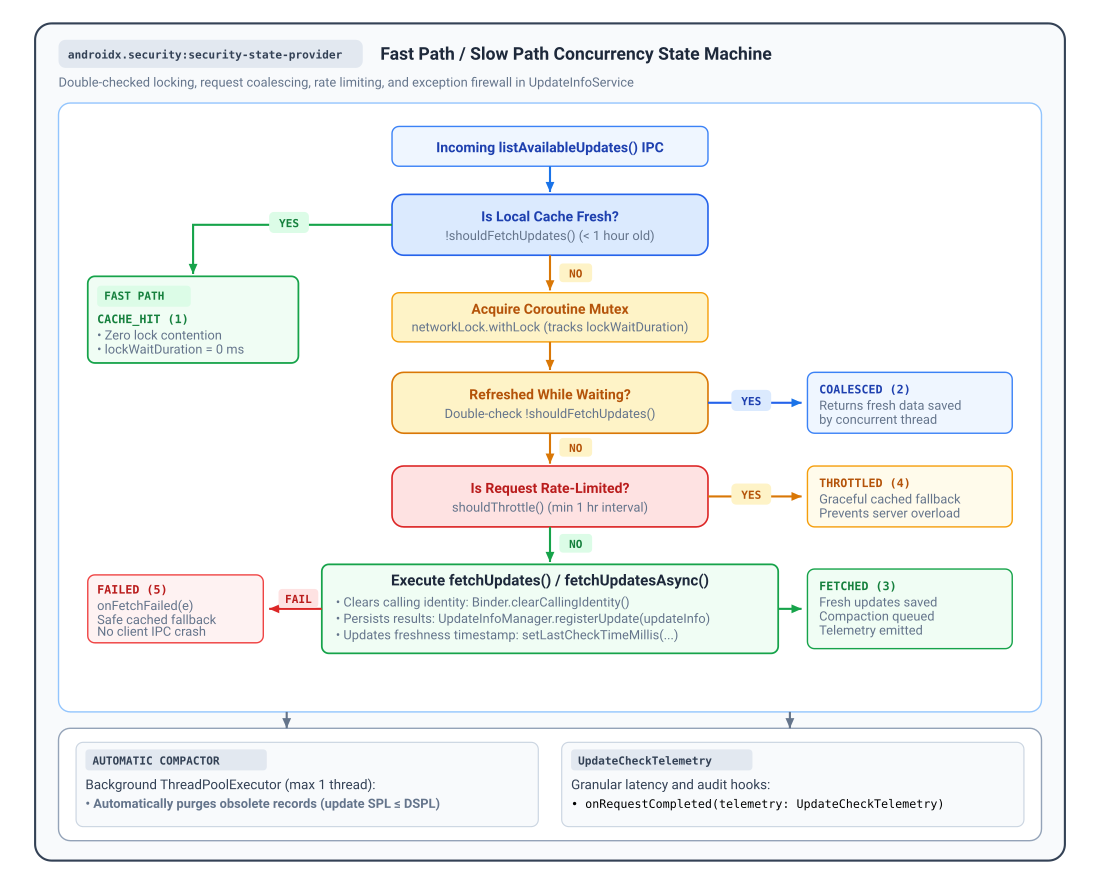
当客户端查询更新时,UpdateInfoService 会执行双重检查锁定工作流,以平衡数据新鲜度和后端服务器负载:
- 快速路径 (
shouldFetchUpdates()):默认情况下,只有当全局lastCheckTimeMillis的时间超过 1 小时 (TimeUnit.HOURS.toMillis(1)) 时,shouldFetchUpdates()才会返回true(表示缓存过时)。当shouldFetchUpdates()返回false时,服务会立即返回结果为UpdateFetchOutcome.CACHE_HIT的缓存记录,而无需获取锁或执行网络 I/O。您可以替换shouldFetchUpdates()以自定义此缓存政策。 - 慢速路径和请求合并:当
shouldFetchUpdates()返回true时,服务会获取内部协程互斥锁并重新评估shouldFetchUpdates()(如果在等待锁期间,并发请求已刷新缓存,则返回UpdateFetchOutcome.COALESCED)。 - 持久速率限制器 (
shouldThrottle()):为了保护后端基础架构免受查询突发或重复失败的影响,shouldThrottle()会在应用和设备重启时强制执行至少 1 小时的持久间隔。UpdateInfoService会在调用fetchUpdates()之前记录每次尝试,因此如果fetchUpdates()抛出异常(在调用onFetchFailed(e)后返回UpdateFetchOutcome.FAILED),则在接下来 60 分钟的宽限期内,后续查询会以UpdateFetchOutcome.THROTTLED的结果正常返回缓存的后备数据。
可观测性、遥测和诊断
UpdateInfoService 提供内置的可观测性钩子,用于跟踪客户端采用情况、监控 IPC 延迟时间,以及记录后端错误,而无需检测低级 AIDL 桩:
onRequestCompleted(telemetry):在每次更新检查完成后调用,并提供UpdateCheckTelemetry摘要。onClientConnected(packageName, callerUid):当经过验证的客户端打开会话时调用。onClientDisconnected(packageName, callerUid):当客户端解除绑定或其进程终止时调用。onFetchFailed(e):如果在fetchUpdates()期间发生异常,且在服务返回缓存的后备数据之前调用。
在 UpdateInfoService (Kotlin) 或 ListenableFutureUpdateInfoService (Java) 中替换以下回调:
Kotlin
import androidx.security.state.provider.UpdateCheckTelemetry
import androidx.security.state.provider.UpdateFetchOutcome
import androidx.security.state.provider.UpdateInfoService

abstract class MonitoredUpdateInfoService : UpdateInfoService() {
    override fun onRequestCompleted(telemetry: UpdateCheckTelemetry) {
        val outcomeName = when (telemetry.outcome) {
            UpdateFetchOutcome.CACHE_HIT -> "CACHE_HIT"
            UpdateFetchOutcome.COALESCED -> "COALESCED"
            UpdateFetchOutcome.FETCHED -> "FETCHED"
            UpdateFetchOutcome.THROTTLED -> "THROTTLED"
            UpdateFetchOutcome.FAILED -> "FAILED"
            else -> "UNKNOWN"
        }
        MyAnalytics.logEvent("SECURITY_UPDATE_CHECK")
            .addParam("outcome", outcomeName)
            .addParam("total_duration_ms", telemetry.totalDurationMillis)
            .addParam("lock_wait_ms", telemetry.lockWaitDurationMillis)
            .addParam("processing_ms", telemetry.processingDurationMillis)
            .addParam("fetch_duration_ms", telemetry.fetchDurationMillis)
            .addParam("caller_uid", telemetry.callerUid)
            .send()
    }

    override fun onClientConnected(packageName: String, callerUid: Int) {
        // Track authenticated client sessions and adoption
        MyMetrics.incrementCounter("client_connected", "package", packageName)
    }

    override fun onClientDisconnected(packageName: String, callerUid: Int) {
        // Track session termination and cleanup resources
        MyMetrics.incrementCounter("client_disconnected", "package", packageName)
    }

    override fun onFetchFailed(e: Exception) {
        // Report exceptions caught during the update check workflow
        MyCrashReporter.recordException(e)
    }
}
Java
import androidx.annotation.NonNull;
import androidx.security.state.provider.ListenableFutureUpdateInfoService;
import androidx.security.state.provider.UpdateCheckTelemetry;
import androidx.security.state.provider.UpdateFetchOutcome;

public abstract class MonitoredUpdateInfoService extends ListenableFutureUpdateInfoService {
    @Override
    protected void onRequestCompleted(@NonNull UpdateCheckTelemetry telemetry) {
        String outcomeName;
        switch (telemetry.getOutcome()) {
            case UpdateFetchOutcome.CACHE_HIT: outcomeName = "CACHE_HIT"; break;
            case UpdateFetchOutcome.COALESCED: outcomeName = "COALESCED"; break;
            case UpdateFetchOutcome.FETCHED: outcomeName = "FETCHED"; break;
            case UpdateFetchOutcome.THROTTLED: outcomeName = "THROTTLED"; break;
            case UpdateFetchOutcome.FAILED: outcomeName = "FAILED"; break;
            default: outcomeName = "UNKNOWN"; break;
        }
        MyAnalytics.logEvent("SECURITY_UPDATE_CHECK")
            .addParam("outcome", outcomeName)
            .addParam("total_duration_ms", telemetry.getTotalDurationMillis())
            .addParam("lock_wait_ms", telemetry.getLockWaitDurationMillis())
            .addParam("processing_ms", telemetry.getProcessingDurationMillis())
            .addParam("fetch_duration_ms", telemetry.getFetchDurationMillis())
            .addParam("caller_uid", telemetry.getCallerUid())
            .send();
    }

    @Override
    protected void onClientConnected(@NonNull String packageName, int callerUid) {
        MyMetrics.incrementCounter("client_connected", "package", packageName);
    }

    @Override
    protected void onClientDisconnected(@NonNull String packageName, int callerUid) {
        MyMetrics.incrementCounter("client_disconnected", "package", packageName);
    }

    @Override
    protected void onFetchFailed(@NonNull Exception e) {
        MyCrashReporter.recordException(e);
    }
}
遥测结果和延迟时间指标
UpdateCheckTelemetry 测量单调递增的经过时间(SystemClock.elapsedRealtime()),并报告 UpdateFetchOutcome 中定义的五种结果之一:
| 结果常量 | @IntDef 代码 |
记录的指标属性 | 说明和系统状态 |
|---|---|---|---|
UpdateFetchOutcome.CACHE_HIT |
1 |
totalDurationMillis、processingDurationMillis、callerUid |
通过快速路径 (shouldFetchUpdates() 返回 false) 立即从本地磁盘/内存缓存提供。lockWaitDurationMillis 和 fetchDurationMillis 为 0。 |
UpdateFetchOutcome.COALESCED |
2 |
totalDurationMillis、lockWaitDurationMillis、processingDurationMillis、callerUid |
查询排在另一个活跃刷新后面;在获取锁后,数据是新鲜的。避免了重复的网络提取(fetchDurationMillis 为 0)。 |
UpdateFetchOutcome.FETCHED |
3 |
totalDurationMillis、lockWaitDurationMillis、processingDurationMillis、fetchDurationMillis、callerUid |
已成功执行后端网络同步(fetchUpdates() 已完成)。新记录已持久存储到磁盘。 |
UpdateFetchOutcome.THROTTLED |
4 |
totalDurationMillis、lockWaitDurationMillis、processingDurationMillis、callerUid |
请求被速率限制器阻止(返回了 shouldThrottle() true)。缓存的数据安全地返回给客户端(fetchDurationMillis 为 0)。 |
UpdateFetchOutcome.FAILED |
5 |
totalDurationMillis、lockWaitDurationMillis、processingDurationMillis、fetchDurationMillis、callerUid |
更新检查或网络请求抛出了异常。被异常防火墙捕获,触发 onFetchFailed(e),返回缓存的回退。 |
高级服务代理钩子:getCallerUid()
当客户端连接时,UpdateInfoService 会在初始 Binder 线程上自动评估 getCallerUid()(在调用 Binder.clearCallingIdentity() 之前,即在 fetchUpdates() 之前),验证软件包所有权,并将经过验证的调用方 UID 直接传递给 onRequestCompleted(telemetry) 中的 onClientConnected()、onClientDisconnected() 和 telemetry.callerUid。
对于标准 Android <service> 组件,您无需调用或替换 getCallerUid()。protected open getCallerUid() 方法(默认情况下委托给 Binder.getCallingUid())作为一种替换钩子提供,适用于通过内部服务代理或代理架构路由 Binder IPC 的宿主应用,让子类返回逻辑客户端 UID 而不是代理的 UID。
其他资源
如需详细了解如何发布安全状态,请参阅以下资源:
文档
API 参考文档
UpdateInfoServiceListenableFutureUpdateInfoServiceUpdateInfoManagerUpdateInfoUpdateInfo.BuilderUpdateCheckTelemetryUpdateFetchOutcomeSecurityPatchState