

सिद्धांत और Jetpack Compose में लागू करना
यह पक्का करें कि नेटवर्क कनेक्शन ठीक से काम न करने या उपयोगकर्ता के ऑफ़लाइन होने पर भी, आपके ऐप्लिकेशन का इस्तेमाल किया जा सके. इससे उपयोगकर्ताओं को बेहतर अनुभव मिलेगा. इसके लिए, नेटवर्क और लोकल डेटाबेस से एक ही समय में पेज लोड किया जा सकता है. इस तरह, आपका ऐप्लिकेशन यूज़र इंटरफ़ेस (यूआई) को लोकल डेटाबेस कैश मेमोरी से मैनेज करता है. साथ ही, डेटाबेस में कोई और डेटा न होने पर ही नेटवर्क से अनुरोध करता है.
यह गाइड इस बात को ध्यान में रखकर बनाई गई है कि आपको Room persistence library और Paging library के बुनियादी इस्तेमाल के बारे में जानकारी है.
डेटा लोड को मैनेज करना
Paging लाइब्रेरी, इस इस्तेमाल के उदाहरण के लिए RemoteMediator कॉम्पोनेंट उपलब्ध कराती है. RemoteMediator, Paging लाइब्रेरी से एक सिग्नल के तौर पर काम करता है. ऐसा तब होता है, जब ऐप्लिकेशन के पास कैश मेमोरी में सेव किया गया डेटा खत्म हो जाता है. इस सिग्नल का इस्तेमाल करके, नेटवर्क से अतिरिक्त डेटा लोड किया जा सकता है. साथ ही, इसे लोकल डेटाबेस में सेव किया जा सकता है. यहां से PagingSource इसे लोड करके, यूज़र इंटरफ़ेस (यूआई) को दिखा सकता है.
जब अतिरिक्त डेटा की ज़रूरत होती है, तो Paging लाइब्रेरी, RemoteMediator के इंप्लिमेंटेशन से load() तरीके को कॉल करती है. यह एक सस्पेंडिंग फ़ंक्शन है. इसलिए, लंबे समय तक चलने वाले काम को सुरक्षित तरीके से किया जा सकता है. यह फ़ंक्शन आम तौर पर, नेटवर्क सोर्स से नया डेटा फ़ेच करता है और उसे डिवाइस की मेमोरी में सेव करता है.
यह प्रोसेस नए डेटा के साथ काम करती है. हालांकि, समय के साथ डेटाबेस में सेव किए गए डेटा को अमान्य करने की ज़रूरत होती है. जैसे, जब उपयोगकर्ता मैन्युअल तरीके से रीफ़्रेश करने की सुविधा को ट्रिगर करता है. इसे load() तरीके को पास की गई LoadType प्रॉपर्टी से दिखाया जाता है. LoadType, RemoteMediator को बताता है कि उसे मौजूदा डेटा को रीफ़्रेश करना है या ऐसा अतिरिक्त डेटा फ़ेच करना है जिसे मौजूदा सूची में जोड़ा जाना है.
इस तरह, RemoteMediator यह पक्का करता है कि आपका ऐप्लिकेशन, उपयोगकर्ताओं की पसंद के हिसाब से डेटा को सही क्रम में लोड करे.
पेजिंग का लाइफ़साइकल
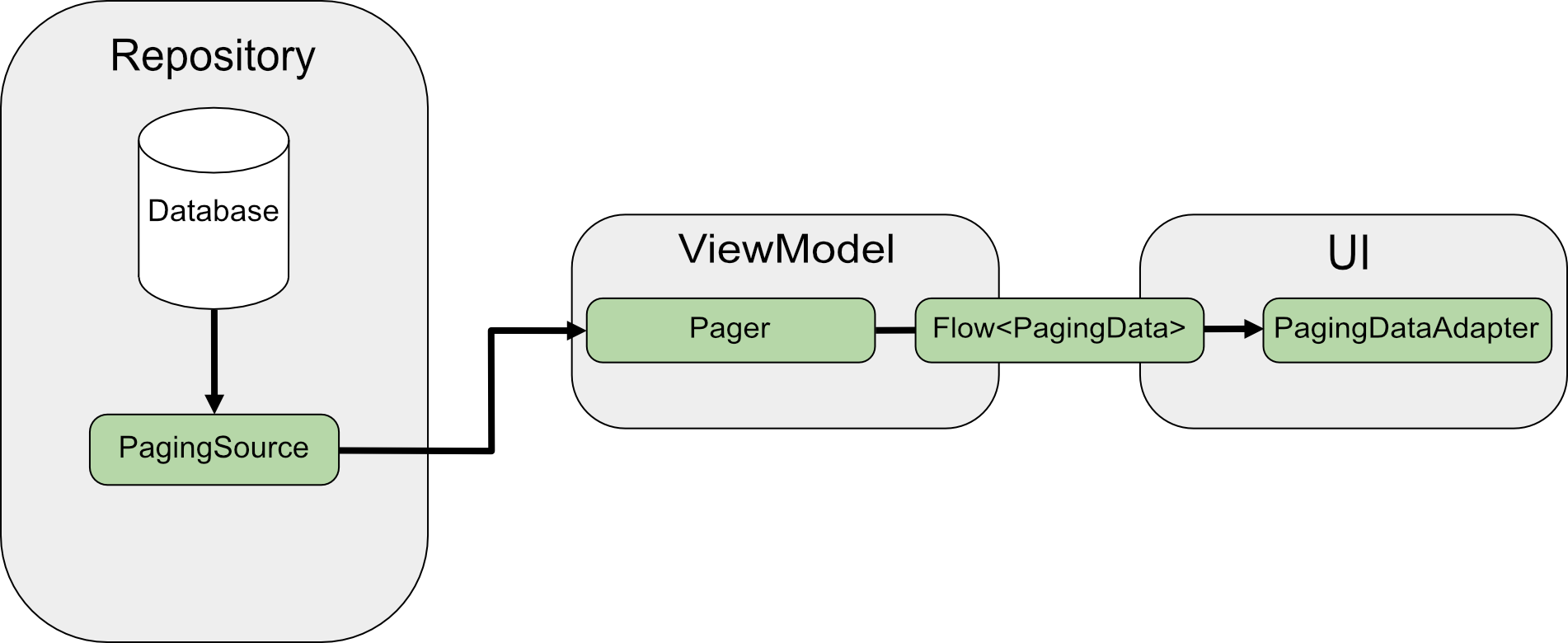
नेटवर्क से सीधे तौर पर पेजिंग करने पर, PagingSource डेटा लोड करता है और LoadResult ऑब्जेक्ट दिखाता है. PagingSource को pagingSourceFactory पैरामीटर के ज़रिए, Pager को पास किया जाता है.
यूज़र इंटरफ़ेस (यूआई) को नए डेटा की ज़रूरत होती है. इसलिए, Pager, PagingSource से load() तरीके को कॉल करता है. इसके बाद, यह PagingData ऑब्जेक्ट की एक स्ट्रीम दिखाता है. इसमें नया डेटा शामिल होता है. हर PagingData ऑब्जेक्ट को आम तौर पर, यूज़र इंटरफ़ेस (यूआई) को दिखाने से पहले ViewModel में कैश किया जाता है.

RemoteMediator इस डेटा फ़्लो को बदलता है. PagingSource अब भी डेटा लोड करता है;
हालांकि, जब पेज में मौजूद डेटा खत्म हो जाता है, तो Paging library, RemoteMediator को ट्रिगर करती है, ताकि वह नेटवर्क सोर्स से नया डेटा लोड कर सके. RemoteMediator, नए डेटा को लोकल डेटाबेस में सेव करता है. इसलिए, ViewModel में इन-मेमोरी कैश मेमोरी की ज़रूरत नहीं होती. आखिर में, PagingSource अपने-आप अमान्य हो जाता है. साथ ही, Pager डेटाबेस से नया डेटा लोड करने के लिए, एक नया इंस्टेंस बनाता है.
बुनियादी इस्तेमाल
मान लें कि आपको अपने ऐप्लिकेशन में, आइटम के हिसाब से कुंजी वाले नेटवर्क डेटा सोर्स से User आइटम के पेजों को लोड करना है. इसके लिए, आपको इन पेजों को Room डेटाबेस में सेव की गई लोकल कैश मेमोरी में लोड करना होगा.
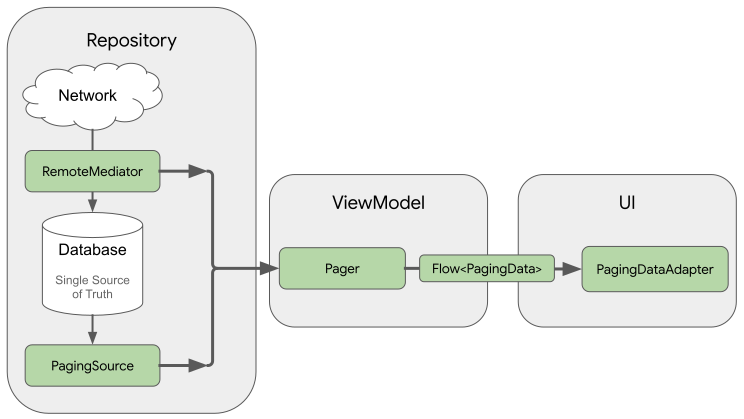
RemoteMediator को लागू करने से, नेटवर्क से पेज किया गया डेटा डेटाबेस में लोड करने में मदद मिलती है. हालांकि, इससे डेटा सीधे यूज़र इंटरफ़ेस (यूआई) में लोड नहीं होता. इसके बजाय, ऐप्लिकेशन डेटाबेस को भरोसेमंद सोर्स के तौर पर इस्तेमाल करता है. दूसरे शब्दों में कहें, तो ऐप्लिकेशन सिर्फ़ उस डेटा को दिखाता है जिसे डेटाबेस में कैश मेमोरी में सेव किया गया है. PagingSource
लागू करने की प्रोसेस (उदाहरण के लिए, Room से जनरेट की गई प्रोसेस) में, डेटाबेस से कैश मेमोरी में सेव किया गया डेटा लोड किया जाता है. इसके बाद, उसे यूज़र इंटरफ़ेस (यूआई) में दिखाया जाता है.
रूम एंटिटी बनाना
पहला चरण, Room persistence library का इस्तेमाल करके, एक ऐसा डेटाबेस तय करना है जिसमें नेटवर्क डेटा सोर्स से पेज किए गए डेटा की लोकल कैश मेमोरी सेव हो. रूम का इस्तेमाल करके, डेटा को किसी स्थानीय डेटाबेस में सेव करना में बताए गए तरीके से, RoomDatabase को लागू करें.
इसके बाद, सूची के आइटम की टेबल को दिखाने के लिए, रूम इकाई तय करें. इसके बारे में रूम इकाइयों का इस्तेमाल करके, डेटा के बारे में बताना लेख में बताया गया है.
इसे id फ़ील्ड को प्राइमरी कुंजी के तौर पर दें. साथ ही, अपनी सूची के आइटम में मौजूद किसी भी अन्य जानकारी के लिए फ़ील्ड दें.
Java
@Entity(tableName = "users")
public class User {
  public String id;
  public String label;
}
Java
@Entity(tableName = "users")
public class User {
  public String id;
  public String label;
}
आपको इस रूम इकाई के लिए, डेटा ऐक्सेस ऑब्जेक्ट (डीएओ) भी तय करना होगा. इसके बारे में रूम के डीएओ इस्तेमाल करके, डेटा को ऐक्सेस करना लेख में बताया गया है. सूची आइटम की इकाई के लिए डीएओ में ये तरीके शामिल होने चाहिए:
insertAll()एक ऐसा तरीका है जो टेबल में आइटम की सूची डालता है.- यह एक ऐसा तरीका है जो क्वेरी स्ट्रिंग को पैरामीटर के तौर पर लेता है और नतीजों की सूची के लिए
PagingSourceऑब्जेक्ट दिखाता है. इस तरह,Pagerऑब्जेक्ट, इस टेबल का इस्तेमाल पेज किए गए डेटा के सोर्स के तौर पर कर सकता है. - यह
clearAll()तरीका, टेबल का पूरा डेटा मिटा देता है.
Java
@Dao
interface UserDao {
  @Insert(onConflict = OnConflictStrategy.REPLACE)
  void insertAll(List<User> users);

  @Query("SELECT * FROM users WHERE mLabel LIKE :query")
  PagingSource<Integer, User> pagingSource(String query);

  @Query("DELETE FROM users")
  int clearAll();
}
Java
@Dao
interface UserDao {
  @Insert(onConflict = OnConflictStrategy.REPLACE)
  void insertAll(List<User> users);

  @Query("SELECT * FROM users WHERE mLabel LIKE :query")
  PagingSource<Integer, User> pagingSource(String query);

  @Query("DELETE FROM users")
  int clearAll();
}
RemoteMediator लागू करना
RemoteMediator की मुख्य भूमिका, नेटवर्क से ज़्यादा डेटा लोड करना है. ऐसा तब होता है, जब Pager के पास डेटा खत्म हो जाता है या मौजूदा डेटा अमान्य हो जाता है. इसमें एक load() तरीका शामिल है. आपको इसे ओवरराइड करना होगा, ताकि लोडिंग के व्यवहार को तय किया जा सके.
RemoteMediator को लागू करने के दौरान, आम तौर पर इन पैरामीटर का इस्तेमाल किया जाता है:
query: यह एक क्वेरी स्ट्रिंग है. इससे यह तय होता है कि बैकएंड सेवा से कौनसा डेटा वापस पाना है.database: Room डेटाबेस, लोकल कैश मेमोरी के तौर पर काम करता है.networkService: बैकएंड सेवा के लिए एपीआई इंस्टेंस.
RemoteMediator<Key, Value> लागू करें. Key टाइप और Value टाइप, दोनों एक जैसे होने चाहिए. ऐसा तब होता है, जब एक ही नेटवर्क डेटा सोर्स के लिए PagingSource तय किया जाता है. टाइप पैरामीटर चुनने के बारे में ज़्यादा जानने के लिए, कुंजी और वैल्यू के टाइप चुनें लेख पढ़ें.
Java
@UseExperimental(markerClass = ExperimentalPagingApi.class)
class ExampleRemoteMediator extends RxRemoteMediator<Integer, User> {
  private String query;
  private ExampleBackendService networkService;
  private RoomDb database;
  private UserDao userDao;

  ExampleRemoteMediator(
    String query,
    ExampleBackendService networkService, RoomDb database
  ) {
    query = query;
    networkService = networkService;
    database = database;
    userDao = database.userDao();
  }

  @NotNull
  @Override
  public Single<MediatorResult> loadSingle(
    @NotNull LoadType loadType,
    @NotNull PagingState<Integer, User> state
  ) {
    ...
  }
}
Java
class ExampleRemoteMediator extends ListenableFutureRemoteMediator<Integer, User> {
  private String query;
  private ExampleBackendService networkService;
  private RoomDb database;
  private UserDao userDao;
  private Executor bgExecutor;

  ExampleRemoteMediator(
    String query,
    ExampleBackendService networkService,
    RoomDb database,
    Executor bgExecutor
  ) {
    this.query = query;
    this.networkService = networkService;
    this.database = database;
    this.userDao = database.userDao();
    this.bgExecutor = bgExecutor;
  }

  @NotNull
  @Override
  public ListenableFuture<MediatorResult> loadFuture(
    @NotNull LoadType loadType,
    @NotNull PagingState<Integer, User> state
  ) {
    ...
  }
}
load() तरीके का इस्तेमाल करके, बैकिंग डेटासेट को अपडेट किया जाता है और PagingSource को अमान्य किया जाता है. पेजिंग की सुविधा के साथ काम करने वाली कुछ लाइब्रेरी (जैसे, Room), लागू किए गए PagingSource ऑब्जेक्ट को अमान्य करने की प्रोसेस को अपने-आप मैनेज करेंगी.
load() तरीके में दो पैरामीटर होते हैं:
PagingState, जिसमें अब तक लोड किए गए पेजों, हाल ही में ऐक्सेस किए गए इंडेक्स, औरPagingConfigऑब्जेक्ट के बारे में जानकारी होती है. इस ऑब्जेक्ट का इस्तेमाल, पेजिंग स्ट्रीम को शुरू करने के लिए किया जाता है.LoadType, जो लोड के टाइप के बारे में बताता है:REFRESH,APPENDयाPREPEND.
load() तरीके की रिटर्न वैल्यू, एक MediatorResult ऑब्जेक्ट होती है. MediatorResult, इनमें से कोई एक हो सकता है:
MediatorResult.Error
(इसमें गड़बड़ी की जानकारी शामिल होती है) या
MediatorResult.Success
(इसमें एक ऐसा सिग्नल शामिल होता है जिससे पता चलता है कि लोड करने के लिए और डेटा है या नहीं).
load() तरीके का इस्तेमाल करते समय, इन चरणों को पूरा करना ज़रूरी है:
- लोड टाइप और अब तक लोड किए गए डेटा के आधार पर, यह तय करता है कि नेटवर्क से कौनसा पेज लोड करना है.
- नेटवर्क अनुरोध ट्रिगर करें.
- डेटा लोड करने की कार्रवाई के नतीजे के आधार पर कार्रवाइयां करें:
- अगर लोड हो जाता है और आइटम की मिली हुई सूची खाली नहीं है, तो सूची में शामिल आइटम को डेटाबेस में सेव करें और
MediatorResult.Success(endOfPaginationReached = false)को वापस भेजें. डेटा सेव होने के बाद, डेटा सोर्स को अमान्य करें, ताकि Paging library को नए डेटा के बारे में सूचना मिल सके. - अगर लोड हो जाता है और मिले हुए आइटम की सूची खाली है या यह आखिरी पेज इंडेक्स है, तो
MediatorResult.Success(endOfPaginationReached = true)दिखाएं. डेटा सेव होने के बाद, डेटा सोर्स को अमान्य करें, ताकि Paging लाइब्रेरी को नए डेटा के बारे में सूचना मिल सके. - अगर अनुरोध से कोई गड़बड़ी होती है, तो
MediatorResult.Errorदिखाएं.
- अगर लोड हो जाता है और आइटम की मिली हुई सूची खाली नहीं है, तो सूची में शामिल आइटम को डेटाबेस में सेव करें और
Java
@NotNull
@Override
public Single<MediatorResult> loadSingle(
  @NotNull LoadType loadType,
  @NotNull PagingState<Integer, User> state
) {
  // The network load method takes an optional after=<user.id> parameter. For
  // every page after the first, pass the last user ID to let it continue from
  // where it left off. For REFRESH, pass null to load the first page.
  String loadKey = null;
  switch (loadType) {
    case REFRESH:
      break;
    case PREPEND:
      // In this example, you never need to prepend, since REFRESH will always
      // load the first page in the list. Immediately return, reporting end of
      // pagination.
      return Single.just(new MediatorResult.Success(true));
    case APPEND:
      User lastItem = state.lastItemOrNull();

      // You must explicitly check if the last item is null when appending,
      // since passing null to networkService is only valid for initial load.
      // If lastItem is null it means no items were loaded after the initial
      // REFRESH and there are no more items to load.
      if (lastItem == null) {
        return Single.just(new MediatorResult.Success(true));
      }

      loadKey = lastItem.getId();
      break;
  }

  return networkService.searchUsers(query, loadKey)
    .subscribeOn(Schedulers.io())
    .map((Function<SearchUserResponse, MediatorResult>) response -> {
      database.runInTransaction(() -> {
        if (loadType == LoadType.REFRESH) {
          userDao.deleteByQuery(query);
        }

        // Insert new users into database, which invalidates the current
        // PagingData, allowing Paging to present the updates in the DB.
        userDao.insertAll(response.getUsers());
      });

      return new MediatorResult.Success(response.getNextKey() == null);
    })
    .onErrorResumeNext(e -> {
      if (e instanceof IOException || e instanceof HttpException) {
        return Single.just(new MediatorResult.Error(e));
      }

      return Single.error(e);
    });
}
Java
@NotNull
@Override
public ListenableFuture<MediatorResult> loadFuture(
  @NotNull LoadType loadType,
  @NotNull PagingState<Integer, User> state
) {
  // The network load method takes an optional after=<user.id> parameter. For
  // every page after the first, pass the last user ID to let it continue from
  // where it left off. For REFRESH, pass null to load the first page.
  String loadKey = null;
  switch (loadType) {
    case REFRESH:
      break;
    case PREPEND:
      // In this example, you never need to prepend, since REFRESH will always
      // load the first page in the list. Immediately return, reporting end of
      // pagination.
      return Futures.immediateFuture(new MediatorResult.Success(true));
    case APPEND:
      User lastItem = state.lastItemOrNull();

      // You must explicitly check if the last item is null when appending,
      // since passing null to networkService is only valid for initial load.
      // If lastItem is null it means no items were loaded after the initial
      // REFRESH and there are no more items to load.
      if (lastItem == null) {
        return Futures.immediateFuture(new MediatorResult.Success(true));
      }

      loadKey = lastItem.getId();
      break;
  }

  ListenableFuture<MediatorResult> networkResult = Futures.transform(
    networkService.searchUsers(query, loadKey),
    response -> {
      database.runInTransaction(() -> {
        if (loadType == LoadType.REFRESH) {
          userDao.deleteByQuery(query);
        }

        // Insert new users into database, which invalidates the current
        // PagingData, allowing Paging to present the updates in the DB.
        userDao.insertAll(response.getUsers());
      });

      return new MediatorResult.Success(response.getNextKey() == null);
    }, bgExecutor);

  ListenableFuture<MediatorResult> ioCatchingNetworkResult =
    Futures.catching(
      networkResult,
      IOException.class,
      MediatorResult.Error::new,
      bgExecutor
    );

  return Futures.catching(
    ioCatchingNetworkResult,
    HttpException.class,
    MediatorResult.Error::new,
    bgExecutor
  );
}
initialize तरीके को तय करें
RemoteMediator लागू करने वाले लोग, initialize() तरीके को भी बदल सकते हैं. इससे यह पता चलता है कि कैश मेमोरी में सेव किया गया डेटा पुराना है या नहीं. साथ ही, इससे यह तय किया जा सकता है कि रिमोट रीफ़्रेश को ट्रिगर करना है या नहीं. यह तरीका, डेटा लोड होने से पहले काम करता है. इसलिए, लोकल या रिमोट लोड ट्रिगर करने से पहले, डेटाबेस में बदलाव किया जा सकता है. उदाहरण के लिए, पुराने डेटा को मिटाने के लिए.
initialize() एक एसिंक्रोनस फ़ंक्शन है. इसलिए, डेटाबेस में मौजूद डेटा की अहमियत का पता लगाने के लिए, डेटा लोड किया जा सकता है. ज़्यादातर मामलों में, कैश मेमोरी में सेव किया गया डेटा सिर्फ़ कुछ समय के लिए मान्य होता है. RemoteMediator यह देख सकता है कि समयसीमा खत्म हो गई है या नहीं. अगर समयसीमा खत्म हो गई है, तो Paging library को डेटा पूरी तरह से रीफ़्रेश करना होगा. initialize() को लागू करने पर, इस तरह InitializeAction मिलना चाहिए:
- अगर स्थानीय डेटा को पूरी तरह से रीफ़्रेश करना है, तो
initialize()कोInitializeAction.LAUNCH_INITIAL_REFRESHवैल्यू दिखानी चाहिए. इससेRemoteMediator, डेटा को पूरी तरह से फिर से लोड करने के लिए रिमोट रीफ़्रेश करता है. कोई भी रिमोटAPPENDयाPREPENDलोड होने से पहले,REFRESHलोड होने का इंतज़ार करता है. - अगर स्थानीय डेटा को रीफ़्रेश करने की ज़रूरत नहीं है, तो
initialize()कोInitializeAction.SKIP_INITIAL_REFRESHदिखाना चाहिए. इस वजह से,RemoteMediatorरिमोट रीफ़्रेश को स्किप कर देता है और कैश मेमोरी में सेव किए गए डेटा को लोड करता है.
Java
@NotNull
@Override
public Single<InitializeAction> initializeSingle() {
  long cacheTimeout = TimeUnit.MILLISECONDS.convert(1, TimeUnit.HOURS);
  return mUserDao.lastUpdatedSingle()
    .map(lastUpdatedMillis -> {
      if (System.currentTimeMillis() - lastUpdatedMillis <= cacheTimeout) {
        // Cached data is up-to-date, so there is no need to re-fetch
        // from the network.
        return InitializeAction.SKIP_INITIAL_REFRESH;
      } else {
        // Need to refresh cached data from network; returning
        // LAUNCH_INITIAL_REFRESH here will also block RemoteMediator's
        // APPEND and PREPEND from running until REFRESH succeeds.
        return InitializeAction.LAUNCH_INITIAL_REFRESH;
      }
    });
}
Java
@NotNull
@Override
public ListenableFuture<InitializeAction> initializeFuture() {
  long cacheTimeout = TimeUnit.MILLISECONDS.convert(1, TimeUnit.HOURS);
  return Futures.transform(
    mUserDao.lastUpdated(),
    lastUpdatedMillis -> {
      if (System.currentTimeMillis() - lastUpdatedMillis <= cacheTimeout) {
        // Cached data is up-to-date, so there is no need to re-fetch
        // from the network.
        return InitializeAction.SKIP_INITIAL_REFRESH;
      } else {
        // Need to refresh cached data from network; returning
        // LAUNCH_INITIAL_REFRESH here will also block RemoteMediator's
        // APPEND and PREPEND from running until REFRESH succeeds.
        return InitializeAction.LAUNCH_INITIAL_REFRESH;
      }
    },
    mBgExecutor);
}
पेजर बनाना
आखिर में, पेज किए गए डेटा की स्ट्रीम सेट अप करने के लिए, आपको Pager इंस्टेंस बनाना होगा.
यह किसी सामान्य नेटवर्क डेटा सोर्स से Pager बनाने जैसा ही है. हालांकि, आपको दो काम अलग तरीके से करने होंगे:
PagingSourceकंस्ट्रक्टर को सीधे तौर पर पास करने के बजाय, आपको क्वेरी वाला ऐसा तरीका देना होगा जो DAO सेPagingSourceऑब्जेक्ट दिखाता हो.- आपको
remoteMediatorपैरामीटर के तौर पर,RemoteMediatorलागू करने का एक इंस्टेंस देना होगा.
Java
UserDao userDao = database.userDao();
Pager<Integer, User> pager = Pager(
  new PagingConfig(/* pageSize = */ 20),
  null, // initialKey,
  new ExampleRemoteMediator(query, database, networkService)
  () -> userDao.pagingSource(query));
Java
UserDao userDao = database.userDao();
Pager<Integer, User> pager = Pager(
  new PagingConfig(/* pageSize = */ 20),
  null, // initialKey
  new ExampleRemoteMediator(query, database, networkService, bgExecutor),
  () -> userDao.pagingSource(query));
रिमोट की कुंजियां मैनेज करना
रिमोट कुंजियां ऐसी कुंजियां होती हैं जिनका इस्तेमाल RemoteMediator, बैकएंड सेवा को यह बताने के लिए करता है कि उसे अगला कौनसा डेटा लोड करना है. सबसे आसान मामले में, पेज में बंटे डेटा के हर आइटम में एक रिमोट कुंजी शामिल होती है. इसे आसानी से रेफ़रंस किया जा सकता है. हालांकि, अगर रिमोट कुंजियां अलग-अलग आइटम से मेल नहीं खाती हैं, तो आपको उन्हें अलग से सेव करना होगा. साथ ही, उन्हें load() तरीके से मैनेज करना होगा.
इस सेक्शन में, उन रिमोट कुंजियों को इकट्ठा करने, सेव करने, और अपडेट करने का तरीका बताया गया है जिन्हें अलग-अलग आइटम में सेव नहीं किया जाता.
आइटम के पासकोड
इस सेक्शन में, उन रिमोट कुंजियों को इस्तेमाल करने का तरीका बताया गया है जो अलग-अलग आइटम से जुड़ी होती हैं. आम तौर पर, जब कोई एपीआई अलग-अलग आइटम के लिए कुंजियां बंद करता है, तो आइटम आईडी को क्वेरी पैरामीटर के तौर पर पास किया जाता है. पैरामीटर के नाम से पता चलता है कि सर्वर को दिए गए आईडी से पहले या बाद के आइटम के साथ जवाब देना चाहिए. User मॉडल क्लास के उदाहरण में, सर्वर से मिले id फ़ील्ड का इस्तेमाल रिमोट कुंजी के तौर पर किया जाता है. ऐसा तब किया जाता है, जब अतिरिक्त डेटा का अनुरोध किया जाता है.
जब आपकी load() विधि को आइटम के हिसाब से रिमोट कुंजियां मैनेज करनी होती हैं, तब ये कुंजियां आम तौर पर सर्वर से फ़ेच किए गए डेटा के आईडी होती हैं. रीफ़्रेश करने की कार्रवाइयों के लिए, लोड की की ज़रूरत नहीं होती. ऐसा इसलिए, क्योंकि ये कार्रवाइयां सिर्फ़ सबसे नया डेटा वापस पाती हैं.
इसी तरह, प्रीपेंड ऑपरेशन के लिए किसी अतिरिक्त डेटा को फ़ेच करने की ज़रूरत नहीं होती, क्योंकि रीफ़्रेश करने पर हमेशा सर्वर से नया डेटा मिलता है.
हालांकि, आईडी जोड़ने के लिए आईडी की ज़रूरत होती है. इसके लिए, आपको डेटाबेस से आखिरी आइटम लोड करना होगा. साथ ही, डेटा के अगले पेज को लोड करने के लिए, उसके आईडी का इस्तेमाल करना होगा. अगर डेटाबेस में कोई आइटम नहीं है, तो endOfPaginationReached को सही पर सेट किया जाता है. इससे पता चलता है कि डेटा को रीफ़्रेश करने की ज़रूरत है.
Java
@NotNull
@Override
public Single>MediatorResult< loadSingle(
  @NotNull LoadType loadType,
  @NotNull PagingState>Integer, User< state
) {
  // The network load method takes an optional String parameter. For every page
  // after the first, pass the String token returned from the previous page to
  // let it continue from where it left off. For REFRESH, pass null to load the
  // first page.
  Single>String< remoteKeySingle = null;
  switch (loadType) {
    case REFRESH:
      // Initial load should use null as the page key, so you can return null
      // directly.
      remoteKeySingle = Single.just(null);
      break;
    case PREPEND:
      // In this example, you never need to prepend, since REFRESH will always
      // load the first page in the list. Immediately return, reporting end of
      // pagination.
      return Single.just(new MediatorResult.Success(true));
    case APPEND:
      User lastItem = state.lastItemOrNull();

      // You must explicitly check if the last item is null when
      // appending, since passing null to networkService is only
      // valid for initial load. If lastItem is null it means no
      // items were loaded after the initial REFRESH and there are
      // no more items to load.
      if (lastItem == null) {
        return Single.just(new MediatorResult.Success(true));
      }
      remoteKeySingle = Single.just(lastItem.getId());
      break;
  }

  return remoteKeySingle
    .subscribeOn(Schedulers.io())
    .flatMap((Function<String, Single<MediatorResult>>) remoteKey -> {
      return networkService.searchUsers(query, remoteKey)
        .map(response -> {
          database.runInTransaction(() -> {
            if (loadType == LoadType.REFRESH) {
              userDao.deleteByQuery(query);
            }
            // Insert new users into database, which invalidates the current
            // PagingData, allowing Paging to present the updates in the DB.
            userDao.insertAll(response.getUsers());
          });

          return new MediatorResult.Success(response.getUsers().isEmpty());
        });
    })
    .onErrorResumeNext(e -> {
      if (e instanceof IOException || e instanceof HttpException) {
        return Single.just(new MediatorResult.Error(e));
      }

      return Single.error(e);
    });
}
Java
@NotNull
@Override
public ListenableFuture<MediatorResult> loadFuture(
  @NotNull LoadType loadType,
  @NotNull PagingState<Integer, User> state
) {
  // The network load method takes an optional after=<user.id> parameter.
  // For every page after the first, pass the last user ID to let it continue
  // from where it left off. For REFRESH, pass null to load the first page.
  ResolvableFuture<String> remoteKeyFuture = ResolvableFuture.create();
  switch (loadType) {
    case REFRESH:
      remoteKeyFuture.set(null);
      break;
    case PREPEND:
      // In this example, you never need to prepend, since REFRESH will always
      // load the first page in the list. Immediately return, reporting end of
      // pagination.
      return Futures.immediateFuture(new MediatorResult.Success(true));
    case APPEND:
      User lastItem = state.lastItemOrNull();

      // You must explicitly check if the last item is null when appending,
      // since passing null to networkService is only valid for initial load.
      // If lastItem is null it means no items were loaded after the initial
      // REFRESH and there are no more items to load.
      if (lastItem == null) {
        return Futures.immediateFuture(new MediatorResult.Success(true));
      }

      remoteKeyFuture.set(lastItem.getId());
      break;
  }

  return Futures.transformAsync(remoteKeyFuture, remoteKey -> {

    ListenableFuture<MediatorResult> networkResult = Futures.transform(
      networkService.searchUsers(query, remoteKey),
      response -> {
        database.runInTransaction(() -> {
        if (loadType == LoadType.REFRESH) {
          userDao.deleteByQuery(query);
        }

        // Insert new users into database, which invalidates the current
        // PagingData, allowing Paging to present the updates in the DB.
        userDao.insertAll(response.getUsers());
      });

      return new MediatorResult.Success(response.getUsers().isEmpty());
    }, bgExecutor);

    ListenableFuture<MediatorResult> ioCatchingNetworkResult =
      Futures.catching(
        networkResult,
        IOException.class,
        MediatorResult.Error::new,
        bgExecutor
      );

    return Futures.catching(
      ioCatchingNetworkResult,
      HttpException.class,
      MediatorResult.Error::new,
      bgExecutor
    );
  }, bgExecutor);
}
पेज बटन
इस सेक्शन में, उन रिमोट कुंजियों को इस्तेमाल करने का तरीका बताया गया है जो अलग-अलग आइटम से मेल नहीं खाती हैं.
रिमोट कुंजी वाली टेबल जोड़ना
जब रिमोट कुंजियां, सूची में शामिल आइटम से सीधे तौर पर जुड़ी न हों, तो उन्हें स्थानीय डेटाबेस में अलग टेबल में सेव करना सबसे अच्छा होता है. रूम की ऐसी इकाई तय करें जो रिमोट की टेबल के बारे में बताती है:
Java
@Entity(tableName = "remote_keys")
public class RemoteKey {
  public String label;
  public String nextKey;
}
Java
@Entity(tableName = "remote_keys")
public class RemoteKey {
  public String label;
  public String nextKey;
}
आपको RemoteKey इकाई के लिए, डीएओ भी तय करना होगा:
Java
@Dao
interface RemoteKeyDao {
  @Insert(onConflict = OnConflictStrategy.REPLACE)
  void insertOrReplace(RemoteKey remoteKey);

  @Query("SELECT * FROM remote_keys WHERE label = :query")
  Single<RemoteKey> remoteKeyByQuerySingle(String query);

  @Query("DELETE FROM remote_keys WHERE label = :query")
  void deleteByQuery(String query);
}
Java
@Dao
interface RemoteKeyDao {
  @Insert(onConflict = OnConflictStrategy.REPLACE)
  void insertOrReplace(RemoteKey remoteKey);

  @Query("SELECT * FROM remote_keys WHERE label = :query")
  ListenableFuture<RemoteKey> remoteKeyByQueryFuture(String query);

  @Query("DELETE FROM remote_keys WHERE label = :query")
  void deleteByQuery(String query);
}
रिमोट बटन की मदद से लोड करना
जब आपकी load() विधि को रिमोट पेज की कुंजियों को मैनेज करने की ज़रूरत होती है, तब आपको इसे RemoteMediator के बुनियादी इस्तेमाल की तुलना में, यहां दिए गए तरीकों से अलग तरीके से तय करना होगा:
- एक ऐसी अतिरिक्त प्रॉपर्टी शामिल करें जो आपकी रिमोट कुंजी टेबल के लिए डीएओ का रेफ़रंस रखती हो.
PagingStateका इस्तेमाल करने के बजाय, रिमोट की टेबल से क्वेरी करके यह तय करें कि अगली कुंजी कौनसी लोड करनी है.- पेज पर मौजूद डेटा के साथ-साथ, नेटवर्क डेटा सोर्स से मिली रिमोट कुंजी को भी डालें या सेव करें.
Java
@NotNull
@Override
public Single<MediatorResult> loadSingle(
  @NotNull LoadType loadType,
  @NotNull PagingState<Integer, User> state
) {
  // The network load method takes an optional String parameter. For every page
  // after the first, pass the String token returned from the previous page to
  // let it continue from where it left off. For REFRESH, pass null to load the
  // first page.
  Single<RemoteKey> remoteKeySingle = null;
  switch (loadType) {
    case REFRESH:
      // Initial load should use null as the page key, so you can return null
      // directly.
      remoteKeySingle = Single.just(new RemoteKey(mQuery, null));
      break;
    case PREPEND:
      // In this example, you never need to prepend, since REFRESH will always
      // load the first page in the list. Immediately return, reporting end of
      // pagination.
      return Single.just(new MediatorResult.Success(true));
    case APPEND:
      // Query remoteKeyDao for the next RemoteKey.
      remoteKeySingle = mRemoteKeyDao.remoteKeyByQuerySingle(mQuery);
      break;
  }

  return remoteKeySingle
    .subscribeOn(Schedulers.io())
    .flatMap((Function<RemoteKey, Single<MediatorResult>>) remoteKey -> {
      // You must explicitly check if the page key is null when appending,
      // since null is only valid for initial load. If you receive null
      // for APPEND, that means you have reached the end of pagination and
      // there are no more items to load.
      if (loadType != REFRESH && remoteKey.getNextKey() == null) {
        return Single.just(new MediatorResult.Success(true));
      }

      return networkService.searchUsers(query, remoteKey.getNextKey())
        .map(response -> {
          database.runInTransaction(() -> {
            if (loadType == LoadType.REFRESH) {
              userDao.deleteByQuery(query);
              remoteKeyDao.deleteByQuery(query);
            }

            // Update RemoteKey for this query.
            remoteKeyDao.insertOrReplace(new RemoteKey(query, response.getNextKey()));

            // Insert new users into database, which invalidates the current
            // PagingData, allowing Paging to present the updates in the DB.
            userDao.insertAll(response.getUsers());
          });

          return new MediatorResult.Success(response.getNextKey() == null);
        });
    })
    .onErrorResumeNext(e -> {
      if (e instanceof IOException || e instanceof HttpException) {
        return Single.just(new MediatorResult.Error(e));
      }

      return Single.error(e);
    });
}
Java
@NotNull
@Override
public ListenableFuture<MediatorResult> loadFuture(
  @NotNull LoadType loadType,
  @NotNull PagingState<Integer, User> state
) {
  // The network load method takes an optional after=<user.id> parameter. For
  // every page after the first, pass the last user ID to let it continue from
  // where it left off. For REFRESH, pass null to load the first page.
  ResolvableFuture<RemoteKey> remoteKeyFuture = ResolvableFuture.create();
  switch (loadType) {
    case REFRESH:
      remoteKeyFuture.set(new RemoteKey(query, null));
      break;
    case PREPEND:
      // In this example, you never need to prepend, since REFRESH will always
      // load the first page in the list. Immediately return, reporting end of
      // pagination.
      return Futures.immediateFuture(new MediatorResult.Success(true));
    case APPEND:
      User lastItem = state.lastItemOrNull();

      // You must explicitly check if the last item is null when appending,
      // since passing null to networkService is only valid for initial load.
      // If lastItem is null it means no items were loaded after the initial
      // REFRESH and there are no more items to load.
      if (lastItem == null) {
        return Futures.immediateFuture(new MediatorResult.Success(true));
      }

      // Query remoteKeyDao for the next RemoteKey.
      remoteKeyFuture.setFuture(
        remoteKeyDao.remoteKeyByQueryFuture(query));
      break;
  }

  return Futures.transformAsync(remoteKeyFuture, remoteKey -> {
    // You must explicitly check if the page key is null when appending,
    // since null is only valid for initial load. If you receive null
    // for APPEND, that means you have reached the end of pagination and
    // there are no more items to load.
    if (loadType != LoadType.REFRESH && remoteKey.getNextKey() == null) {
      return Futures.immediateFuture(new MediatorResult.Success(true));
    }

    ListenableFuture<MediatorResult> networkResult = Futures.transform(
      networkService.searchUsers(query, remoteKey.getNextKey()),
      response -> {
        database.runInTransaction(() -> {
        if (loadType == LoadType.REFRESH) {
          userDao.deleteByQuery(query);
          remoteKeyDao.deleteByQuery(query);
        }

        // Update RemoteKey for this query.
        remoteKeyDao.insertOrReplace(new RemoteKey(query, response.getNextKey()));

        // Insert new users into database, which invalidates the current
        // PagingData, allowing Paging to present the updates in the DB.
        userDao.insertAll(response.getUsers());
      });

      return new MediatorResult.Success(response.getNextKey() == null);
    }, bgExecutor);

    ListenableFuture<MediatorResult> ioCatchingNetworkResult =
      Futures.catching(
        networkResult,
        IOException.class,
        MediatorResult.Error::new,
        bgExecutor
      );

    return Futures.catching(
      ioCatchingNetworkResult,
      HttpException.class,
      MediatorResult.Error::new,
      bgExecutor
    );
  }, bgExecutor);
}
अन्य संसाधन
पेजिंग लाइब्रेरी के बारे में ज़्यादा जानने के लिए, यहां दिए गए अन्य संसाधन देखें:
कोडलैब
सैंपल
आपके लिए सुझाव
- ध्यान दें: JavaScript बंद होने पर लिंक का टेक्स्ट दिखता है
- पेज में बंटे डेटा को लोड करना और दिखाना
- पेजिंग की सुविधा लागू करने की जांच करना
- Paging 3 पर माइग्रेट करना