

請確認你的應用程式可在網路連線不穩定或使用者離線時使用,以提供更優質的使用者體驗。要達到這個目的,其中一個做法是同時從網路和本機資料庫載入網頁。這樣一來,你的應用程式會從本機資料庫快取驅動使用者介面,只有在資料庫中沒有其他資料時,才會向網路傳送要求。
本指南假設你已熟悉 Room 永久性程式庫和分頁程式庫的基本用法。
協調資料載入作業
Paging 程式庫為這項用途提供了 RemoteMediator 元件。在應用程式快取資料不足時,RemoteMediator 可視為來自分頁程式庫的信號。你可以使用這個信號從網路載入其他資料,並將其儲存至本機資料庫。PagingSource 可以載入資料,並提供給使用者介面顯示。
如果你需要更多資料,分頁程式庫會從 RemoteMediator 實作呼叫 load() 方法。這是一個暫停函式,因此可以放心執行長時間的工作。這項函式通常會從網路來源擷取新資料,並儲存至本機儲存空間。
這項程序適用於新資料,但儲存在資料庫中的資料一段時間後必然會失效,例如使用者手動觸發重新整理作業時。這個情況會以傳遞至 load() 方法的 LoadType 屬性表示。LoadType 會通知 RemoteMediator 是否需要重新整理現有資料,或擷取需要附加到現有清單之前或之後執行的其他資料。
在這種情況下,RemoteMediator 可確保你的應用程式以適當的順序載入使用者想查看的資料。
分頁生命週期
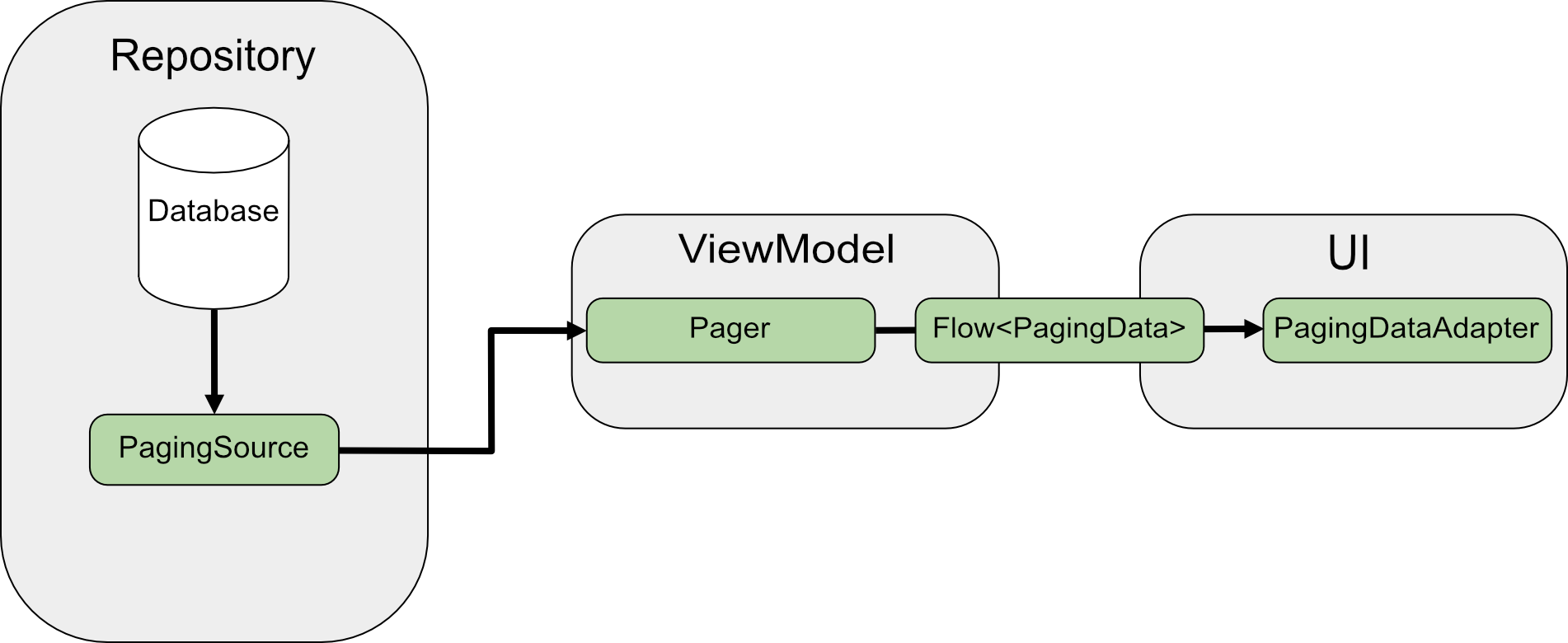
直接從網路分頁時,PagingSource 會載入資料並傳回 LoadResult 物件。PagingSource 實作會透過 pagingSourceFactory 參數傳遞至 Pager。
因為使用者介面需要新資料,Pager 會從 PagingSource 呼叫 load() 方法並傳回一組封裝新資料的 PagingData 物件。一般來說,每個 PagingData 物件都會先從 ViewModel 快取,然後再傳送到使用者介面顯示。
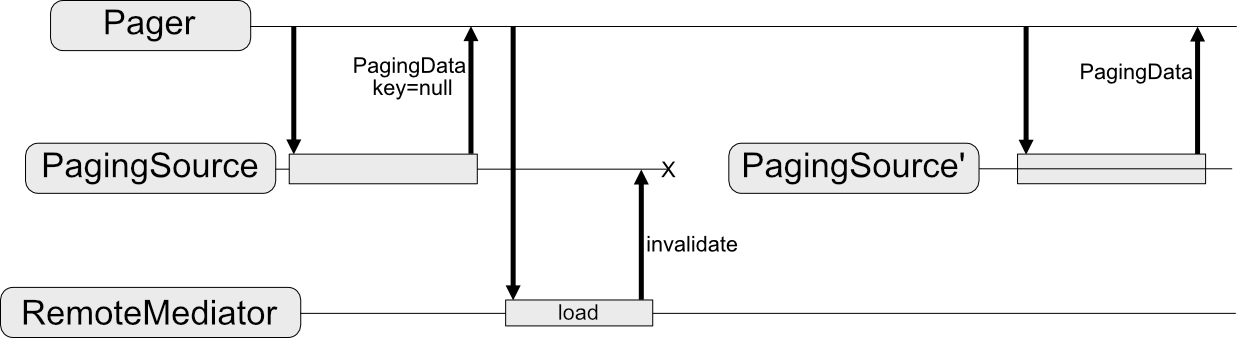
RemoteMediator 會變更這個資料流程。PagingSource 仍會載入資料。不過,一旦分頁資料用盡,分頁程式庫就會觸發 RemoteMediator,從網路來源載入新資料。RemoteMediator 會將新資料儲存在本機資料庫中,因此不需要 ViewModel 中的記憶體內快取。最後,PagingSource 會自動失效,而 Pager 會建立新的執行個體,以從資料庫載入最新資料。
基本用法
假設你要應用程式將透過項目鍵分頁的網路資料來源 User 項目頁面載入到 Room 資料庫中儲存的本機快取。
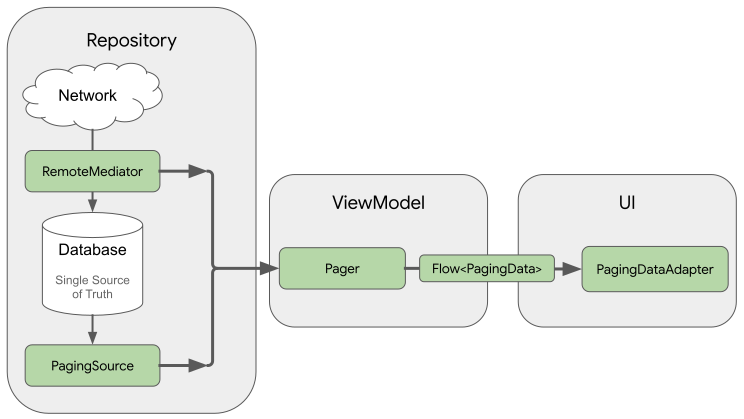
RemoteMediator 實作可將網路的分頁資料載入到資料庫,但不會將資料直接載入到使用者介面。不過,應用程式會使用資料庫做為真實資訊來源。換句話說,應用程式只會顯示資料庫中已快取的資料。PagingSource 實作 (例如 Room 產生的實作) 會負責將資料庫的快取資料載入到使用者介面。
建立 Room 實體
第一步是使用 Room 永久保存程式庫來定義資料庫,其中包含網路資料來源的分頁資料本機快取。首先請實作 RoomDatabase,詳情請參閱使用 Room 將資料儲存在本機資料庫中的說明。
接下來,請定義 Room 實體來代表清單項目的資料表,如使用 Room 實體定義資料一節所述。將 id 欄位設為主鍵,以及清單項目包含的任何其他資訊欄位。
Java
@Entity(tableName = "users")
public class User {
  public String id;
  public String label;
}
Java
@Entity(tableName = "users")
public class User {
  public String id;
  public String label;
}
你也必須按照使用 Room DAO 存取資料一節所述,定義這個 Room 實體的資料存取物件 (DAO)。清單項目實體的 DAO 必須包含以下方法:
- 可將項目清單插入資料表中的
insertAll()方法。 - 可將查詢字串視為參數,並傳回結果清單
PagingSource物件的方法。這樣一來,Pager物件就可以使用這個資料表做為分頁資料來源。 - 用於刪除資料表中所有資料的
clearAll()方法。
Java
@Dao
interface UserDao {
  @Insert(onConflict = OnConflictStrategy.REPLACE)
  void insertAll(List<User> users);

  @Query("SELECT * FROM users WHERE mLabel LIKE :query")
  PagingSource<Integer, User> pagingSource(String query);

  @Query("DELETE FROM users")
  int clearAll();
}
Java
@Dao
interface UserDao {
  @Insert(onConflict = OnConflictStrategy.REPLACE)
  void insertAll(List<User> users);

  @Query("SELECT * FROM users WHERE mLabel LIKE :query")
  PagingSource<Integer, User> pagingSource(String query);

  @Query("DELETE FROM users")
  int clearAll();
}
實作 RemoteMediator
RemoteMediator 的主要角色是在 Pager 的資料用盡或現有資料失效時,從網路載入更多資料。其中包含一個必須覆寫以定義載入行為的 load() 方法。
常見的 RemoteMediator 導入方式包含下列參數:
query:這個查詢字串會定義要從後端服務擷取的資料。database:做為本機快取的 Room 資料庫。networkService:後端服務的 API 執行個體。
建立 RemoteMediator<Key, Value> 實作。Key 類型和 Value 類型應與定義該網路資料來源的 PagingSource 時相同。如要進一步瞭解如何選取類型參數,請參閱選取鍵和值類型。
Java
@UseExperimental(markerClass = ExperimentalPagingApi.class)
class ExampleRemoteMediator extends RxRemoteMediator<Integer, User> {
  private String query;
  private ExampleBackendService networkService;
  private RoomDb database;
  private UserDao userDao;

  ExampleRemoteMediator(
    String query,
    ExampleBackendService networkService, RoomDb database
  ) {
    query = query;
    networkService = networkService;
    database = database;
    userDao = database.userDao();
  }

  @NotNull
  @Override
  public Single<MediatorResult> loadSingle(
    @NotNull LoadType loadType,
    @NotNull PagingState<Integer, User> state
  ) {
    ...
  }
}
Java
class ExampleRemoteMediator extends ListenableFutureRemoteMediator<Integer, User> {
  private String query;
  private ExampleBackendService networkService;
  private RoomDb database;
  private UserDao userDao;
  private Executor bgExecutor;

  ExampleRemoteMediator(
    String query,
    ExampleBackendService networkService,
    RoomDb database,
    Executor bgExecutor
  ) {
    this.query = query;
    this.networkService = networkService;
    this.database = database;
    this.userDao = database.userDao();
    this.bgExecutor = bgExecutor;
  }

  @NotNull
  @Override
  public ListenableFuture<MediatorResult> loadFuture(
    @NotNull LoadType loadType,
    @NotNull PagingState<Integer, User> state
  ) {
    ...
  }
}
load() 方法會負責更新備份資料集並使 PagingSource 失效。部分支援分頁的程式庫 (例如 Room) 會自動使已實作的 PagingSource 物件失效。
load() 方法可接受兩個參數:
PagingState包含目前載入的網頁相關資訊、最近存取的索引,以及用來將分頁串流初始化的PagingConfig物件。LoadType代表載入類型:REFRESH、APPEND或PREPEND。
load() 方法的傳回值為 MediatorResult 物件。MediatorResult 可以是 MediatorResult.Error (含錯誤說明) 或 MediatorResult.Success (當中包含信號,指出是否要載入更多資料)。
load() 方法必須執行下列步驟:
- 根據載入類型和目前載入的資料,判斷要從網路載入哪些網頁。
- 觸發網路要求。
- 根據載入作業的結果執行動作:
- 如果載入成功且收到的項目清單並非空白,則將清單項目儲存在資料庫中,然後傳回
MediatorResult.Success(endOfPaginationReached = false)。資料儲存完畢後,讓資料來源失效以通知新資料的分頁程式庫。 - 如果載入成功且收到的項目清單為空白或是最後一頁索引,則傳回
MediatorResult.Success(endOfPaginationReached = true)。資料儲存完畢後,讓資料來源失效以通知新資料的分頁程式庫。 - 如果要求導致錯誤發生,則傳回
MediatorResult.Error。
- 如果載入成功且收到的項目清單並非空白,則將清單項目儲存在資料庫中,然後傳回
Java
@NotNull
@Override
public Single<MediatorResult> loadSingle(
  @NotNull LoadType loadType,
  @NotNull PagingState<Integer, User> state
) {
  // The network load method takes an optional after=<user.id> parameter. For
  // every page after the first, pass the last user ID to let it continue from
  // where it left off. For REFRESH, pass null to load the first page.
  String loadKey = null;
  switch (loadType) {
    case REFRESH:
      break;
    case PREPEND:
      // In this example, you never need to prepend, since REFRESH will always
      // load the first page in the list. Immediately return, reporting end of
      // pagination.
      return Single.just(new MediatorResult.Success(true));
    case APPEND:
      User lastItem = state.lastItemOrNull();

      // You must explicitly check if the last item is null when appending,
      // since passing null to networkService is only valid for initial load.
      // If lastItem is null it means no items were loaded after the initial
      // REFRESH and there are no more items to load.
      if (lastItem == null) {
        return Single.just(new MediatorResult.Success(true));
      }

      loadKey = lastItem.getId();
      break;
  }

  return networkService.searchUsers(query, loadKey)
    .subscribeOn(Schedulers.io())
    .map((Function<SearchUserResponse, MediatorResult>) response -> {
      database.runInTransaction(() -> {
        if (loadType == LoadType.REFRESH) {
          userDao.deleteByQuery(query);
        }

        // Insert new users into database, which invalidates the current
        // PagingData, allowing Paging to present the updates in the DB.
        userDao.insertAll(response.getUsers());
      });

      return new MediatorResult.Success(response.getNextKey() == null);
    })
    .onErrorResumeNext(e -> {
      if (e instanceof IOException || e instanceof HttpException) {
        return Single.just(new MediatorResult.Error(e));
      }

      return Single.error(e);
    });
}
Java
@NotNull
@Override
public ListenableFuture<MediatorResult> loadFuture(
  @NotNull LoadType loadType,
  @NotNull PagingState<Integer, User> state
) {
  // The network load method takes an optional after=<user.id> parameter. For
  // every page after the first, pass the last user ID to let it continue from
  // where it left off. For REFRESH, pass null to load the first page.
  String loadKey = null;
  switch (loadType) {
    case REFRESH:
      break;
    case PREPEND:
      // In this example, you never need to prepend, since REFRESH will always
      // load the first page in the list. Immediately return, reporting end of
      // pagination.
      return Futures.immediateFuture(new MediatorResult.Success(true));
    case APPEND:
      User lastItem = state.lastItemOrNull();

      // You must explicitly check if the last item is null when appending,
      // since passing null to networkService is only valid for initial load.
      // If lastItem is null it means no items were loaded after the initial
      // REFRESH and there are no more items to load.
      if (lastItem == null) {
        return Futures.immediateFuture(new MediatorResult.Success(true));
      }

      loadKey = lastItem.getId();
      break;
  }

  ListenableFuture<MediatorResult> networkResult = Futures.transform(
    networkService.searchUsers(query, loadKey),
    response -> {
      database.runInTransaction(() -> {
        if (loadType == LoadType.REFRESH) {
          userDao.deleteByQuery(query);
        }

        // Insert new users into database, which invalidates the current
        // PagingData, allowing Paging to present the updates in the DB.
        userDao.insertAll(response.getUsers());
      });

      return new MediatorResult.Success(response.getNextKey() == null);
    }, bgExecutor);

  ListenableFuture<MediatorResult> ioCatchingNetworkResult =
    Futures.catching(
      networkResult,
      IOException.class,
      MediatorResult.Error::new,
      bgExecutor
    );

  return Futures.catching(
    ioCatchingNetworkResult,
    HttpException.class,
    MediatorResult.Error::new,
    bgExecutor
  );
}
定義 initialize 方法
RemoteMediator 實作也可以覆寫 initialize() 方法,檢查快取資料是否過時,並決定是否觸發遠端重新整理。這個方法會在所有載入作業之前執行,因此你可以在觸發任何本機或遠端載入之前,先操控資料庫 (例如清除舊資料)。
由於 initialize() 是非同步函式,因此你可以載入資料來確定資料庫中現有資料的關聯性。最常見的情況是,快取資料僅在一段時間內有效。RemoteMediator 可以檢查這個到期時間是否已過期;在這個情況下,分頁程式庫必須全面重新整理資料,initialize() 的實作應會傳回 InitializeAction,如下所示:
- 如果本機資料需要完全重新整理,
initialize()會傳回InitializeAction.LAUNCH_INITIAL_REFRESH。這會導致RemoteMediator執行遠端重新整理以完全重新載入資料。任何遠端APPEND或PREPEND載入都會等待REFRESH載入成功,再進行下一步。 - 如果本機資料不需要重新整理,
initialize()會傳回InitializeAction.SKIP_INITIAL_REFRESH。這會導致RemoteMediator略過遠端重新整理並載入快取的資料。
Java
@NotNull
@Override
public Single<InitializeAction> initializeSingle() {
  long cacheTimeout = TimeUnit.MILLISECONDS.convert(1, TimeUnit.HOURS);
  return mUserDao.lastUpdatedSingle()
    .map(lastUpdatedMillis -> {
      if (System.currentTimeMillis() - lastUpdatedMillis <= cacheTimeout) {
        // Cached data is up-to-date, so there is no need to re-fetch
        // from the network.
        return InitializeAction.SKIP_INITIAL_REFRESH;
      } else {
        // Need to refresh cached data from network; returning
        // LAUNCH_INITIAL_REFRESH here will also block RemoteMediator's
        // APPEND and PREPEND from running until REFRESH succeeds.
        return InitializeAction.LAUNCH_INITIAL_REFRESH;
      }
    });
}
Java
@NotNull
@Override
public ListenableFuture<InitializeAction> initializeFuture() {
  long cacheTimeout = TimeUnit.MILLISECONDS.convert(1, TimeUnit.HOURS);
  return Futures.transform(
    mUserDao.lastUpdated(),
    lastUpdatedMillis -> {
      if (System.currentTimeMillis() - lastUpdatedMillis <= cacheTimeout) {
        // Cached data is up-to-date, so there is no need to re-fetch
        // from the network.
        return InitializeAction.SKIP_INITIAL_REFRESH;
      } else {
        // Need to refresh cached data from network; returning
        // LAUNCH_INITIAL_REFRESH here will also block RemoteMediator's
        // APPEND and PREPEND from running until REFRESH succeeds.
        return InitializeAction.LAUNCH_INITIAL_REFRESH;
      }
    },
    mBgExecutor);
}
建立呼叫器
最後,你必須建立 Pager 執行個體,才能設定分頁資料串流。方法與從簡單的網路資料來源建立 Pager 類似,但有兩件事必須採取不同做法:
- 你必須提供直接從 DAO 傳回
PagingSource物件的查詢方法,而不是直接傳送PagingSource建構函式。 - 你必須提供
RemoteMediator實作執行個體做為remoteMediator參數。
Java
UserDao userDao = database.userDao();
Pager<Integer, User> pager = Pager(
  new PagingConfig(/* pageSize = */ 20),
  null, // initialKey,
  new ExampleRemoteMediator(query, database, networkService)
  () -> userDao.pagingSource(query));
Java
UserDao userDao = database.userDao();
Pager<Integer, User> pager = Pager(
  new PagingConfig(/* pageSize = */ 20),
  null, // initialKey
  new ExampleRemoteMediator(query, database, networkService, bgExecutor),
  () -> userDao.pagingSource(query));
管理遠端鍵
RemoteMediator 實作項目會使用「遠端鍵」,告知後端服務接下來要載入哪些資料。在最簡單的情況下,分頁資料的每個項目都包含一個可輕鬆參照的遠端鍵。不過,如果遠端鍵並未對應至個別項目,就必須分開儲存並在你的 load() 方法中加以管理。
本節說明如何收集、儲存及更新未儲存在個別項目中的遠端鍵。
項目鍵
本節說明如何使用與個別項目對應的遠端鍵。一般而言,當 API 金鑰從個別項目中移除時,項目 ID 會以查詢參數的形式傳遞。參數名稱會指出伺服器應在提供的指定 ID 之前或之後運用項目來回應。在 User 模型類別的範例中,來自伺服器的 id 欄位會當做遠端鍵,用於要求其他資料。
當 load() 方法需要管理項目專屬的遠端鍵時,這些鍵通常是從伺服器擷取的資料 ID。重新整理作業不需要載入鍵,因為這類作業只會擷取最新的資料。同樣地,前附作業不需要擷取任何其他資料,因為重新整理功能一律會從伺服器提取最新資料。
但是,附加作業就必須使用 ID。你必須從資料庫載入最後一個項目,並使用該項目的 ID 載入下一頁的資料。如果資料庫中沒有任何項目,則 endOfPaginationReached 會設為 true,表示需要重新整理資料。
Java
@NotNull
@Override
public Single>MediatorResult< loadSingle(
  @NotNull LoadType loadType,
  @NotNull PagingState>Integer, User< state
) {
  // The network load method takes an optional String parameter. For every page
  // after the first, pass the String token returned from the previous page to
  // let it continue from where it left off. For REFRESH, pass null to load the
  // first page.
  Single>String< remoteKeySingle = null;
  switch (loadType) {
    case REFRESH:
      // Initial load should use null as the page key, so you can return null
      // directly.
      remoteKeySingle = Single.just(null);
      break;
    case PREPEND:
      // In this example, you never need to prepend, since REFRESH will always
      // load the first page in the list. Immediately return, reporting end of
      // pagination.
      return Single.just(new MediatorResult.Success(true));
    case APPEND:
      User lastItem = state.lastItemOrNull();

      // You must explicitly check if the last item is null when
      // appending, since passing null to networkService is only
      // valid for initial load. If lastItem is null it means no
      // items were loaded after the initial REFRESH and there are
      // no more items to load.
      if (lastItem == null) {
        return Single.just(new MediatorResult.Success(true));
      }
      remoteKeySingle = Single.just(lastItem.getId());
      break;
  }

  return remoteKeySingle
    .subscribeOn(Schedulers.io())
    .flatMap((Function<String, Single<MediatorResult>>) remoteKey -> {
      return networkService.searchUsers(query, remoteKey)
        .map(response -> {
          database.runInTransaction(() -> {
            if (loadType == LoadType.REFRESH) {
              userDao.deleteByQuery(query);
            }
            // Insert new users into database, which invalidates the current
            // PagingData, allowing Paging to present the updates in the DB.
            userDao.insertAll(response.getUsers());
          });

          return new MediatorResult.Success(response.getUsers().isEmpty());
        });
    })
    .onErrorResumeNext(e -> {
      if (e instanceof IOException || e instanceof HttpException) {
        return Single.just(new MediatorResult.Error(e));
      }

      return Single.error(e);
    });
}
Java
@NotNull
@Override
public ListenableFuture<MediatorResult> loadFuture(
  @NotNull LoadType loadType,
  @NotNull PagingState<Integer, User> state
) {
  // The network load method takes an optional after=<user.id> parameter.
  // For every page after the first, pass the last user ID to let it continue
  // from where it left off. For REFRESH, pass null to load the first page.
  ResolvableFuture<String> remoteKeyFuture = ResolvableFuture.create();
  switch (loadType) {
    case REFRESH:
      remoteKeyFuture.set(null);
      break;
    case PREPEND:
      // In this example, you never need to prepend, since REFRESH will always
      // load the first page in the list. Immediately return, reporting end of
      // pagination.
      return Futures.immediateFuture(new MediatorResult.Success(true));
    case APPEND:
      User lastItem = state.lastItemOrNull();

      // You must explicitly check if the last item is null when appending,
      // since passing null to networkService is only valid for initial load.
      // If lastItem is null it means no items were loaded after the initial
      // REFRESH and there are no more items to load.
      if (lastItem == null) {
        return Futures.immediateFuture(new MediatorResult.Success(true));
      }

      remoteKeyFuture.set(lastItem.getId());
      break;
  }

  return Futures.transformAsync(remoteKeyFuture, remoteKey -> {

    ListenableFuture<MediatorResult> networkResult = Futures.transform(
      networkService.searchUsers(query, remoteKey),
      response -> {
        database.runInTransaction(() -> {
        if (loadType == LoadType.REFRESH) {
          userDao.deleteByQuery(query);
        }

        // Insert new users into database, which invalidates the current
        // PagingData, allowing Paging to present the updates in the DB.
        userDao.insertAll(response.getUsers());
      });

      return new MediatorResult.Success(response.getUsers().isEmpty());
    }, bgExecutor);

    ListenableFuture<MediatorResult> ioCatchingNetworkResult =
      Futures.catching(
        networkResult,
        IOException.class,
        MediatorResult.Error::new,
        bgExecutor
      );

    return Futures.catching(
      ioCatchingNetworkResult,
      HttpException.class,
      MediatorResult.Error::new,
      bgExecutor
    );
  }, bgExecutor);
}
頁面鍵
本節說明如何使用不需對應至個別項目的遠端鍵。
新增遠端鍵資料表
當遠端鍵沒有與清單項目直接關聯時,最好將鍵儲存在本機資料庫的不同資料表中。定義代表遠端鍵資料表的 Room 實體:
Java
@Entity(tableName = "remote_keys")
public class RemoteKey {
  public String label;
  public String nextKey;
}
Java
@Entity(tableName = "remote_keys")
public class RemoteKey {
  public String label;
  public String nextKey;
}
你也必須定義 RemoteKey 實體的 DAO:
Java
@Dao
interface RemoteKeyDao {
  @Insert(onConflict = OnConflictStrategy.REPLACE)
  void insertOrReplace(RemoteKey remoteKey);

  @Query("SELECT * FROM remote_keys WHERE label = :query")
  Single<RemoteKey> remoteKeyByQuerySingle(String query);

  @Query("DELETE FROM remote_keys WHERE label = :query")
  void deleteByQuery(String query);
}
Java
@Dao
interface RemoteKeyDao {
  @Insert(onConflict = OnConflictStrategy.REPLACE)
  void insertOrReplace(RemoteKey remoteKey);

  @Query("SELECT * FROM remote_keys WHERE label = :query")
  ListenableFuture<RemoteKey> remoteKeyByQueryFuture(String query);

  @Query("DELETE FROM remote_keys WHERE label = :query")
  void deleteByQuery(String query);
}
使用遠端鍵載入
當 load() 方法需要管理遠端頁面鍵時,你必須採取下列與 RemoteMediator 基本用法不同的方式加以定義:
- 納入另一個屬性,其中包含遠端鍵資料表的 DAO 參照。
- 透過查詢遠端鍵資料表 (而非使用
PagingState) 來決定要載入哪些鍵。 - 除了分頁資料本身之外,同時也插入或儲存網路資料來源傳回的遠端鍵。
Java
@NotNull
@Override
public Single<MediatorResult> loadSingle(
  @NotNull LoadType loadType,
  @NotNull PagingState<Integer, User> state
) {
  // The network load method takes an optional String parameter. For every page
  // after the first, pass the String token returned from the previous page to
  // let it continue from where it left off. For REFRESH, pass null to load the
  // first page.
  Single<RemoteKey> remoteKeySingle = null;
  switch (loadType) {
    case REFRESH:
      // Initial load should use null as the page key, so you can return null
      // directly.
      remoteKeySingle = Single.just(new RemoteKey(mQuery, null));
      break;
    case PREPEND:
      // In this example, you never need to prepend, since REFRESH will always
      // load the first page in the list. Immediately return, reporting end of
      // pagination.
      return Single.just(new MediatorResult.Success(true));
    case APPEND:
      // Query remoteKeyDao for the next RemoteKey.
      remoteKeySingle = mRemoteKeyDao.remoteKeyByQuerySingle(mQuery);
      break;
  }

  return remoteKeySingle
    .subscribeOn(Schedulers.io())
    .flatMap((Function<RemoteKey, Single<MediatorResult>>) remoteKey -> {
      // You must explicitly check if the page key is null when appending,
      // since null is only valid for initial load. If you receive null
      // for APPEND, that means you have reached the end of pagination and
      // there are no more items to load.
      if (loadType != REFRESH && remoteKey.getNextKey() == null) {
        return Single.just(new MediatorResult.Success(true));
      }

      return networkService.searchUsers(query, remoteKey.getNextKey())
        .map(response -> {
          database.runInTransaction(() -> {
            if (loadType == LoadType.REFRESH) {
              userDao.deleteByQuery(query);
              remoteKeyDao.deleteByQuery(query);
            }

            // Update RemoteKey for this query.
            remoteKeyDao.insertOrReplace(new RemoteKey(query, response.getNextKey()));

            // Insert new users into database, which invalidates the current
            // PagingData, allowing Paging to present the updates in the DB.
            userDao.insertAll(response.getUsers());
          });

          return new MediatorResult.Success(response.getNextKey() == null);
        });
    })
    .onErrorResumeNext(e -> {
      if (e instanceof IOException || e instanceof HttpException) {
        return Single.just(new MediatorResult.Error(e));
      }

      return Single.error(e);
    });
}
Java
@NotNull
@Override
public ListenableFuture<MediatorResult> loadFuture(
  @NotNull LoadType loadType,
  @NotNull PagingState<Integer, User> state
) {
  // The network load method takes an optional after=<user.id> parameter. For
  // every page after the first, pass the last user ID to let it continue from
  // where it left off. For REFRESH, pass null to load the first page.
  ResolvableFuture<RemoteKey> remoteKeyFuture = ResolvableFuture.create();
  switch (loadType) {
    case REFRESH:
      remoteKeyFuture.set(new RemoteKey(query, null));
      break;
    case PREPEND:
      // In this example, you never need to prepend, since REFRESH will always
      // load the first page in the list. Immediately return, reporting end of
      // pagination.
      return Futures.immediateFuture(new MediatorResult.Success(true));
    case APPEND:
      User lastItem = state.lastItemOrNull();

      // You must explicitly check if the last item is null when appending,
      // since passing null to networkService is only valid for initial load.
      // If lastItem is null it means no items were loaded after the initial
      // REFRESH and there are no more items to load.
      if (lastItem == null) {
        return Futures.immediateFuture(new MediatorResult.Success(true));
      }

      // Query remoteKeyDao for the next RemoteKey.
      remoteKeyFuture.setFuture(
        remoteKeyDao.remoteKeyByQueryFuture(query));
      break;
  }

  return Futures.transformAsync(remoteKeyFuture, remoteKey -> {
    // You must explicitly check if the page key is null when appending,
    // since null is only valid for initial load. If you receive null
    // for APPEND, that means you have reached the end of pagination and
    // there are no more items to load.
    if (loadType != LoadType.REFRESH && remoteKey.getNextKey() == null) {
      return Futures.immediateFuture(new MediatorResult.Success(true));
    }

    ListenableFuture<MediatorResult> networkResult = Futures.transform(
      networkService.searchUsers(query, remoteKey.getNextKey()),
      response -> {
        database.runInTransaction(() -> {
        if (loadType == LoadType.REFRESH) {
          userDao.deleteByQuery(query);
          remoteKeyDao.deleteByQuery(query);
        }

        // Update RemoteKey for this query.
        remoteKeyDao.insertOrReplace(new RemoteKey(query, response.getNextKey()));

        // Insert new users into database, which invalidates the current
        // PagingData, allowing Paging to present the updates in the DB.
        userDao.insertAll(response.getUsers());
      });

      return new MediatorResult.Success(response.getNextKey() == null);
    }, bgExecutor);

    ListenableFuture<MediatorResult> ioCatchingNetworkResult =
      Futures.catching(
        networkResult,
        IOException.class,
        MediatorResult.Error::new,
        bgExecutor
      );

    return Futures.catching(
      ioCatchingNetworkResult,
      HttpException.class,
      MediatorResult.Error::new,
      bgExecutor
    );
  }, bgExecutor);
}
其他資源
如要進一步瞭解 Paging 程式庫,請參閱以下資源:
程式碼研究室
範例
為您推薦
- 注意:系統會在 JavaScript 關閉時顯示連結文字
- 載入並顯示分頁資料
- 測試分頁實作
- 遷移至 Paging 3