

कॉन्सेप्ट और Jetpack Compose का लागू करना
पेजिंग लाइब्रेरी, बड़े डेटासेट से पेज के हिसाब से डेटा लोड करने और दिखाने की बेहतरीन सुविधाएं उपलब्ध कराती है. इस गाइड में, नेटवर्क डेटा सोर्स से पेज के हिसाब से डेटा की स्ट्रीम सेट अप करने और उसे पेजिंग
लाइब्रेरी का इस्तेमाल करके दिखाने का तरीका बताया गया है
RecyclerView.
डेटा सोर्स तय करना
पहला चरण, डेटा सोर्स की पहचान करने के लिए, PagingSource को लागू करना है. PagingSource एपीआई क्लास में, load तरीका शामिल होता है.
इसे ओवरराइड करके, यह बताया जाता है कि संबंधित
डेटा सोर्स से पेज के हिसाब से डेटा कैसे वापस पाया जाए.
एसिंक लोड करने के लिए, Kotlin कोरूटीन का इस्तेमाल करने के लिए, सीधे PagingSource क्लास का इस्तेमाल करें. पेजिंग लाइब्रेरी, अन्य एसिंक फ़्रेमवर्क के साथ काम करने के लिए भी क्लास उपलब्ध कराती है:
- RxJava का इस्तेमाल करने के लिए, इसके बजाय
RxPagingSourceलागू करें. - Guava से
ListenableFutureका इस्तेमाल करने के लिए, इसके बजायListenableFuturePagingSourceलागू करें.
कुंजी और वैल्यू के टाइप चुनना
PagingSource<Key, Value> में दो टाइप पैरामीटर होते हैं: Key और Value. कुंजी, डेटा लोड करने के लिए इस्तेमाल किए जाने वाले आइडेंटिफ़ायर को तय करती है. वहीं, वैल्यू, डेटा का टाइप होती है. उदाहरण के लिए, अगर Retrofit को Int पेज नंबर पास करके, नेटवर्क से User ऑब्जेक्ट के पेज लोड किए जाते हैं, तो Int को Key टाइप और User को Value टाइप के तौर पर चुनें.
PagingSource तय करना
यहां दिए गए उदाहरण में, PagingSource को लागू किया गया है. यह पेज नंबर के हिसाब से आइटम के पेज लोड करता है
. Key टाइप Int है और Value टाइप User है.
Java (RxJava)
class ExamplePagingSource extends RxPagingSource<Integer, User> {
  @NonNull
  private ExampleBackendService mBackend;
  @NonNull
  private String mQuery;

  ExamplePagingSource(@NonNull ExampleBackendService backend,
    @NonNull String query) {
    mBackend = backend;
    mQuery = query;
  }

  @NotNull
  @Override
  public Single<LoadResult<Integer, User>> loadSingle(
    @NotNull LoadParams<Integer> params) {
    // Start refresh at page 1 if undefined.
    Integer nextPageNumber = params.getKey();
    if (nextPageNumber == null) {
      nextPageNumber = 1;
    }

    return mBackend.searchUsers(mQuery, nextPageNumber)
      .subscribeOn(Schedulers.io())
      .map(this::toLoadResult)
      .onErrorReturn(LoadResult.Error::new);
  }

  private LoadResult<Integer, User> toLoadResult(
    @NonNull SearchUserResponse response) {
    return new LoadResult.Page<>(
      response.getUsers(),
      null, // Only paging forward.
      response.getNextPageNumber(),
      LoadResult.Page.COUNT_UNDEFINED,
      LoadResult.Page.COUNT_UNDEFINED);
  }

  @Nullable
  @Override
  public Integer getRefreshKey(@NotNull PagingState<Integer, User> state) {
    // Try to find the page key of the closest page to anchorPosition from
    // either the prevKey or the nextKey; you need to handle nullability
    // here.
    //  * prevKey == null -> anchorPage is the first page.
    //  * nextKey == null -> anchorPage is the last page.
    //  * both prevKey and nextKey are null -> anchorPage is the
    //    initial page, so return null.
    Integer anchorPosition = state.getAnchorPosition();
    if (anchorPosition == null) {
      return null;
    }

    LoadResult.Page<Integer, User> anchorPage = state.closestPageToPosition(anchorPosition);
    if (anchorPage == null) {
      return null;
    }

    Integer prevKey = anchorPage.getPrevKey();
    if (prevKey != null) {
      return prevKey + 1;
    }

    Integer nextKey = anchorPage.getNextKey();
    if (nextKey != null) {
      return nextKey - 1;
    }

    return null;
  }
}
Java (Guava/LiveData)
class ExamplePagingSource extends ListenableFuturePagingSource<Integer, User> {
  @NonNull
  private ExampleBackendService mBackend;
  @NonNull
  private String mQuery;
  @NonNull
  private Executor mBgExecutor;

  ExamplePagingSource(
    @NonNull ExampleBackendService backend,
    @NonNull String query, @NonNull Executor bgExecutor) {
    mBackend = backend;
    mQuery = query;
    mBgExecutor = bgExecutor;
  }

  @NotNull
  @Override
  public ListenableFuture<LoadResult<Integer, User>> loadFuture(@NotNull LoadParams<Integer> params) {
    // Start refresh at page 1 if undefined.
    Integer nextPageNumber = params.getKey();
    if (nextPageNumber == null) {
      nextPageNumber = 1;
    }

    ListenableFuture<LoadResult<Integer, User>> pageFuture =
      Futures.transform(mBackend.searchUsers(mQuery, nextPageNumber),
      this::toLoadResult, mBgExecutor);

    ListenableFuture<LoadResult<Integer, User>> partialLoadResultFuture =
      Futures.catching(pageFuture, HttpException.class,
      LoadResult.Error::new, mBgExecutor);

    return Futures.catching(partialLoadResultFuture,
      IOException.class, LoadResult.Error::new, mBgExecutor);
  }

  private LoadResult<Integer, User> toLoadResult(@NonNull SearchUserResponse response) {
    return new LoadResult.Page<>(response.getUsers(),
    null, // Only paging forward.
    response.getNextPageNumber(),
    LoadResult.Page.COUNT_UNDEFINED,
    LoadResult.Page.COUNT_UNDEFINED);
  }

  @Nullable
  @Override
  public Integer getRefreshKey(@NotNull PagingState<Integer, User> state) {
    // Try to find the page key of the closest page to anchorPosition from
    // either the prevKey or the nextKey; you need to handle nullability
    // here.
    //  * prevKey == null -> anchorPage is the first page.
    //  * nextKey == null -> anchorPage is the last page.
    //  * both prevKey and nextKey are null -> anchorPage is the
    //    initial page, so return null.
    Integer anchorPosition = state.getAnchorPosition();
    if (anchorPosition == null) {
      return null;
    }

    LoadResult.Page<Integer, User> anchorPage = state.closestPageToPosition(anchorPosition);
    if (anchorPage == null) {
      return null;
    }

    Integer prevKey = anchorPage.getPrevKey();
    if (prevKey != null) {
      return prevKey + 1;
    }

    Integer nextKey = anchorPage.getNextKey();
    if (nextKey != null) {
      return nextKey - 1;
    }

    return null;
  }
}
आम तौर पर, PagingSource को लागू करने के लिए, कंस्ट्रक्टर में दिए गए पैरामीटर को load तरीके से पास किया जाता है, ताकि किसी क्वेरी के लिए सही डेटा लोड किया जा सके. ऊपर दिए गए उदाहरण में, ये पैरामीटर हैं:
backend: बैकएंड सेवा का एक इंस्टेंस, जो डेटा उपलब्ध कराता हैquery: खोज क्वेरी, जिसेbackendसे दिखाई गई सेवा को भेजा जाना है
LoadParams ऑब्जेक्ट में, लोड करने की कार्रवाई के बारे में जानकारी होती है जिसे
किया जाना है. इसमें, लोड की जाने वाली कुंजी और लोड किए जाने वाले आइटम की संख्या शामिल होती है.
LoadResult ऑब्जेक्ट में, लोड करने की कार्रवाई का नतीजा होता है.
LoadResult एक सील की गई क्लास है. यह दो फ़ॉर्म में से किसी एक में होती है. यह इस बात पर निर्भर करता है कि load कॉल सफल हुआ है या नहीं:
- अगर लोड सफल होता है, तो
LoadResult.Pageऑब्जेक्ट लौटाएं. - अगर लोड सफल नहीं होता है, तो
LoadResult.Errorऑब्जेक्ट लौटाएं.
यहां दी गई इमेज में दिखाया गया है कि इस उदाहरण में, load फ़ंक्शन को हर लोड के लिए कुंजी कैसे मिलती है और यह अगले लोड के लिए कुंजी कैसे उपलब्ध कराता है.
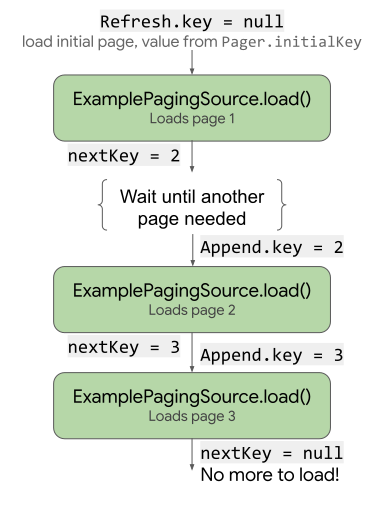
load कुंजी का इस्तेमाल और उसे अपडेट कैसे करता है.
PagingSource को लागू करने के लिए, getRefreshKey
तरीका भी लागू करना ज़रूरी है. यह PagingState ऑब्जेक्ट को पैरामीटर के तौर पर लेता है. यह, शुरुआती लोड के बाद डेटा रीफ़्रेश या अमान्य होने पर, load तरीके में पास की जाने वाली कुंजी को लौटाता है. पेजिंग लाइब्रेरी, डेटा के बाद के रीफ़्रेश पर इस तरीके को अपने-आप कॉल करती है.
गड़बड़ियों को ठीक करना
डेटा लोड करने के अनुरोध कई वजहों से फ़ेल हो सकते हैं. खास तौर पर, नेटवर्क पर लोड करते समय. load तरीके से LoadResult.Error ऑब्जेक्ट लौटाकर, लोड करने के दौरान हुई गड़बड़ियों की रिपोर्ट करें.
उदाहरण के लिए, पिछले उदाहरण में दिए गए ExamplePagingSource में, लोड करने से जुड़ी गड़बड़ियों को पकड़ा जा सकता है और उनकी रिपोर्ट की जा सकती है. इसके लिए, load तरीके में यह कोड जोड़ें:
Java (RxJava)
return backend.searchUsers(searchTerm, nextPageNumber)
  .subscribeOn(Schedulers.io())
  .map(this::toLoadResult)
  .onErrorReturn(LoadResult.Error::new);
Java (Guava/LiveData)
ListenableFuture<LoadResult<Integer, User>> pageFuture = Futures.transform(
  backend.searchUsers(query, nextPageNumber), this::toLoadResult,
  bgExecutor);

ListenableFuture<LoadResult<Integer, User>> partialLoadResultFuture = Futures.catching(
  pageFuture, HttpException.class, LoadResult.Error::new,
  bgExecutor);

return Futures.catching(partialLoadResultFuture,
  IOException.class, LoadResult.Error::new, bgExecutor);
Retrofit की गड़बड़ियों को ठीक करने के बारे में ज़्यादा जानने के लिए, PagingSource एपीआई रेफ़रंस में दिए गए सैंपल देखें.
PagingSource , LoadResult.Error ऑब्जेक्ट इकट्ठा करके यूज़र इंटरफ़ेस (यूआई) को डिलीवर करता है, ताकि उन पर कार्रवाई की जा सके. यूआई में लोड होने की स्थिति दिखाने के बारे में ज़्यादा जानने के लिए, लोड होने की स्थितियों को मैनेज करना और दिखाना लेख पढ़ें.
PagingData की स्ट्रीम सेट अप करना
इसके बाद, आपको PagingSource को लागू करने से, पेज के हिसाब से डेटा की स्ट्रीम की ज़रूरत होगी.
अपने ViewModel में डेटा स्ट्रीम सेट अप करें. Pager क्लास, ऐसे तरीके उपलब्ध कराती है जो PagingData ऑब्जेक्ट की रिएक्टिव स्ट्रीम दिखाते हैं
PagingSource. पेजिंग लाइब्रेरी, कई तरह की स्ट्रीम का इस्तेमाल करने की सुविधा देती है. इनमें Flow, LiveData के साथ-साथ, RxJava से Flowable और Observable टाइप भी शामिल हैं.
रिएक्टिव स्ट्रीम सेट अप करने के लिए, Pager इंस्टेंस बनाते समय, आपको
इंस्टेंस को PagingConfig कॉन्फ़िगरेशन ऑब्जेक्ट और एक
फ़ंक्शन देना होगा. इससे Pager को पता चलता है कि PagingSource
को लागू करने का इंस्टेंस कैसे पाया जाए:
Java (RxJava)
// CoroutineScope helper provided by the lifecycle-viewmodel-ktx artifact.
CoroutineScope viewModelScope = ViewModelKt.getViewModelScope(viewModel);
Pager<Integer, User> pager = Pager<>(
  new PagingConfig(/* pageSize = */ 20),
  () -> ExamplePagingSource(backend, query));

Flowable<PagingData<User>> flowable = PagingRx.getFlowable(pager);
PagingRx.cachedIn(flowable, viewModelScope);
Java (Guava/LiveData)
// CoroutineScope helper provided by the lifecycle-viewmodel-ktx artifact.
CoroutineScope viewModelScope = ViewModelKt.getViewModelScope(viewModel);
Pager<Integer, User> pager = Pager<>(
  new PagingConfig(/* pageSize = */ 20),
  () -> ExamplePagingSource(backend, query));

PagingLiveData.cachedIn(PagingLiveData.getLiveData(pager), viewModelScope);
cachedIn ऑपरेटर, डेटा स्ट्रीम को शेयर करने लायक बनाता है और लोड किए गए डेटा को दिए गए CoroutineScope के साथ कैश मेमोरी में सेव करता है. इस उदाहरण में, लाइफ़साइकल lifecycle-viewmodel-ktx आर्टफ़ैक्ट से मिले viewModelScope का इस्तेमाल किया गया है.
Pager ऑब्जेक्ट, PagingSource ऑब्जेक्ट से load तरीके को कॉल करता है.
इसके लिए, LoadParams ऑब्जेक्ट उपलब्ध कराता है और बदले में
LoadResult ऑब्जेक्ट लेता है.
RecyclerView अडैप्टर तय करना
आपको RecyclerView सूची में डेटा पाने के लिए, एक अडैप्टर भी सेट अप करना होगा. पेजिंग लाइब्रेरी, इसके लिए PagingDataAdapter क्लास उपलब्ध कराती है.
PagingDataAdapter से एक्सटेंड होने वाली क्लास तय करें. उदाहरण के लिए, UserAdapter
से एक्सटेंड होता है, ताकि RecyclerView टाइप के सूची आइटम के लिए PagingDataAdapter अडैप्टर उपलब्ध कराया जा सके. साथ ही, UserViewHolder के तौर पर User का इस्तेमाल किया जा सके:
Kotlin (कोरूटीन)
class UserAdapter(diffCallback: DiffUtil.ItemCallback<User>) :
  PagingDataAdapter<User, UserViewHolder>(diffCallback) {
  override fun onCreateViewHolder(
    parent: ViewGroup,
    viewType: Int
  ): UserViewHolder {
    return UserViewHolder(parent)
  }

  override fun onBindViewHolder(holder: UserViewHolder, position: Int) {
    val item = getItem(position)
    // Note that item can be null. ViewHolder must support binding a
    // null item as a placeholder.
    holder.bind(item)
  }
}
Java (RxJava)
class UserAdapter extends PagingDataAdapter<User, UserViewHolder> {
  UserAdapter(@NotNull DiffUtil.ItemCallback<User> diffCallback) {
    super(diffCallback);
  }

  @NonNull
  @Override
  public UserViewHolder onCreateViewHolder(@NonNull ViewGroup parent, int viewType) {
    return new UserViewHolder(parent);
  }

  @Override
  public void onBindViewHolder(@NonNull UserViewHolder holder, int position) {
    User item = getItem(position);
    // Note that item can be null. ViewHolder must support binding a
    // null item as a placeholder.
    holder.bind(item);
  }
}
Java (Guava/LiveData)
class UserAdapter extends PagingDataAdapter<User, UserViewHolder> {
  UserAdapter(@NotNull DiffUtil.ItemCallback<User> diffCallback) {
    super(diffCallback);
  }

  @NonNull
  @Override
  public UserViewHolder onCreateViewHolder(@NonNull ViewGroup parent, int viewType) {
    return new UserViewHolder(parent);
  }

  @Override
  public void onBindViewHolder(@NonNull UserViewHolder holder, int position) {
    User item = getItem(position);
    // Note that item can be null. ViewHolder must support binding a
    // null item as a placeholder.
    holder.bind(item);
  }
}
आपके अडैप्टर को onCreateViewHolder और
onBindViewHolder तरीके भी तय करने होंगे. साथ ही, DiffUtil.ItemCallback तय करना होगा. यह उसी तरह काम करता है जैसे RecyclerView सूची अडैप्टर तय करते समय आम तौर पर काम करता है:
Kotlin (कोरूटीन)
object UserComparator : DiffUtil.ItemCallback<User>() {
  override fun areItemsTheSame(oldItem: User, newItem: User): Boolean {
    // Id is unique.
    return oldItem.id == newItem.id
  }

  override fun areContentsTheSame(oldItem: User, newItem: User): Boolean {
    return oldItem == newItem
  }
}
Java (RxJava)
class UserComparator extends DiffUtil.ItemCallback<User> {
  @Override
  public boolean areItemsTheSame(@NonNull User oldItem,
    @NonNull User newItem) {
    // Id is unique.
    return oldItem.id.equals(newItem.id);
  }

  @Override
  public boolean areContentsTheSame(@NonNull User oldItem,
    @NonNull User newItem) {
    return oldItem.equals(newItem);
  }
}
Java (Guava/LiveData)
class UserComparator extends DiffUtil.ItemCallback<User> {
  @Override
  public boolean areItemsTheSame(@NonNull User oldItem,
    @NonNull User newItem) {
    // Id is unique.
    return oldItem.id.equals(newItem.id);
  }

  @Override
  public boolean areContentsTheSame(@NonNull User oldItem,
    @NonNull User newItem) {
    return oldItem.equals(newItem);
  }
}
यूज़र इंटरफ़ेस (यूआई) में पेज के हिसाब से डेटा दिखाना
अब आपने PagingSource तय कर लिया है, अपने ऐप्लिकेशन के लिए
PagingData की स्ट्रीम जनरेट करने का तरीका बना लिया है, और PagingDataAdapter तय कर लिया है. अब इन एलिमेंट को एक साथ कनेक्ट किया जा सकता है और अपनी
ऐक्टिविटी में पेज के हिसाब से डेटा दिखाया जा सकता है.
अपनी ऐक्टिविटी के onCreate या फ़्रैगमेंट के onViewCreated तरीके में, यह तरीका अपनाएं:
PagingDataAdapterक्लास का एक इंस्टेंस बनाएं.PagingDataAdapterइंस्टेंस को उसRecyclerViewसूची में पास करें जिसमें आपको पेज के हिसाब से डेटा दिखाना है.PagingDataस्ट्रीम को देखें और जनरेट की गई हर वैल्यू को अपने अडैप्टर केsubmitData()तरीके में पास करें.
Kotlin (कोरूटीन)
val viewModel by viewModels<ExampleViewModel>()

val pagingAdapter = UserAdapter(UserComparator)
val recyclerView = findViewById<RecyclerView>(R.id.recycler_view)
recyclerView.adapter = pagingAdapter

// Activities can use lifecycleScope directly; fragments use
// viewLifecycleOwner.lifecycleScope.
lifecycleScope.launch {
  viewModel.flow.collectLatest { pagingData ->
    pagingAdapter.submitData(pagingData)
  }
}
Java (RxJava)
ExampleViewModel viewModel = new ViewModelProvider(this)
  .get(ExampleViewModel.class);

UserAdapter pagingAdapter = new UserAdapter(new UserComparator());
RecyclerView recyclerView = findViewById<RecyclerView>(
  R.id.recycler_view);
recyclerView.adapter = pagingAdapter

viewModel.flowable
  // Using AutoDispose to handle subscription lifecycle.
  // See: https://github.com/uber/AutoDispose.
  .to(autoDisposable(AndroidLifecycleScopeProvider.from(this)))
  .subscribe(pagingData -> pagingAdapter.submitData(lifecycle, pagingData));
Java (Guava/LiveData)
ExampleViewModel viewModel = new ViewModelProvider(this)
  .get(ExampleViewModel.class);

UserAdapter pagingAdapter = new UserAdapter(new UserComparator());
RecyclerView recyclerView = findViewById<RecyclerView>(
  R.id.recycler_view);
recyclerView.adapter = pagingAdapter

// Activities can use getLifecycle() directly; fragments use
// getViewLifecycleOwner().getLifecycle().
viewModel.liveData.observe(this, pagingData ->
  pagingAdapter.submitData(getLifecycle(), pagingData));
RecyclerView सूची में अब डेटा सोर्स से पेज के हिसाब से डेटा दिखता है. साथ ही, ज़रूरत पड़ने पर दूसरा पेज अपने-आप लोड हो जाता है.