

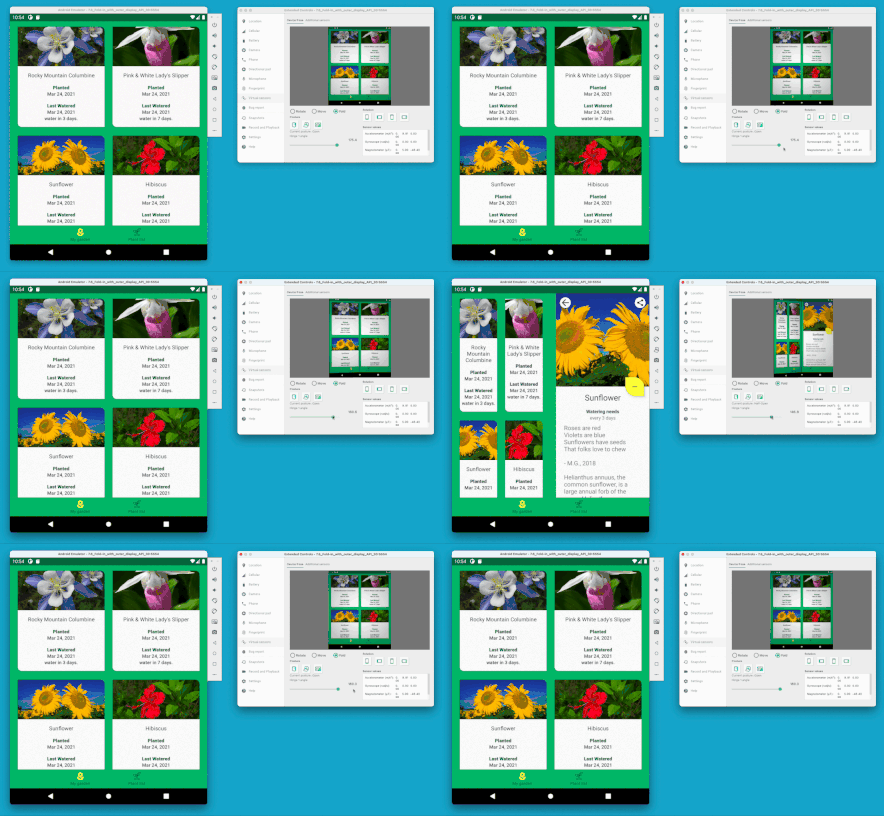
在ConstraintLayout中
2.1 版本中,我们添加了几项功能来帮助
管理可折叠设备,包括SharedValues、
ReactiveGuide,以及通过 MotionLayout 增强了对动画的支持。
共享值
我们在 ConstraintLayout 中添加了一种新机制来注入运行时值:
旨在用于系统级值,因为
“ConstraintLayout”能够访问此值。
对于可折叠设备,我们可以使用这种机制 折叠边在运行时的位置:
Kotlin
ConstraintLayout.getSharedValues().fireNewValue(R.id.fold, fold)
Java
ConstraintLayout.getSharedValues().fireNewValue(R.id.fold, fold);
在自定义帮助程序中,您可以通过添加 更改:
Kotlin
val sharedValues: SharedValues = ConstraintLayout.getSharedValues()
sharedValues.addListener(mAttributeId, this)
Java
SharedValues sharedValues = ConstraintLayout.getSharedValues();
sharedValues.addListener(mAttributeId, this);
您可以查看 FoldableExperiments 示例
看看我们如何使用
Jetpack WindowManager 库和注入
放入 ConstraintLayout。
Kotlin
inner class StateContainer : Consumer<WindowLayoutInfo> {

    override fun accept(newLayoutInfo: WindowLayoutInfo) {

        // Add views that represent display features
        for (displayFeature in newLayoutInfo.displayFeatures) {
            val foldFeature = displayFeature as? FoldingFeature
            if (foldFeature != null) {
                if (foldFeature.isSeparating &&
                    foldFeature.orientation == FoldingFeature.Orientation.HORIZONTAL
                ) {
                    // The foldable device is in tabletop mode
                    val fold = foldPosition(motionLayout, foldFeature)
                    ConstraintLayout.getSharedValues().fireNewValue(R.id.fold, fold)
                } else {
                    ConstraintLayout.getSharedValues().fireNewValue(R.id.fold, 0);
                }
            }
        }
    }
}
Java
class StateContainer implements Consumer<WindowLayoutInfo> {

    @Override
    public void accept(WindowLayoutInfo newLayoutInfo) {

        // Add views that represent display features
        for (DisplayFeature displayFeature : newLayoutInfo.getDisplayFeatures()) {
            if (displayFeature instanceof FoldingFeature) {
                FoldingFeature foldFeature = (FoldingFeature)displayFeature;
                if (foldFeature.isSeparating() &&
                    foldFeature.getOrientation() == FoldingFeature.Orientation.HORIZONTAL
                ) {
                    // The foldable device is in tabletop mode
                    int fold = foldPosition(motionLayout, foldFeature);
                    ConstraintLayout.getSharedValues().fireNewValue(R.id.fold, fold);
                } else {
                    ConstraintLayout.getSharedValues().fireNewValue(R.id.fold, 0);
                }
            }
        }
    }
}
fireNewValue() 将表示值的 ID 作为第一个参数,
要作为第二个参数注入的值。
ReactiveGuide
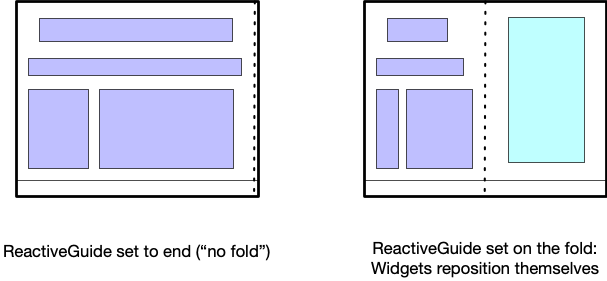
在布局中利用 SharedValue 的一种方式,无需
使用 ReactiveGuide
帮助程序。这将根据
关联时间:SharedValue。
    <androidx.constraintlayout.widget.ReactiveGuide
        android:id="@+id/fold"
        app:reactiveGuide_valueId="@id/fold"
        android:orientation="horizontal" />
然后,您可以像使用一般准则一样使用它。
MotionLayout 适用于可折叠设备
我们在 2.1 版的 MotionLayout 中添加了几项有助于变形的功能
状态,这对可折叠设备特别有用。
必须处理不同可能布局之间的动画。
可折叠设备有两种方法:
- 在运行时,更新当前布局 (
ConstraintSet) 以显示或隐藏 折叠。 - 针对所需的每种可折叠状态使用单独的
ConstraintSet支持(closed、folded或fully open)。
为 ConstraintSet 添加动画效果
2.1 版中添加了 MotionLayout 中的 updateStateAnimate() 函数
发布:
Kotlin
fun updateStateAnimate(stateId: Int, set: ConstraintSet, duration: Int)
Java
void updateStateAnimate(int stateId, ConstraintSet set, int duration);
该函数会在更新指定的
ConstraintSet,而不是立即更新(您可以通过
updateState(stateId, constraintset))。这样,您就可以在
动态运行,具体取决于变化,例如您当前所处的可折叠状态。
MotionLayout 中的 ReactiveGuide
ReactiveGuide 还支持在
MotionLayout:
app:reactiveGuide_animateChange="true|false"app:reactiveGuide_applyToAllConstraintSets="true|false"
第一个代码将修改当前的 ConstraintSet,并为变化添加动画效果
。第二个代码将采用 ReactiveGuide 的新值
应用于 MotionLayout 中所有 ConstraintSet 的位置。典型的
可折叠设备应使用表示折叠位置的 ReactiveGuide,
相对于 ReactiveGuide 设置布局元素。
使用多个 ConstraintSet 表示可折叠状态
不必更新当前的 MotionLayout 状态,
为了支持可折叠设备,您的界面是创建特定的单独的状态(包括
closed、folded 和 fully open)。
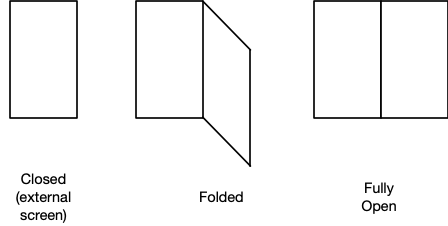
在这种情况下,您可能仍需要使用 ReactiveGuide 来表示
但您可以拥有更多控制权(与
更新当前 ConstraintSet 时的动画),说明每种状态是如何
过渡到另一个主题。
如果使用此方法,在 DeviceState 监听器中,您只需指示
MotionLayout,通过
MotionLayout.transitionToState(stateId)
方法。