

เมื่อโต้ตอบกับทีวี ผู้ใช้มักจะชอบป้อนข้อมูลให้น้อยที่สุดก่อนดู เนื้อหา สถานการณ์ที่เหมาะสำหรับผู้ใช้ทีวีจำนวนมากคือ นั่งลง เปิดทีวี และดู โดยทั่วไปแล้ว ผู้ใช้จะชอบวิธีที่ง่ายที่สุด ในการเข้าถึงเนื้อหาที่ตนชื่นชอบ
หมายเหตุ: ใช้ API ที่อธิบายไว้ที่นี่เพื่อสร้างคำแนะนำในแอปที่ทำงานใน Android เวอร์ชันไม่เกิน Android 7.1 (ระดับ API 25) เท่านั้น หากต้องการให้ คำแนะนำสำหรับแอปที่ทำงานใน Android 8.0 (ระดับ API 26) ขึ้นไป แอปของคุณต้องใช้ ช่องคำแนะนำ
เฟรมเวิร์ก Android ช่วยให้การโต้ตอบต้องใช้ข้อมูลน้อยที่สุดโดยแสดงแถวคำแนะนำ ในหน้าจอหลัก คำแนะนำเนื้อหาจะปรากฏเป็นแถวแรกของหน้าจอหลักของทีวีหลังจาก ใช้งานอุปกรณ์ครั้งแรก การให้คำแนะนำจากแคตตาล็อกเนื้อหาของแอปจะช่วย ดึงดูดให้ผู้ใช้กลับมาใช้แอปของคุณ
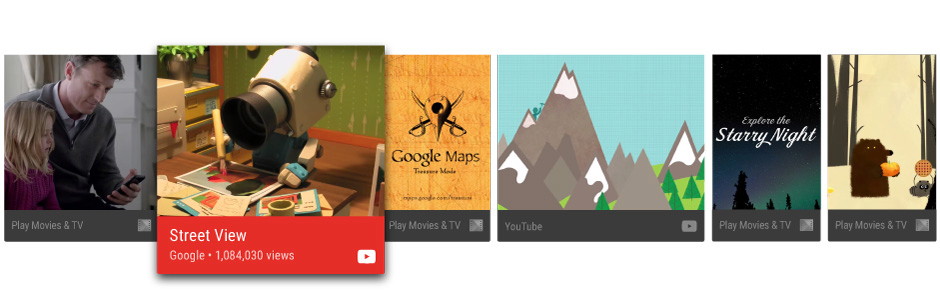
คู่มือนี้จะสอนวิธีสร้างคำแนะนำและส่งคำแนะนำไปยังเฟรมเวิร์ก Android เพื่อให้ผู้ใช้ค้นพบและเพลิดเพลินกับเนื้อหาในแอปของคุณ ดูตัวอย่างการใช้งานใน แอปตัวอย่าง Leanback ด้วย
แนวทางปฏิบัติแนะนำสำหรับคำแนะนำ
คำแนะนำช่วยให้ผู้ใช้ค้นหาเนื้อหาและแอปที่ตนชื่นชอบได้อย่างรวดเร็ว การสร้างคำแนะนำที่มีคุณภาพสูงและเกี่ยวข้องกับผู้ใช้เป็นปัจจัยสำคัญในการสร้างประสบการณ์ของผู้ใช้ที่ยอดเยี่ยมด้วยแอป TV ของคุณ ด้วยเหตุนี้ คุณจึงควรพิจารณาอย่างรอบคอบว่าคำแนะนำใดที่คุณจะแสดงต่อผู้ใช้และจัดการคำแนะนำเหล่านั้นอย่างใกล้ชิด
ประเภทของคำแนะนำ
เมื่อสร้างคำแนะนำ คุณควรลิงก์ผู้ใช้กลับไปยังกิจกรรมการดูที่ไม่สมบูรณ์หรือแนะนำกิจกรรมที่ขยายไปยังเนื้อหาที่เกี่ยวข้อง คำแนะนำบางประเภทที่คุณควรพิจารณามีดังนี้
- คำแนะนำเนื้อหาต่อเนื่อง สำหรับตอนถัดไปเพื่อให้ผู้ใช้กลับมาดูซีรีส์ต่อ หรือใช้คำแนะนำเนื้อหาต่อเนื่องสำหรับภาพยนตร์ รายการทีวี หรือพอดแคสต์ที่หยุดชั่วคราวเพื่อให้ผู้ใช้กลับมาดูเนื้อหาที่หยุดชั่วคราวได้ในไม่กี่คลิก
- คำแนะนำเนื้อหาใหม่ เช่น ตอนใหม่ที่ออกอากาศเป็นครั้งแรก หากผู้ใช้ดูซีรีส์อื่นจบแล้ว นอกจากนี้ หากแอปของคุณอนุญาตให้ผู้ใช้สมัครรับข้อมูล ติดตาม หรือติดตามเนื้อหา ให้ใช้คำแนะนำเนื้อหาใหม่สำหรับรายการที่ยังไม่ได้ดูในรายการเนื้อหาที่ติดตาม
- คำแนะนำเนื้อหาที่เกี่ยวข้อง ตามพฤติกรรมการดูที่ผ่านมาของผู้ใช้
ดูข้อมูลเพิ่มเติมเกี่ยวกับวิธีออกแบบการ์ดคำแนะนำเพื่อให้ผู้ใช้ได้รับประสบการณ์การใช้งานที่ดีที่สุดได้ที่ Recommendation Row ใน Android TV Design Spec
รีเฟรชคำแนะนำ
เมื่อรีเฟรชคำแนะนำ อย่าเพียงแค่นำคำแนะนำออกแล้วโพสต์ใหม่ เพราะการทำเช่นนั้นจะทำให้คำแนะนำปรากฏที่ส่วนท้ายของแถวคำแนะนำ เมื่อเล่นรายการเนื้อหา เช่น ภาพยนตร์แล้ว ให้ลบรายการนั้นออกจากคำแนะนำ
ปรับแต่งคำแนะนำ
คุณสามารถปรับแต่งการ์ดคำแนะนำเพื่อสื่อถึงข้อมูลการสร้างแบรนด์ได้โดยการตั้งค่าองค์ประกอบของอินเทอร์เฟซผู้ใช้ เช่น รูปภาพพื้นหน้าและพื้นหลัง สี ไอคอนแอป ชื่อ และคำบรรยาย ดูข้อมูลเพิ่มเติมได้ที่ Recommendation Row ใน Android TV Design Spec
จัดกลุ่มคำแนะนำ
คุณสามารถจัดกลุ่มคำแนะนำตามแหล่งที่มาของคำแนะนำได้ ตัวอย่างเช่น แอปของคุณอาจมีคำแนะนำ 2 กลุ่ม ได้แก่ คำแนะนำเนื้อหาที่ผู้ใช้สมัครรับข้อมูล และคำแนะนำเนื้อหาใหม่ที่กำลังมาแรงซึ่งผู้ใช้อาจไม่ทราบ
ระบบจะจัดอันดับและจัดลำดับคำแนะนำสำหรับแต่ละกลุ่มแยกกันเมื่อสร้างหรืออัปเดตแถวคำแนะนำ การระบุข้อมูลกลุ่มสำหรับคำแนะนำจะช่วยให้คำแนะนำของคุณไม่ถูกจัดลำดับภายใต้คำแนะนำที่ไม่เกี่ยวข้อง
ใช้ NotificationCompat.Builder.setGroup() เพื่อตั้งค่าสตริงคีย์กลุ่มของคำแนะนำ ตัวอย่างเช่น หากต้องการทำเครื่องหมายคำแนะนำว่าอยู่ในกลุ่มที่มีเนื้อหาใหม่ที่กำลังมาแรง คุณอาจเรียกใช้ setGroup("trending")
สร้างบริการคำแนะนำ
คำแนะนำเนื้อหาจะสร้างขึ้นด้วยการประมวลผลเบื้องหลัง หากต้องการให้แอปพลิเคชันของคุณมีส่วนร่วมในการให้คำแนะนำ ให้สร้างบริการที่จะเพิ่มข้อมูลจากแคตตาล็อกของแอปไปยังรายการคำแนะนำของระบบเป็นระยะๆ
ตัวอย่างโค้ดต่อไปนี้แสดงวิธีขยาย IntentService เพื่อ
สร้างบริการคำแนะนำสำหรับแอปพลิเคชัน
Kotlin
class UpdateRecommendationsService : IntentService("RecommendationService") {
    override protected fun onHandleIntent(intent: Intent) {
        Log.d(TAG, "Updating recommendation cards")
        val recommendations = VideoProvider.getMovieList()
        if (recommendations == null) return

        var count = 0

        try {
            val builder = RecommendationBuilder()
                    .setContext(applicationContext)
                    .setSmallIcon(R.drawable.videos_by_google_icon)

            for (entry in recommendations.entrySet()) {
                for (movie in entry.getValue()) {
                    Log.d(TAG, "Recommendation - " + movie.getTitle())

                    builder.setBackground(movie.getCardImageUrl())
                            .setId(count + 1)
                            .setPriority(MAX_RECOMMENDATIONS - count)
                            .setTitle(movie.getTitle())
                            .setDescription(getString(R.string.popular_header))
                            .setImage(movie.getCardImageUrl())
                            .setIntent(buildPendingIntent(movie))
                            .build()
                    if (++count >= MAX_RECOMMENDATIONS) {
                        break
                    }
                }
                if (++count >= MAX_RECOMMENDATIONS) {
                    break
                }
            }
        } catch (e: IOException) {
            Log.e(TAG, "Unable to update recommendation", e)
        }
    }

    private fun buildPendingIntent(movie: Movie): PendingIntent {
        val detailsIntent = Intent(this, DetailsActivity::class.java)
        detailsIntent.putExtra("Movie", movie)

        val stackBuilder = TaskStackBuilder.create(this)
        stackBuilder.addParentStack(DetailsActivity::class.java)
        stackBuilder.addNextIntent(detailsIntent)

        // Ensure a unique PendingIntents, otherwise all
        // recommendations end up with the same PendingIntent
        detailsIntent.setAction(movie.getId().toString())

        val intent = stackBuilder.getPendingIntent(0, PendingIntent.FLAG_UPDATE_CURRENT)
        return intent
    }

    companion object {
        private val TAG = "UpdateRecommendationsService"
        private val MAX_RECOMMENDATIONS = 3
    }
}
Java
public class UpdateRecommendationsService extends IntentService {
    private static final String TAG = "UpdateRecommendationsService";
    private static final int MAX_RECOMMENDATIONS = 3;

    public UpdateRecommendationsService() {
        super("RecommendationService");
    }

    @Override
    protected void onHandleIntent(Intent intent) {
        Log.d(TAG, "Updating recommendation cards");
        HashMap<String, List<Movie>> recommendations = VideoProvider.getMovieList();
        if (recommendations == null) return;

        int count = 0;

        try {
            RecommendationBuilder builder = new RecommendationBuilder()
                    .setContext(getApplicationContext())
                    .setSmallIcon(R.drawable.videos_by_google_icon);

            for (Map.Entry<String, List<Movie>> entry : recommendations.entrySet()) {
                for (Movie movie : entry.getValue()) {
                    Log.d(TAG, "Recommendation - " + movie.getTitle());

                    builder.setBackground(movie.getCardImageUrl())
                            .setId(count + 1)
                            .setPriority(MAX_RECOMMENDATIONS - count)
                            .setTitle(movie.getTitle())
                            .setDescription(getString(R.string.popular_header))
                            .setImage(movie.getCardImageUrl())
                            .setIntent(buildPendingIntent(movie))
                            .build();

                    if (++count >= MAX_RECOMMENDATIONS) {
                        break;
                    }
                }
                if (++count >= MAX_RECOMMENDATIONS) {
                    break;
                }
            }
        } catch (IOException e) {
            Log.e(TAG, "Unable to update recommendation", e);
        }
    }

    private PendingIntent buildPendingIntent(Movie movie) {
        Intent detailsIntent = new Intent(this, DetailsActivity.class);
        detailsIntent.putExtra("Movie", movie);

        TaskStackBuilder stackBuilder = TaskStackBuilder.create(this);
        stackBuilder.addParentStack(DetailsActivity.class);
        stackBuilder.addNextIntent(detailsIntent);
        // Ensure a unique PendingIntents, otherwise all
        // recommendations end up with the same PendingIntent
        detailsIntent.setAction(Long.toString(movie.getId()));

        PendingIntent intent = stackBuilder.getPendingIntent(0, PendingIntent.FLAG_UPDATE_CURRENT);
        return intent;
    }
}
หากต้องการให้ระบบรู้จักและเรียกใช้บริการนี้ ให้ลงทะเบียนบริการโดยใช้ไฟล์ Manifest ของแอป ข้อมูลโค้ดต่อไปนี้แสดงวิธีประกาศคลาสนี้เป็นบริการ
<manifest ... >
  <application ... >
    ...

    <service
            android:name="com.example.android.tvleanback.UpdateRecommendationsService"
            android:enabled="true" />
  </application>
</manifest>
สร้างคำแนะนำ
เมื่อบริการคำแนะนำเริ่มทำงานแล้ว บริการจะต้องสร้างคำแนะนำและส่งคำแนะนำไปยัง
เฟรมเวิร์ก Android เฟรมเวิร์กจะรับคำแนะนำเป็น Notification ออบเจ็กต์ที่ใช้เทมเพลตเฉพาะและทำเครื่องหมายด้วยหมวดหมู่เฉพาะ
การตั้งค่า
หากต้องการตั้งค่าองค์ประกอบ UI สำหรับการ์ดคำแนะนำ ให้สร้างคลาส Builder ที่เป็นไปตามรูปแบบ Builder ที่อธิบายไว้ดังนี้ ขั้นแรก ให้ตั้งค่าองค์ประกอบของการ์ดคำแนะนำ
Kotlin
class RecommendationBuilder {
    ...

    fun setTitle(title: String): RecommendationBuilder {
        this.title = title
        return this
    }

    fun setDescription(description: String): RecommendationBuilder {
        this.description = description
        return this
    }

    fun setImage(uri: String): RecommendationBuilder {
        imageUri = uri
        return this
    }

    fun setBackground(uri: String): RecommendationBuilder {
        backgroundUri = uri
        return this
    }

...
Java
public class RecommendationBuilder {
    ...

    public RecommendationBuilder setTitle(String title) {
            this.title = title;
            return this;
        }

        public RecommendationBuilder setDescription(String description) {
            this.description = description;
            return this;
        }

        public RecommendationBuilder setImage(String uri) {
            imageUri = uri;
            return this;
        }

        public RecommendationBuilder setBackground(String uri) {
            backgroundUri = uri;
            return this;
        }
...
สร้างการแจ้งเตือน
เมื่อตั้งค่าแล้ว ให้สร้างการแจ้งเตือนโดยกำหนดค่าจากคลาส Builder
ให้กับการแจ้งเตือน และเรียกใช้ NotificationCompat.Builder.build()
นอกจากนี้ อย่าลืมเรียกใช้
setLocalOnly()
เพื่อไม่ให้การแจ้งเตือน NotificationCompat.BigPictureStyle ปรากฏ
ในอุปกรณ์อื่นๆ
ตัวอย่างโค้ดต่อไปนี้แสดงวิธีสร้างคำแนะนำ
Kotlin
class RecommendationBuilder {
    ...

    @Throws(IOException::class)
    fun build(): Notification {
        ...

        val notification = NotificationCompat.BigPictureStyle(
        NotificationCompat.Builder(context)
                .setContentTitle(title)
                .setContentText(description)
                .setPriority(priority)
                .setLocalOnly(true)
                .setOngoing(true)
                .setColor(context.resources.getColor(R.color.fastlane_background))
                .setCategory(Notification.CATEGORY_RECOMMENDATION)
                .setLargeIcon(image)
                .setSmallIcon(smallIcon)
                .setContentIntent(intent)
                .setExtras(extras))
                .build()

        return notification
    }
}
Java
public class RecommendationBuilder {
    ...

    public Notification build() throws IOException {
        ...

        Notification notification = new NotificationCompat.BigPictureStyle(
                new NotificationCompat.Builder(context)
                        .setContentTitle(title)
                        .setContentText(description)
                        .setPriority(priority)
                        .setLocalOnly(true)
                        .setOngoing(true)
                        .setColor(context.getResources().getColor(R.color.fastlane_background))
                        .setCategory(Notification.CATEGORY_RECOMMENDATION)
                        .setLargeIcon(image)
                        .setSmallIcon(smallIcon)
                        .setContentIntent(intent)
                        .setExtras(extras))
                .build();

        return notification;
    }
}
เรียกใช้บริการคำแนะนำ
บริการคำแนะนำของแอปต้องทำงานเป็นระยะๆ เพื่อสร้างคำแนะนำปัจจุบัน
หากต้องการเรียกใช้บริการ ให้สร้างคลาสที่เรียกใช้ตัวจับเวลาและเรียกใช้เป็นช่วงเวลาปกติ ตัวอย่างโค้ดต่อไปนี้ขยายคลาส BroadcastReceiver เพื่อเริ่มการดำเนินการบริการคำแนะนำเป็นระยะๆ
ทุกครึ่งชั่วโมง:
Kotlin
class BootupActivity : BroadcastReceiver() {
    override fun onReceive(context: Context, intent: Intent) {
        Log.d(TAG, "BootupActivity initiated")
        if (intent.action.endsWith(Intent.ACTION_BOOT_COMPLETED)) {
            scheduleRecommendationUpdate(context)
        }
    }

    private fun scheduleRecommendationUpdate(context: Context) {
        Log.d(TAG, "Scheduling recommendations update")
        val alarmManager = context.getSystemService(Context.ALARM_SERVICE) as AlarmManager
        val recommendationIntent = Intent(context, UpdateRecommendationsService::class.java)
        val alarmIntent = PendingIntent.getService(context, 0, recommendationIntent, 0)
        alarmManager.setInexactRepeating(AlarmManager.ELAPSED_REALTIME_WAKEUP,
                INITIAL_DELAY,
                AlarmManager.INTERVAL_HALF_HOUR,
                alarmIntent
        )
    }

    companion object {
        private val TAG = "BootupActivity"
        private val INITIAL_DELAY:Long = 5000
    }
}
Java
public class BootupActivity extends BroadcastReceiver {
    private static final String TAG = "BootupActivity";

    private static final long INITIAL_DELAY = 5000;

    @Override
    public void onReceive(Context context, Intent intent) {
        Log.d(TAG, "BootupActivity initiated");
        if (intent.getAction().endsWith(Intent.ACTION_BOOT_COMPLETED)) {
            scheduleRecommendationUpdate(context);
        }
    }

    private void scheduleRecommendationUpdate(Context context) {
        Log.d(TAG, "Scheduling recommendations update");

        AlarmManager alarmManager = (AlarmManager) context.getSystemService(Context.ALARM_SERVICE);
        Intent recommendationIntent = new Intent(context, UpdateRecommendationsService.class);
        PendingIntent alarmIntent = PendingIntent.getService(context, 0, recommendationIntent, 0);

        alarmManager.setInexactRepeating(AlarmManager.ELAPSED_REALTIME_WAKEUP,
                INITIAL_DELAY,
                AlarmManager.INTERVAL_HALF_HOUR,
                alarmIntent);
    }
}
การใช้งานคลาส BroadcastReceiver นี้ต้องทำงานหลังจากเริ่ม
อุปกรณ์ทีวีที่ติดตั้ง หากต้องการทำเช่นนี้ ให้ลงทะเบียนคลาสนี้ในไฟล์ Manifest ของแอป
ด้วย Intent Filter ที่รอรับการแจ้งเตือนเมื่อกระบวนการบูตอุปกรณ์เสร็จสมบูรณ์ โค้ดตัวอย่างต่อไปนี้แสดงวิธีเพิ่มการกำหนดค่านี้ลงในไฟล์ Manifest
<manifest ... >
  <application ... >
    <receiver android:name="com.example.android.tvleanback.BootupActivity"
              android:enabled="true"
              android:exported="false">
      <intent-filter>
        <action android:name="android.intent.action.BOOT_COMPLETED"/>
      </intent-filter>
    </receiver>
  </application>
</manifest>
สำคัญ: การรับการแจ้งเตือนการบูตเสร็จสมบูรณ์กำหนดให้แอปของคุณ
ต้องขอสิทธิ์ RECEIVE_BOOT_COMPLETED
ดูข้อมูลเพิ่มเติมได้ที่ ACTION_BOOT_COMPLETED
ในเมธอด onHandleIntent() ของคลาสบริการคำแนะนำ ให้โพสต์คำแนะนำไปยังผู้จัดการดังนี้
Kotlin
val notification = notificationBuilder.build()
notificationManager.notify(id, notification)
Java
Notification notification = notificationBuilder.build();
notificationManager.notify(id, notification);