

对于需要实时低延迟语音支持的应用(例如聊天机器人或代理互动),Gemini Live API 提供了一种优化的方式来流式传输 Gemini 模型的输入和输出。通过使用 Firebase AI Logic,您可以直接从 Android 应用调用 Gemini Live API,而无需进行后端集成。本指南介绍了如何使用 Firebase AI Logic 在 Android 应用中使用 Gemini Live API。
开始使用
开始之前,请确保您的应用以 API 级别 23 或更高级别为目标平台。
如果您尚未这样做,请设置 Firebase 项目并将您的应用连接到 Firebase。如需了解详情,请参阅 Firebase AI Logic 文档。
设置 Android 项目
将 Firebase AI Logic 库和 App Check 依赖项添加到您的应用级 build.gradle.kts 或 build.gradle 文件中。使用 Firebase Android BoM 管理库版本。
dependencies {
  // Import the Firebase BoM
  implementation(platform("com.google.firebase:firebase-bom:35.0.2"))

  // Add the dependencies for the Firebase AI Logic and App Check libraries
  // When using the BoM, you don't specify versions in Firebase library dependencies
  implementation("com.google.firebase:firebase-ai")
  implementation("com.google.firebase:firebase-appcheck-debug")
}
添加依赖项后,将 Android 项目与 Gradle 同步。
为本地开发配置 App Check 调试提供程序
自 2026 年 7 月初起,在 Firebase 控制台中针对 AI Logic 的引导式设置工作流程中,系统会自动强制执行 Firebase App Check,以保护 Gemini API。对于本地开发,您需要配置 App Check 调试提供程序,以便在绕过证明的同时,仍能保持 App Check 的强制执行。
在调试 build 中,将 App Check 配置为使用调试提供程序工厂:
Kotlin
Firebase.initialize(context = this)
Firebase.appCheck.installAppCheckProviderFactory(
    DebugAppCheckProviderFactory.getInstance(),
)
Java
FirebaseApp.initializeApp(/*context=*/ this);
FirebaseAppCheck firebaseAppCheck = FirebaseAppCheck.getInstance();
firebaseAppCheck.installAppCheckProviderFactory(
        DebugAppCheckProviderFactory.getInstance());
获取调试令牌:
在模拟器中或在测试设备上运行应用。
在日志中查找 App Check 调试令牌。例如:
D DebugAppCheckProvider: Enter this debug secret into the allow list
in the Firebase Console for your project: 123a4567-b89c-12d3-e456-789012345678
复制令牌(例如
123a4567-b89c-12d3-e456-789012345678)。
通过 App Check 注册调试令牌:
在 Firebase 控制台中,依次前往安全性 > App Check > 应用标签页。
找到您的应用,点击溢出菜单 (),然后选择管理调试令牌。
按照屏幕上的说明注册调试令牌。
如需详细了解调试提供程序(包括如何获取新的调试令牌),请参阅 App Check 官方文档。
集成 Firebase AI Logic 并初始化生成式模型
向应用的 AndroidManifest.xml 文件添加 RECORD_AUDIO 权限:
<uses-permission android:name="android.permission.RECORD_AUDIO" />
初始化 Gemini Developer API 后端服务并访问 LiveModel。
使用支持 Live API 的模型,例如 gemini-2.5-flash-native-audio-preview-12-2025。如需了解可用的 Live API 模型,请参阅 Firebase 文档。
如需指定语音,请在 speechConfig 对象中设置语音名称,作为模型配置的一部分。如果您未指定语音,则默认语音为 Puck。
Kotlin
// Initialize the `LiveModel` val model = Firebase.ai(backend = GenerativeBackend.googleAI()).liveModel( modelName = "gemini-2.5-flash-native-audio-preview-12-2025", generationConfig = liveGenerationConfig { responseModality = ResponseModality.AUDIO speechConfig = SpeechConfig(voice = Voice("FENRIR")) } )
Java
// Initialize the `LiveModel`
LiveGenerativeModel model = FirebaseAI
       .getInstance(GenerativeBackend.googleAI())
       .liveModel(
              "gemini-2.5-flash-native-audio-preview-12-2025",
              new LiveGenerationConfig.Builder()
                     .setResponseModality(ResponseModality.AUDIO)
                     .setSpeechConfig(new SpeechConfig(new Voice("FENRIR"))
              ).build(),
        null,
        null
);
您可以根据需要设置系统指令,以定义模型扮演的角色:
Kotlin
val systemInstruction = content { text("You are a helpful assistant, you main role is [...]") } val model = Firebase.ai(backend = GenerativeBackend.googleAI()).liveModel( modelName = "gemini-2.5-flash-native-audio-preview-12-2025", generationConfig = liveGenerationConfig { responseModality = ResponseModality.AUDIO speechConfig = SpeechConfig(voice = Voice("FENRIR")) }, systemInstruction = systemInstruction, )
Java
Content systemInstruction = new Content.Builder()
       .addText("You are a helpful assistant, you main role is [...]")
       .build();

LiveGenerativeModel model = FirebaseAI
       .getInstance(GenerativeBackend.googleAI())
       .liveModel(
              "gemini-2.5-flash-native-audio-preview-12-2025",
              new LiveGenerationConfig.Builder()
                     .setResponseModality(ResponseModality.AUDIO)
                     .setSpeechConfig(new SpeechConfig(new Voice("FENRIR"))
              ).build(),
        tools, // null if you don't want to use function calling
        systemInstruction
);
您还可以使用系统指令来提供特定于应用的上下文(例如用户应用内活动历史记录),从而进一步细化与模型的对话。
初始化 Live API 会话
创建 LiveModel 实例后,调用 model.connect() 以创建 LiveSession 对象,并通过低延迟流式传输与模型建立持久连接。LiveSession 可让您通过启动和停止语音会话以及发送和接收文本来与模型互动。
然后,您可以调用 startAudioConversation() 来开始与模型的对话:
Kotlin
val session = model.connect() session.startAudioConversation()
Java
LiveModelFutures model = LiveModelFutures.from(liveModel);
ListenableFuture<LiveSession> sessionFuture = model.connect();

Futures.addCallback(sessionFuture, new FutureCallback<LiveSession>() {
    @Override
    public void onSuccess(LiveSession ses) {
        LiveSessionFutures session = LiveSessionFutures.from(ses);
        session.startAudioConversation();
    }
    @Override
    public void onFailure(Throwable t) {
        // Handle exceptions
    }
}, executor);
请注意,在与模型对话时,模型不会处理中断。此外,Live API 是双向的,因此您可以使用同一连接发送和接收内容。
您还可以使用 Gemini Live API 根据不同的输入模态生成音频:
- 发送文本和音频输入内容。
- 发送视频输入(请查看 Firebase 快速入门应用)。
函数调用:将 Gemini Live API 连接到您的应用
更进一步,您还可以让模型使用函数调用直接与应用的逻辑进行交互。
函数调用(或工具调用)是生成式 AI 实现的一项功能,可让模型主动调用函数来执行操作。如果函数有输出,模型会将其添加到上下文中,并将其用于后续生成。
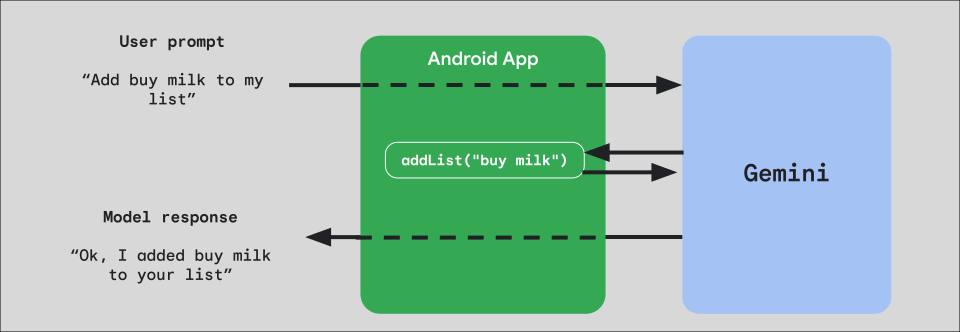
如需在应用中实现函数调用,请先为要向模型公开的每个函数创建一个 FunctionDeclaration 对象。
例如,若要向 Gemini 公开一个将字符串附加到字符串列表的 addList 函数,请先创建一个 FunctionDeclaration 变量,其中包含该函数及其参数的名称和简短的纯英文说明:
Kotlin
val itemList = mutableListOf<String>() fun addList(item: String) { itemList.add(item) } val addListFunctionDeclaration = FunctionDeclaration( name = "addList", description = "Function adding an item the list", parameters = mapOf( "item" to Schema.string("A short string describing the item to add to the list") ) )
Java
HashMap<String, Schema> addListParams = new HashMap<String, Schema>(1);

addListParams.put("item", Schema.str("A short string describing the item to add to the list"));

FunctionDeclaration addListFunctionDeclaration = new FunctionDeclaration(
    "addList",
    "Function adding an item the list",
    addListParams,
    Collections.emptyList()
);
然后,在实例化模型时,将此 FunctionDeclaration 作为 Tool 传递给模型:
Kotlin
val addListTool = Tool.functionDeclarations(listOf(addListFunctionDeclaration)) val model = Firebase.ai(backend = GenerativeBackend.googleAI()).liveModel( modelName = "gemini-2.5-flash-native-audio-preview-12-2025", generationConfig = liveGenerationConfig { responseModality = ResponseModality.AUDIO speechConfig = SpeechConfig(voice = Voice("FENRIR")) }, systemInstruction = systemInstruction, tools = listOf(addListTool) )
Java
LiveGenerativeModel model = FirebaseAI.getInstance(
    GenerativeBackend.googleAI()).liveModel(
        "gemini-2.5-flash-native-audio-preview-12-2025",
  new LiveGenerationConfig.Builder()
        .setResponseModality(ResponseModality.AUDIO)
        .setSpeechConfig(new SpeechConfig(new Voice("FENRIR")))
        .build(),
  List.of(Tool.functionDeclarations(List.of(addListFunctionDeclaration))),
               null,
               systemInstruction
        );
最后,实现一个处理程序函数来处理模型发出的工具调用,并将响应传递回模型。当您调用 startAudioConversation 时提供给 LiveSession 的此处理函数接受 FunctionCallPart 参数并返回 FunctionResponsePart:
Kotlin
session.startAudioConversation(::functionCallHandler) // ... fun functionCallHandler(functionCall: FunctionCallPart): FunctionResponsePart { return when (functionCall.name) { "addList" -> { // Extract function parameter from functionCallPart val itemName = functionCall.args["item"]!!.jsonPrimitive.content // Call function with parameter addList(itemName) // Confirm the function call to the model val response = JsonObject( mapOf( "success" to JsonPrimitive(true), "message" to JsonPrimitive("Item $itemName added to the todo list") ) ) FunctionResponsePart(functionCall.name, response) } else -> { val response = JsonObject( mapOf( "error" to JsonPrimitive("Unknown function: ${functionCall.name}") ) ) FunctionResponsePart(functionCall.name, response) } } }
Java
Futures.addCallback(sessionFuture, new FutureCallback<LiveSessionFutures>() {

    @RequiresPermission(Manifest.permission.RECORD_AUDIO)
    @Override
    @OptIn(markerClass = PublicPreviewAPI.class)
    public void onSuccess(LiveSessionFutures ses) {
        ses.startAudioConversation(::handleFunctionCallFuture);
    }

    @Override
    public void onFailure(Throwable t) {
        // Handle exceptions
    }
}, executor);

// ...

ListenableFuture<JsonObject> handleFunctionCallFuture = Futures.transform(response, result -> {
    for (FunctionCallPart functionCall : result.getFunctionCalls()) {
        if (functionCall.getName().equals("addList")) {
            Map<String, JsonElement> args = functionCall.getArgs();
            String item =
                    JsonElementKt.getContentOrNull(
                            JsonElementKt.getJsonPrimitive(
                                    locationJsonObject.get("item")));
            return addList(item);
        }
    }
    return null;
}, Executors.newSingleThreadExecutor());
后续步骤
- 在 Android AI 目录示例应用中试用 Gemini Live API。
- 如需详细了解 Gemini Live API,请参阅 Firebase AI Logic 文档。
- 详细了解可用的 Gemini 模型。
- 详细了解函数调用。
- 探索提示设计策略。