

במדריך הזה מוסבר איך לשלב את האפליקציה עם ממשקי ה-API של ספריית החיובים ב-Play כדי להציע למשתמשים בחירה של מערכת חיוב.
שילוב עם PBL
יש ארבעה תרחישים שבהם אפשר לשלב את אפשרות החיוב עם PBL. התרחישים שונים בהתאם למי שמציג את מסך הבחירה ולמקום שבו יתבצע התשלום. בטבלה הבאה מפורטים תרחישי השילוב:
| איזה מסך אפשרויות בחירה לחיוב רוצים להציג? | |||
| Google Play | שלכם (בהתאם להנחיות לגבי חוויית המשתמש) | ||
| איפה מתבצע התשלום? | באפליקציה | תרחיש 1א
Google מציגה את מסך הבחירה והחיוב החלופי מתבצע באפליקציה. |
תרחיש 1B
מפתח האפליקציה יוצר את מסך הבחירה ומערכת החיוב החלופית מטופלת בתוך האפליקציה. |
| קישור לדף אינטרנט אחר | תרחיש 2א
Google מציגה את מסך אפשרויות הבחירה, והמשתמש מופנה מחוץ לאפליקציה לאתרים שלכם כדי לבצע רכישות. |
תרחיש 2ב
מפתח האפליקציה מציג את מסך הבחירה, והמשתמש מופנה אל מחוץ לאפליקציה לאתרים שלכם כדי לבצע רכישות. |
|
באיור הבא מפורט תהליך בחירת החיוב בכל אחד מהתרחישים האלה:
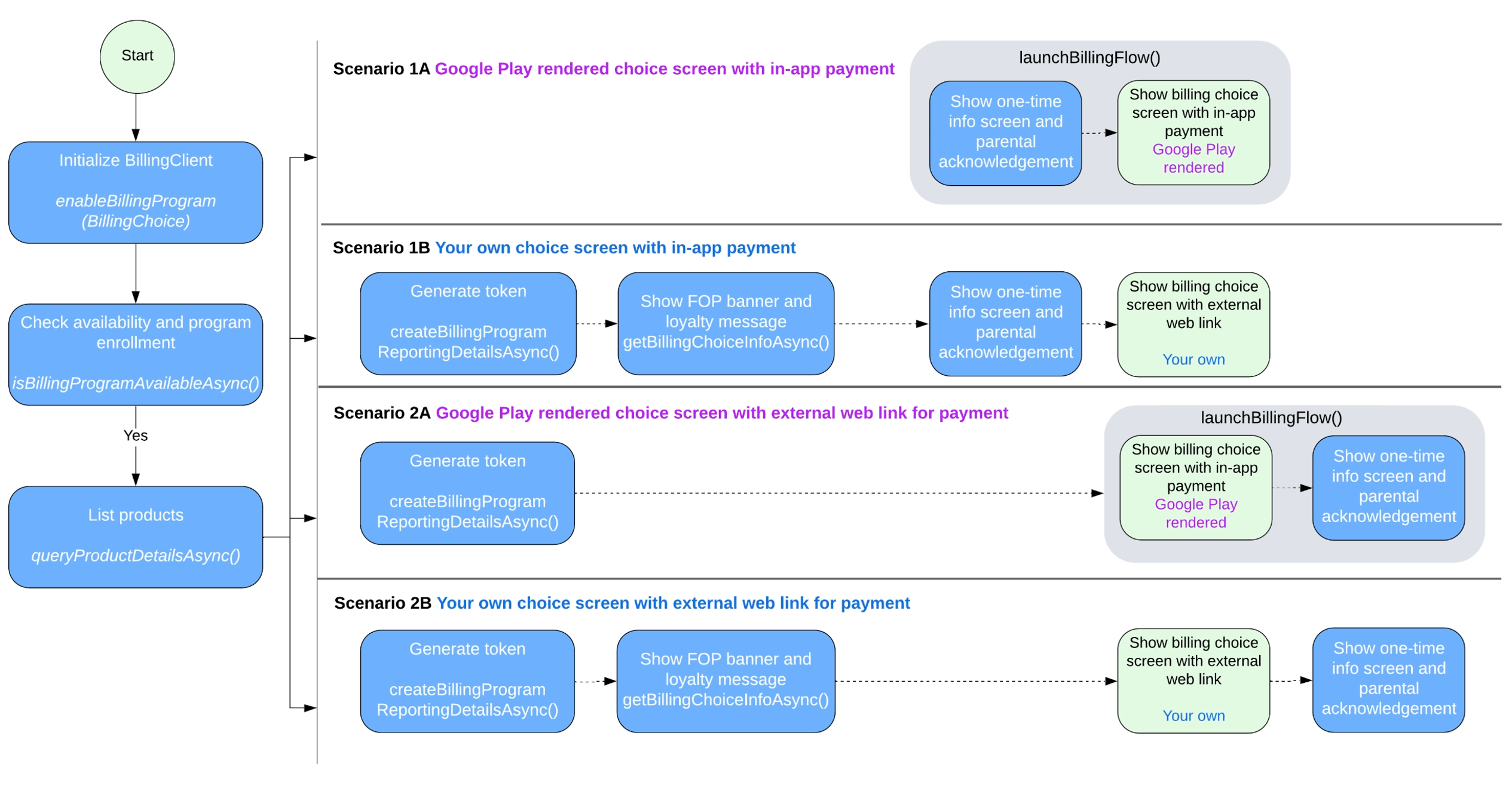
תרחישי שילוב של PBL
בהתאם לתרחיש ההטמעה, פועלים לפי השלבים שבקטע הזה כדי להטמיע את האפשרות לבחירת מערכת חיוב באפליקציה.
טיפול בתרחיש 1A
Google יוצרת את המסך לבחירת מערכת חיוב, והחיוב החלופי מתבצע באפליקציה. כדי להפעיל את האפשרות לבחירת מערכת חיוב בתרחיש הזה:
כשיוצרים את מופע BillingClient, צריך להתקשר אל
enableBillingProgramעםEnableBillingProgramParamsואז להתחיל את החיבור. לדוגמה:Kotlin
// Build the parameters to enable the Billing Choice program and assign the listener // to handle user selection of the developer-provided billing option. val enableBillingProgramParams = EnableBillingProgramParams.newBuilder() .setBillingProgram(BillingProgram.BILLING_CHOICE) .setDeveloperProvidedBillingListener(developerProvidedBillingListener) .build() // Build the parameters to enable support for pending purchases. val pendingPurchasesParams = PendingPurchasesParams.newBuilder() .enableOneTimeProducts() .build() // Construct the BillingClient instance with the purchases updated listener, // pending purchases support, and the billing choice params. val billingClient = BillingClient.newBuilder(context) .setListener(purchasesUpdatedListener) .enablePendingPurchases(pendingPurchasesParams) .enableBillingProgram(enableBillingProgramParams) .build() // Establish a connection to Google Play val billingResult = suspendCancellableCoroutine<BillingResult> { continuation -> billingClient.startConnection(object : BillingClientStateListener { // Called when the connection setup process completes. override fun onBillingSetupFinished(billingResult: BillingResult) { // Resume the coroutine and pass back the BillingResult to the caller. if (continuation.isActive) { continuation.resume(billingResult) } } // Called if the connection to the Play Store service is dropped. // This prevents the await or suspension point from hanging indefinitely. override fun onBillingServiceDisconnected() { if (continuation.isActive) { continuation.resume( BillingResult.newBuilder() .setResponseCode(BillingResponseCode.SERVICE_DISCONNECTED) .setDebugMessage("Billing service disconnected during connection setup") .build() ) } } }) }
Java
EnableBillingProgramParams params = EnableBillingProgramParams.newBuilder()
        .setBillingProgram(BillingProgram.BILLING_CHOICE)
        .setDeveloperProvidedBillingListener(developerProvidedBillingListener)
        .build();

BillingClient billingClient = BillingClient.newBuilder(context)
        .setListener(purchasesUpdatedListener)
        .enablePendingPurchases(
                PendingPurchasesParams.newBuilder()
                        .enableOneTimeProducts()
                        .build()
        )
        .enableBillingProgram(params)
        .build();
מוודאים שהמשתמש יכול לבחור במערכת החיוב ש-Google יצרה.
מתקשרים למספר
isBillingProgramAvailableAsyncכדי לבדוק את זמינות התוכנית, ואז מתקשרים למספרqueryProductDetailsAsyncכדי לראות את המוצרים הזמינים. לדוגמה:Kotlin
val (billingResult, billingProgramAvailabilityDetails) = billingClient.isBillingProgramAvailable(BillingProgram.BILLING_CHOICE) if (billingResult.responseCode == BillingResponseCode.OK) { val billingChoiceAvailabilityDetails = billingProgramAvailabilityDetails.billingChoiceAvailabilityDetails if (billingChoiceAvailabilityDetails != null && billingChoiceAvailabilityDetails.choiceScreenType == ChoiceScreenType.GOOGLE_RENDERED ) { // Billing choice is available. Query products and proceed. } else { // Fallback to other available programs. } } else { // Fallback to other available programs. }
Java
// ... billingClient.isBillingProgramAvailableAsync( BillingProgram.BILLING_CHOICE, (billingResult, billingProgramAvailabilityDetails) -> { if (billingResult.getResponseCode() == BillingResponseCode.OK) { BillingChoiceAvailabilityDetails billingChoiceAvailabilityDetails = billingProgramAvailabilityDetails.getBillingChoiceAvailabilityDetails(); if (billingChoiceAvailabilityDetails != null && billingChoiceAvailabilityDetails.getChoiceScreenType() == ChoiceScreenType.GOOGLE_RENDERED) { // Billing choice is available. Query products and proceed. } else { // Fallback to other available programs. } } else { // Fallback to other available programs. } } );הערה:
billingProgramAvailabilityDetailsמציין אם מסך בחירת מערכת חיוב ש-Google יצרה או מסך שהמפתח יצר זמין.מפעילים את הפונקציה
launchBillingFlowכדי להפעיל את תהליך הרכישה כשהמשתמש לוחץ על 'קנייה'. אם אפשרות החיוב זמינה, מעבירים את הערךDeveloperBillingOptionParamsאלBillingFlowParams. לדוגמה:Kotlin
val developerBillingOptionParams = DeveloperBillingOptionParams.newBuilder() .setBillingProgram(BillingProgram.BILLING_CHOICE) .build() val billingFlowParams = BillingFlowParams.newBuilder() .setProductDetailsParamsList(productDetailsParamsList) .enableDeveloperBillingOption(developerBillingOptionParams) .build() val billingResult = billingClient.launchBillingFlow(activity, billingFlowParams)
Java
DeveloperBillingOptionParams developerBillingOptionParams = DeveloperBillingOptionParams.newBuilder() .setBillingProgram(BillingProgram.BILLING_CHOICE) .build(); BillingFlowParams billingFlowParams = BillingFlowParams.newBuilder() .setProductDetailsParamsList(productDetailsParamsList) .enableDeveloperBillingOption(developerBillingOptionParams) .build(); BillingResult billingResult = billingClient.launchBillingFlow(activity, billingFlowParams);הערה: אמצעי בקרת ההורים מוצגים למשתמשים בפיקוח.
כך מטפלים בבחירת סוג החיוב של המשתמש:
- אם המשתמש בוחר בחיוב ב-Play, תוצאת החיוב מוחזרת אל
PurchasesUpdatedListenerשנרשם בשלב 1. - אם המשתמש בוחר במערכת החיוב החלופית שלכם, תוצאת החיוב מוחזרת אל
DeveloperProvidedBillingListenerשנרשם בשלב 1. הערךDeveloperProvidedBillingDetailsשמוחזר מכילexternalTransactionTokenבמקרה הזה. האסימון ישמש לדיווח על עסקאות.
- אם המשתמש בוחר בחיוב ב-Play, תוצאת החיוב מוחזרת אל
תרחיש 1B
המפתח יוצר את מסך בחירת מערכת החיוב, והחיוב החלופי מתבצע באפליקציה. כדי להפעיל את בחירת מערכת החיוב בתרחיש הזה, צריך לבצע את השלבים הבאים:
מתקשרים אל
enableBillingProgramבליDeveloperProvidedBillingListenerב-EnableBillingProgramParamsכשיוצרים מופע שלBillingClient, ואז מתחילים את החיבור. לדוגמה:Kotlin
// Build the parameters to enable the Billing Choice program. val enableBillingProgramParams = EnableBillingProgramParams.newBuilder() .setBillingProgram(BillingProgram.BILLING_CHOICE) .build() // Build the parameters to enable support for pending purchases. val pendingPurchasesParams = PendingPurchasesParams.newBuilder() .enableOneTimeProducts() .build() // Construct the BillingClient instance with the purchases updated listener, // pending purchases support, and the billing choice params. val billingClient = BillingClient.newBuilder(context) .setListener(purchasesUpdatedListener) .enablePendingPurchases(pendingPurchasesParams) .enableBillingProgram(enableBillingProgramParams) .build() // Establish a connection to Google Play val billingResult = suspendCancellableCoroutine<BillingResult> { continuation -> billingClient.startConnection(object : BillingClientStateListener { // Called when the connection setup process completes. override fun onBillingSetupFinished(billingResult: BillingResult) { // Resume the coroutine and pass back the BillingResult to the caller. if (continuation.isActive) { continuation.resume(billingResult) } } // Called if the connection to the Play Store service is dropped. // This prevents the await or suspension point from hanging indefinitely. override fun onBillingServiceDisconnected() { if (continuation.isActive) { continuation.resume( BillingResult.newBuilder() .setResponseCode(BillingResponseCode.SERVICE_DISCONNECTED) .setDebugMessage("Billing service disconnected during connection setup") .build() ) } } }) }
Java
EnableBillingProgramParams params = EnableBillingProgramParams.newBuilder()
        .setBillingProgram(BillingProgram.BILLING_CHOICE)
        .build();

BillingClient billingClient = BillingClient.newBuilder(context)
        .setListener(purchasesUpdatedListener)
        .enablePendingPurchases()
        .enableBillingProgram(params)
        .build();
מוודאים שהמשתמש יכול לבחור במערכת החיוב שהמפתח יצר.
מתקשרים למספר
isBillingProgramAvailableAsyncכדי לבדוק את זמינות התוכנית, ואז מתקשרים למספרqueryProductDetailsAsyncכדי לראות את המוצרים הזמינים. לדוגמה:Kotlin
val (billingResult, billingProgramAvailabilityDetails) = billingClient.isBillingProgramAvailable(BillingProgram.BILLING_CHOICE) if (billingResult.responseCode == BillingResponseCode.OK) { val billingChoiceAvailabilityDetails = billingProgramAvailabilityDetails.billingChoiceAvailabilityDetails if (billingChoiceAvailabilityDetails != null && billingChoiceAvailabilityDetails.choiceScreenType == ChoiceScreenType.DEVELOPER_RENDERED ) { // Billing choice is available. Query products and proceed. // You can inspect details such as: // - billingChoiceAvailabilityDetails.choiceScreenType // - billingChoiceAvailabilityDetails.isExternalLinkAvailable } else { // Fallback to other available programs. } } else { // Fallback to other available programs. }
Java
// ... billingClient.isBillingProgramAvailableAsync( BillingProgram.BILLING_CHOICE, (billingResult, billingProgramAvailabilityDetails) -> { if (billingResult.getResponseCode() == BillingResponseCode.OK) { BillingChoiceAvailabilityDetails billingChoiceAvailabilityDetails = billingProgramAvailabilityDetails.getBillingChoiceAvailabilityDetails(); if (billingChoiceAvailabilityDetails != null && billingChoiceAvailabilityDetails.getChoiceScreenType() == ChoiceScreenType.DEVELOPER_RENDERED) { // Billing choice is available. Query products and proceed. // You can inspect details such as: // - billingChoiceAvailabilityDetails.getChoiceScreenType() // - billingChoiceAvailabilityDetails.isExternalLinkAvailable() } else { // Fallback to other available programs. } } else { // Fallback to other available programs. } } );הערה:
billingProgramAvailabilityDetailsמציין אם זמין מסך לבחירת מערכת חיוב ש-Google יצרה או מסך שהמפתח יצר.מתקשרים לשיטה
getBillingChoiceInfoAsyncכדי לקבל את הבאנר של החיוב ב-Play ואת פרטי מועדון הלקוחות. לדוגמה:Kotlin
// 1. Create the params required for the request val params = GetBillingChoiceInfoParams.newBuilder() .setBillingProgram(BillingProgram.BILLING_CHOICE) .setPlayBillingChoiceImageLayout(GetBillingChoiceInfoParams.ImageLayout.RECTANGULAR_FOUR_BY_ONE) .build() // 2. Call the suspend method on your billingClient instance val (billingResult, playBillingChoiceInfo) = billingClient.getBillingChoiceInfo(params) if (billingResult.responseCode == BillingResponseCode.OK && playBillingChoiceInfo != null) { // Access the URL of the image associated with the Play Billing Choice val imageUrl = playBillingChoiceInfo.playBillingChoiceImageUrl // Access the Play Loyalty string information, if available val loyaltyInfo = playBillingChoiceInfo.playBillingLoyaltyInfo // Populate your developer-rendered UI elements playBillingLoyaltyTextView.text = loyaltyInfo loadImage(imageUrl, playBillingImageView) } else { // Handle error scenarios }
Java
// 1. Create the params required for the request
GetBillingChoiceInfoParams params = GetBillingChoiceInfoParams.newBuilder()
    .setBillingProgram(BillingClient.BillingProgram.BILLING_CHOICE)
    .setPlayBillingChoiceImageLayout(GetBillingChoiceInfoParams.ImageLayout.RECTANGULAR_FOUR_BY_ONE)
    .build();
// 2. Call the method asynchronously on your billingClient instance
billingClient.getBillingChoiceInfoAsync(params, (billingResult, playBillingChoiceInfo) -> {
    if (billingResult.getResponseCode() == BillingResponseCode.OK && playBillingChoiceInfo != null) {
      // Access the URL of the image associated with the Play Billing Choice
        String imageUrl = playBillingChoiceInfo.getPlayBillingChoiceImageUrl();
        // Access the Play Loyalty string information, if available
        String loyaltyInfo = playBillingChoiceInfo.getPlayBillingLoyaltyInfo();

        // Populate your developer-rendered UI elements
        playBillingLoyaltyTextView.setText(loyaltyInfo);
          loadImage(imageUrl, playBillingImageView);
      } else {
          // Handle error scenarios
      }
});
יוצרים טוקן לעסקה חיצונית עם הערך IN_APP של DeveloperBillingType. לדוגמה:
Kotlin
// Build the parameters specifying the billing program and that the billing type is IN_APP. val params = BillingProgramReportingDetailsParams.newBuilder() .setBillingProgram(BillingProgram.BILLING_CHOICE) .setDeveloperBillingType(DeveloperBillingType.IN_APP) .build() // Call the suspending extension function to request the reporting details val (billingResult, billingProgramReportingDetails) = billingClient.createBillingProgramReportingDetails(params) if (billingResult.responseCode != BillingResponseCode.OK) { // Handle failures such as retrying due to network errors. return } // Extract the transaction token from the returned reporting details val transactionToken = billingProgramReportingDetails?.externalTransactionToken // Persist the external transaction token locally. Pass it to // DeveloperBillingOptionParams when launchBillingFlow is called. // It can also be used as part of your external website
Java
BillingProgramReportingDetailsParams params =
    BillingProgramReportingDetailsParams.newBuilder()
        .setBillingProgram(BillingProgram.BILLING_CHOICE)
        .setDeveloperBillingType(DeveloperBillingType.IN_APP)
        .build();

billingClient.createBillingProgramReportingDetailsAsync(
    params,
    new BillingProgramReportingDetailsListener() {
        @Override
        public void onCreateBillingProgramReportingDetailsResponse(
            BillingResult billingResult,
            @Nullable BillingProgramReportingDetails billingProgramReportingDetails
        ) {
            if (billingResult.getResponseCode() != BillingResponseCode.OK) {
                // Handle failures such as retrying due to network errors.
                return;
            }

            String transactionToken =
                billingProgramReportingDetails.getExternalTransactionToken();

            // Persist the external transaction token locally. Pass it to
            // DeveloperBillingOptionParams when launchBillingFlow is called.
            // It can also be used as part of your external website
        }
    }
);
כשמשתמש לוחץ על 'קנייה', מתבצעת קריאה ל-
showBillingProgramInformationDialogכדי להציג תיבת דו-שיח עם מידע. לדוגמה, אפשר לעיין במאמר בנושא תיבת דו-שיח עם מידע למשתמשים. צריך להגדיר בבקשה את BillingProgram ואת transactionToken משלב 4.הערה: אמצעי בקרת ההורים מוצגים למשתמשים בפיקוח.
מפעילים את מסך הבחירה של מערכת החיוב החלופית אם התוצאה מהשלב הקודם היא
OK.כך מטפלים בבחירת סוג החיוב של המשתמש:
- אם המשתמש בוחר בחיוב ב-Play, צריך להתקשר אל
launchBillingFlowבהתאם להנחיות הרגילות לחיוב ב-Play. תוצאת החיוב מוחזרת אלPurchasesUpdatedListenerשנרשם בשלב 1. - אם המשתמש בוחר במערכת החיוב החלופית שלכם, אתם צריכים לטפל בעסקה בעצמכם ולדווח עליה ל-Play באמצעות הטוקן שנוצר בשלב 4.
- אם המשתמש בוחר בחיוב ב-Play, צריך להתקשר אל
טיפול בתרחיש 2A
Google מציגה את המסך לבחירת מערכת חיוב, והחיוב החלופי מתבצע מחוץ לאפליקציה. כדי להפעיל את האפשרות לבחירת מערכת חיוב בתרחיש הזה, צריך לבצע את השלבים הבאים:
כשיוצרים את מופע BillingClient, צריך להתקשר אל
enableBillingProgramעםEnableBillingProgramParamsואז להתחיל את החיבור. לדוגמה:Kotlin
// Build the parameters to enable the Billing Choice program and assign the listener // to handle user selection of the developer-provided billing option. val enableBillingProgramParams = EnableBillingProgramParams.newBuilder() .setBillingProgram(BillingProgram.BILLING_CHOICE) .setDeveloperProvidedBillingListener(developerProvidedBillingListener) .build() // Build the parameters to enable support for pending purchases. val pendingPurchasesParams = PendingPurchasesParams.newBuilder() .enableOneTimeProducts() .build() // Construct the BillingClient instance with the purchases updated listener, // pending purchases support, and the billing choice params. val billingClient = BillingClient.newBuilder(context) .setListener(purchasesUpdatedListener) .enablePendingPurchases(pendingPurchasesParams) .enableBillingProgram(enableBillingProgramParams) .build() // Establish a connection to Google Play val billingResult = suspendCancellableCoroutine<BillingResult> { continuation -> billingClient.startConnection(object : BillingClientStateListener { // Called when the connection setup process completes. override fun onBillingSetupFinished(billingResult: BillingResult) { // Resume the coroutine and pass back the BillingResult to the caller. if (continuation.isActive) { continuation.resume(billingResult) } } // Called if the connection to the Play Store service is dropped. // This prevents the await or suspension point from hanging indefinitely. override fun onBillingServiceDisconnected() { if (continuation.isActive) { continuation.resume( BillingResult.newBuilder() .setResponseCode(BillingResponseCode.SERVICE_DISCONNECTED) .setDebugMessage("Billing service disconnected during connection setup") .build() ) } } }) }
Java
EnableBillingProgramParams params = EnableBillingProgramParams.newBuilder()
        .setBillingProgram(BillingProgram.BILLING_CHOICE)
        .setDeveloperProvidedBillingListener(developerProvidedBillingListener)
        .build();

BillingClient billingClient = BillingClient.newBuilder(context)
        .setListener(purchasesUpdatedListener)
        .enablePendingPurchases(
                PendingPurchasesParams.newBuilder()
                        .enableOneTimeProducts()
                        .build()
        )
        .enableBillingProgram(params)
        .build();
בודקים את הזמינות של הדברים הבאים:
- אפשרות החיוב שמוצגת על ידי Google
- קישור לדף אינטרנט אחר
מתקשרים למספר
isBillingProgramAvailableAsyncכדי לבדוק את הזמינות של התוכנית, ואז מתקשרים למספרqueryProductDetailsAsyncכדי לראות את המוצרים הזמינים. לדוגמה:Kotlin
// Check the availability of the billing choice program asynchronously using coroutines val (billingResult, billingProgramAvailabilityDetails) = billingClient.isBillingProgramAvailable(BillingProgram.BILLING_CHOICE) // Ensure the billing program query succeeded if (billingResult.responseCode == BillingResponseCode.OK) { // Retrieve the availability details specific to the billing choice program val billingChoiceAvailabilityDetails = billingProgramAvailabilityDetails.billingChoiceAvailabilityDetails // Check if billing choice is available, renders via Google Play, and external link is supported if (billingChoiceAvailabilityDetails != null && billingChoiceAvailabilityDetails.choiceScreenType == ChoiceScreenType.GOOGLE_RENDERED && billingChoiceAvailabilityDetails.isExternalLinkAvailable ) { // Billing choice is available and external transaction links are supported. Query products and proceed. } else { // Fallback to other available programs. } } else { // Fallback to other available programs. }
Java
// ...
billingClient.isBillingProgramAvailableAsync(
    BillingProgram.BILLING_CHOICE,
    (billingResult, billingProgramAvailabilityDetails) -> {
        if (billingResult.getResponseCode() == BillingResponseCode.OK) {
            BillingChoiceAvailabilityDetails billingChoiceAvailabilityDetails =
                billingProgramAvailabilityDetails.getBillingChoiceAvailabilityDetails();

            if (billingChoiceAvailabilityDetails != null
                    && billingChoiceAvailabilityDetails.getChoiceScreenType() == ChoiceScreenType.GOOGLE_RENDERED
                    && billingChoiceAvailabilityDetails.isExternalLinkAvailable()) {
                // Billing choice is available and external transaction links are supported.
                // Query products and proceed.
            } else {
                // Fallback to other available programs.
            }
        } else {
            // Fallback to other available programs.
        }
    }
);
מפעילים את
createBillingProgramReportingDetailsAsyncכדי ליצור טוקן של עסקה חיצונית כשהמשתמש מביע כוונה לקנות. לדוגמה:Kotlin
// Build the parameters for creating reporting details val params = BillingProgramReportingDetailsParams.newBuilder() .setBillingProgram(BillingProgram.BILLING_CHOICE) .setDeveloperBillingType(DeveloperBillingType.EXTERNAL_LINK) .build() // Call the suspend function to create billing program reporting details val (billingResult, billingProgramReportingDetails) = billingClient.createBillingProgramReportingDetails(params) // Handle response failure cases if (billingResult.responseCode != BillingResponseCode.OK) { // Handle failures such as retrying due to network errors. return } // Retrieve the external transaction token val transactionToken = billingProgramReportingDetails?.externalTransactionToken // Persist the external transaction token locally. Pass it to // DeveloperBillingOptionParams when launchBillingFlow is called. // It can also be used as part of your external website
Java
BillingProgramReportingDetailsParams params =
    BillingProgramReportingDetailsParams.newBuilder()
        .setBillingProgram(BillingProgram.BILLING_CHOICE)
        .setDeveloperBillingType(DeveloperBillingType.EXTERNAL_LINK)
        .build();

billingClient.createBillingProgramReportingDetailsAsync(
    params,
    new BillingProgramReportingDetailsListener() {
        @Override
        public void onCreateBillingProgramReportingDetailsResponse(
            BillingResult billingResult,
            @Nullable BillingProgramReportingDetails billingProgramReportingDetails
        ) {
            if (billingResult.getResponseCode() != BillingResponseCode.OK) {
                // Handle failures such as retrying due to network errors.
                return;
            }

            String transactionToken =
                billingProgramReportingDetails.getExternalTransactionToken();

            // Persist the external transaction token locally. Pass it to
            // DeveloperBillingOptionParams when launchBillingFlow is called.
            // It can also be used as part of your external website.
        }
    }
);
מפעילים את הפונקציה
launchBillingFlowכדי להפעיל את תהליך הרכישה כשהמשתמש לוחץ על 'קנייה'. אם אפשרות החיוב זמינה למשתמש, מבצעים את הפעולות הבאות:- מעבירים את
DeveloperBillingOptionParamsאלBillingFlowParams. - מעבירים את הטוקן לעסקה חיצונית משלב 3 אל
DeveloperBillingOptionParams.
לדוגמה:
Kotlin
// Build the developer billing option parameters with the external link URI, // the transaction token, and browser/app launch mode. val developerBillingOptionParams = DeveloperBillingOptionParams.newBuilder() .setBillingProgram(BillingProgram.BILLING_CHOICE) .setLinkUri(Uri.parse("https://www.example.com/external/purchase")) .setExternalTransactionToken(transactionToken) .setLaunchMode( DeveloperBillingOptionParams.LaunchMode.LAUNCH_IN_EXTERNAL_BROWSER_OR_APP ) .build() val billingFlowParams = BillingFlowParams.newBuilder() .setProductDetailsParamsList(productDetailsParamsList) .enableDeveloperBillingOption(developerBillingOptionParams) .build() val billingResult = billingClient.launchBillingFlow(activity, billingFlowParams)
Java
DeveloperBillingOptionParams developerBillingOptionParams = DeveloperBillingOptionParams.newBuilder() .setBillingProgram(BillingProgram.BILLING_CHOICE) .setLinkUri(Uri.parse("https://www.example.com/external/purchase")) .setExternalTransactionToken(transactionToken) .setLaunchMode( DeveloperBillingOptionParams.LaunchMode.LAUNCH_IN_EXTERNAL_BROWSER_OR_APP) .build();הערה: אמצעי בקרת ההורים מוצגים למשתמשים בפיקוח.
- מעבירים את
כך מטפלים בבחירת סוג החיוב של המשתמש:
- אם המשתמש בוחר בחיוב ב-Play, צריך להתקשר אל
launchBillingFlowבהתאם להנחיות הרגילות לחיוב ב-Play. תוצאת החיוב מוחזרת אלPurchasesUpdatedListenerשנרשם בשלב 1. - אם המשתמש בוחר במערכת החיוב החלופית שלכם, תוצאת החיוב מוחזרת אל
DeveloperProvidedBillingListenerשרשום בשלב- הערך המוחזר
DeveloperProvidedBillingDetailsמכיל אתexternalTransactionTokenשהועבר אלDeveloperBillingOptionParamsבשלב 4, אם זהו אסימון תקין.
- הערך המוחזר
- אם המשתמש בוחר בחיוב ב-Play, צריך להתקשר אל
Handle scenario 2B
המפתח יוצר את מסך בחירת מערכת החיוב, והחיוב החלופי מתבצע מחוץ לאפליקציה. כדי להפעיל את בחירת מערכת החיוב בתרחיש הזה, צריך לבצע את השלבים הבאים:
מתקשרים אל
enableBillingProgramבליDeveloperProvidedBillingListenerב-EnableBillingProgramParamsכשיוצרים מופע BillingClient, ואז מתחילים את החיבור. לדוגמה:Kotlin
// Build the parameters to enable the Billing Choice program. val enableBillingProgramParams = EnableBillingProgramParams.newBuilder() .setBillingProgram(BillingProgram.BILLING_CHOICE) .build() // Build the parameters to enable support for pending purchases. val pendingPurchasesParams = PendingPurchasesParams.newBuilder() .enableOneTimeProducts() .build() // Construct the BillingClient instance with the purchases updated listener, // pending purchases support, and the billing choice params. val billingClient = BillingClient.newBuilder(context) .setListener(purchasesUpdatedListener) .enablePendingPurchases(pendingPurchasesParams) .enableBillingProgram(enableBillingProgramParams) .build() // Establish a connection to Google Play val billingResult = suspendCancellableCoroutine<BillingResult> { continuation -> billingClient.startConnection(object : BillingClientStateListener { // Called when the connection setup process completes. override fun onBillingSetupFinished(billingResult: BillingResult) { // Resume the coroutine and pass back the BillingResult to the caller. if (continuation.isActive) { continuation.resume(billingResult) } } // Called if the connection to the Play Store service is dropped. // This prevents the await or suspension point from hanging indefinitely. override fun onBillingServiceDisconnected() { if (continuation.isActive) { continuation.resume( BillingResult.newBuilder() .setResponseCode(BillingResponseCode.SERVICE_DISCONNECTED) .setDebugMessage("Billing service disconnected during connection setup") .build() ) } } }) }
Java
EnableBillingProgramParams params = EnableBillingProgramParams.newBuilder()
        .setBillingProgram(BillingProgram.BILLING_CHOICE)
        .build();

BillingClient billingClient = BillingClient.newBuilder(context)
        .setListener(purchasesUpdatedListener)
        .enablePendingPurchases()
        .enableBillingProgram(params)
        .build();
בודקים את הזמינות של הדברים הבאים:
- אפשרות החיוב שמוצגת על ידי Google
- קישור לדף אינטרנט אחר
מתקשרים למספר
isBillingProgramAvailableAsyncכדי לבדוק את הזמינות של התוכנית, ואז מתקשרים למספרqueryProductDetailsAsyncכדי לראות את המוצרים הזמינים. לדוגמה:Kotlin
// Check the availability of the billing choice program asynchronously using a coroutine val (billingResult, billingProgramAvailabilityDetails) = billingClient.isBillingProgramAvailable(BillingProgram.BILLING_CHOICE) // Ensure the response code is OK if (billingResult.responseCode == BillingResponseCode.OK) { // Retrieve the billing choice availability details val billingChoiceAvailabilityDetails = billingProgramAvailabilityDetails.billingChoiceAvailabilityDetails // Check if billing choice details are available, choice screen is developer-rendered, // and external transaction links are supported. if (billingChoiceAvailabilityDetails != null && billingChoiceAvailabilityDetails.choiceScreenType == ChoiceScreenType.DEVELOPER_RENDERED && billingChoiceAvailabilityDetails.isExternalLinkAvailable ) { // Billing choice is available and external transaction links are supported. // Query products and proceed. } else { // Fallback to other available programs. } } else { // Fallback to other available programs. }
Java
// ...

billingClient.isBillingProgramAvailableAsync(
    BillingProgram.BILLING_CHOICE,
    (billingResult, billingProgramAvailabilityDetails) -> {
        if (billingResult.getResponseCode() == BillingResponseCode.OK) {
            BillingChoiceAvailabilityDetails billingChoiceAvailabilityDetails =
                billingProgramAvailabilityDetails.getBillingChoiceAvailabilityDetails();
            if (billingChoiceAvailabilityDetails != null &&
                billingChoiceAvailabilityDetails.getChoiceScreenType() == ChoiceScreenType.DEVELOPER_RENDERED &&
                billingChoiceAvailabilityDetails.isExternalLinkAvailable()) {
                // Billing choice is available and external transaction links are supported. Query products and proceed.
            } else {
                // Fallback to other available programs.
            }
        } else {
            // Fallback to other available programs.
        }
    }
);
מתקשרים לשיטה
getBillingChoiceInfoAsyncכדי לקבל את הבאנר של החיוב ב-Play ואת פרטי מועדון הלקוחות.Kotlin
// 1. Create the params required for the request val params = GetBillingChoiceInfoParams.newBuilder() .setBillingProgram(BillingProgram.BILLING_CHOICE) .setPlayBillingChoiceImageLayout(GetBillingChoiceInfoParams.ImageLayout.RECTANGULAR_FOUR_BY_ONE) .build() // 2. Call the suspend method on your billingClient instance val (billingResult, playBillingChoiceInfo) = billingClient.getBillingChoiceInfo(params) if (billingResult.responseCode == BillingResponseCode.OK && playBillingChoiceInfo != null) { // Access the URL of the image associated with the Play Billing Choice val imageUrl = playBillingChoiceInfo.playBillingChoiceImageUrl // Access the Play Loyalty string information, if available val loyaltyInfo = playBillingChoiceInfo.playBillingLoyaltyInfo // Populate your developer-rendered UI elements playBillingLoyaltyTextView.text = loyaltyInfo loadImage(imageUrl, playBillingImageView) } else { // Handle error scenarios }
Java
// 1. Create the params required for the request
GetBillingChoiceInfoParams params = GetBillingChoiceInfoParams.newBuilder()
    .setBillingProgram(BillingClient.BillingProgram.BILLING_CHOICE)
    .setPlayBillingChoiceImageLayout(GetBillingChoiceInfoParams.ImageLayout.RECTANGULAR_FOUR_BY_ONE)
    .build();
// 2. Call the method asynchronously on your billingClient instance
billingClient.getBillingChoiceInfoAsync(params, (billingResult, playBillingChoiceInfo) -> {
    if (billingResult.getResponseCode() == BillingResponseCode.OK && playBillingChoiceInfo != null) {
      // Access the URL of the image associated with the Play Billing Choice
        String imageUrl = playBillingChoiceInfo.getPlayBillingChoiceImageUrl();
        // Access the Play Loyalty string information, if available
        String loyaltyInfo = playBillingChoiceInfo.getPlayBillingLoyaltyInfo();

        // Populate your developer-rendered UI elements
        playBillingLoyaltyTextView.setText(loyaltyInfo);
          loadImage(imageUrl, playBillingImageView);
      } else {
          // Handle error scenarios
      }
});
מפעילים את
createBillingProgramReportingDetailsAsyncכדי ליצור טוקן של עסקה חיצונית כשהמשתמש מביע כוונה לקנות. לדוגמה:Kotlin
// Build the parameters for creating reporting details val params = BillingProgramReportingDetailsParams.newBuilder() .setBillingProgram(BillingProgram.BILLING_CHOICE) .setDeveloperBillingType(DeveloperBillingType.EXTERNAL_LINK) .build() // Call the suspend function to create billing program reporting details val (billingResult, billingProgramReportingDetails) = billingClient.createBillingProgramReportingDetails(params) // Handle response failure cases if (billingResult.responseCode != BillingResponseCode.OK) { // Handle failures such as retrying due to network errors. return } // Retrieve the external transaction token val transactionToken = billingProgramReportingDetails?.externalTransactionToken // Persist the external transaction token locally. Pass it to // DeveloperBillingOptionParams when launchBillingFlow is called. // It can also be used as part of your external website
Java
BillingProgramReportingDetailsParams params =
    BillingProgramReportingDetailsParams.newBuilder()
        .setBillingProgram(BillingProgram.BILLING_CHOICE)
        .setDeveloperBillingType(DeveloperBillingType.EXTERNAL_LINK)
        .build();

billingClient.createBillingProgramReportingDetailsAsync(
    params,
    new BillingProgramReportingDetailsListener() {
        @Override
        public void onCreateBillingProgramReportingDetailsResponse(
            BillingResult billingResult,
            @Nullable BillingProgramReportingDetails billingProgramReportingDetails
        ) {
            if (billingResult.getResponseCode() != BillingResponseCode.OK) {
                // Handle failures such as retrying due to network errors.
                return;
            }

            String transactionToken =
                billingProgramReportingDetails.getExternalTransactionToken();

            // Persist the external transaction token locally. Pass it to
            // DeveloperBillingOptionParams when launchBillingFlow is called.
            // It can also be used as part of your external website.
        }
    }
);
הצגת מסך אפשרויות בחירה חלופי כשהמשתמש לוחץ על 'קנייה'.
כך מטפלים בבחירת סוג החיוב של המשתמש:
אם המשתמש בוחר בחיוב ב-Play, צריך להתקשר אל
launchBillingFlowבהתאם להנחיות הרגילות לחיוב ב-Play. תוצאת החיוב מוחזרת אלPurchasesUpdatedListenerשנרשם בשלב 1.אמצעי בקרת ההורים מוצגים למשתמשים בפיקוח.
אם המשתמש בוחר במערכת החיוב החלופית שלכם, צריך להפעיל את launchExternalLink. לדוגמה:
Kotlin
// An activity reference from which the purchase flow will be launched. val params = LaunchExternalLinkParams.newBuilder() .setBillingProgram(BillingProgram.BILLING_CHOICE) .setExternalTransactionToken(transactionToken) // You can pass along the external transaction token from // BillingProgramReportingDetails as a URL parameter in the URI .setLinkUri(yourLinkUri) .setLinkType(LaunchExternalLinkParams.LinkType.LINK_TO_DIGITAL_CONTENT_OFFER) .setLaunchMode( LaunchExternalLinkParams.LaunchMode.LAUNCH_IN_EXTERNAL_BROWSER_OR_APP ) .build() // Call launchExternalLink with a callback billingClient.launchExternalLink(activity, params) { billingResult -> if (billingResult.responseCode == BillingResponseCode.OK) { // Proceed with the rest of the purchase flow. If the user // purchases an item, be sure to report the transaction to Google // Play. } else { // Handle failures such as retrying due to network errors. } }
Java
// An activity reference from which the purchase flow will be launched.
Activity activity = ...;

LaunchExternalLinkParams params = LaunchExternalLinkParams.newBuilder()
    .setBillingProgram(BillingProgram.BILLING_CHOICE)
    // You can pass along the external transaction token from
    // BillingProgramReportingDetails as a URL parameter in the URI
    .setLinkUri(yourLinkUri)
    .setLinkType(LaunchExternalLinkParams.LinkType.LINK_TO_DIGITAL_CONTENT_OFFER)
    .setLaunchMode(
        LaunchExternalLinkParams.LaunchMode.LAUNCH_IN_EXTERNAL_BROWSER_OR_APP)
    .setExternalTransactionToken(transactionToken)
    .build();

LaunchExternalLinkResponseListener listener =
    new LaunchExternalLinkResponseListener() {
      @Override
      public void onLaunchExternalLinkResponse(BillingResult billingResult) {
        if (billingResult.getResponseCode() == BillingResponseCode.OK) {
          // Proceed with the rest of the purchase flow. If the user
          // purchases an item, be sure to report the transaction to Google
          // Play.
        } else {
          // Handle failures such as retrying due to network errors.
        }
      }
    };

billingClient.launchExternalLink(activity, params, listener);
מעבירים את הטוקן לעסקה חיצונית משלב 4 אל
LaunchExternalLinkParams. אם מוחזר OK, ממשיכים בעסקה ומדווחים על העסקה ל-Google Play.אמצעי בקרת ההורים מוצגים למשתמשים בפיקוח.
אפשרות החיוב במהלך החלפת מינוי
במקרה של החלפת מינוי, מסך האפשרויות לא מוצג למשתמש, כי הבחירה שלו לגבי הרכישה המקורית נשמרת לשדרוגים ולשנמוכים.
אם הרכישה המקורית עובדה דרך חיוב ב-Google Play, צריך להתקשר אל launchBillingFlow עם מידע רגיל על החלפת מינוי דרך חיוב ב-Google Play.
עם זאת, אם הרכישה המקורית עובדה דרך חיוב חלופי, הטיפול בהחלפת מינויים יהיה שונה מעט בהתאם לתרחישים.
החלפת מינוי בתרחיש 1א
משתמשים שמבקשים לשדרג או לשנמך צריכים לעשות זאת דרך מערכת החיוב החלופית של המפתח, בלי לעבור שוב את התהליך של אפשרויות בחירה למשתמשים.
כדי לאפשר זאת, צריך להפעיל את launchBillingFlow כשמשתמש מבקש שדרוג או שנמוך. משתמשים ב-setOriginalExternalTransactionId בתוך האובייקט SubscriptionUpdateParams בפרמטרים כדי לציין את מזהה העסקה החיצוני של הרכישה המקורית. מסך האפשרויות לא מוצג למשתמש, כי הבחירה שלו לגבי הרכישה המקורית נשמרת לשדרוגים ולשנמוכים. הקריאה אל launchBillingFlow במקרה הזה יוצרת טוקן חדש לעסקה חיצונית עבור העסקה, שאפשר לאחזר מהקריאה החוזרת.
Kotlin
// The external transaction ID from the current // alternative billing subscription. val externalTransactionId = "external_transaction_id" val developerBillingOptionParams = DeveloperBillingOptionParams.newBuilder() .setBillingProgram(BillingProgram.BILLING_CHOICE) .build() val billingFlowParams = BillingFlowParams.newBuilder() .setProductDetailsParamsList( listOf( BillingFlowParams.ProductDetailsParams.newBuilder() // Fetched using queryProductDetailsAsync. .setProductDetails(productDetailsNewPlan) // offerIdToken can be found in // ProductDetails=>SubscriptionOfferDetails. .setOfferToken(offerTokenNewPlan) .build() ) ) .setSubscriptionUpdateParams( SubscriptionUpdateParams.newBuilder() .setOriginalExternalTransactionId(externalTransactionId) .build() ) .enableDeveloperBillingOption(developerBillingOptionParams) .build() val billingResult = billingClient.launchBillingFlow(activity, billingFlowParams) // When the user selects the alternative billing flow, // the DeveloperProvidedBillingListener is triggered.
Java
// The external transaction ID from the current
// alternative billing subscription.
String externalTransactionId = //... ;

DeveloperBillingOptionParams developerBillingOptionParams =
    DeveloperBillingOptionParams.newBuilder()
        .setBillingProgram(BillingProgram.BILLING_CHOICE)
        .build();

List<ProductDetailsParams> productDetailsParamsList = new ArrayList<>();
productDetailsParamsList.add(
    ProductDetailsParams.newBuilder()
        // Fetched using queryProductDetailsAsync.
        .setProductDetails(productDetailsNewPlan)
        // offerIdToken can be found in
        // ProductDetails=>SubscriptionOfferDetails
        .setOfferToken(offerTokenNewPlan)
        .build());

BillingFlowParams billingFlowParams =
    BillingFlowParams.newBuilder()
        .setProductDetailsParamsList(productDetailsParamsList)
        .setSubscriptionUpdateParams(
            SubscriptionUpdateParams.newBuilder()
                .setOriginalExternalTransactionId(externalTransactionId)
                .build())
        .enableDeveloperBillingOption(developerBillingOptionParams)
        .build();

BillingResult billingResult = billingClient.launchBillingFlow(activity, billingFlowParams);

// When the user selects the alternative billing flow,
// the DeveloperProvidedBillingListener is triggered.
כשהשדרוג או השנמוך מסתיימים, צריך לדווח על עסקה חדשה באמצעות טוקן העסקה החיצונית שהתקבל בקריאה הקודמת לרכישת המינוי החדש.
החלפת מינוי בתרחיש 1ב'
בתרחיש הזה, צריך ליצור טוקן חדש לעסקה חיצונית. ההבדל היחיד מרכישה רגילה הוא שבתרחיש הזה אפשרויות בחירה למשתמשים נשמרות, ולא צריך להציג את מסך האפשרויות לשדרוג או לשנמוך. עם זאת, אתם צריכים להציג את תיבת הדו-שיח של המידע החד-פעמי ואת אישור ההורים.
דוגמה לקוד שילוב מופיעה בשלב 4 בתרחיש 1ב: המפתח מציג את מסך הבחירה והחיוב החלופי מתבצע באפליקציה.
כשהשדרוג או השנמוך מסתיימים, צריך לדווח על עסקה חדשה באמצעות טוקן העסקה החיצונית שהתקבל בקריאה הקודמת לרכישת המינוי החדש.
החלפת מינוי בתרחיש 2א
במינויים שנרכשו במקור דרך האתר של המפתח או דרך אפליקציית תשלומים לאחר בחירת המשתמש, משתמשים שמבקשים לשדרג או לשנמך צריכים לעשות זאת דרך האתר של המפתח או דרך אפליקציית תשלומים בלי לעבור שוב את התהליך של אפשרויות בחירה למשתמשים.
כדי לאפשר זאת, צריך להפעיל את launchBillingFlow כשמשתמש מבקש שדרוג או שנמוך. במקום לציין פרמטרים אחרים באובייקט SubscriptionUpdateParams, צריך להשתמש ב-setOriginalExternalTransactionId ולציין את מזהה העסקה החיצוני של הרכישה המקורית.
צריך לספק גם את DeveloperBillingOptionParams בקריאה הזו. מסך האפשרויות לא מוצג למשתמש, כי אפשרויות הבחירה למשתמשים לגבי הרכישה המקורית נשמרות לשדרוגים ולשנמוכים. לדוגמה:
Kotlin
val externalTransactionId = "external_transaction_id" // 1. Construct DeveloperBillingOptionParams indicating the billing program val developerBillingOptionParams = DeveloperBillingOptionParams.newBuilder() .setBillingProgram(BillingProgram.BILLING_CHOICE) .build() // 2. Build BillingFlowParams combining DeveloperBillingOptionParams and SubscriptionUpdateParams val billingFlowParams = BillingFlowParams.newBuilder() .setProductDetailsParamsList( listOf( BillingFlowParams.ProductDetailsParams.newBuilder() // Fetched using queryProductDetailsAsync. .setProductDetails(productDetailsNewPlan) // offerIdToken can be found in ProductDetails=>SubscriptionOfferDetails. .setOfferToken(offerTokenNewPlan) .build() ) ) .setSubscriptionUpdateParams( SubscriptionUpdateParams.newBuilder() .setOriginalExternalTransactionId(externalTransactionId) .build() ) .enableDeveloperBillingOption(developerBillingOptionParams) .build()
Java
String externalTransactionId = //... ;

// 1. Construct DeveloperBillingOptionParams indicating the billing program
DeveloperBillingOptionParams developerBillingOptionParams =
    DeveloperBillingOptionParams.newBuilder()
        .setBillingProgram(BillingClient.BillingProgram.BILLING_CHOICE)
        .build();

// 2. Add ProductDetailsParams
List productDetailsParamsList = new ArrayList<>();
productDetailsParamsList.add(
    ProductDetailsParams.newBuilder()
        // Fetched using queryProductDetailsAsync.
        .setProductDetails(productDetailsNewPlan)
        // offerIdToken can be found in ProductDetails=>SubscriptionOfferDetails
        .setOfferToken(offerTokenNewPlan)
        .build());

// 3. Build BillingFlowParams combining DeveloperBillingOptionParams and SubscriptionUpdateParams
BillingFlowParams billingFlowParams =
    BillingFlowParams.newBuilder()
        .setProductDetailsParamsList(productDetailsParamsList)
        .setSubscriptionUpdateParams(
            SubscriptionUpdateParams.newBuilder()
                .setOriginalExternalTransactionId(externalTransactionId)
                .build())
        .enableDeveloperBillingOption(developerBillingOptionParams)
        .build();
צריך גם ליצור טוקן חדש לעסקה חיצונית. לדוגמה:
Kotlin
val params = BillingProgramReportingDetailsParams.newBuilder() .setBillingProgram(BillingProgram.BILLING_CHOICE) .setDeveloperBillingType(DeveloperBillingType.EXTERNAL_LINK) .build() val (billingResult, billingProgramReportingDetails) = billingClient.createBillingProgramReportingDetails(params) if (billingResult.responseCode != BillingResponseCode.OK) { // Handle failures such as retrying due to network errors. return } val externalTransactionToken = billingProgramReportingDetails?.externalTransactionToken // Persist the external transaction token locally. Pass it to // the external website using DeveloperBillingOptionParams when // launchBillingFlow is called.
Java
BillingProgramReportingDetailsParams params =
    BillingProgramReportingDetailsParams.newBuilder()
        .setBillingProgram(BillingProgram.BILLING_CHOICE)
        .setDeveloperBillingType(DeveloperBillingType.EXTERNAL_LINK)
        .build();

billingClient.createBillingProgramReportingDetailsAsync(
    params,
    new BillingProgramReportingDetailsListener() {
      @Override
      public void onCreateBillingProgramReportingDetailsResponse(
          BillingResult billingResult,
          @Nullable BillingProgramReportingDetails billingProgramReportingDetails) {
        if (billingResult.getResponseCode() != BillingResponseCode.OK) {
          // Handle failures such as retrying due to network errors.
          return;
        }
        String transactionToken =
            billingProgramReportingDetails.getExternalTransactionToken();
        // Persist the external transaction token locally. Pass it to
        // the external website using DeveloperBillingOptionParams when
        // launchBillingFlow is called.
      }
    });
אחרי שיוצרים את הטוקן החדש, צריך להפעיל את method launchBillingFlow כדי להפעיל את תהליך הרכישה.
כשהשדרוג או השנמוך מסתיימים, צריך לדווח על עסקה חדשה באמצעות טוקן העסקה החיצונית שהתקבל בקריאה הקודמת לרכישת המינוי החדש.
החלפת מינוי בתרחיש 2B
השלבים לטיפול בהחלפת מינוי בתרחיש הזה דומים לשלבים שמתוארים במאמר בנושא החלפת מינוי בתרחיש 2א. ההבדל היחיד הוא שאחרי יצירת אסימון העסקה, במקום לקרוא לשיטה launchBillingFlow, צריך לקרוא ל-launchExternalLink כדי להציג את תיבת הדו-שיח של כתב הוויתור על קישור חיצוני. בתרחיש הזה, הבחירה של המשתמש נשמרת, ולא צריך להציג את מסך הבחירה לשדרוג או לשנמוך.
דוגמה לקוד שילוב מופיעה בשלב 6 בתרחיש 2ב: המפתח מציג את מסך הבחירה והחיוב החלופי מתבצע באפליקציה.
כשהשדרוג או השנמוך מסתיימים, צריך לדווח על עסקה חדשה באמצעות טוקן העסקה החיצונית שהתקבל בקריאה הקודמת לרכישת המינוי החדש.