

本指南介绍了如何将您的应用与 Play 结算库 API 集成,以便向用户提供结算方式选择。
与 PBL 集成
您可以在四种场景中将结算方式选择与 PBL 集成。这些场景的区别在于谁呈现选择界面以及付款将在何处发生。 下表概述了集成场景:
| 您想要呈现哪个结算方式选择界面? | |||
| Google Play 的 | 您自己的(符合用户体验指南) | ||
| 付款将在何处发生? | 应用内 | 场景 1A
Google 呈现选择界面,备选结算系统在您的应用内处理 。 |
场景 1B
应用开发者呈现选择界面,备选结算系统在您的应用内处理 。 |
| 外部网页链接 | 场景 2A
Google 呈现选择界面,用户通过链接离开您的应用,前往您自己的网站 进行购买。 |
场景 2B
应用开发者呈现选择界面,用户通过链接离开您的应用,前往您自己的网站 进行购买。 |
|
下图详细说明了每种场景的结算方式选择流程:
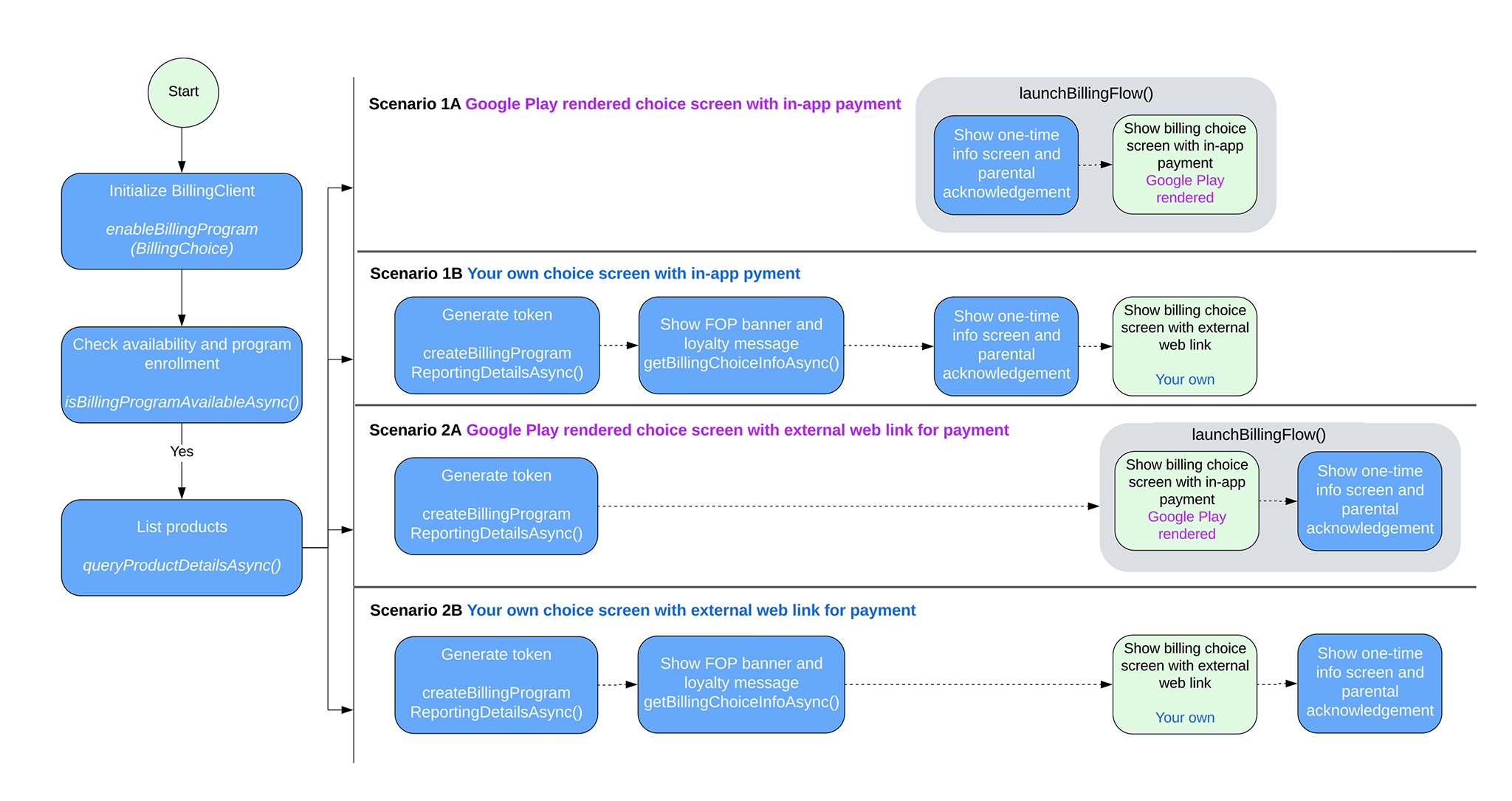
PBL 集成场景
根据您的集成场景,按照本部分中的步骤在您的应用中实现结算方式选择。
处理场景 1A
Google 呈现选择界面,备选结算系统在您的应用内处理 。请按照以下步骤在此场景中启用结算方式选择:
构建 BillingClient 实例时,使用
EnableBillingProgramParams调用enableBillingProgram,然后启动连接。例如:Kotlin
// Build the parameters to enable the Billing Choice program and assign the listener // to handle user selection of the developer-provided billing option. val enableBillingProgramParams = EnableBillingProgramParams.newBuilder() .setBillingProgram(BillingProgram.BILLING_CHOICE) .setDeveloperProvidedBillingListener(developerProvidedBillingListener) .build() // Build the parameters to enable support for pending purchases. val pendingPurchasesParams = PendingPurchasesParams.newBuilder() .enableOneTimeProducts() .build() // Construct the BillingClient instance with the purchases updated listener, // pending purchases support, and the billing choice params. val billingClient = BillingClient.newBuilder(context) .setListener(purchasesUpdatedListener) .enablePendingPurchases(pendingPurchasesParams) .enableBillingProgram(enableBillingProgramParams) .build() // Establish a connection to Google Play val billingResult = suspendCancellableCoroutine<BillingResult> { continuation -> billingClient.startConnection(object : BillingClientStateListener { // Called when the connection setup process completes. override fun onBillingSetupFinished(billingResult: BillingResult) { // Resume the coroutine and pass back the BillingResult to the caller. if (continuation.isActive) { continuation.resume(billingResult) } } // Called if the connection to the Play Store service is dropped. // This prevents the await or suspension point from hanging indefinitely. override fun onBillingServiceDisconnected() { if (continuation.isActive) { continuation.resume( BillingResult.newBuilder() .setResponseCode(BillingResponseCode.SERVICE_DISCONNECTED) .setDebugMessage("Billing service disconnected during connection setup") .build() ) } } }) }
Java
EnableBillingProgramParams params = EnableBillingProgramParams.newBuilder()
        .setBillingProgram(BillingProgram.BILLING_CHOICE)
        .setDeveloperProvidedBillingListener(developerProvidedBillingListener)
        .build();

BillingClient billingClient = BillingClient.newBuilder(context)
        .setListener(purchasesUpdatedListener)
        .enablePendingPurchases(
                PendingPurchasesParams.newBuilder()
                        .enableOneTimeProducts()
                        .build()
        )
        .enableBillingProgram(params)
        .build();
验证用户是否可以使用 Google 呈现的结算方式选择。
调用
isBillingProgramAvailableAsync以检查计划 可用性,然后调用queryProductDetailsAsync以显示 可用商品。例如:Kotlin
val (billingResult, billingProgramAvailabilityDetails) = billingClient.isBillingProgramAvailable(BillingProgram.BILLING_CHOICE) if (billingResult.responseCode == BillingResponseCode.OK) { val billingChoiceAvailabilityDetails = billingProgramAvailabilityDetails.billingChoiceAvailabilityDetails if (billingChoiceAvailabilityDetails != null && billingChoiceAvailabilityDetails.choiceScreenType == ChoiceScreenType.GOOGLE_RENDERED ) { // Billing choice is available. Query products and proceed. } else { // Fallback to other available programs. } } else { // Fallback to other available programs. }
Java
// ... billingClient.isBillingProgramAvailableAsync( BillingProgram.BILLING_CHOICE, (billingResult, billingProgramAvailabilityDetails) -> { if (billingResult.getResponseCode() == BillingResponseCode.OK) { BillingChoiceAvailabilityDetails billingChoiceAvailabilityDetails = billingProgramAvailabilityDetails.getBillingChoiceAvailabilityDetails(); if (billingChoiceAvailabilityDetails != null && billingChoiceAvailabilityDetails.getChoiceScreenType() == ChoiceScreenType.GOOGLE_RENDERED) { // Billing choice is available. Query products and proceed. } else { // Fallback to other available programs. } } else { // Fallback to other available programs. } } );注意:
billingProgramAvailabilityDetails会告知您 Google 呈现的结算方式选择界面或开发者呈现的结算方式选择界面是否可用。当用户 点击“购买”时,调用
launchBillingFlow以触发购买流程。如果结算方式选择可用,请将DeveloperBillingOptionParams传递给BillingFlowParams。例如:Kotlin
val developerBillingOptionParams = DeveloperBillingOptionParams.newBuilder() .setBillingProgram(BillingProgram.BILLING_CHOICE) .build() val billingFlowParams = BillingFlowParams.newBuilder() .setProductDetailsParamsList(productDetailsParamsList) .enableDeveloperBillingOption(developerBillingOptionParams) .build() val billingResult = billingClient.launchBillingFlow(activity, billingFlowParams)
Java
DeveloperBillingOptionParams developerBillingOptionParams = DeveloperBillingOptionParams.newBuilder() .setBillingProgram(BillingProgram.BILLING_CHOICE) .build(); BillingFlowParams billingFlowParams = BillingFlowParams.newBuilder() .setProductDetailsParamsList(productDetailsParamsList) .enableDeveloperBillingOption(developerBillingOptionParams) .build(); BillingResult billingResult = billingClient.launchBillingFlow(activity, billingFlowParams);注意:对于受监督用户,系统会显示家长控制。
按如下方式处理用户对结算类型的选择:
- 如果用户选择 Play 结算服务,结算结果将返回到在第 1 步中注册的
PurchasesUpdatedListener。 - 如果用户选择您的备选结算系统,结算结果将
返回到
DeveloperProvidedBillingListener在 第 1 步中注册的。在这种情况下,返回的DeveloperProvidedBillingDetails包含 anexternalTransactionToken。该令牌将用于交易报告。
- 如果用户选择 Play 结算服务,结算结果将返回到在第 1 步中注册的
处理场景 1B
开发者呈现选择界面,备选结算系统在您的应用内处理 。请按照以下步骤在此场景中启用结算方式选择:
构建
BillingClient实例时,在EnableBillingProgramParams中调用enableBillingProgram,但不使用DeveloperProvidedBillingListener,然后启动连接。例如:Kotlin
// Build the parameters to enable the Billing Choice program. val enableBillingProgramParams = EnableBillingProgramParams.newBuilder() .setBillingProgram(BillingProgram.BILLING_CHOICE) .build() // Build the parameters to enable support for pending purchases. val pendingPurchasesParams = PendingPurchasesParams.newBuilder() .enableOneTimeProducts() .build() // Construct the BillingClient instance with the purchases updated listener, // pending purchases support, and the billing choice params. val billingClient = BillingClient.newBuilder(context) .setListener(purchasesUpdatedListener) .enablePendingPurchases(pendingPurchasesParams) .enableBillingProgram(enableBillingProgramParams) .build() // Establish a connection to Google Play val billingResult = suspendCancellableCoroutine<BillingResult> { continuation -> billingClient.startConnection(object : BillingClientStateListener { // Called when the connection setup process completes. override fun onBillingSetupFinished(billingResult: BillingResult) { // Resume the coroutine and pass back the BillingResult to the caller. if (continuation.isActive) { continuation.resume(billingResult) } } // Called if the connection to the Play Store service is dropped. // This prevents the await or suspension point from hanging indefinitely. override fun onBillingServiceDisconnected() { if (continuation.isActive) { continuation.resume( BillingResult.newBuilder() .setResponseCode(BillingResponseCode.SERVICE_DISCONNECTED) .setDebugMessage("Billing service disconnected during connection setup") .build() ) } } }) }
Java
EnableBillingProgramParams params = EnableBillingProgramParams.newBuilder()
        .setBillingProgram(BillingProgram.BILLING_CHOICE)
        .build();

BillingClient billingClient = BillingClient.newBuilder(context)
        .setListener(purchasesUpdatedListener)
        .enablePendingPurchases()
        .enableBillingProgram(params)
        .build();
验证用户是否可以使用开发者呈现的结算方式选择。
调用
isBillingProgramAvailableAsync以检查计划 可用性,然后调用queryProductDetailsAsync以显示 可用商品。例如:Kotlin
val (billingResult, billingProgramAvailabilityDetails) = billingClient.isBillingProgramAvailable(BillingProgram.BILLING_CHOICE) if (billingResult.responseCode == BillingResponseCode.OK) { val billingChoiceAvailabilityDetails = billingProgramAvailabilityDetails.billingChoiceAvailabilityDetails if (billingChoiceAvailabilityDetails != null && billingChoiceAvailabilityDetails.choiceScreenType == ChoiceScreenType.DEVELOPER_RENDERED ) { // Billing choice is available. Query products and proceed. // You can inspect details such as: // - billingChoiceAvailabilityDetails.choiceScreenType // - billingChoiceAvailabilityDetails.isExternalLinkAvailable } else { // Fallback to other available programs. } } else { // Fallback to other available programs. }
Java
// ... billingClient.isBillingProgramAvailableAsync( BillingProgram.BILLING_CHOICE, (billingResult, billingProgramAvailabilityDetails) -> { if (billingResult.getResponseCode() == BillingResponseCode.OK) { BillingChoiceAvailabilityDetails billingChoiceAvailabilityDetails = billingProgramAvailabilityDetails.getBillingChoiceAvailabilityDetails(); if (billingChoiceAvailabilityDetails != null && billingChoiceAvailabilityDetails.getChoiceScreenType() == ChoiceScreenType.DEVELOPER_RENDERED) { // Billing choice is available. Query products and proceed. // You can inspect details such as: // - billingChoiceAvailabilityDetails.getChoiceScreenType() // - billingChoiceAvailabilityDetails.isExternalLinkAvailable() } else { // Fallback to other available programs. } } else { // Fallback to other available programs. } } );注意:
billingProgramAvailabilityDetails会告知您 Google 呈现的 或开发者呈现的结算方式选择界面是否可用。调用
getBillingChoiceInfoAsync方法以获取 Play 结算服务横幅和忠诚度信息。例如:Kotlin
// 1. Create the params required for the request val params = GetBillingChoiceInfoParams.newBuilder() .setBillingProgram(BillingProgram.BILLING_CHOICE) .setPlayBillingChoiceImageLayout(GetBillingChoiceInfoParams.ImageLayout.RECTANGULAR_FOUR_BY_ONE) .build() // 2. Call the suspend method on your billingClient instance val (billingResult, playBillingChoiceInfo) = billingClient.getBillingChoiceInfo(params) if (billingResult.responseCode == BillingResponseCode.OK && playBillingChoiceInfo != null) { // Access the URL of the image associated with the Play Billing Choice val imageUrl = playBillingChoiceInfo.playBillingChoiceImageUrl // Access the Play Loyalty string information, if available val loyaltyInfo = playBillingChoiceInfo.playBillingLoyaltyInfo // Populate your developer-rendered UI elements playBillingLoyaltyTextView.text = loyaltyInfo loadImage(imageUrl, playBillingImageView) } else { // Handle error scenarios }
Java
// 1. Create the params required for the request
GetBillingChoiceInfoParams params = GetBillingChoiceInfoParams.newBuilder()
    .setBillingProgram(BillingClient.BillingProgram.BILLING_CHOICE)
    .setPlayBillingChoiceImageLayout(GetBillingChoiceInfoParams.ImageLayout.RECTANGULAR_FOUR_BY_ONE)
    .build();
// 2. Call the method asynchronously on your billingClient instance
billingClient.getBillingChoiceInfoAsync(params, (billingResult, playBillingChoiceInfo) -> {
    if (billingResult.getResponseCode() == BillingResponseCode.OK && playBillingChoiceInfo != null) {
      // Access the URL of the image associated with the Play Billing Choice
        String imageUrl = playBillingChoiceInfo.getPlayBillingChoiceImageUrl();
        // Access the Play Loyalty string information, if available
        String loyaltyInfo = playBillingChoiceInfo.getPlayBillingLoyaltyInfo();

        // Populate your developer-rendered UI elements
        playBillingLoyaltyTextView.setText(loyaltyInfo);
          loadImage(imageUrl, playBillingImageView);
      } else {
          // Handle error scenarios
      }
});
创建外部交易令牌,并将 DeveloperBillingType 设置为 IN_APP 。例如:
Kotlin
// Build the parameters specifying the billing program and that the billing type is IN_APP. val params = BillingProgramReportingDetailsParams.newBuilder() .setBillingProgram(BillingProgram.BILLING_CHOICE) .setDeveloperBillingType(DeveloperBillingType.IN_APP) .build() // Call the suspending extension function to request the reporting details val (billingResult, billingProgramReportingDetails) = billingClient.createBillingProgramReportingDetails(params) if (billingResult.responseCode != BillingResponseCode.OK) { // Handle failures such as retrying due to network errors. return } // Extract the transaction token from the returned reporting details val transactionToken = billingProgramReportingDetails?.externalTransactionToken // Persist the external transaction token locally. Pass it to // DeveloperBillingOptionParams when launchBillingFlow is called. // It can also be used as part of your external website
Java
BillingProgramReportingDetailsParams params =
    BillingProgramReportingDetailsParams.newBuilder()
        .setBillingProgram(BillingProgram.BILLING_CHOICE)
        .setDeveloperBillingType(DeveloperBillingType.IN_APP)
        .build();

billingClient.createBillingProgramReportingDetailsAsync(
    params,
    new BillingProgramReportingDetailsListener() {
        @Override
        public void onCreateBillingProgramReportingDetailsResponse(
            BillingResult billingResult,
            @Nullable BillingProgramReportingDetails billingProgramReportingDetails
        ) {
            if (billingResult.getResponseCode() != BillingResponseCode.OK) {
                // Handle failures such as retrying due to network errors.
                return;
            }

            String transactionToken =
                billingProgramReportingDetails.getExternalTransactionToken();

            // Persist the external transaction token locally. Pass it to
            // DeveloperBillingOptionParams when launchBillingFlow is called.
            // It can also be used as part of your external website
        }
    }
);
当用户点击“购买”时,调用
showBillingProgramInformationDialog以显示信息对话框。例如,请参阅 面向用户的信息对话框。 必须在请求中设置第 4 步中的 BillingProgram 和 transactionToken 。注意:对于受监督用户,系统会显示家长控制。
如果上一步的结果为
OK,请启动您的备选结算方式选择界面。按如下方式处理用户对结算类型的选择:
- 如果用户选择 Play 结算服务,请按照标准的 Play 结算服务指南调用
launchBillingFlow。结算结果 将返回到在第 1 步中注册的PurchasesUpdatedListener。 - 如果用户选择您的备选结算系统,您必须自行处理交易,并使用在第 4 步中生成的令牌向 Play 报告交易。
- 如果用户选择 Play 结算服务,请按照标准的 Play 结算服务指南调用
处理场景 2A
Google 呈现选择界面,备选结算系统在您的应用外处理 。请按照以下步骤在此场景中启用结算方式选择:
构建 BillingClient 实例时,使用
EnableBillingProgramParams调用enableBillingProgram,然后启动连接。例如:Kotlin
// Build the parameters to enable the Billing Choice program and assign the listener // to handle user selection of the developer-provided billing option. val enableBillingProgramParams = EnableBillingProgramParams.newBuilder() .setBillingProgram(BillingProgram.BILLING_CHOICE) .setDeveloperProvidedBillingListener(developerProvidedBillingListener) .build() // Build the parameters to enable support for pending purchases. val pendingPurchasesParams = PendingPurchasesParams.newBuilder() .enableOneTimeProducts() .build() // Construct the BillingClient instance with the purchases updated listener, // pending purchases support, and the billing choice params. val billingClient = BillingClient.newBuilder(context) .setListener(purchasesUpdatedListener) .enablePendingPurchases(pendingPurchasesParams) .enableBillingProgram(enableBillingProgramParams) .build() // Establish a connection to Google Play val billingResult = suspendCancellableCoroutine<BillingResult> { continuation -> billingClient.startConnection(object : BillingClientStateListener { // Called when the connection setup process completes. override fun onBillingSetupFinished(billingResult: BillingResult) { // Resume the coroutine and pass back the BillingResult to the caller. if (continuation.isActive) { continuation.resume(billingResult) } } // Called if the connection to the Play Store service is dropped. // This prevents the await or suspension point from hanging indefinitely. override fun onBillingServiceDisconnected() { if (continuation.isActive) { continuation.resume( BillingResult.newBuilder() .setResponseCode(BillingResponseCode.SERVICE_DISCONNECTED) .setDebugMessage("Billing service disconnected during connection setup") .build() ) } } }) }
Java
EnableBillingProgramParams params = EnableBillingProgramParams.newBuilder()
        .setBillingProgram(BillingProgram.BILLING_CHOICE)
        .setDeveloperProvidedBillingListener(developerProvidedBillingListener)
        .build();

BillingClient billingClient = BillingClient.newBuilder(context)
        .setListener(purchasesUpdatedListener)
        .enablePendingPurchases(
                PendingPurchasesParams.newBuilder()
                        .enableOneTimeProducts()
                        .build()
        )
        .enableBillingProgram(params)
        .build();
验证以下各项的可用性:
- Google 呈现的结算方式选择
- 外部网页链接
调用
isBillingProgramAvailableAsync以检查计划 可用性,然后调用queryProductDetailsAsync以显示可用商品。例如:Kotlin
// Check the availability of the billing choice program asynchronously using coroutines val (billingResult, billingProgramAvailabilityDetails) = billingClient.isBillingProgramAvailable(BillingProgram.BILLING_CHOICE) // Ensure the billing program query succeeded if (billingResult.responseCode == BillingResponseCode.OK) { // Retrieve the availability details specific to the billing choice program val billingChoiceAvailabilityDetails = billingProgramAvailabilityDetails.billingChoiceAvailabilityDetails // Check if billing choice is available, renders via Google Play, and external link is supported if (billingChoiceAvailabilityDetails != null && billingChoiceAvailabilityDetails.choiceScreenType == ChoiceScreenType.GOOGLE_RENDERED && billingChoiceAvailabilityDetails.isExternalLinkAvailable ) { // Billing choice is available and external transaction links are supported. Query products and proceed. } else { // Fallback to other available programs. } } else { // Fallback to other available programs. }
Java
// ...
billingClient.isBillingProgramAvailableAsync(
    BillingProgram.BILLING_CHOICE,
    (billingResult, billingProgramAvailabilityDetails) -> {
        if (billingResult.getResponseCode() == BillingResponseCode.OK) {
            BillingChoiceAvailabilityDetails billingChoiceAvailabilityDetails =
                billingProgramAvailabilityDetails.getBillingChoiceAvailabilityDetails();

            if (billingChoiceAvailabilityDetails != null
                    && billingChoiceAvailabilityDetails.getChoiceScreenType() == ChoiceScreenType.GOOGLE_RENDERED
                    && billingChoiceAvailabilityDetails.isExternalLinkAvailable()) {
                // Billing choice is available and external transaction links are supported.
                // Query products and proceed.
            } else {
                // Fallback to other available programs.
            }
        } else {
            // Fallback to other available programs.
        }
    }
);
当用户表示有意购买时,调用
createBillingProgramReportingDetailsAsync以创建外部 交易令牌。例如:Kotlin
// Build the parameters for creating reporting details val params = BillingProgramReportingDetailsParams.newBuilder() .setBillingProgram(BillingProgram.BILLING_CHOICE) .setDeveloperBillingType(DeveloperBillingType.EXTERNAL_LINK) .build() // Call the suspend function to create billing program reporting details val (billingResult, billingProgramReportingDetails) = billingClient.createBillingProgramReportingDetails(params) // Handle response failure cases if (billingResult.responseCode != BillingResponseCode.OK) { // Handle failures such as retrying due to network errors. return } // Retrieve the external transaction token val transactionToken = billingProgramReportingDetails?.externalTransactionToken // Persist the external transaction token locally. Pass it to // DeveloperBillingOptionParams when launchBillingFlow is called. // It can also be used as part of your external website
Java
BillingProgramReportingDetailsParams params =
    BillingProgramReportingDetailsParams.newBuilder()
        .setBillingProgram(BillingProgram.BILLING_CHOICE)
        .setDeveloperBillingType(DeveloperBillingType.EXTERNAL_LINK)
        .build();

billingClient.createBillingProgramReportingDetailsAsync(
    params,
    new BillingProgramReportingDetailsListener() {
        @Override
        public void onCreateBillingProgramReportingDetailsResponse(
            BillingResult billingResult,
            @Nullable BillingProgramReportingDetails billingProgramReportingDetails
        ) {
            if (billingResult.getResponseCode() != BillingResponseCode.OK) {
                // Handle failures such as retrying due to network errors.
                return;
            }

            String transactionToken =
                billingProgramReportingDetails.getExternalTransactionToken();

            // Persist the external transaction token locally. Pass it to
            // DeveloperBillingOptionParams when launchBillingFlow is called.
            // It can also be used as part of your external website.
        }
    }
);
当用户 点击“购买”时,调用
launchBillingFlow以触发购买流程。如果用户可以使用结算方式选择,请执行以下操作:- 将
DeveloperBillingOptionParams传递给BillingFlowParams。 - 将第 3 步中的外部交易令牌传递给
DeveloperBillingOptionParams。
例如:
Kotlin
// Build the developer billing option parameters with the external link URI, // the transaction token, and browser/app launch mode. val developerBillingOptionParams = DeveloperBillingOptionParams.newBuilder() .setBillingProgram(BillingProgram.BILLING_CHOICE) .setLinkUri(Uri.parse("https://www.example.com/external/purchase")) .setExternalTransactionToken(transactionToken) .setLaunchMode( DeveloperBillingOptionParams.LaunchMode.LAUNCH_IN_EXTERNAL_BROWSER_OR_APP ) .build() val billingFlowParams = BillingFlowParams.newBuilder() .setProductDetailsParamsList(productDetailsParamsList) .enableDeveloperBillingOption(developerBillingOptionParams) .build() val billingResult = billingClient.launchBillingFlow(activity, billingFlowParams)
Java
DeveloperBillingOptionParams developerBillingOptionParams = DeveloperBillingOptionParams.newBuilder() .setBillingProgram(BillingProgram.BILLING_CHOICE) .setLinkUri(Uri.parse("https://www.example.com/external/purchase")) .setExternalTransactionToken(transactionToken) .setLaunchMode( DeveloperBillingOptionParams.LaunchMode.LAUNCH_IN_EXTERNAL_BROWSER_OR_APP) .build();注意:对于 受监督用户,系统会显示家长控制。
- 将
按如下方式处理用户对结算类型的选择:
- 如果用户选择 Play 结算服务,请按照标准的 Play 结算服务指南调用
launchBillingFlow。结算结果 将返回到在第 1 步中注册的PurchasesUpdatedListener。 - 如果用户选择您的备选结算系统,结算结果将返回到
DeveloperProvidedBillingListener在第-
步注册的
- 如果返回的
DeveloperProvidedBillingDetails包含在第 4 步中传递给DeveloperBillingOptionParams的externalTransactionToken,则该令牌是有效的。
- 如果返回的
- 如果用户选择 Play 结算服务,请按照标准的 Play 结算服务指南调用
处理场景 2B
开发者呈现选择界面,备选结算系统在应用外处理 。请按照以下步骤在此场景中启用结算方式选择:
构建 BillingClient 实例时,在
EnableBillingProgramParams中调用enableBillingProgram,但不使用DeveloperProvidedBillingListener,然后启动连接。例如:Kotlin
// Build the parameters to enable the Billing Choice program. val enableBillingProgramParams = EnableBillingProgramParams.newBuilder() .setBillingProgram(BillingProgram.BILLING_CHOICE) .build() // Build the parameters to enable support for pending purchases. val pendingPurchasesParams = PendingPurchasesParams.newBuilder() .enableOneTimeProducts() .build() // Construct the BillingClient instance with the purchases updated listener, // pending purchases support, and the billing choice params. val billingClient = BillingClient.newBuilder(context) .setListener(purchasesUpdatedListener) .enablePendingPurchases(pendingPurchasesParams) .enableBillingProgram(enableBillingProgramParams) .build() // Establish a connection to Google Play val billingResult = suspendCancellableCoroutine<BillingResult> { continuation -> billingClient.startConnection(object : BillingClientStateListener { // Called when the connection setup process completes. override fun onBillingSetupFinished(billingResult: BillingResult) { // Resume the coroutine and pass back the BillingResult to the caller. if (continuation.isActive) { continuation.resume(billingResult) } } // Called if the connection to the Play Store service is dropped. // This prevents the await or suspension point from hanging indefinitely. override fun onBillingServiceDisconnected() { if (continuation.isActive) { continuation.resume( BillingResult.newBuilder() .setResponseCode(BillingResponseCode.SERVICE_DISCONNECTED) .setDebugMessage("Billing service disconnected during connection setup") .build() ) } } }) }
Java
EnableBillingProgramParams params = EnableBillingProgramParams.newBuilder()
        .setBillingProgram(BillingProgram.BILLING_CHOICE)
        .build();

BillingClient billingClient = BillingClient.newBuilder(context)
        .setListener(purchasesUpdatedListener)
        .enablePendingPurchases()
        .enableBillingProgram(params)
        .build();
验证以下各项的可用性:
- Google 呈现的结算方式选择
- 外部网页链接
调用
isBillingProgramAvailableAsync以检查计划 可用性,然后调用queryProductDetailsAsync以显示可用商品。例如:Kotlin
// Check the availability of the billing choice program asynchronously using a coroutine val (billingResult, billingProgramAvailabilityDetails) = billingClient.isBillingProgramAvailable(BillingProgram.BILLING_CHOICE) // Ensure the response code is OK if (billingResult.responseCode == BillingResponseCode.OK) { // Retrieve the billing choice availability details val billingChoiceAvailabilityDetails = billingProgramAvailabilityDetails.billingChoiceAvailabilityDetails // Check if billing choice details are available, choice screen is developer-rendered, // and external transaction links are supported. if (billingChoiceAvailabilityDetails != null && billingChoiceAvailabilityDetails.choiceScreenType == ChoiceScreenType.DEVELOPER_RENDERED && billingChoiceAvailabilityDetails.isExternalLinkAvailable ) { // Billing choice is available and external transaction links are supported. // Query products and proceed. } else { // Fallback to other available programs. } } else { // Fallback to other available programs. }
Java
// ...

billingClient.isBillingProgramAvailableAsync(
    BillingProgram.BILLING_CHOICE,
    (billingResult, billingProgramAvailabilityDetails) -> {
        if (billingResult.getResponseCode() == BillingResponseCode.OK) {
            BillingChoiceAvailabilityDetails billingChoiceAvailabilityDetails =
                billingProgramAvailabilityDetails.getBillingChoiceAvailabilityDetails();
            if (billingChoiceAvailabilityDetails != null &&
                billingChoiceAvailabilityDetails.getChoiceScreenType() == ChoiceScreenType.DEVELOPER_RENDERED &&
                billingChoiceAvailabilityDetails.isExternalLinkAvailable()) {
                // Billing choice is available and external transaction links are supported. Query products and proceed.
            } else {
                // Fallback to other available programs.
            }
        } else {
            // Fallback to other available programs.
        }
    }
);
调用
getBillingChoiceInfoAsync方法以获取 Play 结算服务横幅和忠诚度信息。Kotlin
// 1. Create the params required for the request val params = GetBillingChoiceInfoParams.newBuilder() .setBillingProgram(BillingProgram.BILLING_CHOICE) .setPlayBillingChoiceImageLayout(GetBillingChoiceInfoParams.ImageLayout.RECTANGULAR_FOUR_BY_ONE) .build() // 2. Call the suspend method on your billingClient instance val (billingResult, playBillingChoiceInfo) = billingClient.getBillingChoiceInfo(params) if (billingResult.responseCode == BillingResponseCode.OK && playBillingChoiceInfo != null) { // Access the URL of the image associated with the Play Billing Choice val imageUrl = playBillingChoiceInfo.playBillingChoiceImageUrl // Access the Play Loyalty string information, if available val loyaltyInfo = playBillingChoiceInfo.playBillingLoyaltyInfo // Populate your developer-rendered UI elements playBillingLoyaltyTextView.text = loyaltyInfo loadImage(imageUrl, playBillingImageView) } else { // Handle error scenarios }
Java
// 1. Create the params required for the request
GetBillingChoiceInfoParams params = GetBillingChoiceInfoParams.newBuilder()
    .setBillingProgram(BillingClient.BillingProgram.BILLING_CHOICE)
    .setPlayBillingChoiceImageLayout(GetBillingChoiceInfoParams.ImageLayout.RECTANGULAR_FOUR_BY_ONE)
    .build();
// 2. Call the method asynchronously on your billingClient instance
billingClient.getBillingChoiceInfoAsync(params, (billingResult, playBillingChoiceInfo) -> {
    if (billingResult.getResponseCode() == BillingResponseCode.OK && playBillingChoiceInfo != null) {
      // Access the URL of the image associated with the Play Billing Choice
        String imageUrl = playBillingChoiceInfo.getPlayBillingChoiceImageUrl();
        // Access the Play Loyalty string information, if available
        String loyaltyInfo = playBillingChoiceInfo.getPlayBillingLoyaltyInfo();

        // Populate your developer-rendered UI elements
        playBillingLoyaltyTextView.setText(loyaltyInfo);
          loadImage(imageUrl, playBillingImageView);
      } else {
          // Handle error scenarios
      }
});
当用户表示有意购买时,调用
createBillingProgramReportingDetailsAsync以创建外部 交易令牌。例如:Kotlin
// Build the parameters for creating reporting details val params = BillingProgramReportingDetailsParams.newBuilder() .setBillingProgram(BillingProgram.BILLING_CHOICE) .setDeveloperBillingType(DeveloperBillingType.EXTERNAL_LINK) .build() // Call the suspend function to create billing program reporting details val (billingResult, billingProgramReportingDetails) = billingClient.createBillingProgramReportingDetails(params) // Handle response failure cases if (billingResult.responseCode != BillingResponseCode.OK) { // Handle failures such as retrying due to network errors. return } // Retrieve the external transaction token val transactionToken = billingProgramReportingDetails?.externalTransactionToken // Persist the external transaction token locally. Pass it to // DeveloperBillingOptionParams when launchBillingFlow is called. // It can also be used as part of your external website
Java
BillingProgramReportingDetailsParams params =
    BillingProgramReportingDetailsParams.newBuilder()
        .setBillingProgram(BillingProgram.BILLING_CHOICE)
        .setDeveloperBillingType(DeveloperBillingType.EXTERNAL_LINK)
        .build();

billingClient.createBillingProgramReportingDetailsAsync(
    params,
    new BillingProgramReportingDetailsListener() {
        @Override
        public void onCreateBillingProgramReportingDetailsResponse(
            BillingResult billingResult,
            @Nullable BillingProgramReportingDetails billingProgramReportingDetails
        ) {
            if (billingResult.getResponseCode() != BillingResponseCode.OK) {
                // Handle failures such as retrying due to network errors.
                return;
            }

            String transactionToken =
                billingProgramReportingDetails.getExternalTransactionToken();

            // Persist the external transaction token locally. Pass it to
            // DeveloperBillingOptionParams when launchBillingFlow is called.
            // It can also be used as part of your external website.
        }
    }
);
当用户点击“购买”时,启动您的备选选择界面。
按如下方式处理用户对结算类型的选择:
如果用户选择 Play 结算服务,请按照标准的 Play 结算服务指南调用
launchBillingFlow。结算结果 将返回到在第 1 步中注册的PurchasesUpdatedListener。对于受监督用户,系统会显示家长控制。
如果用户选择您的备选结算系统,请调用 launchExternalLink。 例如:
Kotlin
// An activity reference from which the purchase flow will be launched. val params = LaunchExternalLinkParams.newBuilder() .setBillingProgram(BillingProgram.BILLING_CHOICE) .setExternalTransactionToken(transactionToken) // You can pass along the external transaction token from // BillingProgramReportingDetails as a URL parameter in the URI .setLinkUri(yourLinkUri) .setLinkType(LaunchExternalLinkParams.LinkType.LINK_TO_DIGITAL_CONTENT_OFFER) .setLaunchMode( LaunchExternalLinkParams.LaunchMode.LAUNCH_IN_EXTERNAL_BROWSER_OR_APP ) .build() // Call launchExternalLink with a callback billingClient.launchExternalLink(activity, params) { billingResult -> if (billingResult.responseCode == BillingResponseCode.OK) { // Proceed with the rest of the purchase flow. If the user // purchases an item, be sure to report the transaction to Google // Play. } else { // Handle failures such as retrying due to network errors. } }
Java
// An activity reference from which the purchase flow will be launched.
Activity activity = ...;

LaunchExternalLinkParams params = LaunchExternalLinkParams.newBuilder()
    .setBillingProgram(BillingProgram.BILLING_CHOICE)
    // You can pass along the external transaction token from
    // BillingProgramReportingDetails as a URL parameter in the URI
    .setLinkUri(yourLinkUri)
    .setLinkType(LaunchExternalLinkParams.LinkType.LINK_TO_DIGITAL_CONTENT_OFFER)
    .setLaunchMode(
        LaunchExternalLinkParams.LaunchMode.LAUNCH_IN_EXTERNAL_BROWSER_OR_APP)
    .setExternalTransactionToken(transactionToken)
    .build();

LaunchExternalLinkResponseListener listener =
    new LaunchExternalLinkResponseListener() {
      @Override
      public void onLaunchExternalLinkResponse(BillingResult billingResult) {
        if (billingResult.getResponseCode() == BillingResponseCode.OK) {
          // Proceed with the rest of the purchase flow. If the user
          // purchases an item, be sure to report the transaction to Google
          // Play.
        } else {
          // Handle failures such as retrying due to network errors.
        }
      }
    };

billingClient.launchExternalLink(activity, params, listener);
将第 4 步中的外部交易令牌传递给
LaunchExternalLinkParams。如果返回 OK,请继续进行交易并向 Google Play 报告交易。对于 受监督用户,系统会显示家长控制。
订阅替换期间的结算方式选择
对于订阅替换,不应显示用户选择界面,因为系统会保留原始购买交易的相关用户选择以用于升级和降级。
如果原始购买交易是通过 Google Play 结算服务处理的,您
应使用标准的 Google Play 结算服务
订阅替换信息调用 launchBillingFlow。
但是,如果原始购买交易是通过备选 结算系统处理的,则订阅替换的处理方式会因 场景而略有不同。
场景 1A 中的订阅替换
请求升级或降级的用户应通过开发者的备选结算系统继续操作,无需用户再次选择。
为此,当用户请求升级或
降级时,请调用 launchBillingFlow。在参数中使用 SubscriptionUpdateParams 对象内的 setOriginalExternalTransactionId 提供原始购买交易的外部交易 ID。采用这种方式不会显示用户选择界面,因为系统会保留原始购买交易的相关用户选择以用于升级和降级。在此使用场景中,调用 launchBillingFlow 会为您可以从回调中检索的交易生成 新的外部交易令牌 。
Kotlin
// The external transaction ID from the current // alternative billing subscription. val externalTransactionId = "external_transaction_id" val developerBillingOptionParams = DeveloperBillingOptionParams.newBuilder() .setBillingProgram(BillingProgram.BILLING_CHOICE) .build() val billingFlowParams = BillingFlowParams.newBuilder() .setProductDetailsParamsList( listOf( BillingFlowParams.ProductDetailsParams.newBuilder() // Fetched using queryProductDetailsAsync. .setProductDetails(productDetailsNewPlan) // offerIdToken can be found in // ProductDetails=>SubscriptionOfferDetails. .setOfferToken(offerTokenNewPlan) .build() ) ) .setSubscriptionUpdateParams( SubscriptionUpdateParams.newBuilder() .setOriginalExternalTransactionId(externalTransactionId) .build() ) .enableDeveloperBillingOption(developerBillingOptionParams) .build() val billingResult = billingClient.launchBillingFlow(activity, billingFlowParams) // When the user selects the alternative billing flow, // the DeveloperProvidedBillingListener is triggered.
Java
// The external transaction ID from the current
// alternative billing subscription.
String externalTransactionId = //... ;

DeveloperBillingOptionParams developerBillingOptionParams =
    DeveloperBillingOptionParams.newBuilder()
        .setBillingProgram(BillingProgram.BILLING_CHOICE)
        .build();

List<ProductDetailsParams> productDetailsParamsList = new ArrayList<>();
productDetailsParamsList.add(
    ProductDetailsParams.newBuilder()
        // Fetched using queryProductDetailsAsync.
        .setProductDetails(productDetailsNewPlan)
        // offerIdToken can be found in
        // ProductDetails=>SubscriptionOfferDetails
        .setOfferToken(offerTokenNewPlan)
        .build());

BillingFlowParams billingFlowParams =
    BillingFlowParams.newBuilder()
        .setProductDetailsParamsList(productDetailsParamsList)
        .setSubscriptionUpdateParams(
            SubscriptionUpdateParams.newBuilder()
                .setOriginalExternalTransactionId(externalTransactionId)
                .build())
        .enableDeveloperBillingOption(developerBillingOptionParams)
        .build();

BillingResult billingResult = billingClient.launchBillingFlow(activity, billingFlowParams);

// When the user selects the alternative billing flow,
// the DeveloperProvidedBillingListener is triggered.
升级或降级完成后,您需要报告新 交易,使用通过 之前针对新订阅购买交易的调用所获得的外部交易令牌。
场景 1B 中的订阅替换
在此场景中,必须生成新的外部交易令牌。与正常购买交易的唯一区别在于,在此场景中,系统会保留用户选择,您无需为升级或降级显示选择界面。但是,您必须显示一次性信息对话框和家长确认。
如需查看示例集成代码,请参阅场景 1B:开发者呈现 选择界面,备选结算系统在您的应用内处理中的第 4 步。
升级或降级完成后,您需要报告新 交易,使用通过 之前针对新订阅购买交易的调用所获得的外部交易令牌。
场景 2A 中的订阅替换
对于最初在用户选择后通过开发者的网站或支付应用购买的订阅,请求升级或降级的用户应通过开发者的网站或支付应用继续操作,无需用户再次选择。
为此,当用户请求升级或
降级时,请调用 launchBillingFlow。请使用 setOriginalExternalTransactionId 提供原始购买交易的外部交易 ID,而不是在
SubscriptionUpdateParams 对象下指定其他参数。您还必须在此调用中提供 DeveloperBillingOptionParams。采用这种方式不会显示用户选择界面,因为系统会保留原始购买交易的相关用户选择以用于升级和降级。例如:
Kotlin
val externalTransactionId = "external_transaction_id" // 1. Construct DeveloperBillingOptionParams indicating the billing program val developerBillingOptionParams = DeveloperBillingOptionParams.newBuilder() .setBillingProgram(BillingProgram.BILLING_CHOICE) .build() // 2. Build BillingFlowParams combining DeveloperBillingOptionParams and SubscriptionUpdateParams val billingFlowParams = BillingFlowParams.newBuilder() .setProductDetailsParamsList( listOf( BillingFlowParams.ProductDetailsParams.newBuilder() // Fetched using queryProductDetailsAsync. .setProductDetails(productDetailsNewPlan) // offerIdToken can be found in ProductDetails=>SubscriptionOfferDetails. .setOfferToken(offerTokenNewPlan) .build() ) ) .setSubscriptionUpdateParams( SubscriptionUpdateParams.newBuilder() .setOriginalExternalTransactionId(externalTransactionId) .build() ) .enableDeveloperBillingOption(developerBillingOptionParams) .build()
Java
String externalTransactionId = //... ;

// 1. Construct DeveloperBillingOptionParams indicating the billing program
DeveloperBillingOptionParams developerBillingOptionParams =
    DeveloperBillingOptionParams.newBuilder()
        .setBillingProgram(BillingClient.BillingProgram.BILLING_CHOICE)
        .build();

// 2. Add ProductDetailsParams
List productDetailsParamsList = new ArrayList<>();
productDetailsParamsList.add(
    ProductDetailsParams.newBuilder()
        // Fetched using queryProductDetailsAsync.
        .setProductDetails(productDetailsNewPlan)
        // offerIdToken can be found in ProductDetails=>SubscriptionOfferDetails
        .setOfferToken(offerTokenNewPlan)
        .build());

// 3. Build BillingFlowParams combining DeveloperBillingOptionParams and SubscriptionUpdateParams
BillingFlowParams billingFlowParams =
    BillingFlowParams.newBuilder()
        .setProductDetailsParamsList(productDetailsParamsList)
        .setSubscriptionUpdateParams(
            SubscriptionUpdateParams.newBuilder()
                .setOriginalExternalTransactionId(externalTransactionId)
                .build())
        .enableDeveloperBillingOption(developerBillingOptionParams)
        .build();
您还必须生成新的外部交易令牌。例如:
Kotlin
val params = BillingProgramReportingDetailsParams.newBuilder() .setBillingProgram(BillingProgram.BILLING_CHOICE) .setDeveloperBillingType(DeveloperBillingType.EXTERNAL_LINK) .build() val (billingResult, billingProgramReportingDetails) = billingClient.createBillingProgramReportingDetails(params) if (billingResult.responseCode != BillingResponseCode.OK) { // Handle failures such as retrying due to network errors. return } val externalTransactionToken = billingProgramReportingDetails?.externalTransactionToken // Persist the external transaction token locally. Pass it to // the external website using DeveloperBillingOptionParams when // launchBillingFlow is called.
Java
BillingProgramReportingDetailsParams params =
    BillingProgramReportingDetailsParams.newBuilder()
        .setBillingProgram(BillingProgram.BILLING_CHOICE)
        .setDeveloperBillingType(DeveloperBillingType.EXTERNAL_LINK)
        .build();

billingClient.createBillingProgramReportingDetailsAsync(
    params,
    new BillingProgramReportingDetailsListener() {
      @Override
      public void onCreateBillingProgramReportingDetailsResponse(
          BillingResult billingResult,
          @Nullable BillingProgramReportingDetails billingProgramReportingDetails) {
        if (billingResult.getResponseCode() != BillingResponseCode.OK) {
          // Handle failures such as retrying due to network errors.
          return;
        }
        String transactionToken =
            billingProgramReportingDetails.getExternalTransactionToken();
        // Persist the external transaction token locally. Pass it to
        // the external website using DeveloperBillingOptionParams when
        // launchBillingFlow is called.
      }
    });
生成新令牌后,您必须调用 launchBillingFlow
方法以启动购买流程。
升级或降级完成后,您需要报告新 交易,使用通过 之前针对新订阅购买交易的调用所获得的外部交易令牌。
场景 2B 中的订阅替换
在此场景中处理订阅替换的步骤与场景 2A 中的订阅替换 中所述的步骤类似。唯一的
区别在于,生成交易令牌后,您必须调用 launchExternalLink 以
显示链接退出免责声明对话框,而不是调用
launchBillingFlow 方法。在此场景中,系统会保留用户选择,您无需为升级或降级显示选择界面。
如需查看示例集成代码,请参阅场景 2B:开发者呈现 选择界面,备选结算系统在您的应用内处理中的第 6 步。
升级或降级完成后,您需要报告新 交易,使用通过 之前针对新订阅购买交易的调用所获得的外部交易令牌。