

คู่มือนี้อธิบายวิธีผสานรวมแอปกับ API ของ Play Billing Library เพื่อให้คุณสามารถเสนอตัวเลือกการเรียกเก็บเงินแก่ผู้ใช้ได้
การผสานรวมกับ PBL
คุณสามารถผสานรวมตัวเลือกการเรียกเก็บเงินกับ PBL ได้ใน 4 สถานการณ์ สถานการณ์ จะแตกต่างกันไปตามผู้ที่แสดงหน้าจอตัวเลือกและสถานที่ที่จะมีการชำระเงิน ตารางต่อไปนี้แสดงสถานการณ์การผสานรวม
| คุณต้องการแสดงหน้าจอตัวเลือกการเรียกเก็บเงินใด | |||
| ของ Google Play | ของคุณเอง (ตามหลักเกณฑ์ UX) | ||
| การชำระเงินเกิดขึ้นที่ใด | ในแอป | สถานการณ์ 1A
Google จะแสดงหน้าจอตัวเลือกและการเรียกเก็บเงินระบบอื่นจะได้รับการจัดการภายในแอปของคุณ |
สถานการณ์ 1B
นักพัฒนาแอปจะแสดงหน้าจอตัวเลือกและจัดการการเรียกเก็บเงินระบบอื่นภายในแอปของคุณ |
| เว็บลิงก์ภายนอก | สถานการณ์ 2A
Google จะแสดงหน้าจอตัวเลือกและลิงก์ผู้ใช้ออกนอกแอปไปยังเว็บไซต์ของคุณเองเพื่อทำการซื้อ |
สถานการณ์ 2B
นักพัฒนาแอปแสดงหน้าจอตัวเลือก และระบบจะลิงก์ผู้ใช้ออกนอกแอปไปยังเว็บไซต์ของคุณเองเพื่อทำการซื้อ |
|
ภาพต่อไปนี้จะอธิบายขั้นตอนการเลือกการเรียกเก็บเงินสำหรับแต่ละสถานการณ์ ต่อไปนี้
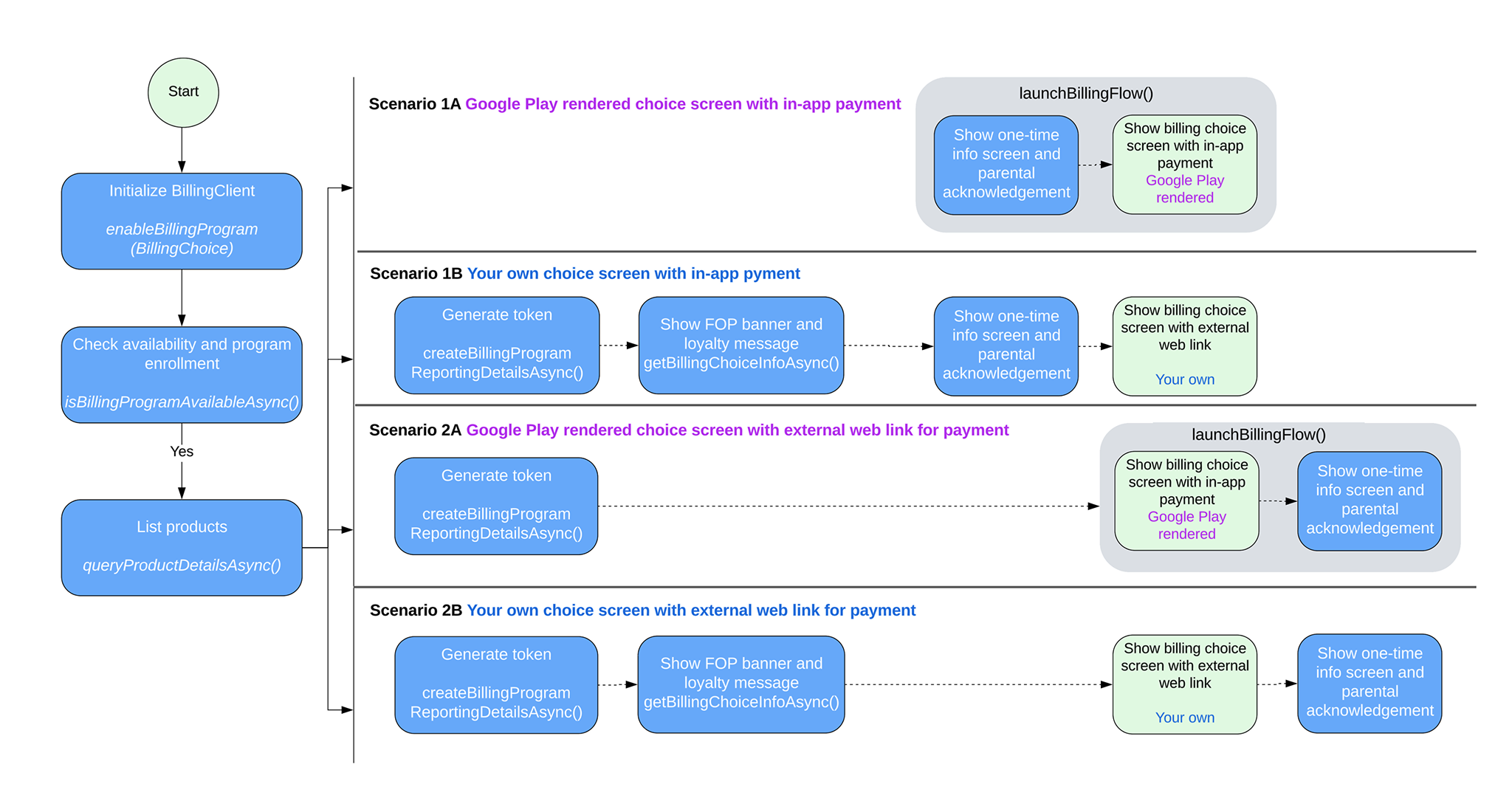
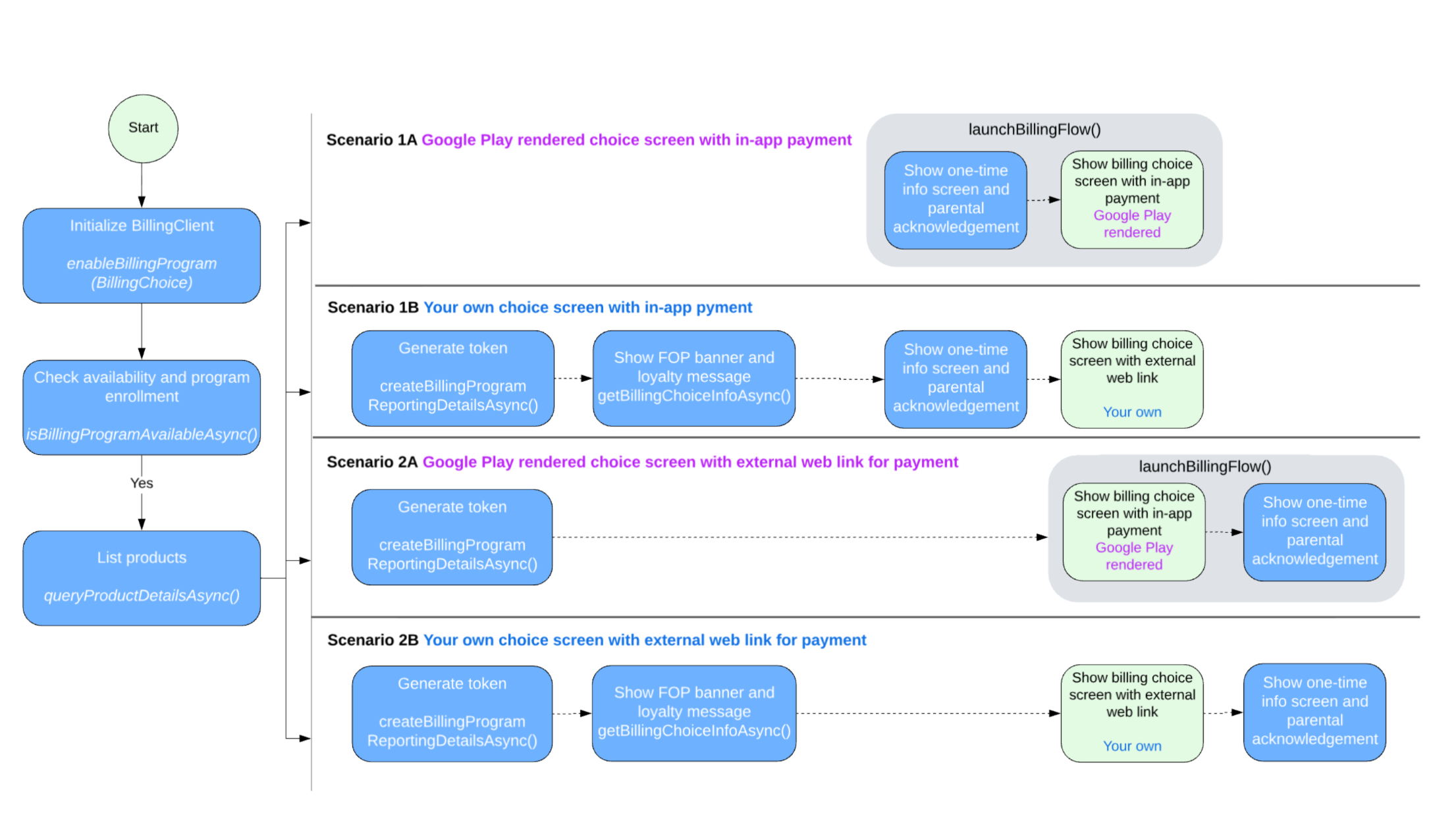
สถานการณ์การผสานรวม PBL
ทำตามขั้นตอนในส่วนนี้เพื่อใช้ตัวเลือกการเรียกเก็บเงินในแอปตามสถานการณ์การผสานรวมของคุณ
จัดการสถานการณ์ 1A
Google แสดงหน้าจอตัวเลือกและการเรียกเก็บเงินระบบอื่นจะได้รับการจัดการภายใน แอปของคุณ ทำตามขั้นตอนต่อไปนี้เพื่อเปิดใช้ตัวเลือกการเรียกเก็บเงินในสถานการณ์นี้
เรียกใช้
enableBillingProgramด้วยEnableBillingProgramParamsเมื่อ สร้างอินสแตนซ์ BillingClient แล้วเริ่มการเชื่อมต่อ เช่นKotlin
// Build the parameters to enable the Billing Choice program and assign the listener // to handle user selection of the developer-provided billing option. val params = EnableBillingProgramParams.newBuilder() .setBillingProgram(BillingProgram.BILLING_CHOICE) .setDeveloperProvidedBillingListener(developerProvidedBillingListener) .build() // Build the parameters to enable support for pending purchases. val pendingPurchasesParams = PendingPurchasesParams.newBuilder() .enableOneTimeProducts() .build() // Construct the BillingClient instance with the purchases updated listener, // pending purchases support, and the billing choice params. val billingClient = BillingClient.newBuilder(context) .setListener(purchasesUpdatedListener) .enablePendingPurchases(pendingPurchasesParams) .enableBillingProgram(params) .build() // Establish a connection to Google Play val billingResult = suspendCancellableCoroutine{ continuation -> billingClient.startConnection(object : BillingClientStateListener { // Called when the connection setup process completes. override fun onBillingSetupFinished(billingResult: BillingResult) { // Resume the coroutine and pass back the BillingResult to the caller. continuation.resume(billingResult) } // Called if the connection to the Play Store service is dropped. // This prevents the await or suspension point from hanging indefinitely. override fun onBillingServiceDisconnected() { continuation.resume( BillingResult.newBuilder() .setResponseCode(BillingClient.BillingResponseCode.SERVICE_DISCONNECTED) .setDebugMessage("Billing service disconnected during connection setup") .build() ) } }) } Java
EnableBillingProgramParams params = EnableBillingProgramParams.newBuilder()
        .setBillingProgram(BillingProgram.BILLING_CHOICE)
        .setDeveloperProvidedBillingListener(developerProvidedBillingListener)
        .build();

BillingClient billingClient = BillingClient.newBuilder(context)
        .setListener(purchasesUpdatedListener)
        .enablePendingPurchases(
                PendingPurchasesParams.newBuilder()
                        .enableOneTimeProducts()
                        .build()
        )
        .enableBillingProgram(params)
        .build();
ตรวจสอบว่าตัวเลือกการเรียกเก็บเงินที่ Google แสดงพร้อมให้บริการแก่ผู้ใช้
โทรไปที่
isBillingProgramAvailableAsyncเพื่อตรวจสอบความพร้อมให้บริการของโปรแกรม แล้วโทรไปที่queryProductDetailsAsyncเพื่อแสดงผลิตภัณฑ์ที่พร้อมให้บริการ เช่นKotlin
val (billingResult, billingProgramAvailabilityDetails) = billingClient.isBillingProgramAvailable(BillingProgram.BILLING_CHOICE)

if (billingResult.responseCode == BillingResponseCode.OK) {
    val billingChoiceAvailabilityDetails = billingProgramAvailabilityDetails.billingChoiceAvailabilityDetails
    if (billingChoiceAvailabilityDetails != null &&
        billingChoiceAvailabilityDetails.choiceScreenType == ChoiceScreenType.GOOGLE_RENDERED
    ) {
        // Billing choice is available. Query products and proceed.

    } else {
        // Fallback to other available programs.
    }
} else {
    // Fallback to other available programs.
}
Java
// ... billingClient.isBillingProgramAvailableAsync( BillingProgram.BILLING_CHOICE, (billingResult, billingProgramAvailabilityDetails) -> { if (billingResult.getResponseCode() == BillingResponseCode.OK) { BillingChoiceAvailabilityDetails billingChoiceAvailabilityDetails = billingProgramAvailabilityDetails.getBillingChoiceAvailabilityDetails(); if (billingChoiceAvailabilityDetails != null && billingChoiceAvailabilityDetails.getChoiceScreenType() == ChoiceScreenType.GOOGLE_RENDERED) { // Billing choice is available. Query products and proceed. } else { // Fallback to other available programs. } } else { // Fallback to other available programs. } } );หมายเหตุ:
billingProgramAvailabilityDetailsจะแจ้งให้คุณทราบว่ามีหน้าจอตัวเลือกการเรียกเก็บเงินที่ Google แสดงผลหรือที่นักพัฒนาแอปแสดงผลหรือไม่เรียกใช้
launchBillingFlowเพื่อทริกเกอร์ขั้นตอนการซื้อเมื่อผู้ใช้ คลิกซื้อ หากมีตัวเลือกการเรียกเก็บเงิน ให้ส่งDeveloperBillingOptionParamsไปยังBillingFlowParamsเช่นKotlin
val developerBillingOptionParams = DeveloperBillingOptionParams.newBuilder()
    .setBillingProgram(BillingProgram.BILLING_CHOICE)
    .build()

val billingFlowParams = BillingFlowParams.newBuilder()
    .setProductDetailsParamsList(productDetailsParamsList)
    .enableDeveloperBillingOption(developerBillingOptionParams)
    .build()

val billingResult = billingClient.launchBillingFlow(activity, billingFlowParams)
Java
DeveloperBillingOptionParams developerBillingOptionParams = DeveloperBillingOptionParams.newBuilder() .setBillingProgram(BillingProgram.BILLING_CHOICE) .build(); BillingFlowParams billingFlowParams = BillingFlowParams.newBuilder() .setProductDetailsParamsList(productDetailsParamsList) .enableDeveloperBillingOption(developerBillingOptionParams) .build(); BillingResult billingResult = billingClient.launchBillingFlow(activity, billingFlowParams);หมายเหตุ: การควบคุมโดยผู้ปกครองจะแสดงสำหรับผู้ใช้ภายใต้การควบคุมดูแล
จัดการการเลือกประเภทการเรียกเก็บเงินของผู้ใช้ดังนี้
- หากผู้ใช้เลือก Play Billing ระบบจะส่งผลการเรียกเก็บเงินไปยัง
PurchasesUpdatedListenerที่ลงทะเบียนไว้ในขั้นตอนที่ 1 - หากผู้ใช้เลือกการเรียกเก็บเงินระบบอื่นของคุณ ระบบจะส่งผลการเรียกเก็บเงินไปยัง
DeveloperProvidedBillingListenerที่ลงทะเบียนไว้ใน ขั้นตอนที่ 1DeveloperProvidedBillingDetailsที่แสดงผลจะมีexternalTransactionTokenในกรณีนี้ ระบบจะใช้โทเค็นสำหรับการรายงานธุรกรรม
- หากผู้ใช้เลือก Play Billing ระบบจะส่งผลการเรียกเก็บเงินไปยัง
จัดการสถานการณ์ 1B
นักพัฒนาแอปแสดงหน้าจอตัวเลือกและจัดการการเรียกเก็บเงินระบบอื่น ภายในแอปของคุณ ทำตามขั้นตอนต่อไปนี้เพื่อเปิดใช้ตัวเลือกการเรียกเก็บเงินในสถานการณ์นี้
เรียกใช้
enableBillingProgramโดยไม่มีDeveloperProvidedBillingListenerในEnableBillingProgramParamsเมื่อสร้างอินสแตนซ์BillingClientแล้วเริ่มการเชื่อมต่อ เช่นKotlin
// Build the parameters to enable the Billing Choice program.
val params = EnableBillingProgramParams.newBuilder()
    .setBillingProgram(BillingProgram.BILLING_CHOICE)
    .build()

// Construct the BillingClient instance with the purchases updated listener,
// pending purchases support, and the billing choice params.
val billingClient = BillingClient.newBuilder(context)
    .setListener(purchasesUpdatedListener)
    .enablePendingPurchases()
    .enableBillingProgram(params)
    .build()

// Establish a connection to Google Play
val billingResult = suspendCancellableCoroutine<BillingResult> { continuation ->
    billingClient.startConnection(object : BillingClientStateListener {
        // Called when the connection setup process completes.
        override fun onBillingSetupFinished(billingResult: BillingResult) {
            // Resume the coroutine and pass back the BillingResult to the caller.
            continuation.resume(billingResult)
        }

        // Called if the connection to the Play Store service is dropped.
        // This prevents the await or suspension point from hanging indefinitely.
        override fun onBillingServiceDisconnected() {
            continuation.resume(
                BillingResult.newBuilder()
                    .setResponseCode(BillingClient.BillingResponseCode.SERVICE_DISCONNECTED)
                    .setDebugMessage("Billing service disconnected during connection setup")
                    .build()
            )
        }
    })
}
Java
EnableBillingProgramParams params = EnableBillingProgramParams.newBuilder()
        .setBillingProgram(BillingProgram.BILLING_CHOICE)
        .build();

BillingClient billingClient = BillingClient.newBuilder(context)
        .setListener(purchasesUpdatedListener)
        .enablePendingPurchases()
        .enableBillingProgram(params)
        .build();
ตรวจสอบว่าตัวเลือกการเรียกเก็บเงินที่นักพัฒนาแอปแสดงพร้อมให้บริการแก่ผู้ใช้
โทรไปที่
isBillingProgramAvailableAsyncเพื่อตรวจสอบความพร้อมให้บริการของโปรแกรม แล้วโทรไปที่queryProductDetailsAsyncเพื่อแสดงผลิตภัณฑ์ที่พร้อมให้บริการ เช่นKotlin
val (billingResult, billingProgramAvailabilityDetails) =
    billingClient.isBillingProgramAvailable(BillingProgram.BILLING_CHOICE)

if (billingResult.responseCode == BillingResponseCode.OK) {
    val billingChoiceAvailabilityDetails =
        billingProgramAvailabilityDetails.billingChoiceAvailabilityDetails

    if (billingChoiceAvailabilityDetails != null &&
        billingChoiceAvailabilityDetails.choiceScreenType == ChoiceScreenType.DEVELOPER_RENDERED
    ) {
        // Billing choice is available. Query products and proceed.
        // You can inspect details such as:
        // - billingChoiceAvailabilityDetails.choiceScreenType
        // - billingChoiceAvailabilityDetails.isExternalLinkAvailable
    } else {
        // Fallback to other available programs.
    }
} else {
    // Fallback to other available programs.
}
Java
// ... billingClient.isBillingProgramAvailableAsync( BillingProgram.BILLING_CHOICE, (billingResult, billingProgramAvailabilityDetails) -> { if (billingResult.getResponseCode() == BillingResponseCode.OK) { BillingChoiceAvailabilityDetails billingChoiceAvailabilityDetails = billingProgramAvailabilityDetails.getBillingChoiceAvailabilityDetails(); if (billingChoiceAvailabilityDetails != null && billingChoiceAvailabilityDetails.getChoiceScreenType() == ChoiceScreenType.DEVELOPER_RENDERED) { // Billing choice is available. Query products and proceed. // You can inspect details such as: // - billingChoiceAvailabilityDetails.getChoiceScreenType() // - billingChoiceAvailabilityDetails.isExternalLinkAvailable() } else { // Fallback to other available programs. } } else { // Fallback to other available programs. } } );หมายเหตุ:
billingProgramAvailabilityDetailsจะบอกคุณว่ามีหน้าจอตัวเลือกการเรียกเก็บเงินที่ Google แสดง หรือที่นักพัฒนาแอปแสดงหรือไม่เรียกใช้
getBillingChoiceInfoAsyncเมธอดเพื่อรับแบนเนอร์ Play Billing และข้อมูลความภักดี เช่นKotlin
// 1. Create the params required for the request
val params = GetBillingChoiceInfoParams.newBuilder()
    .setBillingProgram(BillingClient.BillingProgram.BILLING_CHOICE)
    .setPlayBillingChoiceImageLayout(GetBillingChoiceInfoParams.ImageLayout.RECTANGULAR_FOUR_BY_ONE)
    .build()

// 2. Call the suspend method on your billingClient instance
val (billingResult, playBillingChoiceInfo) = billingClient.getBillingChoiceInfo(params)

if (billingResult.responseCode == BillingResponseCode.OK && playBillingChoiceInfo != null) {
    // Access the URL of the image associated with the Play Billing Choice
    val imageUrl = playBillingChoiceInfo.playBillingChoiceImageUrl

    // Access the Play Loyalty string information, if available
    val loyaltyInfo = playBillingChoiceInfo.playBillingLoyaltyInfo

    // Populate your developer-rendered UI elements
    playBillingLoyaltyTextView.text = loyaltyInfo
    loadImage(imageUrl, playBillingImageView)
} else {
    // Handle error scenarios
}
Java
// 1. Create the params required for the request
GetBillingChoiceInfoParams params = GetBillingChoiceInfoParams.newBuilder()
    .setBillingProgram(BillingClient.BillingProgram.BILLING_CHOICE)
    .setPlayBillingChoiceImageLayout(GetBillingChoiceInfoParams.ImageLayout.RECTANGULAR_FOUR_BY_ONE)
    .build();
// 2. Call the method asynchronously on your billingClient instance
billingClient.getBillingChoiceInfoAsync(params, (billingResult, playBillingChoiceInfo) -> {
    if (billingResult.getResponseCode() == BillingResponseCode.OK && playBillingChoiceInfo != null) {
      // Access the URL of the image associated with the Play Billing Choice
        String imageUrl = playBillingChoiceInfo.getPlayBillingChoiceImageUrl();
        // Access the Play Loyalty string information, if available
        String loyaltyInfo = playBillingChoiceInfo.getPlayBillingLoyaltyInfo();

        // Populate your developer-rendered UI elements
        playBillingLoyaltyTextView.setText(loyaltyInfo);
          loadImage(imageUrl, playBillingImageView);
      } else {
          // Handle error scenarios
      }
});
สร้างโทเค็นธุรกรรมภายนอกโดยตั้งค่า DeveloperBillingType เป็น IN_APP เช่น
Kotlin
// Build the parameters specifying the billing program and that the billing type is IN_APP.
val params = BillingProgramReportingDetailsParams.newBuilder()
    .setBillingProgram(BillingProgram.BILLING_CHOICE)
    .setDeveloperBillingType(DeveloperBillingType.IN_APP)
    .build()

// Call the suspending extension function to request the reporting details
val (billingResult, billingProgramReportingDetails) =
    billingClient.createBillingProgramReportingDetails(params)

if (billingResult.responseCode != BillingResponseCode.OK) {
    // Handle failures such as retrying due to network errors.
    return
}

// Extract the transaction token from the returned reporting details
val transactionToken = billingProgramReportingDetails?.externalTransactionToken

// Persist the external transaction token locally. Pass it to
// DeveloperBillingOptionParams when launchBillingFlow is called.
// It can also be used as part of your external website
Java
BillingProgramReportingDetailsParams params =
    BillingProgramReportingDetailsParams.newBuilder()
        .setBillingProgram(BillingProgram.BILLING_CHOICE)
        .setDeveloperBillingType(DeveloperBillingType.IN_APP)
        .build();

billingClient.createBillingProgramReportingDetailsAsync(
    params,
    new BillingProgramReportingDetailsListener() {
        @Override
        public void onCreateBillingProgramReportingDetailsResponse(
            BillingResult billingResult,
            @Nullable BillingProgramReportingDetails billingProgramReportingDetails
        ) {
            if (billingResult.getResponseCode() != BillingResponseCode.OK) {
                // Handle failures such as retrying due to network errors.
                return;
            }

            String transactionToken =
                billingProgramReportingDetails.getExternalTransactionToken();

            // Persist the external transaction token locally. Pass it to
            // DeveloperBillingOptionParams when launchBillingFlow is called.
            // It can also be used as part of your external website
        }
    }
);
เมื่อผู้ใช้คลิกซื้อ ให้เรียกใช้
showBillingProgramInformationDialogเพื่อแสดง กล่องโต้ตอบข้อมูล เช่น ดูกล่องโต้ตอบข้อมูลสำหรับผู้ใช้ ต้องตั้งค่า BillingProgram และ transactionToken จากขั้นตอนที่ 4 ในคำขอหมายเหตุ: การควบคุมโดยผู้ปกครองจะแสดงสำหรับผู้ใช้ภายใต้การควบคุมดูแล
เปิดหน้าจอตัวเลือกการเรียกเก็บเงินระบบอื่นหากผลลัพธ์จาก ขั้นตอนก่อนหน้าคือ
OKจัดการการเลือกประเภทการเรียกเก็บเงินของผู้ใช้ดังนี้
- หากผู้ใช้เลือก Play Billing ให้เรียกใช้
launchBillingFlowตามคำแนะนำมาตรฐานของ Play Billing ระบบจะส่งผลการเรียกเก็บเงิน ไปยังPurchasesUpdatedListenerที่ลงทะเบียนไว้ในขั้นตอน ที่ 1 - หากผู้ใช้เลือกการเรียกเก็บเงินระบบอื่น คุณต้องจัดการธุรกรรมด้วยตนเองและรายงานต่อ Play โดยใช้โทเค็นที่สร้างขึ้นในขั้นตอนที่ 4
- หากผู้ใช้เลือก Play Billing ให้เรียกใช้
จัดการสถานการณ์ 2A
Google แสดงหน้าจอตัวเลือกและการเรียกเก็บเงินระบบอื่นจะได้รับการจัดการ ภายนอกแอปของคุณ ทำตามขั้นตอนต่อไปนี้เพื่อเปิดใช้ตัวเลือกการเรียกเก็บเงินในสถานการณ์นี้
เรียกใช้
enableBillingProgramด้วยEnableBillingProgramParamsเมื่อ สร้างอินสแตนซ์ BillingClient แล้วเริ่มการเชื่อมต่อ เช่นKotlin
// Build the parameters to enable the Billing Choice program and assign the listener // to handle user selection of the developer-provided billing option. val params = EnableBillingProgramParams.newBuilder() .setBillingProgram(BillingProgram.BILLING_CHOICE) .setDeveloperProvidedBillingListener(developerProvidedBillingListener) .build() // Build the parameters to enable support for pending purchases. val pendingPurchasesParams = PendingPurchasesParams.newBuilder() .enableOneTimeProducts() .build() // Construct the BillingClient instance with the purchases updated listener, // pending purchases support, and the billing choice params. val billingClient = BillingClient.newBuilder(context) .setListener(purchasesUpdatedListener) .enablePendingPurchases(pendingPurchasesParams) .enableBillingProgram(params) .build() // Establish a connection to Google Play val billingResult = suspendCancellableCoroutine{ continuation -> billingClient.startConnection(object : BillingClientStateListener { // Called when the connection setup process completes. override fun onBillingSetupFinished(billingResult: BillingResult) { // Resume the coroutine and pass back the BillingResult to the caller. continuation.resume(billingResult) } // Called if the connection to the Play Store service is dropped. // This prevents the await or suspension point from hanging indefinitely. override fun onBillingServiceDisconnected() { continuation.resume( BillingResult.newBuilder() .setResponseCode(BillingClient.BillingResponseCode.SERVICE_DISCONNECTED) .setDebugMessage("Billing service disconnected during connection setup") .build() ) } }) } Java
EnableBillingProgramParams params = EnableBillingProgramParams.newBuilder()
        .setBillingProgram(BillingProgram.BILLING_CHOICE)
        .setDeveloperProvidedBillingListener(developerProvidedBillingListener)
        .build();

BillingClient billingClient = BillingClient.newBuilder(context)
        .setListener(purchasesUpdatedListener)
        .enablePendingPurchases(
                PendingPurchasesParams.newBuilder()
                        .enableOneTimeProducts()
                        .build()
        )
        .enableBillingProgram(params)
        .build();
ตรวจสอบความพร้อมใช้งานของสิ่งต่อไปนี้
- ตัวเลือกการเรียกเก็บเงินที่ Google แสดง
- เว็บลิงก์ภายนอก
โทรไปที่
isBillingProgramAvailableAsyncเพื่อตรวจสอบความพร้อมให้บริการของโปรแกรม แล้วโทรไปที่queryProductDetailsAsyncเพื่อแสดง ผลิตภัณฑ์ที่พร้อมให้บริการ เช่นKotlin
// Check the availability of the billing choice program asynchronously using coroutines
val (billingResult, billingProgramAvailabilityDetails) =
    billingClient.isBillingProgramAvailable(BillingProgram.BILLING_CHOICE)

// Ensure the billing program query succeeded
if (billingResult.responseCode == BillingResponseCode.OK) {
    // Retrieve the availability details specific to the billing choice program
    val billingChoiceAvailabilityDetails =
        billingProgramAvailabilityDetails.billingChoiceAvailabilityDetails

    // Check if billing choice is available, renders via Google Play, and external link is supported
    if (billingChoiceAvailabilityDetails != null &&
        billingChoiceAvailabilityDetails.choiceScreenType == ChoiceScreenType.GOOGLE_RENDERED &&
        billingChoiceAvailabilityDetails.isExternalLinkAvailable
    ) {
        // Billing choice is available and external transaction links are supported. Query products and proceed.
    } else {
        // Fallback to other available programs.
    }
} else {
    // Fallback to other available programs.
}
Java
// ...
billingClient.isBillingProgramAvailableAsync(
    BillingProgram.BILLING_CHOICE,
    (billingResult, billingProgramAvailabilityDetails) -> {
        if (billingResult.getResponseCode() == BillingResponseCode.OK) {
            BillingChoiceAvailabilityDetails billingChoiceAvailabilityDetails =
                billingProgramAvailabilityDetails.getBillingChoiceAvailabilityDetails();

            if (billingChoiceAvailabilityDetails != null
                    && billingChoiceAvailabilityDetails.getChoiceScreenType() == ChoiceScreenType.GOOGLE_RENDERED
                    && billingChoiceAvailabilityDetails.isExternalLinkAvailable()) {
                // Billing choice is available and external transaction links are supported.
                // Query products and proceed.
            } else {
                // Fallback to other available programs.
            }
        } else {
            // Fallback to other available programs.
        }
    }
);
เรียกใช้
createBillingProgramReportingDetailsAsyncเพื่อสร้างโทเค็นธุรกรรมภายนอกเมื่อผู้ใช้แสดงความตั้งใจที่จะซื้อ เช่นKotlin
// Build the parameters for creating reporting details
val params =
    BillingProgramReportingDetailsParams.newBuilder()
        .setBillingProgram(BillingProgram.BILLING_CHOICE)
        .setDeveloperBillingType(DeveloperBillingType.EXTERNAL_LINK)
        .build()

// Call the suspend function to create billing program reporting details
val (billingResult, billingProgramReportingDetails) =
    billingClient.createBillingProgramReportingDetails(params)

// Handle response failure cases
if (billingResult.responseCode != BillingResponseCode.OK) {
    // Handle failures such as retrying due to network errors.
    return
}

// Retrieve the external transaction token
val transactionToken =
    billingProgramReportingDetails?.externalTransactionToken

// Persist the external transaction token locally. Pass it to
// DeveloperBillingOptionParams when launchBillingFlow is called.
// It can also be used as part of your external website
Java
BillingProgramReportingDetailsParams params =
    BillingProgramReportingDetailsParams.newBuilder()
        .setBillingProgram(BillingProgram.BILLING_CHOICE)
        .setDeveloperBillingType(DeveloperBillingType.EXTERNAL_LINK)
        .build();

billingClient.createBillingProgramReportingDetailsAsync(
    params,
    new BillingProgramReportingDetailsListener() {
        @Override
        public void onCreateBillingProgramReportingDetailsResponse(
            BillingResult billingResult,
            @Nullable BillingProgramReportingDetails billingProgramReportingDetails
        ) {
            if (billingResult.getResponseCode() != BillingResponseCode.OK) {
                // Handle failures such as retrying due to network errors.
                return;
            }

            String transactionToken =
                billingProgramReportingDetails.getExternalTransactionToken();

            // Persist the external transaction token locally. Pass it to
            // DeveloperBillingOptionParams when launchBillingFlow is called.
            // It can also be used as part of your external website.
        }
    }
);
เรียกใช้
launchBillingFlowเพื่อทริกเกอร์ขั้นตอนการซื้อเมื่อผู้ใช้ คลิกซื้อ หากตัวเลือกการเรียกเก็บเงินพร้อมให้บริการแก่ผู้ใช้ ให้ทำดังนี้- ส่ง DeveloperBillingOptionParams ไปยัง
BillingFlowParams - ส่งโทเค็นธุรกรรมภายนอกจากขั้นตอนที่ 3 ไปยัง
DeveloperBillingOptionParams
เช่น
Kotlin
// Build the developer billing option parameters with the external link URI,
// the transaction token, and browser/app launch mode.
val developerBillingOptionParams =
    DeveloperBillingOptionParams.newBuilder()
        .setBillingProgram(BillingProgram.BILLING_CHOICE)
        .setLinkUri(Uri.parse("https://www.example.com/external/purchase"))
        .setExternalTransactionToken(transactionToken)
        .setLaunchMode(
            DeveloperBillingOptionParams.LaunchMode.LAUNCH_IN_EXTERNAL_BROWSER_OR_APP
        )
        .build()
Java
DeveloperBillingOptionParams developerBillingOptionParams = DeveloperBillingOptionParams.newBuilder() .setBillingProgram(BillingProgram.BILLING_CHOICE) .setLinkUri(Uri.parse("https://www.example.com/external/purchase")) .setExternalTransactionToken(transactionToken) .setLaunchMode( DeveloperBillingOptionParams.LaunchMode.LAUNCH_IN_EXTERNAL_BROWSER_OR_APP) .build();หมายเหตุ: การควบคุมโดยผู้ปกครองจะแสดงสำหรับผู้ใช้ภายใต้การควบคุมดูแล
- ส่ง DeveloperBillingOptionParams ไปยัง
จัดการการเลือกประเภทการเรียกเก็บเงินของผู้ใช้ดังนี้
- หากผู้ใช้เลือก Play Billing ให้เรียกใช้
launchBillingFlowตามคำแนะนำมาตรฐานของ Play Billing ระบบจะส่งผลการเรียกเก็บเงิน ไปยังPurchasesUpdatedListenerที่ลงทะเบียนไว้ในขั้นตอน ที่ 1 - หากผู้ใช้เลือกการเรียกเก็บเงินระบบอื่นของคุณ ระบบจะส่งผลการเรียกเก็บเงินไปยัง
DeveloperProvidedBillingListenerที่ลงทะเบียนไว้ใน ขั้นตอนDeveloperProvidedBillingDetailsที่แสดงผลจะมีexternalTransactionTokenที่ส่งไปยังDeveloperBillingOptionParamsในขั้นตอนที่ 4 หากเป็นโทเค็นที่ถูกต้อง
- หากผู้ใช้เลือก Play Billing ให้เรียกใช้
จัดการสถานการณ์ 2B
นักพัฒนาแอปแสดงหน้าจอตัวเลือกและการเรียกเก็บเงินระบบอื่นจะได้รับการจัดการ ภายนอกแอป ให้ทำตามขั้นตอนต่อไปนี้เพื่อเปิดใช้ตัวเลือกการเรียกเก็บเงินในสถานการณ์นี้
เรียกใช้
enableBillingProgramโดยไม่มีDeveloperProvidedBillingListenerในEnableBillingProgramParamsเมื่อสร้างอินสแตนซ์ BillingClient แล้วเริ่มการเชื่อมต่อ เช่นKotlin
// Build the parameters to enable the Billing Choice program.
val params = EnableBillingProgramParams.newBuilder()
    .setBillingProgram(BillingProgram.BILLING_CHOICE)
    .build()

// Construct the BillingClient instance with the purchases updated listener,
// pending purchases support, and the billing choice params.
val billingClient = BillingClient.newBuilder(context)
    .setListener(purchasesUpdatedListener)
    .enablePendingPurchases()
    .enableBillingProgram(params)
    .build()

// Establish a connection to Google Play
val billingResult = suspendCancellableCoroutine<BillingResult> { continuation ->
    billingClient.startConnection(object : BillingClientStateListener {
        // Called when the connection setup process completes.
        override fun onBillingSetupFinished(billingResult: BillingResult) {
            // Resume the coroutine and pass back the BillingResult to the caller.
            continuation.resume(billingResult)
        }

        // Called if the connection to the Play Store service is dropped.
        // This prevents the await or suspension point from hanging indefinitely.
        override fun onBillingServiceDisconnected() {
            continuation.resume(
                BillingResult.newBuilder()
                    .setResponseCode(BillingClient.BillingResponseCode.SERVICE_DISCONNECTED)
                    .setDebugMessage("Billing service disconnected during connection setup")
                    .build()
            )
        }
    })
}
Java
EnableBillingProgramParams params = EnableBillingProgramParams.newBuilder()
        .setBillingProgram(BillingProgram.BILLING_CHOICE)
        .build();

BillingClient billingClient = BillingClient.newBuilder(context)
        .setListener(purchasesUpdatedListener)
        .enablePendingPurchases()
        .enableBillingProgram(params)
        .build();
ตรวจสอบความพร้อมใช้งานของสิ่งต่อไปนี้
- ตัวเลือกการเรียกเก็บเงินที่ Google แสดง
- เว็บลิงก์ภายนอก
โทรไปที่
isBillingProgramAvailableAsyncเพื่อตรวจสอบความพร้อมให้บริการของโปรแกรม แล้วโทรไปที่queryProductDetailsAsyncเพื่อแสดง ผลิตภัณฑ์ที่พร้อมให้บริการ เช่นKotlin
// Check the availability of the billing choice program asynchronously using a coroutine
val (billingResult, billingProgramAvailabilityDetails) =
    billingClient.isBillingProgramAvailable(BillingProgram.BILLING_CHOICE)

// Ensure the response code is OK
if (billingResult.responseCode == BillingResponseCode.OK) {
    // Retrieve the billing choice availability details
    val billingChoiceAvailabilityDetails =
        billingProgramAvailabilityDetails.billingChoiceAvailabilityDetails

    // Check if billing choice details are available, choice screen is developer-rendered,
    // and external transaction links are supported.
    if (billingChoiceAvailabilityDetails != null &&
        billingChoiceAvailabilityDetails.choiceScreenType == ChoiceScreenType.DEVELOPER_RENDERED &&
        billingChoiceAvailabilityDetails.isExternalLinkAvailable
    ) {
        // Billing choice is available and external transaction links are supported.
        // Query products and proceed.
    } else {
        // Fallback to other available programs.
    }
} else {
    // Fallback to other available programs.
}
Java
// ...

billingClient.isBillingProgramAvailableAsync(
    BillingProgram.BILLING_CHOICE,
    (billingResult, billingProgramAvailabilityDetails) -> {
        if (billingResult.getResponseCode() == BillingResponseCode.OK) {
            BillingChoiceAvailabilityDetails billingChoiceAvailabilityDetails =
                billingProgramAvailabilityDetails.getBillingChoiceAvailabilityDetails();
            if (billingChoiceAvailabilityDetails != null &&
                billingChoiceAvailabilityDetails.getChoiceScreenType() == ChoiceScreenType.DEVELOPER_RENDERED &&
                billingChoiceAvailabilityDetails.isExternalLinkAvailable()) {
                // Billing choice is available and external transaction links are supported. Query products and proceed.
            } else {
                // Fallback to other available programs.
            }
        } else {
            // Fallback to other available programs.
        }
    }
);
เรียกใช้
getBillingChoiceInfoAsyncเมธอดเพื่อรับแบนเนอร์ Play Billing และข้อมูลความภักดีKotlin
// 1. Create the params required for the request
val params = GetBillingChoiceInfoParams.newBuilder()
    .setBillingProgram(BillingClient.BillingProgram.BILLING_CHOICE)
    .setPlayBillingChoiceImageLayout(GetBillingChoiceInfoParams.ImageLayout.RECTANGULAR_FOUR_BY_ONE)
    .build()

// 2. Call the suspend method on your billingClient instance
val (billingResult, playBillingChoiceInfo) = billingClient.getBillingChoiceInfo(params)

if (billingResult.responseCode == BillingResponseCode.OK && playBillingChoiceInfo != null) {
    // Access the URL of the image associated with the Play Billing Choice
    val imageUrl = playBillingChoiceInfo.playBillingChoiceImageUrl

    // Access the Play Loyalty string information, if available
    val loyaltyInfo = playBillingChoiceInfo.playBillingLoyaltyInfo

    // Populate your developer-rendered UI elements
    playBillingLoyaltyTextView.text = loyaltyInfo
    loadImage(imageUrl, playBillingImageView)
} else {
    // Handle error scenarios
}
Java
// 1. Create the params required for the request
GetBillingChoiceInfoParams params = GetBillingChoiceInfoParams.newBuilder()
    .setBillingProgram(BillingClient.BillingProgram.BILLING_CHOICE)
    .setPlayBillingChoiceImageLayout(GetBillingChoiceInfoParams.ImageLayout.RECTANGULAR_FOUR_BY_ONE)
    .build();
// 2. Call the method asynchronously on your billingClient instance
billingClient.getBillingChoiceInfoAsync(params, (billingResult, playBillingChoiceInfo) -> {
    if (billingResult.getResponseCode() == BillingResponseCode.OK && playBillingChoiceInfo != null) {
      // Access the URL of the image associated with the Play Billing Choice
        String imageUrl = playBillingChoiceInfo.getPlayBillingChoiceImageUrl();
        // Access the Play Loyalty string information, if available
        String loyaltyInfo = playBillingChoiceInfo.getPlayBillingLoyaltyInfo();

        // Populate your developer-rendered UI elements
        playBillingLoyaltyTextView.setText(loyaltyInfo);
          loadImage(imageUrl, playBillingImageView);
      } else {
          // Handle error scenarios
      }
});
เรียกใช้
createBillingProgramReportingDetailsAsyncเพื่อสร้างโทเค็นธุรกรรมภายนอกเมื่อผู้ใช้แสดงความตั้งใจที่จะซื้อ เช่นKotlin
// Build the parameters for creating reporting details
val params =
    BillingProgramReportingDetailsParams.newBuilder()
        .setBillingProgram(BillingProgram.BILLING_CHOICE)
        .setDeveloperBillingType(DeveloperBillingType.EXTERNAL_LINK)
        .build()

// Call the suspend function to create billing program reporting details
val (billingResult, billingProgramReportingDetails) =
    billingClient.createBillingProgramReportingDetails(params)

// Handle response failure cases
if (billingResult.responseCode != BillingResponseCode.OK) {
    // Handle failures such as retrying due to network errors.
    return
}

// Retrieve the external transaction token
val transactionToken =
    billingProgramReportingDetails?.externalTransactionToken

// Persist the external transaction token locally. Pass it to
// DeveloperBillingOptionParams when launchBillingFlow is called.
// It can also be used as part of your external website
Java
BillingProgramReportingDetailsParams params =
    BillingProgramReportingDetailsParams.newBuilder()
        .setBillingProgram(BillingProgram.BILLING_CHOICE)
        .setDeveloperBillingType(DeveloperBillingType.EXTERNAL_LINK)
        .build();

billingClient.createBillingProgramReportingDetailsAsync(
    params,
    new BillingProgramReportingDetailsListener() {
        @Override
        public void onCreateBillingProgramReportingDetailsResponse(
            BillingResult billingResult,
            @Nullable BillingProgramReportingDetails billingProgramReportingDetails
        ) {
            if (billingResult.getResponseCode() != BillingResponseCode.OK) {
                // Handle failures such as retrying due to network errors.
                return;
            }

            String transactionToken =
                billingProgramReportingDetails.getExternalTransactionToken();

            // Persist the external transaction token locally. Pass it to
            // DeveloperBillingOptionParams when launchBillingFlow is called.
            // It can also be used as part of your external website.
        }
    }
);
เปิดหน้าจอตัวเลือกอื่นเมื่อผู้ใช้คลิก "ซื้อ"
จัดการการเลือกประเภทการเรียกเก็บเงินของผู้ใช้ดังนี้
หากผู้ใช้เลือก Play Billing ให้เรียกใช้
launchBillingFlowตามคำแนะนำมาตรฐานของ Play Billing ระบบจะส่งผลการเรียกเก็บเงิน ไปยังPurchasesUpdatedListenerที่ลงทะเบียนไว้ในขั้นตอน ที่ 1การควบคุมโดยผู้ปกครองจะแสดงสำหรับผู้ใช้ภายใต้การควบคุมดูแล
หากผู้ใช้เลือกการเรียกเก็บเงินระบบอื่นของคุณ ให้เรียกใช้ launchExternalLink เช่น
Kotlin
// An activity reference from which the purchase flow will be launched.
val activity: Activity = ...

val params = LaunchExternalLinkParams.newBuilder()
    .setBillingProgram(BillingProgram.BILLING_CHOICE)
    // You can pass along the external transaction token from
    // BillingProgramReportingDetails as a URL parameter in the URI
    .setLinkUri(yourLinkUri)
    .setLinkType(LaunchExternalLinkParams.LinkType.LINK_TO_DIGITAL_CONTENT_OFFER)
    .setLaunchMode(
        LaunchExternalLinkParams.LaunchMode.LAUNCH_IN_EXTERNAL_BROWSER_OR_APP
    )
    .build()

// Call launchExternalLink with a callback
billingClient.launchExternalLink(activity, params) { billingResult ->
    if (billingResult.responseCode == BillingResponseCode.OK) {
        // Proceed with the rest of the purchase flow. If the user
        // purchases an item, be sure to report the transaction to Google
        // Play.
    } else {
        // Handle failures such as retrying due to network errors.
    }
}
Java
// An activity reference from which the purchase flow will be launched.
Activity activity = ...;

LaunchExternalLinkParams params = LaunchExternalLinkParams.newBuilder()
    .setBillingProgram(BillingProgram.BILLING_CHOICE)
    // You can pass along the external transaction token from
    // BillingProgramReportingDetails as a URL parameter in the URI
    .setLinkUri(yourLinkUri)
    .setLinkType(LaunchExternalLinkParams.LinkType.LINK_TO_DIGITAL_CONTENT_OFFER)
    .setLaunchMode(
        LaunchExternalLinkParams.LaunchMode.LAUNCH_IN_EXTERNAL_BROWSER_OR_APP)
    .setExternalTransactionToken(transactionToken)
    .build();

LaunchExternalLinkResponseListener listener =
    new LaunchExternalLinkResponseListener() {
      @Override
      public void onLaunchExternalLinkResponse(BillingResult billingResult) {
        if (billingResult.getResponseCode() == BillingResponseCode.OK) {
          // Proceed with the rest of the purchase flow. If the user
          // purchases an item, be sure to report the transaction to Google
          // Play.
        } else {
          // Handle failures such as retrying due to network errors.
        }
      }
    };

billingClient.launchExternalLink(activity, params, listener);
ส่งโทเค็นธุรกรรมภายนอกจากขั้นตอนที่ 4 ไปยัง
LaunchExternalLinkParamsหากแสดงผลเป็น OK ให้ดำเนินการ ธุรกรรมต่อและรายงานธุรกรรมไปยัง Google Playการควบคุมโดยผู้ปกครองจะแสดงสำหรับผู้ใช้ภายใต้การควบคุมดูแล
ตัวเลือกการเรียกเก็บเงินระหว่างการเปลี่ยนการสมัครใช้บริการ
สำหรับการแทนที่การสมัครใช้บริการ ไม่ควรแสดงหน้าจอตัวเลือกของผู้ใช้เนื่องจาก ระบบจะเก็บตัวเลือกของผู้ใช้สำหรับการซื้อครั้งแรกไว้สำหรับการอัปเกรดและ การดาวน์เกรด
หากการซื้อครั้งแรกประมวลผลผ่าน Google Play Billing คุณควรเรียกใช้ launchBillingFlow พร้อมข้อมูลการเปลี่ยนแพ็กเกจการสมัครใช้บริการของ Google Play Billing มาตรฐาน
อย่างไรก็ตาม หากการซื้อครั้งแรกดำเนินการผ่านการเรียกเก็บเงินทางเลือก การจัดการการแทนที่การสมัครใช้บริการจะแตกต่างกันเล็กน้อยตาม สถานการณ์
การแทนที่การสมัครใช้บริการในสถานการณ์ 1ก
ผู้ใช้ที่ขออัปเกรดหรือดาวน์เกรดควรดำเนินการผ่านระบบการเรียกเก็บเงินระบบอื่นของนักพัฒนาแอปโดยไม่ต้องผ่านประสบการณ์ตัวเลือกของผู้ใช้อีกครั้ง
โดยให้เรียกใช้ launchBillingFlow เมื่อผู้ใช้ขออัปเกรดหรือดาวน์เกรด ใช้ setOriginalExternalTransactionId ภายในออบเจ็กต์
SubscriptionUpdateParams ในพารามิเตอร์เพื่อระบุรหัสธุรกรรมภายนอก
สำหรับการซื้อครั้งแรก ซึ่งจะไม่แสดงหน้าจอตัวเลือกของผู้ใช้ เนื่องจากระบบจะเก็บตัวเลือกของผู้ใช้สำหรับการซื้อครั้งแรกไว้สำหรับการอัปเกรดและดาวน์เกรด การเรียกใช้ launchBillingFlow ในกรณีนี้
จะสร้างโทเค็นธุรกรรมภายนอกใหม่สำหรับธุรกรรมที่คุณ
เรียกข้อมูลได้จากโปรแกรมเรียกกลับ
Kotlin
// The external transaction ID from the current
// alternative billing subscription.
val externalTransactionId = //... ;

val developerBillingOptionParams = DeveloperBillingOptionParams.newBuilder()
    .setBillingProgram(BillingProgram.BILLING_CHOICE)
    .build()

val billingFlowParams = BillingFlowParams.newBuilder()
    .setProductDetailsParamsList(
        listOf(
            BillingFlowParams.ProductDetailsParams.newBuilder()
                // Fetched using queryProductDetailsAsync.
                .setProductDetails(productDetailsNewPlan)
                // offerIdToken can be found in
                // ProductDetails=>SubscriptionOfferDetails.
                .setOfferToken(offerTokenNewPlan)
                .build()
        )
    )
    .setSubscriptionUpdateParams(
        BillingFlowParams.SubscriptionUpdateParams.newBuilder()
            .setOriginalExternalTransactionId(externalTransactionId)
            .build()
    )
    .enableDeveloperBillingOption(developerBillingOptionParams)
    .build()

val billingResult = billingClient.launchBillingFlow(activity, billingFlowParams)

// When the user selects the alternative billing flow,
// the DeveloperProvidedBillingListener is triggered.
Java
// The external transaction ID from the current
// alternative billing subscription.
String externalTransactionId = //... ;

DeveloperBillingOptionParams developerBillingOptionParams =
    DeveloperBillingOptionParams.newBuilder()
        .setBillingProgram(BillingProgram.BILLING_CHOICE)
        .build();

List<ProductDetailsParams> productDetailsParamsList = new ArrayList<>();
productDetailsParamsList.add(
    ProductDetailsParams.newBuilder()
        // Fetched using queryProductDetailsAsync.
        .setProductDetails(productDetailsNewPlan)
        // offerIdToken can be found in
        // ProductDetails=>SubscriptionOfferDetails
        .setOfferToken(offerTokenNewPlan)
        .build());

BillingFlowParams billingFlowParams =
    BillingFlowParams.newBuilder()
        .setProductDetailsParamsList(productDetailsParamsList)
        .setSubscriptionUpdateParams(
            SubscriptionUpdateParams.newBuilder()
                .setOriginalExternalTransactionId(externalTransactionId)
                .build())
        .enableDeveloperBillingOption(developerBillingOptionParams)
        .build();

BillingResult billingResult = billingClient.launchBillingFlow(activity, billingFlowParams);

// When the user selects the alternative billing flow,
// the DeveloperProvidedBillingListener is triggered.
เมื่ออัปเกรดหรือดาวน์เกรดเสร็จสมบูรณ์แล้ว คุณต้องรายงานธุรกรรมใหม่โดยใช้โทเค็นธุรกรรมภายนอกที่ได้รับผ่าน การเรียกก่อนหน้านี้สำหรับการซื้อการสมัครใช้บริการใหม่
การแทนที่การสมัครใช้บริการในสถานการณ์ 1ข
ในสถานการณ์นี้ คุณต้องสร้างโทเค็นธุรกรรมภายนอกใหม่ ความแตกต่างเพียงอย่างเดียวจากการซื้อปกติคือในสถานการณ์นี้ ระบบจะ เก็บตัวเลือกของผู้ใช้ไว้ และคุณไม่ต้องแสดงหน้าจอตัวเลือกสำหรับการอัปเกรดหรือ ดาวน์เกรด อย่างไรก็ตาม คุณต้องแสดงกล่องโต้ตอบข้อมูลแบบครั้งเดียวและ การรับทราบของผู้ปกครอง
ดูโค้ดการผสานรวมตัวอย่างได้ที่ขั้นตอนที่ 4 ในสถานการณ์ 1B: นักพัฒนาแอปแสดงหน้าจอทางเลือกและจัดการการเรียกเก็บเงินระบบอื่นภายในแอป
เมื่ออัปเกรดหรือดาวน์เกรดเสร็จสมบูรณ์แล้ว คุณต้องรายงานธุรกรรมใหม่โดยใช้โทเค็นธุรกรรมภายนอกที่ได้รับผ่าน การเรียกก่อนหน้านี้สำหรับการซื้อการสมัครใช้บริการใหม่
การแทนที่การสมัครใช้บริการในสถานการณ์ 2A
สำหรับการสมัครใช้บริการที่ซื้อผ่านเว็บไซต์ของนักพัฒนาแอปหรือแอปการชำระเงินหลังจากที่ผู้ใช้เลือกแล้ว ผู้ใช้ที่ขออัปเกรดหรือดาวน์เกรดควรดำเนินการผ่านเว็บไซต์ของนักพัฒนาแอปหรือแอปการชำระเงินโดยไม่ต้องผ่านตัวเลือกของผู้ใช้อีกครั้ง
โดยให้เรียกใช้ launchBillingFlow เมื่อผู้ใช้ขออัปเกรดหรือดาวน์เกรด แทนที่จะระบุพารามิเตอร์อื่นๆ ภายใต้ออบเจ็กต์
SubscriptionUpdateParams ให้ใช้ setOriginalExternalTransactionId
โดยระบุรหัสธุรกรรมภายนอกสำหรับการซื้อครั้งแรก
นอกจากนี้ คุณต้องระบุ DeveloperBillingOptionParams ในการเรียกนี้ด้วย การดำเนินการนี้จะไม่
แสดงหน้าจอตัวเลือกของผู้ใช้ เนื่องจากระบบจะเก็บตัวเลือกของผู้ใช้สำหรับการซื้อครั้งแรก
ไว้สำหรับการอัปเกรดและดาวน์เกรด เช่น
Kotlin
val externalTransactionId = //... ;

// 1. Construct DeveloperBillingOptionParams indicating the billing program
val developerBillingOptionParams = DeveloperBillingOptionParams.newBuilder()
    .setBillingProgram(BillingClient.BillingProgram.BILLING_CHOICE)
    .build()

// 2. Build BillingFlowParams combining DeveloperBillingOptionParams and SubscriptionUpdateParams
val billingFlowParams = BillingFlowParams.newBuilder()
    .setProductDetailsParamsList(
        listOf(
            BillingFlowParams.ProductDetailsParams.newBuilder()
                // Fetched using queryProductDetailsAsync.
                .setProductDetails(productDetailsNewPlan)
                // offerIdToken can be found in ProductDetails=>SubscriptionOfferDetails.
                .setOfferToken(offerTokenNewPlan)
                .build()
        )
    )
    .setSubscriptionUpdateParams(
        SubscriptionUpdateParams.newBuilder()
            .setOriginalExternalTransactionId(externalTransactionId)
            .build()
    )
    .enableDeveloperBillingOption(developerBillingOptionParams)
    .build()
Java
String externalTransactionId = //... ;

// 1. Construct DeveloperBillingOptionParams indicating the billing program
DeveloperBillingOptionParams developerBillingOptionParams =
    DeveloperBillingOptionParams.newBuilder()
        .setBillingProgram(BillingClient.BillingProgram.BILLING_CHOICE)
        .build();

// 2. Add ProductDetailsParams
List productDetailsParamsList = new ArrayList<>();
productDetailsParamsList.add(
    ProductDetailsParams.newBuilder()
        // Fetched using queryProductDetailsAsync.
        .setProductDetails(productDetailsNewPlan)
        // offerIdToken can be found in ProductDetails=>SubscriptionOfferDetails
        .setOfferToken(offerTokenNewPlan)
        .build());

// 3. Build BillingFlowParams combining DeveloperBillingOptionParams and SubscriptionUpdateParams
BillingFlowParams billingFlowParams =
    BillingFlowParams.newBuilder()
        .setProductDetailsParamsList(productDetailsParamsList)
        .setSubscriptionUpdateParams(
            SubscriptionUpdateParams.newBuilder()
                .setOriginalExternalTransactionId(externalTransactionId)
                .build())
        .enableDeveloperBillingOption(developerBillingOptionParams)
        .build();
นอกจากนี้ คุณยังต้องสร้างโทเค็นธุรกรรมภายนอกใหม่ด้วย เช่น
Kotlin
val params =
    BillingProgramReportingDetailsParams.newBuilder()
        .setBillingProgram(BillingProgram.BILLING_CHOICE)
        .setDeveloperBillingType(DeveloperBillingType.EXTERNAL_LINK)
        .build()

billingClient.createBillingProgramReportingDetailsAsync(
    params,
    object : BillingProgramReportingDetailsListener {
        override fun onCreateBillingProgramReportingDetailsResponse(
            billingResult: BillingResult,
            billingProgramReportingDetails: BillingProgramReportingDetails?
        ) {
            if (billingResult.responseCode != BillingResponseCode.OK) {
                // Handle failures such as retrying due to network errors.
                return
            }
            val externalTransactionToken =
                billingProgramReportingDetails?.externalTransactionToken
            // Persist the external transaction token locally. Pass it to
            // the external website using DeveloperBillingOptionParams when
            // launchBillingFlow is called.
        }
    }
)
Java
BillingProgramReportingDetailsParams params =
    BillingProgramReportingDetailsParams.newBuilder()
        .setBillingProgram(BillingProgram.BILLING_CHOICE)
        .setDeveloperBillingType(DeveloperBillingType.EXTERNAL_LINK)
        .build();

billingClient.createBillingProgramReportingDetailsAsync(
    params,
    new BillingProgramReportingDetailsListener() {
      @Override
      public void onCreateBillingProgramReportingDetailsResponse(
          BillingResult billingResult,
          @Nullable BillingProgramReportingDetails billingProgramReportingDetails) {
        if (billingResult.getResponseCode() != BillingResponseCode.OK) {
          // Handle failures such as retrying due to network errors.
          return;
        }
        String transactionToken =
            billingProgramReportingDetails.getExternalTransactionToken();
        // Persist the external transaction token locally. Pass it to
        // the external website using DeveloperBillingOptionParams when
        // launchBillingFlow is called.
      }
    });
หลังจากสร้างโทเค็นใหม่แล้ว คุณต้องเรียกใช้เมธอด launchBillingFlow
เพื่อเปิดตัวขั้นตอนการซื้อ
เมื่ออัปเกรดหรือดาวน์เกรดเสร็จสมบูรณ์แล้ว คุณต้องรายงานธุรกรรมใหม่โดยใช้โทเค็นธุรกรรมภายนอกที่ได้รับผ่าน การเรียกก่อนหน้านี้สำหรับการซื้อการสมัครใช้บริการใหม่
การแทนที่การสมัครใช้บริการในสถานการณ์ 2B
ขั้นตอนในการจัดการการแทนที่การสมัครใช้บริการในสถานการณ์นี้จะคล้ายกับ
ขั้นตอนที่อธิบายไว้ในการแทนที่การสมัครใช้บริการในสถานการณ์ที่ 2A ความแตกต่างเพียงอย่างเดียวคือหลังจากสร้างโทเค็นธุรกรรมแล้ว คุณต้องเรียกใช้ launchExternalLink เพื่อแสดงกล่องโต้ตอบข้อจำกัดความรับผิดของลิงก์ภายนอกแทนที่จะเรียกใช้เมธอด launchBillingFlow ในกรณีนี้ ระบบจะเก็บตัวเลือกของผู้ใช้ไว้
และคุณไม่จำเป็นต้องแสดงหน้าจอที่มีตัวเลือกสำหรับการอัปเกรดหรือดาวน์เกรด
ดูโค้ดการผสานรวมตัวอย่างได้ที่ขั้นตอนที่ 6 ในสถานการณ์ที่ 2B: นักพัฒนาแอปแสดงหน้าจอทางเลือกและจัดการการเรียกเก็บเงินระบบอื่นภายในแอป
เมื่ออัปเกรดหรือดาวน์เกรดเสร็จสมบูรณ์แล้ว คุณต้องรายงานธุรกรรมใหม่โดยใช้โทเค็นธุรกรรมภายนอกที่ได้รับผ่าน การเรียกก่อนหน้านี้สำหรับการซื้อการสมัครใช้บริการใหม่