

Hướng dẫn này mô tả cách tích hợp ứng dụng của bạn với các API của Thư viện Play Billing để bạn có thể cung cấp lựa chọn thanh toán cho người dùng.
Tích hợp với PBL
Bạn có thể tích hợp lựa chọn hệ thống thanh toán với PBL trong 4 trường hợp. Các trường hợp này khác nhau tuỳ thuộc vào bên hiển thị màn hình lựa chọn và nơi diễn ra giao dịch thanh toán. Bảng sau đây trình bày các trường hợp tích hợp:
| Bạn muốn hiển thị màn hình lựa chọn phương thức thanh toán nào? | |||
| Google Play | Của riêng bạn (theo nguyên tắc về trải nghiệm người dùng) | ||
| Khoản thanh toán được thực hiện ở đâu? | Trong ứng dụng | Tình huống 1A
Google hiển thị màn hình lựa chọn và hệ thống thanh toán thay thế được xử lý trong ứng dụng của bạn. |
Tình huống 1B
Nhà phát triển ứng dụng hiển thị màn hình lựa chọn và hệ thống thanh toán thay thế được xử lý trong ứng dụng của bạn. |
| Đường liên kết trang web bên ngoài | Tình huống 2A
Google kết xuất màn hình lựa chọn và người dùng sẽ được liên kết ra bên ngoài ứng dụng đến trang web của riêng bạn để mua hàng. |
Tình huống 2B
Nhà phát triển ứng dụng hiển thị màn hình lựa chọn và người dùng được liên kết ra bên ngoài ứng dụng đến trang web của riêng bạn để mua hàng. |
|
Hình minh hoạ sau đây trình bày chi tiết quy trình lựa chọn thanh toán cho từng trường hợp này:
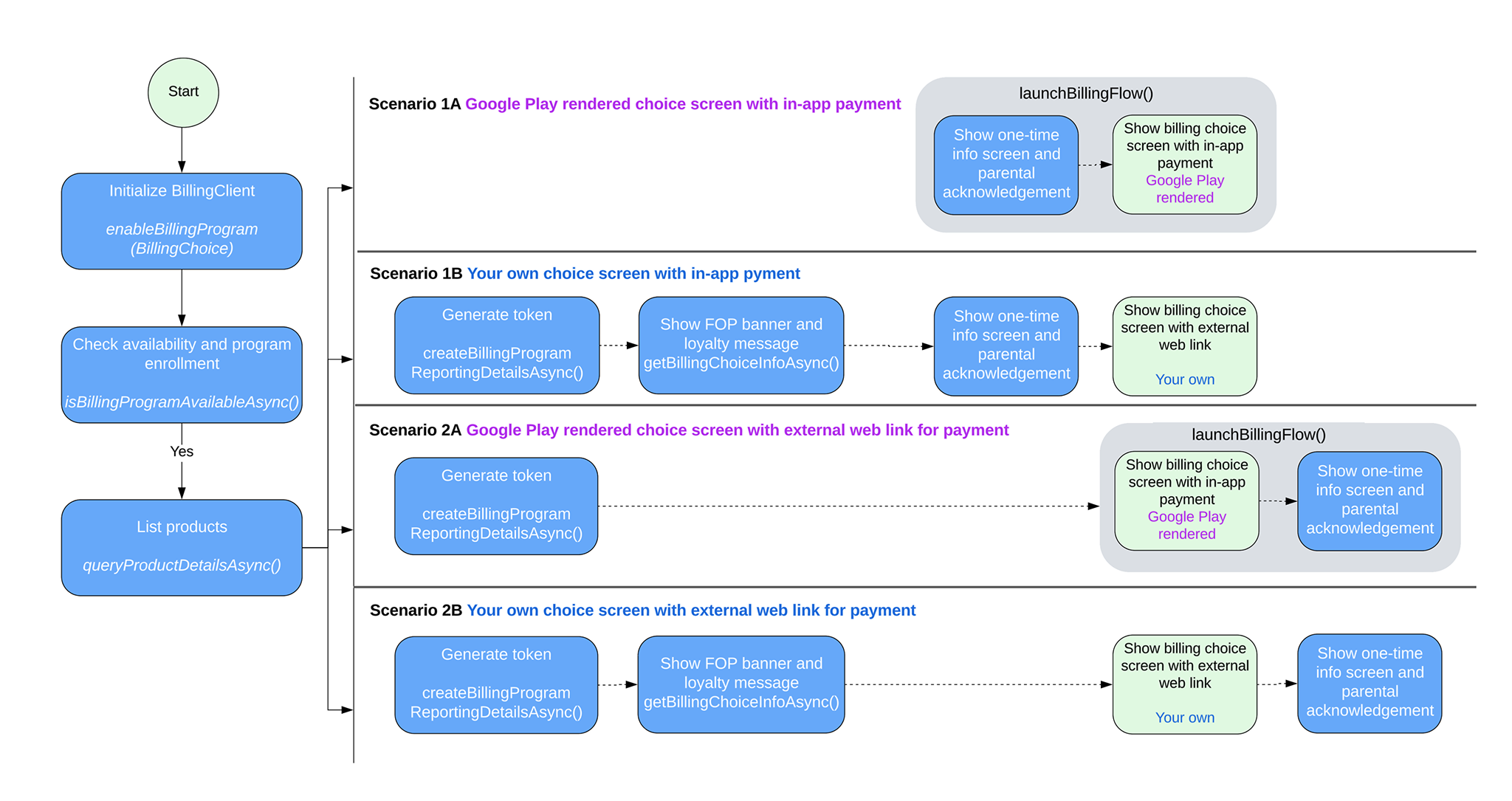
Các trường hợp tích hợp PBL
Tuỳ thuộc vào trường hợp tích hợp của bạn, hãy làm theo các bước trong phần này để triển khai lựa chọn hệ thống thanh toán trong ứng dụng.
Xử lý tình huống 1A
Google hiển thị màn hình lựa chọn và hệ thống thanh toán thay thế được xử lý trong ứng dụng của bạn. Hãy làm theo các bước sau để bật lựa chọn hệ thống thanh toán trong trường hợp này:
Gọi
enableBillingProgrambằngEnableBillingProgramParamskhi tạo thực thể BillingClient, rồi bắt đầu kết nối. Ví dụ:Kotlin
// Build the parameters to enable the Billing Choice program and assign the listener // to handle user selection of the developer-provided billing option. val enableBillingProgramParams = EnableBillingProgramParams.newBuilder() .setBillingProgram(BillingProgram.BILLING_CHOICE) .setDeveloperProvidedBillingListener(developerProvidedBillingListener) .build() // Build the parameters to enable support for pending purchases. val pendingPurchasesParams = PendingPurchasesParams.newBuilder() .enableOneTimeProducts() .build() // Construct the BillingClient instance with the purchases updated listener, // pending purchases support, and the billing choice params. val billingClient = BillingClient.newBuilder(context) .setListener(purchasesUpdatedListener) .enablePendingPurchases(pendingPurchasesParams) .enableBillingProgram(enableBillingProgramParams) .build() // Establish a connection to Google Play val billingResult = suspendCancellableCoroutine<BillingResult> { continuation -> billingClient.startConnection(object : BillingClientStateListener { // Called when the connection setup process completes. override fun onBillingSetupFinished(billingResult: BillingResult) { // Resume the coroutine and pass back the BillingResult to the caller. if (continuation.isActive) { continuation.resume(billingResult) } } // Called if the connection to the Play Store service is dropped. // This prevents the await or suspension point from hanging indefinitely. override fun onBillingServiceDisconnected() { if (continuation.isActive) { continuation.resume( BillingResult.newBuilder() .setResponseCode(BillingResponseCode.SERVICE_DISCONNECTED) .setDebugMessage("Billing service disconnected during connection setup") .build() ) } } }) }
Java
EnableBillingProgramParams params = EnableBillingProgramParams.newBuilder()
        .setBillingProgram(BillingProgram.BILLING_CHOICE)
        .setDeveloperProvidedBillingListener(developerProvidedBillingListener)
        .build();

BillingClient billingClient = BillingClient.newBuilder(context)
        .setListener(purchasesUpdatedListener)
        .enablePendingPurchases(
                PendingPurchasesParams.newBuilder()
                        .enableOneTimeProducts()
                        .build()
        )
        .enableBillingProgram(params)
        .build();
Xác minh rằng người dùng có thể sử dụng lựa chọn hệ thống thanh toán do Google hiển thị.
Gọi
isBillingProgramAvailableAsyncđể kiểm tra xem chương trình có sẵn hay không, sau đó gọiqueryProductDetailsAsyncđể cho thấy các sản phẩm hiện có. Ví dụ:Kotlin
val (billingResult, billingProgramAvailabilityDetails) = billingClient.isBillingProgramAvailable(BillingProgram.BILLING_CHOICE) if (billingResult.responseCode == BillingResponseCode.OK) { val billingChoiceAvailabilityDetails = billingProgramAvailabilityDetails.billingChoiceAvailabilityDetails if (billingChoiceAvailabilityDetails != null && billingChoiceAvailabilityDetails.choiceScreenType == ChoiceScreenType.GOOGLE_RENDERED ) { // Billing choice is available. Query products and proceed. } else { // Fallback to other available programs. } } else { // Fallback to other available programs. }
Java
// ...
billingClient.isBillingProgramAvailableAsync(
    BillingProgram.BILLING_CHOICE,
    (billingResult, billingProgramAvailabilityDetails) -> {
        if (billingResult.getResponseCode() == BillingResponseCode.OK) {
            BillingChoiceAvailabilityDetails billingChoiceAvailabilityDetails =
                billingProgramAvailabilityDetails.getBillingChoiceAvailabilityDetails();

            if (billingChoiceAvailabilityDetails != null &&
                billingChoiceAvailabilityDetails.getChoiceScreenType() == ChoiceScreenType.GOOGLE_RENDERED) {
                // Billing choice is available. Query products and proceed.
            } else {
                // Fallback to other available programs.
            }
        } else {
            // Fallback to other available programs.
        }
    }
);
Lưu ý:
billingProgramAvailabilityDetailscho biết bạn có thể sử dụng màn hình lựa chọn hệ thống thanh toán do Google hiển thị hay do nhà phát triển hiển thị.Gọi
launchBillingFlowđể kích hoạt quy trình mua khi người dùng nhấp vào Mua. Nếu có lựa chọn hệ thống thanh toán, hãy truyềnDeveloperBillingOptionParamsđếnBillingFlowParams. Ví dụ:Kotlin
val developerBillingOptionParams = DeveloperBillingOptionParams.newBuilder() .setBillingProgram(BillingProgram.BILLING_CHOICE) .build() val billingFlowParams = BillingFlowParams.newBuilder() .setProductDetailsParamsList(productDetailsParamsList) .enableDeveloperBillingOption(developerBillingOptionParams) .build() val billingResult = billingClient.launchBillingFlow(activity, billingFlowParams)
Java
DeveloperBillingOptionParams developerBillingOptionParams =
    DeveloperBillingOptionParams.newBuilder()
        .setBillingProgram(BillingProgram.BILLING_CHOICE)
        .build();
BillingFlowParams billingFlowParams =
    BillingFlowParams.newBuilder()
        .setProductDetailsParamsList(productDetailsParamsList)
        .enableDeveloperBillingOption(developerBillingOptionParams)
        .build();

BillingResult billingResult = billingClient.launchBillingFlow(activity, billingFlowParams);
Lưu ý: Chế độ kiểm soát của cha mẹ sẽ xuất hiện đối với người dùng được giám sát.
Xử lý lựa chọn của người dùng về loại thanh toán như sau:
- Nếu người dùng chọn Play Billing, kết quả thanh toán sẽ được trả về
PurchasesUpdatedListenerđã đăng ký ở bước 1. - Nếu người dùng chọn hệ thống thanh toán thay thế của bạn, thì kết quả thanh toán sẽ được trả về
DeveloperProvidedBillingListenerđã đăng ký ở bước 1.DeveloperProvidedBillingDetailsđược trả về chứa mộtexternalTransactionTokentrong trường hợp này. Mã thông báo này sẽ được dùng để báo cáo giao dịch.
- Nếu người dùng chọn Play Billing, kết quả thanh toán sẽ được trả về
Xử lý tình huống 1B
Nhà phát triển hiển thị màn hình lựa chọn và hệ thống thanh toán thay thế được xử lý trong ứng dụng của bạn. Hãy làm theo các bước sau để bật lựa chọn hệ thống thanh toán trong trường hợp này:
Gọi
enableBillingProgrammà không cóDeveloperProvidedBillingListenertrongEnableBillingProgramParamskhi tạo một thực thểBillingClient, rồi bắt đầu kết nối. Ví dụ:Kotlin
// Build the parameters to enable the Billing Choice program. val enableBillingProgramParams = EnableBillingProgramParams.newBuilder() .setBillingProgram(BillingProgram.BILLING_CHOICE) .build() // Build the parameters to enable support for pending purchases. val pendingPurchasesParams = PendingPurchasesParams.newBuilder() .enableOneTimeProducts() .build() // Construct the BillingClient instance with the purchases updated listener, // pending purchases support, and the billing choice params. val billingClient = BillingClient.newBuilder(context) .setListener(purchasesUpdatedListener) .enablePendingPurchases(pendingPurchasesParams) .enableBillingProgram(enableBillingProgramParams) .build() // Establish a connection to Google Play val billingResult = suspendCancellableCoroutine<BillingResult> { continuation -> billingClient.startConnection(object : BillingClientStateListener { // Called when the connection setup process completes. override fun onBillingSetupFinished(billingResult: BillingResult) { // Resume the coroutine and pass back the BillingResult to the caller. if (continuation.isActive) { continuation.resume(billingResult) } } // Called if the connection to the Play Store service is dropped. // This prevents the await or suspension point from hanging indefinitely. override fun onBillingServiceDisconnected() { if (continuation.isActive) { continuation.resume( BillingResult.newBuilder() .setResponseCode(BillingResponseCode.SERVICE_DISCONNECTED) .setDebugMessage("Billing service disconnected during connection setup") .build() ) } } }) }
Java
EnableBillingProgramParams params = EnableBillingProgramParams.newBuilder()
        .setBillingProgram(BillingProgram.BILLING_CHOICE)
        .build();

BillingClient billingClient = BillingClient.newBuilder(context)
        .setListener(purchasesUpdatedListener)
        .enablePendingPurchases()
        .enableBillingProgram(params)
        .build();
Xác minh rằng người dùng có thể sử dụng lựa chọn hệ thống thanh toán do nhà phát triển hiển thị.
Gọi
isBillingProgramAvailableAsyncđể kiểm tra xem chương trình có sẵn hay không, sau đó gọiqueryProductDetailsAsyncđể cho thấy các sản phẩm hiện có. Ví dụ:Kotlin
val (billingResult, billingProgramAvailabilityDetails) = billingClient.isBillingProgramAvailable(BillingProgram.BILLING_CHOICE) if (billingResult.responseCode == BillingResponseCode.OK) { val billingChoiceAvailabilityDetails = billingProgramAvailabilityDetails.billingChoiceAvailabilityDetails if (billingChoiceAvailabilityDetails != null && billingChoiceAvailabilityDetails.choiceScreenType == ChoiceScreenType.DEVELOPER_RENDERED ) { // Billing choice is available. Query products and proceed. // You can inspect details such as: // - billingChoiceAvailabilityDetails.choiceScreenType // - billingChoiceAvailabilityDetails.isExternalLinkAvailable } else { // Fallback to other available programs. } } else { // Fallback to other available programs. }
Java
// ...
billingClient.isBillingProgramAvailableAsync(
    BillingProgram.BILLING_CHOICE,
    (billingResult, billingProgramAvailabilityDetails) -> {
        if (billingResult.getResponseCode() == BillingResponseCode.OK) {
            BillingChoiceAvailabilityDetails billingChoiceAvailabilityDetails =
                billingProgramAvailabilityDetails.getBillingChoiceAvailabilityDetails();

            if (billingChoiceAvailabilityDetails != null
                    && billingChoiceAvailabilityDetails.getChoiceScreenType() == ChoiceScreenType.DEVELOPER_RENDERED) {
                // Billing choice is available. Query products and proceed.
                // You can inspect details such as:
                // - billingChoiceAvailabilityDetails.getChoiceScreenType()
                // - billingChoiceAvailabilityDetails.isExternalLinkAvailable()
            } else {
                // Fallback to other available programs.
            }
        } else {
            // Fallback to other available programs.
        }
    }
);
Lưu ý:
billingProgramAvailabilityDetailscho biết bạn có thể dùng màn hình lựa chọn hệ thống thanh toán do Google hiển thị hay do nhà phát triển hiển thị.Gọi phương thức
getBillingChoiceInfoAsyncđể nhận biểu ngữ Play Billing và thông tin về chương trình khách hàng thân thiết. Ví dụ:Kotlin
// 1. Create the params required for the request val params = GetBillingChoiceInfoParams.newBuilder() .setBillingProgram(BillingProgram.BILLING_CHOICE) .setPlayBillingChoiceImageLayout(GetBillingChoiceInfoParams.ImageLayout.RECTANGULAR_FOUR_BY_ONE) .build() // 2. Call the suspend method on your billingClient instance val (billingResult, playBillingChoiceInfo) = billingClient.getBillingChoiceInfo(params) if (billingResult.responseCode == BillingResponseCode.OK && playBillingChoiceInfo != null) { // Access the URL of the image associated with the Play Billing Choice val imageUrl = playBillingChoiceInfo.playBillingChoiceImageUrl // Access the Play Loyalty string information, if available val loyaltyInfo = playBillingChoiceInfo.playBillingLoyaltyInfo // Populate your developer-rendered UI elements playBillingLoyaltyTextView.text = loyaltyInfo loadImage(imageUrl, playBillingImageView) } else { // Handle error scenarios }
Java
// 1. Create the params required for the request
GetBillingChoiceInfoParams params = GetBillingChoiceInfoParams.newBuilder()
    .setBillingProgram(BillingClient.BillingProgram.BILLING_CHOICE)
    .setPlayBillingChoiceImageLayout(GetBillingChoiceInfoParams.ImageLayout.RECTANGULAR_FOUR_BY_ONE)
    .build();
// 2. Call the method asynchronously on your billingClient instance
billingClient.getBillingChoiceInfoAsync(params, (billingResult, playBillingChoiceInfo) -> {
    if (billingResult.getResponseCode() == BillingResponseCode.OK && playBillingChoiceInfo != null) {
      // Access the URL of the image associated with the Play Billing Choice
        String imageUrl = playBillingChoiceInfo.getPlayBillingChoiceImageUrl();
        // Access the Play Loyalty string information, if available
        String loyaltyInfo = playBillingChoiceInfo.getPlayBillingLoyaltyInfo();

        // Populate your developer-rendered UI elements
        playBillingLoyaltyTextView.setText(loyaltyInfo);
          loadImage(imageUrl, playBillingImageView);
      } else {
          // Handle error scenarios
      }
});
Tạo mã thông báo giao dịch bên ngoài với DeveloperBillingType được đặt thành IN_APP. Ví dụ:
Kotlin
// Build the parameters specifying the billing program and that the billing type is IN_APP. val params = BillingProgramReportingDetailsParams.newBuilder() .setBillingProgram(BillingProgram.BILLING_CHOICE) .setDeveloperBillingType(DeveloperBillingType.IN_APP) .build() // Call the suspending extension function to request the reporting details val (billingResult, billingProgramReportingDetails) = billingClient.createBillingProgramReportingDetails(params) if (billingResult.responseCode != BillingResponseCode.OK) { // Handle failures such as retrying due to network errors. return } // Extract the transaction token from the returned reporting details val transactionToken = billingProgramReportingDetails?.externalTransactionToken // Persist the external transaction token locally. Pass it to // DeveloperBillingOptionParams when launchBillingFlow is called. // It can also be used as part of your external website
Java
BillingProgramReportingDetailsParams params =
    BillingProgramReportingDetailsParams.newBuilder()
        .setBillingProgram(BillingProgram.BILLING_CHOICE)
        .setDeveloperBillingType(DeveloperBillingType.IN_APP)
        .build();

billingClient.createBillingProgramReportingDetailsAsync(
    params,
    new BillingProgramReportingDetailsListener() {
        @Override
        public void onCreateBillingProgramReportingDetailsResponse(
            BillingResult billingResult,
            @Nullable BillingProgramReportingDetails billingProgramReportingDetails
        ) {
            if (billingResult.getResponseCode() != BillingResponseCode.OK) {
                // Handle failures such as retrying due to network errors.
                return;
            }

            String transactionToken =
                billingProgramReportingDetails.getExternalTransactionToken();

            // Persist the external transaction token locally. Pass it to
            // DeveloperBillingOptionParams when launchBillingFlow is called.
            // It can also be used as part of your external website
        }
    }
);
Khi người dùng nhấp vào Mua, hãy gọi
showBillingProgramInformationDialogđể hiện hộp thoại thông tin. Ví dụ: xem Hộp thoại thông tin dành cho người dùng. Bạn phải đặt BillingProgram và transactionToken từ bước 4 trong yêu cầu.Lưu ý: Chế độ kiểm soát của cha mẹ sẽ xuất hiện đối với người dùng được giám sát.
Khởi chạy màn hình lựa chọn hệ thống thanh toán thay thế nếu kết quả của bước trước là
OK.Xử lý lựa chọn của người dùng về loại thanh toán như sau:
- Nếu người dùng chọn Play Billing, hãy gọi
launchBillingFlowtheo hướng dẫn tiêu chuẩn về Play Billing. Kết quả thanh toán được trả vềPurchasesUpdatedListenerđã đăng ký ở bước 1. - Nếu người dùng chọn hệ thống thanh toán thay thế của bạn, thì bạn phải tự xử lý giao dịch và báo cáo giao dịch đó cho Play bằng mã thông báo được tạo ở bước 4.
- Nếu người dùng chọn Play Billing, hãy gọi
Xử lý tình huống 2A
Google hiển thị màn hình lựa chọn và hệ thống thanh toán thay thế được xử lý bên ngoài ứng dụng của bạn. Hãy làm theo các bước sau để bật lựa chọn hệ thống thanh toán trong trường hợp này:
Gọi
enableBillingProgrambằngEnableBillingProgramParamskhi tạo thực thể BillingClient, rồi bắt đầu kết nối. Ví dụ:Kotlin
// Build the parameters to enable the Billing Choice program and assign the listener // to handle user selection of the developer-provided billing option. val enableBillingProgramParams = EnableBillingProgramParams.newBuilder() .setBillingProgram(BillingProgram.BILLING_CHOICE) .setDeveloperProvidedBillingListener(developerProvidedBillingListener) .build() // Build the parameters to enable support for pending purchases. val pendingPurchasesParams = PendingPurchasesParams.newBuilder() .enableOneTimeProducts() .build() // Construct the BillingClient instance with the purchases updated listener, // pending purchases support, and the billing choice params. val billingClient = BillingClient.newBuilder(context) .setListener(purchasesUpdatedListener) .enablePendingPurchases(pendingPurchasesParams) .enableBillingProgram(enableBillingProgramParams) .build() // Establish a connection to Google Play val billingResult = suspendCancellableCoroutine<BillingResult> { continuation -> billingClient.startConnection(object : BillingClientStateListener { // Called when the connection setup process completes. override fun onBillingSetupFinished(billingResult: BillingResult) { // Resume the coroutine and pass back the BillingResult to the caller. if (continuation.isActive) { continuation.resume(billingResult) } } // Called if the connection to the Play Store service is dropped. // This prevents the await or suspension point from hanging indefinitely. override fun onBillingServiceDisconnected() { if (continuation.isActive) { continuation.resume( BillingResult.newBuilder() .setResponseCode(BillingResponseCode.SERVICE_DISCONNECTED) .setDebugMessage("Billing service disconnected during connection setup") .build() ) } } }) }
Java
EnableBillingProgramParams params = EnableBillingProgramParams.newBuilder()
        .setBillingProgram(BillingProgram.BILLING_CHOICE)
        .setDeveloperProvidedBillingListener(developerProvidedBillingListener)
        .build();

BillingClient billingClient = BillingClient.newBuilder(context)
        .setListener(purchasesUpdatedListener)
        .enablePendingPurchases(
                PendingPurchasesParams.newBuilder()
                        .enableOneTimeProducts()
                        .build()
        )
        .enableBillingProgram(params)
        .build();
Xác minh tình trạng còn hàng của những sản phẩm sau:
- Lựa chọn hệ thống thanh toán do Google cung cấp
- Đường liên kết trang web bên ngoài
Gọi
isBillingProgramAvailableAsyncđể kiểm tra tình trạng cung cấp chương trình, sau đó gọiqueryProductDetailsAsyncđể cho thấy các sản phẩm hiện có. Ví dụ:Kotlin
// Check the availability of the billing choice program asynchronously using coroutines val (billingResult, billingProgramAvailabilityDetails) = billingClient.isBillingProgramAvailable(BillingProgram.BILLING_CHOICE) // Ensure the billing program query succeeded if (billingResult.responseCode == BillingResponseCode.OK) { // Retrieve the availability details specific to the billing choice program val billingChoiceAvailabilityDetails = billingProgramAvailabilityDetails.billingChoiceAvailabilityDetails // Check if billing choice is available, renders via Google Play, and external link is supported if (billingChoiceAvailabilityDetails != null && billingChoiceAvailabilityDetails.choiceScreenType == ChoiceScreenType.GOOGLE_RENDERED && billingChoiceAvailabilityDetails.isExternalLinkAvailable ) { // Billing choice is available and external transaction links are supported. Query products and proceed. } else { // Fallback to other available programs. } } else { // Fallback to other available programs. }
Java
// ...
billingClient.isBillingProgramAvailableAsync(
    BillingProgram.BILLING_CHOICE,
    (billingResult, billingProgramAvailabilityDetails) -> {
        if (billingResult.getResponseCode() == BillingResponseCode.OK) {
            BillingChoiceAvailabilityDetails billingChoiceAvailabilityDetails =
                billingProgramAvailabilityDetails.getBillingChoiceAvailabilityDetails();

            if (billingChoiceAvailabilityDetails != null
                    && billingChoiceAvailabilityDetails.getChoiceScreenType() == ChoiceScreenType.GOOGLE_RENDERED
                    && billingChoiceAvailabilityDetails.isExternalLinkAvailable()) {
                // Billing choice is available and external transaction links are supported.
                // Query products and proceed.
            } else {
                // Fallback to other available programs.
            }
        } else {
            // Fallback to other available programs.
        }
    }
);
Gọi
createBillingProgramReportingDetailsAsyncđể tạo mã thông báo giao dịch bên ngoài khi người dùng cho thấy ý định mua hàng. Ví dụ:Kotlin
// Build the parameters for creating reporting details val params = BillingProgramReportingDetailsParams.newBuilder() .setBillingProgram(BillingProgram.BILLING_CHOICE) .setDeveloperBillingType(DeveloperBillingType.EXTERNAL_LINK) .build() // Call the suspend function to create billing program reporting details val (billingResult, billingProgramReportingDetails) = billingClient.createBillingProgramReportingDetails(params) // Handle response failure cases if (billingResult.responseCode != BillingResponseCode.OK) { // Handle failures such as retrying due to network errors. return } // Retrieve the external transaction token val transactionToken = billingProgramReportingDetails?.externalTransactionToken // Persist the external transaction token locally. Pass it to // DeveloperBillingOptionParams when launchBillingFlow is called. // It can also be used as part of your external website
Java
BillingProgramReportingDetailsParams params =
    BillingProgramReportingDetailsParams.newBuilder()
        .setBillingProgram(BillingProgram.BILLING_CHOICE)
        .setDeveloperBillingType(DeveloperBillingType.EXTERNAL_LINK)
        .build();

billingClient.createBillingProgramReportingDetailsAsync(
    params,
    new BillingProgramReportingDetailsListener() {
        @Override
        public void onCreateBillingProgramReportingDetailsResponse(
            BillingResult billingResult,
            @Nullable BillingProgramReportingDetails billingProgramReportingDetails
        ) {
            if (billingResult.getResponseCode() != BillingResponseCode.OK) {
                // Handle failures such as retrying due to network errors.
                return;
            }

            String transactionToken =
                billingProgramReportingDetails.getExternalTransactionToken();

            // Persist the external transaction token locally. Pass it to
            // DeveloperBillingOptionParams when launchBillingFlow is called.
            // It can also be used as part of your external website.
        }
    }
);
Gọi
launchBillingFlowđể kích hoạt quy trình mua khi người dùng nhấp vào Mua. Nếu người dùng có thể chọn hệ thống thanh toán, hãy thực hiện những việc sau:- Truyền
DeveloperBillingOptionParamsđếnBillingFlowParams. - Truyền mã thông báo giao dịch bên ngoài từ bước 3 đến
DeveloperBillingOptionParams.
Ví dụ:
Kotlin
// Build the developer billing option parameters with the external link URI, // the transaction token, and browser/app launch mode. val developerBillingOptionParams = DeveloperBillingOptionParams.newBuilder() .setBillingProgram(BillingProgram.BILLING_CHOICE) .setLinkUri(Uri.parse("https://www.example.com/external/purchase")) .setExternalTransactionToken(transactionToken) .setLaunchMode( DeveloperBillingOptionParams.LaunchMode.LAUNCH_IN_EXTERNAL_BROWSER_OR_APP ) .build() val billingFlowParams = BillingFlowParams.newBuilder() .setProductDetailsParamsList(productDetailsParamsList) .enableDeveloperBillingOption(developerBillingOptionParams) .build() val billingResult = billingClient.launchBillingFlow(activity, billingFlowParams)
Java
DeveloperBillingOptionParams developerBillingOptionParams =
    DeveloperBillingOptionParams.newBuilder()
        .setBillingProgram(BillingProgram.BILLING_CHOICE)
        .setLinkUri(Uri.parse("https://www.example.com/external/purchase"))
        .setExternalTransactionToken(transactionToken)
        .setLaunchMode(
          DeveloperBillingOptionParams.LaunchMode.LAUNCH_IN_EXTERNAL_BROWSER_OR_APP)
        .build();
Lưu ý: Chế độ kiểm soát của cha mẹ sẽ xuất hiện đối với người dùng được giám sát.
- Truyền
Xử lý lựa chọn của người dùng về loại thanh toán như sau:
- Nếu người dùng chọn Play Billing, hãy gọi
launchBillingFlowtheo hướng dẫn tiêu chuẩn về Play Billing. Kết quả thanh toán được trả vềPurchasesUpdatedListenerđã đăng ký ở bước 1. - Nếu người dùng chọn hệ thống thanh toán thay thế của bạn, thì kết quả thanh toán sẽ được trả về
DeveloperProvidedBillingListenerđã đăng ký ở bướcDeveloperProvidedBillingDetailsđược trả về chứaexternalTransactionTokenđã được truyền đếnDeveloperBillingOptionParamsở bước 4 nếu đó là một mã thông báo hợp lệ.
- Nếu người dùng chọn Play Billing, hãy gọi
Xử lý tình huống 2B
Nhà phát triển hiển thị màn hình lựa chọn và hệ thống thanh toán thay thế được xử lýbên ngoài ứng dụng. Hãy làm theo các bước sau để bật lựa chọn thanh toán trong trường hợp này:
Gọi
enableBillingProgrammà không cóDeveloperProvidedBillingListenertrongEnableBillingProgramParamskhi tạo một thực thể BillingClient, sau đó bắt đầu kết nối. Ví dụ:Kotlin
// Build the parameters to enable the Billing Choice program. val enableBillingProgramParams = EnableBillingProgramParams.newBuilder() .setBillingProgram(BillingProgram.BILLING_CHOICE) .build() // Build the parameters to enable support for pending purchases. val pendingPurchasesParams = PendingPurchasesParams.newBuilder() .enableOneTimeProducts() .build() // Construct the BillingClient instance with the purchases updated listener, // pending purchases support, and the billing choice params. val billingClient = BillingClient.newBuilder(context) .setListener(purchasesUpdatedListener) .enablePendingPurchases(pendingPurchasesParams) .enableBillingProgram(enableBillingProgramParams) .build() // Establish a connection to Google Play val billingResult = suspendCancellableCoroutine<BillingResult> { continuation -> billingClient.startConnection(object : BillingClientStateListener { // Called when the connection setup process completes. override fun onBillingSetupFinished(billingResult: BillingResult) { // Resume the coroutine and pass back the BillingResult to the caller. if (continuation.isActive) { continuation.resume(billingResult) } } // Called if the connection to the Play Store service is dropped. // This prevents the await or suspension point from hanging indefinitely. override fun onBillingServiceDisconnected() { if (continuation.isActive) { continuation.resume( BillingResult.newBuilder() .setResponseCode(BillingResponseCode.SERVICE_DISCONNECTED) .setDebugMessage("Billing service disconnected during connection setup") .build() ) } } }) }
Java
EnableBillingProgramParams params = EnableBillingProgramParams.newBuilder()
        .setBillingProgram(BillingProgram.BILLING_CHOICE)
        .build();

BillingClient billingClient = BillingClient.newBuilder(context)
        .setListener(purchasesUpdatedListener)
        .enablePendingPurchases()
        .enableBillingProgram(params)
        .build();
Xác minh tình trạng còn hàng của những sản phẩm sau:
- Lựa chọn hệ thống thanh toán do Google cung cấp
- Đường liên kết trang web bên ngoài
Gọi
isBillingProgramAvailableAsyncđể kiểm tra tình trạng cung cấp chương trình, sau đó gọiqueryProductDetailsAsyncđể cho thấy các sản phẩm hiện có. Ví dụ:Kotlin
// Check the availability of the billing choice program asynchronously using a coroutine val (billingResult, billingProgramAvailabilityDetails) = billingClient.isBillingProgramAvailable(BillingProgram.BILLING_CHOICE) // Ensure the response code is OK if (billingResult.responseCode == BillingResponseCode.OK) { // Retrieve the billing choice availability details val billingChoiceAvailabilityDetails = billingProgramAvailabilityDetails.billingChoiceAvailabilityDetails // Check if billing choice details are available, choice screen is developer-rendered, // and external transaction links are supported. if (billingChoiceAvailabilityDetails != null && billingChoiceAvailabilityDetails.choiceScreenType == ChoiceScreenType.DEVELOPER_RENDERED && billingChoiceAvailabilityDetails.isExternalLinkAvailable ) { // Billing choice is available and external transaction links are supported. // Query products and proceed. } else { // Fallback to other available programs. } } else { // Fallback to other available programs. }
Java
// ...

billingClient.isBillingProgramAvailableAsync(
    BillingProgram.BILLING_CHOICE,
    (billingResult, billingProgramAvailabilityDetails) -> {
        if (billingResult.getResponseCode() == BillingResponseCode.OK) {
            BillingChoiceAvailabilityDetails billingChoiceAvailabilityDetails =
                billingProgramAvailabilityDetails.getBillingChoiceAvailabilityDetails();
            if (billingChoiceAvailabilityDetails != null &&
                billingChoiceAvailabilityDetails.getChoiceScreenType() == ChoiceScreenType.DEVELOPER_RENDERED &&
                billingChoiceAvailabilityDetails.isExternalLinkAvailable()) {
                // Billing choice is available and external transaction links are supported. Query products and proceed.
            } else {
                // Fallback to other available programs.
            }
        } else {
            // Fallback to other available programs.
        }
    }
);
Gọi phương thức
getBillingChoiceInfoAsyncđể nhận biểu ngữ Play Billing và thông tin về chương trình khách hàng thân thiết.Kotlin
// 1. Create the params required for the request val params = GetBillingChoiceInfoParams.newBuilder() .setBillingProgram(BillingProgram.BILLING_CHOICE) .setPlayBillingChoiceImageLayout(GetBillingChoiceInfoParams.ImageLayout.RECTANGULAR_FOUR_BY_ONE) .build() // 2. Call the suspend method on your billingClient instance val (billingResult, playBillingChoiceInfo) = billingClient.getBillingChoiceInfo(params) if (billingResult.responseCode == BillingResponseCode.OK && playBillingChoiceInfo != null) { // Access the URL of the image associated with the Play Billing Choice val imageUrl = playBillingChoiceInfo.playBillingChoiceImageUrl // Access the Play Loyalty string information, if available val loyaltyInfo = playBillingChoiceInfo.playBillingLoyaltyInfo // Populate your developer-rendered UI elements playBillingLoyaltyTextView.text = loyaltyInfo loadImage(imageUrl, playBillingImageView) } else { // Handle error scenarios }
Java
// 1. Create the params required for the request
GetBillingChoiceInfoParams params = GetBillingChoiceInfoParams.newBuilder()
    .setBillingProgram(BillingClient.BillingProgram.BILLING_CHOICE)
    .setPlayBillingChoiceImageLayout(GetBillingChoiceInfoParams.ImageLayout.RECTANGULAR_FOUR_BY_ONE)
    .build();
// 2. Call the method asynchronously on your billingClient instance
billingClient.getBillingChoiceInfoAsync(params, (billingResult, playBillingChoiceInfo) -> {
    if (billingResult.getResponseCode() == BillingResponseCode.OK && playBillingChoiceInfo != null) {
      // Access the URL of the image associated with the Play Billing Choice
        String imageUrl = playBillingChoiceInfo.getPlayBillingChoiceImageUrl();
        // Access the Play Loyalty string information, if available
        String loyaltyInfo = playBillingChoiceInfo.getPlayBillingLoyaltyInfo();

        // Populate your developer-rendered UI elements
        playBillingLoyaltyTextView.setText(loyaltyInfo);
          loadImage(imageUrl, playBillingImageView);
      } else {
          // Handle error scenarios
      }
});
Gọi
createBillingProgramReportingDetailsAsyncđể tạo mã thông báo giao dịch bên ngoài khi người dùng cho thấy ý định mua hàng. Ví dụ:Kotlin
// Build the parameters for creating reporting details val params = BillingProgramReportingDetailsParams.newBuilder() .setBillingProgram(BillingProgram.BILLING_CHOICE) .setDeveloperBillingType(DeveloperBillingType.EXTERNAL_LINK) .build() // Call the suspend function to create billing program reporting details val (billingResult, billingProgramReportingDetails) = billingClient.createBillingProgramReportingDetails(params) // Handle response failure cases if (billingResult.responseCode != BillingResponseCode.OK) { // Handle failures such as retrying due to network errors. return } // Retrieve the external transaction token val transactionToken = billingProgramReportingDetails?.externalTransactionToken // Persist the external transaction token locally. Pass it to // DeveloperBillingOptionParams when launchBillingFlow is called. // It can also be used as part of your external website
Java
BillingProgramReportingDetailsParams params =
    BillingProgramReportingDetailsParams.newBuilder()
        .setBillingProgram(BillingProgram.BILLING_CHOICE)
        .setDeveloperBillingType(DeveloperBillingType.EXTERNAL_LINK)
        .build();

billingClient.createBillingProgramReportingDetailsAsync(
    params,
    new BillingProgramReportingDetailsListener() {
        @Override
        public void onCreateBillingProgramReportingDetailsResponse(
            BillingResult billingResult,
            @Nullable BillingProgramReportingDetails billingProgramReportingDetails
        ) {
            if (billingResult.getResponseCode() != BillingResponseCode.OK) {
                // Handle failures such as retrying due to network errors.
                return;
            }

            String transactionToken =
                billingProgramReportingDetails.getExternalTransactionToken();

            // Persist the external transaction token locally. Pass it to
            // DeveloperBillingOptionParams when launchBillingFlow is called.
            // It can also be used as part of your external website.
        }
    }
);
Khởi chạy màn hình lựa chọn thay thế khi người dùng nhấp vào nút Mua.
Xử lý lựa chọn của người dùng về loại thanh toán như sau:
Nếu người dùng chọn Play Billing, hãy gọi
launchBillingFlowtheo hướng dẫn tiêu chuẩn về Play Billing. Kết quả thanh toán được trả vềPurchasesUpdatedListenerđã đăng ký ở bước 1.Chế độ kiểm soát của cha mẹ sẽ xuất hiện cho người dùng được giám sát.
Nếu người dùng chọn hệ thống thanh toán thay thế của bạn, hãy gọi launchExternalLink. Ví dụ:
Kotlin
// An activity reference from which the purchase flow will be launched. val params = LaunchExternalLinkParams.newBuilder() .setBillingProgram(BillingProgram.BILLING_CHOICE) .setExternalTransactionToken(transactionToken) // You can pass along the external transaction token from // BillingProgramReportingDetails as a URL parameter in the URI .setLinkUri(yourLinkUri) .setLinkType(LaunchExternalLinkParams.LinkType.LINK_TO_DIGITAL_CONTENT_OFFER) .setLaunchMode( LaunchExternalLinkParams.LaunchMode.LAUNCH_IN_EXTERNAL_BROWSER_OR_APP ) .build() // Call launchExternalLink with a callback billingClient.launchExternalLink(activity, params) { billingResult -> if (billingResult.responseCode == BillingResponseCode.OK) { // Proceed with the rest of the purchase flow. If the user // purchases an item, be sure to report the transaction to Google // Play. } else { // Handle failures such as retrying due to network errors. } }
Java
// An activity reference from which the purchase flow will be launched.
Activity activity = ...;

LaunchExternalLinkParams params = LaunchExternalLinkParams.newBuilder()
    .setBillingProgram(BillingProgram.BILLING_CHOICE)
    // You can pass along the external transaction token from
    // BillingProgramReportingDetails as a URL parameter in the URI
    .setLinkUri(yourLinkUri)
    .setLinkType(LaunchExternalLinkParams.LinkType.LINK_TO_DIGITAL_CONTENT_OFFER)
    .setLaunchMode(
        LaunchExternalLinkParams.LaunchMode.LAUNCH_IN_EXTERNAL_BROWSER_OR_APP)
    .setExternalTransactionToken(transactionToken)
    .build();

LaunchExternalLinkResponseListener listener =
    new LaunchExternalLinkResponseListener() {
      @Override
      public void onLaunchExternalLinkResponse(BillingResult billingResult) {
        if (billingResult.getResponseCode() == BillingResponseCode.OK) {
          // Proceed with the rest of the purchase flow. If the user
          // purchases an item, be sure to report the transaction to Google
          // Play.
        } else {
          // Handle failures such as retrying due to network errors.
        }
      }
    };

billingClient.launchExternalLink(activity, params, listener);
Truyền mã thông báo giao dịch bên ngoài từ bước 4 đến
LaunchExternalLinkParams. Nếu phương thức này trả về OK, hãy tiếp tục giao dịch và báo cáo giao dịch đó cho Google Play.Chế độ kiểm soát của cha mẹ sẽ xuất hiện cho người dùng được giám sát.
Lựa chọn thanh toán trong quá trình thay thế gói thuê bao
Đối với việc thay thế gói thuê bao, màn hình lựa chọn của người dùng sẽ không xuất hiện vì lựa chọn của người dùng cho giao dịch mua ban đầu được giữ nguyên cho việc nâng cấp và hạ cấp.
Nếu giao dịch mua ban đầu được xử lý thông qua Google Play Billing, bạn nên gọi launchBillingFlow bằng thông tin tiêu chuẩn về việc thay thế gói thuê bao qua Google Play Billing.
Tuy nhiên, nếu giao dịch mua ban đầu được xử lý thông qua một hệ thống thanh toán thay thế, thì việc xử lý các trường hợp thay thế gói thuê bao sẽ có chút khác biệt tuỳ theo từng trường hợp.
Thay thế gói thuê bao trong Tình huống 1A
Người dùng yêu cầu nâng cấp hoặc hạ cấp nên tiến hành thông qua hệ thống thanh toán thay thế của nhà phát triển mà không cần trải qua sự lựa chọn của người dùng lần nữa.
Để thực hiện việc này, hãy gọi launchBillingFlow khi người dùng yêu cầu nâng cấp hoặc hạ cấp. Sử dụng setOriginalExternalTransactionId bên trong đối tượng SubscriptionUpdateParams trong các tham số để cung cấp mã giao dịch bên ngoài cho giao dịch mua ban đầu. Thao tác này sẽ không cho thấy màn hình lựa chọn của người dùng, vì lựa chọn của người dùng cho giao dịch mua ban đầu được giữ nguyên cho việc nâng cấp và hạ cấp. Trong trường hợp này, lệnh gọi đến launchBillingFlow sẽ tạo ra mã giao dịch bên ngoài mới đối với giao dịch mà bạn truy xuất được qua lệnh gọi lại.
Kotlin
// The external transaction ID from the current // alternative billing subscription. val externalTransactionId = "external_transaction_id" val developerBillingOptionParams = DeveloperBillingOptionParams.newBuilder() .setBillingProgram(BillingProgram.BILLING_CHOICE) .build() val billingFlowParams = BillingFlowParams.newBuilder() .setProductDetailsParamsList( listOf( BillingFlowParams.ProductDetailsParams.newBuilder() // Fetched using queryProductDetailsAsync. .setProductDetails(productDetailsNewPlan) // offerIdToken can be found in // ProductDetails=>SubscriptionOfferDetails. .setOfferToken(offerTokenNewPlan) .build() ) ) .setSubscriptionUpdateParams( SubscriptionUpdateParams.newBuilder() .setOriginalExternalTransactionId(externalTransactionId) .build() ) .enableDeveloperBillingOption(developerBillingOptionParams) .build() val billingResult = billingClient.launchBillingFlow(activity, billingFlowParams) // When the user selects the alternative billing flow, // the DeveloperProvidedBillingListener is triggered.
Java
// The external transaction ID from the current
// alternative billing subscription.
String externalTransactionId = //... ;

DeveloperBillingOptionParams developerBillingOptionParams =
    DeveloperBillingOptionParams.newBuilder()
        .setBillingProgram(BillingProgram.BILLING_CHOICE)
        .build();

List<ProductDetailsParams> productDetailsParamsList = new ArrayList<>();
productDetailsParamsList.add(
    ProductDetailsParams.newBuilder()
        // Fetched using queryProductDetailsAsync.
        .setProductDetails(productDetailsNewPlan)
        // offerIdToken can be found in
        // ProductDetails=>SubscriptionOfferDetails
        .setOfferToken(offerTokenNewPlan)
        .build());

BillingFlowParams billingFlowParams =
    BillingFlowParams.newBuilder()
        .setProductDetailsParamsList(productDetailsParamsList)
        .setSubscriptionUpdateParams(
            SubscriptionUpdateParams.newBuilder()
                .setOriginalExternalTransactionId(externalTransactionId)
                .build())
        .enableDeveloperBillingOption(developerBillingOptionParams)
        .build();

BillingResult billingResult = billingClient.launchBillingFlow(activity, billingFlowParams);

// When the user selects the alternative billing flow,
// the DeveloperProvidedBillingListener is triggered.
Khi hoàn tất quy trình nâng cấp hoặc hạ cấp, bạn cần báo cáo giao dịch mới bằng mã thông báo giao dịch bên ngoài nhận được thông qua lệnh gọi trước đó đối với giao dịch mua gói thuê bao mới.
Thay thế gói thuê bao trong Trường hợp 1B
Trong trường hợp này, bạn phải tạo mã giao dịch bên ngoài mới. Điểm khác biệt duy nhất so với giao dịch mua thông thường là trong trường hợp này, lựa chọn của người dùng được giữ nguyên và bạn không phải cho thấy màn hình lựa chọn để nâng cấp hoặc hạ cấp. Tuy nhiên, bạn phải cho thấy hộp thoại thông tin một lần và lời xác nhận của cha mẹ.
Để xem mã tích hợp mẫu, hãy xem bước 4 trong Tình huống 1B: Nhà phát triển hiển thị màn hình lựa chọn và hệ thống thanh toán thay thế được xử lý trong ứng dụng của bạn.
Khi hoàn tất quy trình nâng cấp hoặc hạ cấp, bạn cần báo cáo giao dịch mới bằng mã thông báo giao dịch bên ngoài nhận được thông qua lệnh gọi trước đó đối với giao dịch mua gói thuê bao mới.
Thay thế gói thuê bao trong Trường hợp 2A
Đối với gói thuê bao ban đầu được mua qua trang web của nhà phát triển hoặc một ứng dụng thanh toán sau khi người dùng lựa chọn, yêu cầu nâng cấp hoặc hạ cấp của người dùng sẽ được xử lý thông qua trang web của nhà phát triển hoặc một ứng dụng thanh toán mà không cần trải qua sự lựa chọn của người dùng lần nữa.
Để thực hiện việc này, hãy gọi launchBillingFlow khi người dùng yêu cầu nâng cấp hoặc hạ cấp. Thay vì chỉ định các tham số khác trong đối tượng SubscriptionUpdateParams, hãy sử dụng setOriginalExternalTransactionId, cung cấp mã giao dịch bên ngoài cho giao dịch mua ban đầu.
Bạn cũng phải cung cấp DeveloperBillingOptionParams trong lệnh gọi này. Thao tác này sẽ không cho thấy màn hình lựa chọn của người dùng, vì lựa chọn của người dùng cho giao dịch mua ban đầu được giữ nguyên cho việc nâng cấp và hạ cấp. Ví dụ:
Kotlin
val externalTransactionId = "external_transaction_id" // 1. Construct DeveloperBillingOptionParams indicating the billing program val developerBillingOptionParams = DeveloperBillingOptionParams.newBuilder() .setBillingProgram(BillingProgram.BILLING_CHOICE) .build() // 2. Build BillingFlowParams combining DeveloperBillingOptionParams and SubscriptionUpdateParams val billingFlowParams = BillingFlowParams.newBuilder() .setProductDetailsParamsList( listOf( BillingFlowParams.ProductDetailsParams.newBuilder() // Fetched using queryProductDetailsAsync. .setProductDetails(productDetailsNewPlan) // offerIdToken can be found in ProductDetails=>SubscriptionOfferDetails. .setOfferToken(offerTokenNewPlan) .build() ) ) .setSubscriptionUpdateParams( SubscriptionUpdateParams.newBuilder() .setOriginalExternalTransactionId(externalTransactionId) .build() ) .enableDeveloperBillingOption(developerBillingOptionParams) .build()
Java
String externalTransactionId = //... ;

// 1. Construct DeveloperBillingOptionParams indicating the billing program
DeveloperBillingOptionParams developerBillingOptionParams =
    DeveloperBillingOptionParams.newBuilder()
        .setBillingProgram(BillingClient.BillingProgram.BILLING_CHOICE)
        .build();

// 2. Add ProductDetailsParams
List productDetailsParamsList = new ArrayList<>();
productDetailsParamsList.add(
    ProductDetailsParams.newBuilder()
        // Fetched using queryProductDetailsAsync.
        .setProductDetails(productDetailsNewPlan)
        // offerIdToken can be found in ProductDetails=>SubscriptionOfferDetails
        .setOfferToken(offerTokenNewPlan)
        .build());

// 3. Build BillingFlowParams combining DeveloperBillingOptionParams and SubscriptionUpdateParams
BillingFlowParams billingFlowParams =
    BillingFlowParams.newBuilder()
        .setProductDetailsParamsList(productDetailsParamsList)
        .setSubscriptionUpdateParams(
            SubscriptionUpdateParams.newBuilder()
                .setOriginalExternalTransactionId(externalTransactionId)
                .build())
        .enableDeveloperBillingOption(developerBillingOptionParams)
        .build();
Bạn cũng phải tạo một mã giao dịch bên ngoài mới. Ví dụ:
Kotlin
val params = BillingProgramReportingDetailsParams.newBuilder() .setBillingProgram(BillingProgram.BILLING_CHOICE) .setDeveloperBillingType(DeveloperBillingType.EXTERNAL_LINK) .build() val (billingResult, billingProgramReportingDetails) = billingClient.createBillingProgramReportingDetails(params) if (billingResult.responseCode != BillingResponseCode.OK) { // Handle failures such as retrying due to network errors. return } val externalTransactionToken = billingProgramReportingDetails?.externalTransactionToken // Persist the external transaction token locally. Pass it to // the external website using DeveloperBillingOptionParams when // launchBillingFlow is called.
Java
BillingProgramReportingDetailsParams params =
    BillingProgramReportingDetailsParams.newBuilder()
        .setBillingProgram(BillingProgram.BILLING_CHOICE)
        .setDeveloperBillingType(DeveloperBillingType.EXTERNAL_LINK)
        .build();

billingClient.createBillingProgramReportingDetailsAsync(
    params,
    new BillingProgramReportingDetailsListener() {
      @Override
      public void onCreateBillingProgramReportingDetailsResponse(
          BillingResult billingResult,
          @Nullable BillingProgramReportingDetails billingProgramReportingDetails) {
        if (billingResult.getResponseCode() != BillingResponseCode.OK) {
          // Handle failures such as retrying due to network errors.
          return;
        }
        String transactionToken =
            billingProgramReportingDetails.getExternalTransactionToken();
        // Persist the external transaction token locally. Pass it to
        // the external website using DeveloperBillingOptionParams when
        // launchBillingFlow is called.
      }
    });
Sau khi tạo mã thông báo mới, bạn phải gọi phương thức launchBillingFlow để bắt đầu quy trình mua.
Khi hoàn tất quy trình nâng cấp hoặc hạ cấp, bạn cần báo cáo giao dịch mới bằng mã thông báo giao dịch bên ngoài nhận được thông qua lệnh gọi trước đó đối với giao dịch mua gói thuê bao mới.
Thay thế gói thuê bao trong Tình huống 2B
Các bước xử lý việc thay thế gói thuê bao trong trường hợp này tương tự như các bước được mô tả trong phần Thay thế gói thuê bao trong Trường hợp 2A. Điểm khác biệt duy nhất là sau khi tạo mã thông báo giao dịch, thay vì gọi phương thức launchBillingFlow, bạn phải gọi launchExternalLink để hiện hộp thoại tuyên bố từ chối trách nhiệm về đường liên kết bên ngoài. Trong trường hợp này, lựa chọn của người dùng sẽ được giữ nguyên và bạn không phải cho thấy màn hình lựa chọn để nâng cấp hoặc hạ cấp.
Để xem mã tích hợp mẫu, hãy xem bước 6 trong Tình huống 2B: Nhà phát triển hiển thị màn hình lựa chọn và hệ thống thanh toán thay thế được xử lý trong ứng dụng của bạn.
Khi hoàn tất quy trình nâng cấp hoặc hạ cấp, bạn cần báo cáo giao dịch mới bằng mã thông báo giao dịch bên ngoài nhận được thông qua lệnh gọi trước đó đối với giao dịch mua gói thuê bao mới.