

用戶在使用電視時,通常傾向於在觀看內容之前盡量減少操作。對許多電視用戶來說,理想的場景是:坐下來,打開電視,觀看。使用者通常會選擇步驟最少的方式來取得他們喜歡的內容。
注意: 此處所述的 API 僅適用於在 Android 7.1(API 等級 25)及更早版本中執行的應用程式進行建議。若要為在 Android 8.0(API 等級 26)及更高版本中執行的應用程式提供推薦,您的應用程式必須使用 推薦頻道。
Android 框架透過在主畫面上提供推薦行來幫助使用者進行最少的輸入互動。首次使用裝置後,內容推薦將顯示在電視主畫面的第一行。從您的應用程式內容庫中提供推薦內容,可以幫助吸引用戶再次使用您的應用程式。
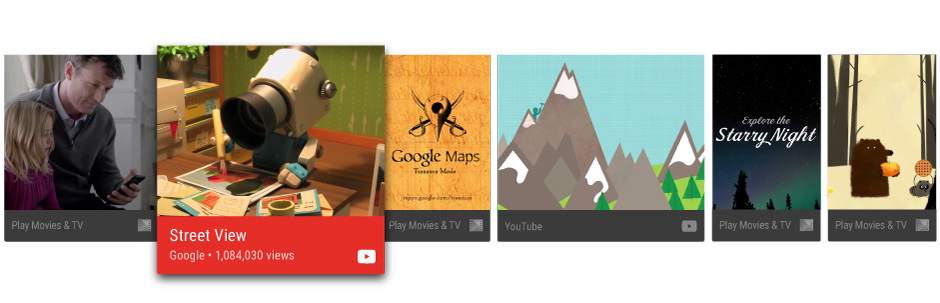
本指南將教您如何建立推薦內容並將其提供給 Android 框架,以便使用者可以發現和享受您的應用內容。另請參閱 Leanback 範例應用程式 中的範例實作。
最佳實踐建議
推薦功能可以幫助用戶快速找到他們喜歡的內容和應用程式。為用戶提供高品質且相關的推薦內容,是打造卓越電視應用程式使用者體驗的關鍵因素。因此,您應該認真考慮向用戶展示哪些推薦內容,並對其進行密切管理。
推薦類型
建立推薦內容時,應將使用者連結回未完成的觀看活動,或建議使用者進行擴充觀看相關內容的活動。以下是一些您應該考慮的具體建議:
- 續集內容 為用戶繼續觀看劇集而推薦的下一集。或者,對暫停的電影、電視節目或播客使用繼續播放建議,以便用戶只需點擊幾下即可繼續觀看暫停的內容。
- 新內容推薦,例如使用者看完其他影集後,系統推薦首播的新集數。此外,如果應用程式允許使用者訂閱、追蹤或追蹤內容,請針對追蹤內容清單中未觀看的項目,提供新的內容建議。
- 根據使用者過往的觀看行為,推薦相關內容。
如要進一步瞭解如何設計建議資訊卡,打造最佳使用者體驗,請參閱 Android TV 設計規格中的「建議列」。
重新整理推薦影片
重新整理建議時,請勿直接移除並重新發布,因為這樣做會導致建議顯示在建議列的結尾。播放電影等內容項目後, 移除推薦內容。
自訂推薦服務
您可以設定使用者介面元素 (例如資訊卡的前景和背景圖片、顏色、應用程式圖示、標題和副標題),自訂建議資訊卡來傳達品牌資訊。詳情請參閱 Android TV 設計規格中的「建議列」。
群組建議
您也可以選擇依最佳化建議來源分組。舉例來說,您的應用程式可能會提供兩組建議:使用者訂閱內容的建議,以及使用者可能不知道的新趨勢內容建議。
建立或更新建議列時,系統會分別為每個群組的建議排序。為建議提供群組資訊,可確保建議不會歸類在不相關的建議下方。
使用 NotificationCompat.Builder.setGroup() 設定建議的群組鍵字串。舉例來說,如要將建議標示為屬於含有新熱門內容的群組,您可以呼叫 setGroup("trending")。
建立建議服務
系統會在背景處理程序中建立內容建議。如要讓應用程式提供推薦內容,請建立服務,定期將應用程式目錄中的項目新增至系統的推薦清單。
以下程式碼範例說明如何擴充 IntentService,為應用程式建立建議服務:
Kotlin
class UpdateRecommendationsService : IntentService("RecommendationService") {
    override protected fun onHandleIntent(intent: Intent) {
        Log.d(TAG, "Updating recommendation cards")
        val recommendations = VideoProvider.getMovieList()
        if (recommendations == null) return

        var count = 0

        try {
            val builder = RecommendationBuilder()
                    .setContext(applicationContext)
                    .setSmallIcon(R.drawable.videos_by_google_icon)

            for (entry in recommendations.entrySet()) {
                for (movie in entry.getValue()) {
                    Log.d(TAG, "Recommendation - " + movie.getTitle())

                    builder.setBackground(movie.getCardImageUrl())
                            .setId(count + 1)
                            .setPriority(MAX_RECOMMENDATIONS - count)
                            .setTitle(movie.getTitle())
                            .setDescription(getString(R.string.popular_header))
                            .setImage(movie.getCardImageUrl())
                            .setIntent(buildPendingIntent(movie))
                            .build()
                    if (++count >= MAX_RECOMMENDATIONS) {
                        break
                    }
                }
                if (++count >= MAX_RECOMMENDATIONS) {
                    break
                }
            }
        } catch (e: IOException) {
            Log.e(TAG, "Unable to update recommendation", e)
        }
    }

    private fun buildPendingIntent(movie: Movie): PendingIntent {
        val detailsIntent = Intent(this, DetailsActivity::class.java)
        detailsIntent.putExtra("Movie", movie)

        val stackBuilder = TaskStackBuilder.create(this)
        stackBuilder.addParentStack(DetailsActivity::class.java)
        stackBuilder.addNextIntent(detailsIntent)

        // Ensure a unique PendingIntents, otherwise all
        // recommendations end up with the same PendingIntent
        detailsIntent.setAction(movie.getId().toString())

        val intent = stackBuilder.getPendingIntent(0, PendingIntent.FLAG_UPDATE_CURRENT)
        return intent
    }

    companion object {
        private val TAG = "UpdateRecommendationsService"
        private val MAX_RECOMMENDATIONS = 3
    }
}
Java
public class UpdateRecommendationsService extends IntentService {
    private static final String TAG = "UpdateRecommendationsService";
    private static final int MAX_RECOMMENDATIONS = 3;

    public UpdateRecommendationsService() {
        super("RecommendationService");
    }

    @Override
    protected void onHandleIntent(Intent intent) {
        Log.d(TAG, "Updating recommendation cards");
        HashMap<String, List<Movie>> recommendations = VideoProvider.getMovieList();
        if (recommendations == null) return;

        int count = 0;

        try {
            RecommendationBuilder builder = new RecommendationBuilder()
                    .setContext(getApplicationContext())
                    .setSmallIcon(R.drawable.videos_by_google_icon);

            for (Map.Entry<String, List<Movie>> entry : recommendations.entrySet()) {
                for (Movie movie : entry.getValue()) {
                    Log.d(TAG, "Recommendation - " + movie.getTitle());

                    builder.setBackground(movie.getCardImageUrl())
                            .setId(count + 1)
                            .setPriority(MAX_RECOMMENDATIONS - count)
                            .setTitle(movie.getTitle())
                            .setDescription(getString(R.string.popular_header))
                            .setImage(movie.getCardImageUrl())
                            .setIntent(buildPendingIntent(movie))
                            .build();

                    if (++count >= MAX_RECOMMENDATIONS) {
                        break;
                    }
                }
                if (++count >= MAX_RECOMMENDATIONS) {
                    break;
                }
            }
        } catch (IOException e) {
            Log.e(TAG, "Unable to update recommendation", e);
        }
    }

    private PendingIntent buildPendingIntent(Movie movie) {
        Intent detailsIntent = new Intent(this, DetailsActivity.class);
        detailsIntent.putExtra("Movie", movie);

        TaskStackBuilder stackBuilder = TaskStackBuilder.create(this);
        stackBuilder.addParentStack(DetailsActivity.class);
        stackBuilder.addNextIntent(detailsIntent);
        // Ensure a unique PendingIntents, otherwise all
        // recommendations end up with the same PendingIntent
        detailsIntent.setAction(Long.toString(movie.getId()));

        PendingIntent intent = stackBuilder.getPendingIntent(0, PendingIntent.FLAG_UPDATE_CURRENT);
        return intent;
    }
}
為了使系統能夠識別並運行此服務,請使用您的應用程式資訊清單註冊它。以下程式碼片段示範如何將此類別宣告為服務:
<manifest ... >
  <application ... >
    ...

    <service
            android:name="com.example.android.tvleanback.UpdateRecommendationsService"
            android:enabled="true" />
  </application>
</manifest>
建構建議
推薦服務啟動後,必須建立推薦內容並將其傳遞給 Android 框架。架構會收到建議,這些建議是使用特定範本且標有特定類別的 Notification 物件。
設定值
如要設定建議資訊卡的 UI 元素值,請建立遵循下列建構工具模式的建構工具類別。首先,您需要設定推薦卡片元素的值。
Kotlin
class RecommendationBuilder {
    ...

    fun setTitle(title: String): RecommendationBuilder {
        this.title = title
        return this
    }

    fun setDescription(description: String): RecommendationBuilder {
        this.description = description
        return this
    }

    fun setImage(uri: String): RecommendationBuilder {
        imageUri = uri
        return this
    }

    fun setBackground(uri: String): RecommendationBuilder {
        backgroundUri = uri
        return this
    }

...
Java
public class RecommendationBuilder {
    ...

    public RecommendationBuilder setTitle(String title) {
            this.title = title;
            return this;
        }

        public RecommendationBuilder setDescription(String description) {
            this.description = description;
            return this;
        }

        public RecommendationBuilder setImage(String uri) {
            imageUri = uri;
            return this;
        }

        public RecommendationBuilder setBackground(String uri) {
            backgroundUri = uri;
            return this;
        }
...
建立通知
設定好值之後,就可以建構通知,將建構器類別中的值指派給通知,然後呼叫 NotificationCompat.Builder.build()。
另外,請務必呼叫 setLocalOnly(),這樣 NotificationCompat.BigPictureStyle 通知就不會出現在其他裝置上。
以下程式碼範例示範如何建立推薦系統。
Kotlin
class RecommendationBuilder {
    ...

    @Throws(IOException::class)
    fun build(): Notification {
        ...

        val notification = NotificationCompat.BigPictureStyle(
        NotificationCompat.Builder(context)
                .setContentTitle(title)
                .setContentText(description)
                .setPriority(priority)
                .setLocalOnly(true)
                .setOngoing(true)
                .setColor(context.resources.getColor(R.color.fastlane_background))
                .setCategory(Notification.CATEGORY_RECOMMENDATION)
                .setLargeIcon(image)
                .setSmallIcon(smallIcon)
                .setContentIntent(intent)
                .setExtras(extras))
                .build()

        return notification
    }
}
Java
public class RecommendationBuilder {
    ...

    public Notification build() throws IOException {
        ...

        Notification notification = new NotificationCompat.BigPictureStyle(
                new NotificationCompat.Builder(context)
                        .setContentTitle(title)
                        .setContentText(description)
                        .setPriority(priority)
                        .setLocalOnly(true)
                        .setOngoing(true)
                        .setColor(context.getResources().getColor(R.color.fastlane_background))
                        .setCategory(Notification.CATEGORY_RECOMMENDATION)
                        .setLargeIcon(image)
                        .setSmallIcon(smallIcon)
                        .setContentIntent(intent)
                        .setExtras(extras))
                .build();

        return notification;
    }
}
執行建議服務
為了產生最新的推薦內容,您的應用程式推薦服務必須定期執行。如要執行服務,請建立會執行計時器並定期叫用計時器的類別。下列程式碼範例會擴充 BroadcastReceiver 類別,每半小時啟動一次建議服務的週期性執行作業:
Kotlin
class BootupActivity : BroadcastReceiver() {
    override fun onReceive(context: Context, intent: Intent) {
        Log.d(TAG, "BootupActivity initiated")
        if (intent.action.endsWith(Intent.ACTION_BOOT_COMPLETED)) {
            scheduleRecommendationUpdate(context)
        }
    }

    private fun scheduleRecommendationUpdate(context: Context) {
        Log.d(TAG, "Scheduling recommendations update")
        val alarmManager = context.getSystemService(Context.ALARM_SERVICE) as AlarmManager
        val recommendationIntent = Intent(context, UpdateRecommendationsService::class.java)
        val alarmIntent = PendingIntent.getService(context, 0, recommendationIntent, 0)
        alarmManager.setInexactRepeating(AlarmManager.ELAPSED_REALTIME_WAKEUP,
                INITIAL_DELAY,
                AlarmManager.INTERVAL_HALF_HOUR,
                alarmIntent
        )
    }

    companion object {
        private val TAG = "BootupActivity"
        private val INITIAL_DELAY:Long = 5000
    }
}
Java
public class BootupActivity extends BroadcastReceiver {
    private static final String TAG = "BootupActivity";

    private static final long INITIAL_DELAY = 5000;

    @Override
    public void onReceive(Context context, Intent intent) {
        Log.d(TAG, "BootupActivity initiated");
        if (intent.getAction().endsWith(Intent.ACTION_BOOT_COMPLETED)) {
            scheduleRecommendationUpdate(context);
        }
    }

    private void scheduleRecommendationUpdate(Context context) {
        Log.d(TAG, "Scheduling recommendations update");

        AlarmManager alarmManager = (AlarmManager) context.getSystemService(Context.ALARM_SERVICE);
        Intent recommendationIntent = new Intent(context, UpdateRecommendationsService.class);
        PendingIntent alarmIntent = PendingIntent.getService(context, 0, recommendationIntent, 0);

        alarmManager.setInexactRepeating(AlarmManager.ELAPSED_REALTIME_WAKEUP,
                INITIAL_DELAY,
                AlarmManager.INTERVAL_HALF_HOUR,
                alarmIntent);
    }
}
安裝後,這個 BroadcastReceiver 類別的實作項目必須在電視裝置啟動後執行。如要達成這個目標,請在應用程式資訊清單中註冊這個類別,並使用意圖篩選器監聽裝置啟動程序是否完成。下列程式碼範例示範如何在資訊清單中新增這項設定:
<manifest ... >
  <application ... >
    <receiver android:name="com.example.android.tvleanback.BootupActivity"
              android:enabled="true"
              android:exported="false">
      <intent-filter>
        <action android:name="android.intent.action.BOOT_COMPLETED"/>
      </intent-filter>
    </receiver>
  </application>
</manifest>
重要事項:如要接收開機完成通知,應用程式必須要求 RECEIVE_BOOT_COMPLETED 權限。詳情請參閱 ACTION_BOOT_COMPLETED。
在建議服務類別的 onHandleIntent() 方法中,將建議發布至管理員,如下所示:
Kotlin
val notification = notificationBuilder.build()
notificationManager.notify(id, notification)
Java
Notification notification = notificationBuilder.build();
notificationManager.notify(id, notification);