

Paging 库提供了强大的功能,用于从较大的数据集加载和显示分页数据。本指南将演示如何使用 Paging 库设置来自网络数据源的分页数据流并将其显示 在延迟列表中。
定义数据源
第一步是定义用于标识
数据源的 PagingSource 实现。PagingSource API 类包含 load 方法,您需要替换该方法,以指明如何从相应数据源检索分页数据。
直接使用 PagingSource 类即可通过 Kotlin 协程进行异步加载。
选择键和值类型
PagingSource<Key, Value> 有两种类型参数:Key 和 Value。键定义了用于加载数据的标识符,值是数据本身的类型。例如,如果您通过将 Int 页码传递给 Retrofit 来从网络加载各页 User 对象,则应选择 Int 作为 Key 类型,选择 User 作为 Value 类型。
定义 PagingSource
以下示例实现了一个 PagingSource,该实现按页码加载各页项
。Key 类型为 Int,Value 类型为
User。
class ExamplePagingSource(
    val backend: ExampleBackendService,
    val query: String
) : PagingSource<Int, User>() {
  override suspend fun load(
    params: LoadParams<Int>
  ): LoadResult<Int, User> {

    init {
        // the data source is expected to be immutable
        // invalidate PagingSource if data source
        // has updated
        backEnd.addDatabaseOnChangedListener {
            invalidate()
        }
    }

    try {
      // Start refresh at page 1 if undefined.
      val nextPageNumber = params.key ?: 1
      val response = backend.searchUsers(query, nextPageNumber)
      return LoadResult.Page(
        data = response.users,
        prevKey = null, // Only paging forward.
        nextKey = nextPageNumber + 1
      )
    } catch (e: Exception) {
      // Handle errors in this block and return LoadResult.Error for
      // expected errors (such as a network failure).
    }
  }

  override fun getRefreshKey(state: PagingState<Int, User>): Int? {
    // Try to find the page key of the closest page to anchorPosition from
    // either the prevKey or the nextKey; you need to handle nullability
    // here.
    //  * prevKey == null -> anchorPage is the first page.
    //  * nextKey == null -> anchorPage is the last page.
    //  * both prevKey and nextKey are null -> anchorPage is the
    //    initial page, so return null.
    return state.anchorPosition?.let { anchorPosition ->
      val anchorPage = state.closestPageToPosition(anchorPosition)
      anchorPage?.prevKey?.plus(1) ?: anchorPage?.nextKey?.minus(1)
    }
  }
}
典型的 PagingSource 实现会将其构造函数中提供的参数传递给 load 方法,以便为查询加载适当的数据。在上面的示例中,这些参数包括:
backend:提供数据的后端服务实例。query:要发送到backend指示的服务的搜索查询。
LoadParams 对象包含有关要执行的加载操作的信息,其中包括要加载的键和要加载的项数。
LoadResult
对象包含加载操作的结果。LoadResult 是一个密封的类,根据 load
调用是否成功,采用如下三种形式之一:
- 如果加载成功,则返回
LoadResult.Page对象。 - 如果加载失败,则返回
LoadResult.Error对象。 - 如果
PagingSource不再有效,应替换为新实例(例如,由于底层数据发生更改),则返回LoadResult.Invalid对象。
下图说明了此示例中的 load 函数如何接收每次加载的键并为后续加载提供键。
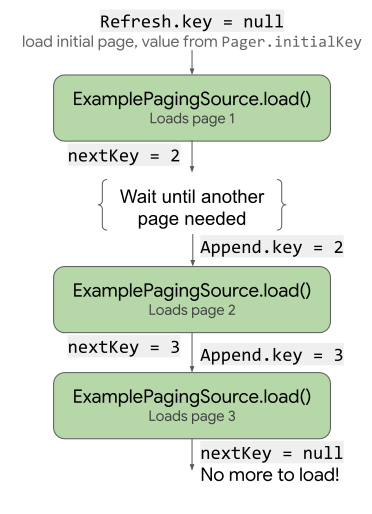
load 如何使用和更新键的流程图。
PagingSource 实现还必须实现 getRefreshKey 方法,该方法接受 PagingState 对象作为参数。当数据在初始加载后刷新或失效时,该方法会返回要传递给 load 方法的键。在后续刷新数据时,Paging
库会自动调用此方法。
处理错误
数据加载请求可能因多种原因而失败,特别是在通过网络加载时。通过从 load 方法返回 LoadResult.Error 对象,可报告在加载过程中遇到的错误。
例如,对于上一个示例,您可以通过向 load 方法添加以下内容来捕获和报告 ExamplePagingSource 中的加载错误:
catch (e: IOException) {
  // IOException for network failures.
  return LoadResult.Error(e)
} catch (e: HttpException) {
  // HttpException for any non-2xx HTTP status codes.
  return LoadResult.Error(e)
}
如需详细了解如何处理 Retrofit 错误,请参阅 PagingSource API 参考文档中的示例。
PagingSource 会收集 LoadResult.Error 对象并将其传递给界面,以便您对其执行操作。如需详细了解如何在界面中显示加载状态
,请参阅管理和显示加载状态。
设置 PagingData 流
接下来,您需要来自 PagingSource 实现的分页数据流。在 ViewModel 中设置数据流。Pager 类提供
的方法可显示来自
PagingSource 的 PagingData 对象的响应式流。Paging 库会将数据流显示为
Flow。
当您创建 Pager 实例来设置响应式流时,必须
为实例提供 PagingConfig 配置对象和
告知 Pager 如何获取您的 PagingSource
实现实例的函数,如以下示例所示。
class UserViewModel(
    private val backend: ExampleBackendService,
    private val query: String
) : ViewModel() {

    val userPagingFlow: Flow<PagingData<User>> = Pager(
        // Configure how data is loaded by passing additional properties to
        // PagingConfig, such as pageSize and enabling or disabling placeholders.
        config = PagingConfig(
            pageSize = 20,
            enablePlaceholders = true
        ),
        pagingSourceFactory = {
            ExamplePagingSource(backend, query)
        }
    )
    .flow
    .cachedIn(viewModelScope)
}
cachedIn 运算符使数据流可共享,并使用提供的 CoroutineScope 缓存加载的数据。如果没有
cachedIn,则无法重新收集 PagingData。此示例使用生命周期 lifecycle-viewmodel-ktx
工件提供的 viewModelScope。
Pager 对象会调用 PagingSource 对象中的 load 方法,
为其提供 LoadParams 对象,并接收返回的
LoadResult 对象。
在界面中收集和显示数据
如需将分页流连接到界面,请从 ViewModel 获取流,并将其传递给列表可组合项。
@Composable
fun UserScreen(viewModel: UserViewModel = viewModel()) {
    val userFlow = viewModel.userPagingFlow
    UserList(flow = userFlow)
}
使用 collectAsLazyPagingItems 将 PagingData 流转换为
LazyPagingItems。然后,在
LazyColumn 中使用 items API 来布局每个项。
请务必使用 itemKey 为每个项提供唯一的稳定标识符。以下示例使用 it.id(引用 User.id 属性),因为
对于数据更新中的 User 实例,该属性保持稳定。
@Composable
fun UserList(flow: Flow<PagingData<User>>) {
    val lazyPagingItems = flow.collectAsLazyPagingItems()
    LazyColumn {
        items(
            lazyPagingItems.itemCount,
            key = lazyPagingItems.itemKey { it.id }
        ) { index ->
            val user = lazyPagingItems[index]
            if (user != null) {
                UserRow(user)
            } else {
                UserPlaceholder()
            }
        }
    }
}
Paging 库在加载页面时使用 null 作为占位符,因此,如果您已启用占位符,则必须在内容块中处理 null 值。
现在,列表会显示分页数据,并且 Paging 库会在用户滚动时加载其他页面。
其他资源
如需详细了解 Paging 库,请参阅下列其他资源:
文档
查看内容
为您推荐
- 注意:当 JavaScript 处于关闭状态时,系统会显示链接文字
- 从网络和数据库加载页面
- 迁移到 Paging 3
- Paging 库概览