

ExoPlayer 的主要演示版应用主要用于以下两个方面:
- 提供功能全面的 ExoPlayer 用法示例。您可以从演示应用入手,方便地开发自己的应用。
- 让您试用 ExoPlayer。除了随附的示例之外,您还可以使用演示版应用测试自有内容的播放。
本页介绍了如何获取、编译和运行演示版应用,还介绍了如何使用该应用播放自己的媒体内容。
获取代码
您可以在我们的 GitHub 项目的 demos/main 文件夹中找到主要演示版应用的源代码。如果尚未克隆项目,请将其克隆到本地目录中:
git clone https://github.com/androidx/media.git
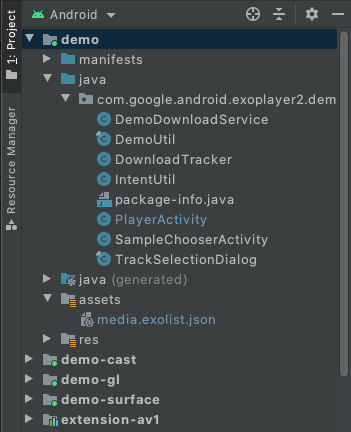
接下来,在 Android Studio 中打开项目。您应该会在 Android 项目视图中看到以下内容(演示版应用的相关文件夹已展开):
编译和运行
如需编译并运行演示版应用,请在 Android Studio 中选择并运行 demo 配置。演示版应用将安装在已连接的 Android 设备上并运行。建议尽可能使用实体设备。如果您想改用模拟器,请阅读支持的设备部分中的模拟器部分,并确保您的虚拟设备使用的系统映像的 API 级别至少为 23。
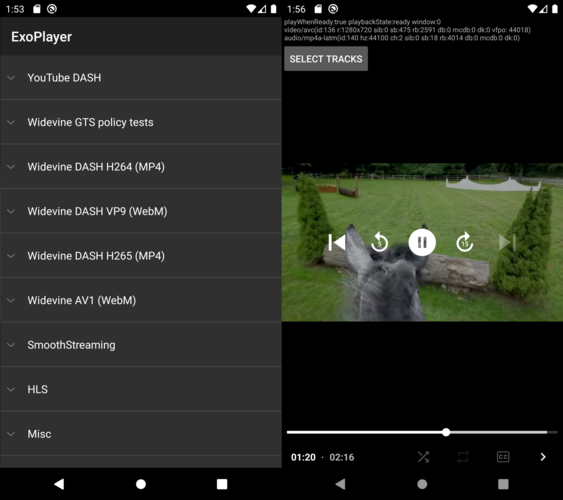
演示版应用会显示一个示例列表 (SampleChooserActivity)。选择一个示例会打开第二个 Activity (PlayerActivity) 以进行播放。此演示版包含播放控制和轨道选择功能。它还使用 ExoPlayer 的 EventLogger 实用程序类将有用的调试信息输出到系统日志。您可以使用以下命令查看此日志记录(以及其他标记的错误级别日志记录):
adb logcat EventLogger:V *:E
启用捆绑式解码器
ExoPlayer 有许多扩展程序,可用于捆绑的软件解码器,包括 AV1、VP9、Opus、FLAC 和 FFmpeg(仅限音频)。可以构建演示版应用,以包含并使用这些扩展程序,如下所示:
- 构建您要添加的每个扩展程序。请注意,这是一个手动过程。如需了解相关说明,请参阅每个扩展程序中的
README.md文件。 在 Android Studio 的“Build Variants”视图中,将演示模块的 build 变体设置为
withDecoderExtensionsDebug或withDecoderExtensionsRelease,如下图所示。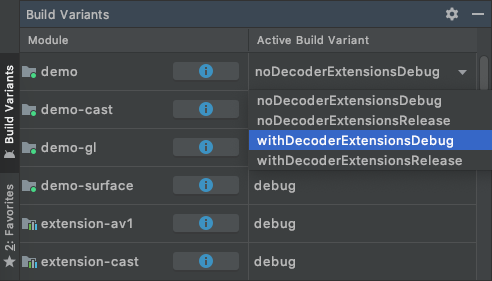
像往常一样编译、安装和运行
demo配置。
默认情况下,仅当不存在合适的平台解码器时,才会使用扩展解码器。您可以指定优先使用扩展解码器,如以下部分所述。
播放您自己的内容
您可以通过多种方式在演示版应用中播放自己的内容。
1. 修改 assets/media.exolist.json
演示版应用中列出的示例是从 assets/media.exolist.json 加载的。通过修改此 JSON 文件,可以向演示应用添加样本和从中移除样本。架构如下所示,其中 [O] 表示可选属性。
[
  {
    "name": "Name of heading",
    "samples": [
      {
        "name": "Name of sample",
        "uri": "The URI of the sample",
        "extension": "[O] Sample type hint. Cannot be combined with mime_type. Values: mpd, ism, m3u8",
        "clip_start_position_ms": "[O] A start point to which the sample should be clipped, in milliseconds"
        "clip_end_position_ms": "[O] An end point from which the sample should be clipped, in milliseconds"
        "drm_scheme": "[O] Drm scheme if protected. Values: widevine, playready, clearkey",
        "drm_license_uri": "[O] URI of the license server if protected",
        "drm_force_default_license_uri": "[O] Whether to force use of "drm_license_uri" for key requests that include their own license URI",
        "drm_key_request_properties": "[O] Key request headers if protected",
        "drm_session_for_clear_content": "[O] Whether to attach a DRM session to clear video and audio tracks"
        "drm_multi_session": "[O] Enables key rotation if protected",
        "mime_type": "[O] The MIME type of the sample. Cannot be combined with extension.",
        "subtitle_uri": "[O] The URI of a subtitle sidecar file",
        "subtitle_mime_type": "[O] The MIME type of subtitle_uri (required if subtitle_uri is set)",
        "subtitle_language": "[O] The BCP47 language code of the subtitle file (ignored if subtitle_uri is not set)",
        "ad_tag_uri": "[O] The URI of an ad tag to load via the IMA extension"
      },
      ...etc
    ]
  },
  ...etc
]
可以使用以下架构指定示例播放列表:
[
  {
    "name": "Name of heading",
    "samples": [
      {
        "name": "Name of playlist sample",
        "playlist": [
          {
            "uri": "The URI of the first sample in the playlist",
            "extension": "[O] Sample type hint. Cannot be combined with mime_type. Values: mpd, ism, m3u8"
            "clip_start_position_ms": "[O] A start point to which the sample should be clipped, in milliseconds"
            "clip_end_position_ms": "[O] An end point from which the sample should be clipped, in milliseconds"
            "drm_scheme": "[O] Drm scheme if protected. Values: widevine, playready, clearkey",
            "drm_license_uri": "[O] URI of the license server if protected",
            "drm_force_default_license_uri": "[O] Whether to force use of "drm_license_uri" for key requests that include their own license URI",
            "drm_key_request_properties": "[O] Key request headers if protected",
            "drm_session_for_clear_content": "[O] Whether to attach a DRM session to clear video and audio tracks",
            "drm_multi_session": "[O] Enables key rotation if protected",
            "mime_type": "[O] The MIME type of the sample. Cannot be combined with extension.",
            "subtitle_uri": "[O] The URI of a subtitle sidecar file",
            "subtitle_mime_type": "[O] The MIME type of subtitle_uri (required if subtitle_uri is set)",
            "subtitle_language": "[O] The BCP47 language code of the subtitle file (ignored if subtitle_uri is not set)"
          },
          {
            "uri": "The URI of the second sample in the playlist",
            ...etc
          },
          ...etc
        ]
      },
      ...etc
    ]
  },
  ...etc
]
如果需要,关键请求标头可指定为一个对象,其中包含每个标头的字符串属性:
"drm_key_request_properties": {
  "name1": "value1",
  "name2": "value2",
  ...etc
}
在示例选择器 activity 中,溢出菜单包含用于指定是否优先使用扩展解码器的选项。
本地文件 URI 和分区存储限制
指定本地文件 URI 时,演示应用会请求必要的存储访问权限来读取这些文件。不过,从 Android 13 开始,无法加载不以典型媒体文件扩展名(例如 .mp4)结尾的任意文件。如果您需要加载此类文件,可以将其放置在没有访问限制的演示应用的特定存储目录中。此文件通常位于 /sdcard/Android/data/androidx.media3.demo.main/files。
2. 加载外部 exolist.json 文件
该演示版应用可以加载使用上述架构并根据 *.exolist.json 惯例命名的外部 JSON 文件。例如,如果您将此类文件托管在 https://yourdomain.com/samples.exolist.json,则可以使用以下命令在演示版应用中打开该文件:
adb shell am start -a android.intent.action.VIEW \
    -d https://yourdomain.com/samples.exolist.json
在安装了演示版应用的设备上点击 *.exolist.json 链接(例如,在浏览器或邮件客户端中),也会在演示版应用中打开该链接。托管 *.exolist.json JSON 文件可让您分发内容,供其他人在演示版应用中试用。
3. 触发 intent
意图可用于绕过示例列表并直接启动播放。如需播放单个样本,请将 intent 的操作设置为 androidx.media3.demo.main.action.VIEW,并将其数据 URI 设置为要播放的样本的 URI。可以使用以下命令从终端触发此类 intent:
adb shell am start -a androidx.media3.demo.main.action.VIEW \
    -d https://yourdomain.com/sample.mp4
单个示例 intent 支持的可选 extra 有:
- 配置额外信息示例:
mime_type[String] 示例 MIME 类型提示。例如,application/dash+xml表示 DASH 内容。clip_start_position_ms[Long] 应将样本剪裁到的起点(以毫秒为单位)。clip_end_position_ms[Long] 应剪裁样本的端点(以毫秒为单位)。drm_scheme[String] 如果受保护,则为 DRM 方案。有效值为widevine、playready和clearkey。也可以使用 DRM 方案 UUID。drm_license_uri[String] 许可服务器的 URI(如果受保护)。drm_force_default_license_uri[布尔值] 是否强制对包含自有许可 URI 的密钥请求使用drm_license_uri。drm_key_request_properties[String array] Key request headers packed as name1, value1, name2, value2 etc. if protected.drm_session_for_clear_content[布尔值] 是否将 DRM 会话附加到未加密的视频轨道和音轨。drm_multi_session[布尔值] 如果受保护,则启用密钥轮替。subtitle_uri[String] 字幕辅助文件的 URI。subtitle_mime_type[String] subtitle_uri 的 MIME 类型(如果设置了 subtitle_uri,则为必需)。subtitle_language[String] 字幕文件的 BCP47 语言代码(如果未设置 subtitle_uri,则忽略)。ad_tag_uri[String] 要使用 IMA 扩展程序加载的广告代码的 URI。prefer_extension_decoders[布尔值] 是否优先使用扩展解码器而非平台解码器。
使用 adb shell am start 启动 intent 时,可以使用 --es 设置可选的字符串 extra(例如 --es extension mpd)。可以使用 --ez 设置可选的布尔值 extra(例如 --ez prefer_extension_decoders TRUE)。可以使用 --el 设置可选的 long extra(例如 --el clip_start_position_ms 5000)。可以使用 --esa 设置可选的字符串数组 extra(例如 --esa drm_key_request_properties name1,value1)。
如需播放示例播放列表,请将 intent 的 action 设置为 androidx.media3.demo.main.action.VIEW_LIST。示例配置 extra 与 androidx.media3.demo.main.action.VIEW 的配置 extra 保持一致,但存在以下两点不同:
- extra 的键应包含下划线和以 0 为起始值的样本索引作为后缀。例如,
extension_0会提示第一个样本的样本类型。drm_scheme_1会为第二个示例设置 DRM 方案。 - 示例的 URI 作为键为
uri_<sample-index>的 extra 传递。
其他不依赖于样本的 extra 不会发生变化。例如,您可以在终端中运行以下命令来播放包含两项内容的播放列表,并替换第二项内容的扩展名:
adb shell am start -a androidx.media3.demo.main.action.VIEW_LIST \
    --es uri_0 https://a.com/sample1.mp4 \
    --es uri_1 https://b.com/sample2.fake_mpd \
    --es extension_1 mpd