

借助 Android 媒体路由器框架,制造商可以在其设备上启用播放功能。
通过名为 MediaRouteProvider 的标准化接口实现。
路由提供程序定义了用于在接收端设备上播放媒体的通用接口,使其
在设备上从任何支持媒体内容的 Android 应用中播放媒体内容
路由。
本指南介绍了如何为接收方设备创建媒体路由提供程序并使其
适用于在 Android 上运行的其他媒体播放应用。要使用此 API,您需要
您需要熟悉
MediaRouteProvider、
MediaRouteProviderDescriptor和
RouteController。
概览
Android 媒体路由器框架让媒体应用开发者和媒体播放设备能够
可以让制造商通过通用 API 和通用界面进行连接。应用开发者
实现一个 MediaRouter 接口,然后将该接口连接到
框架,并将内容播放到参与媒体路由器框架的设备。媒体
播放设备制造商可以通过以下方式加入该框架:发布一个 MediaRouteProvider,以允许其他应用连接到
在接收设备上播放媒体内容。图 1 说明了应用如何连接到
通过媒体路由器框架连接到设备
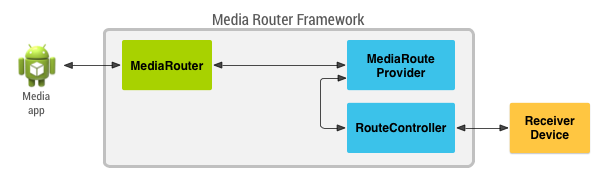
图 1. 媒体路由提供程序类如何提供通信的概览 从媒体应用到接收设备的过程。
当您为接收方设备构建媒体路由提供程序时,该提供程序会传送 以下用途:
- 描述和发布接收方设备的功能,以便其他应用可以发现该设备 以及使用其播放功能。
- 封装接收方设备的编程接口及其通信 传输机制,使设备与媒体路由器框架兼容。
分发路由提供程序
媒体路由提供程序作为 Android 应用的一部分进行分发。您的路线提供商可以
扩展为可供其他应用使用
MediaRouteProviderService,或者封装您的
将 MediaRouteProvider 替换为您自己的服务并声明 intent
过滤器。这些步骤可让其他应用发现和利用
媒体路由。
注意:包含媒体路由提供程序的应用还可以包含一个 MediaRouter 接口, 路由提供程序,但这不是必需的。
MediaRouter 支持库
媒体路由器 API 在 AndroidX MediaRouter 库 您必须将此库添加到您的应用开发项目中。 如需详细了解如何将支持库添加到 项目的详情,请参阅支持库设置。
注意:请务必使用 AndroidX
媒体路由器框架的实现
请勿使用旧版 android.media 软件包。
创建提供程序服务
媒体路由器框架必须能够发现并连接到您的媒体路由提供程序
以允许其他应用使用您的路由。为此,媒体路由器框架
查找声明媒体路由提供程序 intent 操作的应用。当另一个应用想要
连接到提供程序时,框架必须能够调用并连接它,这样您的提供程序
必须封装在 Service 中。
以下示例代码显示了媒体路由提供程序服务的声明,以及 intent 过滤器,以便媒体路由器发现并使用该过滤器 框架:
<service android:name=".provider.SampleMediaRouteProviderService"
    android:label="@string/sample_media_route_provider_service"
    android:process=":mrp">
    <intent-filter>
        <action android:name="android.media.MediaRouteProviderService" />
    </intent-filter>
</service>
此清单示例声明了一项封装实际媒体路由提供程序类的服务。
Android 媒体路由器框架提供了
MediaRouteProviderService 类,用作以下对象的服务封装容器
媒体路由提供程序以下示例代码演示了如何使用此封装容器
类:
Kotlin
class SampleMediaRouteProviderService : MediaRouteProviderService() {

    override fun onCreateMediaRouteProvider(): MediaRouteProvider {
        return SampleMediaRouteProvider(this)
    }
}
Java
public class SampleMediaRouteProviderService extends MediaRouteProviderService {

    @Override
    public MediaRouteProvider onCreateMediaRouteProvider() {
        return new SampleMediaRouteProvider(this);
    }
}
指定路由功能
连接到媒体路由器框架的应用可以通过 应用的清单声明,但还需要知道 提供的资源媒体路由的类型多种多样,具有不同的功能和其他应用 需要能够发现这些详细信息,以确定它们是否与您的路线兼容。
借助媒体路由器框架,您可以定义和发布媒体的功能
通过 IntentFilter 对象、MediaRouteDescriptor 对象和 MediaRouteProviderDescriptor 进行路由。本部分将介绍如何使用
类为其他应用发布媒体路由的详细信息。
路由类别
在程序化说明媒体路由提供程序时,您必须指定 您的提供程序是否支持远程播放和/或辅助输出。这些是 类别:
CATEGORY_LIVE_AUDIO— 将音频输出到辅助输出设备,例如支持无线功能的音乐系统。CATEGORY_LIVE_VIDEO— 将视频输出到辅助输出设备,例如无线显示设备。CATEGORY_REMOTE_PLAYBACK- 在处理媒体的独立设备上播放视频或音频 检索、解码和播放,例如 Chromecast 设备。
为了在媒体路由的说明中添加这些设置,您需要将这些设置插入到
一个 IntentFilter 对象,您稍后会将其添加到
MediaRouteDescriptor 对象:
Kotlin
class SampleMediaRouteProvider(context: Context) : MediaRouteProvider(context) {

    companion object {
        private val CONTROL_FILTERS_BASIC: ArrayList<IntentFilter> = IntentFilter().run {
            addCategory(MediaControlIntent.CATEGORY_REMOTE_PLAYBACK)
            arrayListOf(this)
        }
    }
}
Java
public final class SampleMediaRouteProvider extends MediaRouteProvider {
    private static final ArrayList<IntentFilter> CONTROL_FILTERS_BASIC;
    static {
        IntentFilter videoPlayback = new IntentFilter();
        videoPlayback.addCategory(MediaControlIntent.CATEGORY_REMOTE_PLAYBACK);
        CONTROL_FILTERS_BASIC = new ArrayList<IntentFilter>();
        CONTROL_FILTERS_BASIC.add(videoPlayback);
    }
}
如果您指定了 CATEGORY_REMOTE_PLAYBACK intent,则还必须定义哪些媒体类型和
您的媒体路由提供程序支持播放控件。下一部分将介绍如何
为您的设备指定这些设置。
媒体类型和协议
远程播放设备的媒体路由提供程序必须指定媒体类型和传输
支持的协议您可以使用 IntentFilter 指定这些设置
类以及 addDataScheme() 和
该对象的 addDataType() 方法。通过
以下代码段演示了如何定义 intent 过滤器来支持远程视频
使用 http、https 和实时流式传输协议 (RTSP) 进行播放:
Kotlin
class SampleMediaRouteProvider(context: Context) : MediaRouteProvider(context) {

    companion object {

        private fun IntentFilter.addDataTypeUnchecked(type: String) {
            try {
                addDataType(type)
            } catch (ex: IntentFilter.MalformedMimeTypeException) {
                throw RuntimeException(ex)
            }
        }

        private val CONTROL_FILTERS_BASIC: ArrayList<IntentFilter> = IntentFilter().run {
            addCategory(MediaControlIntent.CATEGORY_REMOTE_PLAYBACK)
            addAction(MediaControlIntent.ACTION_PLAY)
            addDataScheme("http")
            addDataScheme("https")
            addDataScheme("rtsp")
            addDataTypeUnchecked("video/*")
            arrayListOf(this)
        }
    }
    ...
}
Java
public final class SampleMediaRouteProvider extends MediaRouteProvider {

    private static final ArrayList<IntentFilter> CONTROL_FILTERS_BASIC;

    static {
        IntentFilter videoPlayback = new IntentFilter();
        videoPlayback.addCategory(MediaControlIntent.CATEGORY_REMOTE_PLAYBACK);
        videoPlayback.addAction(MediaControlIntent.ACTION_PLAY);
        videoPlayback.addDataScheme("http");
        videoPlayback.addDataScheme("https");
        videoPlayback.addDataScheme("rtsp");
        addDataTypeUnchecked(videoPlayback, "video/*");
        CONTROL_FILTERS_BASIC = new ArrayList<IntentFilter>();
        CONTROL_FILTERS_BASIC.add(videoPlayback);
    }
    ...

    private static void addDataTypeUnchecked(IntentFilter filter, String type) {
        try {
            filter.addDataType(type);
        } catch (MalformedMimeTypeException ex) {
            throw new RuntimeException(ex);
        }
    }
}
播放控件
提供远程播放功能的媒体路由提供程序必须指定媒体控件的类型 支持的存储类型媒体路由可以提供以下几种常规控件类型:
- 播放控件,例如播放、暂停、快退和快进。
- 加入队列功能:可让发送邮件的应用添加和移除内容 从接收方设备维护的播放列表中获取。
- 会话功能,用于防止发送应用干扰 另一种方法是让接收方设备向发出请求的应用提供会话 ID,然后检查 该 ID 与每个后续播放控制请求相关联。
以下代码示例演示了如何构建用于支持 基本的媒体路由播放控件:
Kotlin
class SampleMediaRouteProvider(context: Context) : MediaRouteProvider(context) {

    companion object {
        ...
        private val CONTROL_FILTERS_BASIC: ArrayList<IntentFilter> = run {
            val videoPlayback: IntentFilter = ...
            ...
            val playControls = IntentFilter().apply {
                addCategory(MediaControlIntent.CATEGORY_REMOTE_PLAYBACK)
                addAction(MediaControlIntent.ACTION_SEEK)
                addAction(MediaControlIntent.ACTION_GET_STATUS)
                addAction(MediaControlIntent.ACTION_PAUSE)
                addAction(MediaControlIntent.ACTION_RESUME)
                addAction(MediaControlIntent.ACTION_STOP)
            }
            arrayListOf(videoPlayback, playControls)
        }
    }
    ...
}
Java
public final class SampleMediaRouteProvider extends MediaRouteProvider {
    private static final ArrayList<IntentFilter> CONTROL_FILTERS_BASIC;
    static {
        ...
        IntentFilter playControls = new IntentFilter();
        playControls.addCategory(MediaControlIntent.CATEGORY_REMOTE_PLAYBACK);
        playControls.addAction(MediaControlIntent.ACTION_SEEK);
        playControls.addAction(MediaControlIntent.ACTION_GET_STATUS);
        playControls.addAction(MediaControlIntent.ACTION_PAUSE);
        playControls.addAction(MediaControlIntent.ACTION_RESUME);
        playControls.addAction(MediaControlIntent.ACTION_STOP);
        CONTROL_FILTERS_BASIC = new ArrayList<IntentFilter>();
        CONTROL_FILTERS_BASIC.add(videoPlayback);
        CONTROL_FILTERS_BASIC.add(playControls);
    }
    ...
}
如需详细了解可用的播放控制 intent,请参阅
MediaControlIntent 类。
MediaRouteProviderDescriptor
使用 IntentFilter 对象定义媒体路由的功能后,您可以创建一个描述符对象,以用于发布到
Android 媒体路由器框架此描述符对象包含媒体的详细信息
路由的功能,以便其他应用可以确定如何与媒体交互
。
以下示例代码演示了如何将之前创建的 intent 过滤器添加到
MediaRouteProviderDescriptor,并设置描述符以供使用
媒体路由器框架
Kotlin
class SampleMediaRouteProvider(context: Context) : MediaRouteProvider(context) {

    init {
        publishRoutes()
    }

    private fun publishRoutes() {
        val resources = context.resources
        val routeName: String = resources.getString(R.string.variable_volume_basic_route_name)
        val routeDescription: String = resources.getString(R.string.sample_route_description)
        // Create a route descriptor using previously created IntentFilters
        val routeDescriptor: MediaRouteDescriptor =
                MediaRouteDescriptor.Builder(VARIABLE_VOLUME_BASIC_ROUTE_ID, routeName)
                        .setDescription(routeDescription)
                        .addControlFilters(CONTROL_FILTERS_BASIC)
                        .setPlaybackStream(AudioManager.STREAM_MUSIC)
                        .setPlaybackType(MediaRouter.RouteInfo.PLAYBACK_TYPE_REMOTE)
                        .setVolumeHandling(MediaRouter.RouteInfo.PLAYBACK_VOLUME_VARIABLE)
                        .setVolumeMax(VOLUME_MAX)
                        .setVolume(mVolume)
                        .build()
        // Add the route descriptor to the provider descriptor
        val providerDescriptor: MediaRouteProviderDescriptor =
                MediaRouteProviderDescriptor.Builder()
                        .addRoute(routeDescriptor)
                        .build()

        // Publish the descriptor to the framework
        descriptor = providerDescriptor
    }
    ...
}
Java
public SampleMediaRouteProvider(Context context) {
    super(context);
    publishRoutes();
}

private void publishRoutes() {
    Resources r = getContext().getResources();
    // Create a route descriptor using previously created IntentFilters
    MediaRouteDescriptor routeDescriptor = new MediaRouteDescriptor.Builder(
            VARIABLE_VOLUME_BASIC_ROUTE_ID,
            r.getString(R.string.variable_volume_basic_route_name))
            .setDescription(r.getString(R.string.sample_route_description))
            .addControlFilters(CONTROL_FILTERS_BASIC)
            .setPlaybackStream(AudioManager.STREAM_MUSIC)
            .setPlaybackType(MediaRouter.RouteInfo.PLAYBACK_TYPE_REMOTE)
            .setVolumeHandling(MediaRouter.RouteInfo.PLAYBACK_VOLUME_VARIABLE)
            .setVolumeMax(VOLUME_MAX)
            .setVolume(mVolume)
            .build();
    // Add the route descriptor to the provider descriptor
    MediaRouteProviderDescriptor providerDescriptor =
            new MediaRouteProviderDescriptor.Builder()
            .addRoute(routeDescriptor)
            .build();

    // Publish the descriptor to the framework
    setDescriptor(providerDescriptor);
}
如需详细了解可用的描述符设置,请参阅参考文档
(针对MediaRouteDescriptor和MediaRouteProviderDescriptor)。
控制路由
当应用连接到您的媒体路由提供程序时,该提供程序会接收播放操作
命令通过媒体路由器框架发送到您的路由。为了处理这些
请求,您必须提供 MediaRouteProvider.RouteController 类的实现,该类可处理命令
并处理与接收方设备的实际通信。
媒体路由器框架调用 onCreateRouteController()
方法获取此类的实例,然后将请求路由到该类。
这些是 MediaRouteProvider.RouteController 类的主要方法,您必须为
您的媒体路由提供程序:
onSelect()- 当应用选择您的路由进行播放时调用。您可以使用此方法 开始播放媒体前可能需要做的准备工作。onControlRequest()- 向接收方设备发送特定播放命令。onSetVolume()- 向接收方设备发送请求,以将播放音量设置为 特定值。onUpdateVolume()- 向接收方设备发送请求以修改播放 指定量的音量。onUnselect()- 当应用取消选择路由时调用此方法。onRelease()— 当框架不再需要路由时调用,以便框架释放其 资源。
所有播放控制请求(音量更改除外)均定向到 onControlRequest()
方法。此方法的实现必须解析并响应控制请求
。以下是此方法的实现示例,该方法处理
远程播放媒体路由:
Kotlin
private class SampleRouteController : MediaRouteProvider.RouteController() {
    ...

    override fun onControlRequest(
            intent: Intent,
            callback: MediaRouter.ControlRequestCallback?
    ): Boolean {
        return if (intent.hasCategory(MediaControlIntent.CATEGORY_REMOTE_PLAYBACK)) {
            val action = intent.action
            when (action) {
                MediaControlIntent.ACTION_PLAY -> handlePlay(intent, callback)
                MediaControlIntent.ACTION_ENQUEUE -> handleEnqueue(intent, callback)
                MediaControlIntent.ACTION_REMOVE -> handleRemove(intent, callback)
                MediaControlIntent.ACTION_SEEK -> handleSeek(intent, callback)
                MediaControlIntent.ACTION_GET_STATUS -> handleGetStatus(intent, callback)
                MediaControlIntent.ACTION_PAUSE -> handlePause(intent, callback)
                MediaControlIntent.ACTION_RESUME -> handleResume(intent, callback)
                MediaControlIntent.ACTION_STOP -> handleStop(intent, callback)
                MediaControlIntent.ACTION_START_SESSION -> handleStartSession(intent, callback)
                MediaControlIntent.ACTION_GET_SESSION_STATUS ->
                    handleGetSessionStatus(intent, callback)
                MediaControlIntent.ACTION_END_SESSION -> handleEndSession(intent, callback)
                else -> false
            }.also {
                Log.d(TAG, sessionManager.toString())
            }
        } else {
            false
        }
    }
    ...
}
Java
private final class SampleRouteController extends
        MediaRouteProvider.RouteController {
    ...

    @Override
    public boolean onControlRequest(Intent intent, ControlRequestCallback callback) {

        String action = intent.getAction();

        if (intent.hasCategory(MediaControlIntent.CATEGORY_REMOTE_PLAYBACK)) {
            boolean success = false;
            if (action.equals(MediaControlIntent.ACTION_PLAY)) {
                success = handlePlay(intent, callback);
            } else if (action.equals(MediaControlIntent.ACTION_ENQUEUE)) {
                success = handleEnqueue(intent, callback);
            } else if (action.equals(MediaControlIntent.ACTION_REMOVE)) {
                success = handleRemove(intent, callback);
            } else if (action.equals(MediaControlIntent.ACTION_SEEK)) {
                success = handleSeek(intent, callback);
            } else if (action.equals(MediaControlIntent.ACTION_GET_STATUS)) {
                success = handleGetStatus(intent, callback);
            } else if (action.equals(MediaControlIntent.ACTION_PAUSE)) {
                success = handlePause(intent, callback);
            } else if (action.equals(MediaControlIntent.ACTION_RESUME)) {
                success = handleResume(intent, callback);
            } else if (action.equals(MediaControlIntent.ACTION_STOP)) {
                success = handleStop(intent, callback);
            } else if (action.equals(MediaControlIntent.ACTION_START_SESSION)) {
                success = handleStartSession(intent, callback);
            } else if (action.equals(MediaControlIntent.ACTION_GET_SESSION_STATUS)) {
                success = handleGetSessionStatus(intent, callback);
            } else if (action.equals(MediaControlIntent.ACTION_END_SESSION)) {
                success = handleEndSession(intent, callback);
            }

            Log.d(TAG, sessionManager.toString());
            return success;
        }
        return false;
    }
    ...
}
请务必注意,MediaRouteProvider.RouteController 类旨在充当封装容器
将 API 传递到媒体播放设备这个类中的方法的实现是
完全取决于接收方设备提供的程序化接口。
示例代码
MediaRouter 示例展示了如何创建自定义媒体路由提供程序。