

您的应用必须在其清单中声明带有 intent 过滤器的 MediaBrowserService。您可以自行选择服务名称。在以下示例中,所选的服务名称为 MediaPlaybackService。
<service android:name=".MediaPlaybackService">
  <intent-filter>
    <action android:name="android.media.browse.MediaBrowserService" />
  </intent-filter>
</service>
初始化媒体会话
当服务收到 onCreate() 生命周期回调方法时,它应该执行以下步骤:
- 创建并初始化媒体会话
- 设置媒体会话回调
- 设置媒体会话令牌
以下 onCreate() 代码展示了这些步骤:
Kotlin
private const val MY_MEDIA_ROOT_ID = "media_root_id"
private const val MY_EMPTY_MEDIA_ROOT_ID = "empty_root_id"

class MediaPlaybackService : MediaBrowserServiceCompat() {

    private var mediaSession: MediaSessionCompat? = null
    private lateinit var stateBuilder: PlaybackStateCompat.Builder

    override fun onCreate() {
        super.onCreate()

        // Create a MediaSessionCompat
        mediaSession = MediaSessionCompat(baseContext, LOG_TAG).apply {

            // Enable callbacks from MediaButtons and TransportControls
            setFlags(MediaSessionCompat.FLAG_HANDLES_MEDIA_BUTTONS
                    or MediaSessionCompat.FLAG_HANDLES_TRANSPORT_CONTROLS
            )

            // Set an initial PlaybackState with ACTION_PLAY, so media buttons can start the player
            stateBuilder = PlaybackStateCompat.Builder()
                    .setActions(PlaybackStateCompat.ACTION_PLAY
                                    or PlaybackStateCompat.ACTION_PLAY_PAUSE
                    )
            setPlaybackState(stateBuilder.build())

            // MySessionCallback() has methods that handle callbacks from a media controller
            setCallback(MySessionCallback())

            // Set the session's token so that client activities can communicate with it.
            setSessionToken(sessionToken)
        }
    }
}
Java
public class MediaPlaybackService extends MediaBrowserServiceCompat {
    private static final String MY_MEDIA_ROOT_ID = "media_root_id";
    private static final String MY_EMPTY_MEDIA_ROOT_ID = "empty_root_id";

    private MediaSessionCompat mediaSession;
    private PlaybackStateCompat.Builder stateBuilder;

    @Override
    public void onCreate() {
        super.onCreate();

        // Create a MediaSessionCompat
        mediaSession = new MediaSessionCompat(context, LOG_TAG);

        // Enable callbacks from MediaButtons and TransportControls
        mediaSession.setFlags(
              MediaSessionCompat.FLAG_HANDLES_MEDIA_BUTTONS |
              MediaSessionCompat.FLAG_HANDLES_TRANSPORT_CONTROLS);

        // Set an initial PlaybackState with ACTION_PLAY, so media buttons can start the player
        stateBuilder = new PlaybackStateCompat.Builder()
                            .setActions(
                                PlaybackStateCompat.ACTION_PLAY |
                                PlaybackStateCompat.ACTION_PLAY_PAUSE);
        mediaSession.setPlaybackState(stateBuilder.build());

        // MySessionCallback() has methods that handle callbacks from a media controller
        mediaSession.setCallback(new MySessionCallback());

        // Set the session's token so that client activities can communicate with it.
        setSessionToken(mediaSession.getSessionToken());
    }
}
管理客户端连接
MediaBrowserService 有两个方法来处理客户端连接:onGetRoot() 控制对服务的访问,onLoadChildren() 使客户端能够构建和显示 MediaBrowserService 内容层次结构菜单。
通过 onGetRoot() 控制客户端连接
onGetRoot() 方法返回内容层次结构的根节点。如果该方法返回 null,则会拒绝连接。
要允许客户端连接到您的服务并浏览其媒体内容,onGetRoot() 必须返回非 null 的 BrowserRoot,这是代表您的内容层次结构的根 ID。
要允许客户端连接到您的 MediaSession 而不进行浏览,onGetRoot() 仍然必须返回非 null 的 BrowserRoot,但此根 ID 应代表一个空的内容层次结构。
典型的 onGetRoot() 实现可能如下所示:
Kotlin
override fun onGetRoot(
        clientPackageName: String,
        clientUid: Int,
        rootHints: Bundle?
): MediaBrowserServiceCompat.BrowserRoot {

    // (Optional) Control the level of access for the specified package name.
    // You'll need to write your own logic to do this.
    return if (allowBrowsing(clientPackageName, clientUid)) {
        // Returns a root ID that clients can use with onLoadChildren() to retrieve
        // the content hierarchy.
        MediaBrowserServiceCompat.BrowserRoot(MY_MEDIA_ROOT_ID, null)
    } else {
        // Clients can connect, but this BrowserRoot is an empty hierarchy
        // so onLoadChildren returns nothing. This disables the ability to browse for content.
        MediaBrowserServiceCompat.BrowserRoot(MY_EMPTY_MEDIA_ROOT_ID, null)
    }
}
Java
@Override
public BrowserRoot onGetRoot(String clientPackageName, int clientUid,
    Bundle rootHints) {

    // (Optional) Control the level of access for the specified package name.
    // You'll need to write your own logic to do this.
    if (allowBrowsing(clientPackageName, clientUid)) {
        // Returns a root ID that clients can use with onLoadChildren() to retrieve
        // the content hierarchy.
        return new BrowserRoot(MY_MEDIA_ROOT_ID, null);
    } else {
        // Clients can connect, but this BrowserRoot is an empty hierarchy
        // so onLoadChildren returns nothing. This disables the ability to browse for content.
        return new BrowserRoot(MY_EMPTY_MEDIA_ROOT_ID, null);
    }
}
在某些情况下,您可能需要控制哪些人可以连接到您的 MediaBrowserService。一种方法是使用访问控制列表 (ACL) 来指定允许哪些连接,或者列出应禁止哪些连接。如需查看如何实现允许特定连接的 ACL 的示例,请参阅 Universal Android Music Player 示例应用中的 PackageValidator 类。
您应该考虑根据执行查询的客户端的类型来提供不同的内容层次结构。特别是,Android Auto 会限制用户与音频应用互动的方式。如需了解详情,请参阅适用于 Auto 的音频播放。您可以在连接时查看 clientPackageName 来确定客户端类型,并根据客户端返回不同的 BrowserRoot 或 rootHints(如果有)。
通过 onLoadChildren() 传达内容
客户端连接后,可以通过重复调用 MediaBrowserCompat.subscribe() 来遍历内容层次结构,以构建界面的本地表示方式。subscribe() 方法将回调 onLoadChildren() 发送给服务,该服务会返回 MediaBrowser.MediaItem 对象的列表。
每个 MediaItem 都有一个唯一的 ID 字符串,这是一个不透明令牌。当客户端想要打开子菜单或播放某项内容时,它就会传递此 ID。您的服务负责将此 ID 与相应的菜单节点或内容项关联起来。
onLoadChildren() 的一个简单实现可能如下所示:
Kotlin
override fun onLoadChildren(
        parentMediaId: String,
        result: MediaBrowserServiceCompat.Result<List<MediaBrowserCompat.MediaItem>>
) {
    //  Browsing not allowed
    if (MY_EMPTY_MEDIA_ROOT_ID == parentMediaId) {
        result.sendResult(null)
        return
    }

    // Assume for example that the music catalog is already loaded/cached.

    val mediaItems = emptyList<MediaBrowserCompat.MediaItem>()

    // Check if this is the root menu:
    if (MY_MEDIA_ROOT_ID == parentMediaId) {
        // Build the MediaItem objects for the top level,
        // and put them in the mediaItems list...
    } else {
        // Examine the passed parentMediaId to see which submenu we're at,
        // and put the children of that menu in the mediaItems list...
    }
    result.sendResult(mediaItems)
}
Java
@Override
public void onLoadChildren(final String parentMediaId,
    final Result<List<MediaItem>> result) {

    //  Browsing not allowed
    if (TextUtils.equals(MY_EMPTY_MEDIA_ROOT_ID, parentMediaId)) {
        result.sendResult(null);
        return;
    }

    // Assume for example that the music catalog is already loaded/cached.

    List<MediaItem> mediaItems = new ArrayList<>();

    // Check if this is the root menu:
    if (MY_MEDIA_ROOT_ID.equals(parentMediaId)) {
        // Build the MediaItem objects for the top level,
        // and put them in the mediaItems list...
    } else {
        // Examine the passed parentMediaId to see which submenu we're at,
        // and put the children of that menu in the mediaItems list...
    }
    result.sendResult(mediaItems);
}
注意: MediaBrowserService 传送的 MediaItem 对象不应包含图标位图。当您为每项内容构建 MediaDescription 时,请通过调用 setIconUri() 来使用 Uri。
有关如何实现 onLoadChildren() 的示例,请参见 Universal Android Music Player 示例应用。
媒体浏览器服务生命周期
Android 服务的行为取决于它是被启动还是绑定到一个或多个客户端。创建服务后,可以启动和绑定服务,或者同时采用这两种方式。在所有这些状态下,服务都能完全正常运行,并按预期执行工作。其区别在于服务存在的时间。绑定的服务在其所有绑定客户端解除绑定之前不会被销毁。启动的服务可以明确停止和销毁(假设它不再绑定到任何客户端)。
当在另一个 activity 中运行的 MediaBrowser 连接到 MediaBrowserService 时,它会将此 activity 绑定到该服务,从而使该服务被绑定(但不启动)。此默认行为已内置到 MediaBrowserServiceCompat 类中。
只绑定(而未启动)的服务在其所有客户端解除绑定时会被销毁。如果此时您的界面 activity 断开连接,服务将被销毁。如果您还没有播放过任何音乐,这不会带来问题。但是,一旦开始播放,用户就可能会希望在切换应用后能够继续听之前的音乐。您可能不希望在取消绑定界面以使用其他应用时销毁播放器。
因此,您需要通过调用 startService() 来确保在开始播放时启动服务。已启动的服务,无论其是否绑定,都必须明确停止。这样可以确保播放器在起控制作用的界面 activity 解除绑定后仍能继续运行。
要停止已启动的服务,请调用 Context.stopService() 或 stopSelf()。系统会尽快停止并销毁服务。不过,如果有一个或多个客户端仍然与服务绑定,则停止服务的调用会被延迟,直到所有客户端解除绑定。
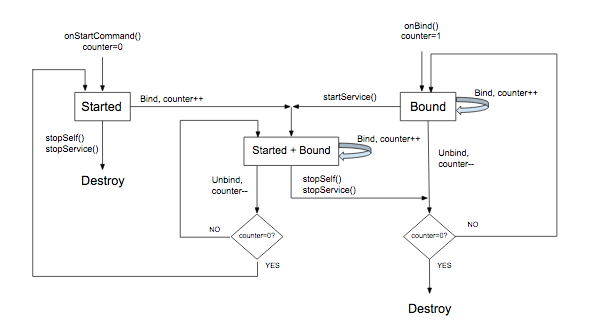
MediaBrowserService 的生命周期由以下几个因素决定:服务的创建方式、绑定到服务的客户端数量,以及服务从媒体会话回调收到的调用。总结:
- 在以下两种情况下会创建该服务:为了响应媒体按钮而启动该服务时,或者当 Activity 绑定到该服务时(通过其
MediaBrowser连接后)。 - 媒体会话
onPlay()回调应包含调用startService()的代码。这样可以确保服务在与之绑定的所有界面MediaBrowserActivity 都解除绑定后,仍能启动并继续运行。 onStop()回调应调用stopSelf()。如果服务已启动,则会停止服务。此外,如果没有 Activity 绑定到服务,服务会被销毁。否则,服务将保持绑定状态,直到其所有 Activity 解除绑定。(如果在销毁服务之前收到后续的startService()调用,则会取消待处理的停止操作。)
以下流程图演示了如何管理服务的生命周期。可变的计数器跟踪绑定的客户端数量:
对前台服务使用 MediaStyle 通知
当服务运行时,它应该在前台运行。这可以让系统知道服务正在执行有用的功能,在系统内存不足时不应将其终止。在前台运行的服务必须显示通知,以便用户知道它并可以选择性地控制它。onPlay() 回调应该将服务置于前台。(请注意,这是具有特殊含义的“前台”。尽管 Android 出于进程管理的目的认为服务位于前台,但对于用户来说,播放器是在后台播放,而某个其他应用正显示在“前台”的屏幕上。)
当服务在前台运行时,它必须显示通知,理想情况下应具有一个或多个传输控件。通知中还应包含会话元数据中的有用信息。
在播放器开始播放时构建并显示通知。最好是在 MediaSessionCompat.Callback.onPlay() 方法中执行此操作。
以下示例使用专为媒体应用设计的 NotificationCompat.MediaStyle。该示例展示了如何构建显示元数据和传输控件的通知。getController() 是一个方便的方法,可让您直接从媒体会话创建媒体控制器。
Kotlin
// Given a media session and its context (usually the component containing the session)
// Create a NotificationCompat.Builder

// Get the session's metadata
val controller = mediaSession.controller
val mediaMetadata = controller.metadata
val description = mediaMetadata.description

val builder = NotificationCompat.Builder(context, channelId).apply {
    // Add the metadata for the currently playing track
    setContentTitle(description.title)
    setContentText(description.subtitle)
    setSubText(description.description)
    setLargeIcon(description.iconBitmap)

    // Enable launching the player by clicking the notification
    setContentIntent(controller.sessionActivity)

    // Stop the service when the notification is swiped away
    setDeleteIntent(
            MediaButtonReceiver.buildMediaButtonPendingIntent(
                    context,
                    PlaybackStateCompat.ACTION_STOP
            )
    )

    // Make the transport controls visible on the lockscreen
    setVisibility(NotificationCompat.VISIBILITY_PUBLIC)

    // Add an app icon and set its accent color
    // Be careful about the color
    setSmallIcon(R.drawable.notification_icon)
    color = ContextCompat.getColor(context, R.color.primaryDark)

    // Add a pause button
    addAction(
            NotificationCompat.Action(
                    R.drawable.pause,
                    getString(R.string.pause),
                    MediaButtonReceiver.buildMediaButtonPendingIntent(
                            context,
                            PlaybackStateCompat.ACTION_PLAY_PAUSE
                    )
            )
    )

    // Take advantage of MediaStyle features
    setStyle(android.support.v4.media.app.NotificationCompat.MediaStyle()
            .setMediaSession(mediaSession.sessionToken)
            .setShowActionsInCompactView(0)

            // Add a cancel button
            .setShowCancelButton(true)
            .setCancelButtonIntent(
                    MediaButtonReceiver.buildMediaButtonPendingIntent(
                            context,
                            PlaybackStateCompat.ACTION_STOP
                    )
            )
    )
}

// Display the notification and place the service in the foreground
startForeground(id, builder.build())
Java
// Given a media session and its context (usually the component containing the session)
// Create a NotificationCompat.Builder

// Get the session's metadata
MediaControllerCompat controller = mediaSession.getController();
MediaMetadataCompat mediaMetadata = controller.getMetadata();
MediaDescriptionCompat description = mediaMetadata.getDescription();

NotificationCompat.Builder builder = new NotificationCompat.Builder(context, channelId);

builder
    // Add the metadata for the currently playing track
    .setContentTitle(description.getTitle())
    .setContentText(description.getSubtitle())
    .setSubText(description.getDescription())
    .setLargeIcon(description.getIconBitmap())

    // Enable launching the player by clicking the notification
    .setContentIntent(controller.getSessionActivity())

    // Stop the service when the notification is swiped away
    .setDeleteIntent(MediaButtonReceiver.buildMediaButtonPendingIntent(context,
       PlaybackStateCompat.ACTION_STOP))

    // Make the transport controls visible on the lockscreen
    .setVisibility(NotificationCompat.VISIBILITY_PUBLIC)

    // Add an app icon and set its accent color
    // Be careful about the color
    .setSmallIcon(R.drawable.notification_icon)
    .setColor(ContextCompat.getColor(context, R.color.primaryDark))

    // Add a pause button
    .addAction(new NotificationCompat.Action(
        R.drawable.pause, getString(R.string.pause),
        MediaButtonReceiver.buildMediaButtonPendingIntent(context,
            PlaybackStateCompat.ACTION_PLAY_PAUSE)))

    // Take advantage of MediaStyle features
    .setStyle(new MediaStyle()
        .setMediaSession(mediaSession.getSessionToken())
        .setShowActionsInCompactView(0)

        // Add a cancel button
       .setShowCancelButton(true)
       .setCancelButtonIntent(MediaButtonReceiver.buildMediaButtonPendingIntent(context,
           PlaybackStateCompat.ACTION_STOP)));

// Display the notification and place the service in the foreground
startForeground(id, builder.build());
使用 MediaStyle 通知时,请注意以下 NotificationCompat 设置的行为:
- 当您使用
setContentIntent()时,您的服务会在用户点按通知时自动启动,这是一项非常方便的功能。 - 在锁定屏幕等“不安全”的情况下,通知内容的默认公开范围为
VISIBILITY_PRIVATE。您也许希望在锁定屏幕上看到传输控件,可以使用VISIBILITY_PUBLIC来实现。 - 设置背景颜色时要小心。在 Android 5.0 或更高版本的普通通知中,该颜色仅会应用于小应用图标的背景。但对于 Android 7.0 之前版本中的 MediaStyle 通知,该颜色会用于整个通知背景。测试您的背景颜色。选择不刺眼的颜色,避免使用过于明亮或耀眼的颜色。
以下设置仅在您使用 NotificationCompat.MediaStyle 时才可用:
- 使用
setMediaSession()将通知与会话关联,以便第三方应用和配套设备访问和控制会话。 - 使用
setShowActionsInCompactView()添加最多 3 项要在通知的标准尺寸 contentView 中显示的操作。(此处指定了暂停按钮。) - 在 Android 5.0(API 级别 21)及更高版本中,当服务不再在前台运行时,您可以通过滑走通知来停止播放器。在更低版本中,您不能这样操作。在 Android 5.0(API 级别 21)之前的版本中,要允许用户移除通知并停止播放,您可以通过调用
setShowCancelButton(true)和setCancelButtonIntent()在通知的右上角添加一个取消按钮。
添加暂停和取消按钮时,您需要为播放操作附加一个 PendingIntent。MediaButtonReceiver.buildMediaButtonPendingIntent() 方法负责将 PlaybackState 操作转换为 PendingIntent。
启用 AVRCP 媒体浏览
除了 Android Auto 等自定义应用之外,系统的蓝牙层还充当 MediaBrowserService 的客户端,以方便进行无线远程目录浏览 (AVRCP)。
在 Android 16 和 Android 17 上,平台要求未使用 Media3 的应用公开具有 intent 过滤器的特定 activity 以供浏览验证。
将此特定 intent 过滤器添加到 AndroidManifest.xml 中的导出 activity。请注意,我们有意省略了 CATEGORY_DEFAULT,以防止您的应用出现在本地音频文件的通用“打开方式”菜单中:
<activity
    android:name=".BluetoothValidationActivity"
    android:exported="true"
    android:theme="@android:style/Theme.NoDisplay"
    android:excludeFromRecents="true"
    android:noHistory="true">
  <intent-filter>
    <action android:name="android.intent.action.VIEW" />
    <data android:scheme="content" />
    <data android:host="media" />
    <!-- Specific path check used by Bluetooth stack for validation -->
    <data android:pathPrefix="/internal/audio/media/" />
    <data android:mimeType="audio/*" />
  </intent-filter>
</activity>