

ExoPlayer의 기본 데모 앱은 다음과 같은 두 가지 주요 목적으로 사용됩니다.
- ExoPlayer 사용의 모든 기능을 갖춘 예시를 제공합니다. 데모 앱은 자체 앱을 개발하기 위한 편리한 시작점으로 사용할 수 있습니다.
- ExoPlayer를 사용해 볼 수 있습니다. 데모 앱을 사용하면 포함된 샘플 외에도 자체 콘텐츠의 재생을 테스트할 수 있습니다.
이 페이지에서는 데모 앱을 가져오고 컴파일하고 실행하는 방법을 설명합니다. 또한 자체 미디어를 재생하는 데 사용하는 방법도 설명합니다.
코드 가져오기
기본 데모 앱의 소스 코드는 GitHub 프로젝트의 demos/main 폴더에서 확인할 수 있습니다. 아직 프로젝트를 로컬 디렉터리에 클론하지 않았으면 클론합니다.
git clone https://github.com/androidx/media.git
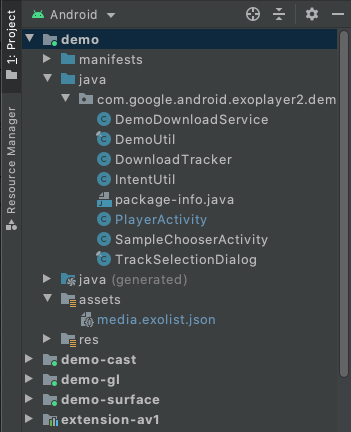
그런 다음 Android 스튜디오에서 프로젝트를 엽니다. Android 프로젝트 뷰에 다음이 표시됩니다(데모 앱의 관련 폴더가 펼쳐짐).
컴파일 및 실행
데모 앱을 컴파일하고 실행하려면 Android 스튜디오에서 demo 구성을 선택하고 실행합니다. 데모 앱이 연결된 Android 지원 기기에 설치되고 실행됩니다. 가능하면 실제 기기를 사용하는 것이 좋습니다. 대신 에뮬레이터를 사용하려면 지원되는 기기의 에뮬레이터 섹션을 읽고 가상 기기가 API 수준이 23 이상인 시스템 이미지를 사용하는지 확인하세요.
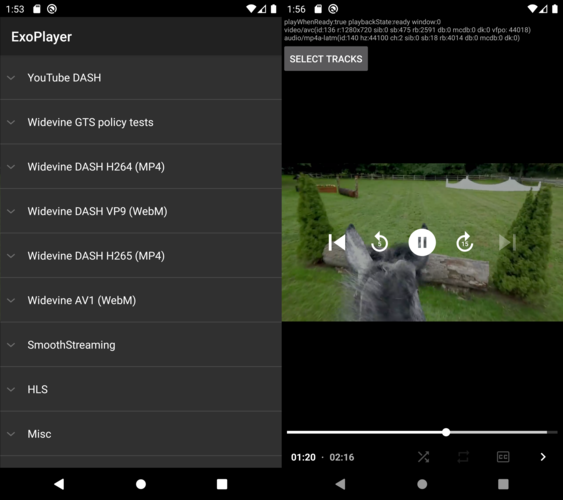
데모 앱은 샘플 목록(SampleChooserActivity)을 표시합니다. 샘플을 선택하면 재생을 위한 두 번째 활동(PlayerActivity)이 열립니다. 데모에는 재생 컨트롤과 트랙 선택 기능이 있습니다. 또한 ExoPlayer의 EventLogger 유틸리티 클래스를 사용하여 유용한 디버그 정보를 시스템 로그에 출력합니다. 이 로깅은 다음 명령어를 사용하여 다른 태그의 오류 수준 로깅과 함께 볼 수 있습니다.
adb logcat EventLogger:V *:E
번들 디코더 사용 설정
ExoPlayer에는 AV1, VP9, Opus, FLAC, FFmpeg(오디오 전용)를 비롯한 번들 소프트웨어 디코더를 사용할 수 있는 여러 확장 프로그램이 있습니다. 데모 앱은 다음과 같이 이러한 확장 프로그램을 포함하고 사용하도록 빌드할 수 있습니다.
- 포함할 각 확장 프로그램을 빌드합니다. 이 작업은 수동 프로세스입니다. 자세한 내용은 각 확장 프로그램의
README.md파일을 참고하세요. Android 스튜디오의 Build Variants 뷰에서 다음 이미지와 같이 데모 모듈의 빌드 변형을
withDecoderExtensionsDebug또는withDecoderExtensionsRelease로 설정합니다.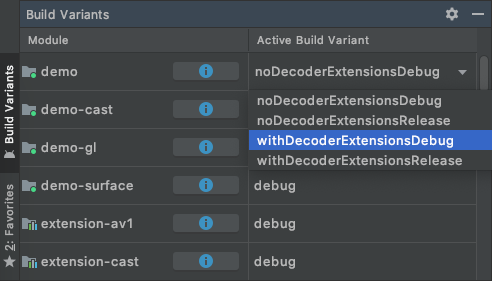
평소와 같이
demo구성을 컴파일, 설치, 실행합니다.
기본적으로 확장 프로그램 디코더는 적합한 플랫폼 디코더가 없는 경우에만 사용됩니다. 다음 섹션에 설명된 대로 확장 프로그램 디코더를 선호하도록 지정할 수 있습니다.
내 콘텐츠 재생하기
데모 앱에서 자체 콘텐츠를 재생하는 방법에는 여러 가지가 있습니다.
1. assets/media.exolist.json 수정
데모 앱에 나열된 샘플은 assets/media.exolist.json에서 로드됩니다.
이 JSON 파일을 수정하면 데모 앱에서 샘플을 추가하고 삭제할 수 있습니다. 스키마는 다음과 같으며 [O] 는 선택적 속성을 나타냅니다.
[
  {
    "name": "Name of heading",
    "samples": [
      {
        "name": "Name of sample",
        "uri": "The URI of the sample",
        "extension": "[O] Sample type hint. Cannot be combined with mime_type. Values: mpd, ism, m3u8",
        "clip_start_position_ms": "[O] A start point to which the sample should be clipped, in milliseconds",
        "clip_end_position_ms": "[O] An end point from which the sample should be clipped, in milliseconds",
        "drm_scheme": "[O] Drm scheme if protected. Values: widevine, playready, clearkey",
        "drm_license_uri": "[O] URI of the license server if protected",
        "drm_force_default_license_uri": "[O] Whether to force use of "drm_license_uri" for key requests that include their own license URI",
        "drm_key_request_properties": "[O] Key request headers if protected",
        "drm_session_for_clear_content": "[O] Whether to attach a DRM session to clear video and audio tracks",
        "drm_multi_session": "[O] Enables key rotation if protected",
        "drm_force_software_crypto": "[O] Whether to force DRM to use the software crypto library regardless of the device's hardware crypto capability if supported by the DRM scheme",
        "mime_type": "[O] The MIME type of the sample. Cannot be combined with extension.",
        "subtitle_uri": "[O] The URI of a subtitle sidecar file",
        "subtitle_mime_type": "[O] The MIME type of subtitle_uri (required if subtitle_uri is set)",
        "subtitle_language": "[O] The BCP47 language code of the subtitle file (ignored if subtitle_uri is not set)",
        "ad_tag_uri": "[O] The URI of an ad tag to load via the IMA extension"
      },
      ...etc
    ]
  },
  ...etc
]
샘플 재생목록은 다음 스키마를 사용하여 지정할 수 있습니다.
[
  {
    "name": "Name of heading",
    "samples": [
      {
        "name": "Name of playlist sample",
        "playlist": [
          {
            "uri": "The URI of the first sample in the playlist",
            "extension": "[O] Sample type hint. Cannot be combined with mime_type. Values: mpd, ism, m3u8",
            "clip_start_position_ms": "[O] A start point to which the sample should be clipped, in milliseconds",
            "clip_end_position_ms": "[O] An end point from which the sample should be clipped, in milliseconds",
            "drm_scheme": "[O] Drm scheme if protected. Values: widevine, playready, clearkey",
            "drm_license_uri": "[O] URI of the license server if protected",
            "drm_force_default_license_uri": "[O] Whether to force use of "drm_license_uri" for key requests that include their own license URI",
            "drm_key_request_properties": "[O] Key request headers if protected",
            "drm_session_for_clear_content": "[O] Whether to attach a DRM session to clear video and audio tracks",
            "drm_multi_session": "[O] Enables key rotation if protected",
            "drm_force_software_crypto": "[O] Whether to force DRM to use the software crypto library regardless of the device's hardware crypto capability if supported by the DRM scheme",
            "mime_type": "[O] The MIME type of the sample. Cannot be combined with extension.",
            "subtitle_uri": "[O] The URI of a subtitle sidecar file",
            "subtitle_mime_type": "[O] The MIME type of subtitle_uri (required if subtitle_uri is set)",
            "subtitle_language": "[O] The BCP47 language code of the subtitle file (ignored if subtitle_uri is not set)"
          },
          {
            "uri": "The URI of the second sample in the playlist",
            ...etc
          },
          ...etc
        ]
      },
      ...etc
    ]
  },
  ...etc
]
필요한 경우 키 요청 헤더는 각 헤더의 문자열 속성을 포함하는 객체로 지정됩니다.
"drm_key_request_properties": {
  "name1": "value1",
  "name2": "value2",
  ...etc
}
샘플 선택기 활동에서 더보기 메뉴에는 확장 프로그램 디코더를 선호할지 여부를 지정하는 옵션이 포함되어 있습니다.
로컬 파일 URI 및 범위 지정 저장소 제한사항
로컬 파일 URI를 지정할 때 데모 앱은 이러한 파일을 읽는 데 필요한 저장소 액세스 권한을 요청합니다. 하지만 Android 13부터는 일반적인 미디어 파일 확장자(예: .mp4)로 끝나지 않는 임의의 파일을 로드할 수 없습니다. 이러한 파일을 로드해야 하는 경우 액세스 제한이 없는 데모 앱의 특정 저장소 디렉터리에 배치할 수 있습니다. 일반적으로 /sdcard/Android/data/androidx.media3.demo.main/files에 있습니다.
2. 외부 exolist.json 파일 로드
데모 앱은 이전 스키마를 사용하고 *.exolist.json 규칙에 따라 이름이 지정된 외부 JSON 파일을 로드할 수 있습니다. 예를 들어 https://yourdomain.com/samples.exolist.json에서 이러한 파일을 호스팅하는 경우 다음을 사용하여 데모 앱에서 열 수 있습니다.
adb shell am start -a android.intent.action.VIEW \
    -d https://yourdomain.com/samples.exolist.json
데모 앱이 설치된 기기에서 *.exolist.json 링크(예: 브라우저 또는 이메일 클라이언트)를 클릭하면 데모 앱에서도 열립니다. *.exolist.json JSON 파일을 호스팅하면 다른 사용자가 데모 앱에서 사용해 볼 수 있도록 콘텐츠를 배포할 수 있습니다.
3. 인텐트 실행
인텐트를 사용하여 샘플 목록을 우회하고 바로 재생을 시작할 수 있습니다. 단일 샘플을 재생하려면 인텐트의 작업을 androidx.media3.demo.main.action.VIEW로 설정하고 데이터 URI를 재생할 샘플의 URI로 설정합니다. 이러한 인텐트는 다음을 사용하여 터미널에서 실행할 수 있습니다.
adb shell am start -a androidx.media3.demo.main.action.VIEW \
    -d https://yourdomain.com/sample.mp4
단일 샘플 인텐트에 지원되는 선택적 추가 항목은 다음과 같습니다.
- 샘플 구성 추가 항목:
mime_type[문자열] 샘플 MIME 유형 힌트입니다. 예를 들어 DASH 콘텐츠의 경우application/dash+xml입니다.clip_start_position_ms[Long] 샘플을 클립해야 하는 시작점(밀리초)입니다.clip_end_position_ms[Long] 샘플을 클립해야 하는 엔드포인트(밀리초)입니다.drm_scheme[문자열] 보호되는 경우 DRM 스킴입니다. 유효한 값은widevine,playready,clearkey입니다. DRM 스키마 UUID도 허용됩니다.drm_license_uri[문자열] 보호되는 경우 라이선스 서버의 URI입니다.drm_force_default_license_uri[불리언] 자체 라이선스 URI를 포함하는 키 요청에drm_license_uri를 강제로 사용할지 여부입니다.drm_key_request_properties[문자열 배열] 보호되는 경우 name1, value1, name2, value2 등으로 패킹된 키 요청 헤더입니다.drm_session_for_clear_content[불리언] DRM 세션을 동영상 및 오디오 트랙 지우기에 연결할지 여부입니다.drm_multi_session[불리언] 보호되는 경우 키 순환을 사용 설정합니다.drm_force_software_crypto[불리언] DRM 스킴에서 지원하는 경우 기기의 하드웨어 암호화 기능과 관계없이 DRM이 소프트웨어 암호화 라이브러리를 사용하도록 강제할지 여부입니다.subtitle_uri[문자열] 자막 사이드카 파일의 URI입니다.subtitle_mime_type[문자열] subtitle_uri의 MIME 유형입니다(subtitle_uri가 설정된 경우 필수).subtitle_language[문자열] 자막 파일의 BCP47 언어 코드입니다(subtitle_uri가 설정되지 않은 경우 무시됨).ad_tag_uri[문자열] IMA 확장 프로그램을 사용하여 로드할 광고 태그의 URI입니다.prefer_extension_decoders[불리언] 확장 프로그램 디코더가 플랫폼 디코더보다 선호되는지 여부입니다.
adb shell am start를 사용하여 인텐트를 실행할 때 선택적 문자열 추가 항목을 --es(예: --es extension mpd)로 설정할 수 있습니다. 선택적 불리언 추가 항목은 --ez(예: --ez prefer_extension_decoders TRUE)로 설정할 수 있습니다. 선택적 긴 추가 항목은 --el(예: --el clip_start_position_ms 5000)로 설정할 수 있습니다. 선택적 문자열 배열 추가 항목은 --esa(예: --esa drm_key_request_properties name1,value1)로 설정할 수 있습니다.
샘플 재생목록을 재생하려면 인텐트의 작업을 androidx.media3.demo.main.action.VIEW_LIST로 설정합니다. 샘플 구성 추가 항목은 다음 두 가지 차이점을 제외하고 androidx.media3.demo.main.action.VIEW와 동일하게 유지됩니다.
- 추가 키에는 밑줄과 샘플의 0 기반 색인이 서픽스로 있어야 합니다. 예를 들어
extension_0은 첫 번째 샘플의 샘플 유형을 힌트합니다.drm_scheme_1는 두 번째 샘플의 DRM 스키마를 설정합니다. - 샘플의 URI는 키
uri_<sample-index>가 있는 추가 항목으로 전달됩니다.
샘플에 종속되지 않는 다른 추가 항목은 변경되지 않습니다. 예를 들어 터미널에서 다음 명령어를 실행하여 두 항목이 있는 재생목록을 재생하고 두 번째 항목의 확장 프로그램을 재정의할 수 있습니다.
adb shell am start -a androidx.media3.demo.main.action.VIEW_LIST \
    --es uri_0 https://a.com/sample1.mp4 \
    --es uri_1 https://b.com/sample2.fake_mpd \
    --es extension_1 mpd