

ExoPlayer 提供用于下载媒体以供离线播放的功能。在大多数使用情形下,即使应用在后台运行,也希望下载继续进行。对于这些使用情形,您的应用应继承 DownloadService 并向服务发送命令,以添加、移除和控制下载。下图显示了涉及的主要类。
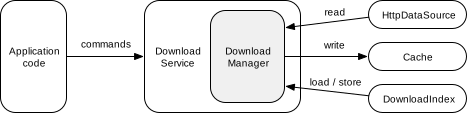
DownloadService:封装DownloadManager并将命令转发给它。该服务允许DownloadManager即使在应用处于后台时也能保持运行。DownloadManager:管理多个下载,从DownloadIndex加载(和存储)其状态,并根据网络连接等要求启动和停止下载。为了下载内容,管理器通常会从HttpDataSource读取正在下载的数据,并将其写入Cache。DownloadIndex:持久保存下载状态。
创建 DownloadService
如需创建 DownloadService,请对其进行子类化并实现其抽象方法:
getDownloadManager():返回要使用的DownloadManager。getScheduler():返回一个可选的Scheduler,当满足待下载项所需的条件时,该可选对象可以重新启动服务。ExoPlayer 提供以下实现:PlatformScheduler,它使用JobScheduler(最低 API 为 21)。如需了解应用权限要求,请参阅PlatformSchedulerJavadoc。WorkManagerScheduler,它使用 WorkManager。
getForegroundNotification():返回要在服务在前台运行时显示的通知。您可以使用DownloadNotificationHelper.buildProgressNotification创建默认样式的通知。
最后,在 AndroidManifest.xml 文件中定义服务:
<uses-permission android:name="android.permission.FOREGROUND_SERVICE"/>
<uses-permission android:name="android.permission.FOREGROUND_SERVICE_DATA_SYNC"/>
<application>
  <service android:name="com.myapp.MyDownloadService"
      android:exported="false"
      android:foregroundServiceType="dataSync">
    <!-- This is needed for Scheduler -->
    <intent-filter>
      <action android:name="androidx.media3.exoplayer.downloadService.action.RESTART"/>
      <category android:name="android.intent.category.DEFAULT"/>
    </intent-filter>
  </service>
</application>
如需查看具体示例,请参阅 ExoPlayer 演示版应用中的 DemoDownloadService 和 AndroidManifest.xml。
创建 DownloadManager
以下代码段展示了如何实例化 DownloadManager,该对象可由 DownloadService 中的 getDownloadManager() 返回:
Kotlin
// Note: This should be a singleton in your app. val databaseProvider = StandaloneDatabaseProvider(context) // A download cache should not evict media, so should use a NoopCacheEvictor. val downloadCache = SimpleCache(downloadDirectory, NoOpCacheEvictor(), databaseProvider) // Create a factory for reading the data from the network. val dataSourceFactory = DefaultHttpDataSource.Factory() // Choose an executor for downloading data. Using Runnable::run will cause each download task to // download data on its own thread. Passing an executor that uses multiple threads will speed up // download tasks that can be split into smaller parts for parallel execution. Applications that // already have an executor for background downloads may wish to reuse their existing executor. val downloadExecutor = Executor(Runnable::run) // Create the download manager. val downloadManager = DownloadManager(context, databaseProvider, downloadCache, dataSourceFactory, downloadExecutor) // Optionally, properties can be assigned to configure the download manager. downloadManager.requirements = requirements downloadManager.maxParallelDownloads = 3
Java
// Note: This should be a singleton in your app. databaseProvider = new StandaloneDatabaseProvider(context); // A download cache should not evict media, so should use a NoopCacheEvictor. downloadCache = new SimpleCache(downloadDirectory, new NoOpCacheEvictor(), databaseProvider); // Create a factory for reading the data from the network. dataSourceFactory = new DefaultHttpDataSource.Factory(); // Choose an executor for downloading data. Using Runnable::run will cause each download task to // download data on its own thread. Passing an executor that uses multiple threads will speed up // download tasks that can be split into smaller parts for parallel execution. Applications that // already have an executor for background downloads may wish to reuse their existing executor. Executor downloadExecutor = Runnable::run; // Create the download manager. downloadManager = new DownloadManager( context, databaseProvider, downloadCache, dataSourceFactory, downloadExecutor); // Optionally, setters can be called to configure the download manager. downloadManager.setRequirements(requirements); downloadManager.setMaxParallelDownloads(3);
如需查看具体示例,请参阅演示版应用中的 DemoUtil。
添加下载
如需添加下载,请创建一个 DownloadRequest 并将其发送到您的 DownloadService。对于自适应流,请使用 DownloadHelper 帮助构建 DownloadRequest。以下示例展示了如何创建下载请求:
Kotlin
val downloadRequest = DownloadRequest.Builder(contentId, contentUri).build()
Java
DownloadRequest downloadRequest = new DownloadRequest.Builder(contentId, contentUri).build();
在此示例中,contentId 是内容的唯一标识符。contentUri 通常可用作 contentId,但应用可以自由使用最适合其使用情形的任何 ID 方案。DownloadRequest.Builder 还有一些可选的 setter。例如,setKeySetId 和 setData 可分别用于设置应用希望与下载相关联的 DRM 和自定义数据。还可以使用 setMimeType 指定内容的 MIME 类型,作为无法从 contentUri 推断出 MIME 类型的情况下的提示。
创建后,可以将请求发送到 DownloadService 以添加下载:
Kotlin
DownloadService.sendAddDownload( context, MyDownloadService::class.java, downloadRequest, /* foreground= */ false, )
Java
DownloadService.sendAddDownload( context, MyDownloadService.class, downloadRequest, /* foreground= */ false);
在此示例中,MyDownloadService 是应用的 DownloadService 子类,而 foreground 参数用于控制服务是否在前台启动。如果您的应用已在前台运行,则 foreground 参数通常应设置为 false,因为 DownloadService 会在确定自己有工作要做时自行进入前台。
正在移除下载内容
通过向 DownloadService 发送移除命令即可移除下载,其中 contentId 用于标识要移除的下载:
Kotlin
DownloadService.sendRemoveDownload( context, MyDownloadService::class.java, contentId, /* foreground= */ false, )
Java
DownloadService.sendRemoveDownload( context, MyDownloadService.class, contentId, /* foreground= */ false);
您还可以使用 DownloadService.sendRemoveAllDownloads 移除所有已下载的数据。
开始和停止下载
只有在满足以下四个条件时,下载才会继续:
- 下载没有停止原因。
- 下载未暂停。
- 下载进度符合要求。要求可以指定对允许的网络类型的限制,以及设备是否应处于空闲状态或连接到充电器。
- 未超出并行下载次数上限。
所有这些条件都可以通过向 DownloadService 发送命令来控制。
设置和清除下载停止原因
您可以为停止一次或所有下载设置原因:
Kotlin
// Set the stop reason for a single download. DownloadService.sendSetStopReason( context, MyDownloadService::class.java, contentId, stopReason, /* foreground= */ false, ) // Clear the stop reason for a single download. DownloadService.sendSetStopReason( context, MyDownloadService::class.java, contentId, Download.STOP_REASON_NONE, /* foreground= */ false, )
Java
// Set the stop reason for a single download. DownloadService.sendSetStopReason( context, MyDownloadService.class, contentId, stopReason, /* foreground= */ false); // Clear the stop reason for a single download. DownloadService.sendSetStopReason( context, MyDownloadService.class, contentId, Download.STOP_REASON_NONE, /* foreground= */ false);
stopReason 可以是任何非零值(Download.STOP_REASON_NONE = 0 是一个特殊值,表示下载不会停止)。如果应用因多种原因停止下载,可以使用不同的值来跟踪每次下载停止的原因。设置和清除所有下载的停止原因与设置和清除单个下载的停止原因的方式相同,只不过 contentId 应设置为 null。
如果下载具有非零的停止原因,则会处于 Download.STATE_STOPPED 状态。停止原因会保留在 DownloadIndex 中,因此,如果应用进程被终止并稍后重新启动,停止原因也会保留。
暂停和恢复所有下载
所有下载都可以暂停和恢复,具体操作如下:
Kotlin
// Pause all downloads. DownloadService.sendPauseDownloads( context, MyDownloadService::class.java, /* foreground= */ false, ) // Resume all downloads. DownloadService.sendResumeDownloads( context, MyDownloadService::class.java, /* foreground= */ false, )
Java
// Pause all downloads. DownloadService.sendPauseDownloads(context, MyDownloadService.class, /* foreground= */ false); // Resume all downloads. DownloadService.sendResumeDownloads(context, MyDownloadService.class, /* foreground= */ false);
下载暂停时,它们将处于 Download.STATE_QUEUED 状态。
与设置停止原因不同,此方法不会保留任何状态更改。它只会影响 DownloadManager 的运行时状态。
设置下载进度要求
Requirements 可用于指定必须满足的约束条件,下载才能继续进行。您可以在创建 DownloadManager 时通过调用 DownloadManager.setRequirements() 来设置要求,如上述示例所示。还可以通过向 DownloadService 发送命令来动态更改这些值:
Kotlin
// Set the download requirements. DownloadService.sendSetRequirements( context, MyDownloadService::class.java, requirements, /* foreground= */ false, )
Java
// Set the download requirements. DownloadService.sendSetRequirements( context, MyDownloadService.class, requirements, /* foreground= */ false);
如果下载因不符合要求而无法继续,则会处于 Download.STATE_QUEUED 状态。您可以使用 DownloadManager.getNotMetRequirements() 查询未满足的要求。
设置并行下载的最大数量
可以通过调用 DownloadManager.setMaxParallelDownloads() 设置并行下载的最大数量。这通常在创建 DownloadManager 时完成,如上文的示例所示。
如果下载因并行下载数量已达上限而无法继续,则会处于 Download.STATE_QUEUED 状态。
查询下载内容
可以查询 DownloadManager 的 DownloadIndex,以了解所有下载的状态,包括已完成或失败的下载。可通过调用 DownloadManager.getDownloadIndex() 获取 DownloadIndex。然后,通过调用 DownloadIndex.getDownloads() 即可获得一个可遍历所有下载内容的游标。或者,也可以通过调用 DownloadIndex.getDownload() 查询单个下载的状态。
DownloadManager 还提供 DownloadManager.getCurrentDownloads(),该方法仅返回当前(即未完成或失败)下载的状态。此方法可用于更新通知和其他显示当前下载进度和状态的界面组件。
聆听下载内容
您可以向 DownloadManager 添加监听器,以便在当前下载项的状态发生变化时收到通知:
Kotlin
downloadManager.addListener( object : DownloadManager.Listener { // Override methods of interest here. } )
Java
downloadManager.addListener( new DownloadManager.Listener() { // Override methods of interest here. });
如需查看具体示例,请参阅演示应用 DownloadTracker 类中的 DownloadManagerListener。
播放已下载的内容
播放下载的内容与播放在线内容类似,只是数据是从下载的 Cache 中读取的,而不是通过网络读取的。
如需播放下载的内容,请使用与下载时相同的 Cache 实例创建 CacheDataSource.Factory,并在构建播放器时将其注入 DefaultMediaSourceFactory:
Kotlin
// Create a read-only cache data source factory using the download cache. val cacheDataSourceFactory: DataSource.Factory = CacheDataSource.Factory() .setCache(downloadCache) .setUpstreamDataSourceFactory(httpDataSourceFactory) .setCacheWriteDataSinkFactory(null) // Disable writing. val player = ExoPlayer.Builder(context) .setMediaSourceFactory( DefaultMediaSourceFactory(context).setDataSourceFactory(cacheDataSourceFactory) ) .build()
Java
// Create a read-only cache data source factory using the download cache. DataSource.Factory cacheDataSourceFactory = new CacheDataSource.Factory() .setCache(downloadCache) .setUpstreamDataSourceFactory(httpDataSourceFactory) .setCacheWriteDataSinkFactory(null); // Disable writing. ExoPlayer player = new ExoPlayer.Builder(context) .setMediaSourceFactory( new DefaultMediaSourceFactory(context).setDataSourceFactory(cacheDataSourceFactory)) .build();
如果同一播放器实例还将用于播放非下载内容,则应将 CacheDataSource.Factory 配置为只读,以避免在播放期间也下载该内容。
使用 CacheDataSource.Factory 配置播放器后,播放器将能够访问下载的内容以进行播放。如需播放下载内容,请将相应的 MediaItem 传递给播放器。可以使用 Download.request.toMediaItem 从 Download 获取 MediaItem,也可以使用 DownloadRequest.toMediaItem 直接从 DownloadRequest 获取。
MediaSource 配置
上述示例使下载缓存可用于播放所有 MediaItem。您还可以使下载缓存可用于各个 MediaSource 实例,这些实例可以直接传递给播放器:
Kotlin
val mediaSource = ProgressiveMediaSource.Factory(cacheDataSourceFactory) .createMediaSource(MediaItem.fromUri(contentUri)) player.setMediaSource(mediaSource) player.prepare()
Java
ProgressiveMediaSource mediaSource = new ProgressiveMediaSource.Factory(cacheDataSourceFactory) .createMediaSource(MediaItem.fromUri(contentUri)); player.setMediaSource(mediaSource); player.prepare();
下载和播放自适应流
自适应流(例如 DASH、SmoothStreaming 和 HLS)通常包含多个媒体轨道。通常,多个轨道包含相同的内容,但质量各不相同(例如 SD、HD 和 4K 视频轨道)。也可能有多个相同类型的轨道包含不同的内容(例如,多个不同语言的音轨)。
对于流式播放,可以使用轨道选择器来选择要播放的轨道。同样,对于下载,可以使用 DownloadHelper 选择要下载的轨道。DownloadHelper 的典型用法如下:
- 使用
DownloadHelper.Factory实例构建DownloadHelper。准备辅助程序并等待回调。 - (可选)使用
getMappedTrackInfo和getTrackSelections检查默认选择的轨道,并使用clearTrackSelections、replaceTrackSelections和addTrackSelection进行调整。 - 通过调用
getDownloadRequest为所选轨道创建DownloadRequest。如前所述,可以将请求传递给DownloadService以添加下载。 - 使用
release()释放辅助程序。
Kotlin
val downloadHelper = DownloadHelper.Factory() .setRenderersFactory(DefaultRenderersFactory(context)) .setDataSourceFactory(dataSourceFactory) .create(MediaItem.fromUri(contentUri)) downloadHelper.prepare(callback)
Java
DownloadHelper downloadHelper = new DownloadHelper.Factory() .setRenderersFactory(new DefaultRenderersFactory(context)) .setDataSourceFactory(dataSourceFactory) .create(MediaItem.fromUri(contentUri)); downloadHelper.prepare(callback);
播放下载的自适应内容需要配置播放器并传递相应的 MediaItem,如前所述。
构建 MediaItem 时,必须将 MediaItem.localConfiguration.streamKeys 设置为与 DownloadRequest 中的值一致,以便播放器仅尝试播放已下载的轨道子集。使用 Download.request.toMediaItem 和 DownloadRequest.toMediaItem 构建 MediaItem 将为您处理此问题。