

หมายเหตุ: หน้านี้อ้างอิงถึงแพ็กเกจ Camera2 เราขอแนะนำให้ใช้ CameraX เว้นแต่ว่าแอปของคุณต้องใช้ฟีเจอร์เฉพาะระดับต่ำจาก Camera2 ทั้ง CameraX และ Camera2 รองรับ Android 5.0 (API ระดับ 21) ขึ้นไป
อุปกรณ์ Android สมัยใหม่หลายเครื่องมีกล้อง 2 ตัวขึ้นไปที่ด้านหน้า ด้านหลัง หรือทั้ง 2 ด้านของอุปกรณ์ เลนส์แต่ละตัวอาจมีความสามารถเฉพาะตัว เช่น การถ่ายภาพต่อเนื่อง การควบคุมด้วยตนเอง หรือการติดตามการเคลื่อนไหว แอปสำหรับฝากเช็คอาจใช้เฉพาะกล้องหลังตัวแรก ในขณะที่แอปโซเชียลมีเดียอาจตั้งค่าเริ่มต้นเป็นกล้องหน้า แต่ให้ตัวเลือกแก่ผู้ใช้ในการสลับระหว่างเลนส์ทั้งหมดที่มี นอกจากนี้ยังจดจำตัวเลือกของผู้ใช้ได้ด้วย
หน้านี้จะอธิบายวิธีแสดงรายการเลนส์กล้องและความสามารถของเลนส์ เพื่อให้คุณตัดสินใจได้ภายในแอปว่าจะใช้เลนส์ใดในสถานการณ์ที่กำหนด ข้อมูลโค้ดต่อไปนี้จะดึงข้อมูลรายการกล้องทั้งหมดและวนซ้ำกล้องเหล่านั้น
Kotlin
try {
    val cameraIdList = cameraManager.cameraIdList // may be empty

    // iterate over available camera devices
    for (cameraId in cameraIdList) {
        val characteristics = cameraManager.getCameraCharacteristics(cameraId)
        val cameraLensFacing = characteristics.get(CameraCharacteristics.LENS_FACING)
        val cameraCapabilities = characteristics.get(CameraCharacteristics.REQUEST_AVAILABLE_CAPABILITIES)

        // check if the selected camera device supports basic features
        // ensures backward compatibility with the original Camera API
        val isBackwardCompatible = cameraCapabilities?.contains(
            CameraMetadata.REQUEST_AVAILABLE_CAPABILITIES_BACKWARD_COMPATIBLE) ?: false
        ...
    }
} catch (e: CameraAccessException) {
    e.message?.let { Log.e(TAG, it) }
    ...
}
Java
try {
    String[] cameraIdList = cameraManager.getCameraIdList(); // may be empty

    // iterate over available camera devices
    for (String cameraId : cameraIdList) {
        CameraCharacteristics characteristics = cameraManager.getCameraCharacteristics(cameraId);
        int cameraLensFacing = characteristics.get(CameraCharacteristics.LENS_FACING);
        int[] cameraCapabilities =
            characteristics.get(CameraCharacteristics.REQUEST_AVAILABLE_CAPABILITIES);

        // check if the selected camera device supports basic features
        // ensures backward compatibility with the original Camera API
        boolean isBackwardCompatible = false;
        for (int capability : cameraCapabilities) {
            if (capability == CameraMetadata.REQUEST_AVAILABLE_CAPABILITIES_BACKWARD_COMPATIBLE) {
                isBackwardCompatible = true;
                break;
            }
        }
        ...
    }
} catch (CameraAccessException e) {
    Log.e(TAG, e.getMessage());
    ...
}
ตัวแปร cameraLensFacing อธิบายทิศทางที่กล้องหันไปเทียบกับหน้าจออุปกรณ์ และมีค่าใดค่าหนึ่งต่อไปนี้
CameraMetadata.LENS_FACING_FRONTCameraMetadata.LENS_FACING_BACKCameraMetadata.LENS_FACING_EXTERNAL
ดูข้อมูลเพิ่มเติมเกี่ยวกับการกำหนดค่าการหันของเลนส์ได้ที่
CameraCharacteristics.LENS_FACING
ตัวแปร cameraCapabilities จากตัวอย่างโค้ดก่อนหน้ามีข้อมูลเกี่ยวกับความสามารถอื่นๆ รวมถึงความสามารถของกล้องในการสร้างเฟรมมาตรฐานเป็นเอาต์พุต (เทียบกับข้อมูลเซ็นเซอร์ความลึกเท่านั้น เป็นต้น) คุณสามารถดูว่า
CameraMetadata.REQUEST_AVAILABLE_CAPABILITIES_BACKWARD_COMPATIBLE
เป็นหนึ่งในความสามารถที่แสดงของกล้องหรือไม่ ซึ่งจัดเก็บเป็นแฟล็กใน
isBackwardCompatible
เลือกค่าเริ่มต้นที่สมเหตุสมผล
ในแอป คุณอาจต้องการเปิดกล้องเฉพาะเจาะจงโดยค่าเริ่มต้น (หากมี) ตัวอย่างเช่น แอปเซลฟีมักจะเปิดกล้องหน้า ในขณะที่แอปเทคโนโลยีความจริงเสริม (AR) อาจเริ่มต้นด้วยกล้องหลัง ฟังก์ชันต่อไปนี้จะแสดงกล้องตัวแรกที่หันไปในทิศทางที่กำหนด
Kotlin
fun getFirstCameraIdFacing(cameraManager: CameraManager,
                           facing: Int = CameraMetadata.LENS_FACING_BACK): String? {
    try {
        // Get list of all compatible cameras
        val cameraIds = cameraManager.cameraIdList.filter {
            val characteristics = cameraManager.getCameraCharacteristics(it)
            val capabilities = characteristics.get(CameraCharacteristics.REQUEST_AVAILABLE_CAPABILITIES)
            capabilities?.contains(
                    CameraMetadata.REQUEST_AVAILABLE_CAPABILITIES_BACKWARD_COMPATIBLE) ?: false
        }

        // Iterate over the list of cameras and return the first one matching desired
        // lens-facing configuration
        cameraIds.forEach {
            val characteristics = cameraManager.getCameraCharacteristics(it)
            if (characteristics.get(CameraCharacteristics.LENS_FACING) == facing) {
                return it
            }
        }

        // If no camera matched desired orientation, return the first one from the list
        return cameraIds.firstOrNull()
    } catch (e: CameraAccessException) {
        e.message?.let { Log.e(TAG, it) }
    }
}
Java
public String getFirstCameraIdFacing(CameraManager cameraManager, @Nullable Integer facing) {
    if (facing == null) facing = CameraMetadata.LENS_FACING_BACK;
    String cameraId = null;

    try {
        // Get a list of all compatible cameras
        String[] cameraIdList = cameraManager.getCameraIdList();

        // Iterate over the list of cameras and return the first one matching desired
        // lens-facing configuration and backward compatibility
        for (String id : cameraIdList) {
            CameraCharacteristics characteristics = cameraManager.getCameraCharacteristics(id);
            int[] capabilities = characteristics.get(CameraCharacteristics.REQUEST_AVAILABLE_CAPABILITIES);
            for (int capability : capabilities) {
                if (capability == CameraMetadata.REQUEST_AVAILABLE_CAPABILITIES_BACKWARD_COMPATIBLE
                        && characteristics.get(CameraCharacteristics.LENS_FACING).equals(facing)) {
                    cameraId = id;
                    break;
                }
            }
        }

        // If no camera matches the desired orientation, return the first one from the list
        cameraId = cameraIdList[0];
    } catch (CameraAccessException e) {
        Log.e(TAG, "getFirstCameraIdFacing: " + e.getMessage());
    }

    return cameraId;
}
เปิดใช้การสลับกล้อง
แอปกล้องหลายแอปให้ตัวเลือกแก่ผู้ใช้ในการสลับระหว่างกล้องต่างๆ
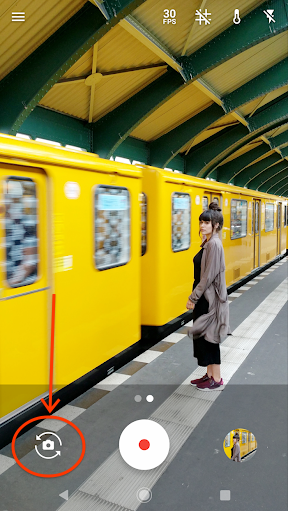
อุปกรณ์หลายเครื่องมีกล้องหลายตัวที่หันไปในทิศทางเดียวกัน บางเครื่องมีกล้อง USB ภายนอกด้วย หากต้องการมอบ UI ให้ผู้ใช้สลับระหว่างกล้องที่หันไปในทิศทางต่างๆ ให้เลือกกล้องตัวแรกที่พร้อมใช้งานสำหรับการกำหนดค่าการหันของเลนส์ที่เป็นไปได้แต่ละรายการ
แม้ว่าจะไม่มีตรรกะสากลสำหรับการเลือกกล้องถัดไป แต่โค้ดต่อไปนี้ใช้ได้กับกรณีการใช้งานส่วนใหญ่
Kotlin
fun filterCompatibleCameras(cameraIds: Array<String>,
                            cameraManager: CameraManager): List<String> {
    return cameraIds.filter {
        val characteristics = cameraManager.getCameraCharacteristics(it)
        characteristics.get(CameraCharacteristics.REQUEST_AVAILABLE_CAPABILITIES)?.contains(
                CameraMetadata.REQUEST_AVAILABLE_CAPABILITIES_BACKWARD_COMPATIBLE) ?: false
    }
}

fun filterCameraIdsFacing(cameraIds: List<String>, cameraManager: CameraManager,
                          facing: Int): List<String> {
    return cameraIds.filter {
        val characteristics = cameraManager.getCameraCharacteristics(it)
        characteristics.get(CameraCharacteristics.LENS_FACING) == facing
    }
}

fun getNextCameraId(cameraManager: CameraManager, currCameraId: String? = null): String? {
    // Get all front, back and external cameras in 3 separate lists
    val cameraIds = filterCompatibleCameras(cameraManager.cameraIdList, cameraManager)
    val backCameras = filterCameraIdsFacing(
            cameraIds, cameraManager, CameraMetadata.LENS_FACING_BACK)
    val frontCameras = filterCameraIdsFacing(
            cameraIds, cameraManager, CameraMetadata.LENS_FACING_FRONT)
    val externalCameras = filterCameraIdsFacing(
            cameraIds, cameraManager, CameraMetadata.LENS_FACING_EXTERNAL)

    // The recommended order of iteration is: all external, first back, first front
    val allCameras = (externalCameras + listOf(
            backCameras.firstOrNull(), frontCameras.firstOrNull())).filterNotNull()

    // Get the index of the currently selected camera in the list
    val cameraIndex = allCameras.indexOf(currCameraId)

    // The selected camera may not be in the list, for example it could be an
    // external camera that has been removed by the user
    return if (cameraIndex == -1) {
        // Return the first camera from the list
        allCameras.getOrNull(0)
    } else {
        // Return the next camera from the list, wrap around if necessary
        allCameras.getOrNull((cameraIndex + 1) % allCameras.size)
    }
}
Java
public List<String> filterCompatibleCameras(CameraManager cameraManager, String[] cameraIds) {
    final List<String> compatibleCameras = new ArrayList<>();

    try {
        for (String id : cameraIds) {
            CameraCharacteristics characteristics = cameraManager.getCameraCharacteristics(id);
            int[] capabilities = characteristics.get(CameraCharacteristics.REQUEST_AVAILABLE_CAPABILITIES);
            for (int capability : capabilities) {
                if (capability == CameraMetadata.REQUEST_AVAILABLE_CAPABILITIES_BACKWARD_COMPATIBLE) {
                    compatibleCameras.add(id);
                }
            }
        }
    } catch (CameraAccessException e) {
        Log.e(TAG, "filterCompatibleCameras: " + e.getMessage());
    }

    return compatibleCameras;
}

public List<String> filterCameraIdsFacing(CameraManager cameraManager, List<String> cameraIds, int lensFacing) {
    final List<String> compatibleCameras = new ArrayList<>();

    try {
        for (String id : cameraIds) {
            CameraCharacteristics characteristics = cameraManager.getCameraCharacteristics(id);
            if (characteristics.get(CameraCharacteristics.LENS_FACING) == lensFacing) {
                compatibleCameras.add(id);
            }
        }
    } catch (CameraAccessException e) {
        Log.e(TAG, "filterCameraIdsFacing: " + e.getMessage());
    }

    return compatibleCameras;
}

public String getNextCameraId(CameraManager cameraManager, @Nullable String currentCameraId) {
    String nextCameraId = null;

    try {
        // Get all front, back, and external cameras in 3 separate lists
        List<String> compatibleCameraIds = filterCompatibleCameras(cameraManager, cameraManager.getCameraIdList());
        List<String> backCameras = filterCameraIdsFacing(cameraManager, compatibleCameraIds, CameraMetadata.LENS_FACING_BACK);
        List<String> frontCameras = filterCameraIdsFacing(cameraManager, compatibleCameraIds, CameraMetadata.LENS_FACING_FRONT);
        List<String>externalCameras = filterCameraIdsFacing(cameraManager, compatibleCameraIds, CameraMetadata.LENS_FACING_EXTERNAL);

        // The recommended order of iteration is: all external, first back, first front
        List<String> allCameras = new ArrayList<>(externalCameras);
        if (!backCameras.isEmpty()) allCameras.add(backCameras.get(0));
        if (!frontCameras.isEmpty()) allCameras.add(frontCameras.get(0));

        // Get the index of the currently selected camera in the list
        int cameraIndex = allCameras.indexOf(currentCameraId);

        // The selected camera may not be in the list, for example it could be an
        // external camera that has been removed by the user
        if (cameraIndex == -1) {
            // Return the first camera from the list
            nextCameraId = !allCameras.isEmpty() ? allCameras.get(0) : null;
        else {
            if (!allCameras.isEmpty()) {
                // Return the next camera from the list, wrap around if necessary
                nextCameraId = allCameras.get((cameraIndex + 1) % allCameras.size());
            }
        }
    } catch (CameraAccessException e) {
        Log.e(TAG, "getNextCameraId: " + e.getMessage());
    }

    return nextCameraId;
}
โค้ดนี้ใช้ได้กับอุปกรณ์จำนวนมากที่มีการกำหนดค่าที่แตกต่างกันมากมาย ดูข้อมูลเพิ่มเติมเกี่ยวกับการพิจารณากรณีพิเศษได้ที่ CameraMetadata.REQUEST_AVAILABLE_CAPABILITIES_LOGICAL_MULTI_CAMERA
สร้างแอปที่เข้ากันได้
สำหรับแอปที่ยังใช้ Camera API ที่เลิกใช้งานแล้ว จำนวนกล้อง
ที่
Camera.getNumberOfCameras()
แสดงผลจะขึ้นอยู่กับการติดตั้งใช้งานของ OEM หากมีกล้องหลายตัวแบบลอจิกในระบบ วิธีนี้จะแสดงกล้องเพียงตัวเดียวสำหรับกล้องลอจิกและกลุ่มกล้องจริงที่เกี่ยวข้องแต่ละกลุ่ม เพื่อรักษาความเข้ากันได้แบบย้อนหลังของแอป
ใช้ Camera2 API เพื่อดูกล้องทั้งหมด
ดูข้อมูลพื้นฐานเพิ่มเติมเกี่ยวกับการวางแนวกล้องได้ที่
Camera.CameraInfo.orientation
โดยทั่วไป ให้ใช้
Camera.getCameraInfo()
API เพื่อค้นหา
orientationของกล้องทั้งหมด
และแสดงกล้องเพียงตัวเดียวสำหรับแต่ละการวางแนวที่พร้อมใช้งานแก่ผู้ใช้ที่
สลับระหว่างกล้องต่างๆ
รองรับอุปกรณ์ทุกประเภท
อย่าคิดว่าแอปของคุณจะทำงานบนอุปกรณ์พกพาที่มีกล้อง 1 หรือ 2 ตัวเสมอไป แต่ให้เลือกกล้องที่เหมาะสมที่สุดสำหรับแอป หากไม่ต้องการกล้องเฉพาะเจาะจง ให้เลือกกล้องตัวแรกที่หันไปในทิศทางที่ต้องการ หากกล้องที่หันไปในทิศทางหนึ่งไม่พร้อมใช้งาน ให้พิจารณาว่าผู้ใช้จะทำขั้นตอนที่ต้องการให้เสร็จสมบูรณ์ได้หรือไม่หากใช้กล้องอื่น อย่าจำกัดความพร้อมใช้งานของแอปในอุปกรณ์บางเครื่องตามฮาร์ดแวร์กล้อง หากเชื่อมต่อกล้องภายนอก ผู้ใช้ส่วนใหญ่อาจต้องการใช้กล้องดังกล่าวเป็นค่าเริ่มต้น