

Aplikacje multimedialne często zawierają kolekcje elementów multimedialnych uporządkowanych hierarchicznie. Na przykład utwory z albumu lub odcinki serialu na playliście. Ta hierarchia plików multimedialnych jest nazywana biblioteką multimediów.
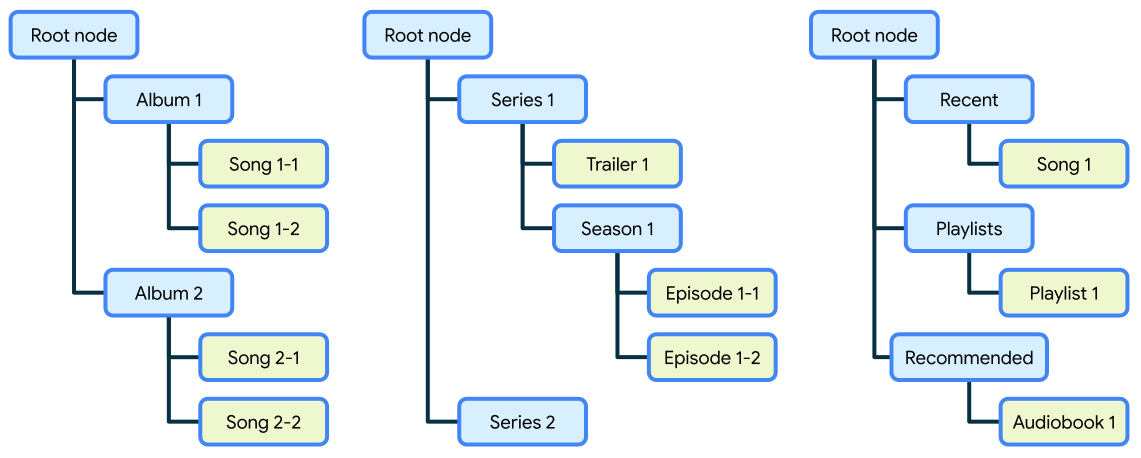
MediaLibraryService udostępnia standardowy interfejs API do obsługi biblioteki multimediów i uzyskiwania do niej dostępu. Może to być przydatne na przykład podczas dodawania obsługi Androida Auto do aplikacji do multimediów, która udostępnia własny interfejs bezpieczny dla kierowcy do biblioteki multimediów.
Utwórz MediaLibraryService
Implementacja MediaLibraryService jest podobna do implementacji MediaSessionService, z tą różnicą, że w metodzie onGetSession() należy zwrócić MediaLibrarySession zamiast MediaSession.
Kotlin
class PlaybackService : MediaLibraryService() { private var mediaLibrarySession: MediaLibrarySession? = null private val callback: MediaLibrarySession.Callback = object : MediaLibrarySession.Callback { /* ... */ } override fun onGetSession(controllerInfo: MediaSession.ControllerInfo): MediaLibrarySession? { // If desired, validate the controller before returning the media library session return mediaLibrarySession } // Create your player and media library session in the onCreate lifecycle event override fun onCreate() { super.onCreate() val player = ExoPlayer.Builder(this).build() mediaLibrarySession = MediaLibrarySession.Builder(this, player, callback).build() } // Remember to release the player and media library session in onDestroy override fun onDestroy() { mediaLibrarySession?.run { player.release() release() mediaLibrarySession = null } super.onDestroy() } }
Java
class PlaybackService extends MediaLibraryService { MediaLibrarySession mediaLibrarySession = null; MediaLibrarySession.Callback callback = new MediaLibrarySession.Callback() { /* ... */ }; @Override public MediaLibrarySession onGetSession(MediaSession.ControllerInfo controllerInfo) { // If desired, validate the controller before returning the media library session return mediaLibrarySession; } // Create your player and media library session in the onCreate lifecycle event @Override public void onCreate() { super.onCreate(); ExoPlayer player = new ExoPlayer.Builder(this).build(); mediaLibrarySession = new MediaLibrarySession.Builder(this, player, callback).build(); } // Remember to release the player and media library session in onDestroy @Override public void onDestroy() { if (mediaLibrarySession != null) { mediaLibrarySession.getPlayer().release(); mediaLibrarySession.release(); mediaLibrarySession = null; } super.onDestroy(); } }
Service i wymagane uprawnienia w pliku manifestu:
<service
    android:name=".PlaybackService"
    android:foregroundServiceType="mediaPlayback"
    android:exported="true">
    <intent-filter>
        <action android:name="androidx.media3.session.MediaLibraryService"/>
        <action android:name="android.media.browse.MediaBrowserService"/>
    </intent-filter>
</service>

<uses-permission android:name="android.permission.FOREGROUND_SERVICE" />
<uses-permission android:name="android.permission.FOREGROUND_SERVICE_MEDIA_PLAYBACK" />
Zalecamy zarejestrowanie usługi jako platformy i interfejsu usługi Media3:
Aby zapewnić zgodność z klientami korzystającymi z interfejsów API sesji multimedialnych platformy, zalecamy umieszczenie elementu
<action
android:name="android.media.browse.MediaBrowserService"/>
w elemencieintent-filter. Media3 automatycznie zapewnia zgodność wsteczną z tym interfejsem usługi.Aby zapewnić przyszłą kompatybilność i umożliwić aplikacjom korzystającym z Media3 komunikację z usługą za pomocą interfejsu Media3 API,
<action
android:name="androidx.media3.session.MediaLibraryService"/>
należy udostępnić wraz z opcją platformy.
Umożliwia to aplikacjom znajdowanie Twojej usługi za pomocą PackageManager i łączenie się z MediaBrowser za pomocą jednego z tych interfejsów.
Użyj MediaLibrarySession
Interfejs MediaLibraryService API oczekuje, że biblioteka multimediów będzie miała strukturę drzewa z jednym węzłem głównym i węzłami podrzędnymi, które mogą być odtwarzane lub przeglądane.
MediaLibrarySession rozszerza interfejs MediaSession API, aby dodać interfejsy API do przeglądania treści. W porównaniu z MediaSessionwywołaniem zwrotnym MediaLibrarySessionwywołanie zwrotne zawiera dodatkowe metody, takie jak:
onGetLibraryRoot()– gdy klient prosi o główny węzełMediaItemdrzewa treści.onGetChildren()– gdy klient zażąda elementów podrzędnych elementuMediaItemw drzewie treści.onGetSearchResult()– gdy klient prosi o wyniki wyszukiwania z drzewa treści dla danego zapytania.
Odpowiednie metody wywołania zwrotnego będą zawierać obiekt LibraryParams z dodatkowymi sygnałami dotyczącymi typu drzewa treści, którym jest zainteresowana aplikacja kliencka.
Przyciski poleceń dotyczące elementów multimedialnych
Aplikacja sesji może zadeklarować przyciski poleceń obsługiwane przez MediaItem w MediaMetadata. Umożliwia to przypisanie do elementu multimedialnego jednego lub większej liczby wpisów CommandButton, które kontroler może wyświetlać i wykorzystywać do wygodnego wysyłania do sesji niestandardowego polecenia dotyczącego tego elementu.
Konfigurowanie przycisków poleceń po stronie sesji
Podczas tworzenia sesji aplikacja sesji deklaruje zestaw przycisków poleceń, które sesja może obsługiwać jako polecenia niestandardowe:
Kotlin
val allCommandButtons = listOf( CommandButton.Builder(CommandButton.ICON_PLAYLIST_ADD) .setDisplayName(context.getString(R.string.add_to_playlist)) .setSessionCommand(SessionCommand(COMMAND_PLAYLIST_ADD, Bundle.EMPTY)) .setExtras(playlistAddExtras) .build(), CommandButton.Builder(CommandButton.ICON_RADIO) .setDisplayName(context.getString(R.string.radio_station)) .setSessionCommand(SessionCommand(COMMAND_RADIO, Bundle.EMPTY)) .setExtras(radioExtras) .build(), ) // Add all command buttons for media items supported by the session. val session = MediaSession.Builder(context, player) .setCommandButtonsForMediaItems(allCommandButtons) .build()
Java
ImmutableList<CommandButton> allCommandButtons = ImmutableList.of( new CommandButton.Builder(CommandButton.ICON_PLAYLIST_ADD) .setDisplayName(context.getString(R.string.add_to_playlist)) .setSessionCommand(new SessionCommand(COMMAND_PLAYLIST_ADD, Bundle.EMPTY)) .setExtras(playlistAddExtras) .build(), new CommandButton.Builder(CommandButton.ICON_RADIO) .setDisplayName(context.getString(R.string.radio_station)) .setSessionCommand(new SessionCommand(COMMAND_RADIO, Bundle.EMPTY)) .setExtras(radioExtras) .build()); // Add all command buttons for media items supported by the session. MediaSession session = new MediaSession.Builder(context, player) .setCommandButtonsForMediaItems(allCommandButtons) .build();
Podczas tworzenia elementu multimedialnego aplikacja sesji może dodać zestaw obsługiwanych identyfikatorów poleceń, które odwołują się do poleceń sesji przycisków poleceń skonfigurowanych podczas tworzenia sesji:
Kotlin
val mediaItem = MediaItem.Builder() .setMediaMetadata( MediaMetadata.Builder() .setSupportedCommands(listOf(COMMAND_PLAYLIST_ADD, COMMAND_RADIO)) .build() ) .build()
Java
MediaItem mediaItem = new MediaItem.Builder() .setMediaMetadata( new MediaMetadata.Builder() .setSupportedCommands(ImmutableList.of(COMMAND_PLAYLIST_ADD, COMMAND_RADIO)) .build()) .build();
Gdy kontroler lub przeglądarka połączy się z sesją lub wywoła inną metodę sesjiCallback, aplikacja sesji może sprawdzić obiekt ControllerInfo przekazany do wywołania zwrotnego, aby uzyskać maksymalną liczbę przycisków poleceń, które mogą być wyświetlane przez kontroler lub przeglądarkę. Obiekt ControllerInfo przekazywany do metody wywołania zwrotnego udostępnia funkcję pobierającą, która umożliwia wygodny dostęp do tej wartości. Domyślnie wartość jest ustawiona na 0, co oznacza, że przeglądarka lub kontroler nie obsługuje tej funkcji:
Kotlin
override fun onGetItem( session: MediaLibrarySession, browser: MediaSession.ControllerInfo, mediaId: String, ): ListenableFuture<LibraryResult<MediaItem>> { val settableFuture = SettableFuture.create<LibraryResult<MediaItem>>() val maxCommandsForMediaItems = browser.maxCommandsForMediaItems loadMediaItemAsync(settableFuture, mediaId, maxCommandsForMediaItems) return settableFuture }
Java
@Override public ListenableFuture<LibraryResult<MediaItem>> onGetItem( MediaLibraryService.MediaLibrarySession session, ControllerInfo browser, String mediaId) { SettableFuture<LibraryResult<MediaItem>> settableFuture = SettableFuture.create(); int maxCommandsForMediaItems = browser.getMaxCommandsForMediaItems(); loadMediaItemAsync(settableFuture, mediaId, maxCommandsForMediaItems); return settableFuture; }
Podczas obsługi działania niestandardowego wysłanego dla elementu multimedialnego aplikacja sesji może pobrać identyfikator produktu z argumentów Bundle przekazanych do onCustomCommand:
Kotlin
override fun onCustomCommand( session: MediaSession, controller: MediaSession.ControllerInfo, customCommand: SessionCommand, args: Bundle, ): ListenableFuture<SessionResult> { val mediaItemId = args.getString(MediaConstants.EXTRA_KEY_MEDIA_ID) return if (mediaItemId != null) handleCustomCommandForMediaItem(controller, customCommand, mediaItemId, args) else handleCustomCommand(controller, customCommand, args) }
Java
@Override public ListenableFuture<SessionResult> onCustomCommand( MediaSession session, ControllerInfo controller, SessionCommand customCommand, Bundle args) { String mediaItemId = args.getString(MediaConstants.EXTRA_KEY_MEDIA_ID); return mediaItemId != null ? handleCustomCommandForMediaItem(controller, customCommand, mediaItemId, args) : handleCustomCommand(controller, customCommand, args); }
Używanie przycisków poleceń jako przeglądarki lub kontrolera
Po stronie MediaController aplikacja może zadeklarować maksymalną liczbę przycisków poleceń, które obsługuje w przypadku elementu multimedialnego, podczas tworzenia MediaController lub MediaBrowser:
Kotlin
val browserFuture = MediaBrowser.Builder(context, sessionToken).setMaxCommandsForMediaItems(3).buildAsync()
Java
ListenableFuture<MediaBrowser> browserFuture = new MediaBrowser.Builder(context, sessionToken).setMaxCommandsForMediaItems(3).buildAsync();
Po połączeniu z sesją aplikacja kontrolera może odbierać przyciski poleceń obsługiwane przez element multimedialny, dla których kontroler ma dostępne polecenie przyznane przez aplikację sesji:
Kotlin
val commandButtonsForMediaItem = controller.getCommandButtonsForMediaItem(mediaItem)
Java
ImmutableList<CommandButton> commandButtonsForMediaItem = controller.getCommandButtonsForMediaItem(mediaItem);
Kotlin
val future = controller.sendCustomCommand( requireNotNull(addToPlaylistButton.sessionCommand), mediaItem, Bundle.EMPTY, )
Java
ListenableFuture<SessionResult> future = controller.sendCustomCommand( checkNotNull(addToPlaylistButton.sessionCommand), mediaItem, Bundle.EMPTY);