

Android 上的应用进程并非独立存在。应用通常依赖于其他应用或系统本身提供的服务。当一个进程通过服务绑定连接到另一个进程时,会创建一个对 Android 框架管理内存的方式产生深远影响的依赖项。
进程状态和 OOM 分数
Android 框架使用进程状态来跟踪每个正在运行的进程的重要性。然后,OomAdjuster 会使用这些状态来分配 OOM 分数调整 (oom_score_adj) 值,范围为 -1000 到 1000。
较低的 oom_score_adj 表示相应进程更重要,不太可能被低内存终止程序 (LMK) 终止。
常见进程状态
下表显示了一些最常见的进程状态及其典型的 oom_score_adj 值。如需查看完整且最新的列表,请参阅 Android 源代码中的 android.app.ActivityManager 和 com.android.server.am.psc.Constants。
| 进程状态(简称) | 说明 | 一般oom_score_adj |
|---|---|---|
| PER(持久) | 必须始终运行的系统进程(例如,电话)。 | -800 |
| TOP | 正与用户交互的进程。 | 0 |
| VIS(可见) | 进程具有可见的 activity(例如,在半透明对话框后面)。 | 100 |
| PERC(可感知) | 用户知晓的后台进程(例如音乐播放)。 | 200 |
| FGS | 托管前台服务的进程。 | 0 至 200(因人而异) |
| BTOP(上限) | 受顶级应用限制的进程。 | 100 |
| BFGS | 已绑定的前台服务(通常是系统绑定的)。 | 0 |
| 上一个 | 用户在当前进程之前所处的最后一个进程。 | 700 |
| 已缓存 | 可以安全终止的后台应用。 | 900 至 999 |
服务绑定的影响
当客户端进程(例如处于 TOP 状态的应用)绑定到服务器进程中的服务时,服务器进程通常会继承更高的优先级。这样可确保服务在客户需要时始终可用。
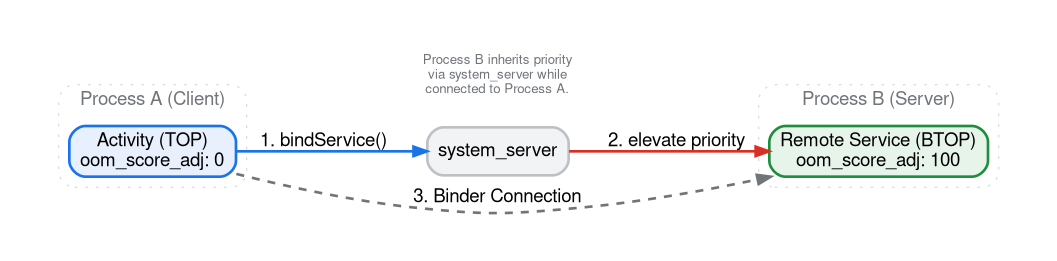
使用 BIND 标志控制继承
使用 Context.BIND_AUTO_CREATE 时,默认行为是继承。
不过,开发者可以使用 bindService() 中的各种标志来控制绑定对目标进程的重要性的影响。
OOM 分数的关键绑定标志
在管理系统范围内的内存压力时,以下标志最为相关:
BIND_AUTO_CREATE:最常见的标志。它可确保服务进程在绑定存在期间启动并保持活跃状态。默认情况下,它还会提升服务器进程优先级以与客户端匹配。BIND_NOT_FOREGROUND:防止目标服务的进程被提升到前台调度优先级(CPU 优先级)。不过,它仍然允许提升内存优先级 (oom_score_adj)。这对于不应与界面竞争 CPU 周期的后台工作非常有用,但仍应防止其被终止。BIND_WAIVE_PRIORITY:一个非常强的标志,指示系统不影响目标进程的调度或内存管理优先级。服务进程将像 LRU 列表中的常规后台进程一样进行管理,即使在绑定时也可能会被 OOM 终止。BIND_ABOVE_CLIENT:表示服务比客户端应用本身更重要。当系统需要回收内存时,会优先终止客户端应用,然后再终止绑定服务。这比BIND_AUTO_CREATE“更强”,因为它以牺牲客户端为代价,为服务提供了一层额外的保护。BIND_NOT_PERCEPTIBLE:将目标服务的重要性降低到PERCEPTIBLE级别以下,使系统能够回收其内存,为更关键的用户可感知进程腾出空间。
实践:观察绑定效果
我们将使用 MemoryLab 应用来演示 TOP 应用的绑定如何影响单独进程的状态。
1. 启动 MemoryLab
以下命令会启动应用。应用打开后,请确保应用保持在前台运行(暂时不要按“主屏幕”按钮或切换应用)。
adb shell am start -n com.android.memorylab/.MainActivity
2. 确定流程
在绑定之前检查进程状态。MemoryLab 在一个进程中运行其主界面,并具有在 :remote 进程中运行的 RemoteService。
adb shell dumpsys activity processes com.android.memorylab
输出代码段示例:
  Process OOM control (154 total, non-act at 7, non-svc at 7):
    Proc #0: fg       T/A/TOP  LCMNFUATI  t: 0 13470:com.android.memorylab/u0a417 (top-activity)
        oom: max=1001 curRaw=0 setRaw=0 cur=0 set=0
        state: cur=TOP  set=TOP   lastRss=0.00 lastCachedRss=0.00
您将看到主进程 com.android.memorylab 处于 TOP 状态。:remote 流程尚未开始。
3. 触发器绑定
向应用发送广播以触发服务绑定:
adb shell am broadcast -a com.android.memorylab.LEAK_BINDER
4. 观察提升状态
再次检查进程状态:
adb shell dumpsys activity processes | grep -A 10 "com.android.memorylab"
示例输出代码段:
  Proc #  1: vis      F/ /BTOP ---NFUATI  t: 0 13560:com.android.memorylab:remote/u0a417 (service)
    com.android.memorylab/.RemoteService<=Proc{13470:com.android.memorylab/u0a417}
    oom: max=1001 curRaw=100 setRaw=100 cur=100 set=100
    state: cur=BTOP set=BTOP  lastRss=0.00 lastCachedRss=0.00
:remote 进程现在正在运行,并且处于 BTOP(绑定 TOP)状态,oom_score_adj 为 100。这比典型的后台服务(优先级为 500 或更高级别)受到的保护要好得多。标记 <=Proc{...} 表示哪个进程负责此优先级提升。
5. 发送到后台
按设备上的主屏幕按钮。再次检查状态:
adb shell dumpsys activity processes | grep -A 10 "com.android.memorylab"
示例输出代码段:
    Proc #  2: prev     b/ /LAST --------I  t: 0 13560:com.android.memorylab:remote/u0a417 (service)
        com.android.memorylab/.RemoteService<=Proc{13470:com.android.memorylab/u0a417}
        oom: max=1001 curRaw=700 setRaw=700 cur=700 set=700
        state: cur=LAST set=LAST  lastRss=0.00 lastCachedRss=0.00
    Proc #  1: prev     b/ /LAST --------I  t: 0 13470:com.android.memorylab/u0a417 (previous)
        oom: max=1001 curRaw=700 setRaw=700 cur=700 set=700
        state: cur=LAST set=LAST  lastRss=209MB lastCachedRss=0.00
现在,这两个进程都已转移到较低的优先级状态 (PREV / oom_score_adj 700),因为客户端进程不再是 TOP。(注意:状态转储中的 LAST 是指 LAST_ACTIVITY 内部状态,它在高级摘要中映射到 PREV)。
使用 procstats 进行分析
procstats 工具可提供这些状态的历史视图。
# View stats for MemoryLab over the last hour
adb shell dumpsys procstats --hours 1 com.android.memorylab
输出代码段示例:
  *   com.android.memorylab / u0a417 / v37:
      *   Prc com.android.memorylab / u0a417 / v37:
             TOTAL: 0.89% (0.00-0.00-0.00/0.00-0.00-0.00/210MB-210MB-210MB over 1)
               Top: 0.89% (0.00-0.00-0.00/0.00-0.00-0.00/210MB-210MB-210MB over 1)
      *   Prc com.android.memorylab:remote / u0a417 / v37:
             TOTAL: 0.19%
           Bnd Top: 0.19%
其中,Bnd Top 表示远程进程在 TOP 状态下被应用绑定所花费的时间百分比。
使用 Perfetto 捕获和分析绑定
虽然 dumpsys 可为您提供快照,但 Perfetto 可让您确切了解绑定发生的时间以及 OOM 分数如何实时变化。
1. 记录轨迹
使用包含 linux.process_stats 和 am atrace 类别的配置:
adb shell perfetto -c - --txt -o /data/misc/perfetto-traces/service_bindings.perfetto-trace <<EOF
buffers: { size_kb: 65536 }
data_sources: {
    config {
        name: "linux.process_stats"
        process_stats_config { proc_stats_poll_ms: 100 }
    }
}
data_sources: {
    config {
        name: "linux.ftrace"
        ftrace_config { ftrace_events: "am/am_proc_bound" }
    }
}
duration_ms: 15000
EOF
2. 查询 OOM 得分转换
使用 PerfettoSQL,您可以查看远程进程的 OOM 分数相对于界面进程的变化情况:
SELECT ts, p.name, value AS oom_score_adj
FROM counter c
JOIN process_counter_track t ON c.track_id = t.id
JOIN process p USING (upid)
WHERE p.name LIKE 'com.android.memorylab%'
  AND t.name = 'oom_score_adj'
ORDER BY ts;
3. 确定绑定事件
如需确切了解绑定依赖关系何时建立以及由哪个进程启动,请使用以下查询:
SELECT
    s.ts,
    p.name AS process_name,
    t.name AS thread_name,
    s.name AS slice_name
FROM slice s
JOIN thread_track tt ON s.track_id = tt.id
JOIN thread t USING (utid)
JOIN process p USING (upid)
WHERE s.name LIKE 'bindService:{com.android.memorylab%';
系统到应用的绑定
Android 系统本身通常会绑定到第三方应用中的服务,以提供核心功能。这些绑定通常旨在缩短延迟时间。通过使进程保持活跃状态并驻留在内存中,当发生关键用户互动时,系统可以避免“冷启动”(加载 APK、初始化运行时和创建 Application 对象)带来的高昂开销。还有其他绑定可防止需要处理后台事件流的应用频繁冷启动。
以下是一些您可以在典型设备上观察到的实际示例:
VoiceInteractor
用户希望数字助理嵌入到手机操作系统中,能够通过语音热词或快速输入手势立即唤醒它,并希望互动过程顺畅无缝。
当触发助理时(例如在 Google Pixel 手机上使用“OK Google”热词),数字助理需要立即做出响应。为确保这一点,system_server 会与用户选择的语音互动服务保持永久绑定。
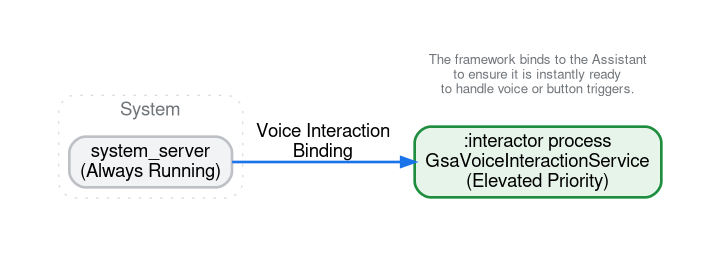
如果您检查进程状态(例如,使用 dumpsys activity processes),您可能会看到一个类似 com.google.android.googlequicksearchbox:interactor 的进程处于 BFGS(绑定前台服务)状态,并通过来自 system_server (UID 1000) 的绑定保持活跃状态。
NotificationListenerService
对于某些系统到应用的绑定,目标不是延迟,而是防止频繁的冷启动。NotificationListenerService 是一种在发布或移除新通知时接收系统调用的服务,就是一个很好的例子。典型的智能手机用户可能全天都会收到数百条通知。如果系统从通知监听器解除绑定,相应应用的进程可能会进入缓存状态,并可能被 LMK 终止。
当下一个通知到达时(可能在几秒钟后),系统将不得不再次冷启动应用进程,以便传递该事件。这种不断终止和冷启动的循环会比仅在后台保持进程绑定和存活消耗更多的 CPU 和电池电量。
启动器的“-1 屏幕”(新闻信息流)
现代启动器应用通常将核心导航功能(主屏幕图标和微件)与新闻信息流相结合,新闻信息流可在启动器屏幕上显示,并与启动器用户体验无缝集成。新闻信息流可能由其他应用提供。例如,在 Google Pixel 上,启动器会与 Google 应用提供的信息流集成。
在主屏幕上向左滑动以查看新闻 Feed 时,过渡效果必须流畅。启动器通过绑定到提供新闻信息流的应用中的服务接口来实现此目的,并尽可能长时间地保持该绑定处于有效状态。这样一来,即使您不看 Feed,Feed 内容也会在内存中呈现并保持就绪状态。
其他常见示例
- 启动器 (HOME_APP_ADJ):启动器应用(主屏幕)在优先级列表中有自己的特殊位置。虽然不一定受服务约束,但会分配
HOME_APP_ADJ(通常为 600)。系统倾向于保持启动器处于活跃状态,因为用户经常会返回到启动器。事实上,系统会优先终止之前使用的应用 (PREV_APP_ADJ = 700),而不是启动器,因为终止启动器会导致用户在退出任何应用时体验不流畅,因为用户需要等待启动器冷启动。 - 输入法 (IME):当您输入内容时,系统会绑定到您选择的键盘应用(例如 Gboard)。即使键盘暂时隐藏,此操作也会使键盘进程保持在提升状态。这样可确保当您点按其他文本字段时,键盘能够立即重新显示。
- NFC 支付:当您使用手机进行感应式付款时,系统会绑定到 NFC 支付服务(例如 Google 钱包)。这些交易通常对商户终端有严格的实时性要求。如果支付应用必须冷启动,交易可能会超时并失败。
权衡取舍和性能骤降
虽然绑定对于性能和正确性是必需的,但会损害系统的内存健康状况。
- 灵活性降低:每个绑定进程都是 LMK 无法轻易终止的进程。这会减少系统可用于在压力下释放内存的缓存进程“缓冲”。
- 加剧性能悬崖:如果绑定了过多的进程,系统可能会发现几乎没有可终止的后台进程。当内存压力增大时,系统会更快地“跌落性能悬崖”,因为它被迫终止更重要的进程或频繁交换页面缓存。
常见的服务绑定反模式
由于服务绑定会直接提升 oom_score_adj,因此在获取或构建绑定时,细微的生命周期错误可能会导致大量内存在特权状态(BTOP、BFGS 或 PERC)中固定数小时。在设计或审核绑定服务时,请注意以下常见的反模式。
长期有效的客户端中被遗忘的 unbindService()
从 Application singleton、后台管理器或在 onStart() 中调用 bindService() 的 Activity 绑定到服务,而 onStop() 中没有匹配的 unbindService() 会导致 ServiceConnection 泄漏。
只要该绑定保持有效状态,目标进程就会继承客户端的提升后优先级。如果客户端是持久性系统组件或前台应用,则绑定服务进程会无限期地固定在 BFGS 或 BTOP 中(在 procstats 中显示为接近 100%),即使服务完全处于空闲状态,也会阻止 LMK 回收其内存。
补救措施:将范围绑定严格限制在需要它们的组件的生命周期内,或者实现一个空闲超时,在一段时间不活动后调用 unbindService()。避免在每个单独的 RPC 调用上取消绑定和重新绑定,这会导致进程抖动和重复的 Binder 设置开销;相反,应将工作突发合并到短时间空闲计时器(例如 5 到 30 秒)后面。
将绑定服务与内存密集型界面共同放置
默认情况下,APK 中的所有组件都在同一进程中运行。如果您的应用在与主 Activity 相同的进程中公开轻量级绑定服务(例如 NotificationListenerService、微件提供方或系统/启动器绑定到的插件服务),则整个进程会继承该服务的提升状态(BFGS 或 PERC,通常为 200 或更低的 oom_score_adj)。
当用户打开应用的界面时,进程会分配大型视图层次结构、解码的位图和图形缓冲区。当用户离开时,进程不会降至 CACHED(oom_score_adj 为 900 或更高值),因为活跃的服务绑定会使进程保持较高优先级。这会导致两个复合问题:
- 无后台内存紧凑化:系统的
CachedAppOptimizer仅在进程进入CACHED状态后才对其进行紧凑化。 - 无缓存 LRU 内存 trim 或 LMK 回收:当服务绑定将进程保持在较高状态时,系统不会传递与缓存 LRU 列表(
TRIM_MEMORY_BACKGROUND及更高级别)关联的后台 trim 回调。如果您的应用未在TRIM_MEMORY_UI_HIDDEN或Activity.onStop()上明确释放界面资源,则界面分配峰值会以特权 OOM 分数固定在 RAM 中,LMK 无法轻松回收这些资源。
补救措施:当界面不再可见时,使用 Activity.onStop()、ComponentCallbacks2.onTrimMemory(TRIM_MEMORY_UI_HIDDEN)、Application.ActivityLifecycleCallbacks 或 ProcessLifecycleOwner 显式逐出界面缓存、解码后的位图和视图引用。或者,使用 android:process 清单属性将始终绑定的服务移至单独的轻量级进程,以便系统可以将主界面进程移至 CACHED 状态,从而独立压缩或回收其内存。
省略了优先级放弃标志
仅使用 BIND_AUTO_CREATE 调用 bindService() 会将调用者的完整调度和内存优先级转移到目标服务。当某个前台应用仅使用 BIND_AUTO_CREATE 绑定到后台分析、日志记录或预提取服务时,该应用会无意中将该后台工作器提升为 BTOP。
解决方法:绑定到不需要与前台界面相同保护级别的辅助服务或尽力而为服务时,将 BIND_AUTO_CREATE 与 BIND_WAIVE_PRIORITY、BIND_NOT_FOREGROUND 或 BIND_NOT_PERCEPTIBLE 结合使用,以便系统仍可在缓存的 LRU 列表中管理目标进程。