

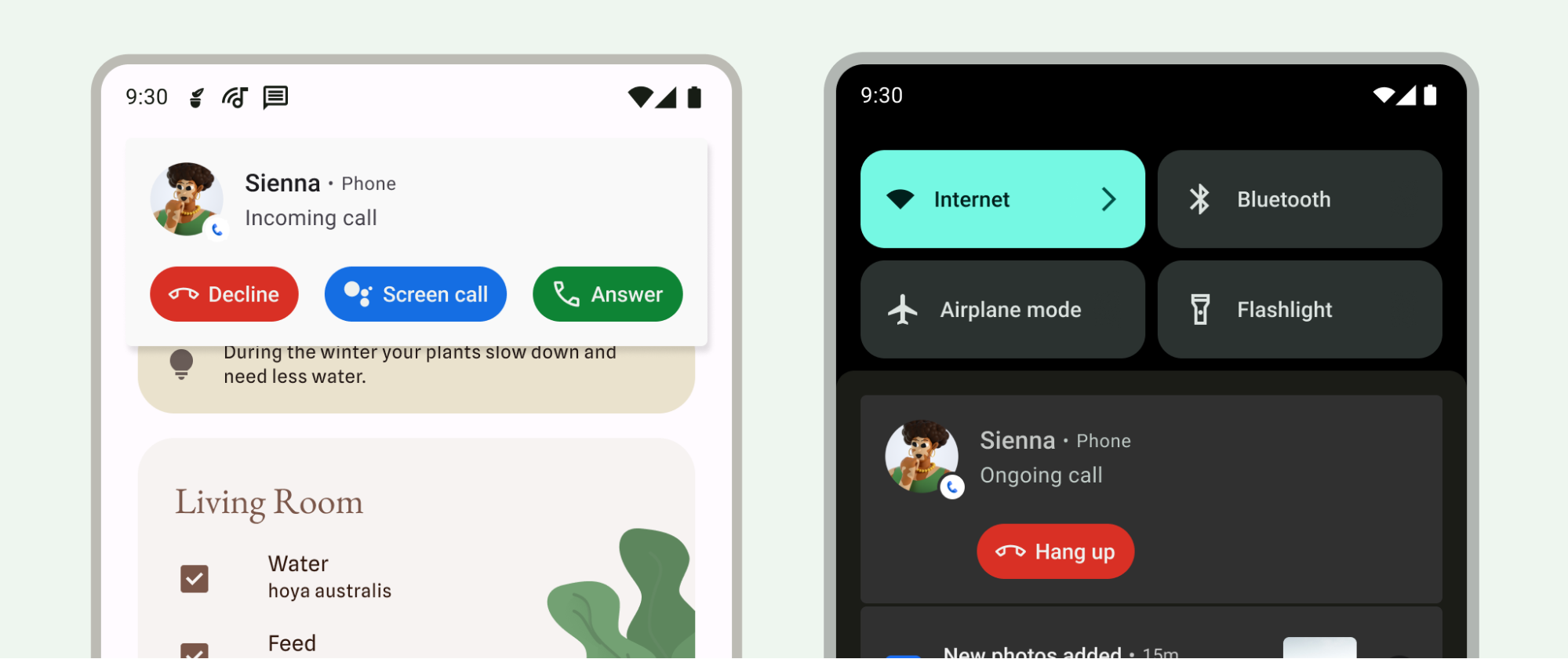
在 Android 12.0(API 级别 31)及更高版本中,系统会提供 CallStyle 通知模板,以区分来电提醒与其他类型的通知。使用此模板可创建来电或正在进行的通话通知。该模板支持大格式通知,其中包含来电者信息和所需操作(例如接听或拒接来电)。
由于来电和正在进行的通话属于高优先级事件,因此这些通知在通知栏中具有最高优先级。此排名还使系统能够将这些优先通话转发到其他设备。
CallStyle 通知模板包含以下必需操作:
- 接听或拒接来电。
- 挂断正在进行的通话。
- 接听或挂断,以便进行来电过滤。
此样式的操作会显示为按钮,系统会自动添加适当的图标和文本。不支持手动为按钮添加标签。 如需详细了解通知设计原则,请参阅通知。
所需的操作会作为 intent 传递,例如以下部分中的 hangupIntent 和 answerIntent。每个令牌都是对系统维护的令牌的引用。令牌是一个轻量级对象,可在不同的应用和进程之间传递。系统
负责管理令牌的生命周期,并确保即使创建 的应用不再
运行,
PendingIntent 仍可使用。当您向其他应用提供 PendingIntent 时,即表示您向其授予了执行指定操作(例如拒绝或接听)的权限。即使创建 intent 的应用未运行,系统也会授予此权限。如需了解详情,请参阅 PendingIntent 的参考文档。
从 Android 14(API 级别 34)开始,您可以将通话通知配置为不可关闭。为此,请使用 Notification.FLAG_ONGOING_EVENT 到 Notification.Builder#setOngoing(true) 的 CallStyle 通知。
以下示例展示了如何将各种方法与 CallStyle 通知搭配使用。
// Create a new call, setting incoming caller. val incomingCaller = Person.Builder() .setName("Jane Doe") .setImportant(true) .build()
来电
使用 forIncomingCall() 方法为来电创建通话样式通知。
// For demonstrative purposes only, should use a well-defined Intents. val contentIntent = PendingIntent.getActivity(context, 0, Intent(), PendingIntent.FLAG_IMMUTABLE) val declineIntent = PendingIntent.getActivity(context, 0, Intent(), PendingIntent.FLAG_IMMUTABLE) val hangupIntent = PendingIntent.getActivity(context, 0, Intent(), PendingIntent.FLAG_IMMUTABLE) val answerIntent = PendingIntent.getActivity(context, 0, Intent(), PendingIntent.FLAG_IMMUTABLE) // Create a call style notification for an incoming call. val builderForIncomingCall = NotificationCompat.Builder(context, CHANNEL_ID) .setContentIntent(contentIntent) .setSmallIcon(R.drawable.ic_logo) .setStyle( NotificationCompat.CallStyle.forIncomingCall(incomingCaller, declineIntent, answerIntent)) .addPerson(incomingCaller)
正在通话
使用 forOngoingCall() 方法为正在进行的通话创建通话样式通知。
// Create a call style notification for an ongoing call. val builderForOngoingCall = NotificationCompat.Builder(context, CHANNEL_ID) .setContentIntent(contentIntent) .setSmallIcon(R.drawable.ic_logo) .setStyle( NotificationCompat.CallStyle.forOngoingCall(callerAtOtherEnd, hangupIntent)) .addPerson(caller)
过滤来电
使用 forScreeningCall() 方法创建通话样式通知,以显示来电。
// Create a call style notification for screening a call. val builder = NotificationCompat.Builder(context, CHANNEL_ID) .setContentIntent(contentIntent) .setSmallIcon(R.drawable.ic_logo) .setStyle( NotificationCompat.CallStyle.forScreeningCall(caller, hangupIntent, answerIntent)) .addPerson(caller)
在更多 Android 版本上提供兼容性
将 API 版本 30 或更低版本上的 CallStyle 通知与前台服务相关联,以便为它们分配在 API 级别 31 或更高级别中获得的较高排名。此外,在 API 版本 30 或更低版本上,CallStyle 通知可以通过使用 setColorized() 方法将通知标记为彩色,从而实现类似的排名。
将 Telecom API 与 CallStyle 通知搭配使用。如需了解详情,请参阅 Telecom 框架概览。