

Compose 会在三个严格有序、向前推进的阶段中执行一个帧:

- Composition:运行
@Composable函数来构建和更新界面树。 - 布局:测量子项,然后放置子项。
- 绘制:发出画布绘制命令,以将像素渲染到屏幕上。
每当在任何阶段读取 Compose State 时,Compose 都会自动记录该状态与相应阶段之间的依赖关系。
是什么导致了“向后”写入?
每当在比读取状态更晚的阶段(或在下游作用域中,即在同一组合传递中按顺序稍后执行的可组合作用域中)修改状态时,就会发生向后写入,从而强制 Compose 通过安排更早的阶段或可组合项再次运行来进行重组。向后写入是一种未优化的重组循环。
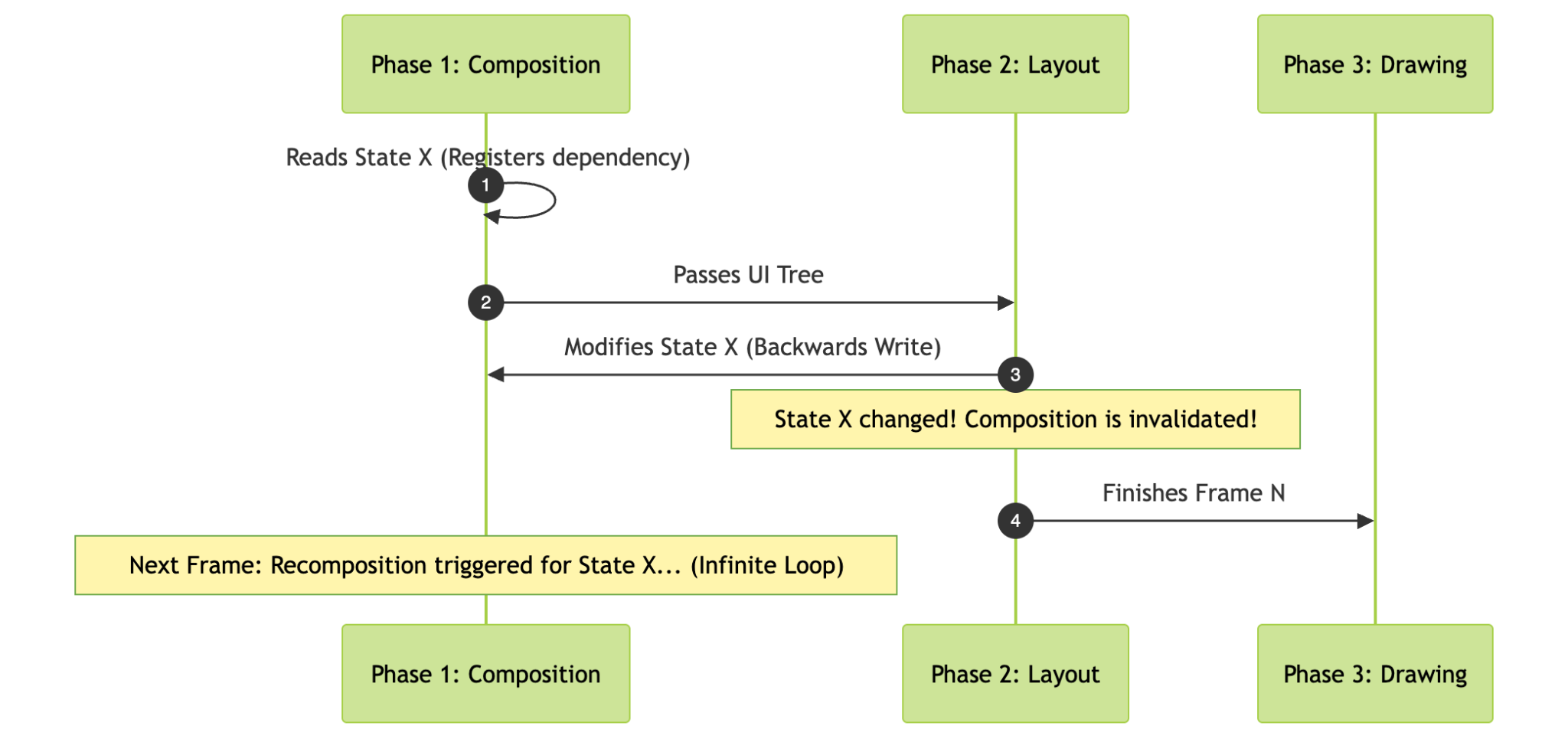
反向写入的后果
向后写入不一定是坏事,也不一定会触发崩溃,但效率低下,并且可能会通过以下几种方式损害应用性能:
- 额外的帧渲染和丢帧:向后写入会强制 Compose 在连续帧中执行多余的组合传递,从而浪费 CPU 和 GPU 资源,并可能导致卡顿。
- 首帧正确性问题:如果组件需要向后写入才能确定其最终尺寸或状态,则首帧会使用无效、默认或不稳定的数据(例如零尺寸或不正确的偏移量)进行渲染。这会导致在渲染第二帧时出现明显的视觉跳跃或布局闪烁。
- 无限重组循环:如果状态更改会改变布局大小,而布局大小又会不断将新值写回状态,那么您可能会面临创建无限帧循环的风险,其中屏幕会不断重组每一帧,而不会稳定下来。
正向流程
状态更改应始终按阶段向前流动:
| 读取阶段 | 写入上下文 | 是否可接受? | 原因 |
|---|---|---|---|
布局 (Modifier.offset { }) |
构图 | 是 | Composition 更新状态 → Layout 在同一帧中稍后读取状态,而无需 recomposing。 |
平局(graphicsLayer { }、drawBehind { }) |
构图 | 是 | 组合阶段更新状态 → 绘制阶段在最后阶段读取状态。组合和布局阶段会完全跳过。 |
| 绘制 | 布局 | 是 | 布局更新状态,绘制读取状态,有效流程。 |
| 构图 | 事件回调(onClick、onValueChange)驱动状态更改。注意:布局回调不计为事件。 |
是 | 事件会改变用于驱动组合的状态。如果事件发生在帧外(不在组合、布局或绘制阶段),则此操作有效。 |
| 构图 | 协程 (LaunchedEffect) |
是 - 谨慎使用 | 根据生命周期/事件异步更新状态。从效应中写入可能是有效的,但可能表明状态分层效率低下。请尽可能避免使用。 |
| 放置(在布局中) | 度量(在布局中) | 是 | 在布局中,可以先更新状态,然后在放置阶段读取该状态。 |
| 度量(在布局中) | Placement(在布局中) | 否 - 反向写入 | 在放置阶段写入状态,然后在读取状态中进一步写入,会导致重新测量循环。 |
| 构图 | 布局(onSizeChanged、LayoutModifier) |
否 - 反向写入 | 布局使 Composition 失效 → Recomposition 循环。 |
| 构图 | 平局(drawWithContent、Canvas) |
否 - 反向写入 | 绘制会使 Composition 失效 → Recomposition 循环。 |
相位组合:向后与向前
以下是 Compose 中向后写入的示例以及解决方法。
反向:在组合阶段读取,在布局阶段写入
- 具体情况:Composition 会读取
componentHeight,以确定要发出什么界面。在帧的后续阶段,布局阶段会测量或放置视图,并向componentHeight写入新值(例如,使用onSizeChanged、onGloballyPositioned或自定义LayoutModifier)。 - 结果:在布局阶段修改
componentHeight会使刚刚完成的组合阶段失效。请注意,onSizeChanged会在布局测量过程完成后报告大小。如果更新后的状态值在下一次传递时稳定下来,重组可能会在额外一帧后停止;但是,如果新值继续改变大小,则会导致无限帧循环。此外,onGloballyPositioned会在布局和放置之后运行,这使得其中的状态写入更容易受到连续帧之间的持续重组和重新布局循环的影响。
// ❌ BAD: Read in Composition, Written in Layout (onSizeChanged) @Composable fun BadAspectRatioImage(painter: Painter) { var calculatedHeight by remember { mutableStateOf(0.dp) } val density = LocalDensity.current // State read during COMPOSITION: Image( painter = painter, contentDescription = "Dynamic Image", modifier = Modifier .fillMaxWidth() .height(calculatedHeight) .onSizeChanged { size -> // State write during LAYOUT phase! // Triggers backwards write and recomposition pass val aspectRatio = 16f / 9f val widthDp = with(density) { size.width.toDp() } calculatedHeight = widthDp / aspectRatio } ) } // ✅ GOOD: Measure and calculate aspect ratio height in Phase 2 (Layout) without recomposition @Composable fun GoodAspectRatioImage( painter: Painter, aspectRatio: Float = 16f / 9f, modifier: Modifier = Modifier ) { Layout( content = { Image( painter = painter, contentDescription = "Dynamic Image" ) }, modifier = modifier ) { measurables, constraints -> val width = constraints.maxWidth val height = (width / aspectRatio).toInt() // Illustrative, you can use Modifier.aspectRatio() val imageConstraints = constraints.copy( minWidth = width, maxWidth = width, minHeight = height, maxHeight = height ) val placeable = measurables.first().measure(imageConstraints) layout(width, height) { placeable.placeRelative(0, 0) } } }
反向:在组合阶段读取,在绘制阶段写入
- 具体情况:在可组合函数主体(组合阶段)中读取状态,但在
Modifier.drawWithContent、Modifier.drawBehind或Canvas(绘制阶段)内发生变化。 - 结果:绘制阶段会改变状态 → Composition 失效 → 无限循环。
// ❌ BAD: Read in Composition, Written in Draw () @Composable fun BadBackwardsWriteDraw() { var componentHeight by remember { mutableStateOf(0.dp) } // State read during COMPOSITION: Text( text = "Height is: $componentHeight", modifier = Modifier.drawBehind { // State write during the DRAW phase! // Invalidates Composition -> triggers recomposition loop! componentHeight = size.height.dp } ) }
向后:在组合阶段读取,在组合阶段写入(同一阶段)
- 具体情况:在可组合函数中读取
count,并在读取后直接在另一个可组合项的内容槽中修改count。 - 结果:快照系统会在同一组合传递中记录读取和后续写入,从而立即让当前作用域失效。
// ❌ BAD: Direct write in Composable body after read @Composable fun BadCounter() { var count by remember { mutableIntStateOf(0) } Text("Count: $count") // State read in Composition Button(onClick = {}) { count++ // State write in Composition (Backwards write!) } } // Acceptable - but error-prone as someone may add a read before the write : Direct write in Composable body before read @Composable fun OkCounter() { var count by remember { mutableIntStateOf(0) } Button(onClick = {}) { count++ // State write in Composition } Text("Count: $count") // State read in Composition }
避免向后写入的关键规则
- 如果状态在 Composition 中读取,请勿在
onGloballyPositioned、onSizeChanged、onPlaced、onLayoutRectChanged或LayoutModifier中写入状态,因为这会导致第一帧正确性问题。- 如果仅在自定义绘制时需要布局坐标或大小,请直接在绘制或布局阶段读取这些信息(例如,使用
Modifier.drawWithCache或Modifier.layout)。 - 对于窗口级大小调整 (
WindowWidthSizeClass):将大小观察提升到窗口级。在进行本地测量之前,Composition 会根据窗口大小类别进行分支。 - 保持 Composition 一致:使用单个自定义 Layout 或
FlowRow或LazyVerticalGrid等 Component,在第 2 阶段调整 Measure 和 Placement,而无需 Recomposition 或更改 Composition 中使用的 State。 - 使用子组合:当子可组合项必须根据本地宽度或高度进行分支时,请使用
BoxWithConstraints或SubcomposeLayout。请谨慎使用:子组合会产生性能开销,通常可以避免。 - 作为最后的手段:允许第一帧出错,将大小存储在
onSizeChanged中以触发第二帧重组。这会导致明显的布局跳动、卡顿,并可能导致无限循环。
- 如果仅在自定义绘制时需要布局坐标或大小,请直接在绘制或布局阶段读取这些信息(例如,使用
- 在组合中首次读取状态后,请勿更改状态:
- 虽然您可以在
SideEffect之外的组合期间安全地写入MutableState对象,但请特别注意,不要写入您之前可能在组合中读取过的状态。当需要在组合中写入状态时,建议使用rememberUpdatedState。在组合期间以其他方式写入状态通常表示缺少效应,或者状态或可组合项设计不当。请注意,组合是乐观的,始终使用状态的最新值执行,因此您可能不会在重组中看到所有状态更改。界面更新不应用作处理一次性事件的方式,因此状态值很少需要因重组而更新。 - 避免改变在组合之外观察到的状态(例如
ViewModel字段或isVisible标志)。影响 Composition 的状态写入操作属于事件 lambda (onClick)、协程 (LaunchedEffect) 或副作用 (SideEffect)。rememberUpdatedState是一个异常,因为它旨在改变仅在@Composable正文中使用的状态。
- 虽然您可以在
- 将状态读取操作推迟到尽可能晚的阶段:
- 在绘制 (
Modifier.graphicsLayer { alpha = ... }) 或布局 (Modifier.offset { IntOffset(...) }) 阶段读取状态可确保更改只会使第 2 阶段或第 3 阶段失效,从而完全跳过第 1 阶段(组合)。
- 在绘制 (