

导航延迟时间是衡量用户体验的关键指标。为了帮助开发者缩短此延迟时间,WebView 提供了用于推测加载和连接优化的 API,让您的应用能够在用户明确导航到内容之前提取或呈现内容。
WebView 支持三种主要的推测加载类型:预连接、预提取和预渲染,以及用于优化协议协商的 QUIC 提示。
通过实现推测加载策略,您可以实现以下目标:
- 大幅缩短了 Web 内容加载延迟时间:将网络启动时间提前到应用生命周期的早期阶段,并优先选择 HTTP/3 等更快的协议。
- 更高的导航成功率:通过预热网络和缓存,导航不太可能因暂时性网络问题而失败。
- 更好的感知响应速度:预渲染尤其可以实现即时过渡,从而显著提升应用速度。
选择推测加载策略
这些策略之间的主要区别在于其范围:preconnect 和 QUIC 提示 API 基于来源,这意味着它们只需要目标网域。预提取和预渲染 API 基于网址,这意味着它们需要确切的网页路径。
由于预连接和 QUIC 提示在源级运行,因此您可以在知道用户将导航到的具体内容或网页之前调用它们。
下表比较了这三种策略,可帮助您根据自己的使用情形选择合适的策略:
| 功能 | 预连接 | 预取 | 预渲染 |
|---|---|---|---|
| 主要目标 | 预热连接 | 仅缓存 HTML(不缓存 JavaScript 或 CSS) | 预渲染整个网页 |
| 范围 | 配置文件级别(在 WebView 之间共享) | 配置文件级别(在 WebView 之间共享) | WebView 级(绑定到特定 WebView) |
| Jetpack WebKit API | androidx.webkit.Profile |
androidx.webkit.Profile |
androidx.webkit.WebViewCompat |
| 核心 API 方法 | preconnect(...) |
prefetchUrlAsync(...) |
prerenderUrlAsync(...) |
| 配置 | 不适用 | PrefetchCache.setMaxPrefetches()PrefetchCache.setPrefetchTtlSeconds() |
setMaxPrerenders() |
| 资源使用情况 | 低(网络) | 中等(网络、内存) | 高(CPU、内存、网络) |
| 适用情形 | 当目标来源已知,但具体网址尚未确定时。 | 当确切的网址已知且可能发生导航时,在 WebView 之间共享缓存。 | 当确切网址已知,并且在特定 WebView 中的导航高度确定时。 |
| 益处 | 更快地为来源中的任何网址设置连接 | 更快地为匹配的网址加载网络 | 激活后即可立即开始导航 |
预连接到来源
预连接通过预先执行指定来源的 DNS 查找和 TCP/TLS 或 QUIC 握手来加快未来的加载速度。
与需要确切目标网址的预提取和预渲染不同,预连接严格基于来源。这样,您就可以在知道确切的网址之前调用 Preconnect。如需有关何时调用此方法的指导,请参阅实现中的提示。
这种低资源、配置文件级策略可减少共享相应配置文件的任何 WebView 的初始延迟时间,前提是尚未访问过相应来源。连接会保持打开状态约 30 秒,从而消除握手开销,使任何后续的跨源 HTTP 请求、导航或子资源受益。DNS 查找结果的缓存时间比连接时间长,因此即使连接关闭,后续对源的请求仍可跳过查找。
实现
如需启动预连接,请对 Profile 实例调用 preconnect(String url)。此 API 必须在界面线程上调用,并且需要支持 WebViewFeature.PRECONNECT。
该 API 基于来源运行,但为方便起见,您可以提供完整网址(例如 https://www.example.com/index.html)。系统会自动将其视为对来源(例如 https://www.example.com)的调用。您可以通过多次调用此 API 来连接多个来源。
Kotlin
// Must be called on the @UiThread
if (WebViewFeature.isFeatureSupported(WebViewFeature.PRECONNECT)) {
    profile.preconnect("https://www.example.com/index.html")
    // This initiates a connection to the origin https://www.example.com
}
Java
// Must be called on the @UiThread
if (WebViewFeature.isFeatureSupported(WebViewFeature.PRECONNECT)) {
    profile.preconnect("https://www.example.com/index.html");
    // This initiates a connection to the origin https://www.example.com
  }
通过 QUIC 提示表明 QUIC 协议支持
HTTP/3(基于 QUIC 传输协议运行)在延迟时间方面比 HTTP/2 有显著改进,包括 0-RTT 握手、改进的连接恢复能力,以及在丢包期间消除队头阻塞。
默认情况下,WebView 仅在有迹象表明源支持 QUIC 时(例如来自先前互动的 Alt-Svc 标头或 DNS HTTPS 记录)尝试建立 QUIC 连接。如果没有此先验知识,WebView 会使用 HTTP/2 或 HTTP/1.1 进行初始连接。
调用 addQuicHints 会预先填充此协议支持信息,从而允许 WebView 在首次连接到指定来源时立即使用 QUIC 进行连接。
使用 QUIC 提示进行预连接
虽然预连接提示和 QUIC 提示都是 Profile 上的源级优化,但它们发挥着不同的互补作用:
preconnect:主动打开并维护网络连接(DNS 查找和 TCP/TLS 或 QUIC 握手),持续时间约为 30 秒。由于它会保持打开的有效网络连接,因此会消耗设备和网络资源,应仅用于高概率目标来源。addQuicHints:不会产生任何即时网络流量。它会更新Profile网络堆栈的内存中服务器属性,以记录协议支持情况。由于开销可忽略不计,因此您可以在应用启动期间为所有已知的支持 HTTP/3 的来源安全地配置 QUIC 提示。
为获得最佳性能,请先调用 addQuicHints,然后再调用 preconnect、prefetchUrlAsync 或 loadUrl。这样可确保任何后续预连接或网页请求从一开始就协商 HTTP/3。
实现
如需配置 QUIC 提示,请对 Profile 实例调用 addQuicHints(Set<String> urls)。您必须在界面线程上调用此 API,并验证 WebView 是否支持 WebViewFeature.ADD_QUIC_HINTS_V1 功能。
与 preconnect 类似,addQuicHints 也基于来源运行,但可以提供完整网址(例如 https://www.example.com/index.html),并且会自动将其标准化为来源 (https://www.example.com)。
此方法是累加性的:多次调用此方法会将提供的来源合并到 Profile 中。
Kotlin
// Must be called on the @UiThread
@OptIn(Profile.ExperimentalAddQuicHints::class)
if (WebViewFeature.isFeatureSupported(WebViewFeature.ADD_QUIC_HINTS_V1)) {
    val quicOrigins = setOf(
        "https://www.example.com",
        "https://api.example.com"
    )
    profile.addQuicHints(quicOrigins)
    // WebView now prioritizes HTTP/3 over QUIC for connections to these origins
}
Java
// Must be called on the @UiThread
// Requires @Profile.ExperimentalAddQuicHints annotation or suppression
if (WebViewFeature.isFeatureSupported(WebViewFeature.ADD_QUIC_HINTS_V1)) {
    Set<String> quicOrigins = new HashSet<>(Arrays.asList(
        "https://www.example.com",
        "https://api.example.com"
    ));
    profile.addQuicHints(quicOrigins);
    // WebView now prioritizes HTTP/3 over QUIC for connections to these origins
}
常见配置:PrefetchParameters 和 PrerenderParameters
预提取和预渲染都使用 PrefetchParameters 或 PrerenderParameters 来自定义请求。借助这些类,您可以为网址匹配提供额外的标头和提示,例如 No-Vary-Search 配置。
Kotlin
// Isolated configuration specifically for Cache-Level Prefetching
val prefetchParams = PrefetchParameters.Builder()
    .addAdditionalHeader("X-Custom-Client", "Android-App-V2")
    .setExpectedNoVarySearchHeader(
        NoVarySearchHeader.varyExcept(true, listOf("session_id", "click_ref"))
    )
    .build()
Java
PrefetchParameters prefetchParams = new PrefetchParameters.Builder()
    .addAdditionalHeader("X-Custom-Header", "value")
    /**
     * Hint to ignore specific query parameters during cache matching.
     * This allows the cache to match even if the tracking_id differs.
     */
    .setExpectedNoVarySearchHeader(
        NoVarySearchHeader.varyExcept(true, Arrays.asList("tracking_id"))
    )
    /**
     * Determines if Client Hints are sent.
     * NOTE: This is ignored for Prerendering API requests, which default to
     * the WebView's WebSettings.getJavaScriptEnabled() value.
     */
    .setJavaScriptEnabled(true)
    .build();
预提取内容
预提取会下载网址的主要 HTML 资源并将其存储在配置文件的网络缓存中。在 WebView 中,Profile 充当浏览器数据(包括 Cookie、HTTP 缓存和服务工作线程)的容器。由于预提取是配置文件级操作,因此与该配置文件关联的任何 WebView 都可以利用已缓存的响应。
实现
如需启动预提取,请对 Profile 实例调用 prefetchUrlAsync()。此操作仅支持 HTTPS 方案。
Kotlin
profile.prefetchUrlAsync(
    url,
    prefetchParams,
    cancellationSignal,
    executor,
    object : WebViewOutcomeReceiver<PrefetchResult, PrefetchException> {
        override fun onResult(result: PrefetchResult) {
            if (result.wasDuplicate()) {
                // URL and No-Vary-Search permutations already exist in the cache layer
            } else {
                // The HTML payload has been successfully secured in the HTTP cache
            }
        }

        override fun onError(error: PrefetchException) {
            when (error) {
                is PrefetchNetworkException -> {
                    // Isolates network layer or server-side HTTP anomalies
                    val code = error.httpStatusCode
                    // Facilitates rapid diagnosis of 4xx or 5xx server responses
                }
                else -> {
                    // Catches generalized execution failures and system constraints
                }
            }
        }
    }
)
Java
profile.prefetchUrlAsync(
    url,
    prefetchParams,
    cancellationSignal,
    executor,
    new WebViewOutcomeReceiver<PrefetchResult, PrefetchException>() {
        @Override
        public void onResult(PrefetchResult result) {
            if (result.wasDuplicate()) {
                // URL and No-Vary-Search permutations already exist in the cache layer
            } else {
                // The HTML payload has been successfully secured in the HTTP cache
            }
        }

        @Override
        public void onError(PrefetchException error) {
            if (error instanceof PrefetchNetworkException) {
                // Isolates network layer or server-side HTTP anomalies
                int code = ((PrefetchNetworkException) error).httpStatusCode;
                // Facilitates rapid diagnosis of 4xx or 5xx server responses
            } else {
                // Catches generalized execution failures and system constraints
            }
        }
    }
);
拦截生命周期
WebView 预取请求会改变 shouldInterceptRequest() 回调的触发时间和方式。由于这会直接影响预提取的内容是否能成功使用,因此务必要了解以下两步生命周期:
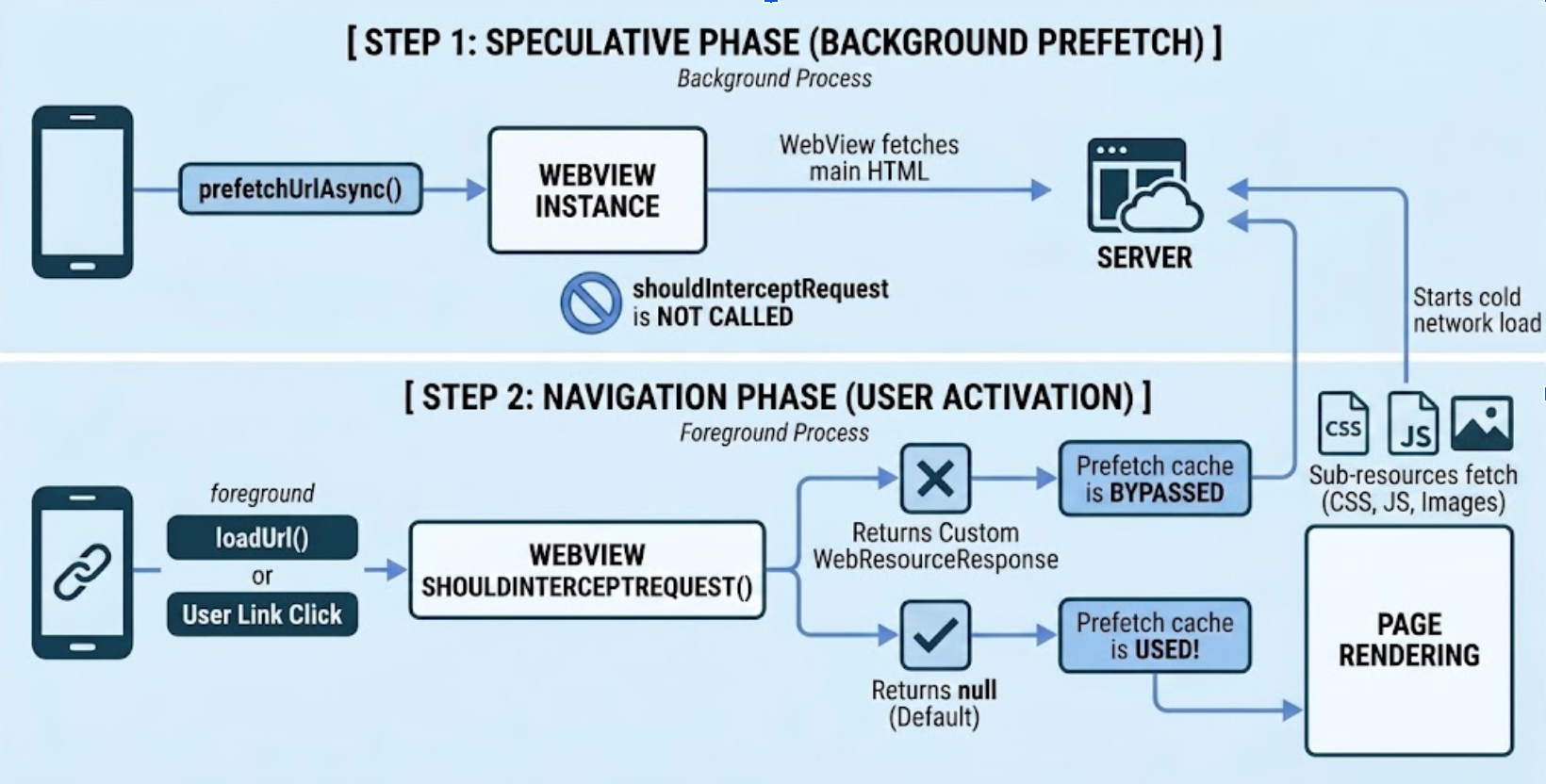
1. 推测阶段(预提取请求)
调用 prefetchUrlAsync() 时,WebView 会在后台下载主要的 HTML 资源。对于此后台请求,系统会完全跳过 shouldInterceptRequest()。通常在拦截器内部处理的任何自定义逻辑、授权令牌或标头注入都不会应用于预提取的 HTML 资源。
2. 导航阶段(用户激活)
当应用明确导航到相应网址(例如,使用 WebViewCompat.navigate 或 loadUrl)或用户点击匹配的链接时,WebView 会确定是否可以使用预提取的缓存:
主要 HTML 评估:WebView 将在此刻针对主要 HTML 触发
shouldInterceptRequest()。如需成功从预提取缓存中提供网页,您的拦截器必须返回null。如果您返回自定义WebResourceResponse,WebView 会尊重您的拦截器并完全绕过预提取缓存。子资源评估:预提取的 HTML 清除完毕后,
shouldInterceptRequest()通常会针对完成网页渲染所需的所有后续子资源(例如图片、脚本和 CSS)触发。
关键行为
以下操作特征和资格检查决定了 WebView 如何发起和管理预取请求:
- 线程安全:可以从任何线程发起请求。
- 资格条件:在发起提取之前,WebView 会通过检查以下各项来确保请求安全且在情境上适当:
- 现有 Cookie:为了保护用户隐私并防止出现类似 CSRF 的副作用,如果请求需要特定的已验证 Cookie(可能会触发服务器上的状态更改),WebView 可能会跳过预提取。
- Service Worker 是否存在:如果 Service Worker 已经控制了网址的范围,WebView 可以延迟到 Service Worker 的 fetch 处理程序,而不是启动标准网络预提取。
- 代理可用性:WebView 会验证当前网络路径(包括所有已配置的代理)是否稳定,以避免在复杂的网络配置下无法完成推测性请求。
- 如果预取无法启动(即使参数有效),通常是因为 WebView 确定后台请求可能会干扰用户的当前会话或安全状态。
- 取消:使用
CancellationSignal终止正在处理的请求,并防止其被缓存。
预渲染网页
预渲染会创建隐藏的“网页内容”,以便在后台完全渲染网页,包括执行脚本和提取子资源。预渲染与预提取依赖于相同的底层基础架构。如果应用启动预渲染,WebView 会先预提取响应,以提供预渲染导航,从而避免冗余的网络活动。
实现
预渲染是一项 WebView 实例级操作。从界面线程使用 WebViewCompat 调用 prerenderUrlAsync()。
Kotlin
WebViewCompat.prerenderUrlAsync(
    webView,
    url,
    cancellationSignal,
    executor,
    params,
    object : PrerenderOperationCallback {
        override fun onPrerenderActivated() {
            // Called when the user navigates to the URL and the hidden page is swapped in
        }

        override fun onError(exception: Throwable) {
            // exception is an instance of PrerenderException
            // Handle prerender failure (for example, memory pressure or disallowed JavaScript APIs)
        }
    }
)
Java
WebViewCompat.prerenderUrlAsync(webView, url, cancellationSignal, executor, params, new PrerenderOperationCallback() {
    @Override
    public void onPrerenderActivated() {
        // Called when the user navigates to the URL and the hidden page is swapped in.
    }

    @Override
    public void onError(@NonNull Throwable exception) {
        // Handle prerender failure (for example, resource constraints or disallowed APIs).
    }
});
预提取和预渲染完全是异步的。prefetchUrlAsync() 可从任何线程调用,而 prerenderUrlAsync() 必须从界面线程启动。
技术限制
为了在即时导航和系统健康状况之间取得平衡,WebView 强制执行以下运行时限制:
- 内存压力:如果设备的 RAM 不足,WebView 会取消预渲染的网址。
- 禁止使用的 API:如果 JavaScript 尝试在后台环境中访问某些 API(例如音频播放、提醒),系统会立即终止预渲染。
- 实例限制:每个 WebView 允许的有效预渲染网址数量有限。
网址匹配和 No-Vary-Search (NVS)
WebView 需要可靠的匹配算法,以确保预加载的资源仅用于其预期的导航。
完全匹配与 NVS 匹配
默认情况下,预提取和预渲染需要网址完全匹配。如果导航到的网址与预加载的网址相同,则会立即从缓存中传送。如果查询参数不同,WebView 会使用以下 No-Vary-Search (NVS) 规则:
- 提示:开发者在启动时提供
setExpectedNoVarySearchHeader()提示。如果导航到的网址与请求网址(减去提示的参数)匹配,WebView 会短暂阻塞,等待服务器的实际标头。 - 服务器标头:来自服务器的 NVS 响应标头是最终权威。如果服务器确认应忽略查询差异,则从缓存中提供匹配结果。如果不是,WebView 会回退到冷网络加载。
No-Vary-Search (NVS) 适用于高级用法,大多数开发者可能不需要它,因为他们会向预提取和导航(WebViewCompat.navigate 或 loadUrl)传递完全相同的网址。只有当预提取网址和导航网址之间的查询参数存在差异时,才需要遵循本指南。
全局配置
通过配置 PrefetchCache 限制和最大预渲染,在配置文件级调整推测加载行为。您还可以将自定义预取限制重置为系统默认值:
Kotlin
// Configure prefetch cache limits
profile.prefetchCache.setMaxPrefetches(10)
profile.prefetchCache.setPrefetchTtlSeconds(60)

// Reset to system defaults when needed
profile.prefetchCache.clearMaxPrefetches()

// Configure maximum active prerenders
profile.setMaxPrerenders(2)
Java
// Configure prefetch cache limits
PrefetchCache prefetchCache = profile.getPrefetchCache();
prefetchCache.setMaxPrefetches(10);
prefetchCache.setPrefetchTtlSeconds(60);

// Reset to system defaults when needed
prefetchCache.clearMaxPrefetches();

// Configure maximum active prerenders
profile.setMaxPrerenders(2);
错误处理和异常
推测性操作使用 OutcomeReceiverCompat 或 PrerenderOperationCallback 来报告结果。
主要例外情况
当推测加载操作失败时,您的错误处理程序会报告以下主要异常类型之一,以帮助您诊断具体的失败情况:
PrefetchException:所有异步预提取错误的基类。PrefetchNetworkException:表示网络或服务器级故障。它可以包含httpStatusCode字段(例如 404 或 503),以帮助诊断服务器端问题。PrerenderException:所有预渲染相关错误的超类,例如因内存压力或在后台使用禁止的 API(如音频播放)而导致的失败。
优化策略
遵循以下建议可最大限度地发挥推测性加载的优势,同时节省系统资源:
- 尽早启动:在应用启动期间或在可能确定导航目的地后立即开始预提取。
- 将 QUIC 提示与连接预热配对:在启动
preconnect()、prefetchUrlAsync()或标准导航之前调用addQuicHints(),以确保 WebView 尝试使用 HTTP/3 建立连接。 - 集成策略:如果您预渲染预提取缓存中已有的网址,则预渲染导航会从该缓存中提供,从而避免冗余的网络请求。
- 监控配额:预渲染会消耗大量资源。最好预提取几个可能的候选对象,并预渲染最有可能发生的导航。
- 方案支持:确保所有网址都使用强制性 HTTPS 方案。无效的方案或 null 输入会触发同步
IllegalArgumentException。
其他资源
如需详细了解如何调试 Web 应用、优化 WebView 启动性能以及处理渲染器进程终止,请参阅以下资源: