

用户喜欢图片、视频和其他富有表现力的内容,但在应用中插入和移动这些内容并非易事。为了让应用能够更轻松地接收富媒体内容,Android 12(API 级别 31)引入了一个统一 API,便于应用接受来自任何来源(剪贴板、键盘或拖动)的内容。
您可以向界面组件附加接口(例如 OnReceiveContentListener),并在通过任何机制插入内容时获得回调。此回调会成为您的代码处理接收所有内容(从纯文本和样式文本到标记、图片、视频、音频文件等)的唯一位置。
为了向后兼容以前的 Android 版本,此 API 也可在 AndroidX 中使用(从 Core 1.7 和 Appcompat 1.4 开始),我们建议您在实现此功能时使用该 API。
概览
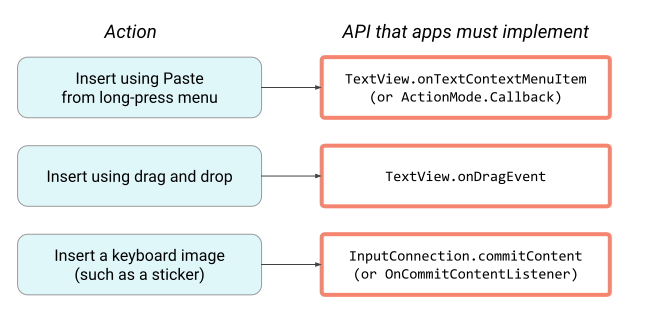
对于其他现有 API,每个界面机制(例如轻触并按住菜单或拖动)都有其自己的对应 API。这意味着您必须单独与每个 API 集成,并为每种插入内容的机制添加类似的代码:
OnReceiveContentListener API 会通过创建一个要实现的单一 API 来整合这些不同的代码路径,这样您就可以专注于应用特定的逻辑,而让平台处理其余的工作:
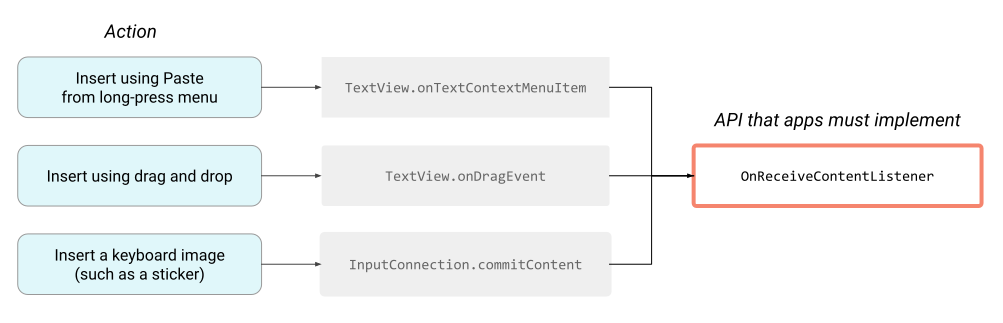
这种方法还意味着,当平台中添加了新的内容插入方式时,您无需进行额外的代码更改即可在应用中启用支持。如果您的应用需要针对特定用例实现完全自定义,您仍然可以使用现有 API,这些 API 会继续以相同的方式运行。
实现
该 API 是一个监听器接口,包含一种方法,即 OnReceiveContentListener。为了支持较低版本的 Android 平台,我们建议您使用 AndroidX Core 库中的匹配 OnReceiveContentListener 接口。
如需使用该 API,请通过指定应用可以处理的内容类型来实现监听器:
Kotlin
object MyReceiver : OnReceiveContentListener {
    val MIME_TYPES = arrayOf("image/*", "video/*")

    // ...

    override fun onReceiveContent(view: View, payload: ContentInfoCompat): ContentInfoCompat? {
        TODO("Not yet implemented")
    }
}
Java
public class MyReceiver implements OnReceiveContentListener {
     public static final String[] MIME_TYPES = new String[] {"image/*", "video/*"};
     // ...
}
指定您的应用支持的所有内容 MIME 类型后,实现该监听器的其余部分:
Kotlin
class MyReceiver : OnReceiveContentListener {
    override fun onReceiveContent(view: View, contentInfo: ContentInfoCompat): ContentInfoCompat {
        val split = contentInfo.partition { item: ClipData.Item -> item.uri != null }
        val uriContent = split.first
        val remaining = split.second
        if (uriContent != null) {
            // App-specific logic to handle the URI(s) in uriContent.
        }
        // Return anything that your app didn't handle. This preserves the
        // default platform behavior for text and anything else that you aren't
        // implementing custom handling for.
        return remaining
    }

    companion object {
        val MIME_TYPES = arrayOf("image/*", "video/*")
    }
}
Java
 public class MyReceiver implements OnReceiveContentListener {
     public static final String[] MIME_TYPES = new String[] {"image/*", "video/*"};

     @Override
     public ContentInfoCompat onReceiveContent(View view, ContentInfoCompat contentInfo) {
         Pair<ContentInfoCompat, ContentInfoCompat> split = contentInfo.partition(
                 item -> item.getUri() != null);
         ContentInfo uriContent = split.first;
         ContentInfo remaining = split.second;
         if (uriContent != null) {
             // App-specific logic to handle the URI(s) in uriContent.
         }
         // Return anything that your app didn't handle. This preserves the
         // default platform behavior for text and anything else that you aren't
         // implementing custom handling for.
         return remaining;
     }
 }
如果您的应用已支持通过 intent 进行分享,则可以重复使用应用专属逻辑来处理内容 URI。将任何剩余数据返回以委派给平台进行处理。
实现监听器后,在应用的相应界面元素上设置该监听器:
Kotlin
class MyActivity : Activity() {
    public override fun onCreate(savedInstanceState: Bundle?) {
        super.onCreate(savedInstanceState)
        // ...
        val myInput = findViewById(R.id.my_input)
        ViewCompat.setOnReceiveContentListener(myInput, MyReceiver.MIME_TYPES, MyReceiver())
    }
}
Java
public class MyActivity extends Activity {
     @Override
     public void onCreate(Bundle savedInstanceState) {
         // ...

         AppCompatEditText myInput = findViewById(R.id.my_input);
         ViewCompat.setOnReceiveContentListener(myInput, MyReceiver.MIME_TYPES, new MyReceiver());
     }
}
URI 权限
对于传递给 OnReceiveContentListener 的载荷中的任何内容 URI,平台都会自动授予和释放读取权限。
通常,应用会在 Service 或 Activity 中处理内容 URI。对于长时间运行的处理任务,请使用 WorkManager。实现此功能时,您应使用 Intent.setClipData 传递内容,并设置标记 FLAG_GRANT_READ_URI_PERMISSION,从而将权限扩展到目标 Service 或 Activity。
或者,您也可以在当前上下文中使用后台线程来处理内容。在这种情况下,您必须保持对监听器收到的 payload 对象的引用,以帮助确保平台不会提前撤消权限。
自定义 View
如果您的应用使用自定义 View 子类,请注意确保系统不会绕过 OnReceiveContentListener。
如果 View 类会替换 onCreateInputConnection 方法,请使用 Jetpack API InputConnectionCompat.createWrapper 配置 InputConnection。
如果 View 类会替换 onTextContextMenuItem 方法,请在菜单项为 R.id.paste 或 R.id.pasteAsPlainText 时委托给 super。
与键盘图片 API 相比
您可以将 OnReceiveContentListener API 视为现有键盘图片 API 的下一个版本。此统一 API 支持键盘图片 API 的功能,以及一些其他功能。设备和功能兼容性因您使用 Jetpack 库还是 Android SDK 中的原生 API 而异。
| 操作或功能 | 受键盘图片 API 支持 | 受统一 API 支持 |
|---|---|---|
| 通过键盘插入 | 是(API 级别 13 及更高) | 是(API 级别 13 及更高) |
| 使用“轻触并按住”菜单中的“粘贴”功能进行插入 | 否 | 是 |
| 使用拖放功能插入 | 否 | 是(API 级别 24 及更高) |
| 操作或功能 | 受键盘图片 API 支持 | 受统一 API 支持 |
|---|---|---|
| 通过键盘插入 | 是(API 级别 25 及更高) | 是(Android 12 及更高版本) |
| 使用“轻触并按住”菜单中的“粘贴”功能进行插入 | 否 | |
| 通过拖放操作插入 | 否 |