

บทเรียนนี้จะแสดงวิธีสร้างคลาสย่อยของคลาส抽象 CompatTab และ TabHelper และวิธีใช้ API ใหม่ แอปพลิเคชันของคุณสามารถใช้การติดตั้งใช้งานนี้ในอุปกรณ์ที่ใช้แพลตฟอร์มเวอร์ชันที่รองรับ
ใช้แท็บโดยใช้ API ใหม่
คลาสคอนกรีตสำหรับ CompatTab และ TabHelper ที่ใช้ API ใหม่กว่าเป็นการติดตั้งใช้งานแบบ พร็อกซี เนื่องจากคลาส抽象ที่กำหนดไว้ในบทเรียนก่อนหน้าจะจำลอง API ใหม่ (โครงสร้างคลาส, ลายเซ็นเมธอด ฯลฯ) คลาสคอนกรีตที่ใช้ API ใหม่กว่าเหล่านี้จึงเรียกเมธอดและแสดงผลลัพธ์แบบพร็อกซี
คุณสามารถใช้ API ใหม่กว่าในคลาสคอนกรีตเหล่านี้ได้โดยตรงและแอปจะไม่หยุดทำงานในอุปกรณ์รุ่นเก่ากว่าเนื่องจากการโหลดคลาสแบบเลื่อนเวลา ระบบจะโหลดและเริ่มต้นคลาสเมื่อมีการเข้าถึงครั้งแรก ไม่ว่าจะเป็นการสร้างอินสแตนซ์ของคลาสหรือการเข้าถึงฟิลด์หรือเมธอดแบบคงที่ของคลาสเป็นครั้งแรก ดังนั้น ตราบใดที่คุณไม่ได้สร้างอินสแตนซ์ของการติดตั้งใช้งานเฉพาะ Honeycomb ในอุปกรณ์รุ่นก่อน Honeycomb, Dalvik VM จะไม่แสดงข้อยกเว้น VerifyError
รูปแบบการตั้งชื่อที่ดีสำหรับการติดตั้งใช้งานนี้คือการต่อท้ายระดับ API หรือชื่อรหัสเวอร์ชันแพลตฟอร์มที่สอดคล้องกับ API ที่คลาสคอนกรีตต้องใช้ ตัวอย่างเช่น การติดตั้งใช้งานแท็บแบบเนทีฟสามารถทำได้โดยคลาส CompatTabHoneycomb และ TabHelperHoneycomb เนื่องจากคลาสเหล่านี้อาศัย API ที่พร้อมใช้งานใน Android 3.0 (ระดับ API 11) ขึ้นไป
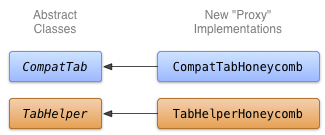
ติดตั้งใช้งาน CompatTabHoneycomb
CompatTabHoneycomb คือการติดตั้งใช้งานคลาส抽象 CompatTab ที่ TabHelperHoneycomb ใช้เพื่ออ้างอิงแท็บแต่ละรายการ CompatTabHoneycomb จะเรียกเมธอดทั้งหมดแบบพร็อกซีไปยังออบเจ็กต์ ActionBar.Tab ที่มีอยู่
เริ่มติดตั้งใช้งาน CompatTabHoneycomb โดยใช้ API ActionBar.Tab ใหม่ดังนี้
Kotlin
class CompatTabHoneycomb internal constructor(val activity: Activity, tag: String) :
        CompatTab(tag) {
    ...
    // The native tab object that this CompatTab acts as a proxy for.
    private var mTab: ActionBar.Tab =
            // Proxy to new ActionBar.newTab API
            activity.actionBar.newTab()

    override fun setText(@StringRes textId: Int): CompatTab {
        // Proxy to new ActionBar.Tab.setText API
        mTab.setText(textId)
        return this
    }

    ...
    // Do the same for other properties (icon, callback, etc.)
}
Java
public class CompatTabHoneycomb extends CompatTab {
    // The native tab object that this CompatTab acts as a proxy for.
    ActionBar.Tab mTab;
    ...

    protected CompatTabHoneycomb(FragmentActivity activity, String tag) {
        ...
        // Proxy to new ActionBar.newTab API
        mTab = activity.getActionBar().newTab();
    }

    public CompatTab setText(int resId) {
        // Proxy to new ActionBar.Tab.setText API
        mTab.setText(resId);
        return this;
    }

    ...
    // Do the same for other properties (icon, callback, etc.)
}
ติดตั้งใช้งาน TabHelperHoneycomb
TabHelperHoneycomb คือการติดตั้งใช้งานคลาส抽象 TabHelper ที่เรียกเมธอดแบบพร็อกซีไปยัง ActionBar จริงที่ได้รับจาก Activity ที่มีอยู่
ติดตั้งใช้งาน TabHelperHoneycomb โดยเรียกเมธอดแบบพร็อกซีไปยัง API ActionBar ดังนี้
Kotlin
class TabHelperHoneycomb internal constructor(activity: FragmentActivity) : TabHelper(activity) {

    private var mActionBar: ActionBar? = null

    override fun setUp() {
        mActionBar = mActionBar ?: mActivity.actionBar.apply {
            navigationMode = ActionBar.NAVIGATION_MODE_TABS
        }
    }

    override fun addTab(tab: CompatTab) {
        // Tab is a CompatTabHoneycomb instance, so its
        // native tab object is an ActionBar.Tab.
        mActionBar?.addTab(tab.getTab() as ActionBar.Tab)
    }
}
Java
public class TabHelperHoneycomb extends TabHelper {
    ActionBar actionBar;
    ...

    protected void setUp() {
        if (actionBar == null) {
            actionBar = activity.getActionBar();
            actionBar.setNavigationMode(
                    ActionBar.NAVIGATION_MODE_TABS);
        }
    }

    public void addTab(CompatTab tab) {
        ...
        // Tab is a CompatTabHoneycomb instance, so its
        // native tab object is an ActionBar.Tab.
        actionBar.addTab((ActionBar.Tab) tab.getTab());
    }

    // The other important method, newTab() is part of
    // the base implementation.
}