

บทเรียนนี้จะอธิบายวิธีสร้างการติดตั้งใช้งานที่จำลอง API ใหม่กว่า แต่ยังรองรับอุปกรณ์รุ่นเก่า
ตัดสินใจเลือกโซลูชันทดแทน
งานที่ท้าทายที่สุดในการใช้ฟีเจอร์ UI ใหม่กว่าในลักษณะที่เข้ากันได้แบบย้อนหลังคือการตัดสินใจและติดตั้งใช้งานโซลูชันเก่ากว่า (สำรอง) สำหรับแพลตฟอร์มเวอร์ชันเก่า ในหลายๆ กรณี คุณสามารถบรรลุวัตถุประสงค์ของคอมโพเนนต์ UI ใหม่กว่าเหล่านี้ได้โดยใช้ฟีเจอร์เฟรมเวิร์ก UI เก่ากว่า เช่น
-
แถบการทำงานสามารถติดตั้งใช้งานได้โดยใช้
LinearLayoutแนวนอนที่มีปุ่มรูปภาพ ไม่ว่าจะเป็นแถบชื่อที่กำหนดเองหรือเป็นมุมมองในเลย์เอาต์กิจกรรม การทำงานล้นสามารถแสดงได้ใต้ปุ่ม เมนู ของอุปกรณ์ -
แท็บแถบการทำงานสามารถติดตั้งใช้งานได้โดยใช้
LinearLayoutแนวนอนที่มีปุ่ม หรือใช้คอมโพเนนต์ UITabWidget -
วิดเจ็ต
NumberPickerและSwitchสามารถติดตั้งใช้งานได้โดยใช้วิดเจ็ตSpinnerและToggleButtonตามลำดับ -
วิดเจ็ต
ListPopupWindowและPopupMenuสามารถติดตั้งใช้งานได้โดยใช้วิดเจ็ตPopupWindow
โดยทั่วไปแล้วจะไม่มีโซลูชันเดียวที่เหมาะกับทุกกรณีสำหรับการย้ายคอมโพเนนต์ UI ใหม่กว่าไปยังอุปกรณ์รุ่นเก่า โปรดคำนึงถึงประสบการณ์ของผู้ใช้ เนื่องจากผู้ใช้ในอุปกรณ์รุ่นเก่าอาจไม่คุ้นเคยกับรูปแบบการออกแบบและคอมโพเนนต์ UI ใหม่กว่า ลองพิจารณาดูว่าจะนำเสนอฟังก์ชันการทำงานเดียวกันโดยใช้คอมโพเนนต์ที่คุ้นเคยได้อย่างไร ในหลายๆ กรณี ปัญหานี้จะไม่น่ากังวลมากนัก หากคอมโพเนนต์ UI ใหม่กว่ามีความโดดเด่นในระบบนิเวศของแอปพลิเคชัน (เช่น แถบการดำเนินการ) หรือในกรณีที่โมเดลการโต้ตอบเป็นแบบพื้นฐานและใช้งานง่าย (เช่น มุมมองการปัดโดยใช้ ViewPager)
ติดตั้งใช้งานแท็บโดยใช้ API เก่ากว่า
หากต้องการสร้างการติดตั้งใช้งานแท็บแถบการดำเนินการแบบเก่ากว่า คุณสามารถใช้ TabWidget และ TabHost (แม้ว่าคุณจะใช้วิดเจ็ต Button ที่จัดวางในแนวนอนแทนก็ได้) ติดตั้งใช้งานในคลาสที่ชื่อว่า TabHelperEclair และ CompatTabEclair เนื่องจากเป็นการติดตั้งใช้งานที่ใช้ API ที่เปิดตัวไม่เกิน Android 2.0 (Eclair)
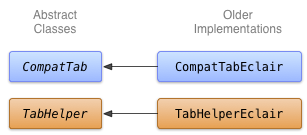
การติดตั้งใช้งาน CompatTabEclair จะจัดเก็บพร็อพเพอร์ตี้ของแท็บ เช่น ข้อความและไอคอนของแท็บ ในตัวแปรอินสแตนซ์ เนื่องจากไม่มีออบเจ็กต์ ActionBar.Tab ที่พร้อมใช้งานเพื่อจัดการการจัดเก็บนี้
Kotlin
class CompatTabEclair internal constructor(val activity: FragmentActivity, tag: String) :
        CompatTab(tag) {

    // Store these properties in the instance,
    // as there is no ActionBar.Tab object.
    private var text: CharSequence? = null
    ...

    override fun setText(resId: Int): CompatTab {
        // Our older implementation simply stores this
        // information in the object instance.
        text = activity.resources.getText(resId)
        return this
    }

    ...
    // Do the same for other properties (icon, callback, etc.)
}
Java
public class CompatTabEclair extends CompatTab {
    // Store these properties in the instance,
    // as there is no ActionBar.Tab object.
    private CharSequence text;
    ...

    public CompatTab setText(int resId) {
        // Our older implementation simply stores this
        // information in the object instance.
        text = activity.getResources().getText(resId);
        return this;
    }

    ...
    // Do the same for other properties (icon, callback, etc.)
}
การติดตั้งใช้งาน TabHelperEclair จะใช้วิธีการใน
TabHost เพื่อสร้าง TabHost.TabSpec
และตัวบ่งชี้แท็บ
Kotlin
class TabHelperEclair internal constructor(activity: FragmentActivity) : TabHelper(activity) {

    private var tabHost: TabHost? = null
    ...

    override fun setUp() {
        // Our activity layout for pre-Honeycomb devices
        // must contain a TabHost.
        tabHost = tabHost ?: mActivity.findViewById<TabHost>(android.R.id.tabhost).apply {
            setup()
        }
    }

    override fun addTab(tab: CompatTab) {
        ...
        tabHost?.newTabSpec(tab.tag)?.run {
            setIndicator(tab.getText()) // And optional icon
            ...
            tabHost?.addTab(this)
        }
    }
    // The other important method, newTab() is part of
    // the base implementation.
}
Java
public class TabHelperEclair extends TabHelper {
    private TabHost tabHost;
    ...

    protected void setUp() {
        if (tabHost == null) {
            // Our activity layout for pre-Honeycomb devices
            // must contain a TabHost.
            tabHost = (TabHost) mActivity.findViewById(
                    android.R.id.tabhost);
            tabHost.setup();
        }
    }

    public void addTab(CompatTab tab) {
        ...
        TabSpec spec = tabHost
                .newTabSpec(tag)
                .setIndicator(tab.getText()); // And optional icon
        ...
        tabHost.addTab(spec);
    }

    // The other important method, newTab() is part of
    // the base implementation.
}
ตอนนี้คุณมีการติดตั้งใช้งาน CompatTab และ TabHelper 2 แบบ ได้แก่ แบบที่ทำงานในอุปกรณ์ที่ใช้ Android 3.0 ขึ้นไปและใช้ API ใหม่ และอีกแบบที่ทำงานในอุปกรณ์ที่ใช้ Android 2.0 ขึ้นไปและใช้ API เก่ากว่า บทเรียนถัดไปจะอธิบายเกี่ยวกับการใช้การติดตั้งใช้งานเหล่านี้ในแอปพลิเคชัน