

我们建议您使用 PgsGamesSignInClient 对玩家进行身份验证,并安全地将玩家的身份传递到后端服务器。这样一来,您的游戏就可以安全地检索玩家的身份和其他数据,而不会在通过设备时面临可能被篡改的风险。
玩家成功通过身份验证后,您可以从 Play 游戏服务 v2 原生 SDK(Beta 版)请求一个特殊的一次性代码(称为服务器授权代码),并由客户端传递到服务器。随后,在服务器上,用服务器授权代码换取 OAuth 2.0 令牌,以供服务器用于调用 Google Play 游戏服务 API。
如需获得有关在游戏中添加身份验证的其他指导,请参阅平台身份验证。
如需离线访问,必须执行以下步骤:
- 在 Google Play 管理中心内:为您的游戏服务器创建凭据。凭据的 OAuth 客户端类型为“Web”(网络)。
- 在 Android 应用中:在平台身份验证过程中,请求获取服务器凭据的服务器授权代码,并将其传递给您的服务器。
PgsGamesSignInClient在请求对 Play 游戏服务 Web API 的服务器端访问权限时,可以请求三个 OAuth 2.0 权限范围。可选范围包括PGS_AUTH_SCOPE_EMAIL、PGS_AUTH_SCOPE_PROFILE和PGS_AUTH_SCOPE_OPENID。两个默认范围是DRIVE_APPFOLDER和GAMES_LITE。 - 在您的游戏服务器上:通过 Google 授权服务用服务器授权代码换取 OAuth 访问令牌,然后使用该访问令牌来调用 Play 游戏服务 REST API。
准备工作
您首先需要在 Google Play 管理中心中添加游戏(如设置 Google Play 游戏服务中所述)。
创建服务器端 Web 应用
Google Play 游戏服务未针对网络游戏提供后端支持。但该服务为 Android 游戏的服务器提供了后端服务器支持。
如果您希望在服务器端应用中使用适用于 Google Play 游戏服务的 REST API,请按以下步骤操作:
- 在 Google Play 管理中心内,选择一款游戏。
- 依次前往 Play 游戏服务 > 设置和管理 > 配置。
- 选择添加凭据,以转到添加凭据页面。选择游戏服务器作为凭据类型,然后继续转到授权部分。
- 如果您的游戏服务器已有一个 OAuth 客户端 ID,请从下拉菜单中选择该 ID。保存您所做的更改后,继续转到下一部分。
- 如果您的游戏服务器当前没有 OAuth 客户端 ID,您可以创建一个。
- 点击创建 OAuth 客户端,然后点击创建 OAuth 客户端 ID 链接。
- 系统会将您转到 Google Cloud Platform 中与您的游戏关联的项目的创建 OAuth 客户端 ID 页面。
- 填写该页面的表单,然后点击“创建”。请务必将“应用类型”设置为“Web 应用”。
- 返回“添加凭据”页面的“授权”部分,选择新创建的 OAuth 客户端,并保存您所做的更改。
获取服务器授权代码
如需检索您的游戏可用于获取后端服务器上的访问令牌的服务器授权代码,请执行以下操作:
- 从客户端调用
PgsGamesSignInClient_requestServerSideAccess。- 请确保您使用的是为游戏服务器注册的 OAuth 客户端 ID,而不是 Android 应用的 OAuth 客户端 ID。
- (可选)如果您的游戏服务器需要离线访问(使用刷新令牌来长期访问)Play 游戏服务,您可以将
force_refresh_token参数设置为 true。
(可选)在身份验证过程中,新用户应会看到一个用于请求额外权限范围的权限请求页面。接受同意后,您可以使用
PGS_AUTH_SCOPE_EMAIL、PGS_AUTH_SCOPE_PROFILE和PGS_AUTH_SCOPE_OPENIDOAuth 权限范围设置PgsAuthScopescopes参数。如果用户拒绝同意,系统只会将两个默认权限范围DRIVE_APPFOLDER和GAMES_LITE发送到后端。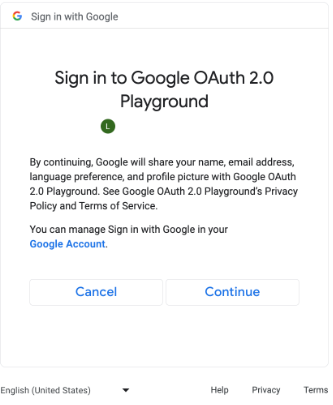
针对其他 OAuth 范围的权限请求页面(点击可放大)。 // #include "google/games/pgs_games_sign_in_client.h" // 1. Define the Callback // This function is called when the server-side access request completes. // It provides the authorization code (on success) or an error (on failure). void OnServerSideAccessCallback(void* context, PgsError error, const char* serverAuthCode) { if (error == PgsError_Success) { if (serverAuthCode != nullptr) { __android_log_print(ANDROID_LOG_INFO, "Games", "Received Server Auth Code: %s", serverAuthCode); // Send 'serverAuthCode' to your backend server immediately. // Your server will exchange this code for an OAuth access token. } } else { __android_log_print(ANDROID_LOG_ERROR, "Games", "Failed to get server auth code. Error: %d", error); } } // 2. Define the Wrapper Function void RequestServerAccess(PgsGamesSignInClient* signInClient) { if (signInClient == nullptr) { return; } // This must match the "Web client ID" from your Google Cloud Console // (linked to your Play Console Game Server Credential). const char* SERVER_CLIENT_ID = "xxxx"; // Set to 'true' if your server needs a Refresh Token (long-lived access). // Set to 'false' if you only need an Access Token (short-lived). bool forceRefreshToken = false; // Call the API PgsGamesSignInClient_requestServerSideAccess( signInClient, SERVER_CLIENT_ID, forceRefreshToken, OnServerSideAccessCallback, // The callback defined nullptr // User context (optional, passed to callback) ); } // 3. Example Usage void TriggerSignInProcess(PgsGamesClient* gamesClient) { // Obtain the Sign-In Client from the main Games Client PgsGamesSignInClient* signInClient = PgsGamesClient_getSignInClient(gamesClient); RequestServerAccess(signInClient); }
将 OAuth 授权代码令牌发送到您的后端服务器,以便交换该令牌,针对 Play 游戏服务 REST API 验证玩家 ID,然后使用您的游戏进行身份验证。
发送服务器授权代码
将服务器授权代码发送到后端服务器以换取访问令牌和刷新令牌。访问令牌可用于代表玩家调用 Play 游戏服务 API,还可选择用于存储刷新令牌以便在访问令牌到期时获取新的访问令牌。
如需详细了解玩家 ID 的运作方式,请参阅新一代玩家 ID。
以下代码段展示了如何在 C++ 编程语言中实现用服务器端授权令牌换取访问令牌的服务器端代码。
Java
/**
 * Exchanges the authcode for an access token credential. The credential
 * is associated with the given player.
 *
 * @param authCode - the non-null authcode passed from the client.
 * @param player   - the player object which the given authcode is
 *                 associated with.
 * @return the HTTP response code indicating the outcome of the exchange.
 */
private int exchangeAuthCode(String authCode, Player player) {
try {

    // The client_secret.json file is downloaded from the Google Cloud
    // console. This is used to identify your web application. The
    // contents of this file shouldn't be shared.

    File secretFile = new File("client_secret.json");

    // If we don't have the file, we can't access any APIs, so return
    // an error.
    if (!secretFile.exists()) {
        log("Secret file : " + secretFile
                .getAbsolutePath() + "  does not exist!");
        return HttpServletResponse.SC_FORBIDDEN;
    }

    GoogleClientSecrets clientSecrets = GoogleClientSecrets.load(
            JacksonFactory.getDefaultInstance(), new
            FileReader(secretFile));

    // Extract the application ID of the game from the client ID.
    String applicationId = extractApplicationId(clientSecrets
            .getDetails().getClientId());

    GoogleTokenResponse tokenResponse =
            new GoogleAuthorizationCodeTokenRequest(
            HTTPTransport,
            JacksonFactory.getDefaultInstance(),
            "https://oauth2.googleapis.com/token",
            clientSecrets.getDetails().getClientId(),
            clientSecrets.getDetails().getClientSecret(),
            authCode,
            "")
            .execute();

    TokenVerifier(tokenResponse);

    log("hasRefresh == " + (tokenResponse.getRefreshToken() != null));
    log("Exchanging authCode: " + authCode + " for token");
    Credential credential = new Credential
            .Builder(BearerToken.authorizationHeaderAccessMethod())
            .setJsonFactory(JacksonFactory.getDefaultInstance())
            .setTransport(HTTPTransport)
            .setTokenServerEncodedUrl("https://www.googleapis.com/oauth2/v4/token")
            .setClientAuthentication(new HttpExecuteInterceptor() {
                @Override
                public void intercept(HttpRequest request)
                        throws IOException {
                        }
            })
            .build()
            .setFromTokenResponse(tokenResponse);

    player.setCredential(credential);

    // Now that we have a credential, we can access the Games API.
    PlayGamesAPI api = new PlayGamesAPI(player, applicationId,
            HTTPTransport, JacksonFactory.getDefaultInstance());

    // Call the verify method, which checks that the access token has
    // access to the Games API, and that the Player ID used by the
    // client matches the playerId associated with the accessToken.
    boolean ok = api.verifyPlayer();

    // Call a Games API on the server.
    if (ok) {
        ok = api.updatePlayerInfo();
        if (ok) {
            // persist the player.
            savePlayer(api.getPlayer());
        }
    }

    return ok ? HttpServletResponse.SC_OK :
            HttpServletResponse.SC_INTERNAL_SERVER_ERROR;

  } catch (IOException e) {
    e.printStackTrace();
  }
  return HttpServletResponse.SC_INTERNAL_SERVER_ERROR;
}
您可以使用 Java 或 Python 中的 Google API 客户端库检索 OAuth 范围,以获取 GoogleIdTokenVerifier 对象。以下代码段展示了 Java 编程语言中的实现。
Java
import com.google.api.client.googleapis.auth.oauth2.GoogleIdToken;
import com.google.api.client.googleapis.auth.oauth2.GoogleIdToken.Payload;
import com.google.api.client.googleapis.auth.oauth2.GoogleIdTokenVerifier;

/**
 * Gets the GoogleIdTokenVerifier object and additional OAuth scopes.
 * If additional OAuth scopes are not requested, the idToken will be null.
 *
 * @param tokenResponse - the tokenResponse passed from the exchangeAuthCode
 *                        function.
 *
 **/

void TokenVerifier(GoogleTokenResponse tokenResponse) {

    string idTokenString = tokenResponse.getIdToken();

    GoogleIdTokenVerifier verifier = new GoogleIdTokenVerifier.Builder(transport, jsonFactory)
        // Specify the WEB_CLIENT_ID of the app that accesses the backend:
        .setAudience(Collections.singletonList(WEB_CLIENT_ID))
        // Or, if multiple clients access the backend:
        //.setAudience(Arrays.asList(WEB_CLIENT_ID_1, WEB_CLIENT_ID_2, WEB_CLIENT_ID_3))
        .build();

    GoogleIdToken idToken = verifier.verify(idTokenString);

    // The idToken can be null if additional OAuth scopes are not requested.
    if (idToken != null) {
        Payload payload = idToken.getPayload();

    // Print user identifier
    String userId = payload.getSubject();
    System.out.println("User ID: " + userId);

    // Get profile information from payload
    String email = payload.getEmail();
    boolean emailVerified = Boolean.valueOf(payload.getEmailVerified());
    String name = (String) payload.get("name");
    String pictureUrl = (String) payload.get("picture");
    String locale = (String) payload.get("locale");
    String familyName = (String) payload.get("family_name");
    String givenName = (String) payload.get("given_name");

    // This ID is unique to each Google Account, making it suitable for use as
    // a primary key during account lookup. Email is not a good choice because
    // it can be changed by the user.
    String sub = payload.getSubject();

    // Use or store profile information
    // ...

    } else {
      System.out.println("Invalid ID token.");
    }
}
从服务器调用 REST API
有关可用的 API 调用的完整说明,请参阅适用于 Google Play 游戏服务的 REST API。
以下这些 REST API 调用示例可能对您有所帮助:
玩家
想要获取已通过身份验证的玩家的 ID 和个人资料数据?请以 'me' 为 ID 调用 Players.get。
成就
如需了解详情,请参阅成就指南。
如需获取当前成就的列表,请调用 AchievementDefinitions.list。
然后结合调用 Achievements.list 的结果,便可了解玩家解锁了哪些成就。
调用 Achievements.unlock 可解锁玩家成就。
调用 Achievements.increment 可报告成就的进度,并了解玩家是否已解锁该成就。
如果您要调试尚未进入正式版阶段的游戏,则可以从 Management API 调用 Achievements.reset 或 Achievements.resetAll 以将成就重置为原始状态。