

如果您在游戏中支持游戏控制器,则有责任确保您的游戏在搭载不同 Android 版本的各种设备上对控制器的响应方式一致。这样一来,您的游戏便可以覆盖更广泛的受众群体,并且即使玩家更换或升级了 Android 设备,也可以通过其控制器获得无缝的游戏体验。
本课程演示了如何以向后兼容的方式使用 Android 4.1 及更高版本中提供的 API,从而使您的游戏在搭载 Android 3.1 及更高版本的设备上支持以下功能:
- 游戏可以检测是否新增、更改或移除了游戏控制器。
- 游戏可以查询游戏控制器的功能。
- 游戏可以识别从游戏控制器传入的动作事件。
准备抽象化处理用于实现游戏控制器支持的 API
假设您希望能够在搭载 Android 3.1(API 级别 12)的设备上确定游戏控制器的连接状态是否已发生更改。但是,相应 API 仅在 Android 4.1(API 级别 16)及更高版本中提供,因此您需要提供支持 Android 4.1 及更高版本的实现,同时提供支持 Android 3.1 至 Android 4.0 的后备机制。
为帮助您确定哪些功能需要针对较低版本提供后备机制,表 1 列出了 Android 3.1(API 级别 12)和 4.1(API 级别 16)在游戏控制器支持方面的不同之处。
表 1. 不同 Android 版本中用于实现游戏控制器支持的 API。
| 控制器信息 | 控制器 API | API 级别 12 | API 级别 16 |
|---|---|---|---|
| 设备标识 | getInputDeviceIds() |
• | |
getInputDevice() |
• | ||
getVibrator() |
• | ||
SOURCE_JOYSTICK |
• | • | |
SOURCE_GAMEPAD |
• | • | |
| 连接状态 | onInputDeviceAdded() |
• | |
onInputDeviceChanged() |
• | ||
onInputDeviceRemoved() |
• | ||
| 输入事件标识 | 方向键按下(KEYCODE_DPAD_UP、KEYCODE_DPAD_DOWN、KEYCODE_DPAD_LEFT、KEYCODE_DPAD_RIGHT、KEYCODE_DPAD_CENTER) |
• | • |
游戏手柄按钮按下(BUTTON_A、BUTTON_B、BUTTON_THUMBL、BUTTON_THUMBR、BUTTON_SELECT、BUTTON_START、BUTTON_R1、BUTTON_L1、BUTTON_R2、BUTTON_L2) |
• | • | |
操纵杆和帽子开关移动(AXIS_X、AXIS_Y、AXIS_Z、AXIS_RZ、AXIS_HAT_X、AXIS_HAT_Y) |
• | • | |
模拟触发器按下(AXIS_LTRIGGER、AXIS_RTRIGGER) |
• | • |
您可以使用抽象来构建跨平台的版本感知型游戏控制器支持。该方法涉及以下步骤:
- 定义一个中间 Java 接口,该接口可用于抽象化游戏所需的游戏控制器功能的实现。
- 创建使用 Android 4.1 及更高版本中 API 的接口的代理实现。
- 创建使用 Android 3.1 至 Android 4.0 版本可用 API 的接口的自定义实现。
- 创建用于在运行时在这些实现之间进行切换的逻辑,并开始在游戏中使用该接口。
如需简要了解如何使用抽象来验证应用能否以向后兼容的方式跨不同的 Android 版本运行,请参阅创建向后兼容界面。
添加接口以实现向后兼容性
为了提供向后兼容性,您可以创建自定义接口,然后添加特定于版本的实现。这种方法的一大优势在于,您可以镜像再现 Android 4.1(API 级别 16)中支持游戏控制器的公共接口。
Kotlin
// The InputManagerCompat interface is a reference example.
// The full code is provided in the ControllerSample.zip sample.
interface InputManagerCompat {
    val inputDeviceIds: IntArray
    fun getInputDevice(id: Int): InputDevice

    fun registerInputDeviceListener(
            listener: InputManager.InputDeviceListener,
            handler: Handler?
    )

    fun unregisterInputDeviceListener(listener:InputManager.InputDeviceListener)

    fun onGenericMotionEvent(event: MotionEvent)

    fun onPause()
    fun onResume()

    interface InputDeviceListener {
        fun onInputDeviceAdded(deviceId: Int)
        fun onInputDeviceChanged(deviceId: Int)
        fun onInputDeviceRemoved(deviceId: Int)
    }
}
Java
// The InputManagerCompat interface is a reference example.
// The full code is provided in the ControllerSample.zip sample.
public interface InputManagerCompat {
    ...
    public InputDevice getInputDevice(int id);
    public int[] getInputDeviceIds();

    public void registerInputDeviceListener(
            InputManagerCompat.InputDeviceListener listener,
            Handler handler);
    public void unregisterInputDeviceListener(
            InputManagerCompat.InputDeviceListener listener);

    public void onGenericMotionEvent(MotionEvent event);

    public void onPause();
    public void onResume();

    public interface InputDeviceListener {
        void onInputDeviceAdded(int deviceId);
        void onInputDeviceChanged(int deviceId);
        void onInputDeviceRemoved(int deviceId);
    }
    ...
}
InputManagerCompat 接口提供以下方法:
getInputDevice()- 镜像
getInputDevice()。获取表示游戏控制器功能的InputDevice对象。 getInputDeviceIds()- 镜像
getInputDeviceIds()。返回一个整数数组,其中每个整数表示不同输入设备的 ID。如果您正在构建一款支持多名玩家的游戏,并且希望检测连接的控制器数量,该方法将非常有用。 registerInputDeviceListener()- 镜像
registerInputDeviceListener()。让您可以进行注册,以便在新增、更改或移除了设备时收到通知。 unregisterInputDeviceListener()- 镜像
unregisterInputDeviceListener()。 取消注册输入设备监听器。 onGenericMotionEvent()- 镜像
onGenericMotionEvent()。让您的游戏可以拦截和处理表示操纵杆移动和模拟触发器按下等事件的MotionEvent对象和轴值。 onPause()- 当主 activity 处于暂停状态或游戏不再获得焦点时,停止轮询游戏控制器事件。
onResume()- 当主 activity 已恢复或者游戏已启动并在前台运行时,开始轮询游戏控制器事件。
InputDeviceListener- 镜像
InputManager.InputDeviceListener接口。让您的游戏可以了解游戏控制器的新增、更改或移除时间。
接下来,创建适用于不同平台版本的 InputManagerCompat 实现。如果您的游戏在搭载 Android 4.1 或更高版本的设备上运行并调用 InputManagerCompat 方法,代理实现就会调用 InputManager 中的等效方法。但是,如果您的游戏在搭载 Android 3.1 至 Android 4.0 的设备上运行,自定义实现就可以通过仅使用不高于 Android 3.1 的版本中引入的 API 处理对 InputManagerCompat 方法的调用。无论在运行时使用了哪种特定于版本的实现,相应实现都会以透明的方式将调用结果传回游戏。
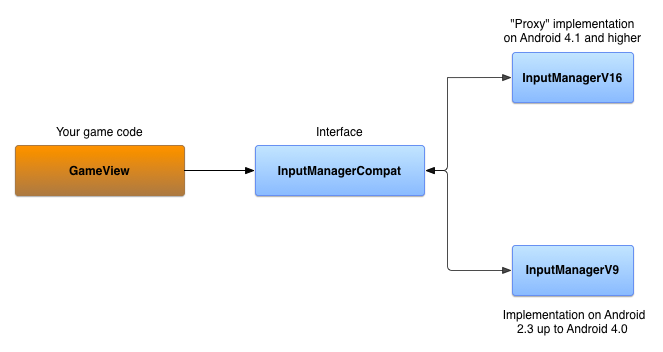
在 Android 4.1 及更高版本上实现接口
InputManagerCompatV16 是 InputManagerCompat 接口的一种实现,用于将方法调用传递给实际 InputManager 和 InputManager.InputDeviceListener。InputManager 从系统 Context 中获取。
Kotlin
// The InputManagerCompatV16 class is a reference implementation.
// The full code is provided in the ControllerSample.zip sample.
public class InputManagerV16(
        context: Context,
        private val inputManager: InputManager =
            context.getSystemService(Context.INPUT_SERVICE) as InputManager,
        private val listeners:
            MutableMap<InputManager.InputDeviceListener, V16InputDeviceListener> = mutableMapOf()
) : InputManagerCompat {
    override val inputDeviceIds: IntArray = inputManager.inputDeviceIds

    override fun getInputDevice(id: Int): InputDevice = inputManager.getInputDevice(id)

    override fun registerInputDeviceListener(
            listener: InputManager.InputDeviceListener,
            handler: Handler?
    ) {
        V16InputDeviceListener(listener).also { v16listener ->
            inputManager.registerInputDeviceListener(v16listener, handler)
            listeners += listener to v16listener
        }
    }

    // Do the same for unregistering an input device listener
    ...

    override fun onGenericMotionEvent(event: MotionEvent) {
        // unused in V16
    }

    override fun onPause() {
        // unused in V16
    }

    override fun onResume() {
        // unused in V16
    }

}

class V16InputDeviceListener(
        private val idl: InputManager.InputDeviceListener
) : InputManager.InputDeviceListener {

    override fun onInputDeviceAdded(deviceId: Int) {
        idl.onInputDeviceAdded(deviceId)
    }
    // Do the same for device change and removal
    ...
}
Java
// The InputManagerCompatV16 class is a reference implementation.
// The full code is provided in the ControllerSample.zip sample.
public class InputManagerV16 implements InputManagerCompat {

    private final InputManager inputManager;
    private final Map<InputManagerCompat.InputDeviceListener,
            V16InputDeviceListener> listeners;

    public InputManagerV16(Context context) {
        inputManager = (InputManager)
                context.getSystemService(Context.INPUT_SERVICE);
        listeners = new HashMap<InputManagerCompat.InputDeviceListener,
                V16InputDeviceListener>();
    }

    @Override
    public InputDevice getInputDevice(int id) {
        return inputManager.getInputDevice(id);
    }

    @Override
    public int[] getInputDeviceIds() {
        return inputManager.getInputDeviceIds();
    }

    static class V16InputDeviceListener implements
            InputManager.InputDeviceListener {
        final InputManagerCompat.InputDeviceListener mIDL;

        public V16InputDeviceListener(InputDeviceListener idl) {
            mIDL = idl;
        }

        @Override
        public void onInputDeviceAdded(int deviceId) {
            mIDL.onInputDeviceAdded(deviceId);
        }

        // Do the same for device change and removal
        ...
    }

    @Override
    public void registerInputDeviceListener(InputDeviceListener listener,
            Handler handler) {
        V16InputDeviceListener v16Listener = new
                V16InputDeviceListener(listener);
        inputManager.registerInputDeviceListener(v16Listener, handler);
        listeners.put(listener, v16Listener);
    }

    // Do the same for unregistering an input device listener
    ...

    @Override
    public void onGenericMotionEvent(MotionEvent event) {
        // unused in V16
    }

    @Override
    public void onPause() {
        // unused in V16
    }

    @Override
    public void onResume() {
        // unused in V16
    }

}
在 Android 3.1 至 Android 4.0 上实现接口
如需创建支持 Android 3.1 至 Android 4.0 的 InputManagerCompat 的实现,您可以使用以下对象:
- 设备 ID 的
SparseArray,用于跟踪连接到设备的游戏控制器。 - 一个
Handler,用于处理设备事件。 当应用启动或恢复时,Handler会收到一条开始轮询游戏控制器断开连接情况的消息。Handler会启动一个循环来检查每个已知连接的游戏控制器,并查看是否返回了设备 ID。如果返回值为null,就表示游戏控制器已断开连接。当应用暂停时,Handler停止轮询。 InputManagerCompat.InputDeviceListener个对象的Map。您将使用监听器更新所跟踪的游戏控制器的连接状态。
Kotlin
// The InputManagerCompatV9 class is a reference implementation.
// The full code is provided in the ControllerSample.zip sample.
class InputManagerV9(
        val devices: SparseArray<Array<Long>> = SparseArray(),
        private val listeners:
        MutableMap<InputManager.InputDeviceListener, Handler> = mutableMapOf()
) : InputManagerCompat {
    private val defaultHandler: Handler = PollingMessageHandler(this)
    …
}
Java
// The InputManagerCompatV9 class is a reference implementation.
// The full code is provided in the ControllerSample.zip sample.
public class InputManagerV9 implements InputManagerCompat {
    private final SparseArray<long[]> devices;
    private final Map<InputDeviceListener, Handler> listeners;
    private final Handler defaultHandler;
    …

    public InputManagerV9() {
        devices = new SparseArray<long[]>();
        listeners = new HashMap<InputDeviceListener, Handler>();
        defaultHandler = new PollingMessageHandler(this);
    }
}
实现对 Handler 进行扩展的 PollingMessageHandler 对象,并替换 handleMessage() 方法。此方法可以检查连接的游戏控制器是否已断开连接,并向已注册的监听器发出通知。
Kotlin
private class PollingMessageHandler(
        inputManager: InputManagerV9,
        private val mInputManager: WeakReference<InputManagerV9> = WeakReference(inputManager)
) : Handler() {

    override fun handleMessage(msg: Message) {
        super.handleMessage(msg)
        when (msg.what) {
            MESSAGE_TEST_FOR_DISCONNECT -> {
                mInputManager.get()?.also { imv ->
                    val time = SystemClock.elapsedRealtime()
                    val size = imv.devices.size()
                    for (i in 0 until size) {
                        imv.devices.valueAt(i)?.also { lastContact ->
                            if (time - lastContact[0] > CHECK_ELAPSED_TIME) {
                                // check to see if the device has been
                                // disconnected
                                val id = imv.devices.keyAt(i)
                                if (null == InputDevice.getDevice(id)) {
                                    // Notify the registered listeners
                                    // that the game controller is disconnected
                                    imv.devices.remove(id)
                                } else {
                                    lastContact[0] = time
                                }
                            }
                        }
                    }
                    sendEmptyMessageDelayed(MESSAGE_TEST_FOR_DISCONNECT, CHECK_ELAPSED_TIME)
                }
            }
        }
    }
}
Java
private static class PollingMessageHandler extends Handler {
    private final WeakReference<InputManagerV9> inputManager;

    PollingMessageHandler(InputManagerV9 im) {
        inputManager = new WeakReference<InputManagerV9>(im);
    }

    @Override
    public void handleMessage(Message msg) {
        super.handleMessage(msg);
        switch (msg.what) {
            case MESSAGE_TEST_FOR_DISCONNECT:
                InputManagerV9 imv = inputManager.get();
                if (null != imv) {
                    long time = SystemClock.elapsedRealtime();
                    int size = imv.devices.size();
                    for (int i = 0; i < size; i++) {
                        long[] lastContact = imv.devices.valueAt(i);
                        if (null != lastContact) {
                            if (time - lastContact[0] > CHECK_ELAPSED_TIME) {
                                // check to see if the device has been
                                // disconnected
                                int id = imv.devices.keyAt(i);
                                if (null == InputDevice.getDevice(id)) {
                                    // Notify the registered listeners
                                    // that the game controller is disconnected
                                    imv.devices.remove(id);
                                } else {
                                    lastContact[0] = time;
                                }
                            }
                        }
                    }
                    sendEmptyMessageDelayed(MESSAGE_TEST_FOR_DISCONNECT,
                            CHECK_ELAPSED_TIME);
                }
                break;
        }
    }
}
如需启动和停止轮询游戏控制器断开连接的情况,请替换以下方法:
Kotlin
private const val MESSAGE_TEST_FOR_DISCONNECT = 101
private const val CHECK_ELAPSED_TIME = 3000L

class InputManagerV9(
        val devices: SparseArray<Array<Long>> = SparseArray(),
        private val listeners:
        MutableMap<InputManager.InputDeviceListener, Handler> = mutableMapOf()
) : InputManagerCompat {
    ...
    override fun onPause() {
        defaultHandler.removeMessages(MESSAGE_TEST_FOR_DISCONNECT)
    }

    override fun onResume() {
        defaultHandler.sendEmptyMessageDelayed(MESSAGE_TEST_FOR_DISCONNECT, CHECK_ELAPSED_TIME)
    }
    ...
}
Java
private static final int MESSAGE_TEST_FOR_DISCONNECT = 101;
private static final long CHECK_ELAPSED_TIME = 3000L;

@Override
public void onPause() {
    defaultHandler.removeMessages(MESSAGE_TEST_FOR_DISCONNECT);
}

@Override
public void onResume() {
    defaultHandler.sendEmptyMessageDelayed(MESSAGE_TEST_FOR_DISCONNECT,
            CHECK_ELAPSED_TIME);
}
如需检测是否添加了输入设备,请替换 onGenericMotionEvent() 方法。当系统报告动作事件时,检查该事件是来自已跟踪的设备 ID,还是来自新的设备 ID。如果来自新的设备 ID,请向已注册的监听器发出通知。
Kotlin
override fun onGenericMotionEvent(event: MotionEvent) {
    // detect new devices
    val id = event.deviceId
    val timeArray: Array<Long> = mDevices.get(id) ?: run {
        // Notify the registered listeners that a game controller is added
        ...
        arrayOf<Long>().also {
            mDevices.put(id, it)
        }
    }
    timeArray[0] = SystemClock.elapsedRealtime()
}
Java
@Override
public void onGenericMotionEvent(MotionEvent event) {
    // detect new devices
    int id = event.getDeviceId();
    long[] timeArray = mDevices.get(id);
    if (null == timeArray) {
        // Notify the registered listeners that a game controller is added
        ...
        timeArray = new long[1];
        mDevices.put(id, timeArray);
    }
    long time = SystemClock.elapsedRealtime();
    timeArray[0] = time;
}
监听器的通知是通过使用 Handler 对象将 DeviceEvent
Runnable 对象发送至消息队列实现的。DeviceEvent 包含对 InputManagerCompat.InputDeviceListener 的引用。当 DeviceEvent 运行时,系统会调用监听器的相应回调方法,以指明是否新增、更改或移除了游戏控制器。
Kotlin
class InputManagerV9(
        val devices: SparseArray<Array<Long>> = SparseArray(),
        private val listeners:
        MutableMap<InputManager.InputDeviceListener, Handler> = mutableMapOf()
) : InputManagerCompat {
    ...
    override fun registerInputDeviceListener(
            listener: InputManager.InputDeviceListener,
            handler: Handler?
    ) {
        listeners[listener] = handler ?: defaultHandler
    }

    override fun unregisterInputDeviceListener(listener: InputManager.InputDeviceListener) {
        listeners.remove(listener)
    }

    private fun notifyListeners(why: Int, deviceId: Int) {
        // the state of some device has changed
        listeners.forEach { listener, handler ->
            DeviceEvent.getDeviceEvent(why, deviceId, listener).also {
                handler?.post(it)
            }
        }
    }
    ...
}

private val sObjectQueue: Queue<DeviceEvent> = ArrayDeque<DeviceEvent>()

private class DeviceEvent(
        private var mMessageType: Int,
        private var mId: Int,
        private var mListener: InputManager.InputDeviceListener
) : Runnable {

    companion object {
        fun getDeviceEvent(messageType: Int, id: Int, listener: InputManager.InputDeviceListener) =
                sObjectQueue.poll()?.apply {
                    mMessageType = messageType
                    mId = id
                    mListener = listener
                } ?: DeviceEvent(messageType, id, listener)

    }

    override fun run() {
        when(mMessageType) {
            ON_DEVICE_ADDED -> mListener.onInputDeviceAdded(mId)
            ON_DEVICE_CHANGED -> mListener.onInputDeviceChanged(mId)
            ON_DEVICE_REMOVED -> mListener.onInputDeviceChanged(mId)
            else -> {
                // Handle unknown message type
            }
        }
    }

}
Java
@Override
public void registerInputDeviceListener(InputDeviceListener listener,
        Handler handler) {
    listeners.remove(listener);
    if (handler == null) {
        handler = defaultHandler;
    }
    listeners.put(listener, handler);
}

@Override
public void unregisterInputDeviceListener(InputDeviceListener listener) {
    listeners.remove(listener);
}

private void notifyListeners(int why, int deviceId) {
    // the state of some device has changed
    if (!listeners.isEmpty()) {
        for (InputDeviceListener listener : listeners.keySet()) {
            Handler handler = listeners.get(listener);
            DeviceEvent odc = DeviceEvent.getDeviceEvent(why, deviceId,
                    listener);
            handler.post(odc);
        }
    }
}

private static class DeviceEvent implements Runnable {
    private int mMessageType;
    private int mId;
    private InputDeviceListener mListener;
    private static Queue<DeviceEvent> sObjectQueue =
            new ArrayDeque<DeviceEvent>();
    ...

    static DeviceEvent getDeviceEvent(int messageType, int id,
            InputDeviceListener listener) {
        DeviceEvent curChanged = sObjectQueue.poll();
        if (null == curChanged) {
            curChanged = new DeviceEvent();
        }
        curChanged.mMessageType = messageType;
        curChanged.mId = id;
        curChanged.mListener = listener;
        return curChanged;
    }

    @Override
    public void run() {
        switch (mMessageType) {
            case ON_DEVICE_ADDED:
                mListener.onInputDeviceAdded(mId);
                break;
            case ON_DEVICE_CHANGED:
                mListener.onInputDeviceChanged(mId);
                break;
            case ON_DEVICE_REMOVED:
                mListener.onInputDeviceRemoved(mId);
                break;
            default:
                // Handle unknown message type
                ...
                break;
        }
        // Put this runnable back in the queue
        sObjectQueue.offer(this);
    }
}
您现在有两种 InputManagerCompat 实现:一种适用于搭载 Android 4.1 及更高版本的设备,另一种适用于搭载 Android 3.1 至 Android 4.0 的设备。
使用特定于版本的实现
特定于版本的切换逻辑在用作 工厂的类中实现。
Kotlin
object Factory {
    fun getInputManager(context: Context): InputManagerCompat =
            if (Build.VERSION.SDK_INT >= Build.VERSION_CODES.JELLY_BEAN) {
                InputManagerV16(context)
            } else {
                InputManagerV9()
            }
}
Java
public static class Factory {
    public static InputManagerCompat getInputManager(Context context) {
        if (Build.VERSION.SDK_INT >= Build.VERSION_CODES.JELLY_BEAN) {
            return new InputManagerV16(context);
        } else {
            return new InputManagerV9();
        }
    }
}
现在,您可以实例化 InputManagerCompat 对象并在主 View 中注册 InputManagerCompat.InputDeviceListener。由于您设置的版本切换逻辑,您的游戏会自动使用适合设备搭载的 Android 版本的实现。
Kotlin
class GameView(context: Context) : View(context), InputManager.InputDeviceListener {
    private val inputManager: InputManagerCompat = Factory.getInputManager(context).apply {
        registerInputDeviceListener(this@GameView, null)
        ...
    }
    ...
}
Java
public class GameView extends View implements InputDeviceListener {
    private InputManagerCompat inputManager;
    ...

    public GameView(Context context, AttributeSet attrs) {
        inputManager =
                InputManagerCompat.Factory.getInputManager(this.getContext());
        inputManager.registerInputDeviceListener(this, null);
        ...
    }
}
接下来,在主视图中替换 onGenericMotionEvent() 方法,如处理来自游戏控制器的 MotionEvent(Android 12 及更高版本)中所述。现在,您的游戏应该能够在搭载 Android 3.1(API 级别)的设备上一致地处理游戏控制器事件。
Kotlin
override fun onGenericMotionEvent(event: MotionEvent): Boolean {
    inputManager.onGenericMotionEvent(event)

    // Handle analog input from the controller as normal
    ...
    return super.onGenericMotionEvent(event)
}
Java
@Override
public boolean onGenericMotionEvent(MotionEvent event) {
    inputManager.onGenericMotionEvent(event);

    // Handle analog input from the controller as normal
    ...
    return super.onGenericMotionEvent(event);
}
您可以在示例 ControllerSample.zip(可供下载)中提供的 GameView 类中找到该兼容性代码的完整实现。