

游戏统计数据是指玩家可在其玩家资料中查看的游戏累计统计信息。玩家可以通过这些统计数据追踪自己的游戏生涯进度、查看精彩瞬间并与其他玩家进行比较,未来还将支持更多 Google Play 功能,例如任务、社交挑战等。
游戏统计数据必须:
- 不要求购买(例如购买宝石),即不应因任何 IAP 购买而更新。
- 不要求观看广告,即不应因观看广告而更新。
- 不属于游戏的一般用途(例如,打开游戏、使用设置)。
- 不包含 Google Play 政策中定义的个人数据和敏感用户数据,包括用户 ID、密码、精确位置或健康数据,或任何令人反感、脏话、露骨色情、暴力或仇恨内容。
- 面向所有用户(例如,不是团队专属操作,不限于特定等级的用户,不限于限时 LiveOps 等)
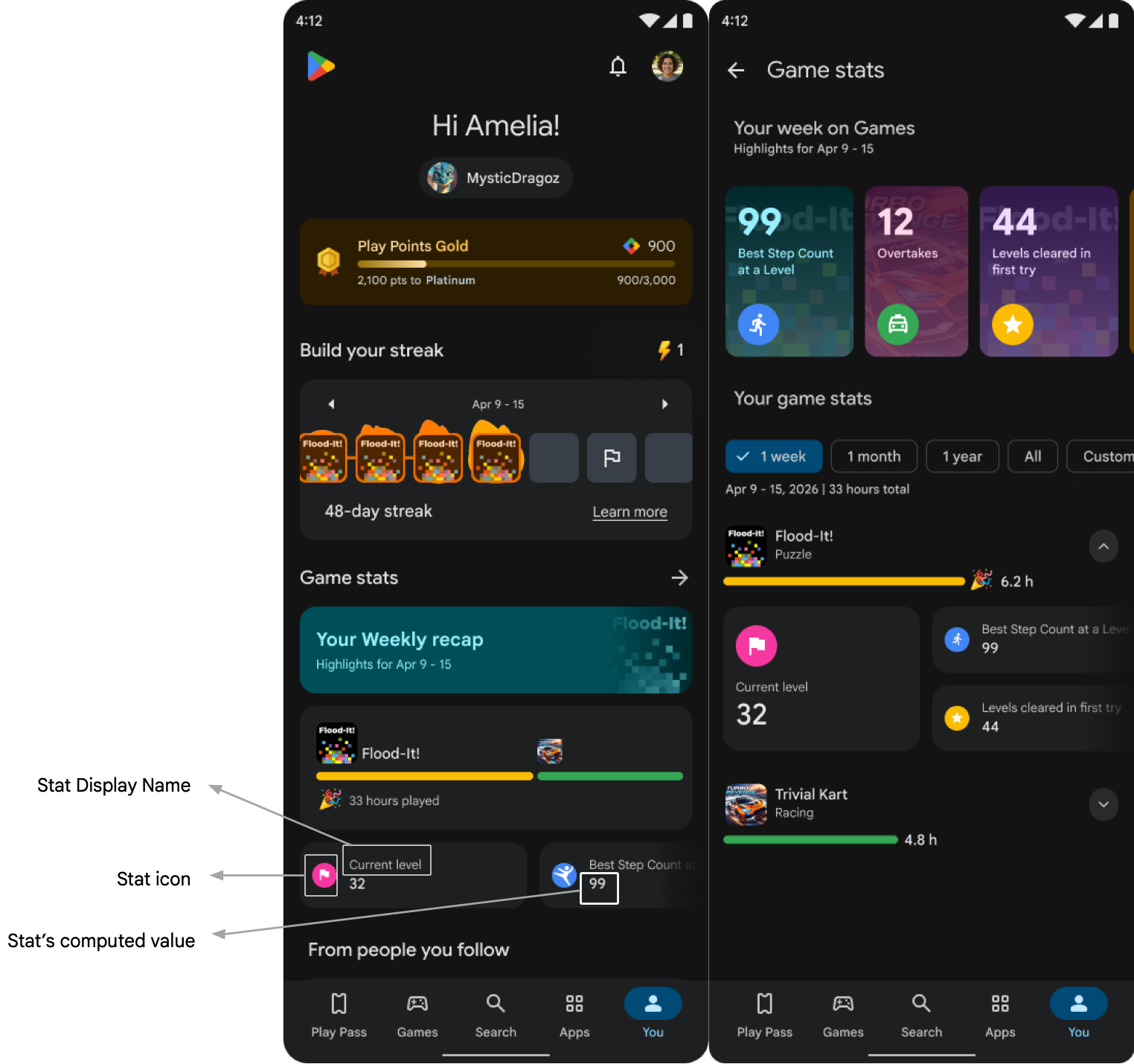
该图片显示了我标签页中玩家资料内的游戏统计数据。 我标签页中的此界面仅用于测试目的。游戏统计数据界面将于 2026 年 9 月推出。
汇总类型
汇总类型会告知 Google Play 如何根据您发送的每个事件的值计算统计信息:
- SUM:用于累计统计信息(例如收集的金币总数、造成的总伤害)。游戏必须发送在每个事件实例期间获得的离散金额。
- COUNT:用于表示事件发生次数(例如玩过的游戏、获胜的游戏)的统计信息。游戏必须发送离散事件发生实例。
- MAX:仅用于单次峰值成就(例如单次运行中的最高分、最大连击数或单场比赛中的最高伤害)。请勿使用 MAX 作为权宜解决方法来显示预计算运行值的生命周期总计。
重复性统计数据的关键实现要求
- 发送每个事件的值:对于每个事件,仅发送该事件中发生的情况,例如在单次运行中收集的金币。然后,在统计信息配置中设置聚合类型,例如 SUM 或 COUNT。这可确保重复的统计信息可在各种互动机制中重复使用,并让 Google Play 能够打造合适的玩家体验。
- 请勿发送生命周期总计:例如,请勿在游戏客户端或服务器上跟踪玩家收集的金币总数,并使用 MAX 汇总发送该总数。此类统计信息将继续显示在玩家资料界面中,但 Google Play 将无法使用这些信息来支持联赛、任务和冲刺等奖励功能,从而无法提升玩家体验并为您的游戏带来积极影响。
如需查看有关正确事件建模的说明和示例,请参阅玩家事件和配置统计信息。
集成步骤
使用 Game Stats API 将数据作为玩家事件发送,以获取重复性统计数据,并为进度统计数据发送预定义事件 progressUpdate。您还需要配置逻辑,以计算将显示在玩家资料中的游戏统计数据及其显示信息。
玩家事件表示不同的游戏内时刻、游戏循环完成情况或进度里程碑。
玩家事件的定义和建模如下:
- 事件由玩家执行的特定操作表示,例如完成比赛、完成跑步、解锁宝箱或在某个区域保存进度。
- 每项操作都会产生特定结果,或具有定义该操作的特定特征。这些事件被建模为事件属性,用于提供有关事件及其具体结果的背景信息(例如,比赛类型、该轮比赛中收集的金币、比赛结果或爆头次数)。
集成过程包括以下步骤:
- 声明原始数据架构:在 Play 管理中心内通过上传 CSV 文件来定义玩家事件。请参阅创建活动。
- 与游戏统计数据 API 集成:以声明的格式发送玩家事件和
progressUpdate事件的原始玩家数据。- 使用客户端或服务器端集成发送所有已定义的事件。
如需了解详情,请参阅玩家事件和
progressUpdate事件的示例。
- 使用客户端或服务器端集成发送所有已定义的事件。
如需了解详情,请参阅玩家事件和
- 上传 ZIP 文件:提供 3 个 CSV 文件和所有图标图片文件,用于定义 5 个重复性统计数据和 1 个玩家进度等级。如需了解详情,请参阅 ZIP 文件指南。
请提供以下详细信息:
- 用于重复统计信息的 CSV 文件:
- 统计数据的唯一 ID。
- 指定要用于统计计算的事件标签。您无法在此处使用
progressUpdate事件标签。- 指定要用于统计计算的属性标签。此属性必须是指定事件的属性。
- 指定聚合类型(SUM、MAX、MIN 或 COUNT),以确定如何计算所选属性标签的统计信息。
- 指定一个可选过滤条件,以便仅在满足该条件时才计算逻辑。定义属性和事件标签、运算符(=、<、<=、>= 或 >)以及阈值。
- 添加一个布尔值标志,用于指示该统计信息是否可用于竞技功能。
- 如果该功能可用于竞技功能,则为真实玩家的每小时上限和下限。我们将使用这些信息来识别在参与联赛和社交挑战等功能时可能存在不当行为的玩家。
- 为玩家看到的统计信息提供一个唯一的显示名称。
- 提供描述统计信息的唯一文本。此说明应详细说明玩家如何获得该统计信息,并将在玩家资料界面中向玩家显示。
- 在 CSV 文件中输入确切的图标文件名,提供代表该统计数据的唯一图标。
- 提供一个可选输入,指明值增加还是减少对玩家有利。此输入将用于庆祝玩家的动作。
- 为统计数据提供可选的计量单位,例如公里、英里和秒。
- 玩家进度统计信息的 CSV 文件:
- 为玩家看到的玩家进度提供唯一的显示名称。
- 请提供一个代表该统计数据的唯一图标。
- 提供进度统计数据的说明。
- 提供一个可选输入,指明值增加还是减少对玩家有利。仅当
currentProgress属性为 INT 类型时,此输入才会用于庆祝玩家移动。 - 为统计数据提供可选的计量单位,例如公里、英里、秒。
- 用于本地化的 CSV 文件:为所有统计信息提供本地化显示名称。
- 为每个本地化版本添加一行。
- 使用在之前的 CSV 文件中添加的统计数据显示名称字符串,以唯一标识要添加本地化内容的统计数据。
- 从语言代码列表中指定语言。
- 为显示名称添加指定语言的本地化版本。
- 为统计信息说明添加指定语言的本地化内容。
- 用于重复统计信息的 CSV 文件:
规划架构
您可以使用游戏统计数据 API 发送两种类型的数据:玩家事件和用于玩家进度统计信息的预定义事件。
以下示例说明了玩家事件在各种游戏类型中的表现:
玩家事件
玩家事件由不同的游戏内时刻、游戏循环完成情况或进度里程碑定义。
- 将事件定义为特定的游戏内时刻、游戏循环完成情况或进度里程碑:
- 游戏循环完成,例如完成一场比赛或一轮游戏。
- 进度里程碑,例如已保存的区域探索进度或已完成的关卡。
- 由于重复性统计数据应真实反映玩家的可重复操作,因此定义的事件应与核心游戏内容相关联。
- 添加属性,以提供有关事件及其结果的背景信息,例如关卡编号、比赛类型、武器类型、武器数量、爆头次数、收集的金币数量、比赛结果、单圈时间或汽车类型。
- 在游戏会话期间,事件发生后立即发送事件。例如,在游戏循环完成后立即发送游戏循环完成事件。
示例
| 游戏类型 | 事件标签 | 游戏内时刻 / 进度事件完成 / 游戏循环完成 | 结果 | 特性 |
|---|---|---|---|---|
| 线性推进式独立益智游戏 | chapter_completed | 进度事件完成 | 不适用 | Chapter Number, Chapter Name, Number of try, number of screens, number of moves, chapter content |
| screen_completed | 进度事件完成 | Chapter Number, Chapter Name, Number of try, number of moves, chapter content | ||
| 3D 无尽跑酷游戏 | run_completed | 游戏循环完成 | 收集的金币、得分 | 奔跑时长、通过喷气背包收集的金币数量、奔跑开始时使用的加速器数量、使用的冲浪板数量、使用的磁铁数量、使用的跳跃器数量、使用的喷气背包数量 |
| 开放世界动作 RPG | areaExplorationProgress | 进度事件完成 | 击败敌人、收集药水 | 地区编号、地区名称、增减百分比 |
| questCompleted | 游戏循环完成 | 不适用 | 任务名称 | |
| weaponUnlocked | 游戏内时刻 | 不适用 | 武器名称、武器等级 | |
| chestUnlocked | 游戏内精彩瞬间 | 已收集强化矿石 | ||
| 带装饰性元游戏的休闲解谜游戏 | puzzleCompleted | 游戏循环完成 / 进度事件完成 | 收集的金币、收集的道具 | 移动次数、是否使用了管家的礼物?关卡类型、关卡编号、使用的颜色增强道具、使用的炸药 |
| cardsCollected | 游戏内时刻 | 1 星卡牌、2 星卡牌、3 星卡牌、总卡牌数 | 专辑编号、专辑名称 | |
| 街机赛车 | raceCompleted | 游戏循环完成 | Rank, NOS used, race_time | Type of race, rating, car_used |
| carUpgraded | 游戏内时刻 | 升级的汽车特性、旧等级 / 值、新等级 / 值 | 汽车类型、当前车库等级 | |
| 第三人称大逃杀射击游戏 | matchCompleted | 游戏循环完成 | 淘汰数、爆头数、荣誉值 | 匹配类型、存留时间 |
| 电竞管理模拟 | matchCompleted | 游戏循环完成 | 结果、进球数、进球 | 对阵队伍的名称、参赛队伍的名称 |
| trainingCompleted | 游戏内精彩瞬间 | Drills done, teamplay_form_attack, teamplay_form_defense, teamplay_form_possession, teamplay_form_condition |
progressUpdate 个事件
如果您的游戏有主要进度机制,请使用此事件发送玩家的当前进度。该事件有一个名为“currentProgress”的预定义属性,类型为 INT 或 STRING。您应使用此属性发送玩家在主要进度机制中的当前进度值。如果您使用此事件,则必须提供预定义属性“currentProgress”,并且必须使用此属性定义进度统计信息。
您可以将游戏中其他进度系统(例如 lifetime highest score 或 current coin balance)的当前值作为此事件的其他属性发送。
由于玩家可以根据游戏中的当前进度来比较其玩家资料,因此在首次集成后,必须立即获取当前进度值。为了向玩家显示准确的当前进度,您应在每个游戏会话开始时以及当前进度有更新时发送 progressUpdate 事件。
示例
| 游戏类型 | `progressUpdate` 事件的 currentProgress 属性 |
|---|---|
| 线性推进益智游戏 | 当前章节编号或关卡编号 |
| 3D 无尽跑酷 | 最高得分、当前加成道具余额 |
| 休闲益智 | 当前关卡编号、首次尝试获胜次数、已完成区域数量、已完成收集数量 |
| 街机赛车 | 当前关卡编号、货币余额 |
| 开放世界动作 RPG | 当前角色排名、当前等级编号 |
| 第三人称射击游戏 | 当前关卡编号 |
| 电子竞技模拟 | 经理等级编号、俱乐部等级编号 |
配置统计数据
您需要通过定义计算逻辑和显示每个统计信息的相关信息来配置重复性统计信息和进度统计信息。下面列出了不同游戏类型的重复性统计信息示例。重复性统计数据通常是指在极少数(3-4 次)游戏会话中为任何玩家重复更新的统计数据,并且与核心游戏循环相关。
如需了解何时使用 SUM、COUNT 或 MAX,请参阅选择合适的汇总类型。
| 游戏名称 | 游戏统计数据 | 事件属性 | 计算逻辑 [aggregation] | 过滤 |
|---|---|---|---|---|
| 3D Endless Runner | 运行已完成 | 事件 run_completed 的任何属性 | 计数 | 所有值 [无滤镜] |
| 已收集的金币 | run_completed 事件的 coins_collected 属性 | 总和 | 不适用 | |
| 已收集的密钥 | run_completed 事件的 keys_collected 属性 | 总和 | 不适用 | |
| 最高运行得分 | run_completed 事件的 score 属性 | Max | 不适用 | |
| 高金币跑酷完成 | run_completed 事件的 coins_collected 属性 | 计数 | Value > 5000 | |
| 线性推进益智游戏 | 已完成的章节 | chapter_completed 事件的任何属性 | 计数 | 所有值 [无滤镜] |
| 已完成的屏幕 | screen_completed 事件的任何属性 | 计数 | 所有值 [无滤镜] | |
| 首次尝试即完成的章节 | chapter_completed 事件的 num_try 属性 | 计数 | Num_try = 1 | |
| 首次尝试即完成的屏幕 | screen_completed 事件的 Num_try 属性 | 计数 | Num_try = 1 | |
| 开放世界动作 RPG | 已完成的任务 | 事件 quest_completed 的任何属性 | 计数 | 所有值 [无滤镜] |
| 探索过的区域 | area_exploration_progress 事件的 perc_progress 属性 | 计数 | 值 = 100 | |
| 已解锁的剑 | weapon_unlocked 事件的 weapon_type 属性 | 计数 | Value = "sword" | |
| 击败的敌人 | 事件 area_exploration_progress 的 Enemies_defeated 属性 | 总和 | 不适用 | |
| 收集的生命药水 | chest_unlocked 事件的 Enhancement_ores 属性 | 总和 | 不适用 | |
| 休闲益智 | 已通过的关卡 | 事件 level_completed 的任何属性 | 计数 | 所有值 [无滤镜] |
| 首次尝试就通过的关卡数 | level_completed 事件的 Num_try 属性 | 计数 | 值 = 1 | |
| 已使用的色彩增强器 | 事件 level_completed 的 Color_booster_used 属性 | 总和 | 不适用 | |
| 已使用的炸弹道具 | level_completed 事件的 Bomb_booster_used 属性 | 总和 | 不适用 | |
| 已收集的卡片 | cards_collected 事件的 total_cards 属性 | 总和 | 不适用 | |
| 街机赛车 | 获胜比赛数 | 事件 race_completed 的 rank 属性 | 计数 | 值 = 1 |
| 最快比赛 | race_completed 事件的 race_time 属性 | 最低值 | 不适用 | |
| NOS used | race_completed 事件的 NOS_used 属性 | 总和 | 不适用 | |
| 使用 Mustang 完成的比赛数 | race_completed 事件的 Car_type 属性 | 计数 | Value = "Mustang" | |
| 汽车升级 | 事件 car_upgraded 的任何属性 | 计数 | 所有值 [无滤镜] | |
| 第三人称大逃杀射击游戏 | 获胜场数 | 事件 match_completed 的任何属性 | 计数 | Match_result = TRUE |
| 总淘汰数 | match_completed 事件的 Eliminations 属性 | 总和 | 不适用 | |
| 最长生存时间 | 事件 match_completed 的 survival_time 属性 | Max | 不适用 | |
| 头像总数 | match_completed 事件的 Headshots 属性 | 总和 | 不适用 | |
| 技能总价值 | 事件 match_completed 的 Skill_value 属性 | 总和 | 不适用 | |
| 电竞管理模拟 | 获胜场数 | match_completed 事件的结果属性 | 计数 | Result = "Won" |
| 总进球数 | match_completed 事件的 goals_scored 属性 | 总和 | 不适用 | |
| 困难关卡获胜次数 | 事件 hard_match_completed 的结果属性 | 计数 | Result = "Won" | |
| 净胜球数最多的胜场 | match_completed 事件的 Goal_difference 属性 | 全速 | Result = "Won" | |
| 训练演练总数 | training_completed 事件的 drills_done 属性 | 总和 | 不适用 | |
| 已完成的培训总数 | training_completed 事件的任何属性 | 计数 | 不适用 |
集成详情
本部分介绍了如何在客户端和服务器端集成中构建事件并发送事件。
何时应发送数据
玩家事件表示与游戏循环完成或特定游戏内时刻相关的游戏内操作。请在这些事件发生后立即提交。例如,在游戏循环完成后立即提交游戏循环完成事件。
progressUpdate 事件表示玩家的当前进度级别。
在以下情况下,应使用此事件发送进度统计数据:
- 每当当前进度有更新时,立即发送最新值
- 每当玩家启动游戏时,以确保玩家始终存在此统计信息。
集成路径
集成路径有两种:客户端集成和服务器到服务器集成。
服务器到服务器集成
通过公共 API 端点,您可以使用以下配置在请求载荷中发送事件:
HTTP 请求
POST https://games.googleapis.com/games/v1/players/{playerId}/gameStats:
batchRecordEvents
路径参数
| 参数 | 数据类型 | 说明 |
|---|---|---|
| playerId | 字符串 | 玩家的 PGS ID。 |
授权和身份验证
服务器到服务器 API 调用遵循使用 OAuth 2.0 的标准服务器端访问 Play 游戏服务指南。请求必须包含使用 https://www.googleapis.com/auth/games 范围授权的 不记名令牌。
事件:请求正文
后端 API 具有严格的结构验证限制:
- 批次大小:每个
BatchRecordEventsRequest最多 30 个事件。 - 属性数量:每个
PlayerGameEvent最多 25 个自定义属性。 - 长度限制:事件名称(最多 100 个字符)、属性键(最多 100 个字符)和属性字符串值(最多 1024 个字符)。
- 事件 ID:必须是有效的 36 字符 UUID 字符串。
- 重试和缓存:如果 API 失败,请避免在本地缓存或累积过多事件,因为超过 30 个事件的批量重试将被拒绝。始终对重试进行分块,以遵守批处理大小限制。
BatchRecordEventsRequest
{
  "packageName": string,
  "requestTime": string,
  "events": [
    {
      object (PlayerGameEvent)
    }
  ]
}
PlayerGameEvent
{ "eventId": string, "eventName": string, "eventProperties": { // keys (e.g., "matchId", "score") "" : { object (PropertyValue) } }, "eventTime": string // RFC 3339 formatted timestamp string (e.g., "2026-01-01T18:00:00Z"). }
PropertyValue
// ONE of the following fields will be present:
{
// 64-bit integer formatted as a string to prevent data loss
"intValue": "string",
// Double-precision floating point number.
"doubleValue": number,
// Standard UTF-8 text string.
"stringValue": "string",
// Boolean value (true or false).
"boolValue": boolean,
// Duration in seconds suffixed with 's' (e.g., "240s" or "3.5s").
"durationValue": "string"
}
progressUpdate 事件:请求正文
BatchRecordEventsRequest
{
  "packageName": string,
  "requestTime": string,
  "events": [
    {
      object (PlayerGameEvent)
    }
  ]
}
PlayerGameEvent - progressUpdate
{ "eventId": string, "eventName": "progressUpdate", "eventProperties": { "" : { object (PropertyValue) // Must have at least one property "currentProgress" of type INT or STRING } }, "eventTime": string // RFC 3339 formatted timestamp string (e.g., "2026-01-01T18:00:00Z") }
响应正文
如果成功,则返回 HTTP 200 OK 状态以及一个空的 JSON 对象。
请求正文示例
事件:PlayerGameEvent
{
  "packageName": "com.example.awesomegame",//Your package name
  "requestTime": "2026-05-09T00:44:44Z",
  "events": [
    {
      "eventId": "123e1234-e29b-41d4-a123-446655440000", // UUID for deduplication and idempotency
      "eventName": "matchCompleted",
      "eventTime": "2026-05-09T01:44:44Z", // RFC 3339 formatted timestamp string (e.g., "2026-05-09T01:44:44Z").
      "eventProperties": {
        "matchId": {
          "stringValue": "Match_A"
        },
        "gameMode": {
          "stringValue": "Battle_B"
        },
        "locationId": {
          "stringValue": "Location_XYZ"
        },
        "playerElimination": {
          "intValue": 2
        },
        "isWinner": {
          "boolValue": true
        }
      }
    }
  ]
}
progressUpdate 事件
{
  "packageName": "com.example.awesomegame",//Your package name
  "requestTime": "2026-05-09T00:44:44Z",
  "events": [
    {
      "eventId": "123e1234-e29b-41d4-a123-446655440000", // UUID
      "eventName": "progressUpdate",
      "eventTime": "2026-05-09T01:44:44Z", // RFC 3339 formatted timestamp string (e.g., "2026-01-01T18:00:00Z").
      "eventProperties": {
        "currentProgress": {
          "intValue": 52
        },
//Add more properties as per your requirement
      }
    }
  ]
}
客户端实现
如需了解适用于您平台的游戏统计数据客户端实现,请参阅以下资源:
里程碑
| 日期 | 游戏统计数据 API 集成 | 游戏统计数据配置 |
| 2026 年 9 月 | 不适用 | 玩家开始在其玩家资料中看到游戏统计数据。 |